
LAFVIN Basic Starter Kit for ESP32 ESP-32S WiFi IoT Development Board with Tutorial Compatible with Arduino IDE
4.5Editor score
Beginner-focused ESP32 foundation
Arduino IDE compatibility
Tutorial with sample lessons
Our Microcontroller Kit for Beginners guide compares 10 starter kits for learning electronics, coding, robotics, IoT, sensors, motors, and connected projects.
A microcontroller kit for beginners should turn abstract programming ideas into visible circuits, working sensors, moving motors, and interactive projects. The best starter bundles balance an approachable development board with useful components, clear wiring guidance, and learning materials that help newcomers troubleshoot problems instead of simply handing them a box of parts.
This guide compares ten options built around Arduino-compatible boards, ESP32 wireless controllers, Raspberry Pi Pico RP2040 platforms, and a modular soldering-focused system. We evaluated each kit using its stated board capabilities, component selection, tutorial coverage, programming options, assembly requirements, and suitability for learners moving from first circuits toward connected or advanced projects.
Each review shows why a kit earns its place while identifying compromises, extra tools, or technical demands that may affect a first purchase. The list includes everything from compact IoT and sensor bundles to camera-based systems and a soldering practice kit, and current availability and prices can change, so shoppers should verify the latest listing details before buying.
4.5Editor score

4.7Editor score

4.6Editor score
The comparison below highlights the development platform, included components, learning materials, and key practical consideration for each starter kit, helping beginners match a bundle to their preferred programming language, hardware focus, and experience level.


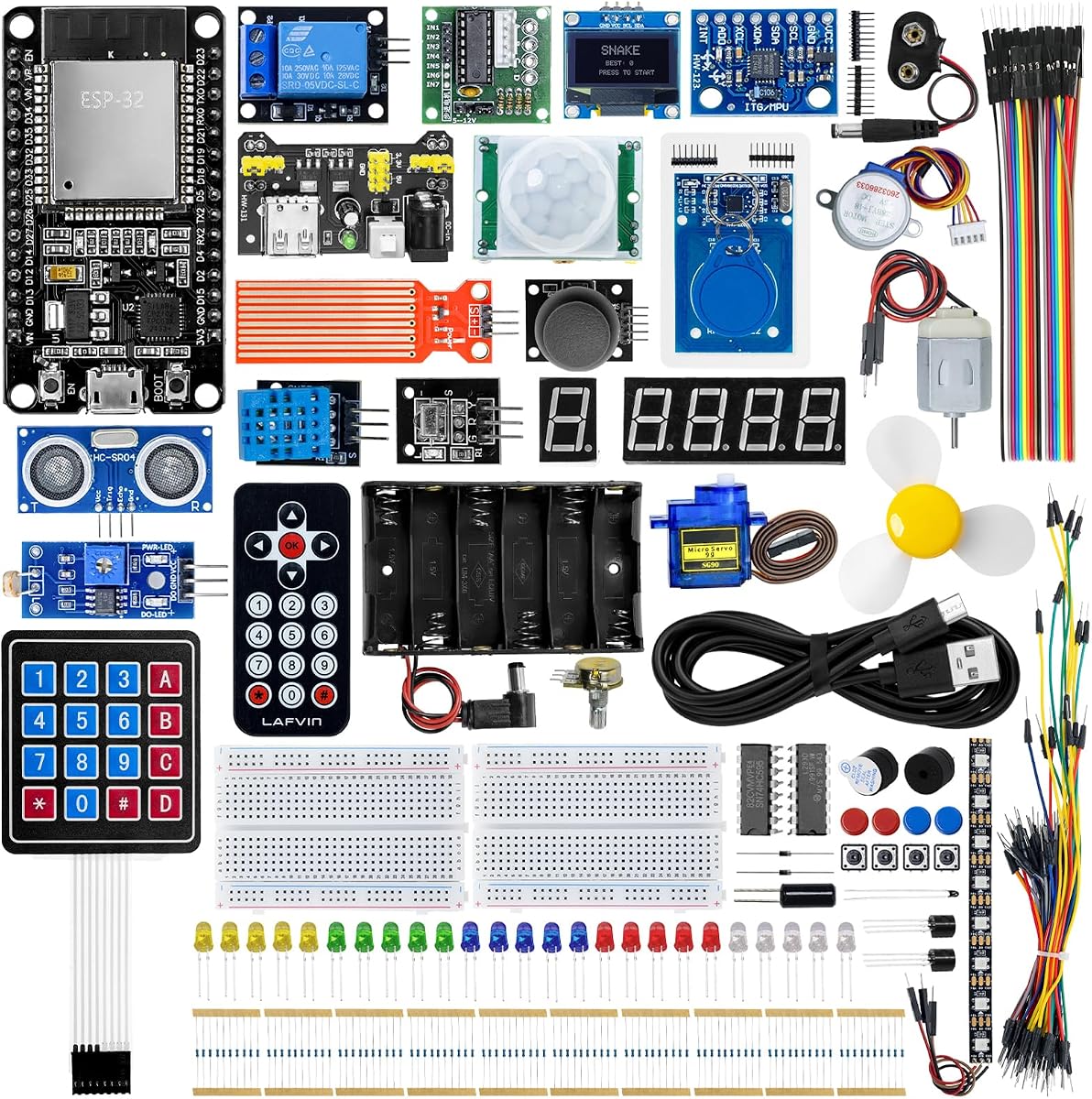


The LAFVIN Basic Starter Kit is a practical entry point for beginners who want to learn on an ESP32 without beginning with a large electronics inventory. Its 4.5 rating reflects a generally approachable package, and the core appeal is the combination of a WiFi-capable ESP32-S3 development board, introductory electronics components, and a downloadable tutorial. That makes it suitable for students, hobbyists, and makers ready to explore their first microcontroller projects.
We may earn a commission when you buy through this link, at no additional cost to you.
The kit's strongest quality is the balance between hardware access and instruction. Users can learn introductory programming, assemble the included modules, and work with components such as LEDs and a DHT11 sensor, while the tutorial provides codes and lessons for putting the kit together. The Arduino IDE compatibility also lowers the barrier compared with more specialized embedded toolchains, allowing beginners to focus on wiring, input, output, and basic control.
The main limitation is scope. This is presented as a basic kit rather than a comprehensive laboratory, so buyers should not expect the wide sensor inventory, motors, displays, or advanced wireless projects found in larger bundles. The tutorial must also be downloaded after delivery, which means a reliable computer and internet connection are useful from the outset. A solderless breadboard approach is desirable, although the exact connection method should be confirmed in the included instructions.
This is our Best Budget pick because it offers a sensible first step into ESP32 and IoT development without surrounding the learner with an overwhelming collection of parts. It is best for someone who wants clear introductory lessons, a familiar coding environment, and a wireless-capable board. Those seeking dozens of modules, extensive robotics components, or camera hardware should consider one of the more comprehensive kits instead.
The ESP32-S3 platform gives beginners an early introduction to connected-device development without requiring a separate wireless module. Learners can use the tutorial's example code to connect basic components and gradually move toward ideas involving sensors, remote control, and browser-based IoT interaction.
Arduino IDE compatibility means that a newcomer can use a widely recognized programming environment while learning core concepts such as pin control, sensor reading, and output activation. The downloadable lessons help bridge the initial assembly stage with actual program experiments.
We may earn a commission when you buy through this link, at no additional cost to you.
The REXQualis Super Starter Kit is built around the Arduino UNO R3 and has a 4.7 rating, making it one of the strongest general-purpose choices in this guide. It includes a controller board, sensors, servo and motor-related hardware, a ULN2003 driver board, an LCD module, and other components. The breadth makes it useful for learners who want to understand how input, output, motion, and display systems work together.
We may earn a commission when you buy through this link, at no additional cost to you.
Several details improve usability for a first major electronics kit. The LCD1602 arrives with a pin header, reducing one assembly obstacle, and the included 9V 1A power adapter removes the need to source a compatible battery. Components and integrated circuits are individually packaged and labeled, while the base board provides a central way to connect compatible modules. A downloadable PDF tutorial and datasheets add reference material for assembly and experimentation.
Its breadth is also its main challenge. Absolute newcomers may need to work through several simple circuits before the kit feels intuitive, and some modules will require careful attention to wiring and board orientation. The supplied information does not state that every part arrives fully soldered, so buyers with no electronics experience should review the contents and preparation requirements before starting. The larger inventory can also make simple projects harder to identify at first.
Choose this kit if you want the familiar Arduino UNO R3 platform and expect to progress from blinking LEDs into motors, sensors, displays, and controller-based projects. It suits students and hobbyists who value a broad collection of clearly organized parts more than the smallest possible footprint. For absolute beginners who only need a minimal first circuit, the LAFVIN ESP32 Basic Kit or Horizon Uno bundle may feel more approachable.
Sensors, displays, LEDs, a servo, motor hardware, and the ULN2003 driver board provide multiple ways to apply programming concepts. A learner can begin with simple reads and outputs before combining displays, motion, and control projects.
The labeled organization and downloadable reference documents make the bundle suitable for structured learning. Its varied components can support classroom exercises, independent study, or a gradual transition from introductory circuits to more involved Arduino systems.
We may earn a commission when you buy through this link, at no additional cost to you.
The amomii Testudo Soldering Practice Kit offers something distinctly different from a conventional sensor-and-jumper-wire bundle. Rated 4.7, it combines a reusable USB-C microcontroller with modular circuit boards that form three devices: a digital piano, an infrared remote, and an arcade console. Its purpose is not merely to teach flashing an LED but to guide beginners through soldering, assembly, physical interaction, and optional programming.
We may earn a commission when you buy through this link, at no additional cost to you.
The learning package is unusually thorough. A step-by-step soldering fundamentals course covers joint anatomy, temperature and tip selection, circuit-board reading, and common fault correction. Printed instructions, detailed PDF manuals, and HD video tutorials complement more than 60 components and three circuit boards. The amomii Link browser tool then allows users to activate the finished gadgets or switch among more than 10 software functions without first completing complex setup.
This approach has important trade-offs. A soldering iron and basic tools are not included, and assembly involves small parts. Children under 14 should have adult supervision, while beginners should be prepared for a steeper physical learning curve than a breadboard-based kit. The optional coding masterclass is valuable but reverses the usual beginner order: usable activities can be explored first, and direct code uploads can come later for those who want deeper control.
The Testudo is our Best Premium pick for learners who want to understand both sides of physical computing. It is well suited to a motivated beginner who wants soldering practice, finished interactive gadgets, and open-source hardware and code resources in one program. It is less appropriate for someone seeking a conventional sensor kit, a ready-made breadboard environment, or a bundle that already includes all necessary tools.
The included course treats soldering as a core engineering skill rather than an inconvenience. Beginners learn how to form a joint, choose a suitable tip, interpret a board, and approach common assembly errors with a more methodical process.
Browser-based activation gives new users an immediate way to operate their builds. Once the hardware feels familiar, the optional coding material opens a path toward manually uploading programs and understanding the engineering behind the finished projects.
We may earn a commission when you buy through this link, at no additional cost to you.
The Horizon Uno Electronics Starter Kit earns our Editor's Choice because it combines hardware, instruction, and classroom flexibility in a cohesive beginner package. Its 4.7 rating is supported by a course designed by robotics engineers, step-by-step video lessons, lectures, labs, projects, and problem sets. The Arduino-compatible Horizon Uno board, sensors, LEDs, and servo motors provide a practical platform for learning electronics and coding together.
We may earn a commission when you buy through this link, at no additional cost to you.
Video-based instruction is particularly useful because beginners can pause, replay, and observe each construction step. Every kit includes a unique access code for the online course, which removes the need to rely solely on a printed manual. The lessons pair coding examples with real-world projects and are designed to build understanding of circuit design, programming logic, and microcontroller operation. The stated audience also includes students, educators, STEM programs, and self-learners.
The important caveat is that the included board is described as Arduino-compatible rather than as a standard Arduino Uno R3. Buyers should confirm pin behavior, software expectations, and any accessory compatibility before planning advanced builds. Online access also means a computer and internet connection are required for the course, and the hardware inventory is not as expansive as the largest camera or IoT kits in this list.
This is the strongest all-around recommendation for a beginner who values structured teaching and broad foundational concepts. It gives learners enough sensors and motion components to make the material engaging while the video course helps explain why circuits behave as they do. It is also particularly attractive to educators who want a repeatable curriculum and self-learners who prefer clear video guidance over deciphering a large collection of parts.
A video lesson can show the expected breadboard layout, connection sequence, and coding result more clearly than a static parts list. The ability to replay difficult steps is valuable while beginners are still building habits for correct wiring and debugging.
Combining sensors, LEDs, servo motors, lectures, labs, and problem sets supports both demonstration-based and project-based teaching. The course structure makes it easier for an instructor to guide groups at different stages of the learning curve.
We may earn a commission when you buy through this link, at no additional cost to you.
The LAFVIN Raspberry Pi Pico Kit is built around the RP2040 and gives beginners an unusually flexible introduction to embedded programming. With a 4.5 rating, it stands out for supporting MicroPython, C, C++, and Piper Make graphical programming. That range allows a learner to begin with visual or high-level code and later move toward lower-level languages without changing hardware platforms.
We may earn a commission when you buy through this link, at no additional cost to you.
The included modules support meaningful interactions. An LCD1602 display provides visible output, an SG90 servo demonstrates controlled movement, a human-body sensing module introduces input, and a WS2812 RGB LED strip adds programmable lighting. A buzzer and buttons extend the possibilities further. Detailed tutorials, wiring instructions, sample code, and experiment-verification guidance help connect those modules to practical lessons in display, input, sensing, and execution control.
Learners should understand that the Pico is not an Arduino Uno, so the transition may feel different from kits that emphasize an Arduino IDE. In particular, the addressable RGB strip may require more attention to timing and library details than a conventional single-color LED. The range of supported languages is valuable, but complete beginners may initially need help deciding which environment to use and how to adapt between them.
Choose this kit for a learner who is interested in Raspberry Pi Pico, Python, or visual programming and wants a hands-on STEM bundle with a display, servo, sensor, and lighting effects. It is also a strong choice for school labs because multiple programming methods can accommodate different levels of experience. Buyers seeking a single familiar Arduino workflow may prefer the Horizon or REXQualis options instead.
Piper Make offers an approachable entry for those who want to focus on logic and interaction, while MicroPython and C/C++ support progressively deeper programming. Having all three paths available makes the same hardware useful across multiple learning stages.
The LCD, servo, sensor, buzzer, buttons, and RGB lighting create multiple forms of feedback. Learners can see information, trigger actions, detect changes, and make physical or visual responses instead of relying only on a serial monitor.
We may earn a commission when you buy through this link, at no additional cost to you.
The LAFVIN ESP32 Ultimate Starter Kit is built for beginners who want to explore wireless electronics and IoT through a wide collection of modules. Its 4.3 rating places it behind the strongest options in the guide, but the package itself is ambitious. It combines introductory tutorials, wiring diagrams, sample code, project courses, and a diverse set of components intended for programming, electronics, robotics, and connected-device study.
We may earn a commission when you buy through this link, at no additional cost to you.
The sensor selection is particularly substantial. Ultrasonic and PIR sensors support distance and motion experiments, RFID hardware enables access-control concepts, the MPU6050 can support angle and motion demonstrations, and temperature, humidity, OLED, and servo modules extend monitoring and output tasks. The stated project range includes RFID access control, environmental monitoring, a motion alarm, a Snake game, smart-home prototypes, and wireless control interfaces viewed through a browser.
The main drawback is the possibility of overwhelming a true beginner. A large module inventory can make it harder to identify a sensible starting point, and each hardware category introduces its own wiring and code details. The lower 4.3 rating may also encourage buyers to inspect recent customer feedback closely for consistency and support. Nevertheless, the stated tutorials and progressive project structure are designed to keep the experience manageable.
This kit is best for a motivated learner who specifically wants ESP32 wireless development and has a strong interest in sensors. It gives more room to experiment than a basic kit and offers a direct path toward browser-based monitoring and control. A newcomer who wants a very small first purchase should look for a more compact bundle, while a student interested in extensive IoT experimentation will find this catalog more useful.
The ESP32 allows projects to move beyond a locally connected breadboard. Browser interfaces, remote LED or motor control, and online sensor displays show how collected data can be presented and controlled across devices.
The stated project list gives learners a reason to use different components rather than leaving them unused in a box. It also creates a natural progression from a single output to sensors, displays, access systems, and complete smart-home-style prototypes.
We may earn a commission when you buy through this link, at no additional cost to you.
The GeeekPi Micro Python Programming Kit is designed for Raspberry Pi Pico enthusiasts who want to learn embedded systems through Python. It holds a 4.4 rating and includes a range of compatible modules and components, a breadboard, and an I2C 1602 LCD display module. The package is especially relevant to programmers who want to transfer familiar Python concepts into a physical electronics environment.
We may earn a commission when you buy through this link, at no additional cost to you.
Its strongest feature is the balance between demonstration and open-ended experimentation. The kit comes with demo code, while each experiment is designed to leave space for learners to modify and extend the exercise. A detailed manual is included, and additional tutorials are available through the referenced wiki or by contacting support. That combination helps users move from a known working example toward an original project without starting with an entirely blank setup.
Compared with the larger ESP32 bundles in this guide, the GeeekPi kit offers a more focused learning path. That can be a benefit for someone who prefers depth in a smaller set of components, although it may be less suitable for a learner eager to work with motors, advanced wireless modules, or many sensor types at once. The I2C display also introduces communication concepts, but buyers should be ready to troubleshoot address, wiring, and library issues as their skills develop.
Choose this kit when Python is your preferred language and the Raspberry Pi Pico is your target platform. It works well for programmers, students, and self-learners who want a display-based experimental foundation. If the goal is an enormous catalog of modules or wireless IoT from day one, one of the ESP32 or comprehensive starter alternatives will be a better fit.
The Pico gives Python learners a direct way to control displays, read inputs, and manipulate physical components. This makes abstract programming ideas more tangible while keeping the language relatively accessible to newcomers.
Demo code acts as a working reference rather than the end of the lesson. The inclusion of a breadboard and supporting modules gives learners enough freedom to combine components and develop their own variations.
We may earn a commission when you buy through this link, at no additional cost to you.
The ESP-32 Super Starter Kit combines a 5.0 rating with a substantial collection of wireless hardware and guided learning content. Its central ESP32 board is a dual-core microcontroller with built-in WiFi and Bluetooth 4.2, and the kit supports the Arduino IDE. More than 35 modules and components cover sensors, displays, motors, buttons, LEDs, an OLED screen, a servo, and a keypad, creating a strong foundation for connected projects.
We may earn a commission when you buy through this link, at no additional cost to you.
The online tutorial reportedly leads users through more than 25 projects with sample code, circuit diagrams, and clear instructions. Its progression moves from simple circuits toward weather stations, smart-home controllers, radio-controlled devices, and interactive gadgets. AP, STA, and combined AP+STA support in the title also signals that learners can work with different wireless operating arrangements as they advance.
There is one important documentation caveat: a printing error means the QR code on the instruction manual does not lead to the correct learning-resource page. The seller instructs buyers to contact them through Amazon buyer-seller messaging so the tutorials, sample codes, and other learning materials can be sent. This is a manageable issue for a prepared shopper, but it should be understood before purchase rather than discovered after delivery.
The kit earns a top-three position because it combines a very strong listed rating, wireless capability, broad parts, and structured projects. It is best for a beginner who wants to move beyond a single blinking-light exercise and explore connected devices with Arduino-compatible software. Buyers who prefer instantly accessible documentation without contacting the seller should choose a kit whose tutorial link is already listed correctly.
Built-in WiFi and Bluetooth make connectivity a central capability rather than an add-on. Learners can use those features for phone or computer interaction, remote monitoring, and connected-device concepts as projects become more sophisticated.
Displays, inputs, sensors, lighting, motion, and sound-related components support varied exercises. The 25-plus project structure provides a practical route through the inventory and helps convert individual modules into complete systems.
We may earn a commission when you buy through this link, at no additional cost to you.
The Freenove ESP32-S3 Camera Board Ultimate Starter Kit is the most advanced platform in this guide, and its 4.6 rating is supported by a substantial 243-item inventory and 121 project tutorials. The board uses a dual-core 32-bit ESP32-S3 processor capable of up to 240 MHz, with 8 MB flash, 8 MB PSRAM, 2.4 GHz WiFi, Bluetooth 5 LE, USB-OTG, a camera, and a memory-card slot.
We may earn a commission when you buy through this link, at no additional cost to you.
Its educational scope is exceptional. The kit provides three sets of code covering MicroPython, C, and Processing, allowing learners to work with embedded Python, a classic systems language, and a computer-based graphical environment. The downloadable English tutorial spans 828 pages and includes 121 projects with schematics, wiring diagrams, complete code, and explanations. A 1 GB memory card and card reader are included for camera-related work.
That scale creates the main challenge. A new learner searching for a simple introduction may find the component count and tutorial length daunting. The absence of a paper manual also means buyers should be comfortable downloading the guide from the link on the product box. Camera projects can introduce additional variables involving storage, image processing, and computer connectivity beyond basic LED control.
This is the top pick for a buyer who wants to learn embedded systems through computer vision and advanced wireless development. It offers a path from simple projects to complex camera systems, with multiple languages and extensive documentation. A first-time buyer wanting the gentlest introduction should instead consider the Horizon Uno or LAFVIN Basic Kit, while a motivated learner ready for a long-term platform may find this kit especially valuable.
The ESP32-S3 board combines camera capture, memory, wireless connectivity, and USB functions in one development platform. It opens projects involving images, sensors, remote communication, and computer-assisted visualization rather than limiting learning to simple indicators.
MicroPython lowers the entry barrier, C supports deeper hardware control, and Processing connects physical input with graphical computer output. The three code sets let learners approach the same platform from different programming perspectives.
We may earn a commission when you buy through this link, at no additional cost to you.
The Freenove ESP32 Camera Board Ultimate Starter Kit delivers a large camera-based learning system for beginners ready to explore embedded vision. It has a 4.6 rating and includes 240 items across components, modules, sensors, wires, and related accessories. The board combines a dual-core 32-bit processor with 4 MB flash, 8 MB PSRAM, 2.4 GHz WiFi, Bluetooth 4.2 LE, a camera, USB code uploading, and a memory-card slot with a 1 GB card and reader.
We may earn a commission when you buy through this link, at no additional cost to you.
The learning material follows a broad progression through 122 projects. Its downloadable and online English tutorial spans 795 pages, with schematics, wiring diagrams, full code, and detailed explanations for each project. MicroPython, C, and Processing code sets are included, which gives learners a choice between high-level embedded scripting, lower-level programming, and computer-based visualization.
Compared with the ESP32-S3 version, this kit has less flash memory and Bluetooth 5 rather than Bluetooth 4.2 LE. Those distinctions may matter for advanced embedded work, although the supplied project count is slightly higher at 122. As with the other Freenove bundle, no paper tutorial is included, and the guide must be downloaded or viewed using the link on the box.
Choose this kit for a beginner who wants a traditional ESP32 camera platform, a very large parts inventory, and a multi-language project curriculum. It is best suited to someone comfortable moving through lengthy documentation and experimenting beyond the first few lessons. For a simpler foundation, look to the Horizon or basic LAFVIN kit; for maximum controller resources, compare the closely related ESP32-S3 version.
With 122 project entries, the bundle can sustain learning well beyond a first classroom or introductory hobby phase. The progression from simple to complex projects helps users build confidence while adding sensors, controls, and connected functions.
The onboard camera, memory-card slot, included card, and USB code uploader support media-focused experiments. Together with MicroPython, C, and Processing options, they create opportunities for image capture, device control, and graphical interaction.
We may earn a commission when you buy through this link, at no additional cost to you.
The right starter kit depends on the learner's preferred language, the kinds of projects they want to build, and how much soldering or tool setup they are ready to handle. Review platform compatibility, learning resources, component coverage, and assembly demands before choosing.
The central board determines which software, libraries, accessories, and learning resources a beginner can use. Arduino-compatible boards are broadly approachable for newcomers, while Raspberry Pi Pico favors Python, MicroPython, C, and visual programming environments. ESP32 platforms add WiFi and Bluetooth but may require a deeper understanding of board configuration, wireless operation, and ESP32-specific code.
A large box of components is less useful when a beginner does not know how to connect them. Look for tutorials that explain basic electronics, provide circuit diagrams, include tested sample code, and progress from simple outputs to meaningful projects. Video instruction can be especially helpful for physical assembly, while written or downloadable guides are valuable for reference and independent work.
Breadboard-based kits let users revise circuits quickly and are generally more forgiving during the earliest lessons. Soldering kits teach a valuable hardware skill but introduce heat, tools, joint quality, and assembly time. Kits that require soldering may still include no-code or browser-based activities, yet buyers should confirm which tools are and are not included and whether adult supervision is appropriate.
Useful starter kits include several kinds of input and output. Inputs such as temperature, humidity, motion, distance, RFID, light, and rotation sensors teach a controller to gather information, while LEDs, displays, buzzers, servos, and motors show how it can respond. A balanced selection helps learners connect code with observable behavior instead of repeating the same circuit with only one component.
WiFi and Bluetooth support can make learning feel more relevant by enabling phone interaction, remote control, browser dashboards, and data monitoring. ESP32 boards are particularly suited to these activities. Consider whether the tutorials explain wireless setup clearly, whether the projects require a separate host computer, and whether the board offers the memory and processing capacity required by the intended examples.
Reliable resistors, sensors, jumper wires, LEDs, connectors, and motors make circuits easier to debug. Organized packaging, labeled parts, and a stable base board can save considerable time, particularly for school groups. Buyers should also verify included power options because a board that works reliably on USB may require a different supply when driving certain motors or larger modules.
Some kits concentrate on a short sequence of introductory exercises, while others offer extensive curricula and hundreds of components. A larger course may remain unused if its instructions are too dense, but it can support months of learning. Consider whether the stated project count covers the learner's goals, whether the platform has enough memory and peripherals for advanced exercises, and whether the hardware is likely to remain relevant beyond the first kit.
Some starters include an OLED or LCD, programmable lighting, cameras, RFID, or motion sensors. These features can make projects more interactive, but they also add setup complexity and may require extra libraries or host-computer support. Check whether the core tutorial can be completed with the simplest supplied parts and whether specialty hardware is introduced only after the learner understands basic wiring and programming.
Begin by sorting the components and reading the complete first lesson before applying power. Identify the development board, voltage-sensitive parts, jumpers, and output modules, then reproduce the tutorial's diagram exactly. Confirm the power source and remove any wiring that could send current to an incorrect pin. A slow, methodical first assembly is more valuable than building an ambitious project while troubleshooting several uncertain connections at once.
Work from one concept to the next. Learn a simple LED blink, add a button or sensor, verify the reading in the serial monitor, and only then combine outputs such as a servo, display, or motor. Save working examples under clear names and change one part of the program at a time. This method makes it easier to determine whether a problem comes from the code, a wiring error, power, or an individual module.
Protect the board and components by disconnecting power before changing a circuit, especially when motors, servos, displays, or camera modules are connected. Keep the controller away from conductive debris and moisture, route wires so they do not tug against connectors, and inspect for reversed power rails. For solder-based projects, use the specified soldering guidance, ventilate the work area, store the iron safely, and keep small parts away from children.
The easiest choice depends on the learner's interests and whether soldering is acceptable. A basic Arduino-compatible or ESP32 kit with a breadboard and guided projects is usually approachable, while the Horizon Uno is especially useful for people who benefit from video instruction. Look for clear wiring diagrams and sample code before considering how many components the package contains.
Arduino is approachable for learners who want a conventional microcontroller experience, especially when the board is compatible with the Arduino IDE. ESP32 adds WiFi and Bluetooth for connected projects. Raspberry Pi Pico is well suited to Python, MicroPython, C, and visual programming. The best choice is the platform whose language and project type you most want to learn.
Not necessarily, and buyers should check the product listing and included contents carefully. Breadboard-based kits normally do not require soldering. The amomii Testudo explicitly requires a soldering iron and basic tools that are not included, while other kits may have partially prepared modules or optional soldering steps.
No. A large inventory is useful only when the instructions give beginners a manageable path through it. A smaller kit with a strong video or written curriculum may teach more effectively than a box containing many advanced modules. Prioritize a logical sequence of projects, reliable parts, and clear wiring guidance over component count alone.
The listed kits support several options, including Arduino-style C/C++, MicroPython, Python, and Processing. The LAFVIN Pico bundle also supports Piper Make graphical programming, while the two Freenove camera kits provide MicroPython, C, and Processing code sets. Begin with the environment that best matches the guide and your previous programming experience.
Yes, these kits require a computer for programming, downloading code, viewing online lessons, and often reading serial output. Some projects also use the computer for Processing interfaces or browser-based control. The computer should have a modern browser, a suitable development environment, and a USB port capable of connecting to the controller.
Several options are explicitly suitable for STEM education, school labs, classrooms, and self-study. The Horizon Uno includes lectures, labs, projects, and problem sets, while the LAFVIN Pico kit emphasizes hands-on practice and logical thinking. For a class, match the bundle to the number of available computers, soldering safety requirements, and the curriculum you plan to follow.
Start by disconnecting power and checking the board, rails, jumper positions, and component orientation against the diagram. Then return to the simplest known working example and change only one element at a time. Verify the code, selected board, and required libraries, and use the serial output where available. If the tutorial link is faulty, contact the seller for the correct materials rather than improvising from memory.
The LAFVIN ESP32 Basic Kit is the most economical way to begin with a wireless-capable platform, while the Horizon Uno Electronics Kit is the strongest choice for organized, video-led learning. For beginners who want a deeper physical-engineering experience and are prepared to solder, the amomii Testudo offers modular builds, immediate browser-based activities, and a reusable controller.
Prioritize the learning path over the size of the box. A beginner should first confirm that the board language feels approachable, the tutorial explains every required connection, and the initial project can be completed with the included materials. Advanced camera, IoT, and modular systems can provide tremendous long-term value, but a simpler kit often makes the earliest learning process more rewarding.
Finally, check the current product listing, included accessories, tutorial availability, and current price before purchasing. Components and support materials can change between versions, and availability also varies. Comparing those details alongside the guidance in this guide will help you select a microcontroller kit that matches your skill level, interests, and preferred pace of learning.