
DC Power Supply Variable 0-30V 0-10A
4.6Editor score
Coarse and fine controls
Short-circuit alarm protection
USB-C charging output
Compare the best DC power supply for laptop repairing, with ten options assessed for voltage control, current limits, protections, display quality, and repair
A dependable bench power supply is one of the most useful tools for laptop repair because it gives technicians controlled, visible power when diagnosing a board or testing a circuit. The right unit should combine accurate adjustment, meaningful current limiting, clear metering, and protection features that reduce the risk of applying the wrong voltage to sensitive components.
This guide compares ten products selected for a laptop-repair workflow, including eight adjustable bench supplies and two DC connector-tip kits that can help match an existing adapter. We considered maximum output, display resolution, adjustment controls, constant-voltage and constant-current behavior, safety systems, accessories, physical practicality, and the usefulness of each option for bench work.
Each review explains the product's strongest benefits, limitations, and most suitable type of technician. The top three represent our budget, overall, and premium selections, while the remaining entries cover compact, programmable, portable, and connector-focused options. Product configurations and availability can change, so readers should confirm current specifications and pricing before purchasing.
4.6Editor score

4.4Editor score

4.2Editor score
The comparison below separates true bench power supplies from the two connector-tip kits, making it easier to compare output range, controls, protection, and intended repair applications.



This adjustable switching bench supply earns the budget recommendation because it combines a broad 0-30V and 0-10A range with controls that suit iterative electronics work. Its 4.6 rating reflects a strong balance of useful features, and its standout qualities are the separate coarse and fine encoders, clear high-resolution display, USB-C charging output, and audible short-circuit response.
We may earn a commission when you buy through this link, at no additional cost to you.
The dual-encoder design makes it easier to move quickly from a broad setpoint to a precise value. The coarse control establishes the number before the decimal point, while the fine control changes the decimal digit. For laptop repair, that is more useful than a generic potentiometer when investigating rails, testing a load, or making small output adjustments around a suspected operating point.
Protection is another important strength. The overcurrent system can stop output and sound an alarm if the connected equipment shorts, while the listed safeguards also include grounding, leakage, overheating, voltage overload, and power overload protection. The temperature-controlled fan and heat sink support sustained work, while automatic 110V and 220V input detection removes the need to change a rear-panel selector.
The main limitation is that the product listing does not state the exact meter resolution, and its USB-C port is primarily a 5V, 3.6A charging convenience rather than a way to power a notebook. It is best suited to repairers who want generous output, precise controls, and strong safety features without moving to a premium workstation class. For most home and independent laptop-repair benches, this is the most convincing all-around package.
The additional Type-C and USB outputs can charge a phone, a repaired device, or a small accessory while the main output handles bench testing. The supplied package includes the power supply, output and input power cords, and a user manual. A useful extra detail is the option to disable the key beep by holding the voltage knob for several seconds, which makes prolonged diagnostic sessions less distracting.
The coarse and fine encoder arrangement lets a technician set an approximate voltage before refining the final decimal value. That separation reduces repeated knob hunting during rail testing, load adjustment, and fault isolation on laptop boards.
Audible short-circuit notification, overcurrent cutoff, and thermal safeguards provide useful layers of control. They do not make risky testing safe, but they can respond faster when a connected load faults or draws excessive current.
We may earn a commission when you buy through this link, at no additional cost to you.
The YIHUA 305D-IV is the strongest general-purpose choice in this guide because it combines accurate readouts, a manageable 0-30V and 0-5A range, and a clear operating-mode display. Its 4.4 rating and laptop-repair positioning make it relevant to technicians who want more measurement visibility than a basic adjustable adapter without moving to a premium programmable station.
We may earn a commission when you buy through this link, at no additional cost to you.
The display shows voltage, current, and power, with voltage readings down to 10mV and current readings to 1mA. It also identifies constant-voltage, constant-current, overvoltage, and constant-current protection status. Those details are valuable when a board does not behave predictably, since a technician can see which limit is controlling the output rather than relying on a single voltage value.
The dual protection circuit helps keep both the device under test and powered components from being overloaded. Constant-voltage and constant-current modes lock the relevant value as operating conditions change. The switch-mode design is also less bulky than a conventional linear supply, and the stated weight of five pounds makes the unit easier to position around a crowded service bench.
The trade-off is regional input compatibility: this model is designed for 110-127V operation with a US-standard plug. It also lacks the PX-70's memory recall and larger accessory package. Even so, its accurate parameter display, compact construction, and supplied alligator clips make it an excellent everyday bench supply for independent laptop repairers, students, and advanced hobbyists.
Because it uses a heat-sink cooling design rather than a fan, the unit offers a quiet workstation experience with no stated need for a bulky transformer. YIHUA also provides 12-month US-exclusive manufacturer technical coverage and 24/7 professional assistance, which adds reassurance for technicians who may need setup assistance.
Showing voltage, current, and power simultaneously makes it easier to recognize a load problem. A rising current reading at a fixed voltage can reveal a short or failing rail before the fault is allowed to continue.
The switch-mode regulator and fanless heat-sink design keep the station relatively light and quiet. That can be valuable in a shared office, small service counter, or workspace where a large linear supply would be inconvenient.
We may earn a commission when you buy through this link, at no additional cost to you.
The X-Tronic PX-70 is the premium selection for repair professionals who need repeatable setups, secure controls, and a comprehensive collection of leads. Its 4.2 rating is supported by a feature set built around daily bench work: 0-30V and 0-5A adjustment, output on/off control, memory recall, parameter locking, and five protection modes.
We may earn a commission when you buy through this link, at no additional cost to you.
Three memory presets are especially useful for laptop service because a technician can recall common test voltages without rebuilding each setup. The lock and unlock function helps prevent accidental changes during longer tests, while the output on/off switch allows voltage and current to be adjusted before current reaches the attached leads.
Adjustment resolution is listed at 0.01V and 0.001A, and the unit uses coarse and fine controls for more controlled setpoint changes. Protection includes one-time and continuous overcurrent handling, a 5V limit switch, over-temperature and over-power protection, and low output noise and ripple. These safeguards support both routine diagnostics and more delicate board-level work.
The principal limitation is input compatibility: the PX-70 is specified for 110/120V, 60Hz, and no 220V version is available. It also offers far more than a technician who only needs a simple adjustable source might require. For a professional or serious hobbyist who values saved presets, lockable settings, accurate controls, and a full lead kit, however, the additional capability is justified.
The accessory package is one of the strongest in the comparison. It includes banana-to-precision-probe leads, stackable banana-to-hook leads, stackable banana-to-alligator leads, a magnetic work mat, a quick-reference guide, a power cord, and illustrated instructions. The listed voltage output accuracy of ±0.02V and recovery time of 100 microseconds further reinforce its suitability as a serious service-bench instrument.
Three memory presets let a technician return to commonly used test conditions quickly. Combined with lockable voltage and current values, this reduces setup time and helps keep a rail test stable while the board is inspected.
The included precision probes, hook leads, alligator clips, work mat, and instructions cover more connection styles than a standard supply. It is a particularly complete starting point for a new professional service bench.
We may earn a commission when you buy through this link, at no additional cost to you.
This variable 32V, 10A supply is the standout choice when a repair workflow needs automation or repeated testing. Its 4.4 rating reflects a feature set centered on visibility and control, including a dual display for set and actual output, USB-C computer control, precise encoder adjustment, and a lock function for long-running tests.
We may earn a commission when you buy through this link, at no additional cost to you.
The USB-C connection avoids obsolete RS232 interfaces and bulky adapters. Once configured, a laptop can adjust voltage and current, run automated sequences, and log real-time parameters. That makes the unit practical for R&D workflows, repeatable board testing, and labs where manual knob operation would slow documentation or create inconsistent results.
The one-key overcurrent protection function turns the preset current limit into the overcurrent threshold. A long press locks set parameters, reducing accidental changes during aging tests or critical experiments. The encoder supports 1mV and 1mA adjustment steps, while automatic constant-voltage and constant-current switching helps the output respond to changing loads.
The main trade-off is that computer control introduces a learning curve and software or communication dependencies that a straightforward bench supply does not have. It may also be less attractive for someone doing only occasional manual diagnostics. Technicians who want repeatable scripts, recorded values, and laptop-based control will find that flexibility more useful than the added complexity.
An 18W Type-C charging port can handle a phone, tablet, or headphones while the main output supports the project. The package includes the supply, a power cord, test lead, USB data cable, and instruction manual. Reverse-current protection is still needed when a task involves charging batteries, so the unit should be treated as a testing tool rather than an unrestricted charger.
USB-C computer control allows voltage, current, and test sequences to be managed from a laptop. Recording real-time parameters also helps technicians compare multiple boards or document how a circuit responds under controlled conditions.
Showing set values beside real output makes drift immediately visible. For a repair bench, that distinction is useful when a connected load changes current draw or when diagnosing a circuit that does not remain at its expected operating point.
We may earn a commission when you buy through this link, at no additional cost to you.
The NICE-POWER SPS-E3010 is aimed at technicians with limited bench space who still want a broad output range. Its 4.5 rating and compact 10 by 18.5 by 8cm enclosure make it notable among 30V, 10A-class supplies, while the 150W ceiling keeps its performance within a defined and understandable power envelope.
We may earn a commission when you buy through this link, at no additional cost to you.
The unit can switch between 15V at 10A and 30V at 5A. It cannot exceed 150W in either configuration, and the current and voltage settings are constrained accordingly. That limitation is sensible for a compact unit and provides a clear operating boundary, although technicians must remember that the maximum current and maximum voltage cannot be selected simultaneously.
Its three-digit indicators provide 0.1V voltage and 0.01A current adjustment. The encoder system works by selecting a digit and rotating to its value, replacing the less precise potentiometer arrangement used by many compact supplies. A temperature-triggered fan starts when cooling is needed, helping the unit dissipate heat during sustained use.
The trade-offs are modest display detail and a relatively coarse resolution compared with four-digit professional units. It is also not a substitute for a supply with independently selectable current limits or programmable presets. These limitations matter most in advanced diagnostics where very small setting changes or automated sequences are routine.
The wide 100-240V, 50-60Hz input makes the unit adaptable to many regions without an external transformer. It is a practical option for a mobile repair bench, compact service counter, or training workspace where a large conventional supply would be difficult to accommodate. The box includes both power cords and a user manual.
Its strongest use is general-purpose testing at common service voltages, including rail investigation and controlled load checks. The manufacturer advises stopping use if the unit becomes too hot, allowing it to cool before continuing. That guidance reinforces the importance of using the stated 150W limit and ensuring adequate ventilation around the enclosure.
The unusually small enclosure weighs less than one kilogram, making it easier to carry between locations. Its size is especially helpful for repairers working from a compact counter, field bench, or shared electronics workspace.
Switching between 15V at 10A and 30V at 5A keeps the supply within a clear power ceiling. Users can select the appropriate configuration without accidentally combining incompatible maximum voltage and current values.
We may earn a commission when you buy through this link, at no additional cost to you.
This 30V, 10A bench supply is a practical choice for repairers who want direct output control and a readable four-digit display. Its 4.5 rating is supported by a precise encoder, an output enable/disable button, automatic constant-voltage and constant-current modes, and audible overcurrent notification.
We may earn a commission when you buy through this link, at no additional cost to you.
The output button is particularly relevant to repair work because it allows a technician to prepare and change voltage and current settings without current continuously reaching the test leads. It is a simple feature, but one that helps separate the adjustment stage from the active test stage and reduces the chance of an unintended powered connection.
The high-precision encoder works by pressing to select a digit and turning to choose a value from zero through nine. The display is accurate to 0.01V and 0.001A, supports adjustable brightness, and indicates whether the supply is operating in constant-voltage or constant-current mode. These details give a repairer immediate feedback without requiring a separate meter for routine confirmation.
The trade-off is that the described protection suite is less extensive than those offered by the leading products in this guide. It includes overcurrent shutdown and an audible short-circuit response, but the listing does not mention the same number of thermal, overvoltage, or overload protections. There is also no stated memory recall feature.
The 18W USB fast-charging port is convenient for keeping a phone or another small device powered during work, but it should not be mistaken for a general-purpose laptop output. For common rail testing, fault isolation, and controlled powering of small boards, this is a capable and understandable bench unit with a useful set of everyday controls.
The dedicated output button lets a technician change the setpoint while the output is disabled. This is a convenient way to prepare a test before connecting a board, although the technician must still confirm the voltage and polarity.
A four-digit display with 0.01V and 0.001A resolution makes the unit appropriate for close inspection of low-level changes. Adjustable brightness is useful in bright service environments or when a darker screen is easier on the eyes.
We may earn a commission when you buy through this link, at no additional cost to you.
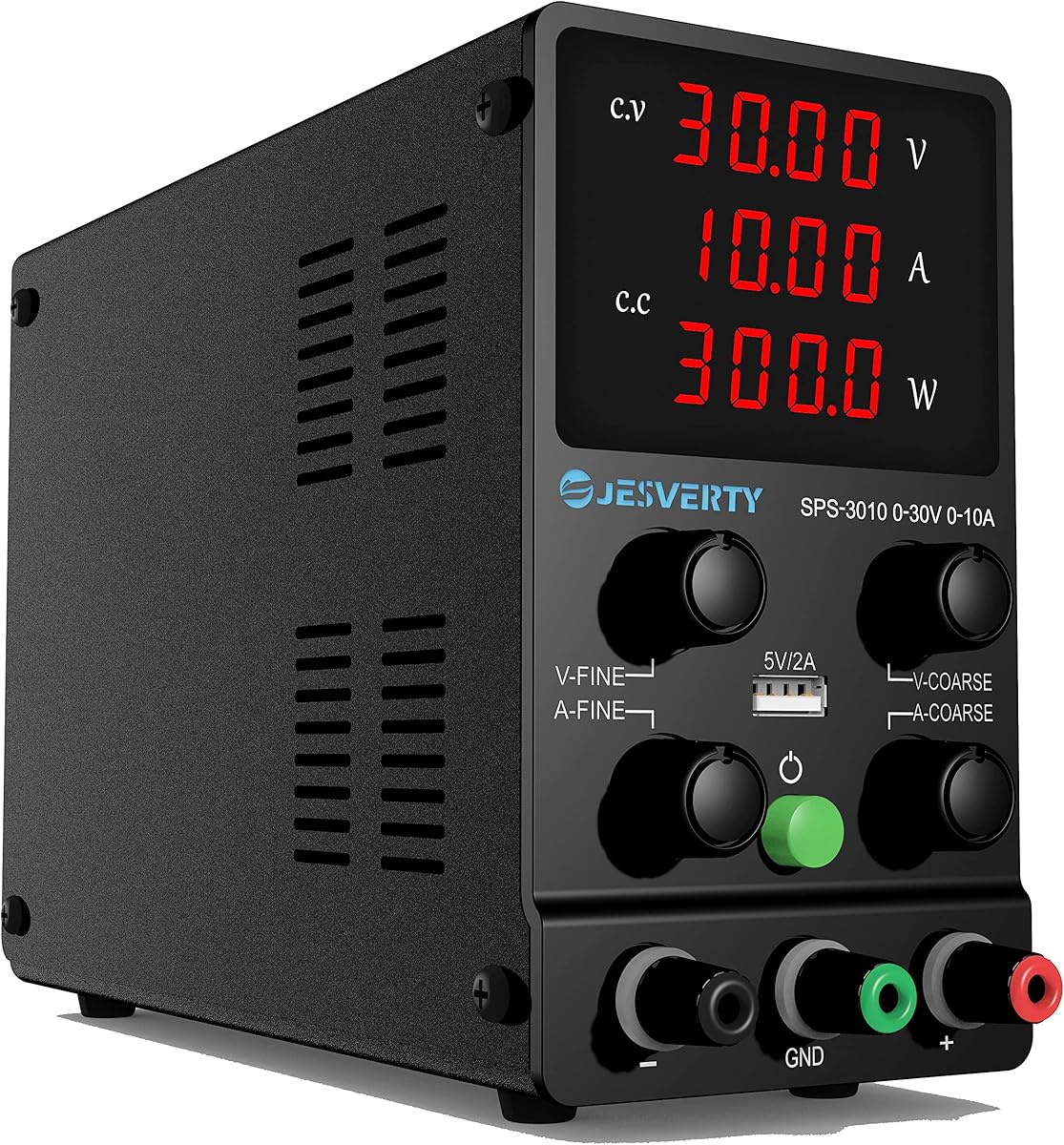
The Jesverty SPS-3010 combines a 0-30V and 0-10A range with a compact 2.5-pound body, making it well suited to mobile or space-conscious repair work. Its 4.5 rating is supported by a large four-digit display that shows voltage, current, and calculated power in real time.
We may earn a commission when you buy through this link, at no additional cost to you.
The meter resolution reaches 0.01V, 0.001A, and 0.1W. The unit also switches automatically between constant-voltage and constant-current operation as the load changes. The voltage and current setpoints function as the crossover points, so understanding that behavior is important when interpreting a load test or testing a board with an unusual startup demand.
Physical dimensions of approximately 7.1 by 3.35 by 6.1 inches help conserve bench space and simplify movement between locations. Protection features include short-circuit and overload protection, a grounding terminal, and a temperature-regulated fan. The supplied package contains the SPS unit, power cord, test leads, and instruction manual.
One important limitation is the manufacturer's warning that the included test leads are essentially a basic addition and that adequately rated leads should be prepared for projects requiring sustained high-current use. Power cords and AC input settings also vary by destination, so buyers outside the intended region should verify compatibility before ordering.
For a technician working on smaller boards or carrying a compact supply between a home bench and a shared workspace, the Jesverty is easy to recommend. Its 5V, 2A USB port is useful for a phone or small accessory, and its multi-parameter display provides enough information for routine laptop diagnostics without the bulk of a larger bench station.
The compact enclosure and low listed weight make the SPS-3010 easy to store or reposition. It suits repairers who need a full 0-30V range but do not want a large linear supply occupying most of the work area.
Voltage and current alone do not always explain a changing load. Displaying watts as well gives a repairer another perspective on consumption and can help distinguish an unexpected power increase from a simple change in operating mode.
We may earn a commission when you buy through this link, at no additional cost to you.
The FNIRSI DPS-150 is designed for users who value visibility, programmability, and a wider range of connection options. Its 4.4 rating and 2.8-inch IPS color screen distinguish it from conventional four-digit supplies, while 30V, 5A, and 150W output ratings cover many common bench-testing requirements.
We may earn a commission when you buy through this link, at no additional cost to you.
The display can flip through 90 degrees, allowing it to be viewed from different bench positions. Numerical and curve views provide alternative ways to examine output behavior. Resolution of 0.01V and 0.001A supports close monitoring, while the listed ripple of less than 20mV is intended to provide a stable source for precision electronics.
The programmable output supports PC, QC, and DC input modes and provides six groups of preset output parameters. That flexibility is useful for repeatable test sequences or quickly switching among known conditions. The connection options include 4mm banana heads, U-shaped terminals, and fine copper-wire connections, expanding compatibility with different test arrangements.
Eight listed safety mechanisms cover overvoltage, overcurrent, short circuit, overheating, and other protective conditions. The principal caution is battery charging: the manufacturer strongly recommends adding reverse-current protection, such as a Schottky diode, to the output. A repair technician should also remember that the supplied connector variety does not make every laptop adapter compatible.
The DPS-150 suits advanced hobbyists, engineers, and repair professionals who want a more visual and programmable station. Its display and saved parameter groups are particularly useful when the technician needs to compare a setpoint with observed behavior over time. The enhanced interface may be unnecessary for basic tasks, but it adds value to a busy diagnostic bench.
The adjustable IPS screen provides larger, clearer feedback than a standard numeric meter. Curve display can help a technician observe changes in current and voltage instead of checking only isolated readings.
Six stored parameter groups reduce repetitive manual entry. They are especially helpful when several known voltages or current limits are used during a structured board inspection or quality-control process.
We may earn a commission when you buy through this link, at no additional cost to you.
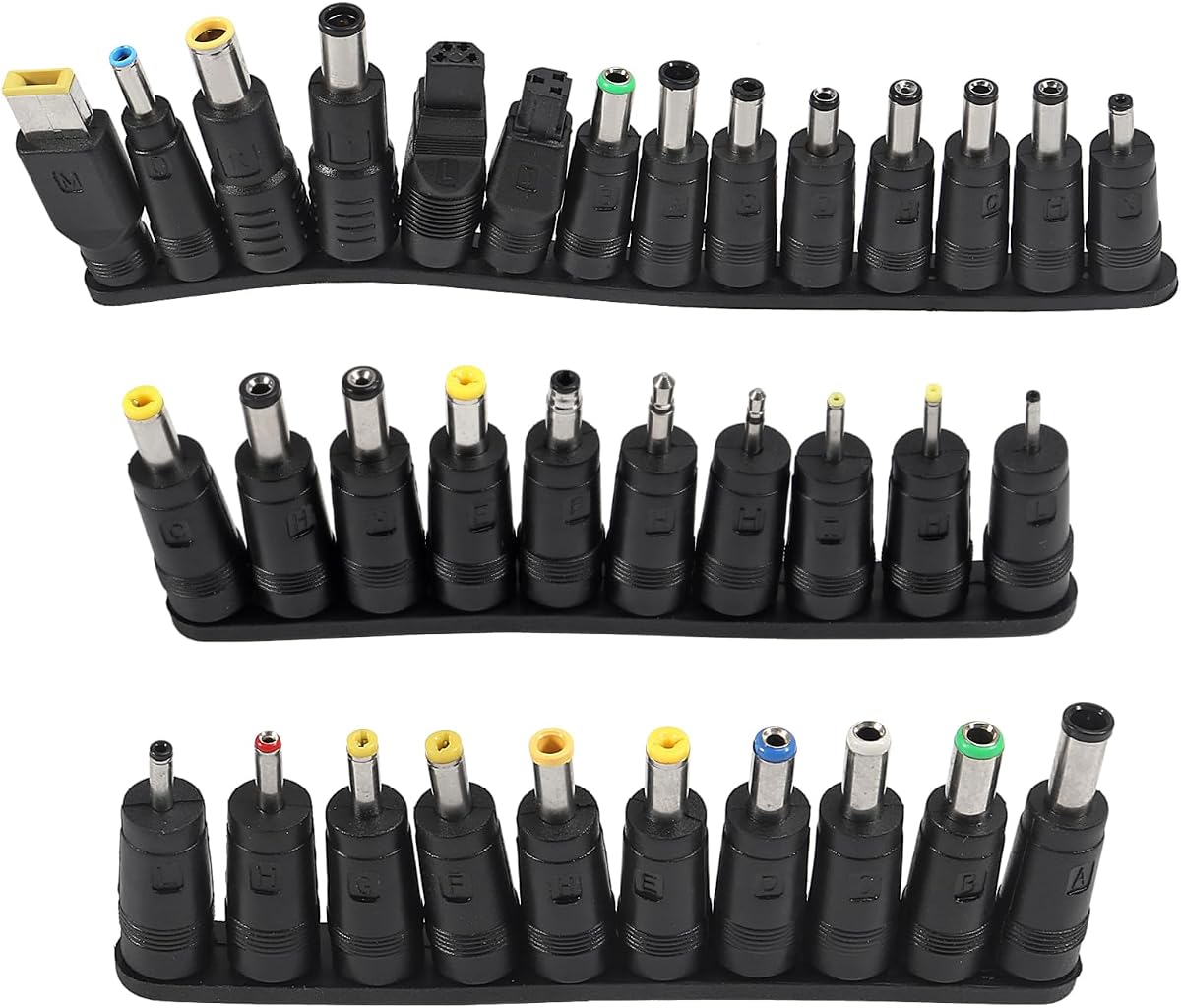
This 34-piece connector kit is not a variable bench supply, so it does not compete with the eight regulated units in this list. Its value to a laptop repairer lies in connector coverage: the set includes round barrel sizes, center-pin variants, a Lenovo square tip, and several manufacturer-specific shapes for older laptops and other electronics.
We may earn a commission when you buy through this link, at no additional cost to you.
A technician may already own a safe regulated adapter but need the correct physical tip to connect a particular device. This kit can make that existing source more versatile without adding another power supply. The included options range from 5.5 by 2.1mm and 5.5 by 2.5mm barrels to smaller sizes used by compact electronics, radios, and some mobile equipment.
The broad assortment reduces the need to search for a single specific connector when testing or replacing a charger lead. It is particularly useful for service benches that support older hardware, since newer USB-C-only laptops do not represent the full range of devices seen in repair work. Several tips also support speakers, humidifiers, and other DC-powered products.
The most important limitation is that connector compatibility does not guarantee electrical compatibility. The correct tip must still be matched to the required voltage, current, center polarity, and plug dimensions. This kit is also explicitly not compatible with Mac, and it does not include a 2017 ASUS Q504UA-compatible tip according to the supplied information.
For a technician seeking a broad physical connector assortment, it is a useful companion to a quality bench supply. It is best for making existing suitable adapters more adaptable, not for controlling output during sensitive diagnostics. The main benefit is preparedness: having the right tip available can eliminate delays when testing a legacy device.
The collection covers many barrel dimensions and several proprietary laptop connectors. It is most valuable in repair environments that continue to service older systems or support devices with changing power-interface requirements.
A matching plug is only one part of a safe connection. Voltage, current capacity, and center polarity must also be confirmed before connecting an adapter to the device under test.
We may earn a commission when you buy through this link, at no additional cost to you.
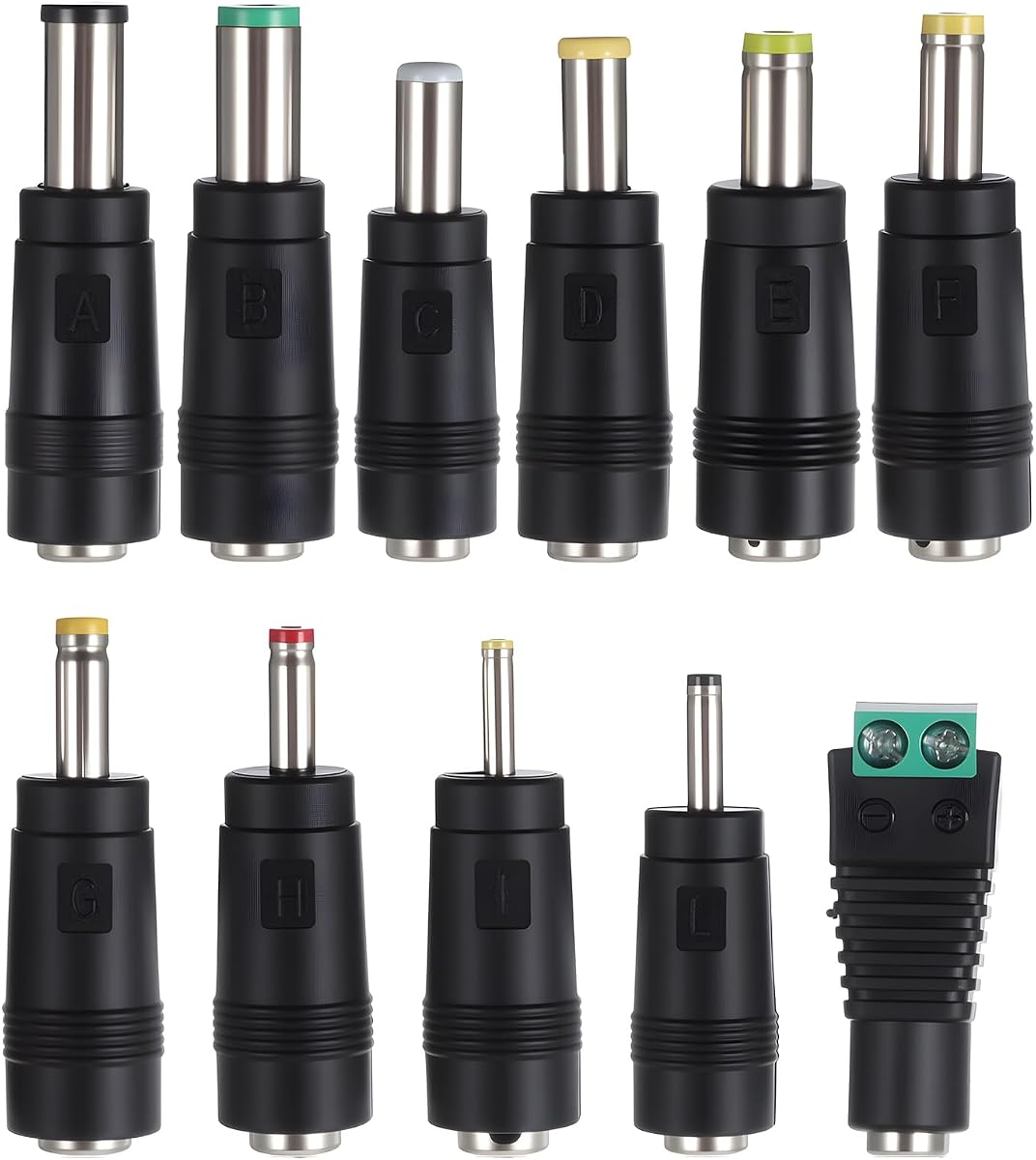
The 11-piece universal adapter kit is a lightweight companion for a laptop repairer who wants several common DC tip sizes in one small set. Its 4.2 rating reflects a basic accessory rather than a full instrument, and its strongest feature is portability: the tips can be kept in a tool pouch or service drawer without taking up much space.
We may earn a commission when you buy through this link, at no additional cost to you.
Each header connects to a 5.5 by 2.1mm female base. The assortment includes 6.5 by 4.3mm, 6.3 by 3.0mm, 5.0 by 3.0mm, 5.5 by 2.5mm, 5.5 by 1.7mm, 4.8 by 1.7mm, 4.0 by 1.7mm, 3.5 by 1.35mm, 3.0 by 1.1mm, and 2.5 by 0.7mm options, along with variants that include an internal pin.
This makes the kit useful for laptops, LED strips, routers, cameras, mini fans, small appliances, and other products using round DC connectors. Rather than replacing a proper bench supply, it can make an existing charger or AC adapter physically compatible with a device whose barrel dimensions differ from the adapter's original tip.
The key limitation is that the kit provides no voltage regulation, current control, or short-circuit protection. It should never be treated as a diagnostic power source, and users must confirm the device's voltage, polarity, and current requirement before connecting it. A physically matching tip can still cause damage if the electrical specification is wrong.
For mobile technicians or anyone who wants a compact tip assortment, this is a practical secondary purchase. It is easier to carry than the 34-piece alternative and includes the most frequently encountered barrel dimensions. A regulated variable bench supply remains the far more important tool for controlled laptop diagnosis, while this kit solves a narrower physical-connection problem.
The compact tip collection fits easily into a technician's pouch and can adapt an existing charger to a device with a different round connector. That convenience is valuable when moving between repair locations.
The connector set does not regulate voltage or current. Confirm the required output and center polarity from the original device documentation before using these tips with any adapter.
We may earn a commission when you buy through this link, at no additional cost to you.
The right choice depends on the kinds of circuits you test, the level of control you need, and how often the supply will be moved. Output range, metering, protection, and connection options deserve more attention than cosmetic extras.
A repair supply should cover the voltages commonly encountered on laptop logic boards and test accessories without forcing repeated changes to an external converter. A 0-30V range is versatile, while a maximum current of 5A is enough for many compact boards; higher-current 10A models can accommodate more demanding loads, although their power and thermal limits still need to be understood.
Choose an output range that matches the work, and pay close attention to the combined power ceiling. A unit that reaches 30V and 10A at the same time may not be able to sustain both, so compare maximum values in the same operating mode.
Fine meter resolution helps a technician distinguish small changes in voltage or current that could reveal a drifting rail or excessive load. Four-digit displays commonly provide finer visibility than three-digit units, and displays showing voltage, current, and power give a fuller picture of how the attached circuit is behaving.
Prioritize at least 0.01V and 0.001A resolution if precise diagnosis matters. Also consider automatic constant-voltage and constant-current indicators, display brightness, and whether a flip or color screen improves visibility from your normal working position.
Encoder knobs are easier to use precisely than basic potentiometers because the technician can select a digit and change it in defined steps. Coarse and fine controls make broad range selection and small adjustments more intuitive, while programmable presets save time when the same voltage or current limit is used repeatedly.
Look for lockable settings if long aging tests, unattended runs, or multiple hands near the controls are possible. Presets are valuable for professional workflows, but they should never replace checking the actual displayed output before connecting a board.
Overcurrent, overvoltage, short-circuit, overload, over-temperature, and power-overload protection can limit the consequences of a mistaken setpoint or failed component. Audible alarms and automatic output cutoff are especially helpful because a technician may need to know immediately that a test has entered a fault condition.
Protection is not a substitute for correct wiring. A technician should still begin with conservative current limits, confirm polarity, and understand whether the unit supports one-time protection, continuous protection, or both before relying on it with expensive equipment.
Constant-voltage mode is the normal state for supplying a circuit, while constant-current mode becomes active when the load draws enough current to reach the programmed limit. This behavior allows a supply to act as a controlled source during startup, short-circuit investigation, LED testing, and other load-dependent work.
Check that the display identifies the active mode. Also remember that the programmed voltage and current commonly act as crossover points, so a technician should interpret the meter in relation to the load rather than assuming the setpoint alone describes the output.
A compact and lightweight supply can make a repair kit more practical, especially for mobile service or a crowded counter. Units around two and a half pounds or less are easy to move, but larger cases can accommodate more substantial cooling and protection systems. Dimensions matter as much as weight when space beside a laptop and tools is limited.
Consider how often the supply will travel, whether ventilation space is available, and whether the display remains readable at the intended angle. A larger screen or foldable display may be more valuable than maximum output if most tasks involve routine visual diagnosis.
Banana plugs, alligator clips, hook leads, and precision probes support different test setups. A complete kit can be convenient for a new bench, although many technicians already own preferred leads and may need to match them to the supply's output terminals. The connector types and current rating should be checked for every high-current application.
Connector-tip kits are accessories rather than power supplies. They can make an existing regulated adapter physically compatible with a device, but they add no voltage regulation or current protection. Always verify the tip dimensions, internal pin, voltage, current, and polarity before connecting any adapter.
USB-C computer control can provide a major advantage in R&D, quality control, and repeated testing. It enables automated sequences, real-time parameter logging, and more consistent comparisons between boards, but it also introduces configuration work and a dependency on the connection between the computer and instrument.
Choose computer control if repeatable documentation and automation are central to the workflow. Choose a straightforward manual unit if the main goal is quick diagnosis, occasional rail testing, or a simple workbench setup that should be ready to use without additional configuration.
Begin by identifying the correct input voltage, output range, current requirement, and polarity for the circuit under test. With the output disabled, connect the positive and negative leads to the load. Inspect every connection, set a conservative current limit, and select the required voltage before enabling the output. Never connect a powered laptop directly to an unknown adjustable source without confirming the board's expected rail and startup behavior.
When diagnosing a fault, increase the current limit only as understanding of the circuit improves. Watch the constant-voltage and constant-current indicators, real measured output, and the load's response. If the supply enters constant-current mode unexpectedly, lower the applied voltage or disconnect the board rather than forcing the limit to remain active. Use the output control and parameter lock to keep settings stable during longer tests.
Keep the ventilation openings clear, avoid placing the unit in an enclosed container, and let it cool before repeated maximum-load operation. Inspect test leads for damaged insulation and replace low-current leads before running sustained high-current tests. Periodically clean dust from vents with power disconnected, store accessories in a dry organizer, and verify all protection, display, and control functions after moving the unit or changing its input configuration.
The correct voltage depends on the specific circuit being tested, not merely the laptop brand. A 0-30V adjustable bench supply covers many common diagnostic voltages, but the technician must verify the board schematic or service documentation before applying power. Some rails are below 12V, while others use higher voltages for specific functions, so the output should always begin at a conservative setting.
A 30V, 10A supply can be useful for testing laptop circuits because it offers a broad adjustment range. It is not automatically safe at maximum output, and its maximum voltage and current may not be available simultaneously. Start with the output disabled, set the correct voltage and a conservative current limit, verify polarity, and only then energize the load.
Constant-voltage mode holds the selected voltage while the load draws current. Constant-current mode holds the programmed current limit when the load demands more current than the supply can provide at the set voltage. A repair technician can use the transition between these modes to identify a short, startup surge, or abnormal load condition.
A current limit helps prevent a damaged rail or shorted component from drawing unlimited current. It is especially valuable when the cause of a no-power or overheating problem is unknown. The limit should initially be set near the circuit's expected draw and increased only when the circuit's design requirements are known.
No. Connector-tip kits only adapt the physical plug on an existing charger or adapter. They do not provide regulated adjustable output, accurate metering, current limiting, or automatic short-circuit response. They are useful accessories, but controlled laptop diagnosis requires a suitable regulated bench supply.
A bench supply may be used for some battery-charging or maintenance procedures, but the chemistry, charge voltage, current, termination behavior, and reverse-current protection must all be considered. The FNIRSI listing specifically recommends adding reverse-current protection when charging batteries. For routine laptop charging, the manufacturer-approved charger is generally the safer and more appropriate choice.
Choose based on the highest current expected from the circuit being tested, the power limit of the unit, and the leads you will use. A 5A supply covers many logic-board and accessory tests, while a 10A model offers more headroom for demanding loads. Higher current does not automatically make a supply better, because sustained operation also depends on cooling, power rating, and safe test leads.
They are not essential for every repair, but they improve consistency when a technician repeatedly uses several known test conditions. Presets reduce setup time and make it easier to return to a standard voltage or current limit. For occasional work, precise manual controls and a clear display may be sufficient.
The 0-30V, 0-10A adjustable supply with coarse and fine encoders is the strongest budget choice, offering useful protection, a clear display, and convenient USB-C charging. The YIHUA 305D-IV is the most balanced option for general repair work, while the X-Tronic PX-70 stands apart as the premium station with memory presets, locking controls, and a complete accessory kit.
Prioritize the features that match your actual workflow. Accurate readouts, a low and adjustable current limit, automatic constant-voltage and constant-current modes, and dependable protection matter more than extra ports. Compact construction helps mobile technicians, programmable control helps repeated testing, and connector-tip kits are best treated as useful additions rather than replacements for a proper bench supply.
Before ordering, confirm the unit's input-voltage requirement, combined power limit, connector type, and compatibility with your test leads. Product configurations can change, and current prices vary, so check the listing and manufacturer details at the time of purchase to ensure the model still matches the needs described here.