
APC BE600M1
4.5Editor score
23-minute runtime at 100W
Five fully protected outlets
Two surge-only outlets
Built-in 1.5A USB charger
Replaceable internal battery
Our guide compares the best battery backup for small office options, covering runtime, capacity, outlets, surge protection, monitoring, and installation.
A small office needs dependable protection from outages, voltage fluctuations, and surge-related damage, but the right battery backup depends on connected equipment, available space, and required runtime. The best units combine useful capacity, protected outlets, clear status monitoring, and features that make recovery and routine maintenance easier.
We compared ten UPS systems using the supplied specifications, focusing on continuous power, wattage, number and type of outlets, surge protection, output quality, USB charging, data-line protection, mounting options, and warranty coverage. The list includes full-size and compact models from CyberPower, Eaton Tripp Lite, and APC.
Each review identifies the features that distinguish one model from another and explains where each is most practical. Ratings reflect the supplied customer feedback, while runtime, output, and compatibility claims are limited to documented specifications. As with all power products, availability and current prices can change.
4.5Editor score

4.5Editor score
4.9Editor score
This side-by-side overview highlights the major differences in power capacity, output design, outlet configuration, monitoring, protection, and physical flexibility across the ten UPS systems.


The CyberPower CP1500PFCLCD is the most versatile unit in this guide for a small office that needs more than basic outlet protection. It supplies 1500VA and up to 1000W of continuous capacity, while its PFC sine wave output is designed to work well with active power factor correction and conventional power supplies. Its supplied 4.5-star rating reflects generally favorable customer feedback, though actual runtime depends on the equipment connected to it.
We may earn a commission when you buy through this link, at no additional cost to you.
The most important strength is the combination of relatively high capacity and clean output. Its 12 NEMA 5-15R receptacles divide into six battery-backed, surge-protected outlets and six surge-only outlets. The color LCD panel reports detailed power and battery conditions and can alert users to developing problems. Automatic voltage regulation corrects minor fluctuations without needlessly transferring the load to battery, while the right-angle plug and five-foot cord help with placement behind desks or other equipment.
Two USB charging ports, one Type-A and one Type-C, add convenience for phones and tablets. A three-year warranty includes the battery, and the listed connected equipment guarantee provides added reassurance. The trade-offs are physical size and the normal limits of battery runtime. Because the unit has substantial capacity, office users must still calculate their combined load and prioritize critical equipment rather than assuming every connected device will receive its maximum runtime.
This model is recommended for offices running a computer, monitor, network equipment, and other active electronics, especially when pure sine wave output is valued. It offers a strong balance of capacity, diagnostics, outlet availability, and charging. A small business wanting straightforward protection with transparent monitoring and room for future equipment should regard it as the leading all-around choice in this roundup.
The PFC sine wave inverter is especially relevant to modern computers and network hardware with active power factor correction. It provides a smoother transition to battery operation than a stepped or heavily simplified waveform, which can make this model a stronger fit for workstations and other sensitive loads.
The tiltable color LCD presents immediate battery and power information and warns users about potential issues. This visibility is useful for routine checks and can reveal conditions that might otherwise lead to unexpected downtime.
We may earn a commission when you buy through this link, at no additional cost to you.
The CyberPower CP1500AVRLCD3 provides 1500VA and 900W of capacity, placing it among the strongest models here for a desk, conference area, or small network room. Its intelligent color LCD gives users clear information about operating conditions, and its 4.5-star supplied rating indicates positive overall customer sentiment. The model uses simulated sine wave technology rather than the pure sine wave output offered by the first-ranked unit.
We may earn a commission when you buy through this link, at no additional cost to you.
Its 12 NEMA 5-15R outlets include six with battery backup and surge protection and six with surge protection only. A Type-A and Type-C USB charging pair supports phones and tablets. Automatic voltage regulation corrects minor line variations without switching to battery mode, which helps extend backup time while keeping essential systems running during mild instability. The unit is UL safety certified according to the supplied information.
The main compromise is its battery waveform. Simulated sine wave output is suitable for many conventional computers, workstations, routers, and entertainment components, but some modern or sensitive electronics can perform better with pure sine wave power. Buyers should verify the startup and operating requirements of critical loads before choosing it over a pure sine wave alternative. Its three-year warranty includes the battery, and the listed connected equipment guarantee adds protection.
The CP1500AVRLCD3 is well suited to small offices seeking substantial outlet availability, strong surge coverage, and a clear display without moving to a larger pure sine wave system. It may be particularly attractive for mixed equipment loads where simulated wave output is accepted. For offices running specialized medical, industrial, or highly sensitive electronics, checking compatibility should come before making the final choice.
With 900W of stated continuous capacity and twelve outlets, this model can support a more varied office arrangement than compact units. Users should still add up the running wattage of computers, displays, network hardware, and other essential loads before installation.
Automatic voltage regulation handles minor fluctuations without transferring to battery power. This is useful in offices where brief, moderate voltage changes are common and uninterrupted operation is more important than reacting to every minor line variation.
We may earn a commission when you buy through this link, at no additional cost to you.
The CyberPower EC850LCD is built around a practical energy-saving idea: reducing standby power use when a connected computer is turned off or asleep. It has a supplied rating of 4.4 stars and provides a multifunction LCD for battery and power status. The model is especially interesting for offices that want basic continuity for a primary workstation, router, and peripherals without keeping every accessory powered continuously.
We may earn a commission when you buy through this link, at no additional cost to you.
Twelve NEMA 5-15R outlets are divided between six battery-backed, surge-protected receptacles and six surge-protected receptacles, with three of the latter controlled by ECO mode. When the UPS recognizes that the associated computer is off or sleeping, it cuts power to connected peripherals on those controlled outlets. The right-angle input plug and five-foot power cord make the unit practical to position near a desk or network area.
The model includes a three-year warranty covering the battery and a listed connected equipment guarantee. Free PowerPanel Personal Edition management software is available for download. Its limitations relate primarily to scale and configuration. It has less stated capacity than the 1500VA models, and critical networking or storage equipment should not be assigned to ECO-controlled outlets because those receptacles intentionally lose power under the energy-saving condition.
This is a sensible choice for a small office that values manageable energy use, uncomplicated monitoring, and a healthy outlet count. It is less compelling for a workstation that needs a long outage window or for sensitive loads that require pure sine wave support. For a typical computer setup where peripheral energy use is meaningful, however, the automatic control can make it an efficient and tidy solution.
ECO mode can switch off power to selected peripherals after the UPS detects that the main computer is off or in sleep mode. Keeping printers, speakers, or other accessories off when they are not needed can reduce unnecessary energy consumption.
The multifunction LCD reports immediate battery and power conditions, making basic system checks faster than relying on indicator lights alone. It helps users determine whether the unit is operating normally without requiring a computer or phone.
We may earn a commission when you buy through this link, at no additional cost to you.
The CyberPower ST900U offers 900VA and 500W in a slim vertical standby design, making it easier to place beside a desk, beside a monitor, or near a network rack than a broad horizontal unit. Its supplied 4.5-star rating is favorable, and the GreenPower high-efficiency design focuses on reducing power consumption while still supplying battery backup and surge protection.
We may earn a commission when you buy through this link, at no additional cost to you.
The unit has 12 NEMA 5-15R outlets, including six with both battery backup and surge protection and six with surge protection only. Four outlets are widely spaced for larger plugs, an advantage in offices where power bricks occupy substantial receptacle space. A right-angle, 45-degree offset input plug and five-foot cord help route the cable behind furniture or along a wall.
The 500W continuous capacity is the primary limitation for heavier office configurations. A desktop computer, display, router, and several peripherals may fit comfortably, but high-power workstations and multiple displays require more careful load management. The standby system also uses simulated sine wave output during battery operation, so highly sensitive or specialized electronics should be checked for compatibility. A three-year warranty includes the battery, alongside the stated connected equipment guarantee and downloadable management software.
The ST900U is recommended for space-conscious offices with moderate equipment loads and a need for numerous conveniently spaced outlets. It offers useful protection for computers, broadband routers, and entertainment or peripheral equipment in a compact footprint. Users who need more wattage, pure sine wave support, or a detailed color display should consider a larger model instead.
The slim profile makes the unit easier to position in locations where a horizontal UPS would be inconvenient. It is particularly suitable beside a monitor, beneath a desk, or next to a compact network setup.
Four widely spaced outlets reduce conflicts between bulky power bricks. That flexibility is helpful in modern offices where chargers, monitor power supplies, and network adapters often occupy neighboring receptacles.
We may earn a commission when you buy through this link, at no additional cost to you.
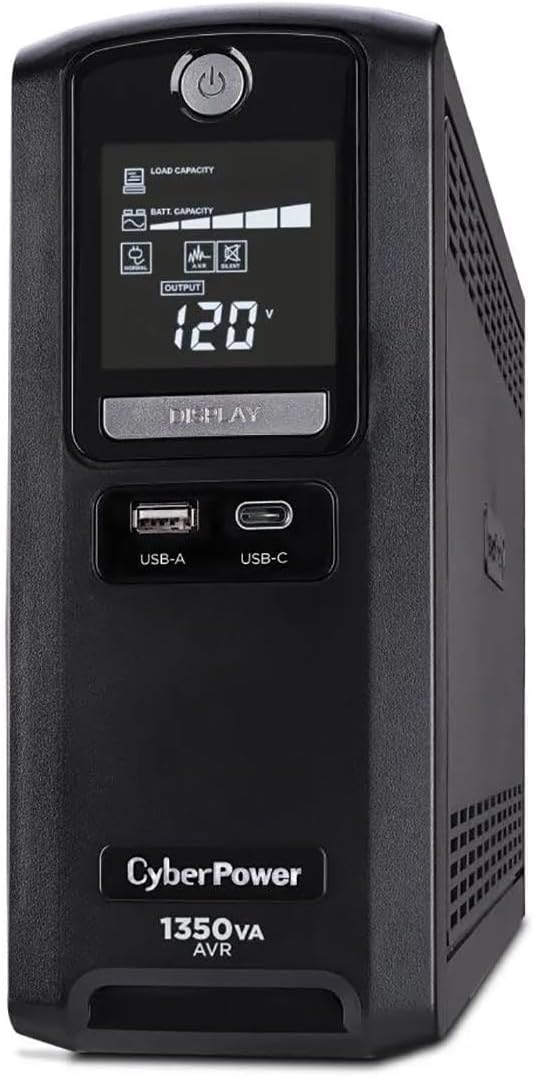
The CyberPower CST135UC stands out with a supplied rating of 4.9 stars, the highest customer feedback score among the products in this guide. It combines 1350VA and 810W of capacity with a multifunction LCD, surge suppression, network and coaxial data-line protection, and downloadable PowerPanel Personal management software. This makes it a feature-rich option for small offices that want broad protection without moving to pure sine wave output.
We may earn a commission when you buy through this link, at no additional cost to you.
Its ten NEMA 5-15R outlets include five battery and surge protected receptacles, while the other five provide surge protection. Two USB charging ports, one Type-A and one Type-C, share a 4.0A output, which is convenient for charging mobile devices while the office remains operational. The 1500-joule surge suppression, EMI/RFI filtration, and telephone or network protection broaden the protection beyond the power cord itself.
Documented runtime is two minutes at full load and ten minutes at half load, so the unit provides a practical window for saving work and shutting down sensitive equipment rather than serving as a long-duration power source. Its Energy Star certification and GreenPower UPS Bypass Technology are intended to reduce energy consumption. The simulated sine wave output and shared USB charging output are the main points to evaluate before purchase.
The CST135UC is a strong recommendation for a small office seeking a large number of surge-protected connections, data-line protection, and excellent customer feedback. It is a particularly good fit for networks with connected routers, storage, and cabling. Users needing a pure sine wave inverter should choose a different design, while those who prioritize monitoring and device protection will find this model unusually comprehensive.
Network and coaxial protection can reduce the risk of surge-related damage reaching connected equipment through communication lines. This is valuable in offices where wired networks, VoIP equipment, or coaxial connections are part of the setup.
The multifunction LCD provides local status information, while the HID-compliant USB port and PowerPanel Personal software support more detailed monitoring. Together they make the system easier to check and manage from a computer.
We may earn a commission when you buy through this link, at no additional cost to you.
The CyberPower AVRG900LCD is a well-rounded 900VA, 480W UPS for a typical office computer and its supporting network equipment. Its supplied 4.6-star rating is the second-highest in the group. The intelligent LCD presents operating information, while the generous set of 12 NEMA 5-15R receptacles makes it easy to organize computers, displays, printers, and other peripherals.
We may earn a commission when you buy through this link, at no additional cost to you.
Six outlets provide battery backup and surge protection, and six provide surge protection only. Automatic voltage regulation corrects minor fluctuations without switching to battery, and telephone data-line protection helps stop surges traveling through connected phone lines. The unit is UL safety certified according to the supplied information, with a three-year warranty that includes the battery and a listed connected equipment guarantee.
Its 480W continuous capacity is adequate for a single primary workstation and lighter network equipment, but it may be restrictive for power-hungry systems or multiple demanding displays. Simulated sine wave output similarly calls for a compatibility check with sensitive or modern electronics. On the other hand, downloadable PowerPanel management software makes the system easier to monitor than a basic indicator-only model.
This model is recommended for offices that want a generous number of outlets, clear local monitoring, and data-line surge protection in a standard desktop form. It is less appropriate as the primary backup for a heavy workstation or equipment that requires pure sine wave output. For ordinary computing and networking, however, its mix of protection, warranty, and user information is difficult to overlook.
AVR corrects minor voltage fluctuations without transferring the connected equipment to battery power. For offices facing frequent mild instability, this can preserve runtime and avoid unnecessary interruptions.
Telephone data-line protection addresses a route through which surges can reach connected electronics. It is a useful addition for offices with telephone equipment, fax systems, or other connected lines.
We may earn a commission when you buy through this link, at no additional cost to you.
The Eaton Tripp Lite BC450 is a compact 450VA, 255W UPS intended for lighter office equipment such as a computer, television, Wi-Fi router, and similar electronics. Its supplied 4.2-star rating is the lowest in this collection, but the product remains appealing to buyers seeking a straightforward small backup with a replaceable internal battery and manageable physical size.
We may earn a commission when you buy through this link, at no additional cost to you.
Eight wide-spacing NEMA outlets provide four battery-backed and surge-protected positions along with four surge-only positions. The bottom mounting tabs support wall installation, and the five-foot cord offers practical placement flexibility. EMI and RFI filtering helps remove disruptive disturbances that could damage hardware. The internal battery uses the Tripp Lite RBC36H cartridge, allowing replacement without discarding the entire unit.
The unit remains silent in both line and battery modes, with an alarm reserved for low-battery or fault warnings. A green LED communicates protection status, overload, and battery replacement conditions. Output is sine wave in AC mode and PWM sine wave in battery mode, which should be checked against sensitive load requirements. The 255W continuous limit is the biggest practical constraint, and the supplied listing states that the product is not for sale in California until further notice.
The BC450 is recommended for small offices or home-office workspaces that need backup for a few essential devices rather than an entire multi-device system. Its replaceable battery, wall-mounting tabs, quiet operation, and technical support are meaningful advantages. It is a sensible choice for light loads and straightforward needs, while a higher-capacity model is necessary for more demanding equipment.
The internal RBC36H cartridge can be replaced when the battery ages. This serviceable approach is more economical and environmentally conscious than discarding the complete UPS whenever its battery reaches the end of its useful life.
The unit remains silent during normal line and battery operation, and its alarm is reserved for meaningful warnings. That makes it suitable for reception desks, workrooms, and other shared office areas where continuous noise would be distracting.
We may earn a commission when you buy through this link, at no additional cost to you.
The Eaton Tripp Lite BC350R is one of the smallest and most approachable options in this guide. It provides 350VA and 210W of uninterruptible power with 190 joules of surge protection. Its 4.5-star supplied rating indicates favorable customer feedback, and its range of intended applications includes computing, networking, AV, kiosks, food service, and light industrial equipment.
We may earn a commission when you buy through this link, at no additional cost to you.
Setup is simple: plug the unit into a grounded wall outlet, press the power button, and connect devices. A resettable circuit breaker helps protect against overloads, while EMI and RFI filtering reduces potentially damaging electrical disturbances. The internal battery is replaceable using Eaton's AG-075C cartridge, preserving the usefulness of the UPS after the original battery ages.
Its key limitation is the 210W continuous rating, which is modest compared with the larger models here. A monitor, small computer, router, and several small peripherals may be appropriate, but high-power computers and multiple displays require a larger unit. Status information is conveyed through audible alarms and red or green LEDs rather than a detailed display. Keyhole mounting slots follow a 100 by 100 millimeter VESA pattern, and user-supplied cable ties offer another installation option.
The BC350R is recommended for kiosks, compact offices, retail counters, and other installations where a small form factor matters. Its automatic restart after power restoration is convenient for unattended equipment that does not require manual intervention each time utility power returns. For a full desk setup, choose a higher-capacity model; for a focused set of essential devices, this compact UPS offers practical protection and straightforward maintenance.
Desktop, floor, and wall placement options make the unit adaptable to reception counters, kiosks, and other constrained locations. The VESA-pattern slots provide a standard route to secure it on a wall.
Green and red LEDs show power and operating conditions, while an audible alarm identifies a low battery or fault. Although less detailed than an LCD system, these cues are sufficient for straightforward local monitoring.
We may earn a commission when you buy through this link, at no additional cost to you.
The APC BE600M1 focuses on a practical small-office goal: keeping a computer, Wi-Fi connection, and router alive long enough to maintain internet access and shut down safely. Its supplied 4.5-star rating is favorable, and its documented 23-minute runtime at a 100W load distinguishes it from smaller units intended only for very brief protection.
We may earn a commission when you buy through this link, at no additional cost to you.
Five well-spaced outlets provide full battery backup and surge protection, while two additional outlets provide surge-only protection. This arrangement makes it easy to place essential network and computing equipment on protected receptacles while reserving the others for less critical accessories. A built-in 1.5A USB port can charge a phone during an outage, giving workers a practical way to maintain communication.
The internal battery can be replaced with an APCRBC154, sold separately, rather than replacing the whole UPS. That helps manage the cost of long-term ownership and allows the unit to remain useful after its battery ages. The primary limitation is overall capacity: its 100W runtime example should not be interpreted as support for every 600VA of possible load over the same duration. Connected equipment still needs to be evaluated for both power draw and startup behavior.
This model is recommended for home offices and small workplaces whose central concern is maintaining a computer, router, and network connection during a short outage. It is particularly appealing when safe shutdown matters more than supporting numerous high-power peripherals. Buyers wanting a larger display, more outlets, or a pure sine wave output should consider a higher-capacity unit, but for essential-device continuity the BE600M1 is especially compelling.
The documented 23-minute runtime at a 100W load creates a meaningful window for saving work, completing calls, or shutting down equipment in an orderly manner. The actual duration will vary with the connected load and operating condition.
Replacing the internal APCRBC154 battery when it ages allows the UPS to remain in service. This is a practical long-term advantage over a sealed unit that would need to be exchanged entirely.
We may earn a commission when you buy through this link, at no additional cost to you.
The CyberPower ST425 is a compact standby UPS designed to safeguard essential home-office or small-office equipment such as a computer, broadband router, gaming console, and selected peripherals. It provides 425VA and 260W of capacity and carries a supplied rating of 4.4 stars. The GreenPower high-efficiency design focuses on reducing power consumption while preserving core backup functionality.
We may earn a commission when you buy through this link, at no additional cost to you.
Eight NEMA 5-15R outlets are divided into four battery-backed and surge-protected positions and four surge-only positions. Transformer-spaced outlets help reduce conflicts between bulky plugs. A right-angle, 45-degree offset input plug and five-foot power cord make the unit easier to route in confined areas, while a simple LED reports power-on and wiring-fault conditions.
Its 260W continuous limit means the unit should be matched to a modest equipment list rather than a full high-performance workstation. The simulated sine wave battery output also calls for compatibility checks with sensitive electronics. Users gain a three-year warranty that includes the battery, a listed connected equipment guarantee, and UL safety certification according to the supplied specifications.
The ST425 is recommended for offices that need to preserve a router, small computer, and essential peripherals through brief outages. It works well where outlet count, efficiency, and a compact body matter more than long runtime or advanced monitoring. For a desk with several displays, heavier computer, or extensive networking equipment, one of the 900VA to 1500VA models would offer a more appropriate capacity margin.
GreenPower technology uses a compact charger and inverter design to reduce power consumption. This is useful for an installation where the UPS remains plugged in continuously but only protects a limited group of devices.
Transformer-spaced outlets create more room for larger power adapters. That practical layout can prevent a single bulky charger from preventing use of neighboring receptacles.
We may earn a commission when you buy through this link, at no additional cost to you.
The right small-office UPS depends on connected equipment, required outage duration, power quality, physical space, and maintenance preferences. Use the following factors to narrow the choices before comparing final specifications.
Choose a model with comfortable capacity above your calculated load rather than matching it exactly.
Decide how long operations must continue, then prioritize a unit with capacity and efficiency suited to that duration.
Use pure sine wave output for maximum compatibility, but verify requirements before paying for a more advanced waveform.
Prioritize protected, well-spaced outlets over a high total count when desk adapters are bulky.
Match monitoring complexity to the installation, not to an imaginary need for more features.
Confirm that the enclosure, cord, and battery-replacement area all fit the intended location.
Prefer a serviceable battery, clear replacement process, and warranty that explicitly covers key components.
Configure automatic shutdown procedures and continuously save important work before relying on outage protection.
Place the UPS on a stable, dry surface with adequate ventilation and enough clearance around its vents. Connect essential equipment to the battery-backed and surge-protected receptacles, while less critical accessories can use surge-only outlets. Confirm that the connected load remains within the unit's continuous wattage rating and that large power adapters do not obstruct neighboring plugs. For wall-mounted models, use the specified tabs, slots, or compatible mounting hardware.
Power on the unit, verify the display or indicator status, and confirm that the UPS recognizes normal line power. Test the outlet assignments and configure connected computers or servers for an automatic shutdown command when power fails. Learn the meaning of the display, LEDs, alarms, and any downloadable management software. Perform a controlled outage test by disconnecting the UPS from its wall outlet and checking that protected equipment remains powered and that shutdown procedures begin as intended.
Check the battery condition during routine maintenance and replace it when the unit reports a low or replace-battery condition. Use only the compatible replacement battery specified by the manufacturer, and switch the unit off before servicing. Keep the enclosure dry, keep vents clear, and avoid placing it near heat sources. Review connected equipment after an extended outage to confirm that every essential system restarted normally, and schedule periodic testing so the backup is dependable when it is actually needed.
The right runtime depends on what the office needs to accomplish during an outage. Two to five minutes may be enough for an immediate shutdown, while 15 to 30 minutes can support file saving, calls, and orderly network shutdowns. Calculate the connected load and consult the manufacturer's runtime guidance. A higher-capacity UPS does not automatically mean longer runtime, because actual duration depends on power draw and battery condition.
Pure sine wave output provides a smoother form of backup power and offers broad compatibility with modern and sensitive electronics. Many ordinary computers, monitors, and routers also work with simulated or PWM sine wave models, but some loads can restart, buzz, or behave unexpectedly. Check the requirements of every essential device. When compatibility is uncertain or uninterrupted operation is critical, pure sine wave output is the safer selection.
A surge protector primarily diverts or blocks sudden voltage spikes, while a UPS also supplies battery power when utility electricity fails. Many models include surge protection on every outlet, but only designated battery-backed outlets maintain power during an outage. A UPS also provides voltage regulation and typically offers status monitoring. For an office that needs to save work or shut down safely, surge protection alone is not enough.
It depends on the UPS's wattage rating and the combined consumption of the monitor, computer, and any other connected device. A 480W or 500W model may handle a modest setup, while a higher-capacity unit offers more flexibility. Check both typical operating consumption and possible startup demands, and avoid assuming that a high VA number alone guarantees adequate support for every device.
Replacement timing depends on usage, temperature, battery quality, and how often the unit enters battery mode. Many manufacturers provide multi-year warranties on their batteries, but an aging battery can still reduce runtime or reliability. Monitor replace-battery warnings, perform periodic tests, and replace the battery when its condition declines or the manufacturer indicates it is necessary. Use the exact compatible cartridge specified for the model.
A UPS is generally designed to remain connected so it can supervise line power and be ready for an outage. Keeping it switched on allows status information, battery conditioning, and monitoring to work normally. If the office will be vacant for an extended period and local safety or energy policies require disconnection, follow the manufacturer's shutdown procedure. Avoid repeatedly unplugging the unit, because that can provide no protection during unexpected outages.
Battery-backed outlets continue supplying power after the wall outlet loses utility electricity, allowing connected equipment to remain online and shut down safely. Surge-only outlets protect against voltage spikes but do not provide backup power. Plugging a router, desktop, or server into a surge-only outlet would therefore undermine the purpose of the UPS during an outage.
First check the unit's display or indicators for a normal status and confirm that essential devices are connected to battery-backed outlets. Then disconnect the UPS from the wall outlet, verify that protected equipment remains powered, and observe whether configured computers begin an orderly shutdown. Afterward, reconnect the unit and confirm that the load restarts normally. Repeat the test periodically and after replacing the battery or changing connected equipment.
The CyberPower CP1500PFCLCD is the strongest all-around option for offices that need useful capacity, pure sine wave output, abundant outlets, and detailed color monitoring. The APC BE600M1 stands out for small setups that value a documented 23-minute runtime at a 100W load, while the CyberPower CST135UC combines a high supplied rating with extensive surge and data-line protection.
For most buyers, the correct starting point is a realistic load calculation followed by a runtime decision. Match the UPS's wattage and waveform to the critical equipment, reserve battery-backed outlets for devices that truly need continuity, and consider battery serviceability before purchase. Compact Eaton models are useful for light loads and constrained spaces, while the larger CyberPower systems offer more headroom and outlet flexibility.
Finally, verify the current specifications, warranty terms, replacement battery availability, and current price for the model you choose. Product configurations and retailer availability can change, and apparent savings may not compensate for inadequate capacity or poor equipment compatibility. Buying the correct UPS for the actual office load will provide a better long-term result than simply choosing the unit with the largest headline number.