
Garmin dezlCam OTR725
3.4Editor score
Large seven-inch navigation display
Integrated 1080p incident recording
Truck-aware custom routing
Satellite arrival planning
Wind speed weather overlay
Our Dash CAM for Big Truck guide compares ten models for night visibility, channel coverage, parking protection, GPS, storage, and easier installation.
A dash cam for a big truck must do more than record a clear forward view. It should handle long cable runs, large cabs, changing light, vibration, heat, limited storage, and the practical need to document what happened across several angles. The strongest choices combine reliable sensors, useful parking modes, GPS data, and controls that remain manageable during extended drives.
We compared all ten products by examining their stated recording resolutions, camera channels, low-light technologies, viewing angles, storage support, parking features, navigation functions, app connectivity, and installation requirements. The list includes conventional front-and-rear systems, three-channel and four-channel cameras, a mirror-style model, and a truck-specific Garmin navigator with an integrated dash cam.
Each review identifies the product's strongest use case and the compromises that truck owners should consider. Features such as hardwire kits, memory cards, regional legal restrictions, and parking-mode requirements vary, so installation details matter. Product prices and configurations can change, making it important to verify the current listing and included accessories before purchasing.
3.4Editor score

4.5Editor score

4.3Editor score
The comparison highlights each camera's channel coverage, recording resolution, low-light approach, and essential accessories. It is designed to help truck owners balance image quality, installation complexity, parking protection, and the amount of data stored during long drives.



The ROVE R2-4K Dual is a strong all-around choice for a truck because it combines forward and rearward recording with built-in GPS, fast WiFi, and three parking options. Its 4.5 rating reflects a capable package, although the advertised front resolution is upscaled rather than native 4K. Owners who value balanced coverage, night visibility, and useful route metadata will find this especially practical.
We may earn a commission when you buy through this link, at no additional cost to you.
Its front camera uses a Sony STARVIS 2 IMX675 sensor with an F1.5 aperture, HDR, and a stated 2.5K recording mode that can be intelligently upscaled to 2160p. The rear camera records at 1080p through an F1.8 aperture. That combination is well suited to long-haul driving because it preserves more usable detail in darkness, dusk, tunnels, and areas with strong oncoming headlights.
The ROVE app can view and manage footage over dual-band 2.4GHz and 5.8GHz WiFi, with stated transfer speeds up to 20MB/s. Built-in GPS displays live speed and compass information on the three-inch IPS screen and embeds route, location, and speed data. Parking options include one-frame-per-second time-lapse, motion detection, and collision detection, each capable of saving a locked one-minute event.
This is the most straightforward recommendation for drivers who want front-and-rear evidence without adding an interior camera. The main caveat is that the front image is not native 4K, and 24-hour parking mode requires a separately purchased hardwire kit. Even so, the included 128GB card, dual-band WiFi, GPS, thermal protection, and expandable storage make it a balanced choice for many truck cabs.
The ROVE R2-4K Dual is best for long-haul and regional drivers who need dependable front-and-rear documentation, downloadable clips, and route information. Verify the hardwire kit, cable routing, and local recording rules before installation. Once mounted and configured, it offers a sensible mix of image quality, storage, and everyday usability.
The STARVIS 2 front sensor, wide aperture, and HDR work together to improve visibility when a truck spends hours on dark highways. This matters more to many owners than a headline resolution alone, especially when identifying vehicles, road signs, or lane movements after an incident.
Dual-band WiFi and stated transfer speeds up to 20MB/s simplify the process of moving important footage to a phone. This is especially helpful after a collision because drivers can review and share relevant clips without routinely removing the memory card.
We may earn a commission when you buy through this link, at no additional cost to you.
The Garmin dezlCam OTR725 is different from the other products in this guide because it combines a seven-inch truck navigator with an integrated 1080p dash cam. Its 3.4 rating is the lowest among the listed cameras, but its navigation purpose is unmatched here. It is best for drivers who want route planning, commercial-truck guidance, and front-facing incident recording in one mounted unit.
We may earn a commission when you buy through this link, at no additional cost to you.
The integrated camera records at 1080p with a wide 140-degree field of view, giving it broader environmental coverage than a standard narrow dash cam. Video of incidents is automatically saved to the pre-installed memory card, reducing the need to manually protect crucial footage. The large, bright touchscreen is easier to read than a compact camera screen and remains useful for route review, truck-scale warnings, and arrival planning.
Its commercial-truck functions are particularly relevant to big-truck owners. Custom routing accounts for truck size and weight where supported, while alerts can cover bridge heights and sharp curves. BirdsEye Direct Satellite Imagery helps drivers visualize destinations, loading docks, truck entrances, and security gates. Community features can surface truck parking, loading docks, gates, and CAT Scale locations in the United States and Canada.
The compromises are substantial for anyone expecting a comprehensive multi-camera recorder. There is no listed rear or interior channel, and the camera records at 1080p rather than the higher resolutions offered by several dedicated systems. The renewed condition may also concern buyers, while the lower rating makes it especially important to understand the condition, return terms, and included components before buying.
The Garmin dezlCam OTR725 is the premium pick for a driver whose priority is commercial navigation with an integrated camera. It should not be chosen purely for the highest resolution or the widest recording coverage. Truckers who need both detailed navigation and comprehensive camera coverage may prefer a dedicated multi-channel system paired with separate navigation.
Size- and weight-based routes, height warnings, sharp-curve alerts, and satellite destination views help drivers plan around commercial-vehicle restrictions. These navigation tools make the OTR725 more specialized than a general-purpose dash cam.
The integrated 1080p camera automatically stores incident video to the pre-installed memory card. This reduces the risk of losing a key clip when a driver needs to review an event quickly.
We may earn a commission when you buy through this link, at no additional cost to you.
The REDTIGER F7NP records 4K from the front and 1080p from the rear, giving it one of the clearest conventional dual-channel specifications in the group. Its STARVIS 2 sensor, F1.5 aperture, six-layer lens, WDR, and HDR are designed to improve low-light and high-contrast footage. A 4.1 rating places it behind several alternatives, but the core recording package remains competitive.
We may earn a commission when you buy through this link, at no additional cost to you.
The 170-degree front lens offers a very broad view, while the rear camera uses a 140-degree lens. That wide coverage can help capture vehicles approaching from the sides as well as directly behind. The STARVIS 2 sensor, WDR, and HDR work together to balance headlights, shadows, and darker portions of a nighttime roadway.
Built-in 5.8GHz WiFi supports stated downloads of up to 20MB/s through the Redtiger Cam app. Owners can preview, download, replay, and view GPS route, speed, and location data. Seamless loop recording manages storage automatically, while the G-sensor locks important event footage. A free memory card is included, reducing the need for an immediate extra purchase.
For parked protection, the camera offers time-lapse and G-sensor parking modes, but a hardwire kit is necessary. The product guidance specifically warns against low-quality charging cables and long exposure to high temperatures. These points are especially relevant in a truck cab, where long cable runs, repeated heat, and vibration can expose poor installation practices.
The F7NP is a strong pick for owners who prioritize a native 4K front image and wide viewing angles without needing an interior camera. Its lower rating and hardwire requirement deserve attention, but the included card, fast WiFi, GPS, and dual parking modes create a well-rounded package for daily and extended driving.
A 170-degree front lens and 140-degree rear lens broaden the scene captured around the truck. This is useful for documenting lane changes, following vehicles, turning movements, and traffic that approaches from an oblique angle.
Loop recording maintains continuous coverage while the G-sensor protects event clips. When hardwired, the parking modes add continuous time-lapse or impact-triggered recording for periods when the truck is unattended.
We may earn a commission when you buy through this link, at no additional cost to you.
The Vantrue N4 Pro S is the most elaborate dedicated dash cam here, with three channels, triple STARVIS 2 sensors, and recording combinations up to 4K plus 2.5K plus 1080p. Its 4.4 rating is strong, and the flexible rear camera makes it particularly interesting for truck owners who need to monitor cargo, passengers, or traffic behind the vehicle.
We may earn a commission when you buy through this link, at no additional cost to you.
The three lenses cover approximately 155 degrees at the front, 160 degrees inside the cab, and 165 degrees at the rear. In front-and-rear mode, the camera records at 4K plus 2.5K. That mode is stated to reduce heat by 30% and use less power than triple recording, which can be a meaningful advantage in a large vehicle exposed to prolonged solar heat.
The rear camera rotates through 360 degrees, allowing it to point toward the road or inward toward the cargo area. Night Vision 4.0 combines triple STARVIS 2 sensors, HDR, and PlatePix technology. The stated plate-recognition claims apply under specific lighting and speed conditions, so drivers should not assume that every nighttime image will be equally readable.
Buffered parking mode can preserve ten seconds before a detected event, while all three cameras remain active. This requires a separately sold hardwire kit. The package also supports up to 1TB microSD cards, but no card is included, and Vantrue recommends its industrial-grade U3 cards for reliable dash cam use.
This model suits owners who need comprehensive documentation and have the space and power budget for three channels. It is a better fit than a simple front-and-rear camera for a truck carrying valuable cargo or transporting passengers. Buyers who do not need cabin coverage can use the lower-heat dual-channel mode to balance visibility and resource use.
The 360-degree rotating rear camera can monitor following traffic or turn inward toward cargo and occupants. That flexibility makes the system more adaptable than fixed-angle rear cameras in the rest of the list.
Switching from three channels to front-and-rear recording is stated to lower heat and power consumption. This can help owners balance extensive coverage with the operating conditions inside a large truck cab.
We may earn a commission when you buy through this link, at no additional cost to you.
The REDTIGER F17 brings 4K front recording and two 1080p auxiliary channels in a three-camera package. It earns a 4.4 rating, matching the Vantrue N4 Pro S, and includes a 64GB memory card. That combination makes it a compelling option for truck owners who need front, rear, and interior evidence without purchasing a memory card separately.
We may earn a commission when you buy through this link, at no additional cost to you.
The front camera uses a STARVIS 2 IMX675 sensor with WDR and HDR. Viewing angles are listed at 150 degrees for the front, 160 degrees for the cabin, and 155 degrees for the rear. Together, the three lenses create broad coverage of the roadway, passenger compartment, and traffic behind the vehicle.
Dual-band WiFi supports management through the REDTIGER app, while the 5GHz band is described as providing faster transfers and simultaneous three-channel playback. The app can also show GPS metrics. A supercapacitor is used instead of a lithium battery, improving reliability in elevated temperatures.
The camera supports time-lapse and collision-detection parking modes when paired with an extra hardwire kit. Its recording modes involve a choice: three-channel operation uses 2.5K for the front, while disabling the cabin camera enables 4K front and 1080p rear recording. That trade-off lets owners prioritize image detail when the interior view is unnecessary.
The F17 is a strong choice for a truck used for family travel, professional driving, or transport where the cab view adds value. Its limitations are the additional hardwire expense and the need to choose between three-channel coverage and maximum front resolution. Verify the current storage capacity and card specifications before recording long, continuous routes.
The front, cabin, and rear cameras provide context that a dual-channel system cannot. Interior footage can help establish passenger activity or cabin conditions, while the rear view documents traffic following the truck.
Operating all three cameras produces 2.5K front footage. Turning off the cabin channel unlocks 4K front and 1080p rear recording, giving owners control based on whether interior coverage is needed.
We may earn a commission when you buy through this link, at no additional cost to you.
The WOLFBOX G840S replaces part of the traditional rearview-mirror area with a 12-inch display. It records 4K from the front and 1080p from the rear, while the oversized screen displays both views. Its 4.3 rating and broad viewing angles make it appealing to drivers who want a large visual reference and a rear camera in one package.
We may earn a commission when you buy through this link, at no additional cost to you.
The front lens covers 170 degrees and the rear lens 140 degrees. A smart split-screen shows both feeds simultaneously, which can help with reversing and provide broad awareness behind the vehicle. The 2.5D curved display is designed to blend into the cab, although its size may feel less natural in some trucks than in compact cars.
A low-reflectivity LCD helps reduce daytime glare. WDR and HDR balance difficult lighting, while a professional-grade sensor and six-glass lens support image quality. For nighttime or dim-road use, these processing features work alongside the 4K front recording and 1080p rear feed.
The included external GPS antenna displays location information directly on the unit. WiFi connectivity allows real-time viewing, playback, and quick sharing through the WOLFBOX app on iOS or Android. A 32GB card is included, and loop recording manages storage during ordinary use.
The G840S is a sensible option for owners who prefer a mirror-style arrangement or need a substantial rearward view. Its biggest practical concern is physical fit: a 12-inch display can obstruct more of the windshield and rear visibility than a compact camera. The parking monitor also requires a hardwire kit, which is not stated as included.
The 12-inch display and split-screen rear feed create a more prominent view than a conventional compact dash cam. This can be useful during reversing, loading, or monitoring traffic that approaches from behind.
The upgraded low-reflectivity LCD is intended to maintain visibility in bright sunlight. WDR and HDR provide additional image balancing when moving from direct light into shadows or darker highway sections.
We may earn a commission when you buy through this link, at no additional cost to you.
The Vantrue N4S records 2.7K at the front, 1440p inside the cab, and 1440p at the rear. Triple STARVIS 2 sensors, HDR, and PlatePix technology make it a strong night-oriented three-channel system. Its 4.3 rating and 360-degree rotating rear camera give it particular value for monitoring cargo, passengers, or the road behind a truck.
We may earn a commission when you buy through this link, at no additional cost to you.
The lenses cover 158 degrees at the front, 165 degrees in the cabin, and 160 degrees at the rear. The rear unit uses a magnetic mount and can rotate to face following traffic or turn inward toward cargo, luggage, or pets. This makes the camera more flexible than systems with a fixed rear lens.
The magnetic mounting, static-cling film, and cable clips support a tool-free, visually tidy installation. Vantrue warns that the rear wiring must be connected correctly, since a loose connection can cause malfunctions. Truck owners should take extra care securing longer runs and checking the cable after the first few drives.
Four parking modes provide options for motion, collision, and reduced bitrate or frame-rate capture. Motion detection can preserve ten seconds before an event, while collision detection locks footage after an impact. The system supports up to 1TB microSD cards, though cards are sold separately.
The N4S is a good choice for a driver who values the rear camera's flexibility and high-resolution cabin view more than having the absolute highest front resolution. Its magnetic rear mount simplifies repositioning, and the supercapacitor is rated for operation from -4°F to 140°F. Confirm storage needs and parking-mode power requirements before installation.
The removable magnetic rear camera can quickly change from road monitoring to inward cargo visibility. That makes it especially useful in trucks whose loads or passengers may need to be documented.
Triple HDR and PlatePix processing apply across the three-camera setup. These features are designed to improve the visibility of plates and reduce the contrast problems caused by headlights against dark surroundings.
We may earn a commission when you buy through this link, at no additional cost to you.
The ROVE R2-4K is the simplest and most budget-conscious dedicated camera in the list. It records native 4K UHD at 2160p through a Sony IMX415 sensor and includes a 150-degree wide-angle lens. Its 4.3 rating is solid, though buyers should note that the memory card is not included and the system records only the forward view.
We may earn a commission when you buy through this link, at no additional cost to you.
The F1.5 aperture, six-glass lens, and Super Night Vision technology are intended to improve footage in dim conditions. Wide Dynamic Range and other standard features, including motion detection, G-sensor protection, loop recording, and emergency locking, create a practical basic package for documenting the road ahead.
Built-in WiFi 6 permits app-based viewing, management, and downloads at stated speeds up to 6MB/s. Integrated GPS records location and speed, and route data can be viewed through Google Maps or the ROVE GPS Player. Over-the-air firmware updates help keep the camera current without a computer-based installation process.
A built-in supercapacitor is used instead of a conventional lithium battery, which improves heat tolerance and power-off behavior. The camera supports Class 10 or U3 microSD cards up to 512GB. Because no card is included, owners should select a suitable card before attempting to use continuous recording.
This is the best budget pick for a truck owner who wants a straightforward front camera and can accept the absence of rear and interior coverage. It may also serve as a supplementary camera in a larger setup. Its major limitation is that important events behind the vehicle will not be documented, which matters when maneuvering a large truck in traffic.
The camera captures true 2160p footage without the multi-camera mounting and wiring required by dual or triple-channel systems. That simpler arrangement can be attractive when windshield space and installation time are limited.
Built-in GPS records location, speed, and route information. The data can be reviewed in the ROVE app, through Google Maps, or with the supplied GPS player for additional incident context.
We may earn a commission when you buy through this link, at no additional cost to you.
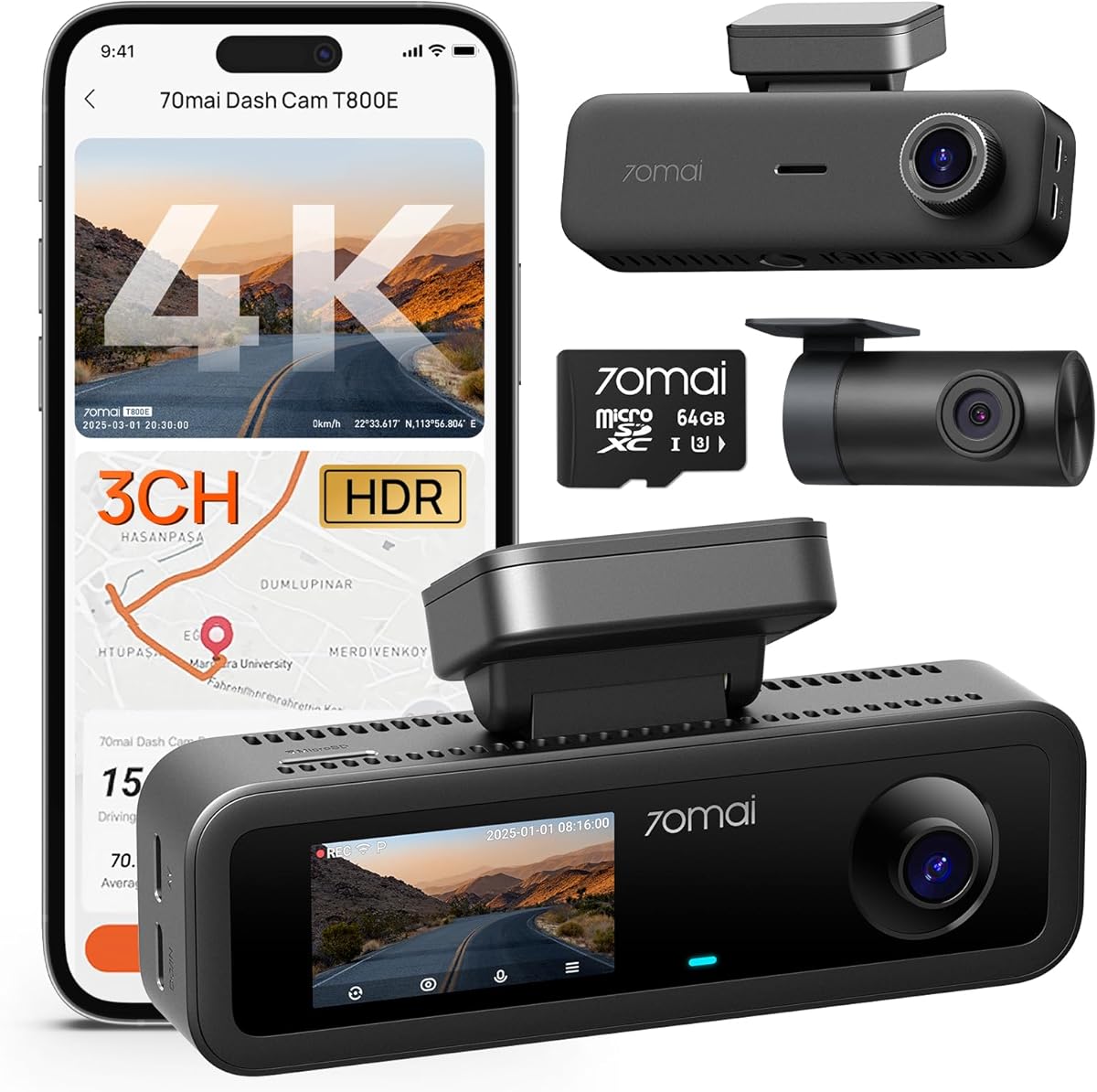
The 70mai T800E combines a 4K front camera with 1080p interior and rear cameras, earning a 4.5 rating. It is a strong three-channel option for a truck because the interior camera includes switchable infrared, a feature that can improve low-light visibility inside the cab. A 64GB memory card is included for immediate loop recording.
We may earn a commission when you buy through this link, at no additional cost to you.
Its ultra-wide lenses and F1.55 aperture support visibility during daytime and nighttime driving. HDR and three-dimensional noise reduction are applied to improve contrast and reduce image noise. The interior camera can use infrared at night or operate with it switched off when unnecessary, giving owners a choice based on the situation.
Five-mode GPS records location, speed, and route information. WiFi 6 supports transfers at stated speeds up to 10MB/s through the 70mai app, while voice commands can take photos, begin recording, or lock clips. These hands-free controls reduce the need to handle the camera while the truck is moving.
The parking monitor uses G-sensor collision detection to record and lock incident footage. Continuous parking monitoring requires a compatible hardwire kit, and 4G connectivity is not supported. A supercapacitor is rated for temperatures from 14°F to 140°F, supporting stable operation in varied climates.
The T800E is an attractive all-around recommendation for a truck used for rideshare, family travel, or professional transport. Its included storage, three cameras, interior infrared, voice control, and GPS create a particularly complete package. The need for a separate hardwire kit and the lack of 4G should be considered if mobile connectivity or unattended parking is central to the purchase.
The interior camera's switchable infrared can illuminate the cabin when visible light is limited. This makes the system more informative during nighttime trips and helps document activity inside the truck.
Commands for taking a photo, starting recording, or locking footage can be issued hands-free. This is particularly helpful in a large cab where manually operating a small screen or button is less convenient.
We may earn a commission when you buy through this link, at no additional cost to you.
The BOTSLAB 4-Channel records from four cameras simultaneously, making it the most comprehensive coverage option in the guide. A 170-degree front camera, two 120-degree side cameras, and a 150-degree rear camera provide a stated total of up to 560 degrees. Its 4.3 rating reflects an ambitious feature set, but one that demands more attention during installation and storage planning.
We may earn a commission when you buy through this link, at no additional cost to you.
The side cameras use detachable magnetic mounts. Owners can select four-channel operation, a three-channel mode with a 4K front and two 1080p side cameras, or dual recording with the front and rear cameras. This flexibility is unusual among dash cams and could benefit large trucks with blind spots on both sides.
The three-point-eight-inch touchscreen supports quick settings and a four-way split-screen playback view. Voice commands can start recording or capture photos. Built-in GPS logs location, speed, and route, which can be converted into route animations with DVplayer or viewed through the app's augmented-reality-style overlay.
A stated eight-second pre-recording function preserves footage before a G-sensor detects a collision or abnormal vibration. For parking, the system offers time-lapse, sentry, and collision-detection modes, each requiring a dedicated hardwire kit. A 128GB memory card is included, and up to 512GB is supported.
The BOTSLAB system is best for truck owners who prioritize awareness of side blind spots and are prepared to manage more cables, mounts, and files. Four simultaneous cameras create the greatest installation and storage workload in this comparison. The thermal-management claims for the supercapacitor help with power cuts and heat, but the system still needs careful placement and secure wiring.
Most competing systems focus on the front, rear, and cabin. BOTSLAB's two side cameras add a valuable view of the areas beside a long vehicle, where turning and merging risks are often harder to document.
The G-sensor can preserve eight seconds before a detected collision or abnormal vibration. That earlier footage can show how an event unfolded rather than limiting the recording to the moment of impact.
We may earn a commission when you buy through this link, at no additional cost to you.
The right truck dash cam balances recording quality, camera angles, heat management, storage, and installation demands. Because large vehicles create more blind spots and travel farther between stops, the most useful system is often the one that captures the right angles without becoming difficult to power, mount, and maintain.
A single front camera records the road ahead but cannot document vehicles approaching from behind or activity beside the truck. Dual-channel systems add a rear view, while three-channel models add an interior perspective. Four-channel systems can place cameras on both sides, which may be especially useful when maneuvering a long vehicle. Choose coverage based on blind spots rather than resolution alone, and consider whether the rear camera can rotate toward cargo or the cab.
4K front footage can preserve fine detail, but sensor quality, aperture, HDR, and processing determine how usable night recordings appear. STARVIS 2 sensors, wide apertures such as F1.5 or F1.55, and multi-camera HDR improve visibility in darkness. Some listed 4K modes are upscaled rather than native, so read the specifications carefully. Resolution should be balanced against storage consumption and heat, particularly during continuous three- or four-channel recording.
A dedicated truck navigator can account for vehicle size, weight, bridge heights, sharp curves, and restricted roads. The Garmin dezlCam OTR725 is the only product in this guide explicitly built around commercial-truck navigation, including satellite destination views and truck parking information. Most other entries are cameras and should be paired with a separate navigation source when route restrictions are a frequent concern.
Large truck cabins can become hot, especially during summer travel or prolonged parking. A supercapacitor is preferable to a lithium battery because it is designed around heat resistance and safer power-off behavior. Dual-channel operation can reduce heat compared with recording three or four channels continuously. Mount the camera away from direct sun where possible, inspect cables in hot weather, and follow the manufacturer's instructions about operating temperature.
Higher-resolution and multi-channel recordings fill memory cards quickly. Some products include a card, while others require one separately, and supported maximum capacities range from 512GB to 1TB. Choose a reliable dash cam card with an appropriate speed rating, especially for 4K or three-channel use. Loop recording manages routine footage, while event locking preserves clips that should not be overwritten.
Most parking surveillance features require a hardwire kit, and hardwire kits are generally sold separately. Time-lapse modes conserve space, while motion and collision detection focus on events. Buffered recording is valuable because it preserves several seconds before an impact. Truck owners should use a kit compatible with the vehicle's electrical system, route the cable safely, and understand how the system behaves after a power interruption.
Built-in GPS can attach location, speed, route, and compass information to recordings, adding useful context to an incident. Fast WiFi makes it easier to retrieve and share clips from a phone without removing the card. Review whether the app supports live viewing, multi-channel playback, route maps, and vehicle compatibility. Some camera brands also recommend their own tested memory cards for dependable operation.
Large vehicles require enough windshield area, secure mounts, and cable routes that avoid airbags, controls, and driver sightlines. Mirror-style systems may dominate the rearview area, while multi-camera kits demand more mounting points. Inspect local regulations and employer policies because dash cam and navigation use can be regulated or restricted in some jurisdictions. Professional installation may be worthwhile when hardwiring or hidden routing is required.
Begin by reading the product manual and checking the parts list before removing any trim or mounting equipment. Clean the glass, position the main camera high enough to avoid blocking the driver's view, and keep it within the region allowed by local law. Route rear and side cables away from sharp edges and moving components, then confirm that every connector is fully seated.
Insert a recommended memory card, format it using the camera's supported process, and adjust resolution, exposure, GPS, timestamp, and loop-recording settings. Configure a secure phone connection and learn the app before an incident occurs. Test each camera, confirm that the display and recordings look correct, and verify that GPS data and event locking work as expected.
For parking surveillance, install the correct hardwire kit and follow the vehicle-specific instructions. Inspect the cables, mounts, and card periodically, particularly after long trips, temperature changes, or heavy vibration. Keep the camera lens clean, avoid leaving the vehicle in extreme heat unnecessarily, and back up important clips before they are overwritten. Use original or manufacturer-recommended power accessories.
A front-and-rear system is generally more useful for a big truck than a single front camera. The rear view can document a following vehicle, impact sequence, or loading incident that the front camera cannot see. A three- or four-channel setup adds even more context, but it also requires more wiring, storage, and maintenance. Choose the number of channels based on your routes, blind spots, cargo, and recording priorities.
A 4K front camera is useful when fine road details matter, but low-light performance is equally important. Sensors, aperture, HDR, and night processing can influence readability more than resolution in dark conditions. Multi-camera systems may offer 4K only in a reduced mode, so verify which cameras remain active and at what resolution when operating continuously.
Most parking modes in this guide require a hardwire kit, and the hardwire kit is usually sold separately. A hardwire connection provides continuous power and avoids depending on the vehicle's accessory socket. Use a kit compatible with the truck's electrical system, follow the manufacturer's instructions, and route the cable where it cannot interfere with pedals, airbags, doors, or other controls.
Only if the card meets the camera's stated capacity, speed, and format requirements. Multi-channel 4K recording benefits from a dependable card designed for continuous dash cam use, and some manufacturers specifically recommend their own industrial-grade cards. Format the card according to the manual and replace it if the camera reports write errors or repeated recording failures.
A truck-specific navigator is better when commercial routing, weight restrictions, bridge clearances, and arrival planning are regular needs. The Garmin dezlCam OTR725 combines those functions with an integrated 1080p camera. It does not offer the multi-camera coverage or higher video resolution of the dedicated multi-channel systems, so the two approaches serve different priorities.
Storage consumption depends on resolution, frame rate, bitrate, and the number of active cameras. Recording three or four high-resolution channels continuously can fill a card much faster than a single front camera. Check the manufacturer's loop-recording and storage guidance, use a suitable high-endurance card, and periodically save important clips before they are overwritten.
Rules differ by jurisdiction, employer, and installed device. The Garmin listing specifically notes that some jurisdictions regulate or prohibit its use, and employers may have separate policies. Check current local laws and company guidance before operating or distributing recorded footage, and avoid placing a camera where it obstructs safe driving.
Use a camera with a capable low-light sensor, wide aperture, HDR, and good processing. Clean the lens, make sure the recording resolution and exposure settings are appropriate, and supply adequate power without modifying the vehicle's electrical system. Recognize that heavy headlights, rain, glare, and motion can still limit detail, so license-plate readability should not be treated as guaranteed.
The ROVE R2-4K Dual is the strongest all-around recommendation because it combines front-and-rear recording, a STARVIS 2 front sensor, GPS, fast dual-band WiFi, and an included 128GB card. The Garmin dezlCam OTR725 is the premium choice for commercial navigation, while the single-camera ROVE R2-4K offers the most focused budget path to native 4K recording.
Owners seeking broader evidence should consider the Vantrue N4 Pro S, REDTIGER F17, or 70mai T800E for three-channel coverage, and the BOTSLAB system for side cameras and maximum visibility. Prioritize the angles that correspond to your actual blind spots, then balance them against heat, storage, and wiring demands. A good truck dash cam should be dependable in darkness, easy to retrieve footage from, and installed so safely that it never obstructs the drive.
Before buying, confirm the current configuration, regional rules, memory-card support, included accessories, and hardwire requirements. Prices, bundles, firmware, and product details can change over time, so review the current listing and seller information. Doing that final check ensures that the chosen camera matches both the truck and the owner's recording priorities.