
Thermaltake View 380 TG ARGB
4.7Editor score
Dual-chamber ATX layout
Four ARGB fans included
Up to 360mm radiators
Hidden-connector motherboard support
Our Dual System PC Cases guide compares ten dual-chamber and true dual-system enclosures, cooling options, radiator support, layouts, and build features.
Dual system PC cases range from true dual-build platforms to dual-chamber ATX designs that isolate power supplies, drives, and cables. Their shared goal is improved airflow and cleaner organization, but layouts, cooling capacity, motherboard support, and component compatibility vary considerably.
We compared all ten cases by examining system architecture, motherboard support, cooling provisions, radiator options, cable-management features, graphics-card support, and included accessories. The list covers true dual-system chassis, spacious dual-chamber towers, and more compact ATX models for different build requirements.
Each review shows which builders the case suits best, along with its strongest features and practical limitations. Ratings reflect the supplied customer feedback, while specifications and included components come from the listed product information. Prices and availability change frequently, so check current listings.
4.7Editor score

5.0Editor score

4.7Editor score
The table below compares the ten cases by system type, cooling capacity, motherboard support, and standout organization features. It is a quick way to separate true dual-build platforms from conventional dual-chamber cases before examining the detailed reviews.


The Thermaltake Capo X is the most literal interpretation of a dual system PC case in this guide. Unlike a dual-chamber enclosure that separates a power supply from the main components, the Capo X can operate two independent mATX platforms inside one chassis. Its supplied rating is 5.0, and its defining advantage is the amount of functionality it provides without requiring two separate cases.
We may earn a commission when you buy through this link, at no additional cost to you.
Its parallel-system architecture is supported by a broad cooling configuration. The case can accommodate up to thirteen 120mm fans, 420mm and 360mm radiators, and air coolers as tall as 180mm. Two detachable clamp-style graphics-card braces attach directly to the chassis frame, providing top and bottom support for both systems. Each platform also receives its own I/O panel with power, reset, HD audio, two USB 3.0 Type-A ports, and a USB 3.2 Gen 2 Type-C port.
The main trade-off is motherboard format: both systems use mATX rather than full-size ATX. Additional cutouts support hidden-connector motherboards from ASUS, MSI, and Gigabyte, helping reduce visible cable clutter. Builders must also account for the depth and complexity of operating two complete systems, particularly when adding shared or separate storage, networking, and peripheral devices.
This is the strongest choice for a developer, tester, streamer, or enthusiast who wants two working Windows systems, a production and test environment, or a compact parallel-computing setup. It is less appropriate for a conventional gaming build, but when the objective is genuine dual operation, the Capo X delivers a more specialized and cohesive solution than a conventional dual-chamber tower.
The two independent mATX platforms are the core advantage. A builder can keep separate operating systems, workloads, and testing environments in one enclosure while retaining individual power and reset controls for each system.
Support for thirteen 120mm fans, large radiators, tall air coolers, and two removable GPU braces makes the Capo X unusually versatile for a specialized dual-build chassis. These provisions also reduce the risk of a compact parallel system becoming thermally constrained.
We may earn a commission when you buy through this link, at no additional cost to you.
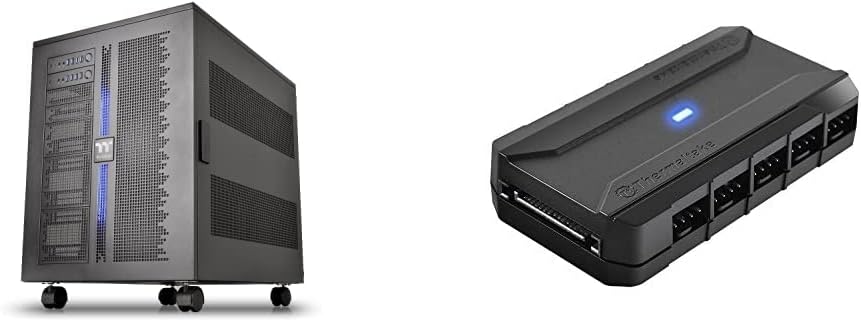
The Thermaltake Core W200 is a substantial true dual-system case built around a back-to-back configuration. It can host two motherboards, two power supplies, and two graphics cards, making it one of the most specialized options in the guide. No customer rating was supplied for the product, so its appeal must be assessed primarily from its unusually broad hardware provisions.
We may earn a commission when you buy through this link, at no additional cost to you.
The fully modular and dismantlable design allows sections of the chassis to be removed during installation. Cooling support is a major strength: the case can carry up to two 600mm radiators, and the bundled Commander FP hub can power as many as ten PWM fans from the PSU. Reusable ties and two hook-and-loop tabs are included to keep the wiring orderly.
Because the two systems face opposite directions, component access and cable routing require planning. The scale of the enclosure may also be excessive for a single desktop. Its value becomes clearest for advanced users who need two complete platforms, isolated cooling zones, and substantial graphics hardware within a shared chassis footprint.
Choose the Core W200 if your requirement extends beyond a tidy ATX build and reaches true simultaneous operation. It suits advanced experimenters and system developers more than ordinary gaming upgrades, and anyone considering it should verify desk clearance, operating-system plans, and the number of power supplies required before building.
The back-to-back layout separates two complete platforms while placing them within one large enclosure. It offers more expansion freedom than dual-chamber cases, provided the builder can manage the greater complexity of two sets of hardware.
Support for two 600mm radiators and ten PWM fans makes the Core W200 appropriate for high-output custom cooling. The Commander FP hub and included reusable ties help control both fan power distribution and cable clutter.
We may earn a commission when you buy through this link, at no additional cost to you.
The NZXT H9 Flow RGB+ combines a polished dual-chamber ATX layout with generous cooling and a strong factory specification. Its supplied rating is 4.7. Rather than hosting two independent operating systems, it separates the main hardware from the power supply and drives, improving the appearance and airflow of a conventional high-performance build.
We may earn a commission when you buy through this link, at no additional cost to you.
Perforated steel panels and angled front-right fans support a cooling layout that can hold nine 140mm fans across the top, front-right, and bottom, plus one 120mm rear fan. It includes two F420 RGB Core single-frame fans, one F120 RGB Core case-version fan, and an NZXT Control Hub. Those RGB fans use three-pin DC control, which is an important distinction for builders expecting addressable lighting.
The panoramic wraparound tempered-glass treatment prioritizes presentation, while extra-wide routing channels, built-in hook-and-loop straps, and tie-down points address the less glamorous need for tidy wiring. Up to a 420mm radiator can fit at the top or front-right, and compatibility with rear-connecting ASUS and MSI motherboards helps create a cleaner front-facing cable arrangement.
The H9 Flow RGB+ is the premium pick for builders who want a cohesive, visually restrained dual-chamber enclosure with good fan support and modern connectivity. It is not a true two-computer case, but it delivers one of the more attractive conventional interpretations of the category.
The separate PSU and drive area keeps functional hardware out of the primary viewing chamber. Combined with wide cable channels and rear-connecting motherboard compatibility, this makes the enclosure particularly appealing to builders who want a clean final presentation.
Capacity for ten fans and 420mm radiators gives builders meaningful freedom in planning airflow. The included 140mm RGB fans provide a useful starting point, while the Control Hub assists with fan management and lighting integration.
We may earn a commission when you buy through this link, at no additional cost to you.
The Cooler Master HAF II 500 ATX emphasizes open airflow and accommodating hardware support. It carries a 4.8 supplied rating, the highest among the cases with listed customer feedback. Although it does not operate two independent systems, its separated rear exhaust arrangement and broad component capacity suit demanding single-system builds.
We may earn a commission when you buy through this link, at no additional cost to you.
The Mighty40 cooling system places two 220 x 40mm fans at the front and one 180 x 40mm fan at the rear. Large front and rear ventilation openings reduce airflow resistance, while the split-level cable-management layout creates additional space around the rear cooling area. The MasterRail system supports multiple fan and radiator sizes at the top and front.
Its dual-mode GPU holder can secure a single card or support two cards up to 3.6 slots, or 72mm, thick each. A flexible storage cage accepts 3.5-inch and 2.5-inch drives in orientations determined by PSU length. The main compromise is physical bulk, while the unusually large included fans may also require checking case and component clearances.
The HAF II 500 ATX is a strong fit for air-cooled enthusiasts, multi-GPU experimenters, and builders who prioritize intake volume over a compact footprint. Buyers should measure their desk and ensure their chosen motherboard and graphics cards fit the listed dimensions before committing.
The pair of large front intake fans and broad ventilation openings are the case's defining strengths. This design favors high airflow through the chassis and can suit systems using substantial air coolers or demanding graphics hardware.
The dual-mode GPU holder expands the case beyond a typical single-card arrangement. Two cards of up to 72mm thickness each can be mounted, though proper spacing, power, and cooling must still be planned by the builder.
We may earn a commission when you buy through this link, at no additional cost to you.
The Antec Flux Pro is a large full-tower case designed for E-ATX hardware, extensive cooling, and flexible internal organization. Its supplied rating is 4.7. It is not a true dual-system enclosure, but its removable cooling brackets and high overall fan capacity make it a practical alternative for builders who want room to grow.
We may earn a commission when you buy through this link, at no additional cost to you.
Six PWM fans are included: three Tranquil 140 PWM fans at the front, two P12R PWM reverse fans on the power-supply shroud, and one Tranquil 140 PWM fan at the rear. Total support extends to twelve fans. Removable brackets at the top, front, and shroud allow cooling hardware to be repositioned, while simultaneous 420mm and 360mm radiator installation is supported.
A 90-degree iShift PSU mount and a CPU/GPU dual-temperature display add convenience and distinctive utility. The exterior combines metal, glass, and wood textures, and the shroud-mounted reverse fans help define the visible component area. The primary drawback is the overall footprint of a full-tower chassis, which can be difficult to accommodate under a desk.
The Flux Pro suits builders with E-ATX motherboards, multiple radiators, or a large collection of drives and expansion cards. It is less relevant to anyone seeking two working operating systems, but for conventional performance builds it offers considerable thermal flexibility and comes with a generous fan package.
Removable supports at the top, front, and power-supply shroud allow the fan layout to evolve as components change. This is particularly useful for builders who may move from air cooling to a multi-radiator liquid-cooling configuration.
The combination of front, reverse shroud, and rear fans creates a useful initial airflow arrangement. Additional support for up to twelve fans and two large radiators makes the enclosure adaptable to more intensive hardware.
We may earn a commission when you buy through this link, at no additional cost to you.
The ASUS TUF Gaming GT502 uses a dual-chamber mid-tower layout to give the CPU and GPU independent cooling zones. Its supplied rating is 4.6. Rather than dividing two complete systems, it separates functional zones within one ATX build, aiming for cleaner airflow and easier cable organization.
We may earn a commission when you buy through this link, at no additional cost to you.
Graphics-card mounting is unusually flexible. The included vertical mount lets the card stand upright in the enclosure, while a bundled support bracket helps prevent sag when it is installed directly in a conventional motherboard slot. Tool-free side panels can be removed by pressing a button hidden at the rear of the chassis, simplifying access during assembly and maintenance.
Tinted tempered-glass panels at the front and side preserve visibility of the main chamber. The front I/O includes USB 3.2 Gen 2 Type-C, two USB 3.0 ports, and an RGB button. The supplied information does not state the number of included fans, so cooling configuration should be checked before purchase rather than assumed from the case's TUF styling.
The GT502 is best suited to gamers who want a recognizable dual-chamber arrangement, modern front connectivity, and strong GPU support without moving to a full-tower case. It does not provide two independent systems, but it offers a balanced approach to cooling separation and clean presentation for a single ATX build.
Dividing the main and rear chambers allows air to be directed toward different heat-producing components. This can reduce interference between CPU and GPU airflow while keeping power and cabling outside the primary viewing area.
A vertical mount and conventional support bracket let builders choose between prominent vertical placement and a more traditional layout. The support system also helps keep heavy modern graphics cards level and reduces the risk of connector strain.
We may earn a commission when you buy through this link, at no additional cost to you.
The HAVN HS 420 is a dual-chamber ATX mid-tower with one of the most ambitious cooling layouts in this comparison. Its supplied rating is 4.6. Although it cannot run two operating systems, it supports eleven 140mm fans and radiators up to 420mm at the top, right, and bottom, providing exceptional configuration freedom.
We may earn a commission when you buy through this link, at no additional cost to you.
The Hybrid Structure directs cool air from the bottom intake toward a centrally positioned graphics card, which is a useful strategy for modern gaming systems. A removable bottom filter helps limit dust, and custom panel ventilation supports the stated airflow design. The PWM fan hub provides a central point for managing compatible fans.
The SimpliCable system uses top-to-bottom grooved guides to route cables, while the curved heat-formed UniSheet glass panel minimizes visual distortion. Storage, fan, radiator, and portable-display options can be combined, and a VESA display mount is included. A three-way adjustable graphics-card support bracket accommodates different card shapes and sizes. Rubber pads on fan brackets help isolate the chassis from resonance.
The HS 420 is a compelling choice for builders who want near-limitless cooling and accessory flexibility in a dual-chamber mid-tower. Its number of potential mounting points means careful planning is essential; buyers should map radiator thickness, fans, tubing, and cables before assembling the final configuration.
Three potential 420mm radiator positions and eleven 140mm fan locations separate this case from many conventional mid-towers. That capacity is valuable for builders creating a visually balanced system with multiple high-speed fans.
Grooved SimpliCable guides, an integrated fan hub, and a compact dual-chamber layout address wiring at the design stage. This helps keep the final build tidy while leaving the main component chamber visually open.
We may earn a commission when you buy through this link, at no additional cost to you.
The ASUS ROG Strix Helios II is built primarily as a premium showcase enclosure, and its dual tempered-glass side panels make the internal components a central part of the design. Its supplied rating is 4.3. It does not run two separate systems, but it offers a sophisticated thermal and organizational layout for one E-ATX build.
We may earn a commission when you buy through this link, at no additional cost to you.
The aluminum front panel uses a diamond-grille design and three-dimensional filter to support cooling. Four 140 x 28mm performance fans are preinstalled, and the chassis supports radiators up to 420mm. Graphics-card compatibility extends to 450mm, with a slot clamp and a rear detachable PSU bracket included to assist installation and stability.
A multifunction cover integrates the graphics-card holders, PSU shroud, cable cover, and rear clips, keeping the visible interior relatively uncluttered. The advanced I/O includes two USB 20Gbps Type-C ports, four USB-A 3.0 ports, an ARGB lighting-control button, and a PWM fan-speed control. The two-year warranty is also listed in the product information.
The Helios II suits showcase builders with powerful, long graphics cards and a preference for refined glass-and-metal styling. Those seeking two independent systems should look to the Capo X or Core W200 instead. For a conventional premium build, however, the included cooling and tidy multi-part cover make this a well-rounded choice.
Dual tempered-glass panels and the structured aluminum front make the enclosure feel closer to a display piece than a utilitarian tower. The grille and filter preserve the visual theme while contributing to the airflow path.
The multifunction cover combines the PSU shroud, cable routing, and graphics-card support into a coordinated arrangement. This reduces visual clutter and can make large, powerful components look more carefully integrated.
We may earn a commission when you buy through this link, at no additional cost to you.
The NZXT H6 RGB+ offers a compact dual-chamber ATX design with a clean, modern appearance. Its supplied rating is 4.4. The dedicated secondary chamber isolates power and cables from the main build, while angled front-right fans target the primary heat-producing components.
We may earn a commission when you buy through this link, at no additional cost to you.
A single piece of tightly curved tempered glass creates a continuous view with minimal distortion. High-airflow mesh spans the top, front-right, and right panels, and a removable bottom nylon filter helps keep dust from entering without restricting intake. Mounting points are standardized for up to ten 120mm fans across the top, front-right, bottom, and rear.
The most important practical limitation is that the H6 ships without fans, so a complete cooling setup must be selected separately. The supplied data also does not state a maximum radiator size. An integrated adjustable anti-sag bracket supports heavy modern graphics cards and helps maintain a clean alignment, but radiator planning should be confirmed with the manufacturer's current specifications.
The H6 RGB+ is best for builders who value a compact footprint, a restrained cable-managed interior, and a curved-glass presentation. It is less convenient for newcomers because it arrives without fans, but experienced builders gain complete freedom over cooling and lighting.
The dedicated secondary chamber preserves the visual separation of the PSU and cables even in a compact ATX enclosure. This makes the H6 useful where floor space is valuable but a clean internal layout remains a priority.
Because no fans are included, the case lets builders select every fan, controller, and lighting component themselves. That customization is valuable for experienced users, although it adds cost and assembly effort compared with cases that arrive with cooling preinstalled.
We may earn a commission when you buy through this link, at no additional cost to you.
The Thermaltake View 380 TG ARGB provides a dual-chamber ATX layout, four illuminated fans, and a coordinated glass-front presentation. Its supplied rating is 4.7. While it cannot operate two separate computers, it offers a straightforward way to gain the cable and thermal separation associated with the dual-chamber category.
We may earn a commission when you buy through this link, at no additional cost to you.
The pillarless front and side tempered-glass panels create broad visibility of the main chamber. Four hydraulic-bearing 120mm ARGB Lite fans are preinstalled, providing a complete basic cooling and lighting package. The case also supports hidden-connector motherboards, which can reduce the number of visible cables emerging behind the board.
Cooling and component clearances are generous for its format. It supports radiators up to 360mm and graphics cards up to 415mm long. The front I/O includes one USB 3.2 Type-C port, two USB 3.0 ports, and HD audio. The listed three-year warranty provides added reassurance, although the dual glass panels may make the enclosure heavier than a basic steel tower.
The View 380 TG ARGB is an attractive choice for builders who want dual-chamber organization, tempered-glass styling, and included ARGB fans without planning a complex custom cooling package. It is the budget pick in this group, although the word budget should not be confused with a minimal feature set.
Four included ARGB Lite fans remove much of the initial setup work and immediately provide illumination through the glass panels. Builders can supplement them as needed while retaining a coordinated visual theme.
Support for 360mm radiators and 415mm graphics cards makes the View 380 TG ARGB practical for mainstream performance components. Hidden-connector motherboard compatibility further improves the possibility of a clean final build.
We may earn a commission when you buy through this link, at no additional cost to you.
Choosing a dual system PC case starts with deciding whether you need two independent computers or one conventional system with divided chambers. Motherboard format, cooling requirements, graphics-card dimensions, and available space should then shape the shortlist.
A true dual-system case contains enough space and connections for two independent computer platforms. The Thermaltake Capo X and Core W200 fit this definition, with separate motherboards, power supplies, graphics cards, and controls. A dual-chamber case, by contrast, generally hosts one motherboard while isolating the power supply, drives, or cables in a separate area. Dual chambers improve airflow and presentation but do not allow two operating systems to run as independent PCs.
Motherboard size establishes the foundation of any enclosure. The Capo X uses two mATX platforms, while most full-size ATX cases in this guide support conventional ATX boards, with some extending to E-ATX. Confirm socket, cooler height, memory clearance, and board dimensions together because a chassis may accept the board while restricting one of its accessories. CPU cooler height is especially important in compact or airflow-focused cases where large air coolers can interfere with side panels, radiators, or memory modules.
Cooling capacity should be judged by mounting positions, radiator dimensions, and the space consumed by fans, pump blocks, and tubing. The HAVN HS 420 supports eleven 140mm fans and three 420mm radiators, while the NZXT H9 Flow RGB+ accommodates ten fans and 420mm radiators. By contrast, the Core W200 accepts extremely large 600mm radiators. Larger mounting capacity offers options but does not guarantee better cooling; airflow path quality, filter placement, fan direction, and radiator position are equally important.
Some cases arrive with a complete cooling package, while others leave cooling entirely to the builder. The View 380 TG ARGB includes four ARGB Lite fans, and the Antec Flux Pro includes six PWM fans. The NZXT H6 RGB+ ships without fans, which provides maximum choice but requires more planning. Also check the control method: the NZXT H9's listed RGB Core case-version fans use three-pin DC, which differs from addressable ARGB control. Fan hubs can simplify power distribution, but their supported connections should be verified.
Modern graphics cards can be both long and thick, making the case's GPU clearance as important as its motherboard support. The ROG Strix Helios II accepts cards up to 450mm long, while the View 380 TG ARGB supports up to 415mm. The Cooler Master HAF II 500 ATX can hold two cards of up to 72mm thickness each. Builders should also consider support brackets, vertical mounting, power-cable bend radius, and the effect that multiple cards have on adjacent cooling.
Dual-chamber designs are often chosen as much for presentation as for thermal performance. Useful features include dedicated rear routing channels, hook-and-loop straps, tie-down points, removable covers, and compatibility with hidden-connector motherboards. The NZXT H9 Flow RGB+ supports ASUS BTF and MSI Project Zero layouts, while the View 380 TG ARGB supports hidden-connector motherboards generally. The Core W200's reusable ties and hook-and-loop tabs help manage the more complex wiring demands of two complete systems.
Storage support can be easy to overlook in a visually open chassis. The Cooler Master HAF II 500 ATX has a flexible cage for 3.5-inch and 2.5-inch drives in orientations based on PSU length, while the NZXT H9 uses its separate chamber for drives. Front I/O matters for daily convenience: options among the list include USB-C, multiple USB-A ports, HD audio, and dedicated fan or lighting controls. Tool-free panels, as found on the ASUS TUF Gaming GT502, can make routine access easier.
Dual-system and full-tower cases demand more room than the word dual may suggest. The Core W200's back-to-back architecture and the Capo X's two complete systems create substantial depth, while dual tempered-glass panels can add weight compared with steel-sided designs. Measure desk clearance, floor space, and the path to power and data connections. It is also wise to leave enough room around intake and exhaust openings, since pushing a case tightly into a cabinet can undermine the airflow advantage that motivated the purchase.
Begin by mapping the layout before installing components. For a true dual-system case, assign the top and bottom systems their own motherboards, power supplies, graphics cards, storage, and I/O requirements. For a dual-chamber case, reserve the main chamber for the motherboard, CPU cooler, and graphics card while keeping the secondary chamber accessible for the power supply, drives, and cable routing.
Install cooling in the direction that moves air from the front or bottom intake toward the rear and upper exhaust positions. Fit filters, secure radiator tubing, and check that every fan can pull and push through the planned path. If the case includes a fan hub, connect only compatible devices and follow the manufacturer's instructions for power and lighting control.
Route cables behind the motherboard tray or through the dedicated chamber, leaving service loops where components may need adjustment. Keep storage data and power cables away from unnecessarily sharp bends and fan blades. After assembly, power on each system separately when applicable, confirm that all fans start, verify the graphics cards are stable, and monitor temperatures during sustained workloads.
A dual-system case can run two independent computer platforms, usually with separate motherboards, power supplies, graphics cards, and I/O controls. A dual-chamber case contains one system but separates parts of it, commonly placing the power supply and drives in a rear chamber. The second type can improve airflow and cable organization, but it does not function as two separate computers.
A dual-chamber case normally runs only one operating system because it has one motherboard and one primary set of computer components. Virtual machines and some bootable software can run multiple environments, but that is different from powering two independent hardware systems. Choose the Capo X or Core W200 when separate motherboards and concurrent operation are required.
No. A larger radiator can provide more thermal capacity and fan area, but it must be matched to the case, pump, tubing, and airflow path. Placement, ambient temperature, fan performance, and component heat generation also influence results. Check clearances carefully because thick fans, reservoirs, and tubing can reduce usable space.
A case with included fans can be more convenient and may provide a coordinated lighting or control setup. A case without fans gives experienced builders more control over fan quality, color, size, and control standard. Ensure that any case sold without fans has enough mounting positions and an appropriate plan for airflow, cooling, and lighting.
The Capo X uses two mATX systems, making it attractive for compact parallel builds with smaller processors. The Core W200 uses a back-to-back architecture and is intended for more expansive dual-system configurations. If you only need one system, ATX and E-ATX offer broader component availability, while dual-chamber designs add organization without a second motherboard.
They can by isolating the PSU and drives from the main chamber and allowing cleaner intake and exhaust paths. The actual improvement depends on case design, fan placement, radiator use, and the components installed. Good airflow planning remains essential; dividing a case into chambers does not replace adequate cooling or sensible cable management.
Expect more space than for a standard mid-tower because two complete systems or broad cooling arrays require a deep chassis. The Core W200 and Capo X are the most specialized in the list, while full-tower options such as the Antec Flux Pro also need substantial clearance. Measure the full case, including side-panel depth and front I/O connections, before ordering.
They can be particularly effective in dual-chamber cases because cables connect directly to the back of the motherboard instead of emerging from its lower edge. Several cases in this guide support hidden-connector layouts, including the NZXT H9 Flow RGB+, Thermaltake Capo X, and View 380 TG ARGB. Confirm the exact motherboard model and connector position are supported before planning the build.
The Thermaltake Capo X stands out as the most capable true dual-system option because it hosts two independent mATX platforms, provides separate I/O, supports extensive cooling, and includes removable GPU braces. The Core W200 offers another genuine dual-build approach with a back-to-back layout and very large radiator support. For a single conventional system, the NZXT H9 Flow RGB+ provides one of the most polished dual-chamber layouts.
The right case depends on the distinction that matters most to you. Choose a true dual-system model for concurrent machines, testing, or separate production workflows. Choose a dual-chamber model for airflow separation, tidier wiring, and a stronger showcase appearance. Prioritize motherboard format, radiator clearance, graphics-card dimensions, and fan placement before considering cosmetic features.
Ratings and specifications provide a useful starting point, but current listings and manufacturer documentation should be checked before purchase. Component compatibility, included accessories, and availability can change, and prices fluctuate over time. Confirm the exact board, cooler, power supply, graphics card, and cooling hardware before committing to any of these enclosures.