
NH-D15 G2 chromax.Black
4.6Editor score
Eight heatpipe second-generation design
Dual NF-A14x25r G2 fans
Offset mounting for hotspot handling
Explore the best Noctua CPU coolers, comparing dual-tower, low-profile, single-tower, and AIO designs for noise, thermals, fit, and features.
Noctua CPU coolers are known for strong thermal performance, restrained acoustics, careful engineering, and broad motherboard compatibility. A worthwhile cooler must handle heat efficiently while fitting the available case space, avoiding memory and expansion-card clearance issues, and remaining quiet during demanding workloads.
This guide compares ten Noctua air coolers and one liquid cooler, examining heatsink design, fan configuration, mounting support, dimensions, clearance, thermal paste, and intended processor use. The list includes dual-tower models, conventional single towers, low-profile SFF coolers, an all-black option, and a 360mm AIO.
Each selection highlights the circumstances in which it makes the most sense, from a compact HTPC to a high-performance workstation. Ratings and product details reflect the supplied listings, while prices and availability can change, so readers should confirm current retailer information before making a final purchase.
4.6Editor score

4.8Editor score

4.8Editor score
The comparison below organizes all ten selections by cooler format, core design features, dimensions, mounting coverage, and practical use, making it easier to identify the model that matches a particular case and processor.



The Noctua NH-D15 chromax.Black is an outstanding general-purpose CPU cooler, earning a 4.8 rating in the supplied data. Its extra-wide dual-tower heatsink, six heatpipes, and pair of 140mm fans make it particularly convincing for powerful Intel Core, Core Ultra, and AMD Ryzen systems where substantial airflow and quiet operation are priorities.
We may earn a commission when you buy through this link, at no additional cost to you.
The two NF-A15 140mm fans provide automatic PWM control and include Low-Noise Adaptors for a more subdued acoustic profile when desired. The cooler also ships with NT-H1 thermal paste and the SecuFirm2 mounting system, covering Intel LGA1851, LGA1700, LGA1200, and LGA115x as well as AMD AM5 and AM4.
The chief compromises are physical rather than functional. A dual-tower design needs a case with sufficient CPU-cooler clearance, and users should account for the width of the fans, the motherboard's RAM layout, and nearby memory heatsinks. Large graphics cards can also restrict front intake airflow in tightly packed configurations.
Despite those physical demands, the NH-D15 chromax.Black offers an excellent balance of cooling headroom, refined acoustics, and understated styling. It is a strong recommendation for builders with a mid-tower or full tower, high-end processors, and a preference for a maintenance-free air-cooled system.
The large fin stack and dual 140mm fans allow the NH-D15 chromax.Black to move substantial air while operating at restrained fan speeds. That matters in real systems because lower fan speeds often produce less obvious noise than a smaller cooler running its single fan aggressively.
The all-black exterior distinguishes this version from the traditional NH-D15 while retaining the same broad heatsink and fan arrangement. It blends well with dark motherboards, graphics cards, and cases without adding bright accents to an otherwise coordinated build.
We may earn a commission when you buy through this link, at no additional cost to you.
The NH-U12A chromax.Black combines a 120mm tower with two NF-A12x25 120mm fans, earning a 4.8 rating and earning recognition as one of the most versatile high-end air coolers in this guide. It delivers more cooling capacity than a typical single-fan tower while remaining easier to accommodate than a large dual-tower design.
We may earn a commission when you buy through this link, at no additional cost to you.
Its 158mm height fits most tower cases, and the listing notes that it does not overhang RAM slots or block PCIe positions on most ATX and Micro-ATX motherboards. PWM control and Low-Noise Adaptors allow both fans to respond to processor demand, while NT-H1 paste and SecuFirm2 mounting cover current and older mainstream platforms.
A 120mm-class heatsink cannot match the physical surface area of the NH-D15 family, and the dual-fan arrangement still occupies more lateral space than a conventional single tower. Very tall memory modules, tightly packed cases, and unusually restrictive CPU-cooler clearances deserve close attention before buying.
For builders who want near-dual-tower performance without the same dimensional burden, this is a particularly persuasive choice. It is well suited to high-end gaming systems and workstations that must balance thermal headroom, noise, and motherboard compatibility.
Two NF-A12x25 120mm fans give the NH-U12A chromax.Black more airflow and flexibility than a single-fan tower. The arrangement can also be tuned with Low-Noise Adaptors, helping create a quieter idle environment without giving up the ability to increase speed under load.
Keeping the fan dimensions aligned with a 120mm footprint allows the cooler to avoid many of the RAM and PCIe conflicts associated with wider dual-tower designs. It is therefore an attractive middle ground for power towers that also use tall memory or a large graphics card.
We may earn a commission when you buy through this link, at no additional cost to you.
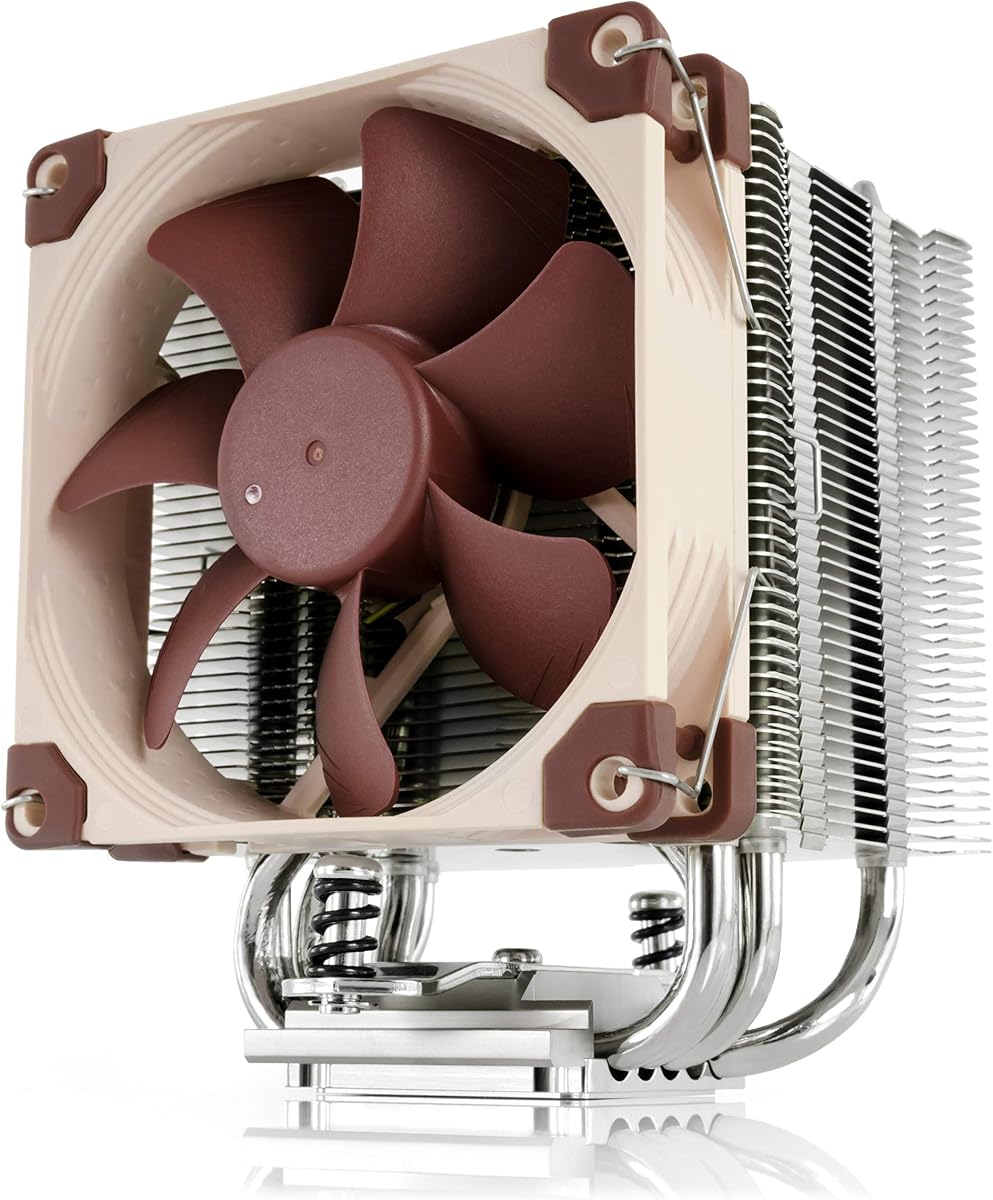
The NH-U9S carries a 4.8 rating and stands out as a compact single-tower cooler with a total height of only 125mm. That makes it a strong candidate for HTPCs, ITX systems, and small-form-factor builds where a full-size tower cannot fit or would interfere with other components.
We may earn a commission when you buy through this link, at no additional cost to you.
Its optimized NF-A9 92mm fan supports PWM control and includes a Low-Noise Adaptor, giving users a straightforward way to balance cooling and noise. The compact tower does not overhang RAM or PCIe slots on most current motherboards, making installation and future component access more convenient.
The limitation is straightforward: less metal and a smaller fan mean less thermal capacity than the larger models in this roundup. It is not the logical choice for deliberately pushing a high-end processor to demanding limits, although its listed compatibility with current Intel and AMD platforms remains impressive.
The NH-U9S is a compelling choice when case height is the deciding constraint. It offers a mature Noctua design, modern socket support, and restrained acoustics in a much smaller footprint than the NH-D15 family.
At 125mm tall, the NH-U9S opens many case options that are inaccessible to conventional 150mm-plus coolers. Its narrow single-tower layout also leaves more open space around memory sockets and expansion slots, which can simplify assembly in a crowded chassis.
The 92mm PWM fan can respond automatically to CPU temperature, while the supplied Low-Noise Adaptor offers additional acoustic control. This makes the cooler practical for systems where fan noise matters even when the processor is not under sustained heavy load.
We may earn a commission when you buy through this link, at no additional cost to you.
The NH-D15 G2 chromax.Black is the highest-capacity air cooler in this guide, with a 4.6 rating and a second-generation design built around eight heatpipes, 20% more surface area, and two NF-A14x25r G2 140mm fans. It is aimed at users who want substantial cooling performance from an air-cooled platform.
We may earn a commission when you buy through this link, at no additional cost to you.
The new fan design supports speed offset for acoustic tuning, PWM control, and Low-Noise Adaptors. Offset mounting is available for AMD AM5, and the package includes NT-H2 thermal paste plus the Torx-based SecuFirm2+ system and NM-SD1 screwdriver for supported Intel and AMD sockets.
The 59mm RAM clearance in single-fan mode drops to 32mm with both fans, according to the supplied information. The offset fin arrangement clears the top PCIe x16 slot on most current motherboards, but system builders should still verify their exact board, memory modules, case, and graphics-card arrangement.
For a roomy, high-end workstation or enthusiast gaming PC, the NH-D15 G2 chromax.Black is a premier air-cooling option. It makes the most sense when thermal headroom and reduced fan speed are priorities and the case can comfortably accommodate its substantial dual-tower design.
The second-generation NH-D15 expands the original design with eight heatpipes and additional surface area. This gives it greater capacity to absorb processor heat, particularly useful on sustained high-power workloads where maintaining low fan speeds is a priority.
The two NF-A14x25r G2 fans can be arranged with speed offset to balance airflow and noise across the heatsink. Combined with Low-Noise Adaptors, this gives users several ways to tailor the cooling behavior to their preferred noise tolerance.
We may earn a commission when you buy through this link, at no additional cost to you.
The original Noctua NH-D15 has a 4.8 rating and remains a benchmark in the air-cooling category. Its dual-tower heatsink, six heatpipes, and two optimized NF-A15 140mm fans support high-performance processors while keeping the visual and acoustic character associated with the NH-D15 series.
We may earn a commission when you buy through this link, at no additional cost to you.
The cooler includes NT-H1 thermal paste and the SecuFirm2 mounting system for Intel LGA1851, LGA1700, LGA1200, and LGA115x plus AMD AM5 and AM4. PWM support and Low-Noise Adaptors allow the included fans to respond to workload demand, and the product carries a six-year manufacturer warranty.
Like the chromax.Black version, it demands attention to physical clearance. Its 140mm fans make the assembly wider than standard tower coolers, and tall memory modules may require the front fan to be raised. Cases also need sufficient CPU-cooler height to avoid restricting the upper fan.
Buyers who want the familiar NH-D15 configuration without the all-black finish will find this model compelling. It is a well-proven choice for powerful gaming PCs, creator systems, and workstations that value strong air cooling and established long-term support.
The NH-D15's six-heatpipe dual-tower design established a well-recognized balance of surface area, airflow, and acoustic control. It remains suitable for overclocking-oriented builds or near-silent systems when the enclosure offers the necessary room.
Thermal paste and mounting hardware for current mainstream sockets are included, reducing the need for extra accessories. The six-year warranty also provides useful long-term reassurance for a cooler expected to remain in a system for years.
We may earn a commission when you buy through this link, at no additional cost to you.
The NH-D15 G2 is the standard all-round version of Noctua's second-generation dual tower, carrying a 4.6 rating. It combines eight heatpipes, 20% more surface area, and a pair of NF-A14x25r G2 140mm fans to deliver high-end air-cooling capacity.
We may earn a commission when you buy through this link, at no additional cost to you.
The supplied information specifically highlights optimal results on AMD AM5 through included offset mounting. It also supports Intel LGA1851, while LGA1700 users are directed to the included NM-ISW1 washers to reduce CPU warp risk. The package includes NT-H2 paste, SecuFirm2+ mounting, and an NM-SD1 screwdriver.
Its recessed lower fins clear the upper PCIe x16 area on most current motherboards, while RAM clearance is 59mm with one fan and 32mm with both. The system is therefore thermally impressive but physically unforgiving, particularly in compact cases or with high-profile memory.
This is a premier choice for a large enthusiast PC with an AMD Ryzen 9 or Intel Core Ultra processor. Buyers who prefer a black exterior can consider the chromax.Black G2, while those seeking the platform's standard presentation can choose this version.
Offset mounting changes the cooler's relationship with the processor contact area and is particularly useful for managing concentrated heat patterns. The supplied listing identifies it as a strong choice for AMD AM5 systems and notes corresponding support for recent Intel platforms.
The G2's greater surface area and second-generation fans make it a logical choice for demanding processors. The tradeoff is a larger assembly whose width, height, and memory requirements should be checked before the cooler is ordered.
We may earn a commission when you buy through this link, at no additional cost to you.
The NH-L9x65 has a 4.7 rating and a 65mm total height, making it one of the most practical choices for HTPCs, compact ITX systems, and small-form-factor PCs. The low-profile design solves cases where a conventional tower would exceed the available clearance.
We may earn a commission when you buy through this link, at no additional cost to you.
Its slim NF-A9x14 92mm fan uses PWM control and includes a Low-Noise Adaptor. The cooler avoids overhanging RAM or PCIe slots on most current motherboards, while the small footprint keeps near-socket connectors accessible. NT-H1 paste and SecuFirm2 hardware cover the listed Intel and AMD sockets.
Cooling capacity is the main consideration. The product is recommended for processors with low to moderate heat dissipation, and the supplied examples emphasize certain X3D and non-X3D chips rather than unrestricted support for every flagship processor. Enthusiastic overclocking is outside its natural design envelope.
The NH-L9x65 is an excellent choice for a compact, efficiently configured system running a suitable processor. For maximum flexibility without increasing height, an HTPC-style case with a capable processor and sensible power limits is the ideal pairing.
The 65mm height is the defining advantage of the NH-L9x65. It allows builders to use a conventional-style Noctua installation in cases where most tower coolers would require side panels to remain open or would not fit at all.
The 95mm footprint and slim fan help preserve access to RAM slots, expansion areas, and near-socket headers. This makes assembly and routine maintenance more convenient in systems where every millimeter around the socket matters.
We may earn a commission when you buy through this link, at no additional cost to you.
The NH-L9x65 chromax.Black combines the established 65mm low-profile format with an all-black finish, earning a 4.6 rating. It is an aesthetic match for compact dark builds that cannot support a standard tower cooler.
We may earn a commission when you buy through this link, at no additional cost to you.
Its 95mm by 95mm footprint stays clear of RAM and PCIe slots on current motherboards, and the slim NF-A9x14 92mm fan supports PWM control with a Low-Noise Adaptor. Installation includes NT-H1 thermal paste and SecuFirm2 mounting for the listed modern Intel and AMD platforms.
Like the standard NH-L9x65, the fundamental limitation is thermal capacity. The supplied information recommends it for CPUs with low to moderate heat dissipation and identifies particular Intel 285K, 265K, 245K and AMD X3D examples. The included listing's wording should be checked against processor-specific compatibility guidance.
Choose this model when appearance and compact dimensions matter as much as fit. It is particularly attractive for a restrained small-form-factor gaming PC or media center using a processor within the recommended thermal envelope.
The chromax.Black treatment gives the compact cooler the same coordinated appearance as Noctua's larger black models. It is a simple way to avoid a silver or light-gray focal point in an otherwise dark compact system.
This cooler works best when paired with a processor whose heat output is compatible with its small heatsink and 92mm fan. A careful CPU choice can produce a compact system that remains quiet without creating an obvious cooling compromise.
We may earn a commission when you buy through this link, at no additional cost to you.
The NH-U12S Redux earns a 4.8 rating as a streamlined version of the respected NH-U12S design. It provides a 120mm single-tower format with a 120mm PWM fan, making it one of the most compelling choices for value-conscious builders who still want recognizable Noctua engineering.
We may earn a commission when you buy through this link, at no additional cost to you.
Its slim profile fits most tower cases with 158mm CPU-cooler clearance, avoids overhanging RAM, and does not block PCIe positions on most ATX and Micro-ATX motherboards. The cooler includes NT-H1 paste and SecuFirm2 hardware for LGA1851, LGA1700, LGA1200, LGA115x, AM5, and AM4.
Compared with dual-fan models, the Redux has less metal and only one fan, so it offers less maximum thermal headroom. The supplied information also does not list Low-Noise Adaptors, although PWM control allows the fan to run more slowly during lighter demands.
This is a highly practical recommendation for mainstream gaming CPUs, productivity processors, and straightforward enthusiast builds. It gives users a quiet 120mm fan, a manageable physical size, and modern platform support without moving to a larger premium design.
The NH-U12S Redux preserves the core 120mm tower format and automatic PWM control that make the original design popular. It provides enough cooling capability for many modern systems while avoiding the width and weight of a full dual-tower assembly.
Because the cooler does not overhang RAM or block PCIe slots on most ATX and Micro-ATX boards, it suits practical builds where component access and assembly convenience matter. Its 158mm height also aligns with a widely supported case-clearance standard.
We may earn a commission when you buy through this link, at no additional cost to you.
The NL-LC1-36 is Noctua's high-end 360mm AIO in this collection and carries a 4.8 rating. It uses the premium Asetek Emma V2 closed-loop platform to offer strong thermal performance, reliability, and a compact CPU-block design suited to high-end gaming PCs and workstations.
We may earn a commission when you buy through this link, at no additional cost to you.
Three NF-A12x25 G2 120mm fans cool the radiator, with speed offset available for acoustic optimization. The pump includes a three-layer acoustic absorber and tuned-mass damper effect intended to reduce operating noise and vibration. A 360mm radiator nevertheless demands a suitably large enclosure.
The mounting system supports Intel LGA1851, LGA1700, LGA1200, and LGA115x as well as AMD AM5 and AM4, with offset options for hotspot optimization. NT-H2 thermal paste and an AM5 thermal paste guard are included, while an optional auxiliary fan is available separately for airflow over other components.
The NL-LC1-36 is the right choice for a spacious case, a powerful processor, and a build that wants the visual flexibility of an AIO with Noctua's fan ecosystem. It is less practical for small cases, and buyers should confirm the case's radiator position and mounting options before ordering.
A 360mm radiator provides ample surface area for a high-power processor and three 120mm fans offer flexible control over airflow. This is particularly useful in workstation or enthusiast systems where sustained loads can generate substantial heat.
The pump's three-layer acoustic structure and tuned-mass damper effect are designed specifically to address noise and vibration. This focus on secondary noise sources complements the fan controls and makes the AIO appealing for near-silent build goals.
We may earn a commission when you buy through this link, at no additional cost to you.
The right Noctua cooler depends on case clearance, processor output, component layout, and the importance you place on acoustics. Comparing format first, then checking socket support and memory clearance, prevents most costly fitment mistakes.
Begin with the case manufacturer's maximum CPU-cooler height rather than the motherboard socket area. The NH-U9S is only 125mm tall, the NH-L9x65 family is 65mm high, and the 158mm designs suit many conventional tower cases. The dual-tower NH-D15 models need substantially more room and are best reserved for mid-towers and full towers with generous specifications.
A cooler's ability to contain temperatures should match the processor's heat output and intended workload. Large dual towers and the 360mm AIO provide the most headroom, while the low-profile models are intended for CPUs with low to moderate heat dissipation. Always check the product's CPU compatibility information and avoid assuming every high-end chip is appropriate for a small cooler.
The fan width and placement determine whether a cooler conflicts with memory modules, heat spreaders, graphics cards, or expansion slots. Noctua's 120mm tower models avoid typical RAM overhang, while the NH-D15 G2 provides 59mm RAM clearance with one fan and 32mm with both. The low-profile NH-L9x65 models use a 95mm square footprint that preserves access around the socket.
An air cooler is a straightforward mechanical solution with no pump and fewer components that can fail. It is often the easiest choice for conventional builds, and Noctua's tower and dual-tower designs provide excellent capacity. The NL-LC1-36 suits a spacious case where a large radiator, multiple fans, and liquid-cooling hardware align with the desired layout.
Larger fans generally move more air at lower rotational speeds, which can reduce noise in a spacious case. The NH-D15 family uses 140mm fans, the NH-U12A and NH-U12S Redux use 120mm fans, and the compact models use 92mm fans. PWM control is standard across the range, while Low-Noise Adaptors are included with most of the models listed in the supplied data.
All ten products in the guide include support for the listed Intel LGA1851, LGA1700, LGA1200, and LGA115x sockets and AMD AM5 and AM4 platforms. The newer G2 models use a Torx-based SecuFirm2+ mounting system and include an NM-SD1 screwdriver. Intel LGA1700 installation on the standard NH-D15 G2 may require the supplied NM-ISW1 washers to reduce CPU warp risk.
Offset mounting can improve the relationship between the heatsink contact area and concentrated processor hotspots. Noctua highlights offset mounting for AMD AM5 across the relevant tower models, and the NL-LC1-36 also offers offset options for AM5 and LGA1851. The right orientation and hardware are important, so users should follow the included instructions rather than improvising with standard mounting positions.
Noctua's standard models use a traditional silver-and-brown appearance, while chromax.Black versions provide a coordinated all-black finish. The NH-L9x65 chromax.Black is especially useful in compact dark systems, while the NH-D15 chromax.Black and NH-D15 G2 chromax.Black serve larger enthusiast builds. Appearance should remain secondary to fit and thermal requirements.
Begin by confirming the processor socket, case clearance, RAM spacing, and graphics-card position. Assemble the mounting hardware according to Noctua's included instructions, apply the supplied thermal paste sparingly, and tighten the fasteners in a gradual cross-pattern so the cooler seats evenly. Confirm that neither fan contacts a memory module or another chassis component.
After installation, connect the fan headers and set the fan curve through the motherboard BIOS or monitoring software. Begin with Noctua's recommended PWM configuration, attach the Low-Noise Adaptors where supplied, and listen for interference under load. The goal is to use the lowest stable fan speed that preserves comfortable temperatures rather than running every fan continuously at maximum.
Maintenance is modest for an air cooler: keep the intake paths clear of dust, inspect the fan for accumulated debris, and gently clean the fins with a soft brush or suitable compressed air while the system is off. For the AIO, keep the radiator and fan area clean and monitor the pump connection. Never operate the cooler without adequate mounting pressure or thermal compound.
The NH-D15 G2 offers the newer eight-heatpipe design, 20% more surface area, NF-A14x25r G2 fans, and a Torx-based SecuFirm2+ mounting system. The original NH-D15 remains a proven dual-tower option with six heatpipes and two NF-A15 140mm fans. The G2 provides more of a platform for the highest thermal headroom, while both demand substantial case space.
The NH-L9x65 and NH-L9x65 chromax.Black are the clearest choices, with a total height of only 65mm. They are intended for HTPCs, ITX systems, and small-form-factor builds. The NH-U9S is another compact option at 125mm, but it is considerably taller and remains a conventional tower cooler.
It depends on the model and the memory height. Noctua's 120mm tower designs generally avoid RAM overhang, while dual-tower coolers may require moving the front fan upward to clear tall heat spreaders. The NH-D15 G2 lists 59mm of RAM clearance with one fan and 32mm with both, so exact dimensions should always be checked.
Yes. Every model in this guide includes mounting support for AMD AM5 and Intel LGA1851, along with the listed older and current platforms. Some models also provide offset mounting for improved hotspot handling, particularly on AM5. Follow the included instructions because mounting methods and recommended orientation can differ by platform.
Neither format is universally better. A large dual-tower air cooler avoids a pump, provides strong thermal performance, and keeps the CPU area uncluttered, while the 360mm NL-LC1-36 offers a large radiator and more flexible case-layout options. The best choice depends on processor heat, enclosure size, aesthetics, and whether a liquid-cooling platform is preferred.
They reduce the maximum fan speed and therefore the maximum airflow available. Under lighter loads this can make a system noticeably quieter because the fans do not need to spin as quickly to maintain the target temperature. For the most demanding processors, the adapter's effect on cooling performance should be considered.
The fans in this guide support PWM control, allowing compatible motherboards to vary their speed automatically according to the selected fan curve. BIOS or motherboard software is typically used to configure that curve. Low-Noise Adaptors, where included, add another way to moderate acoustic output.
Inspection frequency depends on the environment, but a visual check every few months is sensible for a dusty or open-air system. Keep the fins and fan unobstructed, clean gently with a soft brush or compressed air, and avoid allowing dust to build between the fan blades. Always power down the computer before touching the cooler.
The NH-D15 chromax.Black is the strongest all-around air-cooled choice for a roomy gaming or workstation build, combining a 4.8 rating, six heatpipes, and dual 140mm fans with a refined black finish. The NH-D15 G2 chromax.Black goes further for maximum thermal headroom, while the NH-U12S Redux delivers the most accessible balance of size, performance, and value.
Prioritize case clearance, processor heat output, and component layout before any other feature. Compact systems should begin with the 65mm NH-L9x65 models or the 125mm NH-U9S, constrained towers can use the NH-U12A or NH-U12S Redux, and large cases open up the full NH-D15 range and 360mm NL-LC1-36.
Ratings, configurations, and availability can evolve, and prices change more often than specifications. Confirm the current retailer listing, socket support, clearance guidance, and case dimensions before ordering so the selected Noctua cooler integrates cleanly with the finished system.