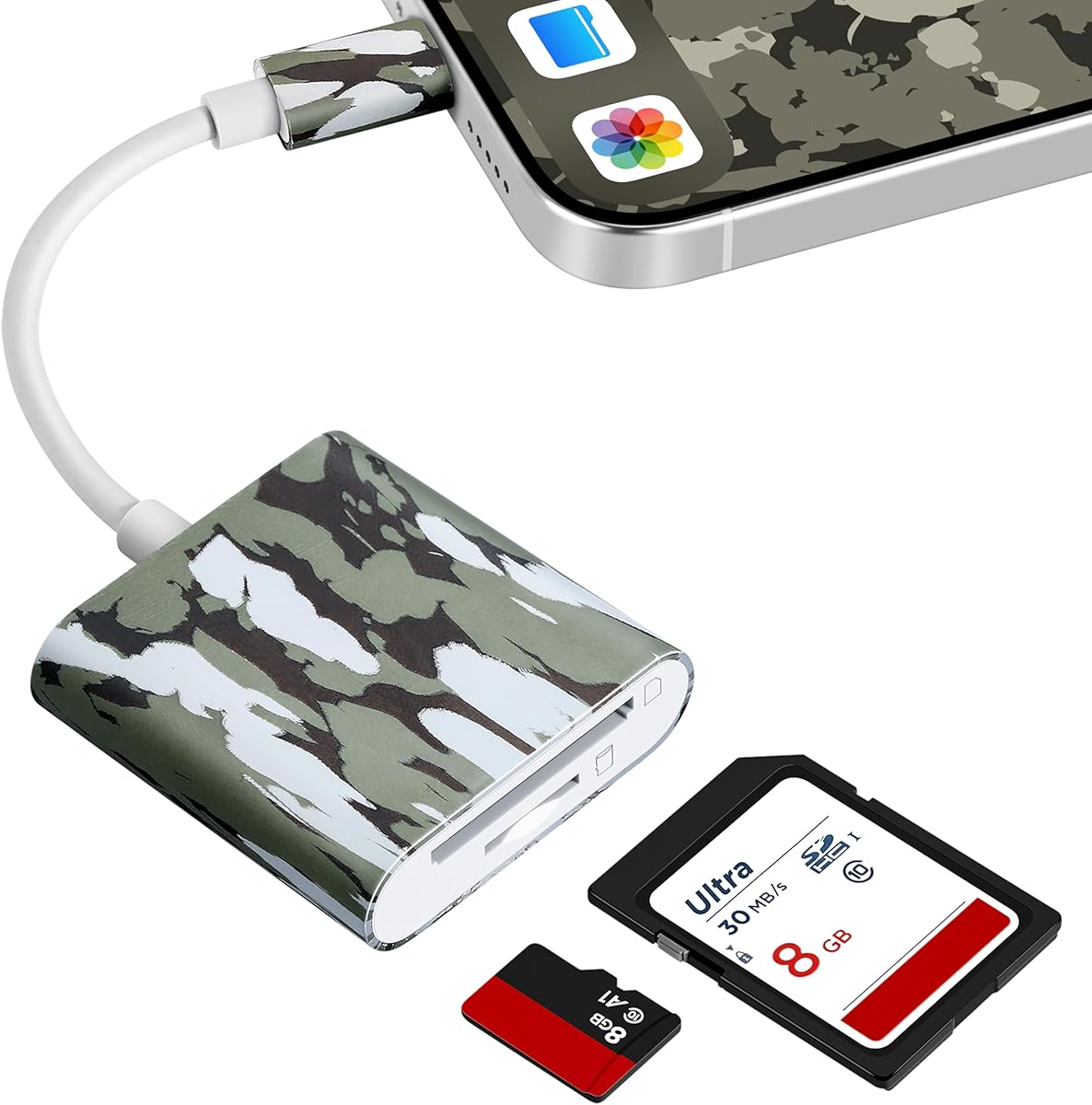
Trail Camera Viewer for USB-C
4.4Editor score
Works with USB-C devices
No apps required
View, save, and share
A trail camera SD card viewer gives hunters and wildlife observers a convenient way to review photos and videos without returning every image to a computer. The right device balances screen visibility, card compatibility, file controls, power requirements, and protection from the weather and rough handling encountered outdoors.
We compared dedicated screen-based viewers with smartphone adapters, compact card readers, and a larger dual-card tablet. The evaluation focused on display size, supported media, control options, connection methods, outdoor construction, file management, compatibility with common trail camera cards, and the convenience of reviewing footage away from a camp or vehicle.
Each pick highlights a distinct approach, from a dedicated 4.3-inch viewer to phone-based adapters and a weather-resistant tablet with two card slots. Ratings and product details reflect the supplied information, while availability and pricing can change. Always verify connector type, card capacity, and device compatibility before purchasing.
4.4Editor score

4.4Editor score
4.3Editor score
As an Amazon Associate we earn from qualifying purchases.
The table below compares all ten options by viewing method, display, media support, card capacity, and outdoor practicality. It helps distinguish standalone viewers from adapters that use a phone, tablet, or computer screen.


The Muddy CRV3 HD is a dedicated trail camera card viewer with a 4.2 rating and a useful balance of screen quality, portability, and media controls. Its 4.3-inch color LCD gives hunters and wildlife observers a clear way to inspect images and 1080p video without connecting the card to a computer or relying on a phone battery.
We may earn a commission when you buy through this link, at no additional cost to you.
Its strongest features are practical rather than decorative. The viewer supports SD cards up to 32GB, includes adjustable brightness and volume, and provides a headphone jack for audio playback. Menu options for viewing, transferring, and deleting files make it possible to organize captures in the field. A micro USB connection adds another route for transferring content, while the water-resistant housing suits trips into damp or dusty environments.
There are practical constraints. The viewer operates on four AA batteries, which are not included, so a spare set should be kept in a vehicle or day pack. Its 32GB maximum also means it cannot take full advantage of the larger cards now used by many trail cameras. The 4.3-inch screen is well suited to checking compositions, but it is not as expansive as a larger dedicated tablet.
The Muddy CRV3 HD is a strong choice for hunters who want an uncomplicated, self-contained viewer with manageable screen size and solid outdoor features. It is especially attractive when a phone is not practical because of battery drain, weak signal, or the need to keep the phone protected. For buyers who use cards larger than 32GB, confirm the capacity used by their trail camera before committing.
The 4.3-inch color LCD is appropriate for checking framing, timestamps, and general subject detail. Brightness adjustment makes the display more useful beneath tree cover or during daylight, while 1080p playback supports familiar trail camera video.
View, transfer, and delete options reduce the need to move every card to a computer immediately. The SD slot, micro USB connection, and headphone jack create a flexible setup for reviewing, organizing, and listening to captured media.
We may earn a commission when you buy through this link, at no additional cost to you.
The Stealth Cam SD Card Reader combines a dedicated 4.3-inch color LCD with five-point touch detection and a 4.4 rating. It is designed for hunters who want to browse trail camera photos and 1080p video directly in the field, using a viewer that feels more like a compact media device than a basic card reader.
We may earn a commission when you buy through this link, at no additional cost to you.
Touch detection and smart gestures are the defining features. They make navigation more intuitive when the goal is to move quickly through still images, open recorded clips, or check a group of captures without carrying a laptop. The viewer also provides straightforward view and delete management options. Its water-resistant housing adds protection against changing weather, and the included wrist lanyard helps prevent drops.
The supplied information is concise, so buyers should not assume capabilities that are not stated. A maximum card capacity is not provided, and details about battery type or charging method are absent. It would therefore be prudent to confirm those specifications before ordering, particularly if a trail camera uses high-capacity cards or the viewer may be used for extended sessions.
Overall, this Stealth Cam reader is an attractive middle ground for users who want touch navigation in a dedicated outdoor viewer. It avoids the need for a phone or computer while offering a screen large enough to review useful visual details. It is a particularly sensible choice for users who find tiny buttons inconvenient and want an interface based on gestures.
Five-point touch detection allows more natural swiping and selection than a button-only interface. The result is easier browsing through images and videos, which is valuable when a card contains many captures from a busy period.
The water-resistant housing and wrist lanyard address common outdoor risks such as moisture, dust, and accidental drops. Together, they make the viewer easier to carry while moving between stands, blinds, or observation points.
We may earn a commission when you buy through this link, at no additional cost to you.
This Stealth Cam card reader and photo manager earns a 4.4 rating through a combination of a 4.3-inch color display, 1080p video playback, and a rugged physical design. It is a more fully described option for hunters who need to review, manage, and listen to trail camera media under demanding outdoor conditions.
We may earn a commission when you buy through this link, at no additional cost to you.
The rubberized buttons and water-resistant housing are particularly relevant around mud, snow, dust, and water drops. The device supports SD cards up to 32GB and includes view and delete options for basic organization. A headphone jack enables audio playback, while a micro USB connection provides a separate path for transfer or connection to other equipment.
It runs on four AAA batteries, which are not included, and the stated maximum card capacity is 32GB. Larger cards may therefore be unsuitable even if a trail camera can record them. The included lanyard reduces the likelihood of dropping the viewer, but it does not make the unit waterproof in every condition, so the housing should still be handled carefully during heavy rain or immersion.
This model is a good fit for users who prefer physical controls and want more explicit file-management functions than a simple playback screen. It works well for hunters managing cards between camera checks and for observers who want audio without relying on a phone speaker. Confirm the card capacity and power requirements before buying if either could affect your workflow.
Rubberized buttons are easier to operate than tiny recessed controls when fingers are cold, damp, or dirty. That makes the viewer more practical during routine wildlife monitoring and hunting trips.
View and delete options let users separate promising captures from unwanted images at the card. The headphone jack also supports immediate review of videos with recorded audio, adding useful context beyond the visual footage alone.
We may earn a commission when you buy through this link, at no additional cost to you.
The USB-C Trail Camera Viewer is a compact adapter for reviewing game camera media on a phone, tablet, or computer. Its 4.4 rating reflects a straightforward alternative to a standalone viewer: the connected device supplies the screen, while the adapter provides card access and file controls.
We may earn a commission when you buy through this link, at no additional cost to you.
The strongest advantage is simplicity. It works without Wi-Fi, internet service, or a third-party application, which is important in remote hunting areas. Users can view, save, share, and delete trail camera images and videos directly through the host device. Compatibility includes iPhone 15 and later models, MacBook series, and USB-C Android devices that support OTG.
The trade-off is dependence on another device. A phone screen can be smaller than a dedicated viewer, and using it outdoors may consume battery even though the adapter itself does not require electricity. Older Lightning-based iPhones, incompatible Android configurations, or devices without the required ports are not suitable. The phrase works with most trail cameras also depends on the card format and device operating system.
This viewer is best for mobile users who already carry a compatible phone and prefer a pocket-sized adapter over a standalone screen. It is also helpful for anyone who wants to share or save selected clips without waiting to reach a computer. Verify OTG support and connector type, and keep a suitable cable or backup viewing method available for remote trips.
The adapter works through a direct connection, so it does not depend on cellular service, Wi-Fi, or downloaded software. That makes it a practical option in areas where cloud viewing and internet-based apps are unavailable.
Viewing, saving, sharing, and deleting are available from the host device. This lets users isolate worthwhile photos and videos quickly instead of carrying a second screen or card reader during every camera check.
We may earn a commission when you buy through this link, at no additional cost to you.
The Wildgame Innovations Trail Pad Tablet VU70 is built for users who want a larger, touch-first display and more involved card organization. Its 7-inch HD backlit TFT screen makes it the most expansive dedicated option in this group, while its 4.3 rating reflects a useful combination of viewing, archive, and connectivity features.
We may earn a commission when you buy through this link, at no additional cost to you.
Two standard-size SD card slots are the defining advantage. The library port can hold a card filled with newly captured images, while the archive slot can hold selected wildlife footage. This separates recent activity from keepers and makes it easier to track one animal or an entire herd without scrolling through the same material. The built-in speaker provides audio during video playback.
Its large touchscreen supports zooming, swiping, and tablet-like navigation, although users who prefer a pocketable tool may find it cumbersome. Both card slots support cards up to 32GB, which may be restrictive for newer trail cameras. Auxiliary and micro USB connections add computer, television, and transfer options, while the heavy-duty weather-resistant housing provides useful protection.
The VU70 is best for dedicated hunters, property managers, and wildlife observers who review many captures at a time and value organization. The larger display is especially helpful for spotting wildlife details and sorting a substantial library. It is less compelling for someone wanting the lightest possible field accessory, but the dual-card workflow is difficult for smaller viewers to duplicate.
The 7-inch backlit TFT display provides a more detailed view than compact 4.3-inch screens. Touch zoom and swipe navigation make it convenient to inspect a subject, compare frames, or move through a card containing hundreds of images.
The library and archive ports encourage a cleaner workflow. Recent captures can remain on the working card while selected images and videos are moved to a second card for long-term organization.
We may earn a commission when you buy through this link, at no additional cost to you.
The BoneView USB-C Reader is a direct Android adapter for hunters and wildlife observers who want to review trail camera media without a standalone screen. It has a 4.0 rating and emphasizes quick, battery-free access to photos and videos stored on SD or microSD cards.
We may earn a commission when you buy through this link, at no additional cost to you.
The adapter reads trail camera memory cards and works with a compatible USB-C smartphone or tablet. It supports viewing, saving, sharing, and deleting, with no third-party application, Wi-Fi connection, cellular service, or batteries required. That makes it particularly useful in remote areas where power and coverage are limited.
Its portability is a major strength because the device does not add another display, charging requirement, or control panel to carry. However, it is designed specifically around USB-C Android devices, so buyers with iPhones, Lightning connections, or incompatible Android ports should choose another option. The broad claim that it reads cards from major trail camera brands should not be taken as a guarantee for every file format, camera, or device configuration.
This BoneView reader is a practical selection for Android users who want fast, offline access to their trail camera cards. It also appeals to users who already manage images on a phone and do not want to carry a separate viewer. Confirm that the Android device supports the required connection mode, and test the card format used by the trail camera before a remote trip.
The reader requires no batteries and no external power source. It can be used without Wi-Fi, cellular service, or an application, reducing preparation for a remote monitoring session.
Users can quickly swipe through photographs, play most video files, and save or share selected content. Direct transfer avoids the repeated card swapping associated with reviewing footage only on a computer.
We may earn a commission when you buy through this link, at no additional cost to you.
The 4-in-1 Portable Card Reader is a versatile card adapter for trail camera media and general file transfer. With a 4.3 rating, it stands apart through its collection of USB, USB-C, micro USB, and iOS charging connections, along with dedicated SD and microSD slots.
We may earn a commission when you buy through this link, at no additional cost to you.
The broad interface selection allows it to work with iPhone, iPad, Android, Mac, computers, and cameras, subject to the relevant port and operating-system requirements. Its charging port can keep a compatible iPhone or iPad powered while files are transferred, addressing a common concern when reviewing long card contents on a mobile device. High-speed two-way transmission is designed to reduce waiting time.
The reader supports cards up to 1TB and is small enough to carry in a pocket. A keychain-style attachment helps reduce the chance of losing it. On the downside, its many interfaces and ports make the design busier than a simple one-purpose trail camera adapter. Compatibility with older iPads may also require a separate connector, and the package does not include memory cards.
This is a strong option for users who move between iOS devices, Android hardware, and computers rather than relying on one connector type. It is also a general-purpose reader that can handle trail camera files, phone transfers, and camera storage. For the trail camera use case, confirm that the connected device supports the appropriate interface and that the file format will be recognized.
USB, USB-C, micro USB, and iOS charging connections provide flexibility when devices change. That makes the adapter useful for both hunting trips and routine file-transfer work.
The added charging connection is valuable for reviewing a full card of photos and videos on a compatible iPhone or iPad. Continuous power can be more convenient than beginning the transfer with a nearly empty device.
We may earn a commission when you buy through this link, at no additional cost to you.
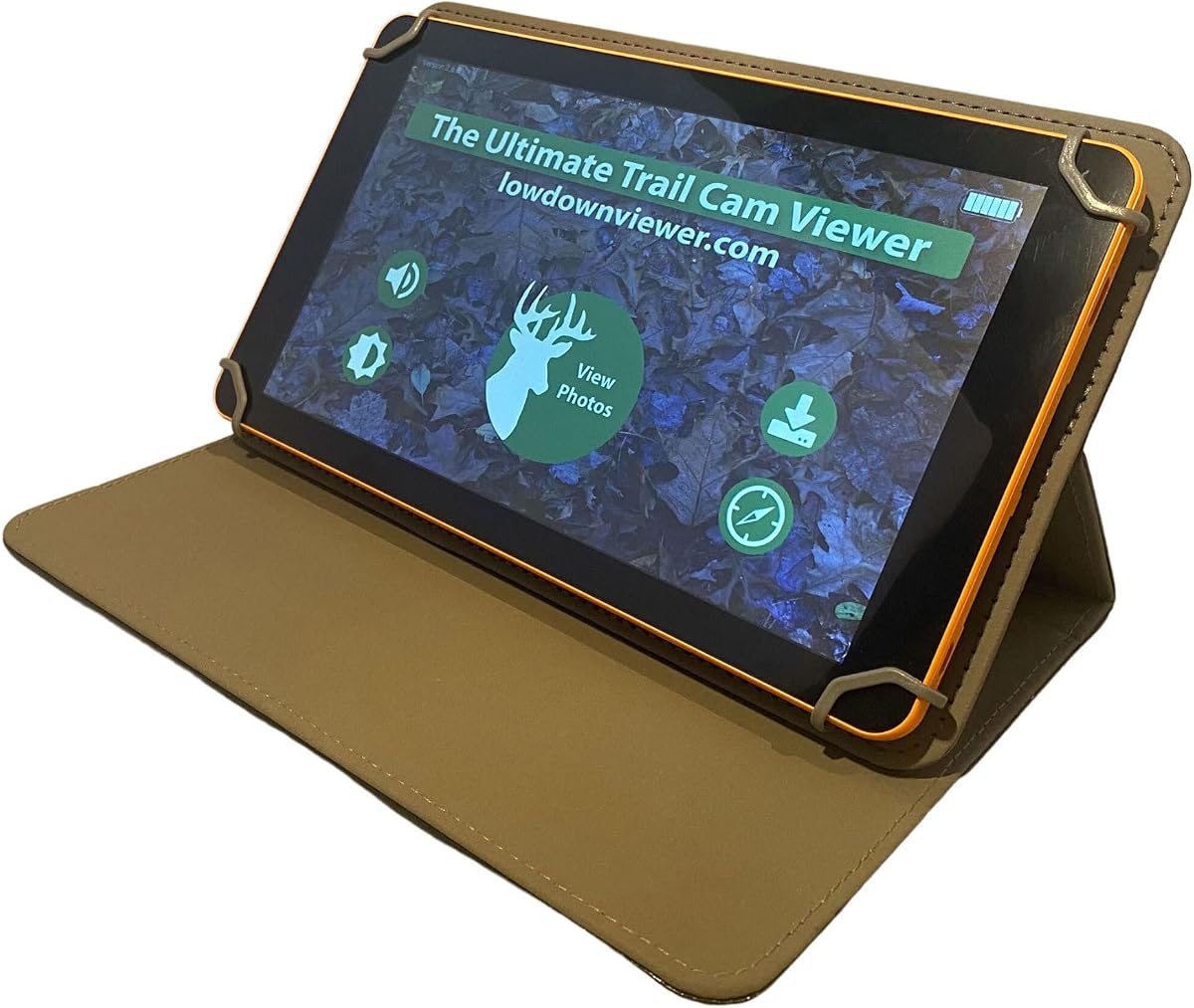
The Advanced Lowdown is a specialized trail camera viewer and photo manager built around fast review of large image collections. Its 4.3 rating and feature set make it a premium-oriented option for users who routinely work with thousands of images and want more control over browsing behavior.
We may earn a commission when you buy through this link, at no additional cost to you.
Three viewing modes distinguish it from basic card readers. QuickView displays eight images at once across three-quarters of the screen, enabling rapid scanning. FullView shows one image at a time in a three-quarter or full-screen format for closer inspection. Slide Show automatically scrolls through the collection. A new scrollbar function helps move through a large card rapidly, while fast video downloading reduces waiting before playback.
The viewer supports cards up to 128GB and can format compatible cards. Users can enlarge photographs, freeze video frames, save a snapshot, and play video with sound. A Navigator Help System is included to simplify operation. These capabilities reward buyers who regularly manage extensive libraries, although the number of modes and tools may feel excessive for occasional checks.
Advanced Lowdown is best for serious trail camera operators, hunting businesses, and observers who prioritize speed and high-volume organization. The 128GB capacity is especially relevant when cards hold extended recording sessions. Users who only need occasional image checks may find a smaller dedicated viewer or phone adapter easier to manage, but this product offers the most specialized workflow in the group.
QuickView shows eight images simultaneously, allowing hunters to identify worthwhile frames without opening each one. The scrollbar and fast loading are designed for cards containing extensive footage from high-traffic locations.
Fast downloads, sound playback, frame freezing, and snapshot saving support both quick monitoring and more deliberate review. Card formatting and 128GB support help keep the workflow centered on modern high-capacity storage.
We may earn a commission when you buy through this link, at no additional cost to you.
The BoneView Android Reader Combo combines a USB-C trail camera card reader with a protective zipper case. Its 4.0 rating reflects a direct Android solution designed to view, save, share, and delete trail camera photos and videos without batteries, Wi-Fi, cellular service, or an additional application.
We may earn a commission when you buy through this link, at no additional cost to you.
The reader supports SD and microSD memory cards from major trail camera brands, making it useful for cameras that use either format. A direct plug-and-play design makes it straightforward to browse through large collections and play most video files. Super-fast transfer speeds are intended to reduce delays when moving or saving images.
The included zipper case is useful for protecting the reader and memory cards during travel, though it adds an item to carry. The device remains dependent on a compatible USB-C Android phone or tablet, and it does not provide its own display. The promise of compatibility across major camera brands should still be checked against the exact card and file type used by a particular trail camera.
This combo is well suited to Android users who want a small, battery-free reader and want storage protected between trips. It is particularly appealing to deer hunters who review camera media directly on a phone. The case is a practical addition for anyone carrying spare cards through brush, rain, or dusty conditions.
Because the reader does not depend on Wi-Fi or cellular service, it remains useful in remote hunting areas. Direct viewing and file controls avoid the need to install and configure additional software.
The zipper case helps shield the small components during transport. It is a useful complement to a compact reader that might otherwise be left loose in a pocket or vehicle.
We may earn a commission when you buy through this link, at no additional cost to you.
The Corded Apple USB-C Reader is designed for iPhone 15 and later models as well as USB-C iPads. Its 3.6 rating is the lowest in this comparison, but its corded design addresses a specific problem: connecting to an iPhone while keeping a thick protective case installed.
We may earn a commission when you buy through this link, at no additional cost to you.
The reader uses the native Apple Files app, so no third-party application is needed. After connecting the device, users can browse the card, view media, and save, share, or delete files without automatically importing everything into limited phone storage. Standard and microSD cards are supported up to 256GB, and the unit needs no battery, Wi-Fi, or cell service.
Compatibility is deliberately limited. It does not support older Lightning-based devices such as iPhone 14 and earlier, so a buyer with an older Apple phone must choose another product. The cord adds reach and can tangle, although the improved connection is intended to provide a secure fit with rugged cases. Its lower rating may also reflect a less proven overall experience than the higher-rated alternatives.
This reader is best for modern Apple users who regularly use a rugged case and want direct access to trail camera files without filling the phone automatically. It is a targeted solution rather than a universal adapter. Confirm the Apple device port and ensure that the Files app can access the inserted card before relying on it during a remote hunt.
The corded connector is intended to reach through a rugged case without requiring removal. This makes the reader more convenient for users who keep their phone protected in the field.
Using the Files app allows users to view, save, share, and delete selected items instead of automatically importing a complete card. That control can preserve phone storage and simplify later organization.
We may earn a commission when you buy through this link, at no additional cost to you.
The most useful trail camera SD card viewer depends on card type, host device, display needs, and how often you review footage. Consider connectivity, power, screen size, file controls, and weather resistance before choosing.
A standalone viewer includes its own display and controls, making it a convenient option for users who do not want to depend on a phone battery or carry a second screen. It is especially useful in areas without service and for anyone who wants to keep a phone protected. Phone adapters are smaller and often more flexible across devices, but they require a compatible connector and use the host device's screen and power.
Phone-based viewers must match the device's physical connection and operating system. USB-C models suit recent iPhones, many Android phones, tablets, and computers, but older Lightning iPhones require a different option. Some Android devices also need OTG support. Dedicated viewers avoid these constraints because they include their own screen, although computer connections may still use micro USB or auxiliary ports.
A 4.3-inch display is a practical balance for portable dedicated viewers, offering enough room to inspect typical trail camera photographs without becoming bulky. A 7-inch touch screen is easier for reviewing large collections, zooming, and organizing files. Phone-adapter users already have a familiar display, but some models have smaller screens. Touch and gesture controls can also reduce the need for small physical buttons.
Trail cameras may use full-size SD cards, microSD cards, or both, so the reader must support the physical format and capacity used by your camera. Listed maximums range from 32GB on several dedicated viewers to 128GB on the Advanced Lowdown, 256GB on the Apple-focused reader, and as much as 1TB on the 4-in-1 reader. Capacity support alone does not guarantee that every camera file format will play.
Most trail cameras produce both still images and video, so a useful viewer should support both. Dedicated units commonly advertise 1080p video playback, while the Advanced Lowdown focuses on fast downloading, full-screen viewing, sound, frame freezing, and snapshots. Adapters generally defer playback to the connected phone, tablet, or computer, which may handle familiar formats well but can be limited by device software.
Viewing alone is not always enough. Useful controls include deleting unwanted files, transferring selected media, saving images, and sharing clips. Larger or more specialized viewers may add dual-card library and archive functions, a multi-image scan mode, slideshows, a scrollbar for large collections, card formatting, image enlargement, and video snapshots. These tools matter most for users who review hundreds of images at once.
Standalone viewers require batteries, and the listed models use either four AA or four AAA batteries, which are not included in some cases. Phone adapters need no separate battery, but the connected phone can still lose charge during extended viewing. Neither approach requires Wi-Fi, but a standalone screen remains useful when a phone is depleted, frozen, or intentionally kept offline.
Field devices should withstand dust, dirt, splashes, snow, and repeated handling. Water-resistant or weather-resistant housings are useful, but they should not be confused with complete waterproofing. A wrist lanyard reduces drops, while a compact adapter is easier to keep in a pocket. A larger tablet may offer superior visibility but requires more room in a pack and can be less convenient beside an active hunting stand.
Before inserting a trail camera card, confirm that the card format, maximum capacity, and recorded file types are supported by the viewer. For a phone adapter, confirm the connector, operating system, and any OTG requirement. For a standalone device, install the specified batteries, power it on, and set the screen brightness and volume to a comfortable level before heading into the field.
Handle the card and viewer with clean, dry hands. Insert the card according to the labeled orientation, browse a few photos, and play a short video to confirm that both images and footage are recognized. Use the view, delete, transfer, or archive options to organize material as needed. When using the phone, open the appropriate native file manager and avoid leaving the card inserted when the device is unattended or exposed to rain.
Remove the card after a review session, power down the viewer, and return batteries to appropriate storage when they are not needed. Keep the device away from standing water, excessive heat, and impact. Periodically clean the card slot and contacts with a dry, soft material, and do not format a card until confirming that all needed images and videos have been transferred.
Yes. Every dedicated viewer in this guide performs local card access without internet service, and the phone adapters are also described as operating without Wi-Fi, cellular service, or a third-party application. A standalone unit is particularly dependable in remote areas because it does not rely on a phone connection. It still needs suitable batteries, while a phone-based option depends on the host device remaining powered.
Not necessarily. You need to match the physical card format, capacity, and recorded file type. Most trail cameras use standard SD or microSD media, but a viewer's stated capacity limit may be below the capacity of the card you own. Even when capacity is supported, unusual file formats or camera-specific settings can still affect playback.
A standalone viewer is better when you want a predictable screen, longer field operation, and no need to remove a protective phone case. A phone adapter is better when you already carry a compatible device, need to share media immediately, or prefer to avoid carrying another powered screen. The main phone-adapter limitation is that some older devices and connectors are not supported.
Match the reader to the capacity commonly used by your trail camera. Dedicated viewers in this guide list maximums of 32GB or 128GB, while certain adapters claim support for 256GB or even 1TB. Higher capacity is useful for extended recording, but it does not remove the need to confirm physical card compatibility and recognized file formats.
Several dedicated viewers provide delete options, while phone adapters can typically delete files through the host device's file manager. Deleting media is irreversible in many operating systems, so review important images and copy them to a separate card or computer before removing them. Check that each file has been backed up before using a format or delete command.
Many products in this guide use water-resistant or weather-resistant housings, which help protect against dust, dirt, splashes, and light precipitation. They should still be handled carefully during heavy rain and cannot automatically be treated as fully waterproof. A protective case, wrist lanyard, and careful storage can further reduce the risk of damage.
No. A phone adapter can use the display of a compatible iPhone, Android device, tablet, or computer. The trade-off is dependence on the host device's connector, operating system, storage, and battery. Dedicated viewers are more independent, and their larger screens can be easier to use when reviewing many images outdoors.
Start with a multi-image or scrolling mode when available, identify promising frames, and use a dedicated archive card for keepers. The Wildgame Innovations VU70 separates library and archive cards, while the Advanced Lowdown provides QuickView, FullView, slideshows, and a scrollbar. On phone-based readers, save selected files to a separate folder or device rather than importing everything indiscriminately.
The Stealth Cam SD Card Reader stands out for its 4.3-inch touch display, 1080p playback, and field-friendly design, while the Muddy CRV3 HD offers a similarly dedicated experience with transfer, delete, audio, and brightness controls. For minimal carrying weight, the USB-C Trail Camera Viewer uses a compatible phone or computer and avoids a separate screen, and the Advanced Lowdown provides the most advanced workflow for large libraries.
Prioritize the requirements that affect your actual routine. Check physical card format and capacity first, then confirm the connector or standalone display, power method, playback features, and file-management tools. A larger screen helps with visual inspection, dual-card support helps with organization, and phone-based adapters are convenient when compatibility with equipment already carried is most important.
Ratings, product details, availability, and pricing can change, so review the current listing before buying. Checking the final specifications ensures that the selected viewer works with your trail camera, card capacity, and preferred review setup while remaining practical for the places where you use it.