
AULA WIN60 HE
4.5Editor score
0.02mm rapid trigger distance
8000Hz maximum polling rate
Hall effect magnetic switches
Web-based customization driver
Our Keyboard for Valorant guide compares ten gaming keyboards for rapid trigger, latency, layout, build quality, and competitive responsiveness.
Valorant rewards fast decisions, clean movement, and accurate peeks, so the right keyboard can make every flick, counter-strafe, and burst feel more responsive. Hall effect switches, rapid trigger, high polling rates, and compact layouts are especially relevant, but comfort, sound, build quality, and software also matter during long matches.
This guide compares ten gaming keyboards using the specifications and product information supplied for each model. It covers wired magnetic designs, optical switches, wireless options, compact layouts, adjustable actuation, macro support, RGB lighting, and practical features that can influence how a keyboard performs in a fast first-person shooter.
The top selections represent a strong overall pick, a value-focused option, and a premium alternative, while the remaining reviews explain where each keyboard fits particular playstyles. Features and availability can change, and current prices should be checked on the linked product pages before making a purchase.
4.5Editor score

4.4Editor score

4.6Editor score
The comparison below highlights the technologies, layouts, connectivity options, and competitive features that separate these ten gaming keyboards for Valorant.


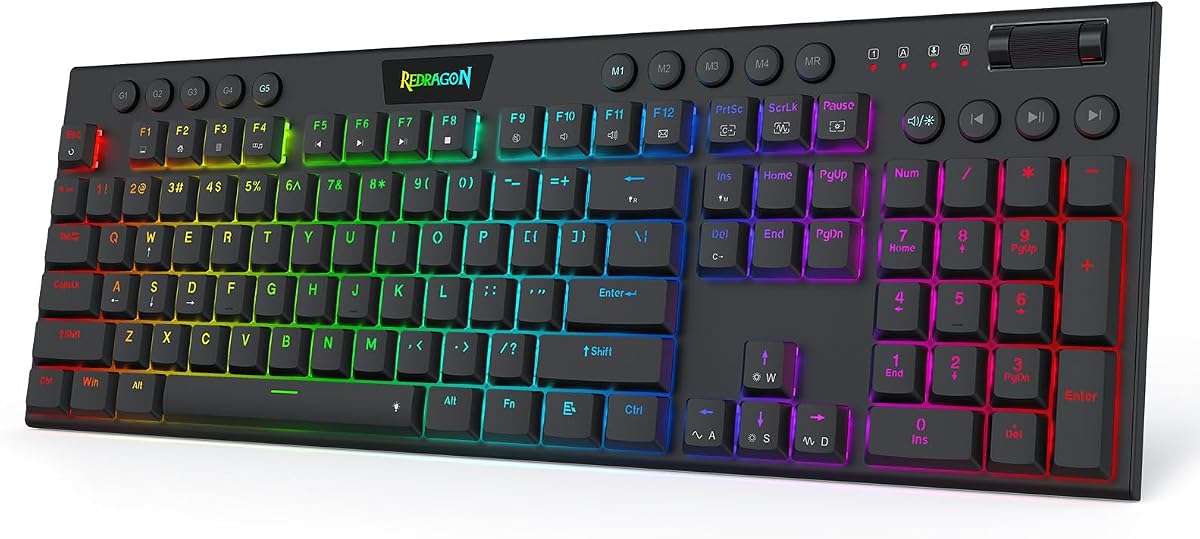




The Redragon K673 HE is a full-size wired gaming keyboard built around UltraMag POM magnetic switches, 8000Hz hyper-polling, rapid trigger, and PRCS. Its supplied rating is 4.1, and its principal appeal for Valorant is the combination of highly adjustable actuation and a design intended to register quick directional changes without requiring the key to return completely to rest.
We may earn a commission when you buy through this link, at no additional cost to you.
Magnetic sensing allows the K673 HE to detect key travel rather than relying on physical contact. That gives users access to actuation settings from 0.1mm to 3.4mm, with several profiles available through the desktop or web-based driver. For a Valorant player who likes short travel and fast resets, those controls can be more useful than a conventional mechanical switch with a fixed response.
The keyboard also includes a single knob for backlight brightness and media control, while the floating structure and internal dampening layers aim to reduce harsh movement noise. Those details improve the everyday experience, although the wired connection, driver dependency, and crowded full-size footprint are less attractive if desk space or a clean competitive setup is the priority.
The K673 HE suits competitive players who want extensive magnetic-switch tuning without moving to a more specialized premium model. Configure the actuation point and rapid-trigger behavior before entering a match, test the result in the practice range, and avoid changing several settings at once. It is a capable wired choice, though compact 60% alternatives may fit more naturally beside a low-sensitivity aiming setup.
Rapid trigger dynamically changes when a pressed key resets, so the keyboard can recognize another movement command without demanding a full return. That concept is particularly relevant when players alternate between WASD directions, peek briefly, and fire at a precise moment.
Saving separate profiles between 0.1mm and 3.4mm makes it possible to use short travel for movement and a different setting for utility keys. The best configuration is the one that feels consistent without causing accidental inputs during a tense round.
We may earn a commission when you buy through this link, at no additional cost to you.
The Redragon K686 HE combines magnetic switches, rapid trigger, PRCS, and an 8000Hz wired connection in a conventional gaming keyboard format. It carries a supplied rating of 4.4, placing it among the stronger-rated models in this guide while keeping the focus on competitive input behavior rather than decorative extras.
We may earn a commission when you buy through this link, at no additional cost to you.
The K686 HE can be tailored through saved actuation profiles spanning 0.1mm to 3.4mm. That flexibility lets a Valorant player experiment with low activation points for movement, higher points for less frequently used abilities, and a rapid-trigger range that better matches repeated strafing or tap-firing patterns. The 8000Hz polling figure also supports the keyboard's positioning as a low-latency wired option.
Its floating switch-plate structure and dampening layers are designed to reduce wobble and harsh sound, while the single knob manages illumination and media playback. These qualities make it more versatile for long sessions than a narrowly specialized FPS board, but the need for software and the full-size footprint may not suit every minimalist setup.
Overall, the K686 HE is a strong fit for players who want the tuning depth of a magnetic keyboard and prefer a familiar full-size arrangement. It may be especially attractive for users who also type, use function keys, or want a number pad. Test the actuation settings carefully, establish a stable baseline, and use Valorant's practice range to confirm that rapid trigger feels smooth rather than twitchy.
Rapid trigger, PRCS, and adjustable actuation provide multiple ways to tune movement behavior. Rather than chasing the lowest possible number, begin conservatively and make small changes while practicing peek-and-fire sequences.
The floating plate, internal dampening, and straightforward knob make the keyboard less narrowly specialized than a bare-bones competitive model. That balance can be useful for players who alternate between Valorant and longer productivity sessions.
We may earn a commission when you buy through this link, at no additional cost to you.
The Redragon K618 HE is a low-profile wired magnetic keyboard with a supplied 5.0 rating, 8000Hz polling, and adjustable actuation from 0.1mm to 2.8mm. Its low-profile switches, dedicated macro zone, and media controls distinguish it from conventional full-size gaming keyboards while remaining clearly oriented toward fast first-person-shooter input.
We may earn a commission when you buy through this link, at no additional cost to you.
The short-travel design is the main reason to consider the K618 HE for Valorant. Reduced distance can make repeated movement and ability inputs feel lighter, while magnetic sensing supports precise activation points. The 20-key macro area can store useful sequences or shortcuts, and the fact that basic macro operation is available without installing software makes the board approachable for a first magnetic-keyboard purchase.
The trade-off is that low-profile designs do not suit everyone. Players accustomed to a pronounced keycap edge or substantial travel may need time to adjust, and the extra macro keys occupy desk space even though the overall chassis is slimmer. The wired hookup also removes the freedom offered by a wireless board.
The K618 HE is an attractive option for players who want quick actuation and onboard utility without a full-size footprint. Its 5.0 supplied rating is encouraging, though ratings should not be treated as a substitute for personal comfort. Confirm the low-profile feel, choose a sensible actuation level, and avoid binding critical movement keys to macros before competitive play.
Shorter travel and a slim structure can reduce wrist movement and conserve desk area. These qualities do not automatically improve accuracy, but they may make long Valorant sessions more comfortable for players who prefer flatter keyboards.
The dedicated 4-by-5 macro zone and media controls offer immediate functionality before driver configuration. Use these keys for noncritical actions, because placing essential movement or ability commands on unusual bindings can disrupt muscle memory.
We may earn a commission when you buy through this link, at no additional cost to you.
The Corsair Clipper PRO MINI 60 is a compact Hall effect gaming keyboard with a supplied 4.4 rating. It combines a 0.1mm rapid-trigger reset, FlashTap SOCD movement, AXON hyper-processing up to 8000Hz, and adjustable 0.2–3.8mm actuation, making it one of the most competition-focused keyboards in this roundup.
We may earn a commission when you buy through this link, at no additional cost to you.
The key advantage is control rather than raw specification alone. Rapid Trigger can reset a key almost immediately, while Multi-Action, Smart Tap, and Tap Lock provide additional ways to assign behavior. FlashTap is intended to produce cleaner directional inputs and more effective counter-strafing, a combination that may appeal to players who practice precise movement and peek timing.
MGX Hyperdrive linear switches are advertised for zero drift and 100 million keystroke durability. The board also uses double-shot PBT keycaps, dual-layer sound dampening, and an IP57-rated construction. These are meaningful quality-of-life details, although the compact format removes the function row and dedicated navigation keys, so users who need those inputs may require a layer or alternate solution.
For Valorant, the Clipper PRO MINI 60 is a persuasive all-around competitive recommendation because it integrates several movement-focused features with a genuinely compact footprint that leaves more room for mouse movement. It is especially well suited to low-sensitivity aiming setups. Treat the advanced settings as tools rather than automatic advantages, learn FlashTap in the practice range, and retain a standard movement profile as a fallback.
FlashTap SOCD is designed to make direction changes cleaner by giving priority to the latest input. That can help players practice the quick stop-and-strafe rhythm required for accurate first-shot positioning.
The 60% layout removes the function row and many secondary keys, freeing meaningful desk area. A wider mouse area can support lower-sensitivity aiming, provided the player is comfortable using an alternate key layer.
We may earn a commission when you buy through this link, at no additional cost to you.
The Razer Huntsman Mini 60% uses Razer Linear Optical switches and has a supplied rating of 4.6. Optical switches register at a 1.0mm actuation point, which the product information describes as 15–30% shorter than other linear switches. Its compact form and Snap Tap support make it a recognizable option for fast Valorant play.
We may earn a commission when you buy through this link, at no additional cost to you.
Snap Tap prioritizes the latest of two assigned keys, allowing a quick movement correction without waiting for the original direction to reset fully. It is a common competitive tool for counter-strafing, although the feature is off by default and must be configured through Razer Synapse 4. The optical switch design also provides consistent light-based registration without the physical contact used by conventional mechanical switches.
Razer Chroma lighting is one of the keyboard's broader ecosystem advantages. Individual key illumination can synchronize with games and compatible devices, while Hypershift supports remapping keys and combinations. The aluminum top frame and oil-resistant double-shot PBT keycaps add a more premium appearance and durable feel. As a compact board, however, it offers fewer navigation and utility keys than a full-size model.
This is a compelling choice for players who want established software, polished lighting, and straightforward optical switches in a compact layout. It is less specialized than the best magnetic boards because its actuation is not presented as finely adjustable, but Snap Tap covers an important movement need. Test the behavior in the practice range and avoid enabling it until the new response pattern feels natural.
Light-based actuation can provide quick, consistent registration without the physical contact required by a mechanical switch. The 1.0mm point is short enough to feel responsive while retaining the familiar feel of a linear switch.
Chroma supports popular games, Razer hardware, and integrations with more than 30 listed partners. Players who value synchronized lighting and coordinated peripherals may find this ecosystem more valuable than a bare RGB option.
We may earn a commission when you buy through this link, at no additional cost to you.
The AULA WIN60 HE is a compact wired keyboard with Hall effect magnetic switches, an 8000Hz polling rate, and a stated rapid-trigger distance of 0.02mm. Its supplied rating is 4.5, and the product information explicitly identifies Valorant and CS2 among its target genres, making its competitive positioning unusually clear.
We may earn a commission when you buy through this link, at no additional cost to you.
Magnetic sensing without physical contact provides a different feel from a traditional mechanical switch and allows the keyboard to focus on quick peeks and stop-and-shoot sequences. The 8000Hz polling figure, ultra-low rapid-trigger setting, and compact 60% layout all align with the needs of fast first-person shooters. The small footprint also leaves more desk area available for precise mouse movement.
Customization happens through a web-based driver, which supports remapping, macros, and RGB lighting without a bulky desktop installation. That convenience is valuable for users who move between systems, although a browser-dependent setup may be less appealing to those who prefer a fully installed application. The wired connection is another limitation when portability is a priority.
The WIN60 HE is a strong value-focused recommendation for Valorant players who want the essential benefits of a magnetic rapid-trigger keyboard without moving to a premium full-size model. Begin with a moderate actuation setting, enable rapid trigger only after mastering the basic response, and use the practice range to check for accidental double inputs.
The advertised 0.02mm rapid-trigger step allows the keyboard to reset movement keys with very little travel. Extremely short reset behavior can reward practiced control, but it may feel overly sensitive at first.
The web driver centralizes key remapping, macros, and lighting in a browser-accessible interface. This keeps software installation lightweight while still offering the customization expected from a modern competitive keyboard.
We may earn a commission when you buy through this link, at no additional cost to you.
The AULA WIN68 HE is a 68-key wired magnetic keyboard with a supplied 4.5 rating, 8000Hz polling, and an advertised latency of 0.3ms. Unlike a bare 60% board, it retains arrow keys and basic function access, making it a practical middle ground for Valorant players who want a compact footprint without losing too much navigation convenience.
We may earn a commission when you buy through this link, at no additional cost to you.
The Hall effect switches provide an adjustable actuation point from 0.02mm to 3.44mm, with settings that can be personalized in 0.1mm increments. Press and reset sensitivity can also be configured for individual keys. Fast trigger is designed to improve command registration, while the driver supports RT, SOCD, DKS, MT, and TGL functions for players who want to experiment with input behavior.
The 68-key format is less disruptive than moving directly to a 75% or full-size board. Dedicated arrow keys can make menu navigation easier, and the detachable USB cable is more convenient for transport. The trade-off is that the web driver is listed as Windows-only, and the layout still lacks the complete function row found on larger models.
The WIN68 HE is a sensible choice for a Windows-based competitive setup that values magnetic tuning and compactness. It may also serve players who want a keyboard for gaming and work, since the arrow keys and general-purpose layout are more versatile than a strict FPS board. Verify the available key combinations and establish sensible per-key profiles before relying on them in ranked play.
Retaining separate arrow keys can make desktop navigation and in-game menus less disruptive. The result is a useful compromise between a 60% competitive design and a larger everyday keyboard.
Individual press and reset sensitivity allows movement keys, abilities, and utility commands to behave differently. This granularity can produce a more personal setup, although it demands time in the practice range.
We may earn a commission when you buy through this link, at no additional cost to you.
The AULA F75 Pro is a wireless 75% mechanical keyboard with a supplied 4.6 rating, tri-mode connectivity, hot-swappable sockets, pre-lubed Reaper switches, and a multifunction knob. It is less narrowly optimized for Valorant than the magnetic rapid-trigger models, but it offers an appealing mix of gaming, productivity, portability, and customization.
We may earn a commission when you buy through this link, at no additional cost to you.
Bluetooth 5.0, 2.4GHz wireless, and USB wired modes allow the keyboard to move between PCs, laptops, tablets, and mobile devices. It can maintain connections to up to five devices, and the 4000mAh battery is intended to provide extended use between charges. The 75% layout retains arrow keys while occupying less desk space than a traditional full-size board.
Hot-swappable support accepts three-pin and five-pin switches, allowing the feel to be changed without soldering. Pre-lubed stabilizers, five internal filling layers, and side-printed PBT keycaps are intended to improve smoothness, sound, and durability. A multi-function knob controls lighting or media, and programmable keys support macros, N-key rollover, and a Windows-key lock.
The F75 Pro is best for a player who wants one keyboard to handle Valorant and everyday productivity while retaining the option to move between devices. Its fixed mechanical switches do not provide the rapid reset behavior found on Hall effect models, so competitive players should not expect equivalent movement tuning. That versatility, however, makes it a strong general-purpose gaming keyboard.
The 75% layout preserves the arrow keys and a broad selection of function keys in a relatively compact package. This makes it easier to move from a Valorant match to messaging, editing, or everyday office work without changing keyboards.
Hot-swappable sockets make it possible to experiment with compatible three-pin or five-pin mechanical switches. The included pre-lubed Reaper switches provide a fast starting point, while custom options can refine sound and feel.
We may earn a commission when you buy through this link, at no additional cost to you.
The ATTACK SHARK X68 HE RT is a 66-key wired magnetic keyboard with a supplied 4.6 rating, 8000Hz polling, and a claimed 0.125ms theoretical latency. It supports rapid trigger, adjustable actuation from 0.1mm to 3.4mm, and four functions based on different press depths, making it a technically ambitious compact option.
We may earn a commission when you buy through this link, at no additional cost to you.
Its magnetic system is designed specifically for quick taps, dynamic keystrokes, and precise counter-strafing. The listed 0.01mm rapid-trigger accuracy allows very fine control over when a key becomes ready for another input. Players can also assign four functions to one key according to pressing depth, although advanced multi-action behavior is more likely to reward experimentation than instant improvement.
A top-mounted structure, anodized aluminum positioning plate, and double-layer PORON aim to create a stable, quieter feel. Cherry-profile double-shot PBT keycaps and south-facing RGB LEDs cover the practical and visual sides of the design. A curved wrist rest, non-slip mat, and detachable streamer-like accessory are unusual additions for a compact gaming board.
The X68 HE RT is a compelling competitive keyboard for players who want substantial magnetic control in a 60% format. Its driver supports remapping, macros, lighting, and separate activation or deactivation points through a web interface. Start with simple profiles, test all four depth functions outside ranked matches, and use a conventional movement layer whenever a more advanced binding feels inconsistent.
The four-function depth system can separate light and heavy presses into different actions. This is useful for experimentation, but familiar binds remain more reliable during high-pressure rounds.
Top mounting, an aluminum plate, and double-layer PORON are intended to reduce wobble and harsh sound. The included wrist rest may improve comfort, depending on desk height and the player's preferred typing posture.
We may earn a commission when you buy through this link, at no additional cost to you.
The ASUS ROG Strix Scope II 96 is a premium wireless mechanical keyboard with a supplied 4.6 rating, a 96% layout, tri-mode connectivity, hot-swappable switches, and a number pad. Unlike most gaming keyboards in this guide, it prioritizes broad everyday versatility over Hall effect rapid-trigger behavior.
We may earn a commission when you buy through this link, at no additional cost to you.
Its body is described as only one centimeter wider than a standard 80-percent keyboard while retaining a number pad. That arrangement appeals to players who need fast number entry, full navigation, and a relatively uncluttered desk. For Valorant, the main advantage is dependable general-purpose performance rather than a specialized advantage-stop function.
The keyboard connects through Bluetooth with support for up to three devices, low-latency 2.4GHz wireless through ROG SpeedNova, or USB wired mode. PC and Mac compatibility, per-key RGB, macro programmability, and a multifunction wheel add flexibility. Pre-lubed ROG NX Snow linear switches offer a smooth starting feel and can be changed for ROG NX Storm clicky switches through the hot-swappable sockets.
Integrated foam and switch-dampening pads improve the acoustic profile, while three tilt positions and a detachable wrist rest support comfort. This is the best premium pick for a player who wants one board for Valorant, streaming, productivity, and a full-size workflow. Competitive purists focused on rapid reset should choose a Hall effect model instead, but this keyboard offers the broadest premium feature set.
The 96% format preserves a number pad and navigation keys while reducing overall width relative to a conventional full-size board. It is a practical compromise for users who need numeric input but dislike an oversized footprint.
Bluetooth, 2.4GHz, and wired modes allow the keyboard to serve different systems. SpeedNova supports low-latency wireless gaming, while the listed battery life provides considerable freedom between charges.
We may earn a commission when you buy through this link, at no additional cost to you.
The most useful gaming keyboard is one whose response, layout, and controls match your playstyle, system, and desk. These are the main factors to evaluate before choosing a model for Valorant.
Valorant depends on repeated movement inputs, ability keys, and carefully timed firing actions. A conventional mechanical or optical keyboard can feel responsive when its switch travel and software behavior suit the player, while a Hall effect keyboard adds magnetic sensing, adjustable actuation, and rapid-trigger behavior. These features can reduce the distance a key must travel and let it reset before reaching a conventional rest point, potentially improving control during rapid direction changes.
Choose a response system you can understand and configure. Extremely short actuation is not automatically better; it can increase accidental inputs while a player is learning. New magnetic-keyboard users should begin with a moderate setting, compare it with their previous keyboard, and make incremental changes in the practice range rather than applying the most extreme specifications immediately.
Several models advertise 8000Hz polling, which means the keyboard reports input changes more frequently than a standard 1000Hz device. Higher polling can complement a competitive setup, but it should be viewed alongside switch design, actuation settings, software, and network performance. A wired connection also eliminates wireless interference concerns and makes the keyboard a straightforward choice for a stationary gaming setup.
If you want the most direct connection and already own a gaming desk setup, a wired board reduces complexity. If you regularly move between a desktop and laptop, consider the available 2.4GHz or Bluetooth modes. Do not assume a headline polling figure alone will determine performance; stable frame rates, mouse control, display response, and network latency remain essential parts of the overall experience.
A 60% keyboard removes the function row and many secondary keys, leaving considerably more space for a mouse. Low-sensitivity aiming players may appreciate that extra room because large mouse movements can be performed without reaching the edge of the desk. The 66-, 68-, and 75% alternatives in this guide retain more navigation keys, while the 96% ROG model adds a number pad.
Compact layouts require adaptation to a different key layer. Practice all essential binds away from live matches and keep a simple reference nearby until the new positions become automatic. Players who type heavily, use function keys often, or work with spreadsheets may prefer a 75% or 96% layout. The best Valorant layout is ultimately the one that supports both rapid movement and a comfortable daily workflow.
Competitive keyboards are frequently used in shared rooms, streamed environments, and late-night sessions. Switch type, mounting, internal foam, dampening pads, and stabilizer tuning can all affect noise and perceived quality. PBT keycaps are valued for their textured finish and resistance to grime, while an aluminum plate or frame may add structural rigidity. None of these characteristics directly guarantees better accuracy, but they influence comfort and long-term satisfaction.
Visit an in-store demonstration if possible and consider whether the sound is sharp, muted, or somewhere in between. Low-profile switches can reduce travel and wrist movement, while full-height mechanical switches may feel more familiar. A wrist rest can improve comfort, but its usefulness depends on posture, desk height, and whether the player rests their palms or keeps their hands raised.
Software determines how easily a player can configure actuation, rapid trigger, SOCD, macros, lighting, and alternate key layouts. Some boards use full desktop applications, others rely on browser-based drivers, and established ecosystems may offer deeper integration with games and peripherals. Whichever approach you choose, check that it supports your operating system and that required features are available without creating unnecessary setup barriers.
Software should support your habits, not dictate them. Competitive players benefit from saved profiles, per-key controls, and an easy way to restore defaults. A separate layer for typing can keep everyday text editing simple. Before a ranked session, export or note important settings, because a browser update, system change, or profile switch can alter the keyboard's behavior without warning.
Wired keyboards provide a consistent, uncomplicated connection and are well suited to a fixed gaming station. Wireless models add portability and desk flexibility, but their performance depends on the quality of the 2.4GHz receiver, Bluetooth implementation, battery level, and competing radio interference. For competitive play, the wired option remains the safest default when uninterrupted input is the top priority.
If wireless convenience matters, verify the number of paired devices, the switching method, and the expected battery life. Check whether the receiver occupies a valuable USB port and whether a cable is included for tournament use. Some wireless boards offer a strong gaming mode and a standard Bluetooth mode, allowing the same keyboard to serve both desktop gaming and travel use.
Look for PBT keycaps, a sturdy mounting system, and a switch platform that suits your maintenance habits. Some models provide an IP rating for water and dust resistance, but that should not be interpreted as permission to submerge a keyboard. Magnetic switches eliminate physical contact within the switch, while conventional hot-swappable models allow users to replace worn or preferred switches without soldering.
Think about cleaning, firmware, and replacement parts before buying. A detachable wrist rest and USB cable make transport easier, while a keyboard with a clear driver and downloadable software may be easier to maintain. Regardless of construction, unplug the keyboard before cleaning it and avoid exposing the electronics to liquids or excessive dust.
Begin with a clean installation and a conservative actuation profile. Install the specified driver, update the firmware if applicable, and begin with a moderate movement setting rather than the shortest possible travel. Use a general layout that closely matches your previous keyboard, then add one advanced feature at a time so you can identify any change in how inputs register.
Test the setup in the Valorant practice range. Practice basic movement, immediate counter-strafes, short peek-and-fire sequences, weapon switching, and ability use. If you employ rapid trigger, SOCD, multi-action, or Snap Tap, compare those behaviors with a conventional profile. Keep a simple profile available for tournaments, unfamiliar settings, or situations where a new configuration does not feel right.
For care, disconnect the keyboard before cleaning the surface. Use a soft microfiber cloth, compressed air for removable debris, and a lightly dampened cloth for the case when appropriate. Avoid spilling liquids into the switches, and do not submerge a keyboard merely because it carries an IP rating. Periodically check the driver, save important profiles, and replace visibly worn keycaps or switches according to the manufacturer's guidance.
A Hall effect keyboard can be better for players who value adjustable actuation, rapid trigger, and detailed control over how movement keys reset. Those features can make fast direction changes easier to tune, but they also require setup and practice. A conventional optical or mechanical keyboard can still provide excellent performance if its fixed response and software features suit the player.
No. A higher polling rate allows a keyboard to report input changes more frequently, but it is only one part of the complete input chain. Switch response, actuation settings, frame rate, mouse performance, display response, and network latency also influence how the game feels in practice.
A 60% keyboard can be ideal because it frees desk space for mouse movement and keeps essential movement keys in familiar positions. It does omit the function row and several secondary keys, so players must learn alternate layers for chat commands, utilities, and other functions. A 75% or 96% layout is more convenient for mixed gaming and productivity use.
Rapid trigger can help with fast movement corrections, but it is not automatically better for every player or every setting. Test it at a moderate sensitivity, compare it with your normal profile, and avoid using it in a match until the behavior feels consistent. A conventional movement profile remains a useful fallback.
Modern wireless gaming keyboards can be suitable, especially those with a dedicated low-latency 2.4GHz mode. The receiver should be placed away from obstructions and other high-interference USB devices. Wired mode remains a simple alternative for tournaments, travel, or players who want to eliminate radio-related concerns entirely.
A gaming keyboard is not required to play competitively. A reliable standard keyboard can perform perfectly well, but gaming models may provide adjustable switches, rapid trigger, anti-ghosting, compact layouts, programmable keys, stronger lighting, and software tools that better match competitive preferences.
There is no single setting that suits every player. Begin with a moderate point that feels responsive without firing before you intend to press a key, then compare it with a longer setting. Lower actuation can support fast reactions, while higher actuation may reduce accidental inputs. Use the practice range to confirm the final choice.
Keycap material affects texture, sound, appearance, and long-term wear more than raw input speed. PBT caps are valued for their durable, textured finish, while other plastics may feel smoother. The more important comfort factors are switch travel, keycap shape, layout, wrist position, and whether the board feels stable during rapid use.
The Corsair Clipper PRO MINI 60 stands out as the strongest overall competitive choice because it combines a 0.1mm rapid-trigger reset, FlashTap SOCD movement, 8000Hz AXON processing, and a compact 60% layout. The AULA WIN60 HE delivers a compelling value-focused magnetic alternative with 8000Hz polling and a 0.02mm rapid-trigger step, while the ASUS ROG Strix Scope II 96 offers the most premium general-purpose feature set with tri-mode wireless connectivity, a number pad, and hot-swappable switches.
Players who only want the most aggressive competitive behavior should begin with a Hall effect model and prioritize repeatable actuation, rapid-trigger control, and a stable mouse area. Those who need one keyboard for Valorant, work, and a full number pad may find a 75% or 96% board more comfortable. Whatever the layout, spend time in the practice range and treat software tuning as part of learning the keyboard rather than as a one-time installation task.
Product features, ratings, software, and availability can change, and current prices should be checked on the linked pages before buying. Compare the physical size, connection method, and switch system against your desk and routine, then choose the model whose controls you are most willing to learn.
