
Keychron K1 Ultra 8K
4.7Editor score
Up to 8K wired polling
Hot-swappable POM switches
Open-source ZMK firmware
Our expert guide compares the best low profile mechanical keyboards, covering switch feel, layout, connectivity, build quality, and features for work or gaming.
Low profile mechanical keyboards combine the familiar tactile response of mechanical switches with a shorter, thinner design that can make desks feel more open and typing more comfortable. The best models balance travel, sound, connectivity, layout, and build quality rather than focusing on just one feature.
We compared ten options using the supplied specifications, customer ratings, switch types, layout sizes, connection methods, lighting, programmability, and ergonomic features. The guide covers true low profile mechanical designs as well as the Razer Ornata V3, whose mecha-membrane keys use a lower-profile construction.
Each review highlights the strongest reason to consider the model, along with meaningful trade-offs for typing, gaming, travel, or desk organization. Ratings reflect the available customer feedback, while availability and prices change, so confirm current product details before purchasing.
4.7Editor score

4.6Editor score

4.1Editor score
The table below compares all ten keyboards by layout, connectivity, switch approach, programmability, and other defining features, making it easier to identify the model that best fits your desk and preferred keyboard style.




The Redragon K618 PRO is a compact, ultra-thin mechanical keyboard that brings an unusually large set of features to an accessible part of the market. It carries a 4.1 customer rating and stands out with 20 dedicated on-the-fly macro keys, dedicated media controls, three connection modes, and lighting customization. Its central appeal is the amount of functionality packed into a small low profile board.
We may earn a commission when you buy through this link, at no additional cost to you.
The keyboard uses linear Red switches whose shorter travel suits quick, light keystrokes. Its tri-mode setup supports USB-C, Bluetooth, and 2.4GHz wireless, allowing it to move among a desktop, laptop, or tablet without requiring repeated pairing. A one-touch Windows and Mac switch adds convenience for people who regularly alternate operating systems, while the Pro software supports remapping, extended keybindings, and 16.8 million-color lighting effects.
The trade-offs are the modest 4.1 rating and the fact that Redragon's onboard macro zone is not a substitute for thoughtfully organized software profiles. The keyboard is designed around gaming and rapid input, so people who prefer a strong tactile bump may find the stock linear switches less satisfying. Its acoustics and structural presentation are also less refined than those of premium aluminum-bodied alternatives.
Even with those limitations, the K618 PRO is a strong pick for someone who wants maximum functionality in a compact footprint. It is particularly useful for players who need many one-touch commands, travelers who want three connection methods, or desk-conscious users who do not need a number pad. For a budget-oriented first mechanical keyboard, its feature density is unusually strong.
The dedicated 4-by-5 macro zone lets users record combinations directly on the keyboard, while the separate media controls handle common playback and volume tasks. That reduces desktop clutter and keeps frequently used commands away from software windows.
USB-C, Bluetooth, and 2.4GHz connectivity make the K618 PRO easy to use across different systems. The fast wireless mode is particularly practical for gaming, while Bluetooth offers a cleaner cable-free setup with a tablet or laptop.
We may earn a commission when you buy through this link, at no additional cost to you.
The Keychron K3 Version 2 is a slim 75% wireless mechanical keyboard built for productivity, typing, and users who want meaningful control over their layouts. Its 4.3 rating reflects a favorable balance of compact dimensions, broad compatibility, and open-source customization. The keyboard supports a traditional 75% arrangement with dedicated function keys, making it easier to transition from a full-size board than smaller layouts can be.
We may earn a commission when you buy through this link, at no additional cost to you.
Its most compelling feature is QMK firmware and the Keychron Launcher web app. Users can remap keys, create macros, and build shortcuts, while the supplied AI assistant offers another route into configuration. Bluetooth 5.1 allows connection to up to three devices, so switching between a laptop, PC, tablet, or phone is straightforward. The operating-system layout can be changed with a one-touch control, and extra Windows and Mac keycaps support accurate physical layouts.
The K3 is not as connectivity-rich as several newer competitors because it uses Bluetooth rather than a dedicated 2.4GHz receiver or wired mode. Its aluminum upper body is paired with a plastic bottom frame, which helps keep the unit light but may not deliver the same solid, refined impression as an all-metal enclosure. Users who need a high-polling gaming connection may find the more recently designed alternatives better aligned with their needs.
For developers, keyboard enthusiasts, and productivity-focused typists, the K3 Version 2 remains an attractive option. It offers useful customization without requiring command-line configuration, preserves the essential navigation and function rows, and fits neatly into a compact desk setup. It is especially convincing for anyone who wants Mac and Windows support in one portable wireless keyboard.
The layout preserves function keys and dedicated navigation controls while removing the number pad. That balance works well for spreadsheets, documents, and coding, and it leaves more space for a mouse or monitor than a full-size keyboard.
QMK and the Launcher app make advanced layouts accessible through a graphical workflow. The AI assistant can help translate customization goals into configuration steps, which reduces the learning curve for first-time mechanical keyboard users.
We may earn a commission when you buy through this link, at no additional cost to you.
The Cherry MX 10.0N RGB is an unusually complete low profile option because it preserves a full-size layout, including the number pad, while measuring only 0.87 inches in height. Its 4.3 rating and aluminum construction make it a credible choice for users who want the familiar utility of a full-size board without the towering profile of a conventional mechanical keyboard.
We may earn a commission when you buy through this link, at no additional cost to you.
Cherry MX Low Profile Speed switches provide linear, quiet, and responsive feedback. The reduced travel suits users who want quick actuation, whether they are typing or gaming. Customizable RGB lighting adds visual customization, and the aluminum housing gives the keyboard a more substantial appearance than many plastic-bodied competitors. A fold-out aluminum support bar can alter the typing angle and adds a practical detail for long work sessions.
The major compromise is the footprint. A full-size low profile keyboard still occupies substantially more desk space than a 75%, 80%, or 96% model, so it will not help users create a minimalist setup as effectively as the smaller alternatives in this list. The product information also emphasizes a wired-style design rather than the multi-device wireless flexibility offered by several other picks.
Despite that limitation, the MX 10.0N RGB serves a specific need well: users who use the number pad for accounting, data entry, or spreadsheets but still want a shallow keyboard. Its reputable switch platform, slim aluminum body, adjustable support, and RGB lighting also make it an attractive general-purpose option for desk setups that need function keys and a numeric keypad.
The keyboard preserves the complete number pad, function row, and navigation area in a body only 0.87 inches thick. It is a practical middle ground for spreadsheet users who do not want to sacrifice numeric input for a smaller footprint.
Low Profile Speed switches offer a linear and quiet response with reduced travel. The short actuation can feel responsive in games and keeps finger movement modest during extended typing sessions.
We may earn a commission when you buy through this link, at no additional cost to you.
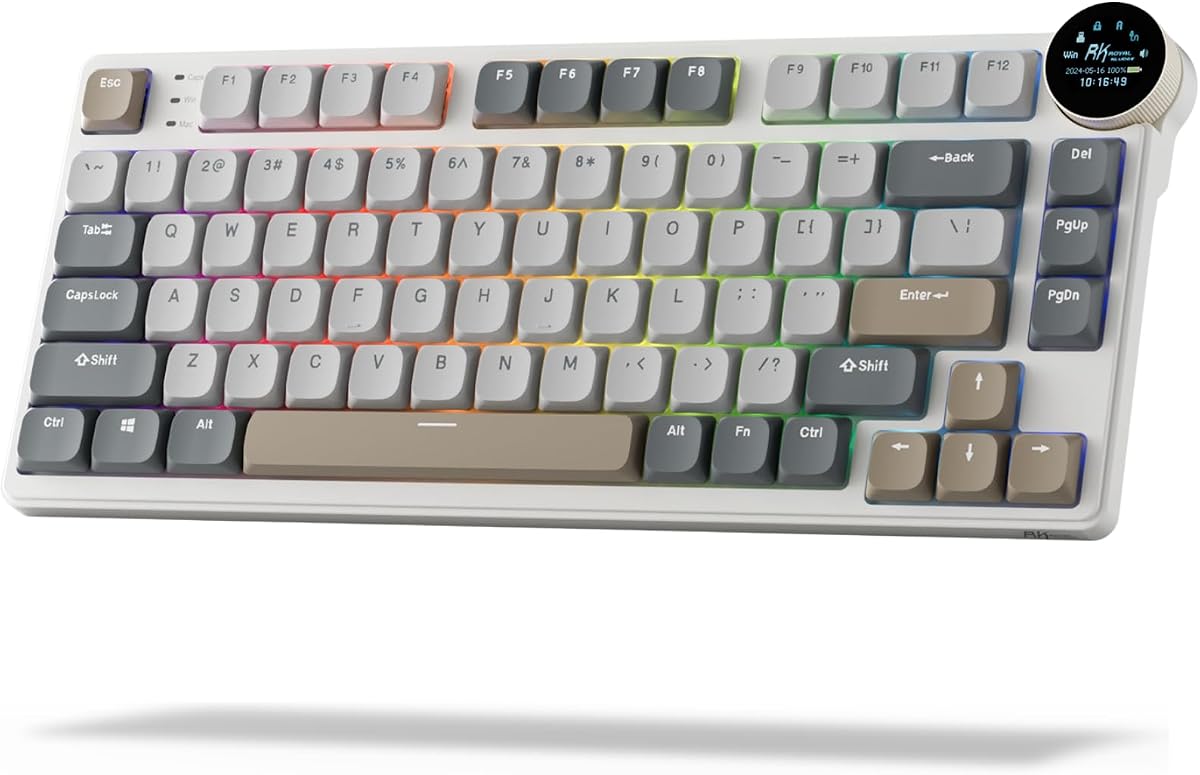
The RK Royal Kludge N80 distinguishes itself with a small smart display and a multifunction knob, giving this compact low profile keyboard more control and status information than a basic model. Its 4.1 rating is supported by a feature list that covers gaming, office work, connectivity, and acoustic refinement. It is the sort of board that can serve as the visual and command center of a compact desk.
We may earn a commission when you buy through this link, at no additional cost to you.
The screen can display custom GIFs, the date, connection modes, Windows and Mac layouts, and battery status. Turning or pressing the knob controls volume, connection mode, backlight brightness and speed, and RGB modes or colors. That means common adjustments are available without opening software. Bluetooth 5.0, 2.4GHz wireless, and USB-C wired operation further strengthen its versatility across computers and mobile devices.
Structurally, the N80 uses a top-mounted design intended to produce a firmer keystroke and increase feedback. Its heavy-duty base addresses the wobble associated with some low profile boards. Dual sound-absorbing foam layers and a silicone bottom pad reduce hollow sound and cavity noise. The main question is whether the screen and knob justify their visual presence for buyers who want a completely understated tool.
The N80 is a compelling pick for gamers and productivity users who enjoy visible status information and direct control. It also suits anyone frustrated by unstable low profile designs. Its compact proportions, reduced travel, and dampened construction support everyday use, while the display and knob add meaningful differentiation beyond basic RGB lighting.
The compact screen displays battery status, layout and connection information, dates, and custom GIFs. It makes the keyboard more interactive without requiring a separate application to check basic status.
The knob adjusts frequently used settings such as volume, lighting, and connection mode. A click can confirm selections, making the control practical for quick changes during work or play.
We may earn a commission when you buy through this link, at no additional cost to you.
The Lofree Flow Lite 84 is a compact low profile mechanical keyboard designed around comfortable everyday typing. Its 4.3 rating, 75% layout, low front height, and reduced-force switches make it a versatile choice for office work, study, and general productivity. It also supports hot-swappable sockets, allowing users to replace the included Specter linear switches without soldering.
We may earn a commission when you buy through this link, at no additional cost to you.
The Specter Full POM linear switches use a 40gf operating force, down from the 50gf version referenced in the product information. The lower force is intended to reduce finger fatigue during long sessions, while the gasket mount and enhanced dampening layer create a softer, more cushioned response. PBT double-shot keycaps offer a matte, durable surface, with PC letter portions allowing the backlighting to show through.
Connectivity is comprehensive: 2.4GHz wireless, Bluetooth, and USB-C wired operation are all supported. The 2.4GHz mode offers a 1000Hz polling rate, and the Lofree Key Mapper provides key customization. A built-in adjustable kickstand and aluminum roller volume control are practical additions. The main drawback is the textured ABS body, which prioritizes lightness and value rather than the visual heft of aluminum. The mixed PBT and PC keycap construction may also matter to buyers seeking a completely uniform material.
The Flow Lite 84 is a strong all-rounder for users who want a comfortable, programmable, portable mechanical keyboard without moving to a full-size board. It is especially attractive when long typing sessions, wireless flexibility, and a clean 75% footprint matter more than premium enclosure materials.
The 40gf Specter switches reduce the force required compared with many low profile alternatives. Combined with full POM construction and a gasket mount, they aim to keep long typing sessions comfortable without sacrificing a linear response.
The built-in kickstand avoids a separate accessory, while the aluminum volume roller provides immediate volume adjustment. Together with three connection modes, these details make the keyboard well suited to changing workspaces.
We may earn a commission when you buy through this link, at no additional cost to you.
The Keychron K1 Ultra 8K is the most performance-oriented keyboard in this guide, combining an 80% TKL layout with up to 8K wired polling, tri-mode connectivity, and open-source firmware. Its 4.7 rating is the highest among the ten products and helps justify its position as the premium selection. The keyboard targets users who want rapid input, broad customization, and a slim profile in the same package.
We may earn a commission when you buy through this link, at no additional cost to you.
Its 2.4GHz and Bluetooth 5.2 modes make it suitable for mixed work and gaming setups, while the wired mode unlocks the advertised 8K polling rate. The 80% layout saves space by removing the number pad but retains commonly used navigation and function keys. A programmable knob can handle volume, backlighting, media, or other assigned functions.
Low profile POM switches use shorter travel and sit in hot-swappable sockets, letting users change them without soldering. ZMK firmware, the Launcher web app, and Keychron's AI assistant provide remapping, layers, macros, and shortcut tools. RGB backlighting offers 22 effects, sound-dampening layers target noise and resonance, and double-shot keycaps are paired with wax-oil-treated hardwood side panels.
It is important to distinguish the headline 8K figure from the other wireless modes: that maximum polling rate is associated with wired use, while 2.4GHz and Bluetooth remain the convenient wireless choices. Even with that nuance, the K1 Ultra 8K offers one of the strongest overall specifications here. It is best suited to gamers, technical users, and enthusiasts who want high polling, open firmware, and switch flexibility in a refined slim board.
The keyboard supports up to 8K polling in wired mode, giving competitive players a very high reporting rate. Wireless modes remain useful for convenience, but a wired connection is the appropriate choice when maximizing polling performance is the priority.
ZMK firmware, the Launcher app, AI-assisted setup, hot-swappable sockets, and a programmable knob create a flexible ecosystem. Users can tailor the 80% layout for work, gaming, or navigation without reaching for a full-size board.
We may earn a commission when you buy through this link, at no additional cost to you.
The Keychron K17 Max offers one of the most practical layouts for users who want a compact mechanical keyboard without giving up a number row. Its 96% arrangement maintains a familiar, near-full-size feel, and the ultra-slim aluminum body and Gateron low profile switches reduce visual and physical bulk. The 4.4 rating reflects a well-rounded combination of typing feel, connectivity, and customization.
We may earn a commission when you buy through this link, at no additional cost to you.
The keyboard supports 2.4GHz wireless, Bluetooth, and USB-C wired connections. Its 2.4GHz mode provides a 1000Hz polling rate, while Bluetooth 5.1 supports up to three devices. QMK firmware and the cross-platform Launcher web app enable key remapping, macros, and shortcuts. For users who enjoy a tactile bump, the included low profile Brown switches offer a middle ground between linear and heavier clicky feedback.
The Gateron low profile switches are described as 31% thinner than standard switches, contributing to the shallow aluminum frame. Double-shot PBT keycaps are designed to resist shine and oil, a useful feature for long-term ownership. As a 96% keyboard, however, it still needs more width than a 75% board because it retains the number row, and the Brown switch profile may not appeal to players who prefer the immediate, bump-free response of a linear switch.
The K17 Max is ideal for spreadsheet users, programmers, and general typists who want a compact but familiar layout. It offers wireless flexibility, tactile mechanical feedback, and advanced firmware without moving to the substantially shorter 75% or 80% formats. For those who can accept a slightly wider desk footprint, it is a particularly sensible near-full-size choice.
The 96% format keeps the number row and dedicated navigation area, preserving familiar placement for touch typists. Its low profile switches and slim aluminum frame reduce the bulk normally associated with that comprehensive layout.
QMK and Launcher make it straightforward to build layers, shortcuts, and macros. Combined with the Brown switch profile, this makes the K17 Max suitable for users who want both tactile feedback and software control.
We may earn a commission when you buy through this link, at no additional cost to you.
The Lofree Flow Lite 100 delivers a useful compromise for users who need numeric entry but dislike the width of a traditional full-size keyboard. Its compact 100-key design, 4.4 rating, and low profile construction make it especially appealing for spreadsheet work, accounting, and mixed desktop use. It combines a shallower body with a reduced number pad and a travel-friendly wireless design.
We may earn a commission when you buy through this link, at no additional cost to you.
The keyboard uses hot-swappable Specter Full POM linear switches with a 40gf operating force. Its gasket mount, enhanced sound-dampening layer, and lower front edge are intended to reduce finger fatigue and produce a cushioned tone. The PBT double-shot keycaps use a two-tone construction, with PC letter areas enabling backlighting and PBT providing a matte surface elsewhere.
Connectivity covers 2.4GHz, Bluetooth, and wired USB-C operation. The 2.4GHz mode supports 1000Hz polling, while the Lofree Key Mapper handles per-key customization. An aluminum roller adjusts volume, and the integrated kickstand adjusts the typing angle. Its 3000mAh battery is listed for up to 100 hours with all lights off, improving the likelihood that it can remain useful for several workdays between charges.
The ABS housing does not provide the same visual solidity or premium impression as an aluminum body, and the 100-key format still takes more space than the 75% and 80% choices here. Nevertheless, the Flow Lite 100 offers the best balance for a buyer who says a standard full-size keyboard is too large but cannot give up the number pad.
The compact 100-key arrangement preserves a numeric keypad in a relatively restrained footprint. It is a useful middle option between a standard full-size keyboard and a layout that omits number entry entirely.
The 40gf switch force, reduced front height, and cushioned gasket structure support extended use. The listed battery life and integrated kickstand make the board practical for both fixed desks and changing work locations.
We may earn a commission when you buy through this link, at no additional cost to you.
The Keychron K3 Max SE is an exceptionally balanced low profile mechanical keyboard, combining a 4.6 customer rating with a 75% layout, three connection methods, hot-swappable switches, and detailed acoustic tuning. It is a strong recommendation for users who want enthusiast-level features without moving to a bulky full-size design. Its slim body also helps preserve the visual simplicity of a modern desk.
We may earn a commission when you buy through this link, at no additional cost to you.
The 2.4GHz connection offers a 1000Hz polling rate for responsive gaming, while Bluetooth 5.2 supports up to three devices for switching among a computer, phone, and tablet. Wired operation offers another dependable option. QMK firmware and the Launcher web app support remapping, layers, macros, and shortcuts, while the included Mac layout remains compatible with Windows.
Keychron Milk POM switches are described as 31% slimmer than traditional full-profile switches and sit in hot-swappable sockets. EPDM acoustic foam, bottom-case foam, and redesigned stabilizers improve the overall sound and stability. The stabilizer work is particularly relevant to larger keys such as the spacebar, Shift, Backspace, and Enter, which are more prone to uneven movement or wobble.
This model is best for users who want a compact keyboard that can handle both serious typing and gaming. It offers enough speed for play, enough customization for productivity, and enough acoustic refinement for shared spaces. The principal caveat is that the configuration process favors current versions of Chrome, Opera, or Edge when accessing the Launcher in wired mode, but that is a minor limitation for most buyers.
EPDM and bottom-case acoustic foam are used to reduce sound and resonance. Together with the revised stabilizers, they target the hollow and uneven sounds that can make low profile keyboards feel less refined.
A 1000Hz 2.4GHz mode serves fast input, while Bluetooth device switching and QMK layers support productivity. The 75% layout keeps navigation keys without retaining a separate number pad.
We may earn a commission when you buy through this link, at no additional cost to you.
The Razer Ornata V3 is a low-profile gaming keyboard built around accessible controls and a familiar full-size experience. Its 4.5 customer rating reflects a solid overall proposition for players who want shorter keys, dedicated media buttons, and wrist support without moving to a specialist enthusiast board. It is the one model here that uses mecha-membrane rather than traditional mechanical switches, so it belongs in the comparison as a low-profile alternative.
We may earn a commission when you buy through this link, at no additional cost to you.
The slimmer keycaps and shorter switches encourage a more natural hand position and reduce the visual height of the keyboard. Mecha-membrane switches blend mechanical-style clicky feedback with the familiar feel of a conventional keyboard. UV-coated keycaps are designed to resist fading and protect legends from frequent wear, while dedicated backlit media keys can pause, play, skip tracks, and adjust volume or brightness.
The magnetic soft-touch wrist rest attaches directly to the keyboard and provides support during long sessions. That convenience is valuable, although it does add to the overall footprint and may not suit users who prefer a bare desk. Since the switches are not conventional mechanical units and the supplied information does not highlight extensive remapping or layer programming, the Ornata V3 is less attractive to customization-focused enthusiasts.
For a gamer who wants a recognizable full-size layout, low-profile keys, accessible media controls, and an integrated wrist rest, the Ornata V3 is a straightforward recommendation. It is best viewed as a polished low-profile gaming alternative rather than the mechanical equivalent of the QMK- and ZMK-equipped models in this guide.
Slimmer keycaps and shorter switches reduce the height of the typing surface and help position the hands more naturally. The result feels more familiar and approachable than many aggressively compact mechanical keyboards.
Dedicated illuminated media keys provide immediate control over playback, volume, and brightness. The included wrist rest attaches magnetically, making it simple to add support without discovering a separate desk pad.
We may earn a commission when you buy through this link, at no additional cost to you.
Choosing a low profile mechanical keyboard means balancing key travel, layout, connectivity, switch behavior, acoustics, and build quality. The most important step is identifying how and where you will use the keyboard before comparing individual features.
Layout size determines which functions are always available and how much desk space the keyboard occupies. A 75% board removes the number pad but generally keeps function and navigation keys, making it a popular middle ground for productivity. An 80% TKL format offers a similar compact approach, while a 96% layout retains a number row and fits more numeric shortcuts into a smaller width. Full-size and 100-key designs include a number pad, which is useful for spreadsheets but takes considerably more room.
Choose the smallest layout that includes every key you use regularly. If you audit spreadsheets or enter numeric data throughout the day, a compact number pad may justify a larger body. If the keyboard is mainly for writing, coding, browsing, and gaming, a 75% or 80% model usually creates the cleanest desk.
Low profile switches reduce key travel, which can make the keyboard look and feel slimmer while changing the way users type and play. Linear switches move smoothly without a tactile bump, tactile switches add a noticeable rise, and clicky switches provide audible feedback. Operating force also matters: a lighter switch may reduce finger effort during long sessions, while a firmer switch can provide a more deliberate keystroke. Some keyboards also support hot-swappable sockets, making it easier to change switch types later.
Think about your previous keyboard habit as well as your tolerance for sound. Players often appreciate short travel, while typists may prefer a textured or tactile bump that confirms each keystroke. If possible, compare switch descriptions and sound characteristics rather than relying only on the word mechanical.
Low profile keyboards increasingly support USB-C wired mode, 2.4GHz wireless, and Bluetooth, but not every model includes all three. Wired mode offers a dependable connection and may unlock a higher polling rate. A 2.4GHz receiver is generally suited to gaming because it minimizes input lag and avoids Bluetooth pairing overhead. Bluetooth is convenient for travel and switching among laptops, tablets, and phones, though users should follow the manufacturer's recommended device distance to minimize interference.
Check whether wireless switching is built in and how many devices can be paired at once. Also consider battery life, charging time, and whether the keyboard can operate while charging. A board with all three modes gives the most flexibility, while a Bluetooth-only design may be simpler and more convenient for a fixed mobile workstation.
Polling rate indicates how often the keyboard reports input to the computer. Higher rates can benefit competitive gaming, though real-world performance also depends on the connection mode and the rest of the system. Among these options, the Keychron K1 Ultra 8K supports up to 8K polling in wired mode, while several other keyboards support 1000Hz operation over 2.4GHz. Bluetooth and standard wired configurations are more likely to serve general productivity than latency-sensitive competitive play.
Do not treat the largest advertised number as the only measure of quality. Switch stability, connection reliability, firmware, and software all affect the experience. If gaming is central, choose the highest appropriate polling rate available in the mode you will actually use and verify whether it requires a cable.
Programmable keyboards let you remap keys, create layers, assign macros, and change lighting or device behavior. QMK and ZMK are open-source firmware platforms supported by several Keychron models, while the Lofree Key Mapper focuses on remapping through a dedicated application. For simple operation, onboard macro keys can be useful; for advanced workflows, browser-based configurators and layered layouts provide much more control.
Decide how much software involvement you want. Beginners may prefer a straightforward visual remapper, while programmers may value the transparency and flexibility of open firmware. Check that the configuration tool supports your operating system and keep the original layout accessible in case a stored profile needs to be reset.
Low profile designs can produce hollow, sharp, or uneven sounds when their internal structure is not well controlled. Foam layers, bottom pads, gasket mounting, and revised stabilizers can reduce resonance and improve consistency on larger keys. The RK Royal Kludge N80 and Lofree Flow Lite models emphasize multi-layer dampening, while the Keychron K3 Max SE uses acoustic foam and redesigned stabilizers. Switch type also shapes the sound: linear switches are often smooth, tactile switches add a bump, and clicky switches are the loudest.
Listen to recordings when possible and consider where the keyboard will be used. A shared office calls for a quieter, dampened model, while a gaming desk may accommodate more pronounced feedback. Stabilizer quality is especially visible on the spacebar, Shift, Backspace, and Enter, so it is worth considering alongside switch choice.
Aluminum housings can give a keyboard a substantial, premium appearance, while ABS and plastic frames can reduce weight and support easier portability. The Cherry MX 10.0N RGB and Keychron K17 Max use aluminum bodies, whereas the Keychron K3 Version 2 pairs an aluminum top with a plastic bottom. Integrated kickstands, wrist rests, and adjustable feet improve usability, but they can increase the amount of desk space the setup occupies.
Balance weight against appearance and portability. A heavier enclosure may feel steadier during rapid typing, while a lighter design is easier to move between a home office, classroom, and meeting room. Consider whether a detachable or magnetic wrist rest is useful or whether you prefer a bare keyboard and separate support.
RGB lighting adds visual personalization and can make key groups or active layers easier to identify. A small display and rotary knob offer a different kind of utility, potentially showing battery status, date, connection mode, or custom graphics while controlling volume and lighting. The RK Royal Kludge N80 takes this approach most directly, while several Keychron and Lofree boards provide programmable knobs or rollers.
Extra controls are most valuable when they reduce software dependence or provide information at a glance. They are less essential if you already prefer a minimalist desk and rely on operating-system controls. Confirm whether lighting effects, screen graphics, knob functions, and media keys can be customized before deciding that they justify the added complexity.
Begin by charging the keyboard fully if it has a battery, then install the appropriate firmware and configuration software before making extensive layout changes. Connect it through the mode you need: USB-C for a fixed desk or maximum wired polling, 2.4GHz for low-latency wireless gaming, or Bluetooth for switching among portable devices. Update the firmware through the manufacturer's recommended application or browser-based tool to access current layouts, layers, and lighting options.
Choose a layer strategy that matches your work. Keep essential navigation and editing commands on the base layer, place application-specific shortcuts on additional layers, and use clearly labeled indicators or lighting cues where possible. Test every remapped key before relying on it in a timed task. For hot-swappable keyboards, power the board down before removing a switch and confirm that the replacement uses the correct low profile footprint and pin arrangement.
Keep the keyboard clean by disconnecting it from power and gently removing dust with a soft brush or microfiber cloth. Avoid spilling liquids directly onto the keys, and clean keycaps according to their material rather than using one aggressive method for the entire board. Charge according to the manufacturer's guidance, avoid leaving the battery depleted for long periods, and periodically inspect the connection, stabilizers, and feet for looseness or uneven wear.
Low profile keyboards can reduce the need to angle your wrists upward, which may feel more comfortable for some users. However, comfort also depends on switch force, keycap shape, desk height, posture, and personal preference. A shallow board with high-force switches may not be more comfortable than a standard keyboard with a light switch.
Low profile mechanical switches use a shorter housing and reduced travel to create a thinner keyboard. Standard mechanical switches generally provide more key travel and a more pronounced tactile or acoustic character. Low profile models are often quieter and faster on the surface, but individual switch design and tuning still influence the overall feel.
They are better for users who want to conserve desk space while retaining many standard keys. A 75% or 80% board removes the number pad, while a 96% layout generally keeps a number row in a narrower arrangement. If you rely on a separate numeric keypad every day, a full-size or 100-key low profile keyboard may remain more practical.
Bluetooth can work for casual gaming, but a wired or 2.4GHz connection is generally preferable when minimizing latency matters. Several keyboards in this guide support 2.4GHz at 1000Hz, and the Keychron K1 Ultra 8K supports up to 8K polling in wired mode. Check the specifications for the exact model and connection mode you intend to use.
Hot-swap sockets are not essential, but they make it easier to change switch feel without soldering. They are especially useful for experimenting with linear, tactile, or clicky options and for replacing a faulty switch. If you are comfortable with conventional keyboard maintenance and already know which switch type you prefer, a fixed-switch model can still be a sound choice.
Linear switches move smoothly and are commonly preferred for gaming and users who dislike a bump during fast typing. Tactile switches provide a noticeable rise that confirms actuation and can satisfy typists who want more feedback. Quiet operation, operating force, and sound profile should also be considered because both switch categories can vary significantly between designs.
They can be durable when their housing, plate, stabilizers, and switch system are well engineered. Aluminum cases can resist flex, gasket mounts can control internal movement, and sound-dampening layers can reduce hollow movement. Build quality, switch compatibility, and careful cleaning are more informative than profile alone when judging expected longevity.
Yes, and their shallow bodies can make a laptop setup more comfortable by keeping the keyboard elevation lower. Bluetooth models are convenient for portable use, while wired options are useful when charging or maximizing polling performance. Check operating-system key labels and modifier placement before switching between Windows and Mac systems.
The Keychron K1 Ultra 8K is the strongest premium choice for users who prioritize high polling, open firmware, hot-swappable switches, and a compact 80% layout. The Keychron K3 Max SE offers the most balanced enthusiast package with a 75% format, 1000Hz wireless mode, acoustic refinement, and hot-swappable switches. For a feature-rich, budget-oriented choice, the Redragon K618 PRO offers tri-mode connectivity, 20 onboard macro keys, and a compact footprint.
Your priorities should determine the best alternative. Choose the Flow Lite 84 for comfortable typing and a useful 75% layout, the Cherry MX 10.0N RGB for a complete number pad in a very slim body, or the K17 Max for a familiar near-full-size arrangement. The Razer Ornata V3 serves gamers who prefer low-profile keys and dedicated media controls without needing the deeper customization offered by true mechanical enthusiast models.
Before buying, verify the current layout, switch type, connection requirements, operating-system support, and warranty details. Customer ratings and product configurations can evolve, and prices change frequently. Checking current listings and recent feedback will help ensure that the model you choose still matches your desk, workflow, and preferred typing style.