
SABRENT 74-in-1 Internal Reader
4.0Editor score
Supports 74 card formats
Six physical card slots
Adds front USB 2.0 port
This Internal Media Card Reader guide compares ten desktop models for format support, USB speed, bay fit, connectivity, ease of use, and build quality.
An internal media card reader turns a compatible desktop bay into a convenient front-facing hub for cameras, phones, action cameras, and legacy memory cards. The best model combines broad format support, dependable transfer performance, a clean fit, and enough internal connectivity for the systems it is expected to support.
We compared all ten products by examining supported media formats, USB generation, mounting location, card-access methods, operating-system compatibility, built-in indicators, and additional front-panel connections. The list covers basic 2.5-inch and 3.5-inch readers as well as feature-rich 5.25-inch dashboards designed for custom desktop builds.
Each review identifies the strongest use case and practical compromises for its product. The top selections represent the strongest options for budget buying, balanced performance, and premium capability, while prices and availability can change at any time. Always verify bay dimensions, connectors, and card compatibility before purchasing.
4.0Editor score
4.5Editor score

5.0Editor score
This side-by-side comparison highlights each reader's physical format, connection standard, supported cards, and standout front-panel features, making it easier to match a reader to your desktop case and media workflow.


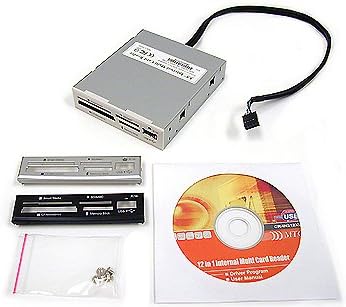
The SABRENT CR-USNT is a budget-oriented 3.5-inch internal reader with a 4.0 rating and a headline claim of support for 74 media types. Its appeal comes from variety rather than cutting-edge throughput: six physical slots cover SD, microSD, CompactFlash, Memory Stick, XD, M2, and several related formats, while a front USB 2.0 port adds a basic way to connect a flash drive or compatible phone.
We may earn a commission when you buy through this link, at no additional cost to you.
The most valuable strength is its flexibility. A photographer can move between camera cards, while a builder who still handles older media gains slots that a modern USB reader might omit. Some Memory Stick variants may require an adapter, so the card's physical design and supported generation should be checked before purchase. The internal power connection is also intended to ensure adequate bus power for attached USB devices.
The main trade-off is USB 2.0. Large photo libraries and high-resolution video files may move more slowly than through a USB 3.0 reader, and the listed operating-system support reflects an older Windows, Linux, and Mac OS X environment rather than a recent platform matrix. That makes it less compelling for a new high-speed workstation, but it remains useful as a broad compatibility panel.
Choose this model when cost control matters and your priority is putting many legacy formats into one 3.5-inch bay. It is less suitable when fast card-to-computer transfers are the main objective or when you need assurance of modern operating-system support. For the stated budget category, its range of slots and extra USB connection make it a practical expansion.
The six slots consolidate formats that would otherwise require several external readers. This is especially helpful for mixed-media workstations containing SD, microSD, CompactFlash, and Memory Stick devices.
The integrated USB 2.0 port turns the reader into a modest front I/O panel. It is convenient for basic peripherals, although USB 2.0 is not the right choice for modern high-speed storage.
We may earn a commission when you buy through this link, at no additional cost to you.
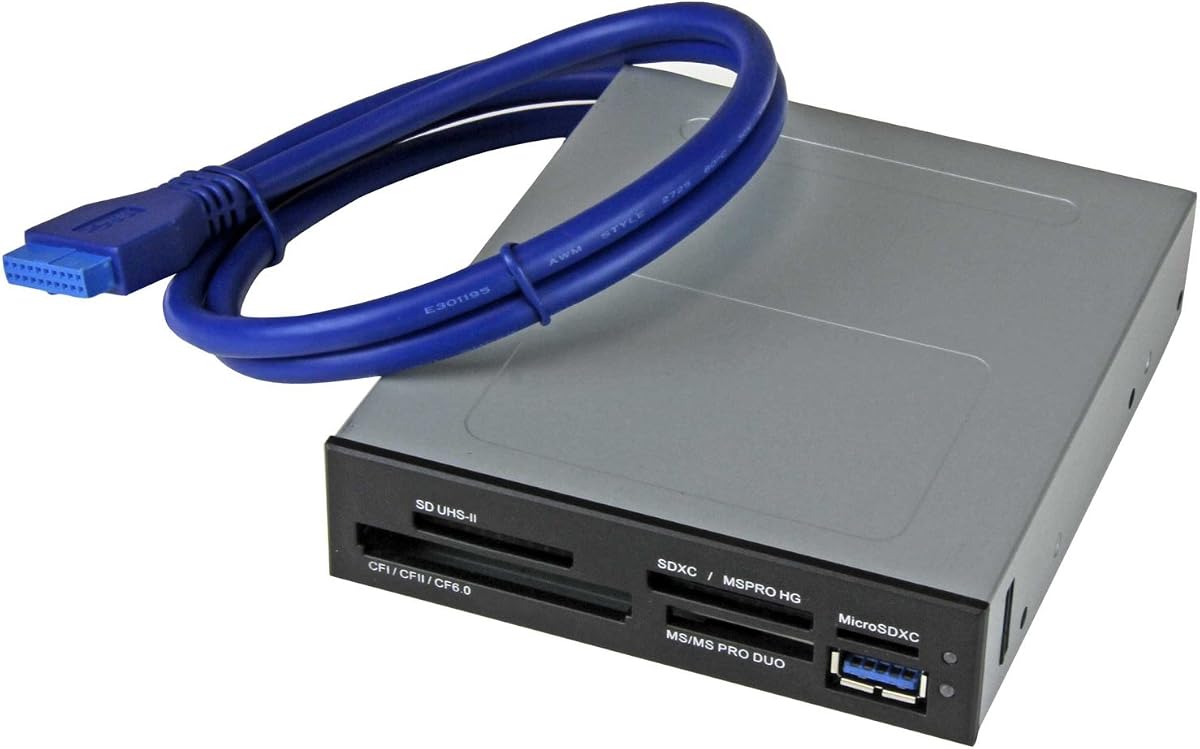
The StarTech 35FCREADBU3 earns a 4.5 rating and stands out as the most balanced professional option in this guide. It fits a 3.5-inch drive bay, connects internally through a 20-pin motherboard header, and places a front-facing USB 3.0 port on the bezel. Its broad card support includes CompactFlash Type I, SD, microSD, SDHC, SDXC, numerous MMC variants, Memory Stick families, and xD.
We may earn a commission when you buy through this link, at no additional cost to you.
Four different card slots can operate at the same time, provided they do not contain the same media type. That arrangement is genuinely useful for photographers, videographers, podcasters, and creators who regularly move footage or still images between two media types. USB 3.0 and UHS-II support also make it better aligned with modern high-capacity cards than a USB 2.0 reader.
Installation requires a suitable internal USB 3.0 header and a 3.5-inch bay, so buyers should verify both before ordering. Its operating-system support is described as independent and compatible with Windows, macOS, and Linux, which is more broadly stated than some competing product descriptions. The reader includes power and activity indicators and a two-year warranty backed by lifetime technical assistance.
This is the strongest recommendation for a builder who wants professional features without moving up to a full 5.25-inch multifunction dashboard. Choose it for simultaneous card access, modern USB performance, and broad media coverage. Those benefits make it the Editor's Choice and a stronger all-purpose choice for creative desktop workstations.
Four simultaneous slots reduce card-swapping when working with camera and flash media together. The restriction against using the same media type at once is reasonable and should be understood before installation.
The internal 20-pin connection avoids an external desktop device and keeps the card reader integrated with the chassis. Built-in power and activity LEDs provide straightforward operational feedback.
We may earn a commission when you buy through this link, at no additional cost to you.
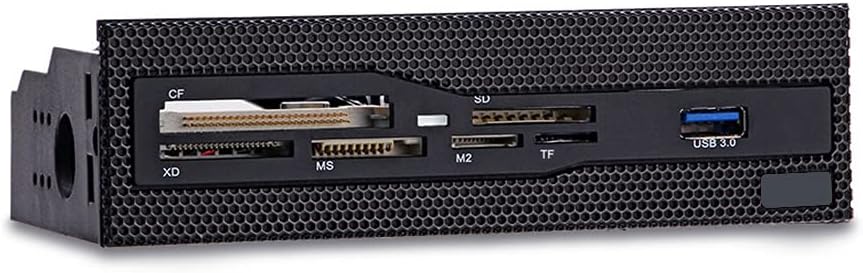
This 5.25-inch dashboard combines a 4.3 rating, six card slots, and a front USB 3.0 port in a single media panel. It supports CompactFlash, XD, Memory Stick, M2, and TF cards, covering many formats still encountered by photographers and collectors. Its grid-style face is designed to integrate with a matching front mesh area on a desktop case.
We may earn a commission when you buy through this link, at no additional cost to you.
The USB 3.0 connection is the main technical advantage over basic USB 2.0 readers. It should provide a more appropriate path for modern flash media and external storage than an older-generation panel. Copper-plated card slots are also highlighted as a means of improving stability during transmission, while the durable panel construction suits a custom-build installation.
Its compatibility depends on having an open 5.25-inch bay and the necessary internal motherboard connections. The description does not offer the same extensive operating-system, simultaneous-access, or card-generation detail found in the StarTech and Vantec entries. That makes it best understood as a straightforward front-panel upgrade rather than a specialist multi-slot workstation reader.
Choose it when your case offers a 5.25-inch opening and you want card access and USB 3.0 without purchasing a larger dashboard with numerous secondary connections. It is especially suitable for a PC builder adding front media access to a case that lacks a card reader.
Six slots cover several common standards, reducing the need to move cards between external adapters. This makes routine imports from several types of photography and video media more convenient.
The durable grid face is designed to blend into cases with a front mesh panel. The result is more integrated than a freestanding external reader while keeping the controls within reach.
We may earn a commission when you buy through this link, at no additional cost to you.
This 5.25-inch media dashboard is designed as a complete front I/O upgrade rather than only a card reader. Its 3.8 rating reflects a solid feature set but trails the leading choices. It combines a five-gigabit-per-second USB 3.0 hub, USB 2.0, eSATA, front audio jacks, and a reader for M2, TF, SD, MMC, Memory Stick, and CompactFlash cards.
We may earn a commission when you buy through this link, at no additional cost to you.
The inclusion of audio and multiple USB connections makes it appealing to custom PC builders who want to avoid reaching behind the chassis. Power and drive-activity LEDs improve visibility, while simultaneous multi-card access allows compatible card types to be handled together. The eSATA and USB 3.0 connections can be useful for both older storage workflows and faster external devices.
There are meaningful caveats. The stated card support reaches up to 64GB, which is modest for present-day high-capacity media, and the product's compatibility description is not as explicit about current operating systems. It also requires a 20-pin USB 3.0 cable, a four-pin power connector, a USB 2.0 jumper, SATA data connections, and front-audio wiring, making installation more involved than a standalone reader.
This dashboard makes the most sense for a builder creating a polished older-style workstation with several front connections. If the sole goal is fast card access, a more focused USB 3.0 reader is easier to install. If the goal is a complete media dashboard, the breadth of ports gives this option a distinct purpose.
USB, eSATA, and audio connections in one bay reduce the need for separate front panels. This consolidation is particularly useful when the chassis has only one available 5.25-inch opening.
Dedicated speaker and microphone jacks improve daily usability, particularly for gaming and podcasting setups. LEDs add visible power and activity information in low-light environments.
We may earn a commission when you buy through this link, at no additional cost to you.
The Vantec UGT-CR940 carries a perfect 5.0 rating and offers the most detailed card compatibility in the group. Designed for Multi-LUN desktop-bay installation and an internal 20-pin USB 3.0 header, it targets users who need more than the common SD and microSD combination. Its stated support spans numerous CompactFlash, Secure Digital, MMC, eMMC, Memory Stick, and xD variants.
We may earn a commission when you buy through this link, at no additional cost to you.
The specification list is unusually thorough. It identifies multiple CompactFlash generations, SD and SDHC standards, SDXC support up to 2TB, microSD variants, several MMC bus modes, and a wide Memory Stick family. For a photographer, archivist, repair technician, or content professional, that breadth reduces uncertainty about whether an uncommon card will fit.
The reader's USB 3.0 connection is appropriate for current desktop workflows and avoids the bottleneck associated with USB 2.0. Its Multi-LUN format may fit several desktop cases, but installation details should still be checked against the chassis. Some capacity figures in the card specification are exceptionally high relative to consumer media, reflecting standards support rather than a guarantee that every listed capacity is practically available.
The Vantec is the premium recommendation for users who value comprehensive card standards and a high-rated, modern interface. It is not the simplest choice for a basic office PC, but for a creator's workstation or specialist archive system, the expansive compatibility can justify the more advanced positioning.
The reader covers generations and variants across several major card families. That breadth is valuable when a workflow includes older cameras, specialized equipment, or mixed archival media.
Support for high-capacity SD, SDHC, and SDXC media suits modern camera workflows. A USB 3.0 internal connection also provides a more appropriate transfer path than older USB 2.0 models.
We may earn a commission when you buy through this link, at no additional cost to you.
The TCC-QL5E is a 5.25-inch multifunction dashboard with no supplied star rating. Its defining characteristic is connection density: a built-in USB 3.0 port, USB 2.0, eSATA, SATA, a four-pin power connection, front audio, and a five-in-one reader for M2, TF, SD, MMC, Memory Stick, and CompactFlash cards.
We may earn a commission when you buy through this link, at no additional cost to you.
This combination is useful for a legacy workstation that needs old and new storage interfaces in one location. USB 3.0 is specified at up to 5Gbps, while USB 2.0 operates at up to 480Mbps. LEDs report power and hard-drive read/write status, and the audio connection moves speaker and microphone access to the front of the chassis.
The installation requires a substantial set of cables, including a 20-pin USB 3.0 cable, four-pin power, USB 2.0, two SATA data cables, and audio wiring. The card reader is described as supporting cards up to 64GB, so buyers using newer high-capacity media should verify expectations. The operating-system statement also lists older Windows versions and Linux or OS support.
Choose the TCC-QL5E only when its broad front I/O is central to the build. A photographer who mainly needs fast card access will find a focused USB 3.0 reader easier to configure. As a single-bay connectivity hub for older desktop hardware, however, it remains unusually capable.
SATA and eSATA support gives the dashboard value beyond card reading. This is helpful when reviving an older workstation that still uses those storage interfaces.
The supplied cable set supports the dashboard's many functions, but the number of connections can make it less convenient than a dedicated reader. Case planning is essential before installation.
We may earn a commission when you buy through this link, at no additional cost to you.
The Sony MRW620/U1/181 is an internal 17-in-1 reader and writer with a 4.0 rating. It was designed for a desktop era when memory cards were transferred through dedicated internal panels rather than increasingly capable external readers and docks. Black and ivory faceplates allow some flexibility in matching the chassis.
We may earn a commission when you buy through this link, at no additional cost to you.
Its strongest practical feature is drive-letter recognition software, which simplifies assigning and identifying the mounted card volumes. The reader-writer format means it can handle relevant write tasks as well as reading images and data, subject to card and operating-system support. It is especially relevant to restoring an older compatible Sony desktop or workstation.
The product's listed system compatibility is limited to Microsoft Vista and Windows XP Home and Professional, which is the decisive issue for modern buyers. The detailed card formats, connection generation, and included mounting information are also not specified in the supplied data, so compatibility must be confirmed before purchase. It should not be assumed to offer modern high-capacity or UHS-II performance.
This is a specialized recommendation for a compatible legacy machine, not a general upgrade for a current desktop. If you are restoring period-correct hardware or need a simple internal reader with automatic drive-letter assignment, it can be functional. For any new Windows, macOS, or Linux build, choose a more explicitly supported modern alternative.
Drive-letter recognition software reduces the need to manage manually assigned letters. It is a useful feature in a fixed workstation used as an editing or transfer station.
The reader and writer combination reflects the needs of older desktop workflows. Its operating-system focus makes it best reserved for hardware restoration or dedicated legacy use.
We may earn a commission when you buy through this link, at no additional cost to you.
The MTG All-In-One is one of only two products in the guide with a perfect 5.0 rating. Its defining advantage is physical efficiency: it fits a 2.5-inch bay, making it a more space-conscious internal option than the 3.5-inch and 5.25-inch alternatives. Black, silver, and white bezel options help it blend into a range of older desktop cases.
We may earn a commission when you buy through this link, at no additional cost to you.
The supplied information is limited, so the reader should be evaluated primarily on its installation format and simplicity. An all-in-one internal reader gives direct card access without occupying a full external desk position. That makes it practical for compact legacy desktops that have an available 2.5-inch bay but little room for a larger panel.
There is no stated USB generation, supported-card list, operating-system compatibility, indicator information, or indication of simultaneous card access. Those omissions make the product impossible to compare confidently on transfer speed and modern media compatibility. Its high rating is meaningful as supplied information, but it should not be confused with an independently described performance test.
Choose this reader only after confirming the actual slot formats and connector requirements with the seller or manufacturer. It is a plausible compact solution for a compatible system, but the three more technically documented modern options are safer for a current build. Its strongest selling point remains efficient use of a 2.5-inch bay.
Fitting a 2.5-inch bay gives builders more placement options than a larger front panel. It can be particularly useful in older compact desktops where space is limited.
Three bezel finishes provide basic visual flexibility. Although color matching is secondary to compatibility, it helps the internal reader look less intrusive in a finished system.
We may earn a commission when you buy through this link, at no additional cost to you.
The Akasa AK-ICR-07 has a 4.2 rating and uses a six-port design in a 3.5-inch bay. It is built around convenient front access, with dedicated ports for media cards and adapters. Compatibility with SDHC cards is explicitly noted, while an additional USB port provides another front connection for USB memory sticks or compatible mobile phones.
We may earn a commission when you buy through this link, at no additional cost to you.
Status feedback is handled by two LEDs that indicate power, card insertion, and data transfer. This is useful in a busy workstation because the user can confirm that a card is recognized without repeatedly checking the operating system. Black and Classic White fascia panels allow a degree of visual coordination with the chassis.
The product description suggests an older generation of desktop connectivity rather than a focus on the newest USB standard. Dedicated adapter positions are helpful, but they also mean the physical slot count can overstate the number of cards that can be inserted directly. Current card-generation, USB-version, and operating-system requirements should therefore be confirmed before installation.
The Akasa is a good fit for users who value clear card access, physical indicators, and an extra USB port more than maximum transfer speed. It is also a sensible option for a compatible legacy desktop that has a 3.5-inch bay. Modern high-volume creators should compare it with the StarTech or Vantec USB 3.0 models first.
Power, card-in, and transfer indicators reduce uncertainty during media imports. Those cues are especially useful when working in a dim studio or editing room.
Separate adapter positions keep small media adapters organized and readily available. They also reduce the chance of losing a frequently used adapter during a busy workflow.
We may earn a commission when you buy through this link, at no additional cost to you.
The MTG CR-IN212XU-1 is a 22-in-1 USB 2.0 internal reader with no supplied star rating. Its metal enclosure fits a 3.5-inch bay and supports CompactFlash, IBM Microdrive, SmartMedia, SD and MMC, the Memory Stick series, and other media. The headline format count includes the various card types and adapter combinations the unit accommodates.
We may earn a commission when you buy through this link, at no additional cost to you.
Four slots can be used simultaneously for data exchange, making this older model more flexible than a basic single-slot reader. Hot-swappable and plug-and-play operation simplify card changes, while the bus-powered design requires no external power supply. Media icons and four color-coded slots are intended to make card identification easier.
USB 2.0 is the primary limitation. The listed transfer rate of up to 4.5MB per second is modest compared with modern USB 3.0 alternatives, particularly for large video files or high-resolution images. The product also lacks a supplied star rating and a detailed modern operating-system compatibility statement, so its relevance depends on the age of the target computer.
Choose this reader for a compatible legacy desktop that frequently handles CompactFlash, SmartMedia, Memory Stick, or older SD media. Its simultaneous slots and hot-swappable design remain useful in an archival or repair workstation. For a contemporary build, prioritize a reader with clearly stated USB 3.0 support and current system compatibility.
Using multiple slots at once can shorten card-exchange workflows involving different media standards. It is particularly relevant to legacy media recovery and photo-processing tasks.
Because the reader needs no external power supply, installation can be straightforward within a compatible desktop. Hot-swappable support also makes card changes more convenient.
We may earn a commission when you buy through this link, at no additional cost to you.
The right internal media card reader depends on your desktop chassis, card standards, operating system, and transfer priorities. Start with physical fit and connector layout, then narrow the field by speed, supported media, and convenience features.
Internal readers are commonly designed for 2.5-inch, 3.5-inch, or 5.25-inch bays. A 2.5-inch reader is useful in compact or older desktops, while a 3.5-inch reader remains common in towers and mid-towers. A 5.25-inch dashboard generally requires a full optical-bay opening and may suit a custom gaming or workstation build. Measure the available space and check for conflicting optical drives, cages, or reservoir hardware before ordering.
Choose a reader that matches an existing bay without modifying the chassis. Pay attention to the full depth, width, and height of the unit, not merely the nominal bay size.
Modern camera workflows commonly rely on SD, SDHC, SDXC, and microSD, but photographers may also need CompactFlash, while older Sony devices use Memory Stick variants. M2, XD, MMC, and SmartMedia appear in specialized or legacy equipment. A product's headline format count can include adapters or combinations, so review the stated slot list rather than relying on the number alone.
Also determine whether your cards require an adapter and whether a full-size SD slot accepts both standard and microSD media. Verify the maximum card generation as well, especially for high-capacity SDXC or newer microSD cards.
USB 2.0 remains adequate for many small files, but USB 3.0 is preferable for large photo libraries, high-resolution video, and memory cards with fast sequential or burst performance. The reader's internal header must match the motherboard connection, and it may also require a separate internal power connector. A front-facing USB port is a separate feature from the card-reader interface and should not be confused with it.
For modern systems, prioritize a clearly documented USB 3.0 reader. For legacy computers, confirm that the motherboard provides the required header and that the operating system supports the connection.
Readers with multiple active slots can transfer files between two different card types at the same time. This is valuable for creators working with camera cards, flash cards, and audio media during the same session. The restriction in the leading model is important: simultaneous access applies to different card types, not two cards of the same type.
If your workflow is dominated by one format, such as SD cards from a modern camera, simultaneous access may matter less than a compatible slot shape and faster interface. Confirm both details before paying for a more elaborate panel.
Some older internal readers list Windows XP or Vista compatibility, which makes them poor choices for a current workstation even if their physical installation remains possible. Modern buyers should favor products that clearly identify current Windows support or explicitly state broad compatibility across Windows, macOS, and Linux. Legacy models can still be useful in a dedicated period-correct computer.
Operating-system support should be checked alongside the reader's driver requirements. A plug-and-play description is helpful, but it is most valuable when the product's supported platform range includes the computer you own.
A 5.25-inch dashboard may add USB 2.0, USB 3.0, eSATA, SATA, and front audio connections. These features can replace separate front I/O accessories and make a custom desktop more convenient. They also increase installation complexity because each connection may need its own internal cable, header, power lead, or audio plug.
Choose a multifunction dashboard when consolidating front connections is a priority. Choose a dedicated card reader when you want a simpler installation and a cleaner focus on media transfer.
Power, card-in, and activity LEDs help confirm that the reader recognizes a card and that data is moving. In a studio or office, this feedback can be more valuable than a long list of secondary ports. It reduces the need to open file-management software solely to determine whether the hardware has mounted correctly.
A clear front-panel design and color-coded slots also improve usability. These are secondary benefits, but they can make frequent card changes less frustrating.
Metal enclosures can feel durable, while ABS plastic and black finishes are common in front-panel dashboards. Aesthetically matching bezel colors helps the reader integrate into an older case, while grid or mesh-style panels suit cases with perforated fronts. For a compact system, a 2.5-inch model may look less intrusive than a full dashboard.
Construction should complement rather than outweigh compatibility. First confirm the bay, connectors, cards, and operating system; then choose the finish and layout that best suit the finished system.
Before installation, shut down the computer, disconnect its power, and consult the desktop or motherboard manuals. Confirm that the selected bay is available and that the motherboard has the required USB header, power connection, SATA cable, or audio lead. Mount the reader with the supplied screws or tool-free retention mechanism as appropriate, then connect each cable without forcing it.
After powering on, insert a compatible card while the system is running and wait for the operating system to assign it a drive letter. Copy or import files rather than removing the card during an active transfer. If a card is not recognized, test it in another reader, check the adapter orientation, and confirm that the exact card generation is supported. Do not force a card into a slot that appears too narrow.
Handle cards by their edges, keep the contacts clean and dry, and avoid operating the reader in a dusty or wet environment. When moving the desktop, unplug all card media and support the reader and its cables so they do not tug against the motherboard headers. Update the operating system and any required card-reader software before a major editing project.
No. The computer must have a compatible drive bay and the appropriate internal USB, power, SATA, or audio connections. The reader's operating-system support must also include the system in question, and some legacy products are limited to older versions of Windows.
It matters most when transferring large photo libraries, high-resolution video, or cards that support fast sequential transfer rates. USB 2.0 can still handle everyday smaller files, but modern USB 3.0 models generally reduce bottlenecks during substantial imports.
A 3.5-inch reader normally installs in a standard hard-drive bay and provides a compact set of card slots. A 5.25-inch dashboard requires an optical-drive-sized bay and often adds USB, eSATA, SATA, and audio connections for a more complete front I/O solution.
Many readers include both slot types or provide an SD-to-microSD adapter, but this must be confirmed for each product. Also verify that the reader supports the capacity and speed generation of your particular cards, particularly high-capacity SDXC and newer microSD media.
Many modern operating systems recognize standard USB card readers automatically, while older readers may include drive-letter recognition software or require drivers. Check the product documentation and operating-system compatibility statement, especially when restoring an older Windows XP, Vista, or period-specific desktop.
No. Wait for the transfer to finish and confirm that the operating system is no longer accessing the card before removing it. Pulling a card during active reading or writing can interrupt a transfer and may corrupt files on the card.
For a modern photographer, transfer speed and support for the exact card generations in use usually matter more than a large headline format count. Format variety becomes more important for legacy collections, repair work, or a workstation that handles several specialized types of media.
The SABRENT 74-in-1 stands out as the best budget choice because it combines numerous media formats with a useful front USB port in a 3.5-inch format. The StarTech USB 3.0 UHS-II model is the Editor's Choice because its modern connection, four simultaneous card slots, broad media support, and clear cross-platform positioning make it the most balanced recommendation.
The Vantec Multi-LUN reader is the premium option for users who require extensive card standards and a high-rated USB 3.0 platform. Before choosing any model, prioritize the physical bay, internal headers, card generations, operating-system support, and USB connection. A large format count cannot compensate for a reader that is incompatible with your desktop.
Prices, stock, and product revisions can change, so review the current listing and seller details before ordering. Confirm the supplied connector set, card support, and case dimensions again, and only select a reader whose physical requirements your system can satisfy without avoidable modification.