Nelko P21 Label Maker
4.4Editor score
Bluetooth phone connectivity
High-resolution thermal printing
Extensive creative templates
Explore the best smart home office gadgets of 2026, comparing charging, lighting, labeling, smart control, organization, and productivity features.
Smart home office gadgets can transform a crowded desk into a more focused, connected, and efficient workspace. The most useful products reduce cable clutter, improve lighting, automate power control, personalize daily routines, and help organize the objects that surround you.
We compared ten practical options across power management, task lighting, labeling, visual decor, smart home control, and multifunctional desktop technology. Selection factors included useful features, device compatibility, space requirements, safety protections, ease of use, and customer ratings.
Each pick reveals what it does best and where its compromises matter, helping you match a gadget to your room, routine, and devices. Prices and availability can change, so confirm current listing details before making a final purchase decision.
4.4Editor score

4.8Editor score

4.0Editor score
The table below compares all ten products by their main function, connectivity, physical design, and standout workspace benefit, making it easier to identify the right gadget for your setup.


The Addtam Surge Protector is a wall-mounted nine-in-one outlet extender with a 4.6 customer rating. It combines five AC outlets, one USB-C port, three USB-A ports, and an automatic night light, making it one of the most versatile options for offices that lack accessible power.
We may earn a commission when you buy through this link, at no additional cost to you.
Its three-sided design gives bulky plugs more room, and the stated 1.7-inch spacing helps reduce interference between large adapters. The USB-C port supports up to 3A, while each USB-A connection supports up to 2.4A. These outputs suit everyday accessories, although they are not intended to replace a high-output charging station for several demanding devices at once.
The dusk-to-dawn sensor activates the perimeter light when ambient illumination falls, while a sensor switch allows manual control. A removable screw and rear plastic prong add stability, although the prong must be cut for use with USB receptacles or GFCI outlets. That installation caveat is worth checking before ordering.
This extender is a strong fit for a compact home office, nightstand, or hallway workspace where every outlet matters. It is especially useful when a desk has too many adapters but little room for a conventional power strip. For shoppers who value lighting, charging, and flexible mounting in one compact accessory, it is an adaptable choice.
Unlike a loose power strip, this unit can be secured directly to a duplex wall outlet. That turns the wall itself into a centralized charging point and keeps charging cables from spreading across the floor.
The integrated night light can make a dark office or hallway easier to navigate without turning on an overhead fixture. Manual override adds flexibility for users who prefer consistent illumination.
We may earn a commission when you buy through this link, at no additional cost to you.
The 6FT Power Strip Tower has a 4.7 customer rating and provides 12 AC outlets plus four USB charging ports. Its vertical format is designed for desks where a conventional horizontal strip would occupy valuable working space or create an untidy row of tangled adapters.
We may earn a commission when you buy through this link, at no additional cost to you.
The tower measures 3.15 by 3.15 by 5.79 inches, allowing it to stand beside a monitor or beneath a desk. Angled outlets help prevent a neighboring plug from blocking access, while the six-foot cord provides placement flexibility. The USB section includes two USB-A and two USB-C ports with a combined output of 3.4A.
That shared USB output is the main limitation for a power hub used as a charging station. It works well for phones, earbuds, and similar accessories, but demanding devices may charge more slowly when several ports are active. The tower also includes overload, short-circuit, and over-current protection, along with a reset switch.
This model is ideal for a power-intensive office with a computer, monitor, docking equipment, chargers, and other peripherals. It offers a cleaner alternative to a sprawling horizontal strip and places frequently used outlets within easy reach. Buyers who need abundant AC capacity will find it especially practical.
The compact tower turns a large collection of plugs into a centralized station. Its wide-spaced outlets can accommodate different adapter shapes more comfortably than a densely packed extension cord.
Four rubber feet help the tower remain in place while cables are attached or removed. This is a meaningful advantage over lightweight strips that can shift across a smooth desk.
We may earn a commission when you buy through this link, at no additional cost to you.
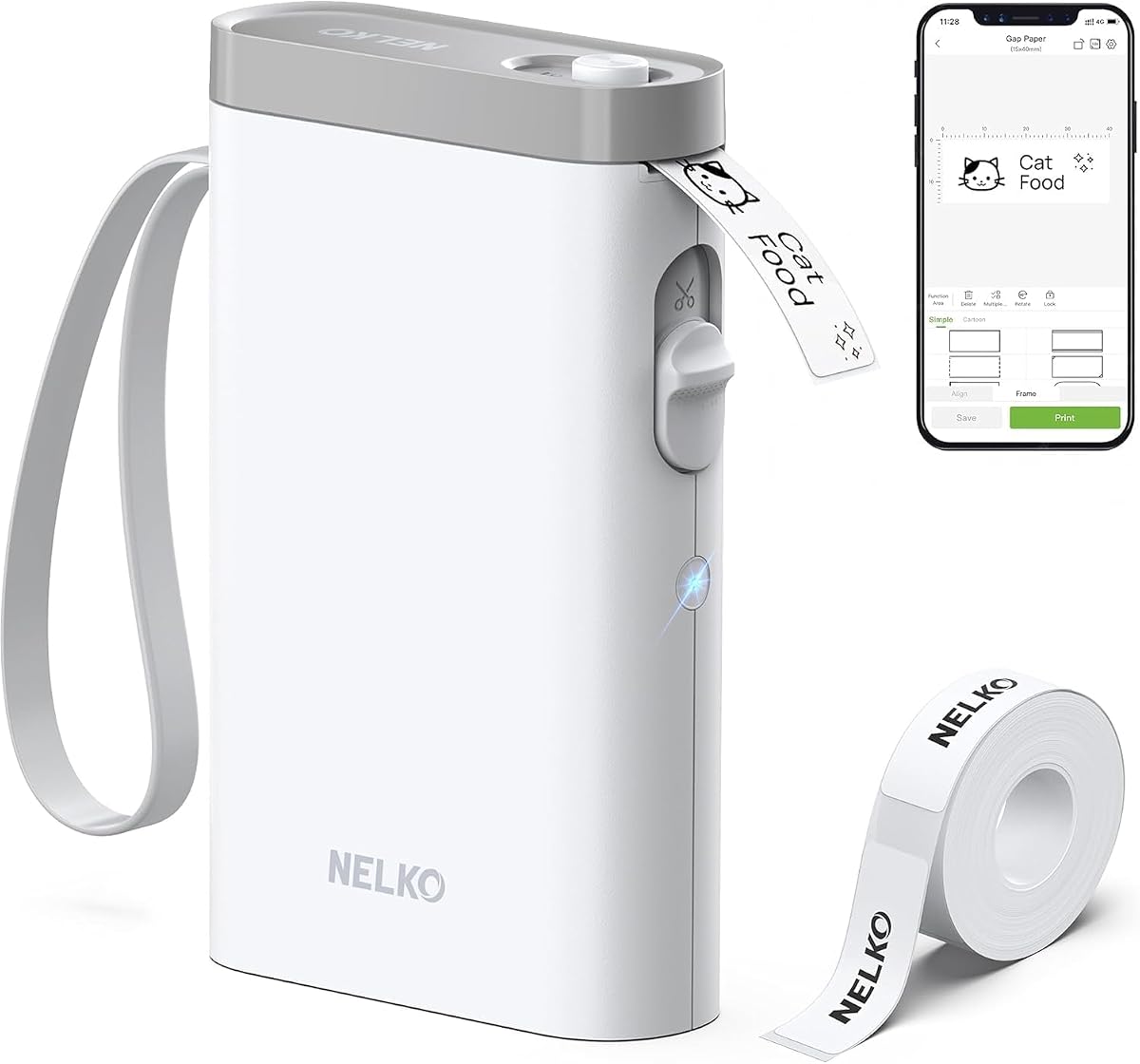
The Nelko P21 Label Maker carries a 4.4 rating and offers a surprisingly capable set of organization tools in a compact body. It prints monochrome labels at 203 DPI using direct thermal technology, eliminating the need for ink or toner while supporting text, QR codes, barcodes, borders, images, and other graphics.
We may earn a commission when you buy through this link, at no additional cost to you.
Bluetooth connectivity allows the printer to work with iOS and Android phones through the Nelko app. The software includes thousands of icons, hundreds of borders, numerous materials, and a large template collection. It also offers fixed label lengths, which keeps tape selection straightforward but limits users who want fully variable-length printing.
Compatibility deserves attention. The product is not compatible with Google Pixel phones running Android 14, and the charging adapter is not included. It also does not work with computers. Even with those limitations, the rechargeable battery, 203-DPI output, and portable size make it effective for labeling drawers, supply bins, cables, notebooks, and household storage.
This label maker is an affordable choice for teachers, home organizers, crafters, and administrative workers who want a practical system for identifying recurring items. It may not suit a workflow built around desktop computers or unlimited label dimensions, but for phone-based labeling it provides impressive creative flexibility in a portable format.
The app turns the label maker into more than a basic text printer. Templates and design elements make it practical for inventory, classroom supplies, shipping preparation, and identifying frequently misplaced household items.
Its compact proportions allow it to move between a home office, classroom, or travel bag. Direct thermal output keeps maintenance simple because there is no cartridge to replace.
We may earn a commission when you buy through this link, at no additional cost to you.
This second 6FT Power Strip Tower shares the same broad design as the second-ranked option and has a 4.7 customer rating. It combines 12 AC outlets with two USB-A and two USB-C ports, making it suitable for offices where computers, monitors, docks, lamps, and mobile devices all need convenient access to power.
We may earn a commission when you buy through this link, at no additional cost to you.
Its 0.30-inch flat plug is designed to sit flush against a wall, which is particularly useful behind a sofa, nightstand, bookshelf, or headboard. The 45-degree right-angle outlet orientation improves access to the wall receptacle. A six-foot extension cord gives the tower enough reach to reach a desk from an outlet that is not directly underneath it.
The compact tower occupies 3.15 by 3.15 by 5.79 inches and rests on four rubber feet. It includes 1800-joule surge protection, overload and short-circuit protection, over-current protection, and a reset switch. As with many multiport strips, the four USB ports share 3.4A of total output, which can limit speed when multiple devices draw power together.
Compared with a conventional horizontal power strip, this product is better suited to users who value vertical organization and abundant AC outlets. It is a particularly good match for a dedicated office, dorm room, or media area, while buyers with only a few devices may find a smaller strip easier to manage.
The thin flat-head plug and angled outlet design reduce the gap that often develops behind furniture. That makes the tower more practical in locations where a thick plug would be inconvenient.
Twelve AC outlets and four USB connections offer enough capacity for a heavily equipped workstation. The vertical form also keeps frequently used connections accessible without stretching a cable across the desk.
We may earn a commission when you buy through this link, at no additional cost to you.
The Angry Mama Microwave Cleaner has a 4.4 rating and offers a low-friction way to loosen food residue and stains inside a microwave. The plastic container is filled with vinegar and water, heated for five to seven minutes, and used to soften grime before the interior is wiped clean.
We may earn a commission when you buy through this link, at no additional cost to you.
Its perforated design releases steam through the top so moisture reaches stuck-on food more effectively. The product contains no harsh chemical cleaner and is described as nontoxic in high-temperature use. Adding a small amount of lemon liquid can also improve the scent left after the cleaning process.
This is a simple gadget rather than an electronic device, but it can meaningfully improve an office kitchen where a microwave is used for lunches. It is dishwasher safe for convenient cleanup. The method still requires manual wiping, and heavily burned or deeply discolored areas may need more than one cycle or additional cleaning.
Choose this option for a shared kitchen, home break room, or small office microwave where routine maintenance has been overlooked. It is less relevant to a desk-only setup, yet its low effort and familiar ingredients make it an appealing addition to a practical list of smart home and office helpers.
Heating water and vinegar creates steam that reaches residue on the microwave walls. The perforated lid distributes that moisture, allowing loosened grime to be wiped away more easily.
A microwave used by multiple coworkers can quickly accumulate splatters. This tool makes a regular deep clean easier and leaves the break room more pleasant for everyone.
We may earn a commission when you buy through this link, at no additional cost to you.
The karidi LED Desk Lamp has a 4.8 customer rating, the highest among the products in this guide. It combines a task lamp, three AC outlets, and four USB charging ports in a single desktop unit, directly addressing two common office problems: inadequate lighting and cable congestion.
We may earn a commission when you buy through this link, at no additional cost to you.
Touch controls provide five color temperatures and five brightness levels. The stated flicker-free, low-blue-light output is designed for prolonged reading, studying, coding, crafting, and gaming. Its weighted base, adjustable arm, and 180-degree rotatable head allow precise positioning while preserving stability on a work surface.
The integrated power section includes two USB-C and two USB-A ports, while the three AC outlets support devices such as laptops, monitors, printers, and workshop tools. A stated capacity of up to 1875W adds flexibility, and the charging functions continue operating when the light is switched off. The tradeoff is that this is a smart, integrated design rather than an app-controlled smart plug.
This lamp is a compelling choice for anyone who wants to reduce desk clutter without sacrificing lighting control. It is particularly useful in a dorm, compact office, creative workspace, or shared family office where one device must handle several roles. Its combination of lighting options, charging access, and stable construction justifies its place as the most versatile desk-focused pick.
The integrated outlets let a laptop, phone, monitor, or small accessory draw power without a separate strip. A single cable to the wall can therefore support most of the devices used around the desk.
Multiple color temperatures and brightness levels make the lamp useful beyond standard desk work. Warm settings suit evening reading, while brighter, cooler modes support focused daytime tasks.
We may earn a commission when you buy through this link, at no additional cost to you.
The RayCue Maclock WB-8 is a retro-styled USB desk clock with a 4.5 customer rating. Its pixel LCD presents the time, calendar, day and date, and room temperature, while a startup smiley animation and removable floppy disk prop deliver a nostalgic early-computer aesthetic.
We may earn a commission when you buy through this link, at no additional cost to you.
The top touch dial makes alarm setup straightforward, with options for off, one-time, weekday, weekend, and daily alarms. A separate lower dial adjusts backlight brightness, allowing a softer glow at night. The included USB-C cable powers the unit, and the complete kit also contains a sticker sheet, manual, and floppy disk holder.
Temperature readings require an extra step because internal display heat can affect the sensor. The clock pauses temperature updates when the backlight is on, and the manufacturer recommends briefly disabling the backlight for more accurate readings. It is also more decorative than task-focused, so buyers seeking only a basic time display may consider it excessive.
This clock is best for a retro gaming setup, creative studio, or home office where personality matters as much as utility. It can act as an information hub and reliable wake-up device while adding a distinctive conversation piece. It is especially fitting for someone who enjoys recreating the appearance of early personal-computer equipment.
Displaying the date and day alongside the time reduces the need to check a phone. For desk workers who follow meeting schedules or recurring appointments, that information can be genuinely useful.
Weekday and weekend alarm modes are more useful than a single generic setting for people with different routines. The one-time option is convenient for appointments or travel days.
We may earn a commission when you buy through this link, at no additional cost to you.
The 32×32 LED Pixel Display has a 3.9 rating and is primarily a customizable visual accent for a gaming or hobby desk. Its 32-by-32 RGB pixel grid can show editable art, text, animations, clock graphics, and templates controlled through a dedicated mobile app.
We may earn a commission when you buy through this link, at no additional cost to you.
Unlike many portable displays, it uses a wired USB connection and has no built-in battery. That design supports stable, long-term operation without repeated charging, although it must remain near a powered computer, outlet, or USB charger. The slim ABS housing can stand on a desk or be mounted vertically on a wall.
Its strongest appeal is personalization rather than productivity. The app's library provides a convenient starting point for users who do not want to design every pixel from scratch. The 3.9 rating is the lowest in this selection, so potential buyers should consider the product primarily as decor and be comfortable with a niche accessory.
This display is best for gamers, streamers, retro-tech enthusiasts, and creative professionals who want a small visual focal point. It can complement a home office with a strong personality, but it offers fewer functional benefits than the task lamp or smart power devices. The right choice depends on whether ambient customization is worth more than practical workspace utility.
The app supports pixel art, editable text, animation, and clock modes. That makes it easy to rotate the display between work indicators, game-inspired graphics, and seasonal decorations.
Its desktop stand and wall-mount capability allow the same panel to work near a monitor or as a small illuminated sign. Continuous USB power is useful for displays that remain on throughout the day.
We may earn a commission when you buy through this link, at no additional cost to you.
The GHome Smart Plug Extender has a 4.4 rating and brings app-based control to a nine-connection outlet system. Three smart AC outlets can be controlled independently, three USB charging ports are managed as a group, and three additional AC outlets remain always on for devices that should not lose power during a schedule.
We may earn a commission when you buy through this link, at no additional cost to you.
Setup uses the GHome app and a 2.4GHz WiFi network, after which compatible outlets can be managed remotely or through Alexa and Google Home. Scheduling options include timers, countdowns, recurring cycles, and random modes, allowing lamps, fans, and humidifiers to follow daily routines without manual switching.
The product is rated for 15A and 1800W, allowing it to support demanding equipment such as air conditioners and refrigerators when operating within its stated limits. It also includes overload, over-current, and fuse protection, along with FCC and ETL certification and a fire-retardant shell. A wide operating-temperature range supports use in varied indoor environments.
This extender is a strong choice for a connected office where remote control and scheduling matter. Its mixed-control layout is useful because frequently forgotten chargers can remain always on while higher-draw accessories receive their own switches. The requirement for 2.4GHz WiFi is the main setup consideration, especially for users whose networks are configured only for newer bands.
Individual outlet control lets a desk lamp be switched off without disrupting a computer, monitor, or phone charger. This is more precise than turning an entire conventional power strip on or off.
Timers and recurring cycles can automate equipment around a fixed work routine. Voice control adds a hands-free option for turning compatible devices on or off when your hands are occupied.
We may earn a commission when you buy through this link, at no additional cost to you.
The Smart LED Table Lamp has a 4.0 rating and integrates five functions into one G-shaped desktop unit: ambient lighting, a Bluetooth speaker, a digital alarm clock, wireless smartphone charging, and app-based control. Its broad lighting and audio features make it the most feature-dense option in this guide.
We may earn a commission when you buy through this link, at no additional cost to you.
The app provides ten preset colors, 256 dynamic modes, and 16 million customizable colors. Lighting can react to music, while stepless dimming and gradual transitions create different moods for work, study, or relaxation. The built-in speaker uses a 6mm high-low frequency driver and a 36mm custom diaphragm to produce highs, mids, and bass with 360-degree sound.
Pairing the lamp with a phone synchronizes the clock automatically and allows custom ringtones and wake timers. The built-in microphone supports hands-free calls. Wireless charging works with compatible phones, although cases with metal rings, built-in magnets, cards, or grips are not recommended, and case thickness should not exceed 4mm.
This lamp is most appealing in a bedroom, executive office, or creative workspace where ambience, music, timekeeping, and charging all belong together. It is less suitable for a minimalist desk or for someone whose phone lacks wireless charging. Buyers should also allow desk depth for the 9.13-inch width and verify app and charging compatibility before ordering.
The alarm, clock, speaker, lighting, and charging functions replace several separate accessories. Consolidating them creates a cleaner surface while providing more controls than a conventional lamp.
Music-reactive effects and granular color customization make the lamp useful for focused work or relaxed downtime. The automatic time synchronization also removes the inconvenience of repeatedly setting the clock by hand.
We may earn a commission when you buy through this link, at no additional cost to you.
The right workspace gadget should solve a specific daily problem while fitting your devices, room, and habits. Consider power demands, control methods, portability, compatibility, and the amount of desk space you can devote to the product.
In short, choose a gadget that improves a task you perform every day.
In short, choose enough connections for your current setup, with some room for occasional additions.
In short, prioritize shared output details and device compatibility over a high port count alone.
In short, verify app, phone, voice-assistant, and WiFi compatibility before ordering a connected product.
In short, measure both the gadget and the space where it will be used before checkout.
In short, use only products with clear protection features and remain within their stated electrical limits.
In short, select the control method that feels natural and dependable for your routine.
In short, account for ongoing upkeep, consumables, and device limitations before choosing.
Begin by placing each device where it supports your workflow rather than simply where it fits. Position a task lamp to illuminate the keyboard and documents without shining directly into your eyes, keep a power tower within easy reach, and mount a wall outlet extender near the charging area. For smart products, confirm network settings and complete app setup before reorganizing the rest of your desk.
Read the included instructions and observe the listed electrical limits. Avoid overloading power strips, keep charging surfaces ventilated, and do not cut or modify the Addtam's plastic prong unless the instructions specifically call for it. Clean charging ports and lamp surfaces gently, and use the correct tape and printing materials with the Nelko label maker.
Establish a simple maintenance routine based on how frequently you use each gadget. Wipe the microwave cleaner after each cycle, remove dust from pixel displays and clock surfaces, and check that cables remain undamaged. Update companion apps when needed, review smart schedules periodically, and remove equipment that is no longer being used to keep the workspace safe and uncluttered.
The karidi LED Desk Lamp is especially suitable for a compact workspace because it combines task lighting with three AC outlets and four USB ports. The 32×32 LED Pixel Display also has a slim design, but it primarily adds decorative value. A wall-mounted outlet extender can free floor and desk space, while a vertical power tower keeps multiple connections accessible.
A smart power strip is useful when you want remote control, scheduling, or voice-assisted switching. If all your devices are manually switched off and you mainly need additional outlets, a conventional power tower may be simpler. The GHome extender is most relevant for users who routinely forget to turn off lights, fans, or other connected equipment.
It depends on the shared output and the devices connected at the same time. The power towers list a combined USB output of 3.4A, while the Addtam provides one USB-C port and three USB-A ports with separate maximum ratings. A single fast device will not necessarily receive the same performance as several devices charging together.
Yes. The Nelko P21 can identify storage bins, drawers, cables, notebooks, pantry items, cosmetics, mailings, and office supplies. Its app supports text, barcodes, QR codes, images, borders, and templates, making it useful for home organization as well as professional labeling. It prints only in monochrome, although color-pattern tape can add visual variety.
The GHome Smart Plug Extender requires a 2.4GHz WiFi network and does not support 5GHz WiFi. If your router combines both bands, you may need to separate or adjust the 2.4GHz network during setup. The product can then be managed through the GHome app and compatible voice assistants.
No. Your phone must support wireless charging, and its charging area must align with the lamp's charging zone. Cases containing metal rings, built-in magnets, cards, or grips may interfere, while cases thicker than 4mm can prevent charging. Using the included power adapter is also recommended for optimal performance.
The Angry Mama Microwave Cleaner is designed specifically for routine microwave maintenance. It uses vinegar, water, and steam to soften residue before wiping, reducing the need for intensive scrubbing. It should still be rinsed and cleaned after use, and it cannot repair permanent staining or damaged microwave components.
Choose a functional gadget when your priority is power access, lighting, organization, or scheduling. The karidi lamp, power towers, label maker, and smart plug each address recurring workspace tasks. Choose the pixel display or retro clock when visual character and atmosphere matter alongside secondary functions such as timekeeping or ambient illumination.
The karidi LED Desk Lamp stands out as the most versatile all-around workspace upgrade, combining adjustable task lighting with several charging connections. The Nelko P21 provides the most approachable path to better organization, while the Smart LED Table Lamp offers the broadest combination of lighting, audio, timekeeping, and charging features.
Prioritize the problem you want to solve. Choose a vertical or wall-mounted power solution for cable and outlet congestion, an adjustable lamp for screen work, a label maker for recurring organization, and app-connected controls for automated routines. Also consider device compatibility, physical dimensions, charging output, and maintenance before narrowing your choice.
Current prices, availability, and listing details may change over time, so review the latest product information before purchasing. Checking the official listing can also help confirm important restrictions, included accessories, network requirements, and electrical specifications for your particular office.