
Braided Micro HDMI to Mini HDMI Cable – 3.3FT
5.0Editor score
3.3-foot braided cable
4K at 60Hz support
Bidirectional device compatibility
Our Micro and Mini HDMI Cables guide compares ten options for length, 4K support, durability, compatibility, portability, and everyday setup needs today.
Micro and Mini HDMI cables solve a specific connectivity problem: joining compact devices with either of these smaller HDMI formats to compatible displays, cameras, and accessories. A worthwhile cable should provide the resolution your equipment needs, maintain a stable signal, fit without an adapter, and withstand the handling expected of a portable setup.
The products in this guide were compared using the information supplied for each listing, with attention to connector format, supported resolution, cable length, construction, shielding, directional support, and stated device compatibility. The list includes direct Micro HDMI to Mini HDMI cables as well as one Micro HDMI to standard HDMI alternative, making port verification especially important.
Each review explains the cable's strongest use case, meaningful trade-offs, and ideal buyer. The top recommendations span short and extended lengths, braided and conventional constructions, and different connection needs. Product details and availability can change, so readers should confirm current specifications, compatibility, and pricing before purchasing.
5.0Editor score

4.6Editor score

4.9Editor score
The table below compares all ten cables by connector format, length, headline performance, and construction so you can quickly narrow the field before checking your devices' ports.


This 3.3-foot Micro HDMI to Mini HDMI cable receives a 4.6 rating and stands out as the most balanced recommendation in the group. It combines a practical length with support for 4K at 60Hz, HDR, 3D, and audio return. That combination makes it appropriate for Raspberry Pi computers, portable monitors, cameras, tablets, and other compatible equipment.
We may earn a commission when you buy through this link, at no additional cost to you.
Its technical claims are notably comprehensive for a compact cable. The listing specifies bandwidth up to 18Gbps, 30AWG pure copper wire, gold-plated connectors, and aluminum shell shielding. It also states support for Dolby audio formats and bi-directional transmission, allowing either the Micro HDMI or Mini HDMI side to serve as the source when the connected devices permit it.
The principal caveat is connector specificity. This is not a Micro HDMI to standard HDMI cable, and it will not connect to USB-C, Micro USB, DisplayPort, or Mini DisplayPort. Its 3.3-foot length is also less suitable when the display sits several feet away, so buyers should measure the actual cable path before ordering.
Overall, this is the strongest general recommendation for users who want a direct Micro HDMI to Mini HDMI connection without committing to a very short or very long run. It suits Raspberry Pi 5 and 4 setups particularly well, while its stated compatibility also reaches cameras, portable monitors, and other compatible devices.
The combination of 18Gbps bandwidth and 4K at 60Hz support makes this cable relevant to Raspberry Pi users who connect a board to a portable or desktop display. The listed ARC, HDR, and multichannel audio support also gives the setup room to take advantage of more than basic video.
Gold-plated connectors, aluminum shielding, and 30AWG copper wire are useful construction details for a lead that may be moved between devices. The stated bi-directional capability adds flexibility, provided both source and display support the relevant HDMI functions.
We may earn a commission when you buy through this link, at no additional cost to you.
This braided 3.3-foot cable has a 5.0 rating, the highest numerical rating in the supplied data. It is positioned as the budget-minded choice for cameras, Raspberry Pi systems, TVs, monitors, projectors, and other devices with Micro HDMI and Mini HDMI ports. Its black nylon braid and aluminum connector shells emphasize portability and everyday durability.
We may earn a commission when you buy through this link, at no additional cost to you.
The listing states support for 4K at 60Hz, HDR, Dolby Atmos, ARC, and 3D. It also identifies broad use cases including mirrorless cameras, GoPro Hero 5, 6, and 7 models, Raspberry Pi portable-monitor arrangements, and a Yoga 3 Pro connection. The stated tangle-free braided exterior is particularly useful in bags or camera kits where loose cables are inconvenient.
Compared with the first cable, this option does not provide a specific 18Gbps bandwidth figure or the same level of detail about its internal wire. That does not erase its advertised performance, but it means buyers prioritizing detailed high-speed specifications may prefer the more fully specified alternative. It also remains a direct Micro-to-Mini connection rather than a standard HDMI lead.
It is a strong pick for people who need a modest-length, flexible cable for a camera, portable computer, or Raspberry Pi workstation. The 3.3-foot length provides enough slack for most desk and travel arrangements without becoming unwieldy, making this one of the most approachable choices in the roundup.
The aluminum nylon braid is designed to resist tangling while the metal shells protect the connector area. Those attributes suit camera bags, travel kits, and frequently changing Raspberry Pi stations where a flexible lead is easier to manage.
Stated support for 4K at 60Hz, HDR, ARC, and 3D makes the cable appropriate for modern displays, projectors, and televisions. Its compatibility list covers several camera families and portable computing devices, although each exact model should still be checked.
We may earn a commission when you buy through this link, at no additional cost to you.
The one-foot version of the braided cable earns a 5.0 rating and focuses on portability. It offers the same stated 4K at 60Hz, HDR, ARC, 3D, and Dolby Atmos support as the longer braided option, but its compact form is better suited to closely positioned devices or frequently packed camera equipment.
We may earn a commission when you buy through this link, at no additional cost to you.
The aluminum nylon braid and aluminum connector shells are valuable attributes for travel. A short cable is less likely to become tangled in a camera bag and is easier to deploy when a Raspberry Pi sits immediately beside a portable monitor. Its stated device support includes mirrorless cameras, GoPro Hero 5, 6, and 7, Raspberry Pi, and compatible computers such as the Yoga 3 Pro.
The obvious limitation is reach. One foot may provide little or no slack if the source and display sit at different heights, use angled adapters, or are separated by a monitor stand. The listing also does not state a numerical bandwidth, so its advertised performance cannot be compared on that metric with the more technically detailed cables.
This is the choice for buyers who value the shortest possible direct Micro HDMI to Mini HDMI link. It is particularly compelling for compact rigs where every inch of space and cable management matters, provided the connected devices can comfortably reach one another.
A one-foot lead reduces clutter around small displays and compact camera rigs. It is also convenient to carry as a backup because it occupies very little room compared with longer HDMI alternatives.
The stated support for 4K at 60Hz, HDR, ARC, and 3D positions this short cable for current display applications. Compatibility still depends on the source device, display, and any feature negotiation they support.
We may earn a commission when you buy through this link, at no additional cost to you.
This five-foot cable has a 4.9 rating and stands out for the clearest description of premium physical construction. It uses a nylon braided jacket, reinforced strain relief, oxygen-free copper conductors, gold-plated connectors, and triple-layer shielding. The combination makes it a strong choice for users who want a direct cable designed for repeated handling.
We may earn a commission when you buy through this link, at no additional cost to you.
Its 4K at 60Hz support is paired with backward compatibility for 2K, 1080p, 720p, HDR, 3D, and multichannel digital audio. Bi-directional transmission gives it more flexibility than a source-specific cable, allowing compatible Micro HDMI and Mini HDMI devices to exchange roles. The stated compatibility includes Raspberry Pi 5 and 4, cameras, camcorders, portable monitors, projectors, graphics tablets, and tablets.
Its five-foot length is a useful middle ground: long enough for ordinary desk arrangements, but more manageable than the ten- and fifteen-foot options. The primary limitation is again the connector format. It will not work with standard HDMI Type A, USB-C, Micro USB, DisplayPort, or Mini DisplayPort, so buyers should inspect both devices rather than relying on the general term HDMI.
This cable is our premium recommendation because its construction, length, detailed performance claims, and bi-directional design form a well-rounded package. It is well suited to permanent desk installations and travel kits that need a more substantial cable without an excessive amount of slack.
Triple-layer shielding, oxygen-free copper conductors, and gold-plated contacts are the defining technical details here. They support the listing's goal of stable video and audio while helping limit signal loss and electromagnetic interference.
Five feet offers enough reach for many Raspberry Pi, camera, and portable-monitor arrangements without creating a large loop. It can serve as a fixed workstation cable or a portable lead with moderate slack.
We may earn a commission when you buy through this link, at no additional cost to you.
This one-foot direct Micro HDMI to Mini HDMI cable carries a 4.6 rating and is built for close-range Raspberry Pi and portable-monitor arrangements. It retains the technical depth of the longer cables in this product family, including 18Gbps bandwidth, 4K at 60Hz, HDR, ARC, 3D, and multichannel audio support.
We may earn a commission when you buy through this link, at no additional cost to you.
The stated construction includes 30AWG pure copper wire, gold-plated connectors, and aluminum shell shielding. A broad compatibility list names Raspberry Pi 5, Raspberry Pi 4, Raspberry Pi Zero W, cameras from Sony, Nikon, and Canon, portable monitors, tablets, laptops, and camcorders. That makes the short length more versatile than it might initially appear, provided the devices are physically close together.
As with other one-foot leads, reach is the defining constraint. A small portable monitor may sit close to the Raspberry Pi, but a monitor placed on a stand or connected through another accessory can require more slack. This cable also cannot substitute for a standard HDMI-to-HDMI lead, which limits its use with ordinary televisions.
For a tightly arranged desk or travel-friendly mini computer kit, it is a highly practical choice. Its compact size reduces clutter while the stated electrical and signal specifications remain competitive with longer options in the same range.
The one-foot form is easy to include in a small computer kit and avoids excess cable around a compact board. It is particularly appealing when the portable display naturally rests close to the Raspberry Pi.
The stated 18Gbps bandwidth and 4K at 60Hz capability provide a solid technical foundation. HDR, ARC, Dolby Atmos, and Dolby TrueHD support broaden its appeal for compatible entertainment and productivity displays.
We may earn a commission when you buy through this link, at no additional cost to you.
The six-foot version provides more placement freedom than the compact options while avoiding the very long runs offered elsewhere in the list. Its 4.6 rating reflects a broadly capable cable for Raspberry Pi computers, portable monitors, cameras, tablets, and other devices with the required ports.
We may earn a commission when you buy through this link, at no additional cost to you.
It advertises 4K at 60Hz, 2K at 144Hz, 1080p at 240Hz, HDR, 3D, ARC, Dolby Atmos, and Dolby TrueHD 7.1. An 18Gbps bandwidth claim, 30AWG pure copper wire, gold-plated connectors, and aluminum shell shielding give the listing a clear high-speed and durability focus.
Compared with the five-foot premium pick, the six-foot cable offers comparable headline resolution and bandwidth specifications but provides a little more slack. The tradeoff is that its listing does not describe a braided exterior, triple shielding, or reinforced strain relief. It may therefore be less compelling for buyers focused on premium jacket construction rather than reach alone.
It is a sound recommendation for desk layouts where the display sits several feet away or the device must connect through a monitor stand. The bi-directional design and broad stated compatibility also make it useful for more than one source-and-display combination, assuming both devices support the required functions.
Six feet gives users more freedom to position a portable monitor, television, or projector. That extra reach can prevent a short cable from being forced into a sharp bend near a desk or stand.
The cable's 18Gbps claim, advanced resolution support, and shielded connectors are appropriate for demanding compatible equipment. Actual results depend on the source, display, settings, and whether both ends support each advertised feature.
We may earn a commission when you buy through this link, at no additional cost to you.
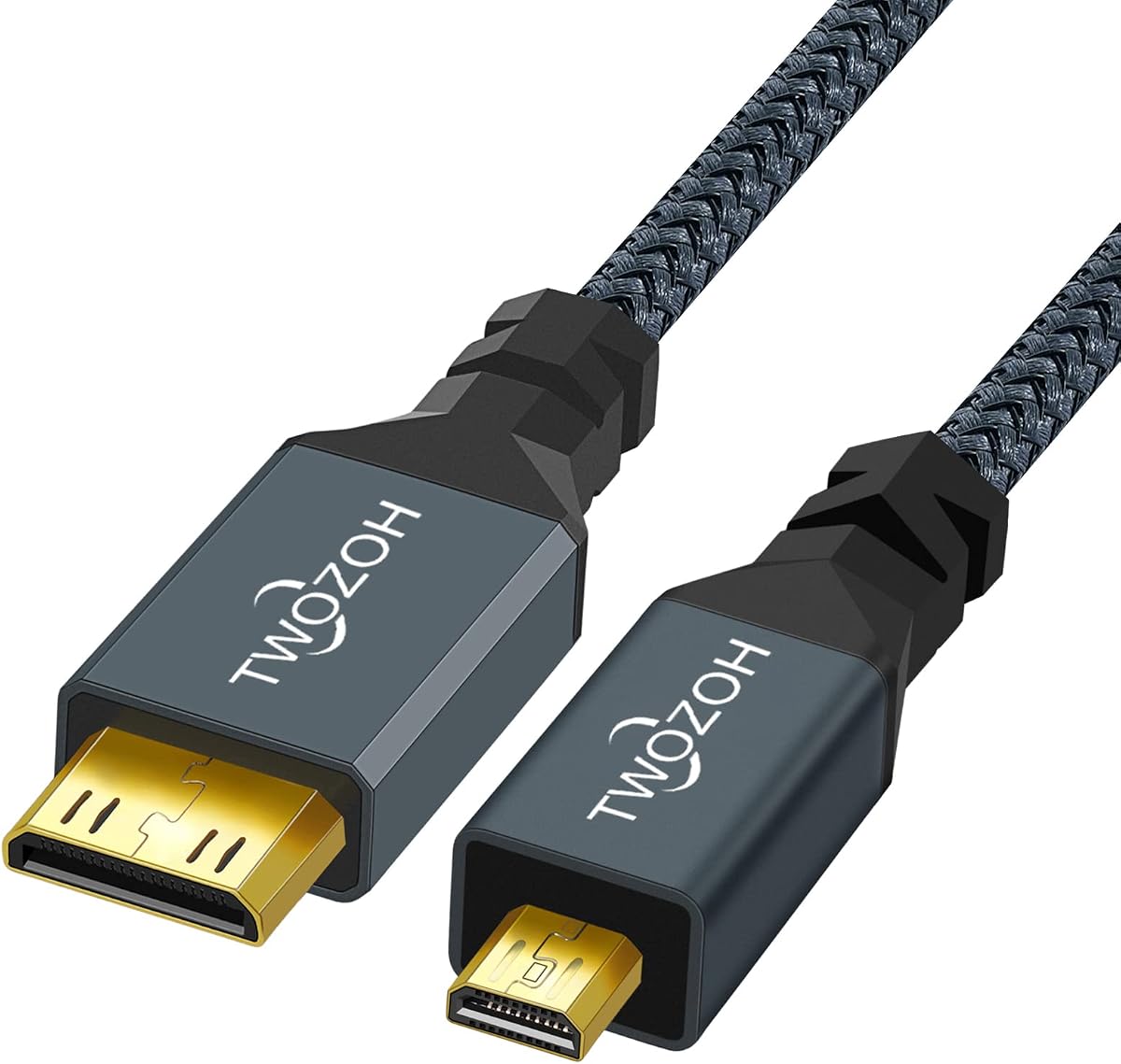
The Twozoh cable is a straightforward one-meter Micro HDMI to Mini HDMI connection with a 4.6 rating. It identifies both ends as male connectors and states support for HDMI 2.0, 3D, 4K, 1080p, 1080i, 720p, and 480p, making it a versatile lead for compatible displays and source equipment.
We may earn a commission when you buy through this link, at no additional cost to you.
Its construction details are less extensive than those of several braided options. The listing highlights gold-plated connectors and nylon, while also stating that every cable is inspected and visually checked before packing. Compatible devices include HDTVs, cameras, camcorders, game players, and other products with Micro HDMI or Mini HDMI ports.
The main ambiguity is refresh-rate detail. Although the title mentions 4K support, it does not clearly state 4K at 60Hz in the same way as several competing products. Buyers requiring a specific high-resolution refresh rate should verify that both the camera or computer and the display can support it, then confirm the cable listing's full specifications.
This is a practical recommendation for someone who wants a straightforward direct cable without paying for a heavily specified premium construction. The one-meter length is also useful when one foot would be too restrictive but three feet would create unnecessary clutter.
The explicit Micro HDMI Type D to Mini HDMI Type C male-to-male format makes the connection easy to understand. It is a direct cable rather than an adapter bundle, reducing the number of separate parts in a kit.
The listing states that cables are inspected and visually checked before packing. That provides some reassurance about basic fit and finish, although it is not equivalent to a detailed performance certification.
We may earn a commission when you buy through this link, at no additional cost to you.
This UGREEN cable is the important format exception in the roundup: it connects Micro HDMI to standard HDMI rather than Micro HDMI to Mini HDMI. That makes it especially useful when a Raspberry Pi, camera, GoPro, tablet, or laptop needs to reach a television or monitor with a full-size HDMI port.
We may earn a commission when you buy through this link, at no additional cost to you.
It has a 4.6 rating and states support for 4K at 60Hz, 2K, 1080p, 3D, HDR, and ARC. Its construction uses tinned copper wire, multiple shielding layers, gold-plated connectors, copper conductors, aluminum foil, and braid shielding. The listing also describes bi-directional operation, allowing either a Micro HDMI source or a standard HDMI source to be used when the devices support the appropriate direction.
The compatibility list is extensive, covering Raspberry Pi models, portable monitors, video capture cards, several GoPro Hero generations, Nikon cameras, and numerous tablets and laptops. Nevertheless, the connector difference is critical: this lead will not plug into a Mini HDMI socket. It also is not a Micro USB adapter, a distinction worth emphasizing for older devices whose charging port may look similar.
For a display with standard HDMI, this may be more useful than any of the direct Micro-to-Mini options. The three-foot length is versatile for cameras, compact computers, and desktop viewing, and the stated 4K at 60Hz support makes it suitable for modern display equipment when the source and display support it.
Most displays use standard HDMI, so this Micro HDMI to HDMI format solves a broader connection problem than a direct Mini HDMI cable. It is a practical choice for users who do not own a Mini HDMI display.
Tinned copper wiring, multiple shielding layers, braided construction, and gold-plated connectors support reliable transmission. These materials also align with the cable's stated goal of minimizing data loss and interference.
We may earn a commission when you buy through this link, at no additional cost to you.
This ten-foot cable provides enough reach for a portable monitor, television, or projector positioned farther from a Raspberry Pi board or camera. It retains a 4.6 rating and the same detailed performance framework as the shorter options, including a stated 18Gbps bandwidth and support for 4K at 60Hz.
We may earn a commission when you buy through this link, at no additional cost to you.
Its compatibility list includes Raspberry Pi 5 and 4, Raspberry Pi Zero W, Sony, Nikon, and Canon cameras, portable monitors, tablets, laptops, and camcorders. The cable also states support for HDR, ARC, Dolby Atmos, Dolby TrueHD 7.1, 2K at 144Hz, 1080p at 240Hz, and 3D, along with bi-directional operation.
The primary concern is cable management. Ten feet is useful when distance matters, but it can be excessive for a board sitting beside a small screen. Buyers should consider whether the additional slack can be coiled without creating a trip hazard, especially in a public or temporary installation.
For fixed installations, presentations, or a portable display that must remain across a desk or table, this is a strong extended-length option. It balances meaningful reach with a comprehensive stated specification set, provided the user confirms the unusual Micro HDMI and Mini HDMI connector combination.
Ten feet supports connections that cannot be served comfortably by a three- or six-foot lead. It can be useful for Raspberry Pi presentations, camera monitoring, and displays placed at a distance from the source.
The stated high-resolution modes, HDR support, audio features, and 18Gbps bandwidth provide a strong specification foundation. The source and display must also support the desired mode for the full advertised benefit to apply.
We may earn a commission when you buy through this link, at no additional cost to you.
The fifteen-foot option is the longest cable in this guide and serves users who need a substantial distance between a compact source and a Mini HDMI display. It carries a 4.6 rating and preserves the same advertised 18Gbps bandwidth, 4K at 60Hz support, and broad compatibility found in the shorter versions.
We may earn a commission when you buy through this link, at no additional cost to you.
Its stated use cases include Raspberry Pi 5 and 4, Raspberry Pi Zero W, cameras, portable monitors, tablets, laptops, and camcorders. The cable also claims HDR, 3D, ARC, Dolby Atmos, and Dolby TrueHD 7.1 support, with 30AWG copper wire, gold-plated connectors, and aluminum shell shielding.
Fifteen feet is a specialist length. It is excessive for a board beside its monitor and may be inconvenient in a tightly packed bag. On the other hand, it can be the simplest option when the source and display must remain far apart or when routing around furniture, walls, or equipment requires extra slack.
This cable is best for installations where reach matters more than compactness. Buyers should plan a clean route for the lead, confirm that both endpoints are actually Mini HDMI and Micro HDMI, and verify that the source and display can deliver the resolution and refresh rate they want.
A fifteen-foot direct lead can bridge a wider physical gap than the shorter alternatives. It may also avoid awkward intermediate connections in fixed installations, provided the cable can be routed safely.
Despite its greater length, the listing retains the same high-speed claims: 18Gbps bandwidth, 4K at 60Hz, HDR, 3D, and advanced audio support. Equipment compatibility remains the deciding factor in actual performance.
We may earn a commission when you buy through this link, at no additional cost to you.
The right Micro and Mini HDMI cable depends first on connector format, then on length, supported video mode, construction, and the devices you plan to connect. These factors help prevent an expensive mismatch while helping you select a cable that suits the intended setup.
Micro HDMI, Mini HDMI, and standard HDMI are physically different. Most of the cables reviewed here have a Micro HDMI Type D male connector on one end and a Mini HDMI Type C male connector on the other. The UGREEN alternative uses Micro HDMI to full-size standard HDMI. Check the labels, manuals, or port outlines on both source and display before ordering, because a visually similar socket does not guarantee the correct fit.
Choose the exact connector combination required by your devices rather than relying on the broad term HDMI. This cable should not be confused with a Micro USB adapter, a USB-C cable, a DisplayPort cable, or a Mini DisplayPort lead.
The selection ranges from one foot to fifteen feet. Short leads minimize clutter and suit compact Raspberry Pi and portable-monitor rigs, while cables from five to ten feet offer more practical placement freedom. The longest option is useful for fixed setups where the display is substantially separated from the source. Measure the actual path rather than estimating from the room dimensions.
Avoid choosing excess length when it will remain unused. Extra cable can be harder to route, take up space, and create snags. Choose the shortest length that provides comfortable slack and allows the connectors to sit without sharp bends.
Many listings advertise 4K, but the meaningful specification includes resolution and refresh rate. The most detailed products here state support for 3840 by 2160 at 60Hz, while others list 4K without clearly identifying a refresh rate. If you require 4K at 60Hz, verify that the cable listing and both connected devices support that exact mode.
Higher refresh modes, HDR, 3D, ARC, and advanced audio formats also depend on source, display, and downstream equipment. A capable cable cannot add support that the source or display itself lacks, so check the complete device chain.
The top direct-cable recommendations specify bandwidth up to 18Gbps. Premium options add multiple shielding layers, oxygen-free copper conductors, and gold-plated contacts. These details are particularly relevant near computers, powered displays, video capture equipment, and other electronics that may introduce interference.
The Twozoh option and UGREEN cable use different constructions and provide fewer numerical bandwidth details. That does not make them unsuitable, but it gives buyers less information to compare. When signal stability is critical, favor a listing with a clear bandwidth claim, shielding description, and supported operating mode.
A braided nylon jacket resists tangling and protects the internal cable during travel. It is especially useful in camera bags and portable computer kits. Other options may use a more conventional jacket but still provide gold-plated connectors, aluminum shells, and strain relief. Consider how often the cable will be plugged, removed, coiled, or routed around sharp edges.
Construction details do not guarantee a particular lifespan, but they indicate the manufacturer's design priorities. For a stationary installation, signal specifications may matter more; for a traveling kit, flexibility, tangle resistance, and connector protection deserve equal attention.
Most products in this guide claim bi-directional transmission, meaning either side can be the source when the attached devices support it. This is helpful for moving a Raspberry Pi, camera, or display between setups. Some listings also mention ARC, Dolby Atmos, Dolby TrueHD, HDR, and 3D, which require compatible source, display, and audio equipment.
Do not treat a cable's support list as a guarantee of every feature in every configuration. Device firmware, display settings, adapters, and capture hardware can all affect what is actually available.
The listed use cases include Raspberry Pi 5, Raspberry Pi 4, Raspberry Pi Zero W, portable monitors, cameras, camcorders, tablets, laptops, projectors, televisions, and GoPro models. Compatibility varies by exact model, and some listings explicitly warn against confusing Micro HDMI with Micro USB. Verify your own equipment before relying on a general compatibility statement.
For devices with standard HDMI, the UGREEN Micro HDMI to HDMI cable may be more appropriate than a Micro-to-Mini cable. A direct cable can reduce setup complexity and make it easier to keep one known lead in a device bag.
Begin by identifying the source and display connectors, then connect the cable before powering on the equipment. Select the intended display input and choose a resolution and refresh rate supported by both devices. If the picture is unstable, check that the connector is fully seated and that no intermediate adapter or incompatible hub is introducing a limitation.
For portable use, coil longer cables loosely rather than making a tight bend around the connectors. Keep the Micro HDMI and Mini HDMI ends protected from dust and avoid pulling the plug by the cable itself. A cable routed behind a monitor should have enough slack to prevent pressure on the port, while a one-foot lead should not be forced sideways to compensate for a large gap.
If you encounter flicker, missing audio, or limited resolution, begin with the device settings and verify that the correct input and highest mutually supported mode are selected. Also inspect the cable for damage and test the same setup with another compatible cable if available. Do not assume a fault lies with the cable until connector format, direction, device support, and power status have all been checked.
Micro HDMI and Mini HDMI are physically smaller and less common than standard HDMI, but they are not interchangeable. Micro HDMI is also known as Type D, while Mini HDMI is Type C. A direct Micro HDMI to Mini HDMI cable only fits devices using those two connector formats, so checking both ports is essential before ordering.
Only if the television has a Mini HDMI input, which is relatively uncommon. Most televisions use full-size standard HDMI. If your display has a standard HDMI port, choose a Micro HDMI to standard HDMI cable, such as the UGREEN option in this guide, rather than a direct Micro-to-Mini cable.
Many of the listed cables advertise 4K support, with several specifically claiming 4K at 60Hz. Your final resolution and refresh rate depend on the source device, display, and any other hardware in the chain. Confirm the exact mode supported by all three before making a purchase.
Bidirectional support is useful when you want to move a cable between different source-and-display combinations. It means either connector can carry the source signal when the attached devices support that arrangement. It is not essential for a fixed setup, but it adds flexibility to a travel kit or shared workstation.
A one-foot cable works when a portable monitor sits directly beside the board, while three to six feet suits many desk arrangements. Longer options help when the display is across a table, mounted farther away, or reached through a less direct route. Measure the intended path and allow modest slack without leaving excess cable unmanaged.
No. Micro HDMI and Micro USB have different connector shapes and serve unrelated purposes. Several product descriptions explicitly warn against confusing the two. If your device identifies its port as Micro USB, you need a suitable Micro USB video adapter or a cable designed for that particular device and output.
A braided jacket is generally easier to manage in a bag because it resists tangling and protects the cable from everyday abrasion. The compact one-foot braided option is especially convenient for camera and portable-computer kits. For a fixed desk, signal specifications and connector fit may be more important than the jacket design.
Many of the cables advertise bi-directional transmission, which allows either the Micro HDMI or Mini HDMI end to act as the source when compatible equipment permits it. That makes the lead more versatile, but the specific source and display must still support the connection and the desired resolution, refresh rate, audio, and other features.
The braided 3.3-foot cable is the top budget option for its 5.0 rating, tangle-resistant construction, and stated 4K at 60Hz support. The 3.3-foot 18Gbps cable earns the Editor's Choice distinction for its stronger combination of performance details, broad compatibility, and practical reach, while the five-foot premium cable stands out for triple-layer shielding and reinforced construction.
Prioritize the connector format before anything else. Decide whether you need a direct Micro HDMI to Mini HDMI connection or a Micro HDMI to standard HDMI cable, then choose a length that fits the real route. After that, compare supported resolution, refresh rate, shielding, jacket construction, and bi-directional capability against the devices on both ends of the connection.
Current listings, product details, and prices can change, so confirm the specifications and connector shapes immediately before purchasing. The products compared here cover short travel leads, flexible desk cables, premium shielded constructions, and extended runs, giving you a practical selection for nearly any compatible Micro and Mini HDMI setup.