
Creative Pebble X Plus 2.1 USB-C Computer Speakers with Subwoofer
4.2Editor score
Up to 30-watt RMS output
Bluetooth 5.3 wireless audio
Customizable RGB lighting
USB-C and AUX connections
Our 2.1 Channel Desktop Speakers guide compares ten systems for sound quality, connectivity, bass, controls, and fit to help you choose confidently.
A 2.1 channel desktop speaker system combines two stereo satellites with a dedicated subwoofer, making it a practical upgrade for a computer, gaming setup, or compact entertainment area. The best models balance clear vocals, impactful low frequencies, useful controls, and a footprint that fits comfortably around a desk.
We compared all ten systems using their published specifications, stated output figures, driver configurations, connection options, control features, and physical design. The list covers compact USB-powered models, more powerful multimedia systems, wireless options, and premium gaming-oriented setups, with special attention to how each system integrates into real desktop spaces.
Each review explains the strongest reason to consider the system, along with important trade-offs involving power, connectivity, size, and placement. Ratings and product details can change over time, and prices also fluctuate, so readers should confirm the latest specifications and availability before making a purchase.
4.2Editor score

4.6Editor score
4.2Editor score
The comparison below highlights the major differences among ten 2.1 channel desktop speaker systems, including power ratings, driver sizes, connection methods, and subwoofer designs, to make it easier to narrow the field before reading the detailed reviews.



The Klipsch ProMedia 2.1 THX Certified Computer Speaker System is a conventional, wired desktop system built around two compact two-way satellite speakers and a substantial 6.5-inch side-firing subwoofer. It carries a 4.5 rating, and its defining features are high output, detailed midrange presentation, and the authority of a subwoofer designed to produce bass you can physically feel. It is a strong all-around option for listeners who want more scale than ordinary computer speakers can provide.
We may earn a commission when you buy through this link, at no additional cost to you.
The satellites use Klipsch MicroTractrix horn technology around three-inch midrange drivers, helping the system reproduce vocals and instruments with clarity while controlling dispersion. That focused output is particularly useful at a desk, where a narrow, forward-directed presentation can make dialogue and positional effects easier to follow. The side-firing 6.5-inch subwoofer adds full-bandwidth low-end support, while the stated 200-watt peak output and 110 dB in-room maximum provide enough headroom for games, films, and music at higher levels.
The trade-offs are mostly practical. At 9.5 inches wide, 9.8 inches deep, and 10.2 inches tall, the subwoofer is much larger than the compact units that dominate this category, so desk users may need to place it on the floor. The system also relies on a 3.5 millimeter connection rather than offering USB-C digital audio, Bluetooth, or app-based controls. Despite those limitations, the hardware-driven design, dedicated subwoofer gain, and plug-and-play operation remain meaningful advantages for a fixed desktop installation.
This is a good choice for someone building a dedicated gaming or entertainment station where power, clarity, and pronounced bass matter more than wireless convenience. It may be less suitable for a small desk or a user who frequently moves between devices. For those priorities, the Logitech Z623 offers more input choices and greater room-filling capacity, while this Klipsch system stands out through its horn-loaded clarity and distinctive subwoofer presentation.
The horn-loaded satellite design directs sound toward the listening position while improving efficiency. That focus can make voices, game effects, and instrumental parts seem more defined than with broadly dispersed compact speakers, especially during extended computer use.
The ported 6.5-inch subwoofer is considerably larger than the units in most budget desktop sets. Its size allows the system to add substantial low-frequency weight, although users with limited floor space should account for the subwoofer's substantial footprint.
We may earn a commission when you buy through this link, at no additional cost to you.
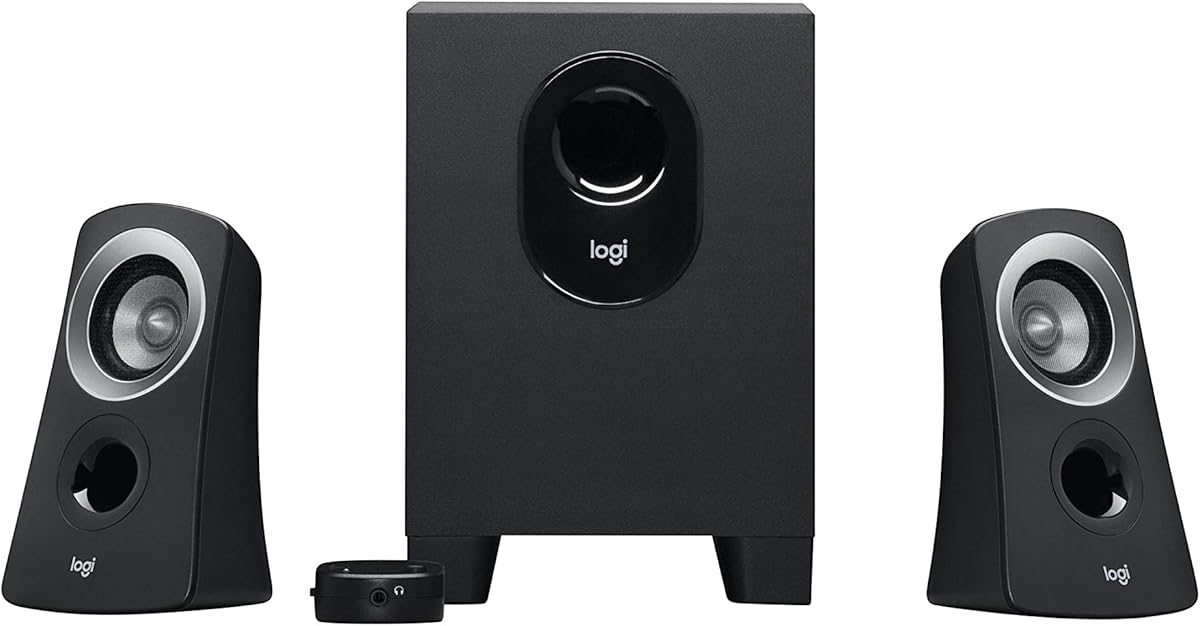
The Logitech Z313 2.1 Multimedia Speaker System with Subwoofer is a straightforward desktop setup for users who want dedicated bass without a large entertainment-room footprint. Its 4.4 rating reflects a favorable balance of recognizable Logitech styling, simple operation, and a compact subwoofer. The system's 25-watt RMS output is modest, but it is appropriate for ordinary computer use, casual gaming, and background listening at a workstation.
We may earn a commission when you buy through this link, at no additional cost to you.
Two satellite speakers handle the stereo image, while the compact subwoofer takes care of low frequencies. A separate control pod provides a convenient place to adjust the master level, avoiding the need to reach behind a satellite for basic volume changes. This arrangement makes the Z313 particularly easy to manage in a work area where the speakers are positioned near the monitor and the subwoofer is tucked farther away.
The main limitation is the system's basic approach to connectivity and amplification. Logitech provides little detail about inputs in the supplied specifications, so buyers who require USB-C digital audio, Bluetooth, or a particular wired standard should check the current package and manual before ordering. Its 25-watt RMS rating also puts it below several more powerful models in the roundup, meaning it is better suited to a near-field desk than a large room or a party-style gaming setup.
Choose the Z313 if your priority is a simple, recognizable 2.1 arrangement with a control pod and relatively compact subwoofer. It is a sensible starting point for offices, dorm rooms, and everyday computers where strong bass is welcome but maximum output is unnecessary. Users seeking more modern connections or greater amplification should consider the Creative Pebble X Plus or Logitech Z623 instead.
The dedicated control pod keeps frequently used volume controls within easy reach. Its separation from the satellite speakers is especially helpful when the subwoofer is stored below or beside the desk.
The Z313 avoids the footprint of a large entertainment subwoofer. That makes it easier to accommodate beside a monitor or under a wider desk, although it will not deliver the same low-frequency scale as a 5.25-inch or 6.5-inch unit.
We may earn a commission when you buy through this link, at no additional cost to you.
The Logitech Z623 400 Watt Home 2.1 Speaker System is the strongest all-around recommendation in this guide. It has the highest listed rating at 4.6, a 400-watt peak output rating, THX certification, and enough power to work as either a near-field computer system or a larger-room entertainment setup. Its combination of strong bass, flexible wired inputs, and simple operation makes it especially versatile.
We may earn a commission when you buy through this link, at no additional cost to you.
Each satellite receives 35 watts, while the subwoofer is rated at 130 watts. Together, the system delivers 400 watts of peak power and 200 watts RMS, providing more headroom than most compact 2.1 alternatives. The subwoofer's 11.2-inch height, 12-inch width, and 10.5-inch depth give it enough physical volume for impactful low-end output. This is a system that can bring energy to games, films, and music rather than sounding like a minor addition to a computer.
Connectivity is a major strength. RCA and 3.5 millimeter inputs allow up to three audio devices to remain connected, making it easy to move among a computer, game console, television, disc player, or mobile source without constantly reconnecting cables. The stated compatibility list includes televisions, computers, smartphones, tablets, music players, DVD and Blu-ray players, and major game consoles. The omission of Bluetooth prevents cable-free playback, but wired support covers an unusually broad range of established entertainment devices.
The main compromise is space. This is not a miniature system, and the subwoofer may be better positioned on the floor or on a dedicated stand rather than immediately beneath a compact desk. It also uses a straightforward wired design without app control, wireless switching, or RGB lighting. Even so, the combination of rated power, THX certification, input flexibility, and excellent customer rating makes the Z623 the most convincing general-purpose choice for a serious desktop audio upgrade.
The 400-watt peak rating and 130-watt subwoofer give the Z623 more output headroom than most desktop-focused systems. That extra capacity is useful for action games, films, and music without forcing the user to work within a small-volume limitation.
RCA and 3.5 millimeter inputs can accommodate several source devices at once. While the lack of Bluetooth makes the system less fluid for phone-first listening, it remains easy to use with computers, televisions, consoles, and other conventional outputs.
We may earn a commission when you buy through this link, at no additional cost to you.
The Creative Pebble X Plus delivers an unusually rich feature set for a budget-focused 2.1 system. It combines 2.75-inch satellite drivers, a compact subwoofer, USB digital audio, Bluetooth 5.3, a universal 3.5 millimeter AUX input, and communication ports for a headset and microphone. Its 4.2 rating and modern spherical styling make it especially appealing to users who want their computer speakers to look as considered as the rest of their desk.
We may earn a commission when you buy through this link, at no additional cost to you.
The standard configuration offers up to 15 watts RMS and 30 watts peak, which is suitable for normal desktop listening. Creative also provides an amplified mode that can reach 30 watts RMS and 60 watts peak when the system is connected to a 30-watt or higher USB PD adapter. The adapter is not included, which is an important qualification for buyers who interpret the amplified figures as part of the standard package.
Connectivity is where the Pebble X Plus stands apart from many basic wired sets. USB provides digital audio, Bluetooth 5.3 removes the need for a cable, and AUX preserves compatibility with analog sources. Dual communication ports support headset and microphone use, making the system more useful for calls, meetings, and online gaming. RGB lighting offers a wide color range and six presets, allowing users to coordinate the speakers with a gaming setup without giving up conventional audio functionality.
The main drawback is that some of the system's most attractive features require deliberate setup. A compatible USB PD adapter is needed for maximum amplification, and the RGB lighting may not match a strictly professional office. Despite that, the combination of wireless audio, digital connectivity, communication support, lighting, and a subwoofer makes the Pebble X Plus a standout value for students, casual gamers, and anyone building a modern compact workstation.
USB, Bluetooth 5.3, and AUX give the system more source options than many similarly sized 2.1 models. That flexibility is valuable for a shared computer or a setup that also serves music and calls.
Adjustable RGB lighting adds personality without taking over the desktop, while the headset and microphone ports make the system more practical for interactive work. These features extend its usefulness beyond simple media playback.
We may earn a commission when you buy through this link, at no additional cost to you.
The Bluedee 2.1 PC Speakers system is designed for users who want a modern, flexible setup for a desktop, home office, or entertainment area. It has a 4.4 rating and an 80-watt peak output specification. A dedicated subwoofer, DSP tuning, RGB lighting, and an all-in-one control knob distinguish it from basic plug-and-play systems while keeping the overall concept straightforward.
We may earn a commission when you buy through this link, at no additional cost to you.
The stated DSP tuning is intended to produce clear vocals, smoother high frequencies, and reduced distortion during ordinary listening. A separate bass unit handles low frequencies, allowing the satellite speakers to remain focused on mids and highs. That arrangement is useful for music, games, and movies because it gives the desk setup more tonal range without requiring the satellites to produce deep bass alone.
The system supports Bluetooth 5.4, USB, USB-C, and 3.5 millimeter AUX connections. It is described as adapter-powered and plug-and-play, making setup uncomplicated for a PC user. A single control knob handles volume, playback, lighting effects, and mode switching, reducing the need for separate desktop software or multiple physical controls. RGB lighting can alternate between dynamic colors or remain as a softer static glow.
One consideration is that the 80-watt figure is peak power rather than a stated continuous RMS rating, so comparisons with systems that publish RMS output should be made cautiously. The supplied information also gives less detail about exact satellite and subwoofer dimensions. Even so, the combination of wireless and wired connectivity, DSP processing, straightforward controls, and dedicated bass makes the Bluedee system appealing for a versatile everyday computer setup.
The built-in signal processing is intended to smooth harsh high frequencies and reduce distortion. That can be especially helpful in long work sessions, where extended exposure to a less balanced desktop system may become tiring.
Combining playback, volume, lighting, and mode controls into a single knob reduces desk clutter. It also makes frequently used changes accessible without opening a companion application or navigating a software interface.
We may earn a commission when you buy through this link, at no additional cost to you.
The Cyber Acoustics CA-3090 is a basic 2.1 system aimed at providing stereo sound and a dedicated subwoofer at an approachable entry point. It carries a 3.9 rating, the lowest among the listed products, and its specifications make the intended use clear: 18 watts of peak power, 9 watts RMS, two-inch satellite drivers, and a four-inch side-firing subwoofer.
We may earn a commission when you buy through this link, at no additional cost to you.
Despite its modest rating, the design covers the basics a desktop user needs. A control pod handles master volume and power, while a separate knob on the subwoofer adjusts bass. That gives users some tonal control without adding a complex interface. The flat-panel satellites and subwoofer keep the design visually simple, and the included 110-volt AC power adapter and user guide make the package straightforward to set up.
The limitations are significant in high-demand applications. Peak output of 18 watts is modest, so the system is best suited to near-field listening at a computer rather than filling a large room. Its two-inch satellite drivers are also small compared with the 2.75-inch and three-inch drivers found in several other systems. The product information recommends setting the source-device volume between 65 and 80 percent before controlling levels through the speaker system, which helps maintain clean output and gives the user more precise level control.
The CA-3090 is most appropriate for a secondary computer, dorm room, office, or inexpensive upgrade from built-in monitor speakers. It is not the right choice for competitive gaming, large-room movie viewing, or listeners who prioritize detailed sound. Even with those limitations, the separate bass control, straightforward control pod, dedicated subwoofer, and included warranty give it a functional foundation for basic desktop listening.
The separate control pod and subwoofer bass knob make basic adjustments straightforward. This is helpful for users who prefer tactile controls over software-based volume management.
With two-inch satellites and modest amplification, the CA-3090 is designed to sound good at a desk rather than across a large room. Keeping the source level properly configured helps the system deliver clean output within its intended operating range.
We may earn a commission when you buy through this link, at no additional cost to you.
The Creative Pebble Plus is a compact, USB-powered 2.1 system created for computer PCs and laptops. Its 4.3 rating reflects a well-regarded design that prioritizes convenience, space efficiency, and a more deliberate listening angle. A standalone four-inch down-firing subwoofer provides dedicated bass, while the two satellite speakers use elevated two-inch midrange drivers to direct sound toward the user.
We may earn a commission when you buy through this link, at no additional cost to you.
The 45-degree driver angle is a particularly useful design choice. Rather than firing straight ahead, the satellites are positioned to create a more natural soundstage for someone seated at a desk. The system supports a high-gain mode that raises output to 8 watts RMS when paired with a 5-volt, 2-amp USB adapter, which is not included. Even without that accessory, its basic USB-powered operation removes the need for a nearby wall outlet and avoids a separate power brick at the desk.
A universal 3.5 millimeter AUX cable provides the audio connection, and the volume controls sit at the front of the speakers. That placement avoids the common inconvenience of changing volume on a rear panel or beneath a satellite. The down-firing subwoofer can be positioned on the floor beneath a desk, where its upward and outward sound can be effective without taking up precious surface area.
Creative's stated maximum of 8 watts RMS places this system at the modest end of the roundup, and the supplied information does not specify a peak-power figure. It therefore makes more sense for close listening in a quiet office, dorm, or compact workstation than for a gaming setup that needs high-volume impact. For users who prioritize simple USB power, attractive angled drivers, and minimal desk clutter, however, the Pebble Plus remains one of the most approachable options available.
Running entirely from USB reduces cable and outlet requirements. It is particularly convenient for laptop users and anyone who wants to relocate the speakers without searching for a free wall socket.
The 45-degree elevation directs the satellite sound toward a seated listener. This can improve perceived clarity and make the small drivers feel more appropriately aligned with a computer workstation.
We may earn a commission when you buy through this link, at no additional cost to you.
The Cyber Acoustics CA-3610 combines a relatively substantial 5.25-inch subwoofer with compact dual-driver satellites. Its 4.2 rating and 62-watt peak power distinguish it from entry-level systems that use much smaller woofers. With 30 watts RMS, a tuned down-firing subwoofer, and a convenient control pod, it is a well-rounded multimedia option for music, films, and games.
We may earn a commission when you buy through this link, at no additional cost to you.
Each satellite contains two 2-inch titanium drivers, an arrangement intended to provide crisp high frequencies and warm midrange response. The subwoofer handles the low end through its larger driver and tuned port. A control pod allows both master volume and bass to be adjusted independently, giving listeners more tonal flexibility than a system with a single shared knob. The pod also provides an easily accessible 3.5 millimeter input and a headphone jack for private listening.
The CA-3610 is compatible with PCs, Macs, laptops, PS4, PS5, Xbox, Nintendo Switch, tablets, and smartphones when they have a 3.5 millimeter connection. The satellites have an angled design, and the subwoofer is intended to fit under most desks or into smaller spaces. However, a 5.25-inch driver still requires more room than the compact units used by the Pebble Plus and CA-3090, and the included 120-volt AC power adapter means it is not as cable-free as a USB-powered system.
This is a good match for a mixed-use desktop that handles productivity software, console gaming, and casual movie watching. A listener who values a large subwoofer, separate bass control, and headphone support will appreciate it more than one who needs USB-C digital input or Bluetooth. Its relatively capable bass and useful control pod make it a solid middle ground between minimal desktop sets and large entertainment systems.
The 5.25-inch down-firing driver and tuned port deliver more low-frequency scale than the subwoofers in many entry-level systems. Its down-firing orientation can work well beneath a desk, where sound spreads naturally across the listening area.
Separate volume and bass controls allow the system to be balanced for different sources. The built-in headphone output is also useful when the user wants to switch from room-filling playback to a quieter personal session.
We may earn a commission when you buy through this link, at no additional cost to you.
The Logitech Z407 is built around a simple idea: a full 2.1 desktop system should be easy to control from across the room. It has a 4.3 rating, 80 watts of peak power, 40 watts RMS, and a wireless control dial with a stated 30-meter line-of-sight range. Bluetooth connectivity further reduces the need to remain at the desk when changing tracks or adjusting the sound.
We may earn a commission when you buy through this link, at no additional cost to you.
The dial supports playback, pause, volume, and bass functions, making the system convenient for a living room, studio, or shared office arrangement where the computer may be across the room. The speaker design adds another layer of flexibility: each oval-shaped satellite can stand vertically or horizontally, allowing the user to place them according to desk shape, available surface area, or preferred visual style.
A 20-watt bass section and digital signal processing support clear, deep low-end output from the ported, down-firing subwoofer. Three source options are available through Bluetooth, micro USB, and 3.5 millimeter input, and the system can move between wired and wireless connections using the input and Bluetooth buttons. This is more versatile than a single-input wired desktop set, although it does not offer the newer USB-C audio connection found on some contemporary alternatives.
The Z407 is best suited to users who want familiar Logitech styling, convenient room control, and multiple source options without moving to a large home-theater speaker package. Its control dial requires a reasonably clear line of sight, and the subwoofer and satellites will take up more space than a minimalist two-piece set. Even so, the balance of power, wireless convenience, flexible positioning, and deep-bass capability makes it a particularly strong choice for a multi-purpose desktop.
The wireless dial removes the need to reach the speakers or computer for common playback changes. Its generous stated range is especially useful when the system supports music rather than strictly near-field computer audio.
Bluetooth, micro USB, and 3.5 millimeter inputs support different source devices, while the dual-position satellites adapt to the available desk area. These options make the Z407 easier to integrate into a flexible entertainment layout.
We may earn a commission when you buy through this link, at no additional cost to you.
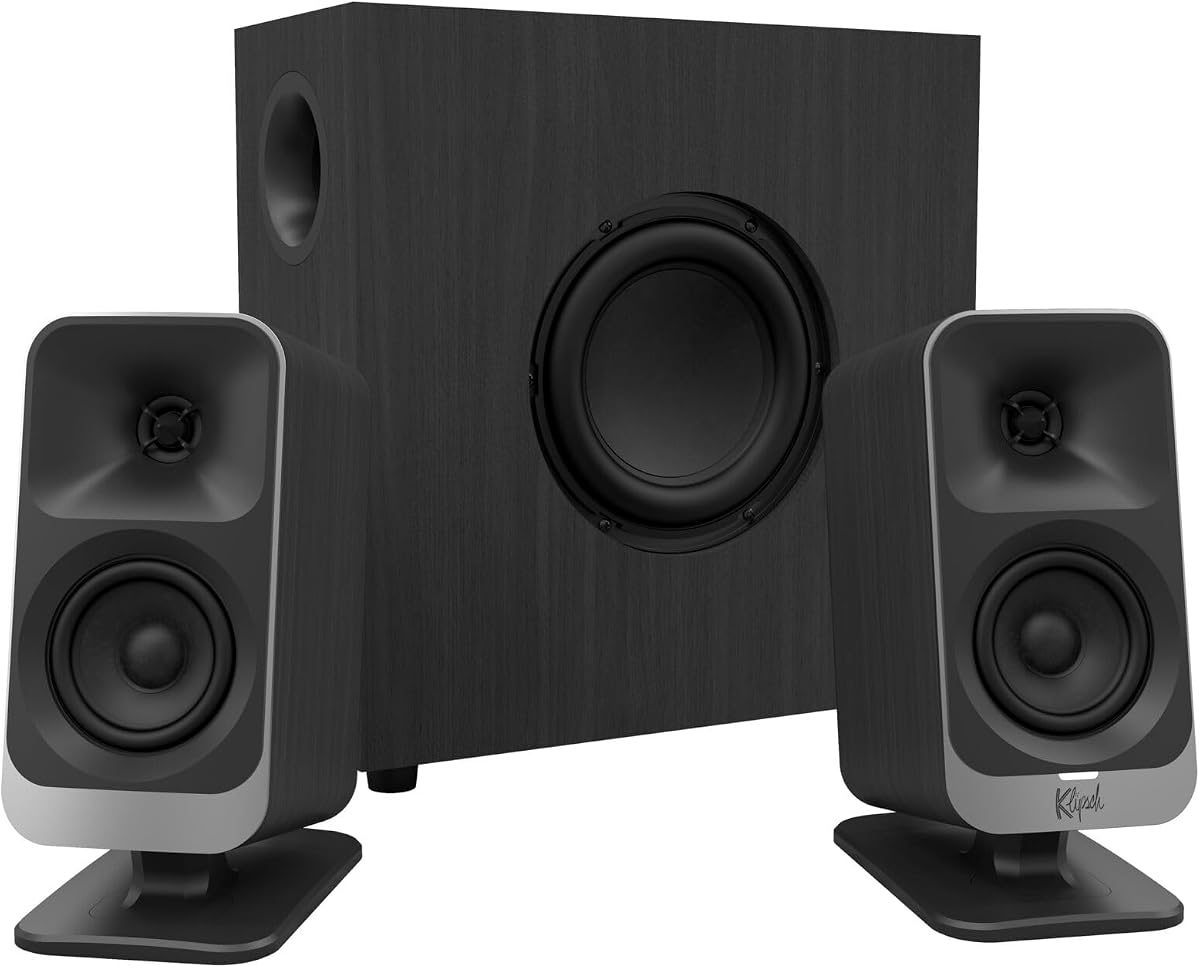
The Klipsch ProMedia Lumina is a modern redesign of Klipsch's long-running ProMedia desktop speaker concept. It carries a 4.2 rating and places emphasis on refined styling, flexible positioning, wireless audio, and app-based control. The two satellites sit on tiltable stands, while a low-profile subwoofer is designed to deliver low-end impact without the tall, bulky form associated with many 2.1 systems.
We may earn a commission when you buy through this link, at no additional cost to you.
Connectivity includes USB-C, AUX, and Bluetooth 5.3, allowing the system to work with modern computers while retaining support for analog and wireless sources. The Klipsch Control desktop app provides precision control over equalization, lighting, night mode, and music-react mode. Three changing color options and the app-based customization create a more integrated experience than the physical control layouts offered by many competing systems.
The redesigned cabinet and tiltable stands are important because sound direction affects the perception of a desktop system. Angling the satellites toward the listener can improve imaging and make the pair feel more cohesive. The low-profile subwoofer, adjustable gain knob, and cable-management design are also intended to reduce visual and physical clutter around a workstation. These features make the Lumina especially attractive for a clean, modern gaming or content-creation setup.
A notable omission from the supplied specifications is a numerical peak or RMS power rating, which limits direct comparison with products that publish clear output figures. The premium product category also indicates a higher investment than conventional 2.1 systems. Nevertheless, the Lumina's modern connections, refined industrial design, lighting, app control, and space-conscious subwoofer make it the most premium-oriented choice here and a compelling upgrade for users who treat their desk as both a workstation and an entertainment hub.
The Klipsch Control app places EQ, lighting, and playback modes in a dedicated interface. This level of software control is useful for users who want to adjust the system's character for games, music, videos, or late-night listening.
Tiltable satellites, a low-profile subwoofer, and integrated cable management help the Lumina integrate neatly into a modern desk. The result is a system designed to look intentional beside a computer, monitor, and other gaming equipment.
We may earn a commission when you buy through this link, at no additional cost to you.
The right 2.1 channel desktop speaker system depends on your room, source devices, preferred controls, and tolerance for desk and floor space. Use the following factors to compare the products in this guide and identify the features that matter most to your setup.
Power specifications are useful for estimating whether a system can produce enough volume without strain, but they must be compared carefully. Some manufacturers list peak power, some list RMS power, and others provide both. Peak power describes the maximum output under ideal conditions, while RMS offers a better indication of continuous performance. The Logitech Z623 supplies 400 watts peak and 200 watts RMS, the Klipsch ProMedia 2.1 lists 200 watts peak, and the Creative Pebble X Plus reaches 30 watts RMS in its amplified mode. Smaller systems such as the Creative Pebble Plus top out at 8 watts RMS, making them better suited to near-field listening.
The dedicated subwoofer is responsible for the low end, and its driver diameter often has a greater effect on perceived bass than a small change in nominal wattage. The Klipsch ProMedia 2.1 uses a 6.5-inch side-firing subwoofer, the Cyber Acoustics CA-3610 uses a 5.25-inch down-firing model, and the Logitech Z407 uses a ported down-firing design with a stated 20-watt bass section. Compact alternatives use smaller four-inch units. Larger drivers can move more air and produce deeper, more convincing bass, but they require additional floor or shelf space. Down-firing subwoofers can work well under a desk, while side-firing designs should have more open space around the front grille.
The most capable system is the one that can accept every source you expect to use. The Logitech Z623 supports RCA and 3.5 millimeter inputs for up to three devices, while the Creative Pebble X Plus combines USB-C, USB, Bluetooth 5.3, and AUX. The Logitech Z407 uses Bluetooth, micro USB, and 3.5 millimeter audio, and the Bluedee system supports Bluetooth 5.4, USB, USB-C, and AUX. Wired-only systems remain dependable and avoid pairing delays, but they require a nearby output with the correct connector. Newer USB-C systems are convenient for modern laptops, whereas support for RCA or 3.5 millimeters can be valuable with televisions and older consoles.
A 2.1 arrangement always uses more space than a simple pair of bookshelf speakers, but the variation between systems is substantial. The Creative Pebble X Plus and Pebble Plus use relatively compact satellites and subwoofers designed for close placement. The Logitech Z623 has a large entertainment subwoofer measuring 11.2 by 12 by 10.5 inches, while the older Klipsch ProMedia 2.1 is also substantial. The Lumina counters with a low-profile chassis and tiltable satellite stands. Users should measure the full desktop, account for speaker separation, and leave the subwoofer's port unobstructed. A system that sounds better but crowds the monitor or keyboard may be less practical than a more compact alternative.
Control design affects how easily you can adjust the sound for different activities. The Logitech Z313 and Cyber Acoustics CA-3090 use separate control pods, while the CA-3610 adds independent bass adjustment and a headphone output. The Logitech Z407 replaces the traditional pod with a wireless dial that handles playback, volume, and bass. The Klipsch ProMedia Lumina offers the deepest software integration through its control app, including EQ, lighting, night mode, and music-react features. Physical controls are predictable and work without software, while apps can provide greater precision but add another interface to learn and maintain.
Wireless connectivity can eliminate cable clutter and make a system more convenient for music or casual gaming. The Creative Pebble X Plus, Logitech Z407, and Bluedee system support modern Bluetooth, while the Klipsch Lumina also combines Bluetooth with USB-C and AUX. For video and games, users should consider whether the source connection introduces delay and whether keeping a wired option available would be useful. Bluetooth remains a convenience feature rather than a replacement for every low-latency application, so systems with both wired and wireless inputs offer greater flexibility. Pairing requirements and the need to switch sources should also be considered for shared desks and multipurpose rooms.
Desktop speakers remain visible throughout the day, so appearance is a legitimate purchasing criterion. The Klipsch Lumina uses refined cabinets, tiltable stands, and app-controlled RGB effects. The Creative Pebble X Plus and Bluedee system also offer adjustable lighting, while the original Klipsch ProMedia 2.1 and Logitech models use more traditional black finishes without prominent lighting. Consider whether lighting adds personality or visual clutter, and whether the satellites can be positioned where you want. A dark, understated system may suit a professional office, whereas customizable lighting can complement a gaming setup and help tie the speakers into the rest of the desk.
A system used at arm's length for calls and documents does not need to fill a room, while a system used for action games, films, and music benefits from greater impact. The Creative Pebble Plus, CA-3090, and standard Creative Pebble X Plus configuration are strongest for near-field desktop use. The Logitech Z623 and Klipsch ProMedia 2.1 provide greater output for a dedicated entertainment area, while the CA-3610 and Z407 serve as practical multimedia middle ground. Identifying the primary listening position and the usual ambient noise level makes it easier to avoid paying for excess output or settling for a system that feels underpowered.
Begin by placing the two satellite speakers symmetrically to the left and right of the monitor, with their tweeters or forward-facing drivers aimed toward the listening position. Put the subwoofer on the floor, a sturdy shelf, or a desk riser where it will not be enclosed. Keep ventilation paths and bass ports clear, and leave enough separation for a stereo image. Connect the audio source, power the system, and set the source volume to a moderate level before adjusting the speaker controls.
For the best balance, begin with bass near the middle and raise it only after listening at a normal volume. Use the system's equalization or app settings, when available, to make modest changes rather than attempting to correct an unsuitable placement with extreme bass. Keep repeated volume changes consistent across games, music, and video. On systems with separate gain controls, raise the subwoofer gradually to ensure that bass does not mask vocals or the satellites' midrange output.
Treat the speakers and subwoofer as sensitive electronics rather than heavy furniture. Use a soft, dry cloth to wipe the cabinets and grilles, and avoid liquid cleaners, excessive dust, and exposed cables near strong heat sources. Do not place papers or objects against the drivers, and avoid pushing the volume far beyond the system's intended capability. Periodic inspection of loose connections and careful cable management will help maintain reliable operation and preserve the available desk space.
A 2.0 system uses two full-range speakers, while a 2.1 system adds a dedicated subwoofer for low-frequency output. The extra subwoofer can provide more impactful bass for music, movies, and games, although it also requires additional power, cable routing, and physical space. For a small desk, a well-positioned 2.0 pair may be more practical, while a 2.1 system is usually better when deeper bass and room-filling output are priorities.
Higher output can be useful because it provides more headroom before the system becomes strained at higher volume. However, wattage alone does not determine sound quality, and a larger speaker does not automatically suit a smaller room. Compare RMS ratings when possible, then consider driver size, tuning, placement, and the volume at which the system will normally be used. A moderately powered near-field system may sound better than an oversized system set at a low level.
Wired systems are dependable, straightforward, and often better suited to gaming because they avoid wireless pairing and potential latency concerns. Wireless models are more convenient for switching among a computer, phone, and tablet while keeping the desk uncluttered. The most flexible options, such as the Creative Pebble X Plus and Logitech Z407, support both wired and wireless connections, allowing users to choose the appropriate mode for each source.
Place it near the satellites, but on the floor or another stable surface where it has room to operate without being pressed against a wall. Down-firing models can work well beneath a desk, while side-firing models need open space in front. Keep the port unobstructed and test several nearby positions, since desk surfaces, walls, and furniture can change the perceived bass level and tonal balance.
Yes, because a dedicated subwoofer can reproduce low-frequency effects that smaller all-in-one computer speakers often struggle to produce. Clear satellite output also helps reveal dialogue, environmental effects, and directional cues. The improvement depends on the source mix and room acoustics, so a properly balanced system with moderate bass is usually preferable to one with exaggerated low end that masks important details.
No, the 2.1 systems in this guide are self-powered and include their own amplification. Their specifications describe the internal amplification available to the satellites and subwoofer. A separate amplifier is generally unnecessary, and adding one would complicate setup. Instead, focus on source compatibility, power requirements, and placing the included power supply where it does not create cable clutter.
Peak wattage describes a maximum short-term output figure, while RMS power better represents sustained output over time. Comparing two peak numbers can be misleading if the manufacturers use different testing methods, so RMS is generally the more useful comparison point. Also consider driver size and enclosure design, since those strongly influence whether the stated power translates into deeper or clearer sound.
Reserve room for two separated satellites, their cables, and a subwoofer that may sit under or beside the desk. Compact systems such as the Creative Pebble range need less surface area, while the Logitech Z623 and Klipsch ProMedia 2.1 have larger subwoofers. Measure the intended location before buying, and make sure the subwoofer port is not blocked by a wall, cabinet, or desk panel.
The Logitech Z623 stands out as the best overall option because it combines the highest listed rating, generous output, THX certification, a powerful subwoofer, and broad wired device compatibility. The Creative Pebble X Plus is the most compelling budget-oriented choice for a modern desk because it combines USB, Bluetooth 5.3, AUX, communication ports, and adjustable RGB lighting. For a premium workstation, the Klipsch ProMedia Lumina offers refined design, tiltable satellites, app-based control, and a low-profile subwoofer.
When narrowing the remaining options, prioritize the details that affect daily use. Choose a compact system for a crowded desk, a more powerful subwoofer for music and action games, and wireless connectivity if switching sources is a regular task. Pay attention to RMS output, source connectors, bass-port clearance, and the placement of controls rather than selecting on wattage or appearance alone. A simple system that integrates cleanly and sounds balanced at your normal listening level is usually more valuable than an oversized one with features you never use.
Finally, confirm the current specifications, package contents, and latest price before ordering. Ratings, software capabilities, accessories, and availability can change, and some systems require a USB PD adapter or AC power supply not emphasized in the basic listing. Checking the current product page and user guide ensures that the chosen 2.1 channel desktop speaker system includes the connections and power options needed for your particular setup.
