
VCE HDMI 90 and 270 Degree Adapter
4.7Editor score
Two adapter orientations
HDMI 2.0 up to 4K
Gold-plated connector housing
Our HDMI L Shape 90 Degree Adapter guide compares ten angled couplers for tight spaces, HDMI 2.0 or 2.1 performance, gaming, 8K, and home theater use.
An HDMI L Shape 90 Degree Adapter changes the direction of an HDMI connection so a bulky cable does not have to bend sharply beside a wall-mounted television, monitor, entertainment center, or compact gaming station. The right geometry can reduce port strain, improve access, and make otherwise difficult installations look considerably neater. A useful adapter should also preserve the resolution, refresh rate, audio, and gaming features supported by every component in the chain.
This guide compares ten right-angle HDMI male-to-female adapters based on their stated angle options, HDMI standards, maximum bandwidth, supported display features, physical construction, device compatibility, and included warranty or support. The list covers both HDMI 2.0 models aimed at 4K setups and HDMI 2.1 options for high-refresh gaming, 8K displays, HDR, VRR, ALLM, eARC, and other advanced features where the source, display, and cable also support them.
The selections reveal where each product is most useful: some are compact two-packs for one or two installations, while others provide four adapters for several rooms or devices. We evaluate specification quality and practical fit rather than assuming a newer interface guarantees better results. Product listings and availability can change, and prices move frequently, so compare the current details and ensure your entire HDMI chain is compatible before buying.
4.7Editor score

4.6Editor score

4.7Editor score
The following comparison highlights each adapter's angle coverage, interface generation, headline resolution support, and strongest feature focus, making it easier to match an adapter to a specific display, gaming system, or installation challenge.

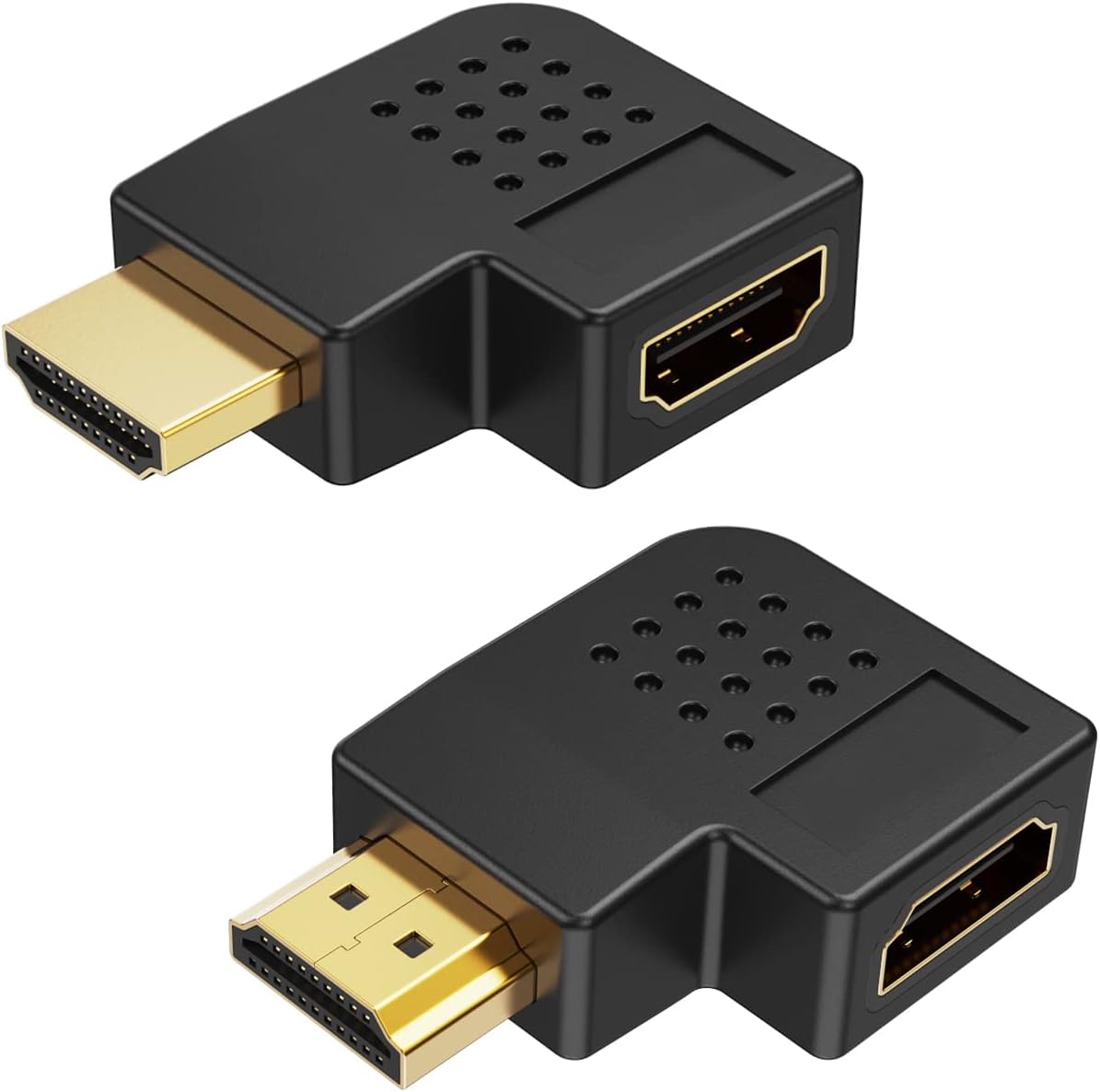


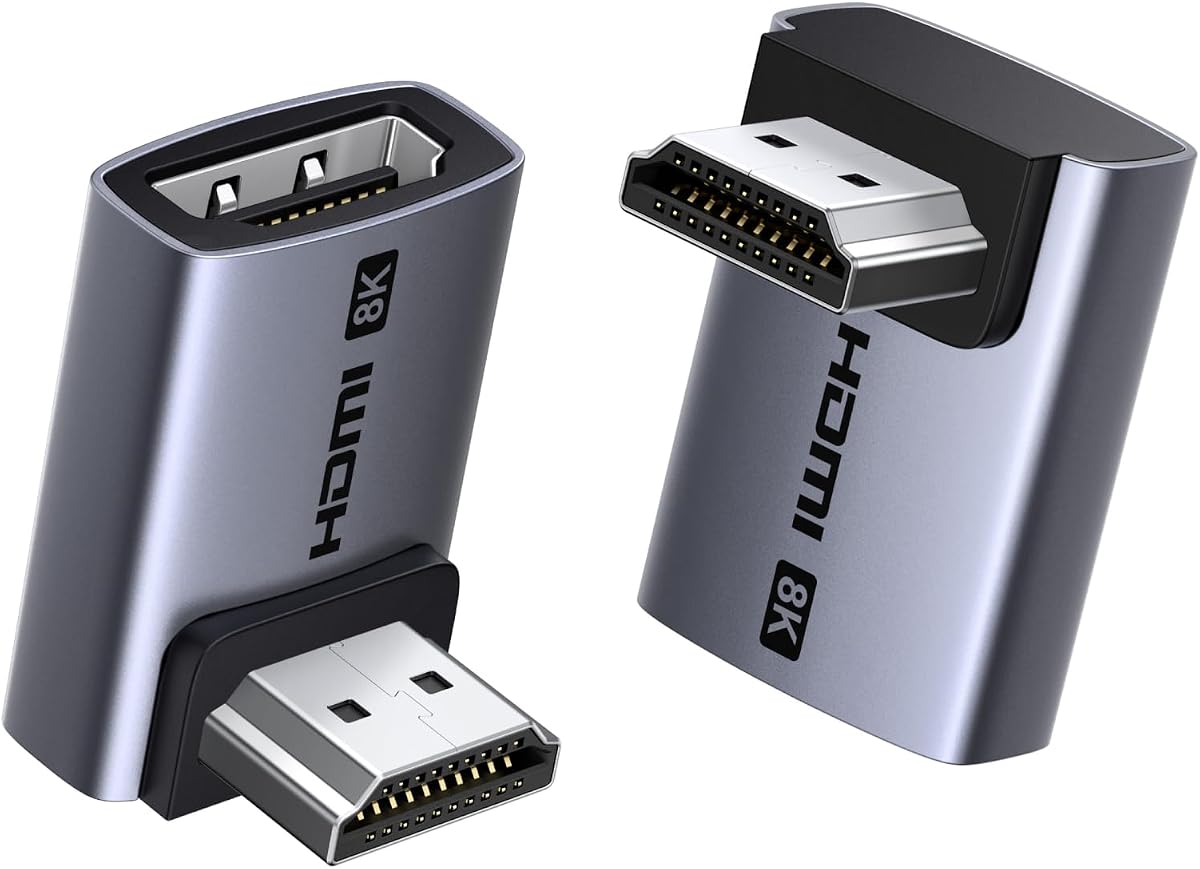
The Togconn 8K 90 Degree HDMI 2.1 Adapter combines a practical two-angle format with one of the broadest feature lists in this guide. Its 4.6 rating reflects generally favorable customer feedback, while the specifications position it as a versatile choice for wall-mounted displays, streaming devices, PCs, laptops, projectors, and conventional home theater equipment. The two-pack includes upward and downward routing options, which is important because the correct direction depends on the location of the female HDMI port.
We may earn a commission when you buy through this link, at no additional cost to you.
Its headline capabilities are 8K at 60Hz and 4K at 120Hz, subject to the HDMI 2.1 capabilities of the connected source, display, and cable. The listed support extends to VRR, ALLM, HDR, Dynamic HDR, Dolby Vision, Dolby Atmos, eARC, HDCP 2.3, and 3D video. That makes the adapter relevant to modern high-refresh gaming and feature-rich home theater configurations rather than merely changing the physical direction of a cable.
Construction is another strength. The product description specifies 24K gold-plated connectors, an aluminum alloy shell for heat dissipation, and a stated ability to withstand 15,000 insertions and removals. The gold plating is intended to resist corrosion, while the metal body addresses both durability and heat management. Those details do not guarantee flawless operation in every setup, because the adapter still depends on compatible ports and a cable capable of carrying the selected resolution and refresh rate.
The main qualification is that a specification-rich adapter cannot create HDMI 2.1 performance in older equipment. Users should verify that their source and display support the target mode and use an appropriate Ultra High Speed cable when necessary. Subject to that compatibility requirement, this is a strong all-around recommendation for someone who wants one adapter to handle 8K, high-refresh gaming, streaming sticks, and tight spaces behind mounted screens.
Including both a 90-degree and a 270-degree orientation makes the set more adaptable than a single-angle package. The upward version can guide a cable away from a wall, while the downward version can route it below a screen or toward a lower shelf, reducing the need for a sharply folded cable.
VRR, ALLM, HDR, Dolby Vision, and eARC support makes the adapter suitable for consoles and PCs connected to capable television or monitor setups. The complete source-to-display chain must support each feature, so the adapter should be treated as a routing solution that preserves compatible signals rather than an upgrade by itself.
We may earn a commission when you buy through this link, at no additional cost to you.
The VCE HDMI 90 and 270 Degree Adapter 2-Pack is a straightforward solution for 4K televisions, monitors, streaming devices, projectors, and gaming consoles that need a cleaner cable route. It holds a 4.7 rating, placing it among the strongest customer-rated options here. The package provides both right-angle directions, letting an installer choose whether the cable should leave the port upward or downward rather than forcing a compromised cable bend.
We may earn a commission when you buy through this link, at no additional cost to you.
The adapter complies with HDMI 2.0 and supports resolutions up to 4K at 60Hz, 2K, and 1080P over an 18Gbps bandwidth. It also supports 3D and uncompressed multichannel audio. For a 4K television used mainly for streaming, conventional gaming, or everyday media, these specifications are often sufficient, particularly when the goal is to improve physical routing rather than unlock a new display format.
Its practical advantages extend beyond resolution. Gold-plated connectors are intended to resist corrosion and support reliable signal transfer, while the housing is described as durable and able to dissipate heat. The adapter requires no extra software or drivers and works with standard HDMI sources, including Roku and Chromecast devices, PCs, laptops, monitors, projectors, and gaming consoles.
Those seeking 4K at 120Hz, 8K, or the broadest HDMI 2.1 feature set should choose a newer interface instead. Within the 4K class, however, this compact two-pack offers a convincing mix of useful angles, broad compatibility, and a strong customer rating. It is a particularly sensible recommendation for a wall-mounted television where cable access is awkward but high-bandwidth 8K performance is unnecessary.
The 90-degree shape allows a flat HDMI cable to run more closely along a wall or entertainment cabinet. That geometry can reduce stress at the port and make it easier to reach a connector that would otherwise sit in a narrow recess.
An 18Gbps HDMI 2.0 connection comfortably covers 4K at 60Hz and common home viewing formats. It is a sensible specification level for displays, projectors, and streaming equipment that do not require HDMI 2.1 gaming features.
We may earn a commission when you buy through this link, at no additional cost to you.
The VCE 4-Pack HDMI 90/270 Degree Adapters are intended for users who need more than one installation point. The package contains two 90-degree and two 270-degree adapters, allowing several devices or rooms to be configured without mixing incompatible geometries. Its 4.7 rating indicates strong customer reception, and the flat-profile design targets the restricted spaces commonly found behind wall-mounted televisions, PCs, and gaming consoles.
We may earn a commission when you buy through this link, at no additional cost to you.
The listed interface is HDMI 2.0 with 18Gbps bandwidth. The product description states support for 4K televisions, monitors, PS5 and Xbox systems, Apple TV, Fire Stick, Audio Return Channel, HDMI Ethernet Channel, and 3D. These are common contemporary home entertainment needs, and the inclusion of both ARC and HEC adds useful flexibility when connecting compatible displays and source devices.
The adapters use corrosion-resistant gold-plated connectors and reinforced housings designed for routine wear. Their low-profile bodies are especially relevant when space behind a mounted screen is limited. A four-piece set is less complicated than managing separate purchases for each device, and the equal number of each angle makes it convenient to standardize cable directions across a home theater or entertainment area.
This pack is less appropriate for a single 8K or 4K at 120Hz installation because its HDMI 2.0 bandwidth cannot provide those modes. It is also more than necessary if only one screen needs a cleaner connection. For users fitting out several rooms or multiple devices with standard 4K equipment, though, the four different adapters offer practical coverage and straightforward installation.
Two adapters at each angle make the package useful for multiple televisions, game systems, streaming devices, or computers. It is easier to maintain consistent cable routing when several devices need the same treatment.
The flat right-angle body can reduce the sideways pressure that a straight cable might place on a female HDMI socket. Keeping the cable aligned with the wall or cabinet can also make future unplugging less awkward.
We may earn a commission when you buy through this link, at no additional cost to you.
The CableCreation HDMI Adapter 2 Pack emphasizes a small L-shaped body designed to fit between a device and a wall. Its 4.6 rating reflects favorable feedback, while its most notable advantage is physical compactness. The product listing specifically identifies a Fire TV Stick connection behind a wall-mounted television as a suitable use case, illustrating how a tiny adapter can solve a problem that would otherwise force a sharply bent cable.
We may earn a commission when you buy through this link, at no additional cost to you.
The package contains one 90-degree and one 270-degree female-to-male connector, allowing the cable to be redirected in either direction. The stated media support reaches full 4K resolution and includes Audio Return Channel, HDMI Ethernet Channel, Dolby TrueHD 7.1 audio, and 3D video. That is a useful feature set for conventional home theater equipment, although the listing does not claim HDMI 2.1's 48Gbps capability.
Compatibility is broad across laptops, desktops, hubs, DVD players, Xbox consoles, Roku devices, PS5 systems, televisions, monitors, and projectors. The connectors follow the usual source-to-display arrangement: a source with an HDMI output connects through the adapter to a display with an HDMI input. Two extra HDMI cables are required because the adapter changes cable direction rather than acting as a complete cable-and-adapter assembly.
This is a good choice when clearance, not maximum gaming bandwidth, is the main concern. The 24-month product replacement coverage adds confidence, and the pocket-sized form is especially convenient for travel or portable setups. Buyers seeking 8K, 4K at 120Hz, VRR, or ALLM should instead select a verified HDMI 2.1 adapter and appropriate cables.
The miniature housing leaves more space around a mounted screen or compact streaming device than a conventional straight connector. That makes the set particularly useful where the female port sits close to a wall bracket or cabinet panel.
Full 4K support, 3D, ARC, HEC, and Dolby TrueHD 7.1 cover many mainstream entertainment requirements. The source and display must support each format, while the connected cable must carry the intended signal.
We may earn a commission when you buy through this link, at no additional cost to you.
The VCELINK 10K 8K HDMI 2.1 Right Angle Adapter is built for users who want modern bandwidth without giving up the practical benefits of angled routing. It has a 4.7 rating and a stated 48Gbps transmission rate, matching the headline capacity of HDMI 2.1. The pair includes 90-degree and 270-degree options for installations where the connector must turn toward an upper or lower route.
We may earn a commission when you buy through this link, at no additional cost to you.
The listed display support is extensive: 8K at 60Hz, 4K at 240Hz with DSC, 4K at 120Hz, and 2K at 240Hz. It also lists Dolby Atmos, Dolby Vision, Dynamic HDR, 3D, VRR, QMS, QFT, ALLM, HDCP 2.3, eARC, DTS:X, extended mode, and mirroring mode. These capabilities make the adapter particularly relevant to current gaming displays, high-end televisions, home theaters, and desktop systems.
Its construction is unusually detailed. A nickel-plated outer metal shell is described as reducing external magnetic interference and signal loss, while an inner gold-plated connector supports transmission. A protective PVC casing surrounds the female port, and a performance chip is intended to reduce overheating during prolonged use. The stated compatibility list includes wall-mounted televisions, streaming devices, receivers, computers, laptops, consoles, cameras, projectors, and other audiovisual equipment.
The key caveat is that impressive adapter specifications are only useful when the full chain is capable of carrying them. Achieving 4K at 240Hz requires DSC-capable devices, and 8K performance requires compatible HDMI 2.1 cables, source hardware, and display. For a suitably equipped setup, VCELINK stands out as a technically ambitious choice with a useful two-angle package and solid stated support for modern media and gaming features.
The stated support for 4K at 240Hz, 4K at 120Hz, VRR, and ALLM targets demanding gaming environments. This is particularly useful when a high-refresh display is positioned where a straight HDMI plug cannot fit comfortably.
The double-shell arrangement combines an interference-resistant outer layer with a gold-plated signal connector. A protective casing and chip-assisted heat management are additional design details intended to support long-term reliability.
We may earn a commission when you buy through this link, at no additional cost to you.
The PANPEO 8K HDMI Adapter 4-Pack combines multi-device coverage with a relatively compact right-angle form. Its 4.7 rating places it among the most well-reviewed products in this comparison. The set includes both 90-degree and 270-degree orientations, while the small aluminum alloy body is designed to solve cable-bending and port-access problems around televisions, consoles, PCs, and other equipment.
We may earn a commission when you buy through this link, at no additional cost to you.
The adapter supports 8K at 60Hz and 4K at 120Hz, along with 6K at 60Hz, 5K at 60Hz, 4K at 144Hz, 2K at 240Hz, and 1080P at 60Hz. 3D support is also listed. Although the product does not present the same explicit 48Gbps figure as the leading HDMI 2.1 options, its resolution and refresh-rate claims make it relevant for modern displays and high-performance gaming configurations.
The stated physical design includes 24K gold-plated connectors, a durable aluminum alloy shell, and a slim profile. The manufacturer also states that the connectors are rated for more than 9,999 insertion and removal cycles. No additional software or drivers are required, allowing the adapter to function as a straightforward pass-through between a standard HDMI source and display.
Compatibility is broad, covering PCs, laptops, monitors, HDTVs, Fire TV Sticks, Nintendo systems, multiple PlayStation generations, DVD players, TV boxes, and televisions. Buyers should still verify the target resolution and refresh rate against their cable and hardware. This pack is most compelling for a multi-device home setup; someone needing one carefully aligned connector may find a two-pack easier to manage.
The four included adapters can address several screens, consoles, and streaming devices. Having matching angle options on hand simplifies cable management across an entertainment center, game room, or home office.
Stated support extends to 8K at 60Hz and 4K at 120Hz, with several intermediate modes also listed. These features can be valuable for compatible gaming PCs, current consoles, and high-end television or monitor combinations.
We may earn a commission when you buy through this link, at no additional cost to you.
The Cable Matters Combo-Pack 8K Right Angle HDMI 2.1 Adapter is a premium-feeling option for installations that need a 48Gbps connection path and more advanced signal features. Its 4.7 rating indicates strong customer approval. The set includes one 90-degree and one 270-degree male-to-female connector, providing enough flexibility to route a cable above or below a display without adding a bulky extension block.
We may earn a commission when you buy through this link, at no additional cost to you.
The adapter supports 8K at 60Hz and 4K at 240Hz when paired with appropriate cables and devices. Its feature list includes ALLM, VRR, 5.1 and 7.1 surround sound, Dolby TrueHD, Dolby Atmos, and HDR. These specifications make it a credible choice for high-end gaming rooms and home theaters where preserving advanced features matters alongside better physical cable management.
The main benefit is pass-through versatility. Unlike an active converter that changes one format into another, the male-to-female adapter presents itself as a routing component for an existing HDMI connection. That can simplify setup because the source, display, and cable can remain familiar while the connector direction changes at the port.
The 4K at 240Hz claim also requires compatible equipment and, in many contexts, DSC support. Similarly, 8K operation requires every link in the chain to handle the intended bandwidth. Subject to those conditions, this is an excellent premium pick for a single demanding installation, particularly when the display is mounted close to a wall and VRR, ALLM, advanced audio, or high-resolution video are priorities.
A 48Gbps pass-through specification is designed to preserve the capabilities of a modern source and display. It is an important distinction for users who need high-resolution gaming, variable refresh rates, or advanced surround-sound formats.
Having both a 90-degree and a 270-degree connector makes it possible to match the port's position and the direction of the available cable route. The compact right-angle form is especially helpful behind entertainment centers and wall-mounted displays.
We may earn a commission when you buy through this link, at no additional cost to you.
The Poyiccot 8K HDMI 90 Degree Adapter stands out for its left-angle form and 48Gbps bandwidth claim. It has a 4.6 rating and arrives as a two-pack, making it a practical choice for users who prefer the same 90-degree orientation in more than one location. The leftward cable exit can be useful when the female HDMI port faces downward or when a direct sideways cable would place unnecessary strain on the socket.
We may earn a commission when you buy through this link, at no additional cost to you.
The stated video support includes 8K at 60Hz, 4K at 120Hz, Dynamic HDR, 3D, eARC, HDCP 2.2 and 2.3, and DTS-HD Master Audio. It also supports extended and mirrored display modes. Compatibility is broad across laptops, desktops, DVD players, HDTVs, monitors, PS5 and PS4 systems, Xbox consoles, and Apple TV devices.
A 48Gbps signal path makes the adapter appropriate for modern HDMI 2.1 equipment, but 8K still depends on compatible source ports, display inputs, and cables. The product is designed to be compact and portable, with a flexible attachment hole that can accommodate a lanyard or keychain. Its integrated LED light provides a visible status indicator, although that light should not be interpreted as proof that a particular high-resolution mode is active.
This is a good option for a user who specifically needs a leftward 90-degree route and values 8K-capable specifications. It is less versatile than mixed 90- and 270-degree packs because every adapter turns in the same direction. Still, for a matching pair of ports or a portable setup, the combination of compact construction, modern bandwidth, and broad device support is compelling.
The 90-degree left-angle geometry is especially useful when a cable needs to move away from the edge of a device or cabinet. Matching adapters make it easier to build a visually consistent setup around similar equipment.
The attachment hole, compact body, and two-pack configuration suit users who may rearrange equipment or carry an adapter between locations. A small connector can solve cable-routing problems without adding a large fixed extension.
We may earn a commission when you buy through this link, at no additional cost to you.
The Cable Matters Combo-Pack 8K Flat Right Angle HDMI 2.1 Adapter focuses on a particularly slim profile for difficult installation spaces. Its 4.6 rating reflects favorable customer feedback, and the package includes both 90-degree and 270-degree adapters. This combination gives users a little more placement flexibility than a single-angle set while preserving the low-profile appearance that is useful behind wall-mounted televisions and inside entertainment cabinets.
We may earn a commission when you buy through this link, at no additional cost to you.
The product lists 48Gbps bandwidth and support for 8K at 60Hz and 4K at 240Hz. It also includes ALLM, VRR, 5.1 and 7.1 surround sound, Dolby TrueHD, Dolby Atmos, and HDR among its supported features. The practical value is highest in a properly equipped high-end setup, where the adapter can maintain a modern HDMI connection while solving the geometry problem created by a shallow recess.
Its flat construction also makes it potentially useful for portable displays, compact desks, projectors, and display arms. The male-to-female pass-through layout means the adapter does not need external power, software, or drivers, and standard HDMI source and display combinations can use it without changing the normal connection arrangement.
Like other high-bandwidth options, it cannot independently guarantee 8K or 4K at 240Hz; the cable and both connected devices must support the selected mode. The two-piece set is modest compared with larger packs, but its flat profile and dual-angle design make it particularly compelling when clearance is the decisive factor. It is a strong fit for premium displays and entertainment systems where both routing and feature preservation matter.
The low-profile body is designed for gaps where a conventional right-angle adapter may still feel too deep. It can help maintain a tidy appearance behind mounted displays and within crowded entertainment centers.
The stated support combines high-resolution video with VRR, ALLM, HDR, and advanced surround audio. This allows the adapter to serve both gaming and home theater installations when the rest of the system is compatible.
We may earn a commission when you buy through this link, at no additional cost to you.
The UGREEN 10K 8K at 60Hz HDMI 2.1 Right Angle Male to Female Adapter is a broadly compatible two-pack designed for modern displays and a wide range of source equipment. Its 4.5 rating is the lowest numerical rating among the ten selections, but it still reflects generally positive feedback. The package provides 90-degree and 270-degree options and advertises 48Gbps transmission for compatible HDMI 2.1 chains.
We may earn a commission when you buy through this link, at no additional cost to you.
The listed resolution support includes 8K at 60Hz and 4K at 240Hz, along with 2K, 1080P, 4K at 60Hz, and other common modes. Features include 3D, HDCP 2.3, HDR10+, VRR, ALLM, dynamic HDR, eARC, Dolby Vision, and HD Dolby 5.1 and 7.1. Importantly, the listing clarifies that 4K at 240Hz requires DSC-capable devices, avoiding the implication that every HDMI 2.1 product can reach that mode automatically.
Its aluminum alloy housing is intended to improve heat dissipation and reduce signal interference, while the angled shape redirects the cable to avoid sharp bends and lessen wear on female ports. The adapter works without drivers and is compatible with TV boxes, Xbox 360, Roku Stick, Chromecast, Switch 2, earlier Switch models, PlayStation 5, 4, and 3, Blu-ray players, PCs, laptops, televisions, monitors, and projectors.
Backward compatibility with HDMI 2.0, 1.4, 1.3, 1.2, and 1.1 broadens its usefulness across mixed equipment collections. As with every HDMI 2.1 option, actual 8K performance depends on the source, display, and cable. Even with a slightly lower customer rating than the leading products, this is a capable, well-described choice for users who value broad compatibility and clear high-performance requirements.
Support for current HDMI 2.1 equipment and several older HDMI versions makes the set useful in homes where game consoles, streaming devices, computers, and displays vary in age. The right-angle form can be deployed wherever port clearance is limited.
The aluminum alloy body is designed to draw heat away from the connection and support stable operation. It also gives the adapter a rigid housing that suits frequent cable reconnections and permanent installations.
We may earn a commission when you buy through this link, at no additional cost to you.
The most useful right-angle adapter is one that fits the available space, matches the capabilities of the connected equipment, and provides the required cable direction. Reviewing angle, bandwidth, feature support, construction, and compatibility before buying prevents a frustrating mismatch later.
A 90-degree adapter and a 270-degree adapter may look similar in a product photograph, but they redirect the cable in opposite directions. Consider the position of the female port, the available space, and the path the existing HDMI cable should take. A connector that turns upward can help behind a television mounted against a wall, while a downward turn may be more useful beneath a monitor, game console, or television cabinet. Buying a mixed pack is often easiest when the direction is uncertain.
Choose the orientation that lets the cable run straight and keeps the plug from being forced sideways. If possible, compare the adapter dimensions with the available gap before ordering.
HDMI 2.0 adapters are generally appropriate for 4K at 60Hz, 2K, 1080P, and common home entertainment features, with a stated bandwidth of 18Gbps. HDMI 2.1 adapters support up to 48Gbps and are more relevant to 8K, 4K at 120Hz or 240Hz, VRR, ALLM, advanced HDR, and other current gaming or media features. The newer standard is useful only when the source, display, and cable also support the selected mode.
Do not judge an adapter by its label alone. A device advertised as 8K capable may rely on DSC, and an adapter cannot improve the capabilities of older source ports or display inputs.
The most important performance figure is the exact resolution and refresh rate you intend to use. For a 4K television used for streaming, 4K at 60Hz may be more than adequate. Competitive gaming may call for 4K at 120Hz or 240Hz, while premium television and PC setups may use 8K at 60Hz. Also verify whether a high mode requires DSC, and ensure the cable between the adapter and the display is rated for that bandwidth.
Matching every link in the chain is safer than relying on the adapter's headline specification. A capable adapter can preserve a suitable signal, but it cannot replace an inadequate cable or unsupported port.
Right-angle adapters are often used in home theaters and game rooms where advanced return-audio and gaming features matter. Look for eARC or ARC, Dolby Atmos, Dolby TrueHD, DTS-HD, VRR, ALLM, HDR, HDR10+, Dynamic HDR, and 3D as appropriate. The names are useful for initial screening, but the source and display must support the feature and negotiate it successfully over HDMI.
Choose broad support when the setup may be upgraded, but avoid paying for advertised features that your current equipment can never use. A simpler HDMI 2.0 adapter may be the more rational choice for conventional 4K viewing.
The adapter must physically fit between the device and the wall. A standard right-angle body solves many cable-routing problems, while an ultra-flat profile can make a difference in especially shallow spaces. Measure the distance from the port to the obstruction and consider the plug's direction, the cable diameter, and any wall-mount bracket. A compact housing also reduces visible bulk and makes the setup neater.
Smaller is not automatically better. A very thin adapter may have less structural margin, while a metal-bodied model can provide greater rigidity and heat dissipation. Choose based on the installation rather than appearance alone.
Gold-plated connectors are common in this category because the plating is intended to resist corrosion and support dependable contact. Aluminum alloy housings can improve heat dissipation and provide a rigid shell, while reinforced or protected female ports can help protect the device connection. A stated insertion rating gives a rough indication of expected connector life, though actual durability also depends on how firmly the plug is inserted and removed.
Look for both robust contacts and a housing that suits the environment. Keep the connector away from moisture, excessive heat, and repeated sideways leverage, all of which can shorten service life.
A two-pack is convenient for two matching devices or a mixed-angle installation, while a four-pack can standardize routing across several rooms, screens, or game systems. A single-adapter option may be sufficient for one display, although the products in this guide are generally sold in pairs. Warranty length, replacement coverage, and customer support can also be useful when comparing otherwise similar products.
Count the ports that genuinely need an angle before choosing a larger set. Extra adapters are useful for future arrangements, but they are not a substitute for verifying angle direction and device fit.
Begin by powering off or safely disconnecting the source and display if practical. Identify the required 90-degree or 270-degree orientation, then connect the adapter's male plug directly to the female HDMI port. The cable should leave the adapter in a natural direction without being twisted, pulled sideways, or forced into a narrow gap.
Connect the other end of your HDMI cable to the adapter's female port and attach the cable to the source or display according to your setup. Allow the devices to establish a link, then select the intended input and resolution. If a high-resolution or high-refresh mode is unavailable, check the source setting, display input, cable rating, and whether the equipment requires DSC or another specific capability.
For care, grip the connector housing rather than pulling the cable. Keep the adapter seated without introducing leverage on the device's port, and avoid resting heavy cables where the bend can pull downward. Periodically inspect the connector for looseness, discoloration, or damage, and keep the area free of moisture and excessive heat. If signal quality becomes unstable, test with another cable and port before assuming the adapter is at fault.
Both change the direction of an HDMI cable, but they turn in opposite directions relative to the connected port. The 90-degree version may route a cable upward, while the 270-degree version may route it downward, depending on how the device is positioned. Measure the available clearance and identify the desired cable path before choosing.
A quality pass-through adapter should preserve compatible HDMI signals, but performance still depends on the adapter, cable, source, and display. Lower-specification HDMI 2.0 models cannot carry 8K or 4K at 120Hz, and an older cable may limit resolution even when the adapter itself is HDMI 2.1 capable. Match all components to the intended mode.
Yes, provided the PS5, television or monitor, and cable support the desired signal. Several adapters in this guide explicitly list PS5 compatibility, while HDMI 2.1 options are more appropriate for high-refresh gaming. A right-angle adapter can also improve access behind a console or mounted display.
It depends on the target refresh rate and equipment. An HDMI 2.0 adapter can support 4K at 60Hz, which is adequate for many displays. For 4K at 120Hz or 240Hz, a suitable HDMI 2.1 adapter, cable, source, and display are generally required, with DSC support potentially needed for the highest mode.
No special tools or software are normally required. Plug the male end into the source or display, connect an HDMI cable to the female end, and power on the devices. The main installation challenge is choosing the correct 90-degree or 270-degree direction and ensuring the cable can sit without a sharp bend.
Right-angle adapters are especially common behind wall-mounted televisions because the gap may be too narrow for a conventional plug and thick cable. They can reduce sideways strain on the port and improve access. Leave enough clearance for the adapter body and cable, and do not force the connector into the gap.
Usually, yes, because the listed products are designed for pass-through connections and many support older HDMI versions. The connection will operate at the lowest common capability of the source, adapter, cable, and display. For example, an older laptop may limit performance well below 8K even when a newer adapter and television are present.
Choose two adapters for one setup with both angle options, two matching devices, or a second device that may need an angle. Choose four when several screens, consoles, streaming devices, or computers need right-angle connections. A larger pack is convenient, but every adapter should have a practical use or be reserved for a future installation.
The Togconn 8K 90 Degree HDMI 2.1 Adapter is the strongest all-around choice because it combines two angle options, advanced 8K and high-refresh specifications, broad media support, and durable metal construction. The VCE two-pack is the value-focused option for conventional 4K setups, while the Cable Matters 8K combo stands out as the premium pick for users who want 48Gbps bandwidth and extensive gaming and home theater features.
Prioritize physical fit first, then match the adapter's HDMI standard and feature set to your actual source and display. A smaller HDMI 2.0 adapter may be more appropriate for a basic 4K television, while an HDMI 2.1 model makes sense for modern gaming, 8K displays, VRR, ALLM, and high-bandwidth home theater equipment. Always verify cable capabilities and device support before selecting a resolution or refresh rate.
Product listings, specifications, and prices can change, so confirm the current package contents, dimensions, warranty terms, and compatibility details before purchasing. The final decision should reflect the direction of your cable, the clearance around the port, and the exact display mode you want to use rather than a headline specification alone.