
BENFEI USB 3.0 Switch
4.1Editor score
Two computers, four devices
Up to 5Gbps data transfer
LED working-status indicator
Our keyboard and mouse switch for 2 computers guide compares switching methods, port counts, USB speeds, compatibility, and features for home offices.
A keyboard and mouse switch for 2 computers can eliminate the repeated cable swapping required when one workstation moves between a desktop and laptop. The best options provide convenient device selection, dependable USB connectivity, and enough ports for the peripherals you actually use every day.
We compared the ten products in this guide by examining their port layouts, switching controls, USB generations, operating-system compatibility, power options, and support for peripherals such as printers and scanners. The list includes compact two-port models, expanded multi-port switches, and a full KVM option.
Each pick highlights a different use case, from a straightforward sharing solution to a more capable hub with USB-C connections or monitor control. Product ratings reflect the supplied marketplace feedback, while prices and availability can change, so confirm current details before purchasing.
4.1Editor score

4.6Editor score

4.3Editor score
The comparison below covers each switch's device capacity, connection standard, switching method, and most important limitation, making it easier to distinguish a basic USB selector from a powered hub or monitor-equipped KVM switch.



The UGREEN USB 3.0 Switch holds a 4.0 rating and stands out for combining four shared device ports with a practical mix of USB-C and USB-A connections. It is intended for people who want one keyboard and mouse to move between two computers while keeping access to several additional peripherals.
We may earn a commission when you buy through this link, at no additional cost to you.
Its most attractive feature is the choice of switching controls. A front button provides quick direct access, while the supplied controller allows the switch itself to sit farther away or out of sight. The four shared ports can accommodate devices such as keyboards, mice, printers, scanners, headphones, and cameras, while the included USB 3.0 cables connect the two computers.
There are important limitations to understand. This is not a KVM switch, so it cannot route a monitor's video signal, and the USB-C port is for data rather than display output. A USB-C-to-USB adapter may also be necessary for a computer that only accepts USB-C peripherals. Optional external power is advisable when several demanding devices are connected at once.
Despite those constraints, it is a strong choice for a dual-computer workspace where USB-C compatibility, multiple peripherals, and remote switching matter. It suits users who already manage video separately and want a flexible data hub rather than an all-in-one display switch.
The external controller is especially useful when the main unit is placed behind a monitor, under a desk, or inside a cable-management area. You can change the active computer without reaching across the workspace.
Having both connector formats reduces adapter clutter and makes the unit practical for newer laptops alongside older peripherals. The USB-C connection remains data-only, however, and cannot carry display video.
We may earn a commission when you buy through this link, at no additional cost to you.
The BENFEI USB 3.0 Switch earns a 4.1 rating and offers a practical way to share four USB devices between two computers. It is a strong budget-oriented option for users who want more than a simple two-port selector without moving into a powered multi-device hub.
We may earn a commission when you buy through this link, at no additional cost to you.
Four USB 3.0 device ports support keyboards, mice, printers, scanners, flash drives, headsets, and cameras. The advertised transfer rate reaches 5Gbps and remains backward compatible with USB 2.0. A push-button control and LED indicator provide clear, straightforward operation, while driver-free operation covers Windows, macOS, Linux, and Chrome OS.
The trade-offs concern flexibility and included accessories. The product notes that operation may require the specified BENFEI USB-A-to-USB-A cables rather than arbitrary substitutes. It also offers a USB-C power input for demanding devices, but the power adapter is not included, so users with hard drives, cameras, or other high-consumption peripherals may need to supply one.
For a home office or shared productivity desk, this switch is easy to recommend because it delivers four ports, fast data transfer, and visible switching status without unnecessary complexity. It is best for buyers who use USB-A peripherals and do not need video switching or USB-C device ports.
The four-device capacity gives you room to keep a keyboard, mouse, printer, and another frequently used peripheral connected. That makes daily switching less disruptive than moving cables by hand.
The auxiliary USB-C power connection can improve stability with hard drives, cameras, and headsets. Since an adapter is not included, consider that extra accessory when building your setup.
We may earn a commission when you buy through this link, at no additional cost to you.
This 2 in 2 Out USB 3.0 Switch has the highest listed rating in the group at 4.6, and its focused design closely matches the core task of sharing a keyboard and mouse between two computers. It also supports a printer, webcam, card reader, or flash drive when a second device port is useful.
We may earn a commission when you buy through this link, at no additional cost to you.
The unit uses USB 3.0 technology with transfer speeds up to 5Gbps and backward compatibility with USB 2.0 and USB 1.1. Switching happens with a single button, and an LED indicator identifies the active computer. It works with Windows, macOS, Linux, and Chrome OS without software or drivers, while the aluminum alloy housing supports heat dissipation and durability.
The obvious limitation is capacity. Two shared ports are ideal for a keyboard and mouse but offer little room for a permanently attached printer, webcam, and storage device. It is also a USB selector rather than a KVM switch, so it cannot carry a monitor signal.
For the stated keyword, this is the most balanced recommendation because it directly addresses the two-computer, two-peripheral scenario without adding features that most users do not need. It is particularly suitable for a home office with a desktop and laptop, especially when both systems use standard USB-A connections.
The direct plug-and-play approach removes complicated network-sharing software from the setup process. Connect the two computer inputs, attach the peripherals, and use the button to choose the active system.
The LED indicator reduces uncertainty when both systems are nearby. Its visible state tells you which computer currently owns the shared keyboard and mouse.
We may earn a commission when you buy through this link, at no additional cost to you.
The UGREEN USB 3.0 Switch 2 in 2 Out receives a 4.1 rating and provides a straightforward method for sharing two USB peripherals across a work computer and personal laptop. Its central appeal is simplicity: a button changes the active connection, and an LED shows which system is selected.
We may earn a commission when you buy through this link, at no additional cost to you.
The two USB 3.0 device ports support data transfer up to 5Gbps and backward compatibility with USB 2.0. They can serve a keyboard and mouse or another combination involving a printer, scanner, or webcam. Plug-and-play operation works with Windows, macOS, Chrome OS, and Linux, reducing setup time for mixed-platform workspaces.
Because the unit has only two device ports, users who routinely move several accessories may need a larger switch. It also cannot transmit display video, so users who expect a complete monitor-control solution should look at a KVM model instead. Despite the word KVM appearing in some marketplace terminology for this category, the supplied product information explicitly distinguishes it from a monitor-capable KVM switch.
This is a sensible option when the priority is an uncomplicated keyboard-and-mouse workflow. It is especially attractive for a dual-computer desk that needs one mouse and one keyboard without the expense or complexity of a larger switching hub.
Two five-foot USB 3.0 A-to-A cables are included, allowing the switch and peripherals to be installed without immediately sourcing additional cables. Their length can also provide useful placement flexibility around a monitor.
Compatibility with four major operating-system families makes the switch useful when a workspace includes a Windows desktop alongside a Mac or Linux machine. No driver installation is required.
We may earn a commission when you buy through this link, at no additional cost to you.
The Hearvo USB 3.0 HDMI KVM Switch has a 4.0 rating and is the only model in this roundup designed to control a monitor as well as shared USB peripherals. It combines two HDMI computer inputs, one monitor connection, four USB 3.0 ports, keyboard and mouse control, and switching between systems.
We may earn a commission when you buy through this link, at no additional cost to you.
Video support reaches 4K at 60Hz with HDCP 2.2 compliance, while additional resolutions include 4K at 30Hz, 2K, 3D, and 1080p. The USB section provides three USB-A ports and one USB-C port, with transfer rates up to 5Gbps. A button or wired remote can change the active computer, and Adaptive EDID helps maintain stable display settings.
The trade-off is complexity and a narrower display configuration. This model is designed around one monitor rather than a multi-monitor matrix, and it requires more careful cable planning than a simple USB selector. Installation remains driver-free, and no separate power supply is required according to the supplied information.
It is the strongest choice for a desk where the monitor, keyboard, and mouse should all move between two computers. Buyers already satisfied with separate video cables may find a USB-only switch more focused and economical, but this KVM offers a more unified and polished workstation.
Unlike a USB selector, the KVM routes HDMI video as well as keyboard and mouse input. That creates a cleaner transition when moving between a work desktop and a personal machine.
The wired remote allows the main unit to sit behind a monitor or beneath a desk. Users can keep the switch accessible while reducing visible cable clutter around the display.
We may earn a commission when you buy through this link, at no additional cost to you.
The UGREEN USB 2.0 Switch holds a 4.4 rating and focuses on reliable peripheral sharing rather than speed. It allows two computers to use four USB 2.0 devices, making it a practical fit for keyboards, mice, scanners, printers, card readers, and flash drives.
We may earn a commission when you buy through this link, at no additional cost to you.
A one-button selector and LED indicator make the active computer easy to identify. The unit supports Windows across several generations, Mac OS X, Linux, and Chrome OS with driver-free plug-and-play operation. A separate micro-USB female power input is available for stabilization when using hard drives, SSDs, or digital cameras.
The main limitation is USB 2.0 throughput, which is substantially lower than the 5Gbps and 10Gbps options elsewhere in the list. The external charging cable and charger are not included, and the specified power input must use a standard 5-volt source. It also does not carry display video.
This switch is a good choice for a stable, uncomplicated setup in which keyboards, mice, and basic peripherals matter more than rapid file transfers. Its four ports and straightforward controls make it particularly suitable for office environments where multiple USB accessories need to be shared.
USB 2.0 remains suitable for many keyboards, mice, printers, and card readers. The switch is most valuable when a shared device does not need the bandwidth of a USB 3.0 peripheral.
Adding a suitable 5-volt power source can prevent disconnections with storage devices, solid-state drives, and cameras. The required charging cable is not supplied, so plan for that accessory if needed.
We may earn a commission when you buy through this link, at no additional cost to you.
The UGREEN USB 3.0 Switch carries a 4.3 rating and combines four shared ports with faster data transfer. It is a natural middle ground for users who want to share a keyboard, mouse, printer, and other accessory without moving to the seven-port models.
We may earn a commission when you buy through this link, at no additional cost to you.
Each of the four shared USB 3.0 ports supports transfer rates up to 5Gbps and backward compatibility with USB 2.0. The product can handle keyboards, mice, storage devices, printers, scanners, USB cameras, and headphones. A front button and LED indicator provide straightforward switching, and setup requires no drivers on Windows, macOS, Chrome OS, or Linux.
External power through the USB-C power input may be needed for hard disk drives, cameras, headsets, microphones, and docking stations. The power adapter is not included, and the unit is a data switch rather than a video KVM. Computers limited to USB-C may also require a USB-C-to-USB-A adapter for their host connection.
This is a strong recommendation for a busy desk where four peripherals are shared and occasional file transfers are part of the workflow. It gives users more flexibility than a two-port selector while avoiding the larger footprint and greater complexity of a seven-port hub.
USB 3.0 support is useful when the shared ports include flash drives or mobile hard disks. The stated 5Gbps ceiling can also shorten transfers compared with a USB 2.0 selector.
The optional USB-C power input helps when several high-consumption devices are attached. It is a sensible addition for users who move storage, camera, or headset connections between computers regularly.
We may earn a commission when you buy through this link, at no additional cost to you.
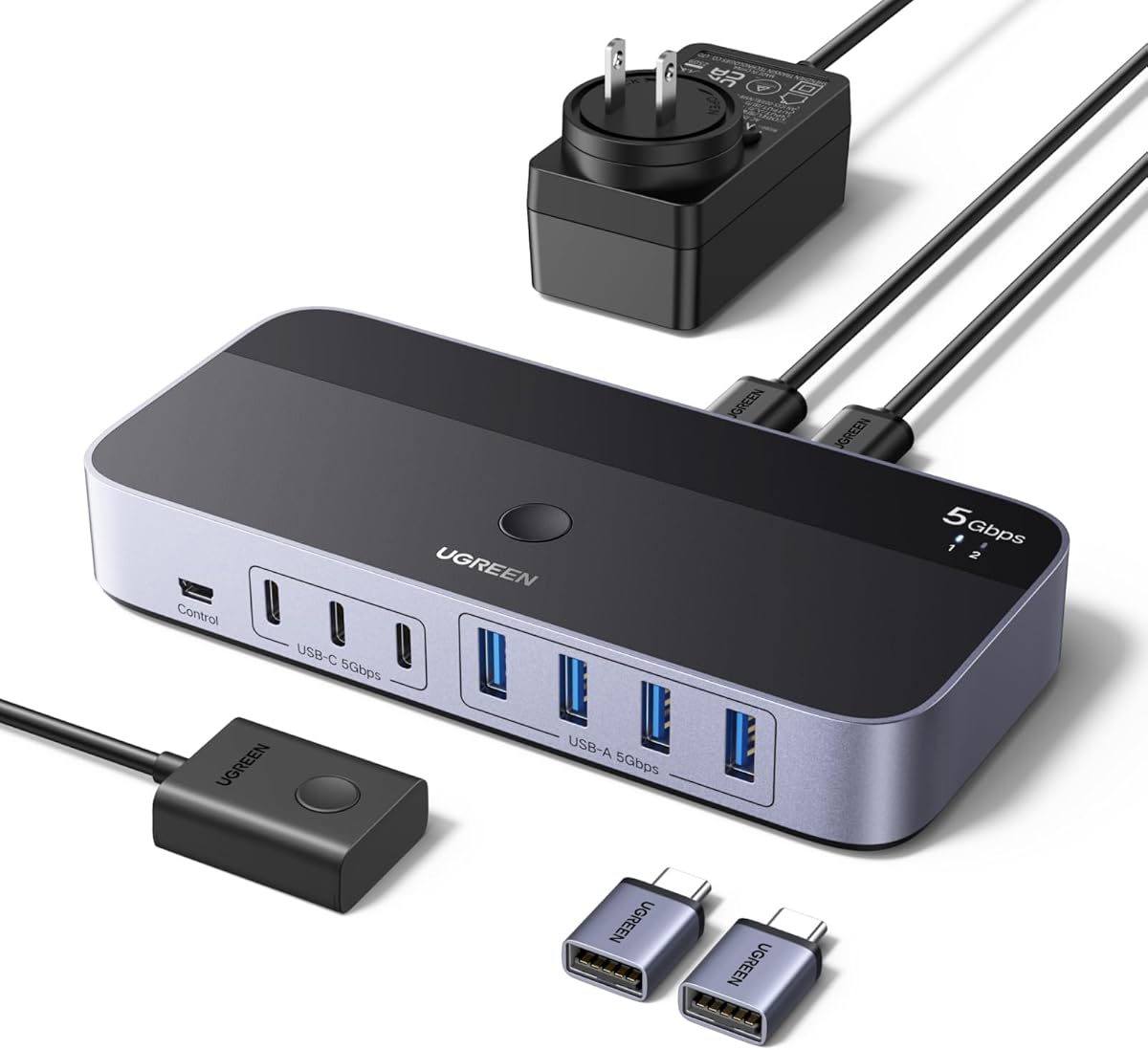
The UGREEN 2-in 7-Out USB 3.0 Switch has a 4.3 rating and is built for users who want a single connection center for numerous peripherals. Two computers can share seven devices through a deliberately mixed layout of four USB-A ports and three USB-C ports.
We may earn a commission when you buy through this link, at no additional cost to you.
Data transfer reaches 5Gbps, and the included USB-C-to-USB-A adapter makes it easier to connect a mix of modern and older computers. A power adapter and charging cable are included, improving the likelihood of stable operation with external hard drives and printers. Users can select the active computer with the built-in button or an external controller.
This remains a USB switch and not a KVM, so it does not provide video output. The device ports are intended primarily for data rather than charging, and the abundance of connectors may be unnecessary for a desk that only needs a keyboard and mouse. Even so, it can replace the need to keep separate hubs attached to each computer.
It is best for power users, creators, and mixed-device offices that routinely connect storage, cameras, printers, headsets, and newer USB-C accessories. The included accessories and broad port selection justify considering it when minimizing repeated reconnections is the main goal.
Seven ports let you keep a broad collection of peripherals connected to the switch rather than to each computer. Switching ownership is more convenient than unplugging devices from one host and reconnecting them to another.
Three USB-C device ports and a supplied USB-C-to-USB-A adapter accommodate contemporary accessories and mixed computer layouts. These ports remain data-focused and should not be treated as general-purpose charging outputs.
We may earn a commission when you buy through this link, at no additional cost to you.
This USB Switch 2 in 2 Out has a 4.2 rating and concentrates on the essential use case: moving a keyboard and mouse between two computers. It also supports printers, scanners, webcams, card readers, and flash drives through its two USB-A device ports.
We may earn a commission when you buy through this link, at no additional cost to you.
A push button on the unit changes the active system, and an LED indicator confirms the selection. An external desktop controller is included, allowing the main switch to be placed away from the immediate work area. It draws power from the computer's USB port, so an AC adapter is unnecessary for basic keyboard-and-mouse sharing.
The supplied information advises against mass-storage devices such as hard drives or flash drives, and it does not advertise an enhanced transfer speed. Input cables must also be connected in the correct direction. These constraints make it more appropriate for ordinary input devices than for intensive data-sharing workflows.
This model is a good choice for a minimal two-computer desk. Its included controller, bus-powered design, and clear status light cover the essentials without the feature overhead of a larger hub or monitor-equipped KVM switch.
The external controller gives you a convenient way to select a computer when the switch itself is mounted behind a display or placed beneath a desk. It adds useful control without requiring a separate software utility.
Because the unit is powered through the connected computer, a standard keyboard-and-mouse setup can begin working immediately. High-demand storage use is not recommended, however.
We may earn a commission when you buy through this link, at no additional cost to you.
The UGREEN 2-in 7-Out USB 3.2 Switch receives a 4.3 rating and offers the highest stated transfer rate in the guide. It is designed for users who need numerous shared connections as well as faster movement of data between a peripheral and one of two computers.
We may earn a commission when you buy through this link, at no additional cost to you.
The switch provides four USB-A and three USB-C device ports, with speeds up to 10Gbps across its USB 3.2 Gen 2 connections. A USB-C-to-USB-A cable allows mixed computer setups, and the included power adapter and charging cable support stable operation with external hard drives and printers. A button or external controller handles computer selection.
Audio-device connections are not recommended because the USB ports are primarily designed for data. The unit also cannot send video to a monitor, so users will still need a separate display connection or a dedicated KVM switch. The broad port count can be excessive for a simple keyboard-and-mouse arrangement.
It is the strongest option for data-heavy users who routinely connect high-speed storage and numerous accessories across modern and legacy computers. For general productivity, a smaller USB 3.0 selector may be more appropriate, but this model offers the most advanced shared-device performance in the lineup.
The 10Gbps specification is the distinguishing feature for fast storage and large file transfers. It reduces waiting compared with switches limited to 5Gbps or USB 2.0.
Seven ports, a USB-C-to-USB-A cable, a power adapter, and a charging cable cover many connection and stability needs. The package is particularly useful for computers with different connector styles.
We may earn a commission when you buy through this link, at no additional cost to you.
The right switch depends on how many peripherals you share, whether your setup includes USB-C devices, how quickly you need to change computers, and whether you also want to control a monitor. These factors help separate simple USB selectors from expanded hubs and KVM switches.
Start with the peripherals that must remain connected. A two-port model is sufficient for one keyboard and one mouse, while a four-port switch can also retain a printer, scanner, webcam, or storage device. Count the shared device connections rather than the computer-input connections, because every product in this guide accepts peripherals from two separate computers.
Choose only the capacity you need. Extra ports can simplify future expansion, but they may make the switch larger or require additional power. For most dual-computer desks, two or four shared ports provide the best balance of convenience and simplicity.
A standard USB switch shares data peripherals but does not carry a monitor signal. If you want the display, keyboard, and mouse to change together, choose a KVM switch with HDMI inputs. The Hearvo model in this guide is designed for two computers and one monitor, supporting 4K at 60Hz.
Do not assume that a marketplace reference to a KVM selector means the product includes video switching. Several listings explicitly state that they are not KVM switches. If the monitor will remain connected separately, a USB-only selector is simpler; otherwise, a monitor-capable KVM provides the more unified workflow.
USB 2.0 is adequate for many keyboards, mice, printers, and card readers, but USB 3.0 and USB 3.2 are preferable when sharing flash drives, mobile hard disks, or other data-heavy accessories. The guide includes options rated up to 5Gbps and 10Gbps, as well as a USB 2.0 model for basic needs.
Consider the slowest device in your setup. A fast host cannot accelerate a USB 2.0 peripheral, but a USB 3.0 switch generally provides more flexibility for future accessories. For the widest range of current and upcoming storage devices, the 10Gbps seven-port option is the most capable.
Shared-device ports are only one side of the connection. You also need a practical way to attach the switch to both computers. A USB-A-focused model may require a USB-C-to-USB-A adapter when a newer laptop has only USB-C ports, and that adapter must support data rather than merely charging.
Mixed-port switches reduce this friction. Models with USB-C device ports and an included converter are useful when several accessories use USB-C. Regardless of the switch, check the physical ports on both computers and confirm the necessary cables or adapters are included.
Most products use a one-button selector with an LED indicator, making them easy to operate. An external desktop controller is useful when the main unit is hidden behind a monitor, under a desk, or inside a cabinet. The UGREEN four-port option with controller and the wired-remote Hearvo KVM provide that added convenience.
Think about where the main unit will live. A front button is faster when the switch sits on the desk, while a remote controller is more comfortable when you want to keep the hardware out of sight. The indicator should clearly identify the active computer.
A keyboard and mouse generally place little demand on a switch, but hard drives, solid-state drives, cameras, and some headsets may require additional power. Several products provide an auxiliary power input, and the two seven-port UGREEN switches include a power adapter. Models powered only by the USB bus are simplest for basic input-device sharing.
Read the supplied instructions carefully before adding power. Some products require a particular standard voltage, and some power adapters or charging cables are not included. Using the correct source helps avoid disconnections, unstable transfers, or unnecessary wear during repeated device switching.
Most switches in the list are driver-free and support Windows, macOS, Linux, and Chrome OS, though the exact listed generations vary. A computer's operating system generally matters less than its connector type, but verifying compatibility prevents avoidable setup issues.
For mixed-platform workspaces, look for explicit cross-platform support rather than assuming universal compatibility. Plug-and-play operation also means the switch should work without installing network-sharing software or specialized utilities, which is valuable when moving between systems throughout the day.
The number of connected peripherals matters more than the speed label alone. Running multiple high-power accessories from a single USB connection can cause instability, especially when the switch relies on bus power. For a busy desk with storage and media equipment, choose a model with an included power supply or a clearly supported auxiliary power input.
Avoid stretching a basic two-port, bus-powered switch beyond its stated purpose. Several products specifically discourage mass-storage use. Taking those limitations seriously is more important than choosing a nominally higher transfer rate that may disconnect under real workloads.
Begin by identifying the two computer input ports and the shared device ports. Connect the switch to each computer using the supplied host cables, observing the correct input direction. Then attach the keyboard, mouse, and any other shared peripherals to the device ports. If a computer has only USB-C, use a suitable data-capable USB-C-to-USB-A adapter where required.
Power on or wake both computers and press the switch's button or remote control. Confirm that the indicator corresponds to the computer you want to operate. Many switches select the keyboard and mouse together, so make sure the active computer is ready before beginning input. For models with auxiliary power, connect the specified source before operating demanding peripherals.
For care, keep the unit away from moisture, excessive heat, and heavy impact, and avoid forcing connectors into the ports. Route cables so they do not pull against the switch. If a device disconnects when several peripherals are active, reduce the load or add the recommended external power. Before changing the hardware configuration, move the mouse away from the screen and save any work in progress.
Yes, that is the primary purpose of the two-port models in this guide. Connect the keyboard and mouse to the shared device ports, attach the two computer inputs, and use the button or controller to select the active system. You may need to wake the selected computer or move the mouse to reactivate its screen. A USB switch does not automatically transfer applications, clipboard data, or display video.
No, the standard USB selectors in this guide cannot transmit display video. They are not KVM switches even when marketplace wording uses KVM terminology. If you need to switch the monitor along with the keyboard and mouse, choose a KVM switch with appropriate video inputs, such as the Hearvo HDMI model designed for one monitor and two computers.
They can, but the connection method depends on the switch. Some models require a USB-C-to-USB-A adapter on the computer side, and the adapter must support data transfer. Switches with native USB-C host or device connections, an included converter, or both are more convenient for modern laptops. Check the included accessories and port layout before choosing a model.
Usually not for a standard keyboard and mouse because their power demand is low. Additional power can be helpful when the switch also serves hard drives, solid-state drives, cameras, headsets, printers, or several connected accessories. Some models include a power adapter, while others provide an auxiliary input without supplying the adapter. Use only the specified power source and voltage.
Yes, most of the products provide shared USB-A ports suitable for printers, and the switches change which computer has active access to the device. The operating system will need the appropriate printer driver installed on both computers. For the best experience, configure the printer on each system before switching and use the provided or supported connection cables.
A USB switch shares peripheral data connections between computers, such as keyboards, mice, printers, and storage devices. A KVM switch also switches the video connection so one monitor can display different computers. The Hearvo option is a true KVM model for two computers and one monitor, while the other products in the guide are data-sharing USB switches.
The cause may be insufficient power, a cable or adapter limitation, or use of a device the product is not designed to support. Start by reducing the number of connected peripherals, then try the manufacturer's specified host cables. For storage devices, check the manual's guidance and consider a switch with a supported or included external power adapter.
The listed products are designed primarily for driver-free, plug-and-play operation across their stated compatible systems. You still need normal operating-system support for any shared printer, storage device, or specialized accessory. A KVM model may also require display and keyboard settings to be recognized correctly, but it does not require a dedicated switching application.
The 2 in 2 Out USB 3.0 Switch is the strongest all-around choice for a straightforward keyboard-and-mouse setup, offering the highest listed rating, USB 3.0 performance, clear status indication, and broad system support. The BENFEI USB 3.0 Switch is a practical budget alternative when four shared ports are more important than USB-C flexibility.
For a desk with numerous mixed peripherals, the UGREEN seven-port options provide greater capacity, optional controller control, and included power equipment. The 10Gbps model is best for high-speed storage, while the 5Gbps version covers a broader and more conventional use case. If the monitor should switch too, the Hearvo HDMI KVM is the dedicated solution.
Before purchasing, verify the number and type of shared ports, both computers' connectors, any required adapters, and the peripheral power demands. Current product specifications, ratings, availability, and prices can change, so check the latest listing details at the time of purchase.