
Amazon Fire 7 Kids
4.3Editor score
Compact seven-inch display
Age-filtered content controls
Sturdy kid-proof case
Kids tablets for ages 3 to 7 must be easy to use, durable enough for small hands, and equipped with controls that parents can understand. A useful first tablet balances accessible entertainment, educational content, strong screen-time management, and protection from everyday drops while avoiding the complexity of an unrestricted general-purpose device.
The products in this guide are compared using their published specifications and listed features. The evaluation considers screen size and resolution, age-appropriate controls, app access, performance specifications, battery expectations, storage, cameras, connectivity, and included protective cases, covering both Amazon Fire models and Android alternatives.
Each review highlights the features that distinguish one model from another and explains which families may find it most suitable. Ratings and availability can change over time, while prices and subscription terms also vary, so readers should verify the current listing and account conditions before making a purchase.
4.3Editor score

4.6Editor score

4.6Editor score
As an Amazon Associate we earn from qualifying purchases.
This side-by-side comparison covers ten full-featured options, with particular attention to the controls, hardware, included content, and protective features most relevant to children between three and seven.


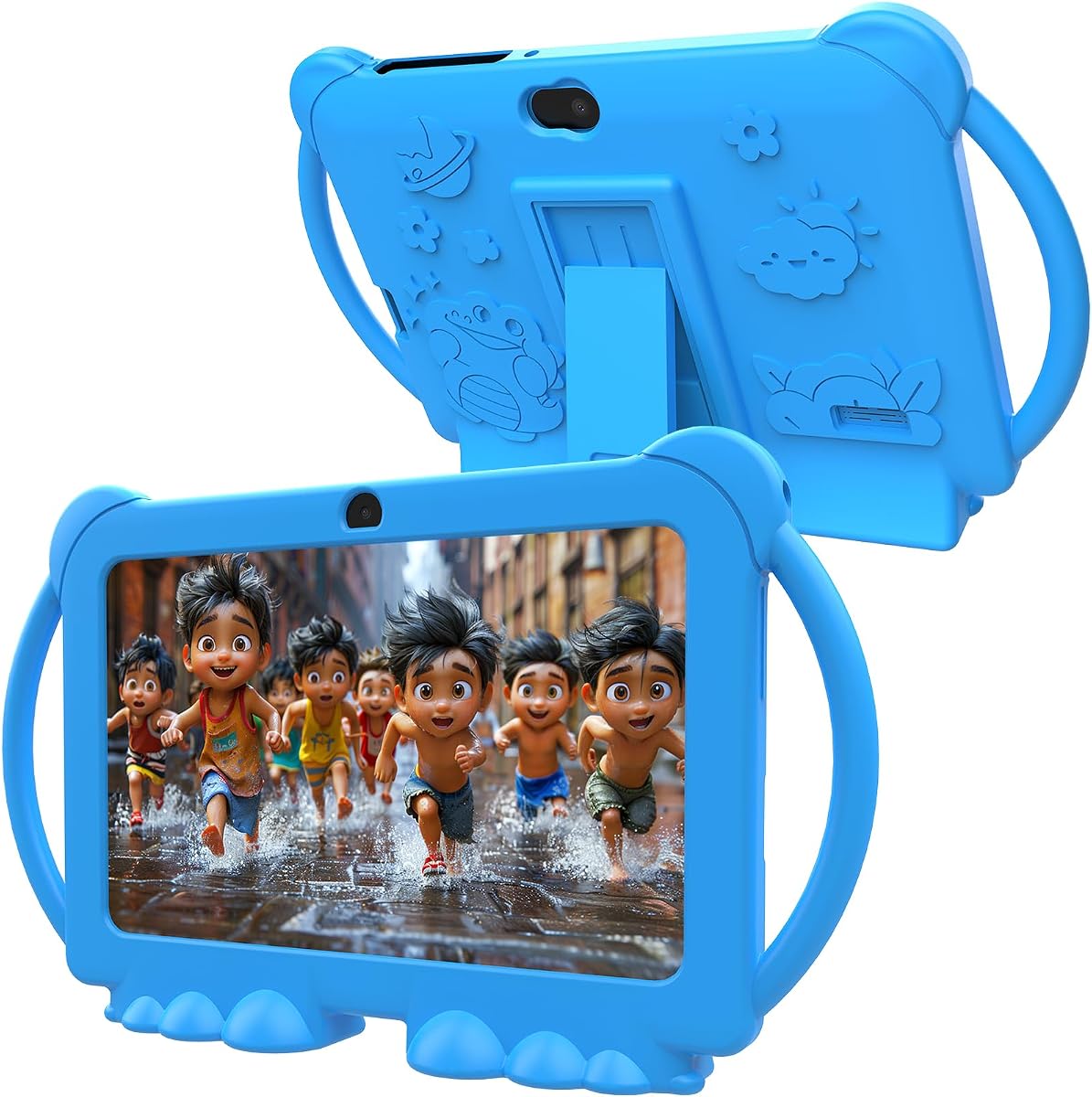


The Amazon Fire 7 Kids is a compact, full-featured tablet created specifically for children ages three through seven. Its listed rating is 4.3, and its strongest combination of traits includes a seven-inch display, a kid-proof case, an age-filtered Parent Dashboard, expandable storage, and up to ten hours of battery life. For a child who mainly reads, watches curated shows, and uses selected learning activities, these features cover the essential needs of a first tablet.
We may earn a commission when you buy through this link, at no additional cost to you.
Amazon Kids+ is a central part of the package, providing a year of access to ad-free books, interactive games, videos, and apps from familiar family brands such as Disney, Nickelodeon, and PBS Kids. Parents can filter material according to age, establish educational goals, set time limits, and grant access to additional services including Netflix and Disney+. The tablet also includes 16GB of internal storage, microSD expansion of up to 1TB, and a sturdy case designed to withstand drops and bumps.
The main trade-off is that 16GB is less internal storage than many Android alternatives in this comparison, and the included Amazon Kids+ access renews on a monthly basis after the first year unless canceled. The seven-inch screen may also feel smaller for shared video viewing or detailed drawing. Even so, the Fire 7 Kids provides a remarkably focused experience, avoiding the amount of freedom found on a standard tablet while preserving familiar app-based learning and entertainment.
This is an attractive choice for families seeking a relatively compact tablet with a simple child-oriented interface and robust Amazon parental controls. It is particularly suitable for a three-year-old or a younger child who is still learning to navigate apps independently. Those who want a larger canvas, more internal storage, or a more conventional Android interface may prefer one of the other models, but the Fire 7 remains a compelling entry point.
The Parent Dashboard gives adults a direct way to filter content by age, set limits, define educational goals, and decide when additional streaming services become available. That combination lets a child use the tablet independently while keeping the adult responsible for the boundaries.
Amazon Kids+ adds ad-free books, games, videos, and educational activities, while 16GB of built-in storage can be supplemented with a microSD card of up to 1TB. Families that regularly download media should still monitor the available capacity.
We may earn a commission when you buy through this link, at no additional cost to you.
The Amazon Fire HD 8 Kids is a balanced recommendation for a child between three and seven. It carries a 4.6 rating and improves on the smaller Fire 7 in several meaningful areas: an eight-inch HD screen, 3GB of RAM, 32GB of storage, up to 13 hours of battery life, and a protective case that doubles as a stand with a handle. It also includes Amazon Kids+ and a two-year worry-free replacement guarantee.
We may earn a commission when you buy through this link, at no additional cost to you.
The newer hardware specification is designed for everyday multitasking, while the larger display gives books, videos, games, and creative activities more room. Parents can remotely review activity, set screen limits, and prioritize books and learning applications over entertainment. The strengthened aluminosilicate glass and kid-proof case add another layer of protection, and storage can be expanded by as much as 1TB with a separately sold microSD card.
As with the Fire 7, the included Amazon Kids+ period automatically transitions into a monthly subscription unless the family cancels through the Parent Dashboard or contacts customer service. Some buyers may also prefer a full Android environment with unrestricted app availability, while this tablet is designed around a more controlled, child-focused experience. It is not a toy, but it also does not expose a young child to the broad configuration demands of a general-purpose tablet.
The Fire HD 8 Kids is ideal for families who want more screen space than a compact model without moving to a configuration aimed primarily at older children. Its combination of battery life, storage, parental oversight, and drop protection makes it particularly well rounded for reading, educational videos, games, and travel. It is the strongest all-around choice in this group for most households shopping for a child in the target age range.
The eight-inch HD display gives illustrated books, videos, puzzles, and drawing activities a more generous canvas than a seven-inch model. That extra space can be especially useful for a child who is beginning to read or follow more involved game interfaces.
A stated battery life of up to 13 hours makes the tablet practical for road trips, flights, and long periods away from an outlet. The included stand handle also provides a stable way to position the device for hands-free viewing.
We may earn a commission when you buy through this link, at no additional cost to you.
This 7-inch Android 12 tablet provides an alternative to Fire tablets for families that prefer the wider app selection of Google Play. It has a 4.0 rating, 4GB of RAM including a listed 2GB expansion, and 32GB of internal storage that can be expanded with a microSD card of up to 512GB. The included children’s apps, protective case, and adjustable stand make it suitable for children in the broader three-to-nine-year age range.
We may earn a commission when you buy through this link, at no additional cost to you.
Google Play access allows families to choose educational and entertainment apps directly, while Widevine L1 support is listed for compatible streaming. Parental tools include screen-time limits, password protection, individual profiles, app blocking, and unsafe-page filtering. Automatic brightness adjustment is included on the 1024 by 600 IPS display, while front and rear cameras, dual speakers, Wi-Fi, Bluetooth, a headphone jack, FM, and GPS add broader device functionality.
The trade-off is that this is an open Android tablet, so the family must establish and maintain its boundaries rather than relying on a tightly curated content environment. Its 4.0 rating is lower than the leading Fire options, and the stated RAM configuration includes expandable memory that should not be treated identically to physical RAM. The seven-inch resolution is adequate for many activities but does not offer the detail of higher-resolution 10-inch alternatives.
This model is best for parents who want a conventional Android tablet with broad app choice, Google Play compatibility, and several ways to limit child use. It can serve a three-year-old when the account is properly configured, though families that value a simpler, more controlled ecosystem may find the Amazon Fire line easier to manage.
Because the tablet is GMS certified and supports Google Play, adults can select specific learning, reading, drawing, and entertainment apps. This flexibility is useful when a child needs a particular curriculum, language app, or creative tool.
Separate profiles, app blocking, page filtering, and time limits make the tablet adaptable to more than one child. Password protection adds another layer against accidental changes to the parent settings.
We may earn a commission when you buy through this link, at no additional cost to you.
The YosaToo Android 16 Kids Tablet stands out through its emphasis on learning that remains available without a reliable internet connection. It carries a 4.2 rating, runs Android 16, and includes 4GB of RAM, 32GB of built-in storage, and an additional 64GB of expandable storage. The seven-inch format and stated suitability for ages three through twelve make it a flexible option for a growing child.
We may earn a commission when you buy through this link, at no additional cost to you.
Its preloaded YUBABE offline software provides access to Montessori-style activities, mini games, STEM material, and art content. That makes the tablet more useful for airplane rides, road trips, and locations with unstable Wi-Fi. Google Kids Space is also preinstalled, while full Play Store access opens the door to additional kid-friendly apps. A silicone case, adjustable stand, camera and drawing apps, photo storage, and parental filters round out the feature set.
The offline content should be understood as a defined learning package rather than an unlimited substitute for streaming or downloaded apps. Families must still manage network use, downloaded applications, and screen-time limits. Android 16 is current within this comparison, but some families may prefer a platform with a more simplified child interface. The listed storage is also modest compared with several 64GB alternatives, although the expansion option helps.
YosaToo is a good match for families that travel often or want meaningful activities available without depending on a connection. The combination of offline content, Google Kids Space, Play Store access, and a durable stand-equipped case makes it particularly practical for a child who needs both structured learning and entertainment.
The preinstalled YUBABE package includes Montessori, mini-game, STEM, and art activities that remain accessible without a connection. It is a useful safeguard against boredom when a family cannot access reliable Wi-Fi.
A drop-resistant silicone case absorbs impacts and protects the screen, while the adjustable stand supports hands-free use. Parents can filter content, set daily limits, monitor app usage, and block unwanted applications.
We may earn a commission when you buy through this link, at no additional cost to you.
The Amazon Fire HD 8 Kids Pro is the most advanced Fire model here, with a 4.6 rating, 64GB of internal storage, up to 4GB of RAM, and a hexa-core processor. Although it is positioned for children ages six through twelve rather than exclusively ages three to seven, it remains a logical premium option for a child ready for more independent browsing, downloads, and communication.
We may earn a commission when you buy through this link, at no additional cost to you.
Its eight-inch HD display and stated battery life of up to 13 hours suit extended periods of reading, gaming, video, and music. The large storage allowance gives families room to download content without filling the device quickly, and microSD expansion of up to 1TB is supported. Parents can remotely inspect activity, approve or deny purchases and download requests, manage content, and use a web browser with controls designed to filter inappropriate sites.
The trade-off is that this model is intended for bigger kids, so a three-year-old may find some features unnecessary. It also includes only six months of Amazon Kids+ before monthly auto-renewal unless canceled. Its slim case is less substantial than the kid-proof case included with younger-child Fire tablets, which may matter for a child who is still learning to handle a device carefully. The stronger specification set nevertheless provides a long useful life.
This is the recommendation for a family seeking a premium, more capable tablet that can transition from guided learning to independent use. It works especially well if the child already reads comfortably, downloads many apps, or wants approved voice and video calls with family members. For the youngest users, the standard Fire HD 8 Kids remains the more age-focused choice.
With 64GB of internal storage and support for up to 1TB of expandable storage, this model is well suited to families that keep books, videos, games, and music on the device. The additional capacity reduces the need to delete content frequently.
A filtered web browser gives older children more freedom without removing parental oversight. Adults can review activity, control downloads, approve purchases, and determine which contacts are available for Wi-Fi calls.
We may earn a commission when you buy through this link, at no additional cost to you.
The PEICHENG 7-inch Android 12 tablet combines a familiar seven-inch form factor with 4GB of RAM, 32GB of storage, and a 1024 by 600 IPS screen. It has a 3.9 rating and is designed for toddlers, with preinstalled child-oriented apps, a shockproof case, and an adjustable stand. The configuration resembles other seven-inch Android kids tablets, but the rear camera is listed at 5MP rather than 2MP.
We may earn a commission when you buy through this link, at no additional cost to you.
Families can download apps from Google Play because the device is GMS certified, and Widevine L1 support is listed for compatible streaming. Parent controls include password protection, time limits, separate profiles, app controls, and unsafe-page filtering. Bluetooth, dual speakers, a 3.5mm headphone jack, and front and rear cameras provide familiar general tablet functions, while automatic brightness adjustment is intended to improve comfort.
The rating is among the lowest in this list, so buyers should consider the level of support and long-term software experience alongside the specifications. The children’s mode uses a default password of 0000, a detail parents must change to prevent a child from leaving restricted settings. The advertised RAM includes a 2GB expansion, and the expandable storage depends on an available microSD card.
PEICHENG is a reasonable option for households seeking a basic Android tablet with child profiles, Play Store access, and a protective stand. It is most useful when the family wants familiar app flexibility but does not require a larger screen or the more integrated content ecosystem of the Fire models.
The lightweight protective case is designed to guard against drops and bumps, while its adjustable stand lets the tablet rest securely during videos, games, or lessons. This reduces the chance that a small child will hold the device incorrectly for long periods.
The listed default kids-mode password is 0000. Parents should replace it with a difficult-to-guess code and keep the primary account credentials separate from the child’s profile.
We may earn a commission when you buy through this link, at no additional cost to you.
The ApoloSignage Android 16 Kids Tablet is built around a large 10-inch HD display, making it one of the most visually spacious options in this guide. It has a 3.8 rating, 8GB of listed RAM, 64GB of internal storage, and expansion up to 1TB. For children who spend considerable time reading, watching instructional videos, drawing, or working with apps, the larger screen may provide a noticeably more comfortable experience.
We may earn a commission when you buy through this link, at no additional cost to you.
An octa-core processor and Android 16 platform support the listed performance claims, while Google Kids Space is preloaded with educational activities, coloring, craft tutorials, story listening, and puzzle games. The 1280 by 800 IPS display includes automatic brightness adjustment and blue-light reduction. Parents can filter content, set daily learning goals, manage screen time, and access Google Play for additional educational applications.
The tablet’s 3.8 rating is the lowest in this comparison, which deserves attention despite the generous specifications. It is also larger and heavier than the seven-inch models, potentially making it less convenient for a small child to carry. The listed RAM includes a 3GB plus 5GB expansion, and actual performance will depend on the device configuration and installed applications. Families should also verify software-update support before committing.
ApoloSignage is best for a child who primarily stays in a fixed location and benefits from a large canvas, such as during drawing lessons or shared video viewing. It is less compelling for frequent travel or for a very young child who needs a lightweight, compact device. Its high-resolution display and expandable storage are the principal reasons to consider it.
The 1280 by 800 display gives drawing, reading, puzzles, and video content additional working space. A larger screen can make small controls and illustrated interfaces easier for a child to see and manipulate.
The octa-core processor, 8GB of listed RAM, and 64GB of storage provide ample room for downloaded educational content. A 5,000mAh battery and adjustable stand further support extended sessions at home.
We may earn a commission when you buy through this link, at no additional cost to you.
The HOTTABLET 7-inch Android 12 tablet is a creative-oriented alternative with a 4.0 rating. It offers 4GB of RAM, 32GB of internal storage, and expansion up to 1TB. The included iWawa app provides activities associated with brain training, painting, games, and children’s television, giving the device more immediately visible creative content than a bare tablet.
We may earn a commission when you buy through this link, at no additional cost to you.
Its 1024 by 600 IPS screen supports wide viewing angles, while eye-protection mode is intended to alleviate dryness and fatigue during longer viewing sessions. A quad-core processor handles the Android 12 environment, and Widevine L1 support is listed for compatible streaming. Parental functions include customizable child profiles, screen-time controls, filtered websites, apps, and video channels, with access to educational apps through Google Play.
Its 3,000mAh battery is listed for up to eight hours of mixed use, which is less generous than the battery claims attached to the Fire models or the larger-capacity Android alternatives. The children’s mode also uses 0000 as the default password, making an immediate password change important. As with any general Android tablet, the parent must decide which apps and services are appropriate rather than relying entirely on the manufacturer’s included content.
HOTTABLET is a practical choice for families interested in drawing, games, and mixed educational content in a compact device. The silicone case and stand help with durability and positioning, while the one-year warranty offers some support. It is best viewed as a flexible Android tablet for creative play rather than a tightly curated reading platform.
The preinstalled iWawa package includes drawing, games, children’s television, and brain-training material. This gives a young user meaningful activities before a parent has to search the Play Store for suitable apps.
Adults can create separate child profiles and control screen time, websites, apps, and video channels. This allows different children to receive different levels of access and content within one device.
We may earn a commission when you buy through this link, at no additional cost to you.
The aiprotablet Android 16 Kids Tablet is one of the more technically ambitious models in the guide, with a 4.0 rating, a 10-inch 1280 by 800 IPS display, 64GB of internal storage, and a listed 24GB of RAM. The tablet is intended for children aged three and older and includes a case, parental controls, a 6,000mAh battery, and support for microSD expansion up to 1TB.
We may earn a commission when you buy through this link, at no additional cost to you.
Its Unisoc T606 octa-core processor is listed at up to 1.6GHz, and the GMS-certified Android 16 system provides access to Google Play and a dedicated kids app store. Preinstalled kid-friendly apps, content filtering, screen-time management, learning goals, and app controls create a child-oriented layer over a standard Android platform. Dual speakers, Bluetooth, FM, dual-band Wi-Fi, and video-call support broaden its use beyond solitary gaming.
The advertised 24GB of RAM consists of 4GB plus a 20GB expansion, so it should not be interpreted as 24GB of dedicated physical memory. The large screen and 6,000mAh battery also make this a substantial device for a three-year-old, and its 4.0 rating is lower than the strongest alternatives. Nevertheless, the specifications are competitive for a child who will download multiple educational apps or use the tablet for communication.
aiprotablet is a compelling option for parents who want a large Android screen, rapid charging, strong connectivity, and extensive storage. It is most suitable for a child old enough to benefit from a bigger interface and a household willing to configure the Android ecosystem. For a compact starter tablet, the seven-inch alternatives are easier to manage.
A 64GB internal storage allowance supports downloaded games, books, videos, and creative apps, while microSD expansion can reach 1TB. The high listed memory figure may also support multiple tasks, subject to the actual physical-memory configuration.
The 6,000mAh battery supports 18W PD fast charging, while dual-band Wi-Fi, Bluetooth, dual speakers, and FM broaden the entertainment options. These features suit a shared family device used for learning and communication.
We may earn a commission when you buy through this link, at no additional cost to you.
The PRITOM 7-inch Kids Tablet offers a broad set of controls in a familiar Android 13 design. It has a 3.9 rating, a 1024 by 600 IPS HD display, 4GB of listed RAM, and 32GB of internal storage. A child-friendly interface and preinstalled iWawa software make it approachable for ages three through twelve, while the Google Play option lets parents add other suitable apps.
We may earn a commission when you buy through this link, at no additional cost to you.
Its parental tools extend beyond basic time limits to include app and network filters, content classification, app recommendations, multimedia controls, child locks, spending limits, game-time limits, preference data analysis, and user and theme settings. Wi-Fi, Bluetooth, dual cameras, a touchscreen, speakers, and a headphone jack cover standard entertainment functions. Storage can be expanded with a microSD card for additional photos, music, and videos.
The listed 4GB of RAM includes 2GB of expansion, and the 3.9 rating is modest compared with the leading Fire options. Parents should also recognize that an Android environment with Play Store access needs careful account and app setup. In return, the device offers more explicit behavioral controls than many competing models, which can be valuable for a child who is old enough to explore menus independently.
PRITOM is well suited to families seeking detailed restrictions, a child-oriented starting interface, and the flexibility to add apps later. It can work well for a three-year-old when the adult configures the initial profile and installs age-appropriate content, while the seven-inch size remains easier for small hands to manage than a 10-inch tablet.
The control suite includes app and network filters, game-time and spending limits, child locks, multimedia controls, and content management. These tools give adults several ways to shape how the tablet is used rather than relying on a single timer.
A child-friendly interface and preinstalled iWawa activities provide an accessible starting point for a young user. The included silicone case has a stand, while USB Type-C charging supports a more modern connection.
We may earn a commission when you buy through this link, at no additional cost to you.
A suitable tablet for a child between three and seven should combine a manageable interface, dependable protection, effective age controls, engaging content, and enough battery life for regular use. The following factors help narrow the field according to a child’s age, interests, and home environment.
A seven-inch screen is compact, portable, and easier for small hands to hold, making it a sensible first-tablet size for a three-year-old. An eight-inch display offers more room for illustrated books, videos, games, and creative activities without becoming as large as a ten-inch model. A ten-inch screen is most useful for drawing, shared viewing, and children who have developed more consistent hand control, although it is less convenient to carry and may be more likely to be dropped.
The most important controls include age-based content filtering, screen-time limits, password protection, child profiles, app blocking, and the ability to review activity remotely. Some tablets provide only basic timers, while others add spending limits, web filtering, learning goals, and download approvals. Because children learn quickly, a profile-based system is valuable when siblings of different ages share a device or when a child begins exploring beyond the preloaded library.
Amazon Fire models emphasize curated Amazon Kids+ content, including ad-free books, videos, games, and activities, while Android alternatives often provide Google Play access, Google Kids Space, and preinstalled creative apps. Curated services can be simpler for a parent to manage, but they may require a subscription after the included period. Open Android devices offer greater app choice but require more deliberate selection, age filtering, and account management.
Look for enough memory to run educational apps, videos, and games without frequent delays, along with sufficient internal storage for downloaded content. A four-gigabyte RAM listing and 32GB of storage are common in this category, while some newer models offer larger figures or 64GB internally. Pay attention to whether advertised memory includes expandable virtual memory, and verify the expansion method and maximum supported capacity before purchasing accessories.
Battery life matters most when the tablet is used for travel, car rides, or long periods away from a charger. The Fire models list up to 10 and 13 hours, while the Android products use battery capacities and mixed-use estimates that are not directly comparable. USB Type-C charging is convenient, and fast charging can reduce downtime in larger Android models. Actual runtime depends on screen brightness, video playback, Wi-Fi use, and installed applications.
Young children need a durable case more than a sophisticated adult tablet. A thick kid-proof case with a raised edge offers better protection against drops, while a stand lets the device rest securely during video or learning sessions. The Fire 7 and Fire HD 8 Kids use substantial protective cases, while the Kids Pro uses a slimmer case intended for older children. Always compare the case shape with the model and consider the grip it provides for small hands.
A three-year-old generally benefits from a simplified interface, a short list of approved activities, and minimal opportunities to change settings. A child nearing seven may be ready for apps selected from Google Play, independent web browsing, camera use, and communication with approved contacts. Devices marketed for wider age ranges are not automatically ideal for the youngest user, so the interface and included controls should be assessed separately from the stated age range.
Some tablets include a year or six months of a subscription service, while others rely on free applications, Google Play, and preinstalled content. Check the renewal terms in the current listing and the availability of parental controls, warranties, or replacement guarantees. Long-term software support matters because an inexpensive device with no updates may age quickly, while a model backed by an established ecosystem may provide a more consistent experience.
Begin by charging the tablet fully, signing into the intended adult account, and installing the included protective case before handing it to a child. Create a dedicated child profile, select age-appropriate content, and test every menu the child can reach. If the device includes a kids mode with a default password, replace that password immediately, set the screen-time limit, and confirm that app purchases, downloads, web browsing, and camera access are restricted as intended.
Teach the child to use the tablet in an upright, stable position and to place it on the included stand when watching videos or using learning apps. Keep food and drinks away from the device, clean the screen with a soft dry cloth, and avoid charging the tablet on soft bedding where heat can accumulate. Inspect the case and charging cable regularly, especially after a drop, and remove the device from use if the screen, cable, or battery appears damaged.
For healthy habits, agree on device-free periods and use the tablet for focused activities rather than continuous background entertainment. Parents should periodically review activity reports, remove unused applications, check remaining storage, and revisit age filters as the child develops new interests. Download important content before a trip, keep a backup of family photos, and test offline activities so a day does not depend entirely on a stable Wi-Fi connection.
A seven-inch screen is usually easiest for a young child to carry and hold, while an eight-inch screen offers a better balance for books, videos, and games. A ten-inch display is most useful for drawing, shared viewing, and children who want more workspace. The best size depends more on grip, viewing habits, and travel needs than on age alone.
Fire tablets are generally easier to manage because their child profiles, curated content, and Parent Dashboard are designed for a controlled family experience. Android tablets provide broader Google Play access and more app choice, but they require parents to choose and filter apps carefully. Consider how much freedom the child needs and how much setup time the adult can maintain.
Yes. A young child is likely to drop a tablet, and a protective case can reduce damage to the screen and body. A case with a raised edge and stable stand is especially useful for travel and hands-free viewing. Check that the case is designed for the exact tablet model and that it does not block buttons, cameras, or charging ports.
At least 32GB is useful for downloaded books, games, videos, and applications, while 64GB provides more room for a growing library. Families that download many videos can use microSD expansion where supported. Storage requirements vary with app sizes, cached media, and system files, so leaving some free capacity helps maintain smoother performance.
Free apps can provide substantial value, especially when Google Kids Space, drawing tools, games, and educational programs are available offline. However, a free library may not offer the same level of age filtering, curated variety, or automatic ad-free content as a managed subscription. Compare the renewal terms and the amount of content your child actually uses before deciding whether a subscription is worthwhile.
Choose a limit that matches the child’s developmental stage and the purpose of the session rather than allowing a full adult entertainment schedule. Short, purposeful sessions with an adult nearby are often more appropriate for very young children. Parents can begin conservatively, observe the child’s behavior, and gradually adjust the daily allowance while retaining time away from the screen for sleep, meals, and physical activity.
No. Processor speed, software optimization, storage speed, and the number of background applications all influence performance. Some listings combine physical memory with expandable virtual memory, so the headline RAM figure may not represent the entire amount of true physical RAM. For a child using a few educational apps, 4GB of listed memory may be adequate, but parents should also consider processor quality and software support.
Confirm that app purchases and downloads require approval, web access is filtered, camera functions are appropriate, and the child cannot change the password, account, or time limit. Test the child profile after each major update, and review the list of approved contacts before enabling communication features. Periodically reassess the settings as the child gets older and begins requesting more independence.
The Amazon Fire HD 8 Kids is the strongest all-around option for most families because it combines an eight-inch HD display, 32GB of storage, up to 13 hours of stated battery life, a protective stand, and straightforward parental oversight. The Amazon Fire 7 Kids offers a more compact and economical path into the same focused content environment, while the Fire HD 8 Kids Pro provides the most storage and power for a child ready for greater independence.
For families that want a full Android experience, the YosaToo model is notable for offline learning content, while the aiprotablet and ApoloSignage options offer large displays and generous hardware specifications. Seven-inch Android choices from PEICHENG, HOTTABLET, PRITOM, and the generic Android 12 model provide Play Store access and varying levels of control, but they require more deliberate parental configuration.
Before buying, compare the current product listing, screen size, case, included content, storage expansion, battery estimate, and subscription terms. Prices, ratings, availability, and promotional bundles can change, so confirming the latest details will help ensure that the selected tablet fits both the child’s current needs and the family’s long-term priorities.
