
Tonmom Adjustable Laptop Stand
4.5Editor score
Seven adjustable height levels
Open airflow-focused design
Folds into travel-friendly shape
A laptop ventilation stand can improve airflow, raise the screen toward a more comfortable viewing level, and make long work sessions easier on your neck and shoulders. The best models balance cooling with stability, useful adjustment, device compatibility, and a footprint that suits your desk or travel bag.
The products in this guide were compared using the specifications and features listed by their manufacturers. They include passive risers that rely on open aluminum designs, powered cooling pads with multiple fans, adjustable frames, and compact wedges, covering everything from simple everyday support to active cooling.
Each review highlights the stand's strongest benefit, practical limitations, ideal user, and most suitable workspace. Ratings and specifications can change, as can prices, so check the current product listing and confirm compatibility with your laptop before making a final purchase.
4.5Editor score

4.6Editor score

4.8Editor score
As an Amazon Associate we earn from qualifying purchases.
This side-by-side comparison shows how the ten stands differ in adjustment, cooling method, portability, device support, and workspace suitability.



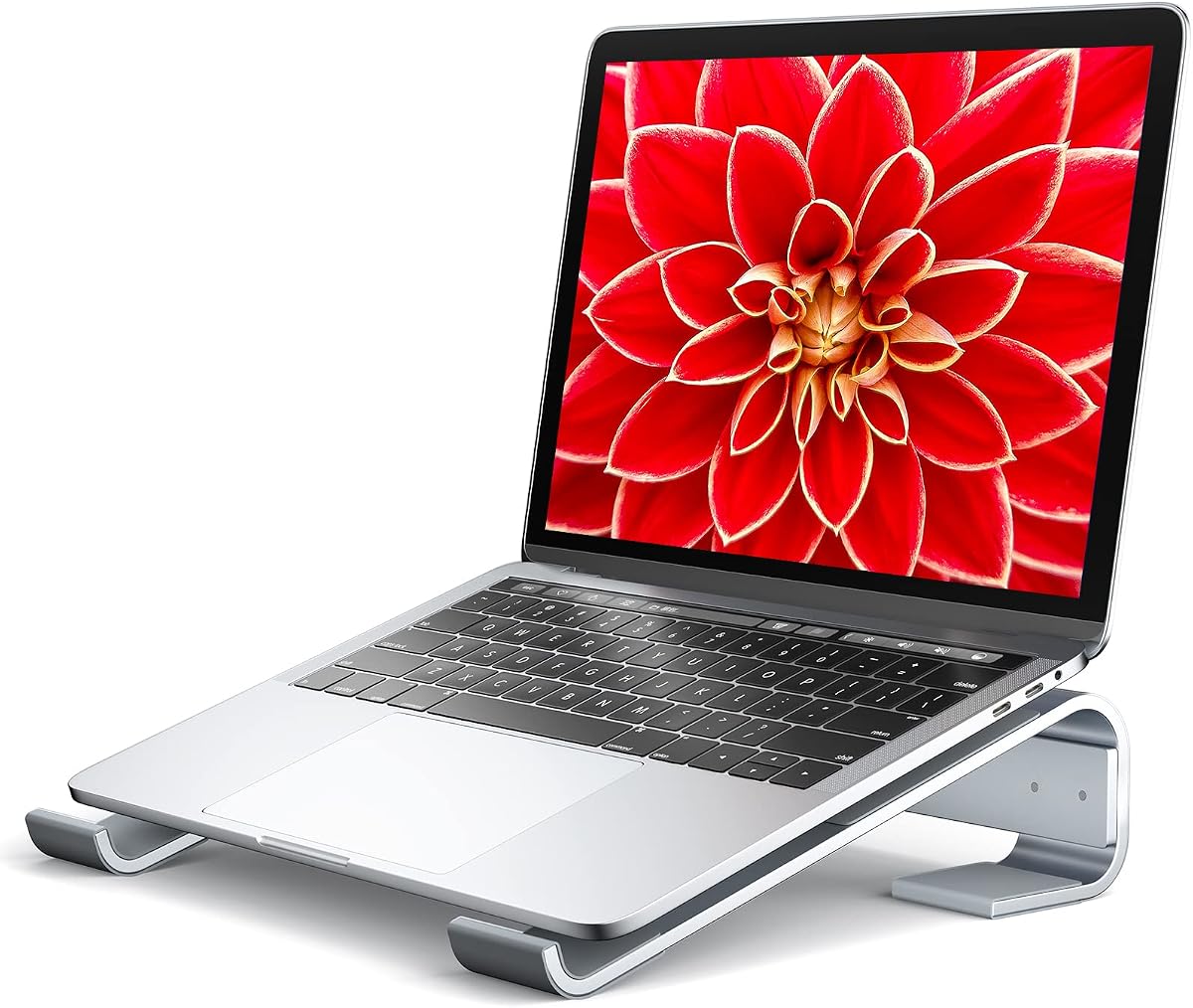


The Tonmom Laptop Stand for Desk is a budget-friendly riser with seven height levels and a 4.5 rating. Its open, forward-tilted design is aimed at improving airflow beneath a notebook while raising the display, making it a practical choice for home offices, shared workspaces, and frequent travel.
We may earn a commission when you buy through this link, at no additional cost to you.
Adjustment is the stand's main attraction. The platform can be elevated from 2.78 to 6.5 inches, giving users several positions for different chairs, desks, and viewing preferences. A triangular support structure and large anti-slip silicone pad help limit sliding, while smooth edges make contact with the device more comfortable.
The product does not contain powered fans, so it should not be confused with an active cooling pad. Instead, it creates space beneath the laptop and encourages passive air movement. It also weighs only 0.53 pounds and folds to 10.5 by 1.96 by 0.68 inches, making it easier to carry than many rigid metal stands.
This is the best pick for shoppers who want adjustable support, a protective surface, and a compact design without paying for powered fans. It suits laptops from 10 to 15.6 inches, including popular MacBook, Dell XPS, HP, ASUS, Lenovo, Chromebook, Pixelbook, and Surface models. Confirm dimensions and weight before use with unusually large or heavy equipment.
Overall, the Tonmom stand provides a strong combination of adjustability, portability, and passive cooling. It is especially appealing to students, travelers, and office workers who value a flexible height range and a broad fit more than active fan-driven cooling.
Seven levels spanning 2.78 to 6.5 inches let users move between lower typing positions and a higher screen. This flexibility makes the stand useful across different desks, chairs, and working styles without requiring a separate riser.
The forward tilt and open structure create breathing room beneath the notebook. Although it cannot provide the cooling of a fan-equipped pad, it can improve circulation around a laptop operating on a hard, flat desk.
We may earn a commission when you buy through this link, at no additional cost to you.
The Thibault Aluminum Laptop Stand is a 4.6-rated, ventilated riser that combines a clean appearance with broad device support. It is especially convincing as an everyday desk accessory because it does not require power, complicated setup, or a large collection of adjustment hardware.
We may earn a commission when you buy through this link, at no additional cost to you.
Aluminum alloy provides a rigid platform, while the ventilated construction allows air to move around the underside of the laptop. Soft rubber pads help protect both the computer and the desk from scratches and contribute to stability. The described assembly process is designed to be quick and straightforward, making this convenient for first-time stand users.
Its compatibility listing covers laptops from 13 to 15.6 inches and also references 16- and 17-inch models, giving the product more flexibility than many compact risers. That makes it relevant to users with larger notebooks, although buyers should still compare their device's dimensions and weight with the manufacturer's guidance before installation.
The main limitation is that the angle appears fixed rather than adjustable through multiple height settings. It also has no active fans, so its cooling benefit comes entirely from elevation and airflow. Those limitations are acceptable for users who prioritize a stable, uncluttered setup over fine positioning or powered cooling.
For most desk-based users, this is the most versatile all-rounder in the list. It suits MacBook, Dell, HP, Lenovo, Microsoft Surface, Acer, ASUS, Samsung, MSI, and Alienware systems, and it should appeal to anyone wanting an aluminum stand that is simple, ventilated, and broadly compatible.
The rigid aluminum structure supports a steady typing position, while the open metal design helps warm air escape from around the laptop. This passive approach is useful for general productivity and entertainment sessions.
A straightforward assembly process reduces the learning curve. Once assembled, the stand requires no power connection, software, or fan controls, leaving the user with a straightforward raised platform.
We may earn a commission when you buy through this link, at no additional cost to you.
The Kootek Laptop Cooling Pad is the most substantial active-cooling option in this guide, with five built-in fans, a 4.4 rating, and support for laptops from 12 to 17 inches. It is designed for users who want more deliberate airflow beneath a notebook rather than relying only on a raised platform.
We may earn a commission when you buy through this link, at no additional cost to you.
One larger 4.72-inch fan and four smaller 2.76-inch fans provide multiple airflow configurations. Two physical switches allow users to select one fan, four fans, or all five, while blue LEDs make the operating state visible. The supplied connection is USB-to-USB, so USB-C-only setups require the appropriate adapter.
A second function is ergonomic elevation. Six height settings let users change the viewing and typing angle for gaming, media viewing, or extended work. Front stoppers help keep the laptop from sliding forward, and the integrated dual USB hub offers extra ports for peripherals without requiring a separate hub.
Unlike a simple metal riser, this product adds cables, powered fans, and a larger footprint. Users who travel frequently or want a completely minimalist desk may prefer a passive model. Fans also add moving parts and may produce more sound than a completely fanless stand, even though the manufacturer describes them as quiet.
The Kootek cooling pad is best for desktop users, gaming setups, and anyone who wants adjustable elevation with active airflow. It is less suitable for a small travel bag or a workspace where an external power source and extra cables would be inconvenient, but it delivers the most feature-rich cooling package in the list.
Users can select one fan, four fans, or the complete five-fan setup. This flexibility makes it possible to balance cooling demand, noise preference, and workflow rather than running every fan continuously.
The built-in dual USB hub provides convenient access to additional peripherals. It reduces the need for a separate dock in setups where the cooling pad can remain connected to the laptop.
We may earn a commission when you buy through this link, at no additional cost to you.
The havit HV-F2056 is a slim powered cooling pad designed for 15.6- to 17-inch laptops. Its 4.4 rating and understated construction make it a practical option for larger notebooks, especially for users who want active airflow without the height range or fan count offered by the Kootek model.
We may earn a commission when you buy through this link, at no additional cost to you.
Three ultra-quiet fans move air across the metal mesh support surface. The pad also has two adjustable height settings, giving it some of the ergonomic benefits of a riser while keeping the design relatively streamlined. An extra USB port and dedicated power switch add utility to a desktop setup.
The main constraint is its narrower device focus. At 15.6 to 17 inches, it is intended for larger laptops and is not the natural choice for small notebooks or tablets. It also has fewer height positions than many competing stands and fewer fans than the five-fan Kootek pad.
The listed cable uses USB-to-USB, meaning a USB-C-only computer needs a Type-C-to-USB adapter. The product description also advises using a Type-C adapter for relevant connections. This setup is less convenient than a completely passive stand, but it remains reasonable for a stationary workspace.
Choose the havit cooling pad when portability, a slim profile, and active cooling for a larger laptop matter more than extensive adjustment. It works well for gaming, media use, and office work, but travelers who prioritize a minimal number of accessories may want to consider a foldable riser instead.
Three fans and a low-profile body provide active cooling without the visual bulk of some desktop pads. The metal mesh creates an open support surface for compatible 15.6- and 17-inch laptops.
The two height settings offer a modest ergonomic improvement over placing the laptop directly on the desk. They are more limited than multi-level designs, but sufficient for choosing between two familiar working positions.
We may earn a commission when you buy through this link, at no additional cost to you.
The Amazon Basics Sturdy and Portable Ergonomic Laptop Stand is a highly adjustable option with up to seven inches of height adjustment and a 4.6 rating. Its aluminum construction, ventilation, and stated load capacity give it a well-rounded feature set for regular office use.
We may earn a commission when you buy through this link, at no additional cost to you.
The stand supports devices from 10 to 15.6 inches, including MacBook, Surface Laptop, Dell XPS, Google Pixelbook, HP, ASUS, Acer, and Chromebook models. Lightweight, rust-resistant aluminum is paired with non-slip silicone pads and protective hooks to keep the notebook in place and reduce the chance of scratches.
The hollow construction is designed to promote airflow beneath the laptop. Although this is passive cooling rather than a fan-based system, the open design can still make the raised platform more suitable for extended work than a closed, solid surface.
Portability comes through a folding design, but this model weighs 1.7 pounds and folds to 10 by 8.7 by 1.8 inches. That is larger and heavier than the very compact plastic risers in this guide. Users should also follow the recommendation to use a flat, solid surface and avoid excessive downward pressure while typing.
This is a strong choice for anyone who values precise screen positioning and a broad adjustment range. It may be less convenient for ultralight travel, but the combination of sturdy aluminum, protective details, ventilation, and folding storage makes it a dependable desk-first option.
A wide adjustment range helps users find a screen height suited to their chair, desk, and viewing habits. The stand can support both lower typing positions and a noticeably higher display.
Silicone pads and protective hooks help reduce sliding and scratching, while the stated 11-pound capacity gives the platform a sturdy feel. Users should still avoid excessive downward force.
We may earn a commission when you buy through this link, at no additional cost to you.
The Adjustable Laptop Stand is a notably portable riser that weighs only 0.49 pounds and folds to 9.96 by 1.98 by 0.68 inches. Its 4.5 rating and six height levels make it a compelling choice for travelers and mobile workers who need more than a flat folding surface.
We may earn a commission when you buy through this link, at no additional cost to you.
The platform raises the laptop from 4.34 to 6.59 inches, offering a more elevated viewing position than a simple fixed wedge. Its forward-tilted, open construction supports passive airflow, and the triangular frame plus anti-slip silicone pad help the device remain steady and protected from scratches.
A notable setup detail is that the two support bars must be inserted at the same level. Following that instruction is important because mismatched bars can compromise balance. Once correctly configured, the stand offers a clean adjustment method without powered components or complicated controls.
This model shares much of its basic design with other inexpensive folding risers, so buyers should distinguish it through its specified height range, weight, and six-level adjustment. It does not offer active cooling, and the open design may permit more movement than a rigid aluminum frame.
The stand is best for business travelers, students attending classes in different locations, and anyone who regularly moves between desks. It supports laptops from 10 to 15.6 inches and fits easily into most laptop bags, making portability its clearest advantage over bulkier models.
At 0.49 pounds and less than an inch thick when folded, the stand is easy to add to a bag. Its narrow shape leaves room for other work essentials during mobile use.
The two support bars should enter matching slots to preserve stability. Checking both sides before placing a laptop can prevent rocking or uneven support.
We may earn a commission when you buy through this link, at no additional cost to you.
The BESIGN LS03 is a premium-feeling aluminum stand with a 4.8 rating, the highest among the ten products listed. It combines a detachable construction, a simple three-step assembly process, and an open design that supports both airflow and a more comfortable screen position.
We may earn a commission when you buy through this link, at no additional cost to you.
The stand elevates a laptop by as much as six inches, helping bring the display closer to eye level and potentially reducing awkward neck and shoulder positioning. It supports laptops from 10 to 15.6 inches, covering many common models from Apple, Lenovo, Dell, HP, ASUS, and other major brands.
Its aluminum alloy construction is stated to support up to 8.8 pounds. Rubber contact points grip the notebook and help prevent scratches. The frame folds flat for storage, while the open aluminum structure promotes airflow around the device without requiring power.
Unlike adjustable plastic stands, the LS03 uses a fixed geometry. That means it cannot be expanded to accommodate every preferred viewing angle or different seating setups. It also offers passive rather than fan-driven cooling, so demanding workloads may still benefit from a powered pad.
The LS03 is recommended for users who value refined materials, straightforward assembly, and a stable elevated platform more than multiple settings. Its 4.8 rating reflects a strong overall proposition, and it should appeal particularly to professionals who want a permanent desktop accessory with a clean, minimal appearance.
The fixed triangular geometry creates a dependable surface without the bulk of a multi-leg adjustable frame. It is well suited to users who already know the screen height and tilt that work best for their desk.
The three-step setup makes the stand approachable even for first-time users. It also folds flat when the extra desk space is needed for other tasks or storage.
We may earn a commission when you buy through this link, at no additional cost to you.
The Soqool Aluminum Laptop Stand is a fixed-angle riser with a 4.7 rating and a rigid triangular structure. It focuses on creating a stable typing surface, adding modest screen elevation, and opening airflow beneath the laptop without the complexity of powered components.
We may earn a commission when you buy through this link, at no additional cost to you.
Its 2.6-inch elevation is lower than the six- to seven-inch adjustment offered by many stands in the guide. That can make it more suitable for users who want improved air circulation and wrist positioning without placing their display at full eye level.
Rubber inlets help keep the stand from moving around the desk, while a protective hook and anti-skid pad support the laptop and reduce scratches. The product description emphasizes a stable structure that does not rock or shift during typing, making it appealing for users who place strong pressure on the keyboard.
The open aluminum design is intended to increase airflow and reduce heat buildup around the computer. Although it cannot provide the same direct cooling as fans, it avoids blocking the underside of the notebook and offers a cleaner desktop than a full-size cooling pad.
Soqool is a sound choice for a fixed workstation and for users who want a stable, slim stand with a relatively low profile. It supports a broad range of laptops from 10 to 15.6 inches, though users seeking a dramatic screen-height increase should consider an adjustable model instead.
Three-sided aluminum support and multiple rubber contact areas help reduce movement. The result is a steady platform for users who type firmly or work in a frequently disturbed desk environment.
The 2.6-inch rise is modest but useful, creating space under the notebook and slightly improving viewing and wrist position. It is less dramatic than the adjustment offered by taller risers.
We may earn a commission when you buy through this link, at no additional cost to you.
The Aluminum Laptop Stand Riser is a compact wedge that raises the rear of a notebook by 35 millimeters, or 1.38 inches. With a 4.6 rating and a minimalist 6061 aluminum design, it is best suited to users who want a small increase in typing angle and passive airflow.
We may earn a commission when you buy through this link, at no additional cost to you.
The low-profile construction takes up less space than a tall riser, making it suitable for compact desks. An elongated 30 by 6.5 centimeter base distributes the laptop's weight evenly, while a sandblasted and anodized finish gives the platform a refined appearance suited to home, office, or studio environments.
A large silicone contact pad helps keep the laptop from sliding and protects its underside from scratches. Additional silicone beneath the wedge helps reduce movement on the desktop. The open front space allows air to circulate under the device without adding a fan, cable, or power requirement.
The principal limitation is the small amount of elevation. It does not bring a display to eye level, and its fixed angle may not suit users who want to alternate between strong keyboard angles and a more upright screen. Its ruler markings are an unusual extra, although they are not a substitute for height adjustment.
This riser is ideal for a tidy, permanent desk where a subtle lift and increased ventilation are enough. It also works with MacBook, Chromebook, and other laptop users, but those who spend long periods looking at a low display may prefer a taller adjustable model.
The 35-millimeter rise creates a more comfortable keyboard angle while leaving the front of the laptop open. This is a practical approach for users who want better airflow without a visibly elevated screen.
Laser-engraved inch and centimeter markings add a small desktop utility. The feature distinguishes the stand without increasing its weight or complicating setup.
We may earn a commission when you buy through this link, at no additional cost to you.
The Nulaxy Ergonomic Adjustable Laptop Stand is a heavy-duty riser with a 4.7 rating and a stated capacity of 22 pounds. Its dual-rod mechanism and broad 10- to 16-inch compatibility make it especially relevant to users with larger or heavier laptops.
We may earn a commission when you buy through this link, at no additional cost to you.
The stand elevates the display toward eye level to help reduce neck, shoulder, and spinal fatigue during long work sessions, video calls, or gaming. Rather than relying on a single hinge, the dual-support mechanism distributes weight and is intended to minimize wobble while the user types.
A geometric heat-vent pattern in the upper panel is designed to create continuous airflow around the laptop. This is still passive cooling, so it is not directly comparable to a fan-equipped pad, but it is a more intentional thermal design than a solid platform.
The dual-foldable structure can collapse flat for transport, making the stand suitable for business trips, cafes, and hybrid work. Its heavier-duty construction and larger support capacity do make it less convenient for minimalist ultralight travel than a compact plastic riser.
Nulaxy is the strongest recommendation here for large, powerful notebooks that need a stable raised surface. It supports prominent laptop brands and is especially useful for gamers or professionals who type firmly and want less movement, provided the added weight and fixed accessory footprint suit their setup.
The dual-support rod mechanism and 22-pound stated capacity offer reassurance for large notebooks and gaming laptops. The design seeks to reduce wobble even under firm typing pressure.
Geometric openings in the upper panel provide a dedicated path for airflow. Users seeking fan-driven cooling should still consider an active pad, while desk users may find this passive design sufficient.
We may earn a commission when you buy through this link, at no additional cost to you.
The right laptop ventilation stand depends on whether you prioritize active cooling, posture, portability, desk space, or support for a particular laptop size. Evaluate the following factors together rather than focusing on elevation alone.
A passive stand raises the laptop and relies on open space to improve circulation. It is quieter, simpler, and usually easier to carry because it has no power cable, controls, or motors. An active cooling pad adds electric fans that can move more air across the laptop's underside, which may be useful during gaming, rendering, video editing, or other demanding work. The tradeoff is greater desk bulk and the need for a power connection.
A laptop screen that sits too low can encourage a bent neck and rounded shoulders, while an overly upright screen can make typing uncomfortable. Adjustable stands allow you to select a height suited to your chair, desk, and viewing distance. Fixed wedges and triangular frames are more compact and consistent, but they are less adaptable when you alternate between locations or use the laptop for both typing and video viewing.
Every stand should securely support the dimensions and weight of your computer. Most models accommodate common 10- to 15.6-inch laptops, while a few extend toward 17 inches or are specifically designed for larger notebooks. Pay attention to the supported width, depth, and load rating. A stand can look compatible while still placing excessive weight near an edge, so a tight footprint with a stated capacity is preferable.
Typing on a raised laptop creates lateral force, so a stable frame matters. Triangular aluminum structures, paired support rods, front stoppers, and textured feet can reduce rocking and sliding. Silicone contact points also help protect the laptop's finish and the desk surface. Look for multiple points of contact rather than a single narrow ledge, particularly if you type forcefully or use the computer for gaming.
Travel-friendly stands should be light, narrow, and quick to collapse. The lightest folding risers can disappear into a laptop bag without adding much bulk, while aluminum models and cooling pads tend to occupy more space. A flat-folding design is convenient for hybrid workers, but a fixed-angle stand may be easier to deploy because there are no support bars to align before every use.
A tall riser can provide better viewing geometry but takes up visible desk area. A low wedge is less noticeable and works well in a compact office. Fan-equipped pads generally need the most room because their platforms, cables, and controls extend across the desk. Consider whether your setup has space for a mouse, external keyboard, notebook, and drink alongside the stand.
Active cooling pads need power, and the connection method matters. Several models use a USB-to-USB cable, while USB-C laptops may require an adapter. Built-in USB hubs can be convenient for connecting peripherals, but they add another element to the setup. Passive stands avoid these concerns entirely, making them simpler for travel, shared offices, and frequently changing workspaces.
If you select a powered pad, noise becomes part of the user experience. Even fans marketed as quiet may be noticeable in a silent room or during voice calls. Adjustable fan switches, as offered by some models, let you reduce the number of operating fans when the laptop does not need maximum cooling. LED indicators and physical controls should also be easy to reach without lifting the computer.
Start by placing the stand on a flat, firm desk and checking that all support bars, legs, or hinges are fully engaged. If the model has adjustable levels, move both sides to matching positions before setting the laptop down. Confirm that the computer sits fully within the supported area and that its weight is comfortably within the stated capacity.
Position the laptop so ventilation openings are not blocked, the screen is centered in front of the user, and the keyboard remains comfortable to type on. For a powered pad, connect the correct cable and begin with the lowest fan setting before increasing cooling. Keep liquids away from the fans and electrical connections, and do not block the notebook's exhaust vents.
For care, wipe the stand with a soft, slightly damp cloth and avoid harsh chemicals that could damage rubber pads or the desk finish. Allow the device to cool before moving a powered pad, unplug it before cleaning, and inspect the surface for debris. A passive stand needs only occasional cleaning and a check that adjustment points remain tight.
A ventilation stand is usually simpler, quieter, and easier to carry because it has no powered fans. A cooling pad can provide stronger airflow beneath the laptop, which may be helpful during demanding tasks. Choose based on cooling intensity, portability, noise, and desk space rather than treating one category as automatically superior.
Raising a laptop can improve airflow around its underside and reduce heat buildup when the device would otherwise sit on a solid surface. It does not guarantee that the internal fans will run less often or that sustained performance will increase. Actual results depend on the laptop's cooling system, workload, room temperature, and the stand's design.
The most useful height is the one that brings the top of the screen near eye level while allowing relaxed shoulders and comfortable arm positioning. This varies with the user, chair, and desk, which is why adjustable stands are often helpful. A fixed low wedge may improve airflow and typing angle without delivering full ergonomic eye-level positioning.
They can by changing the keyboard angle and reducing the need to hunch toward a low screen. Some users also prefer typing on a raised platform because it keeps the wrists more neutral. Stability and surface grip are important, since a poorly designed stand can shift or rock while you type.
A gaming laptop with demanding internal cooling may benefit more from active airflow than a passive stand can provide. A powered cooling pad can move air across the underside, but it does not replace internal cleaning, sensible room temperature, or responsible use of performance modes. Users should also check the pad's size, noise, and stability requirements.
Aluminum stands generally feel rigid and resist warping, which can improve stability and support a wider range of laptop sizes. Plastic folding models can be lighter and more compact, making them easier to carry. Material is only one part of the decision; adjustment, airflow, grip, fit, and build quality also matter.
No. Check the stated screen-size range, supported dimensions, and load capacity before ordering. A label claiming compatibility with 15.6-inch laptops may not accommodate every unusually thick or heavy model, so compare the manufacturer's measurements with your device and avoid placing excess weight near the edge.
A passive ventilated riser is often sufficient for documents, browsing, video calls, and ordinary productivity tasks. A powered pad becomes more compelling with sustained heavy workloads or when the laptop's intake area is frequently blocked. Its added noise, power requirement, and larger footprint should be considered before choosing one.
The Tonmom stand is the most budget-friendly adjustment among the leading choices, while the Thibault model offers a balanced aluminum design and broad compatibility. The BESIGN LS03 stands out for its 4.8 rating, detachable construction, premium material, and refined ventilation design.
Prioritize the feature that solves your actual workspace problem: choose an adjustable model for frequent screen-position changes, a compact wedge for a small desk, a fan-equipped pad for active cooling, or a heavy-duty stand for a large laptop. Stability, device fit, and a secure grip should remain priorities regardless of which style appeals to you.
Ratings, specifications, and prices can change over time, so review the current listing before ordering. Confirm laptop dimensions, weight, connector type, and desk space, and use the stand on a flat, stable surface for the most reliable result.