
Akai Professional LPD8
4.4Editor score
Eight RGB-backlit MPC pads
Eight assignable Q-Link knobs
Four programmable preset slots
USB-powered Mac and PC
Broad DAW compatibility
Explore the best MIDI controllers for drums, comparing pad layouts, sensitivity, connectivity, software, portability, and features for every skill level.
MIDI controllers for drums turn finger movements, taps, and gestures into musical events that can trigger samples, virtual instruments, DAW clips, and effects. A strong controller should feel responsive, provide enough physical controls for live performance, integrate cleanly with your software, and suit the way you make music.
We compared ten pad-focused and hybrid controllers based on their pad counts, velocity response, bank options, assignable controls, note-repeat features, connectivity, portability, and included software. The list covers compact travel models, larger studio controllers, Ableton Live specialists, and keyboards that combine playing with drum triggering.
Each selection highlights a different practical advantage, from the Akai Professional LPD8's simple portability to the APC Mini MK2's clip-launching workflow. Ratings and product details reflect the supplied information, while prices can change at any time, so compare current listings and software requirements before buying.
4.4Editor score

4.6Editor score

4.6Editor score
The table below compares the ten controllers by their most important practical attributes, including pad format, expression controls, software integration, and connection options. These distinctions help show whether a model is best suited to beat making, live performance, mobile production, or a hybrid keyboard workflow.




The Akai Professional MPD218 combines a traditional MPC-style pad layout with enough controls to serve as a serious beat-making hub. It carries a 4.4 rating, and its defining qualities are sixteen thick, expressive pads, three accessible pad banks, and eighteen assignable 360-degree knobs. The result is a more adaptable controller than the compact options without approaching the footprint of a large keyboard.
We may earn a commission when you buy through this link, at no additional cost to you.
Its pad banks make it possible to move among 48 assignable positions without relying entirely on software menus. The knobs can be mapped to DAW functions, virtual instruments, and effects, while note repeat and full-level controls support both rapid beat construction and live triggering. The supplied Ableton Live Lite, Drum Synth 500 by AIR Music Tech, and MPC Beats software add useful starting material and familiar MPC concepts.
The main compromises are visible in the physical layout. Sixteen pads provide less visual overview than a grid-style controller, and the MPD218 does not offer a screen or a large collection of dedicated performance buttons. iOS connectivity is possible, but the required Camera Connection Kit is sold separately, so buyers who want an immediate tablet setup should account for that extra accessory.
The MPD218 is a strong recommendation for beat makers who want a traditional MPC pad feel, extensive assignable control, and a reasonably portable format. It is particularly useful for producers combining live drumming with virtual instrument tweaking. Those who need dozens of clips visible at once may prefer a grid controller, but for focused drum performance this is a balanced and mature choice.
The thick MPC-style pads and bank-based layout make the MPD218 feel immediately familiar to producers accustomed to hardware beat machines. Eighteen assignable knobs add real-time parameter control without forcing every adjustment into a software screen.
Ableton Live Lite, Drum Synth 500, and MPC Beats provide multiple ways to begin making music. The bundle is especially helpful for learning the relationship between hardware control, samples, synthesis, and a DAW-based workflow.
We may earn a commission when you buy through this link, at no additional cost to you.
The Akai Professional LPD8 is a compact, approachable option for producers building beats on a laptop. Its 4.4 rating reflects a well-balanced feature set, but the main attraction is how much control it places in a slim enclosure. Eight RGB-backlit MPC pads, eight assignable Q-Link knobs, and four programmable preset slots make it more versatile than a bare trigger pad.
We may earn a commission when you buy through this link, at no additional cost to you.
The preset system is practical for regular use. A musician can create mappings for a DAW, virtual instrument, or effects chain, save them, and recall them when switching projects. Q-Link controls provide tactile parameter changes, while the RGB lighting helps users identify the active pad state without staring at the computer display.
Its limitations are straightforward. Eight pads offer less room for finger-drumming patterns or wide clip layouts, and there is no keyboard, display, or extensive transport section. That means the LPD8 is best treated as a focused drum and performance controller rather than a complete production surface. It also uses USB power, so it is tied to a host computer or compatible power source during operation.
For beginners, mobile producers, and anyone building a compact home-studio setup, the LPD8 offers an easy entry into hardware control. It requires no separate driver or power adapter, supports Mac and PC, and works with popular applications including GarageBand, Logic, Studio One, Cubase, Ableton Live, Pro Tools, FL Studio, and Adobe Audition. Its ease of use and portability make it a particularly sensible budget choice.
Four programmable preset slots can store different control configurations for separate workflows. This reduces setup time when moving between a drum instrument, an effect chain, and a DAW mixer without rebuilding mappings from scratch.
The slim housing, USB power, and driver-free setup make the LPD8 easy to carry between a studio, rehearsal space, and traveling setup. RGB pad lighting and tactile Q-Link controls also make it practical for live use.
We may earn a commission when you buy through this link, at no additional cost to you.
The Akai Professional APC Mini MK2 is a purpose-built controller for Ableton Live, and its 4.6 rating reflects a strong, specialized feature set. Its defining advantage is the eight-by-eight RGB pad matrix, which places 64 color-coded clip launchers directly under the player's hands. For drumming, those same pads can trigger loops, samples, and other assigned content.
We may earn a commission when you buy through this link, at no additional cost to you.
Nine assignable faders provide direct control over Ableton's mixer, including eight channel faders and one master fader. A Device mode shifts the same controls toward macro and device parameters. Drum mode integrates with Ableton Drum Rack, while Note mode and the Smart Scale View assist melodic playing by displaying scale relationships on the grid.
This close software relationship is both an advantage and a limitation. Ableton users can move from loop launching to mixing to note performance without navigating heavily, but musicians working primarily in a different DAW may find that controller-specific routing requires extra configuration. The grid also takes up more desk space than a conventional eight-pad controller.
The APC Mini MK2 is a compelling choice for producers who perform with Ableton Live, arrange clips by touch, and want physical control over a busy mixer. USB power and plug-and-play connectivity keep setup simple on Mac and PC, while the included Ableton Live Lite and virtual instruments offer a usable starting point. It is the most specialized controller in this guide and one of the most effective for its intended platform.
The 64-pad grid turns Ableton's visual session arrangement into a tactile performance instrument. RGB colors provide immediate visual confirmation, making it easier to locate and trigger loops during a live set or recording.
The controller moves from clip launching to mixer control, Drum Rack operation, and note playing without requiring separate hardware. Dedicated faders and Smart Scale View make it more than a one-purpose trigger pad.
We may earn a commission when you buy through this link, at no additional cost to you.
The Xjam Mobile Studio is built around a slim aluminum frame intended for portable creation across computers, tablets, and phones. It has a 4.4 rating, and its standout qualities include adjustable pad sensitivity, polyphonic aftertouch, 48 assignable pad positions, and 18 assignable knobs. Those features make it more ambitious than a simple mobile drum pad.
We may earn a commission when you buy through this link, at no additional cost to you.
Each pad can transmit notes in temporary or toggle form, absolute or relative control changes, MIDI programs, or MIDI machine control commands. The footswitch and mini-TRS MIDI output expand the performance possibilities and allow the controller to communicate with external MIDI equipment. Plug-and-play USB operation supports macOS, iOS, Windows, Android, Linux, and Chrome OS.
Compatibility breadth is the primary appeal, but it also places more responsibility on the user. Different devices and applications may handle MIDI input, virtual instrument routing, and audio monitoring differently, so a recent version of the target operating system is advisable. The single USB port limits simultaneous wired connections, and users should verify the connection requirements of their chosen mobile device.
Xjam is a good option for mobile beat makers who want more sensitivity and mapping depth than a lightweight mobile app. The included Bitwig Studio 8-track, Cubasis LE, and WaveLab LE provide a useful software foundation for recording, mixing, and sketching ideas. For a creator who values portability, broad platform support, and aftertouch, this is a distinctive and capable choice.
Compatibility with major desktop and mobile operating systems makes the controller useful for creators who move between a Mac, PC, iPad, iPhone, Android device, or Chromebook. The included software also supports both recording and immediate idea development.
Forty-eight assignable pad positions, tricolor LEDs, and 18 knobs provide substantial control despite the slim enclosure. Polyphonic aftertouch and MIDI output offer more nuance and external-device integration than many compact alternatives.
We may earn a commission when you buy through this link, at no additional cost to you.
The Akai Professional MPK Mini IV combines a 25-key velocity-sensitive keyboard with eight pressure-sensitive MPC pads. Its 4.6 rating and extensive feature set position it as one of the strongest hybrid controllers here. It suits musicians who trigger drum parts, play synth leads, and need programmable DAW access without carrying two separate devices.
We may earn a commission when you buy through this link, at no additional cost to you.
Eight assignable 360-degree knobs, a full-color screen, and a push-and-turn encoder keep navigation away from the mouse. The display can present settings, presets, and DAW functions, while the integrated transport section supports a smoother production workflow. Arpeggiator features include Pattern, Freeze, and Mutate functions, alongside chord and scale modes for songwriting and improvisation.
The included software package is unusually substantial, with a VST/AU and standalone suite containing more than 1,000 professional drums, keys, synths, bass instruments, and effects from AIR, Akai Professional, and Moog. Ableton Live Lite 12, Logic Pro, FL Studio support, a Melodics trial, and a Splice trial add further onboarding resources. Native Kontrol Standard integration also gives users access to one of three complimentary Native Instruments sound bundles.
The primary compromise is the mini-key format. These keys are well suited to compact composition and virtual instrument performance, but pianists who need a full-size action may find the spacing less familiar. The feature set also takes time to configure. Even so, the MPK Mini IV is an excellent recommendation for mobile producers, beat makers, and performers who want equal attention to pads, keys, and software control.
Eight MPC pads can handle finger drumming, sample triggering, and DAW control, while the 25 mini keys cover melodies, bass lines, and synth leads. This combination reduces the need to switch between a keyboard and a dedicated pad surface.
The full-color screen and push-and-turn encoder make important settings easier to identify and adjust. This is especially useful when changing patches, navigating a DAW, or working with parameters that cannot be inferred from knob positions.
We may earn a commission when you buy through this link, at no additional cost to you.
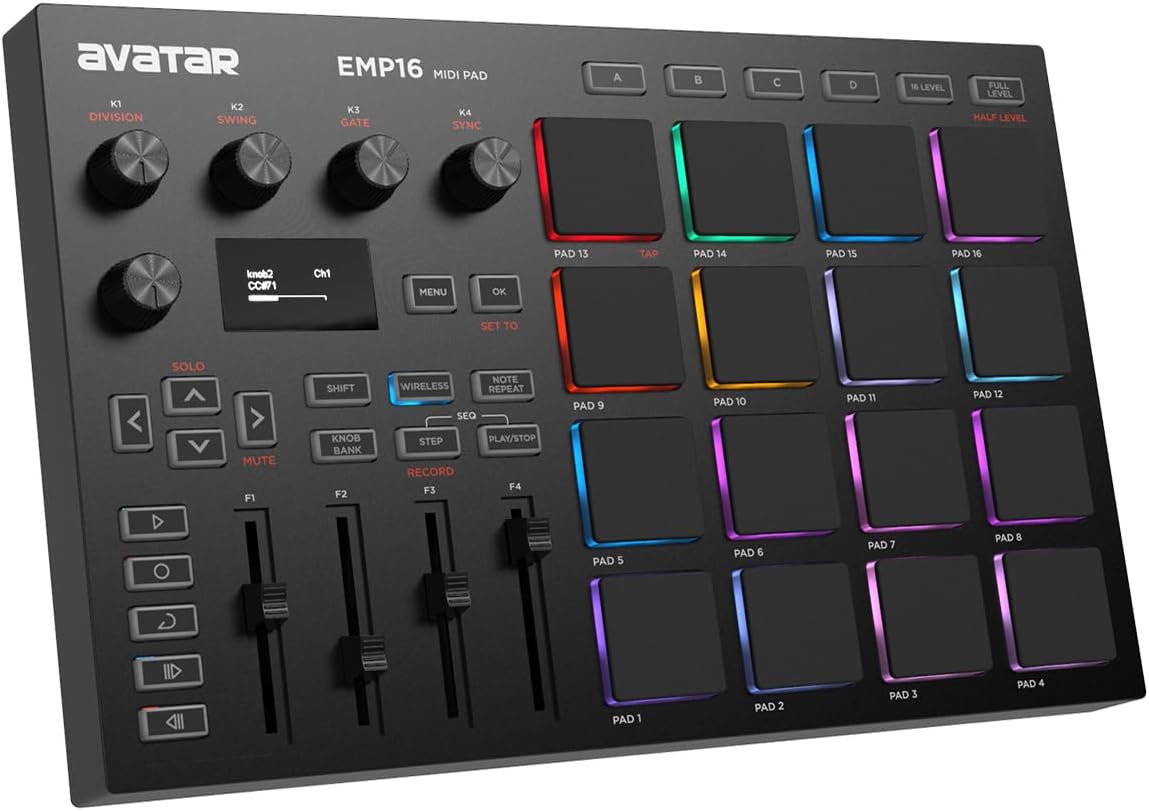
The EMP16 stands out through wireless flexibility, 16 illuminated beat pads, and a generous collection of performance controls. It has a 4.2 rating, and its main strengths include Bluetooth 5.0 operation, four pad banks, three velocity curves, pressure threshold adjustment, and an OLED display. It is designed for beat makers who want to perform without a USB cable constantly attached.
We may earn a commission when you buy through this link, at no additional cost to you.
The controller can be powered through USB or two AA batteries, although batteries are not included. Wireless operation is designed for iPad, iPhone, iPod touch, and Mac without requiring a separate driver, OTG adapter, or cable. For wired configurations, USB MIDI and standard MIDI inputs and outputs support connections to computers and external MIDI gear.
Its control set is more extensive than the pad count alone suggests. Four assignable faders, five assignable buttons, and four endless rotary knobs are accessible through three banks. Note Repeat, Swing, Gate, Sequencer, Clock Synchronization, Transport, and Tap Tempo features support live and recorded performance, while the OLED provides immediate visual feedback without requiring a computer-based editor.
The EMP16 is a strong option for mobile producers who value wireless freedom and detailed control. Its standard MIDI connections also make it more flexible than a controller limited to one host device. Buyers should remember that the bundled Cubase LE 15 and Cubasis LE 3 require a separate download and redemption, and that wireless performance still depends on the mobile operating system's MIDI support.
Bluetooth 5.0 removes the need for a tethered connection to compatible mobile devices. The controller can be positioned more freely during finger-drumming, which is useful when a nearby computer screen is not practical.
The OLED and onboard controls expose timing, expression, and performance settings directly. This reduces interruptions caused by opening editors or navigating host software during a rehearsal or live set.
We may earn a commission when you buy through this link, at no additional cost to you.
The PreSonus ATOM is a compact production and performance controller with a clear emphasis on expressive pads and tight PreSonus integration. Its 4.3 rating reflects a capable package featuring 16 full-size velocity- and pressure-sensitive RGB pads, eight assignable banks, 20 buttons, and four endless rotary encoders. It is designed to keep essential studio actions close to the player's hands.
We may earn a commission when you buy through this link, at no additional cost to you.
The supplied Studio One Artist and Ableton Live Lite 10 provide working environments for producing, playing virtual instruments, and triggering samples or loops. Selectable pad velocity curves and pressure thresholds let users tune the response to their playing style. Application-dependent keyboard, Note Repeat, and full-velocity modes expand the controller beyond a single trigger configuration.
PreSonus also includes Studio Magic Plug-In Suite, a package described as containing more than $1,000 worth of computer recording software plug-ins, along with MVP Loops content curated for ATOM. These assets are valuable for learning and immediate use, though the exact tools available can depend on the current bundle and redemption process.
ATOM is a strong recommendation for producers centered on Studio One, and its general USB MIDI compatibility also supports use with other music software. The pressure-sensitive pads and sizeable button set provide more control than minimalist mobile pads. Users working primarily in a different DAW should verify function assignments and host-specific behavior, while those wanting the deepest Ableton integration may prefer a dedicated Ableton controller.
Pressure sensitivity, velocity curves, and pressure thresholds offer several ways to shape how the pads respond. Users can move from softer ghost-note effects to stronger accents without relying on a single fixed sensitivity.
Studio One Artist, Ableton Live Lite 10, the Studio Magic Plug-In Suite, and curated loops create a useful starting library. Together, they make it easier to explore production, virtual instruments, sampling, and loop-based arrangement.
We may earn a commission when you buy through this link, at no additional cost to you.
The Akai Professional MPK Mini MK3 is a compact hybrid that pairs 25 velocity-sensitive mini keys with eight backlit MPC-style pads. It holds a 4.6 rating and remains a capable choice for producers who want traditional beat-making controls alongside melodic input. Eight assignable knobs provide virtual instrument and effects control, while note repeat and full-level behavior support drum programming.
We may earn a commission when you buy through this link, at no additional cost to you.
A four-way thumbstick offers dynamic pitch and modulation control, and the built-in arpeggiator provides adjustable resolution, range, and modes. Native Kontrol Standard integration allows users to browse and control compatible Native Instruments presets, with one complimentary Komplete 15 Select bundle available in Beats, Band, or Electronic form. The Complete Music Production Starter Kit adds MPC Beats, three virtual instruments, and 2GB of sound content.
Compared with the newer MPK Mini IV, this model lacks a full-color screen and a more detailed encoder, but its core control layout is still effective. The absence of a display can also make software navigation less informative, so users who depend on visual parameter feedback should account for that difference. The mini keys, as on other compact keyboards, are designed more for portable composition than full-size piano technique.
The MPK Mini MK3 is a good recommendation for a producer who wants a recognizable MPC experience, a compact keyboard, and strong bundled software at an accessible entry point. It works well for beat making, sample triggering, sound design, and portable song sketches. Buyers comparing it with the latest MPK generation should decide whether the newer model's screen and revised interface justify moving to a different generation.
The eight backlit pads, note repeat, and full-level control preserve the core MPC beat-making experience. This makes the controller approachable for drummers while remaining easy to map for samples, chords, and effects.
Twenty-five mini keys, a thumbstick, and an arpeggiator expand the controller beyond drum triggering. The included production starter kit and NKS support provide a considerable starting point for a small production setup.
We may earn a commission when you buy through this link, at no additional cost to you.
The Korg nanoPAD2 is a deliberately simple drum-entry controller built around 16 solid, responsive, velocity-sensitive pads. It has a 4.0 rating, and its low-profile enclosure makes it easy to position close to a laptop, keyboard, or compact studio setup. The X-Y touchpad provides a way to control multiple MIDI parameters without adding a large knob bank.
We may earn a commission when you buy through this link, at no additional cost to you.
Its simplicity is both the main appeal and the main limitation. There are no banks of dedicated transport buttons, displays, faders, or extensive performance functions. The controller focuses on sending drum data and managing MIDI parameters, which keeps the learning curve modest and the physical footprint small.
Users who need note repeat, clip launching, extensive assignment options, or a visible bank structure may find the nanoPAD2 too limited. There is also no display to clarify active mappings or controller state. However, those limitations are less important for a musician who wants a dependable basic pad surface or already performs most control functions elsewhere.
The nanoPAD2 is best for beginners building a first pad setup, composers who want a simple way to enter drum data, and owners of larger systems who need a lightweight auxiliary controller. Its compact body and USB connection make it easy to integrate, while 16 velocity-sensitive pads provide more room than the smallest eight-pad models. It remains a focused option rather than a complete performance console.
Sixteen velocity-sensitive pads provide a straightforward way to trigger sounds or enter percussion parts. The small footprint makes the controller easy to place wherever it supports the musician most effectively.
The X-Y touchpad gives the user another input dimension without filling the surface with knobs. It is a practical way to manipulate paired MIDI parameters while keeping the controller visually simple.
We may earn a commission when you buy through this link, at no additional cost to you.
The Akai Professional MPK Mini Plus is the most expansive keyboard option in this guide, combining 37 velocity-sensitive keys with eight RGB MPC pads. Its 4.5 rating reflects a flexible design for producers who want more melodic range than a 25-key controller without moving to a full-size keyboard. Three octaves make bass lines, chord progressions, and melodies easier to realize.
We may earn a commission when you buy through this link, at no additional cost to you.
Its standout feature is the built-in 64-step sequencer, which can handle one drum track and one melodic or chord track with up to eight notes on each. That means a musician can sketch ideas without a computer, then transfer the work into a DAW. Eight assignable rotary knobs manage EQ, volume, automation, and virtual instrument parameters, while the transport section handles recording, playback, and timeline navigation.
Connectivity is also unusually broad for a compact controller. USB powers the unit, and MIDI I/O, CV, and Gate allow it to work with synths, sound modules, and modular equipment. Eight premium RGB MPC pads provide a visual performance surface, and chord and scale modes help simplify melodic playing.
The MPK Mini Plus is a strong recommendation for musicians who want a self-contained beat and composition tool with the option to grow into hardware control. Its MPC Beats software, Native Kontrol Standard integration, and complimentary Komplete 15 Select bundle add production resources. The tradeoff is size and a denser control surface, so it will not fit every small workspace, but it offers more musical range than compact alternatives.
The two-track sequencer provides a quick way to develop drum and melodic ideas away from the computer. Its drum lane and melodic or chord lane make it possible to sketch a complete concept rather than capture isolated events.
MIDI I/O, CV, and Gate expand the controller beyond DAW use. Users can integrate synths, sound modules, and compatible modular equipment while retaining the familiar drum pads and compact keybed.
We may earn a commission when you buy through this link, at no additional cost to you.
The right MIDI drum controller depends on how you perform, which software you use, and how much of your workflow you want to control with hardware. Pads, expression, connectivity, and included tools should be evaluated together rather than by pad count alone.
A four-by-four arrangement of 16 pads resembles many familiar drum controllers and works well for finger-drumming, conventional sample kits, and compact performances. An eight-by-eight grid gives you 64 visual launch positions, making clip-based workflows easier to navigate but requiring more desk space. Smaller eight-pad designs are highly portable and work well for basic triggering, although they provide less room for patterns and layered parts. A keyboard with integrated pads is ideal when drums and melody share the same performance, while a dedicated grid remains more focused on arrangement and live control.
Velocity sensitivity lets the controller distinguish lighter touches from harder strikes, which is essential for realistic dynamics and ghost notes. Pressure sensitivity adds a second expressive dimension, allowing note or effect intensity to change while a finger remains on a pad. Adjustable velocity curves and pressure thresholds are useful because the most responsive setting differs among users, instruments, and playing environments. Look for controllers that support full-level or fixed-velocity behavior when consistency matters more than dynamics.
Banks let a small physical pad surface represent many different sounds or functions. Three banks across 16 physical pads can provide 48 positions, while the APC Mini MK2 displays 64 RGB pads at once. Preset storage is also valuable because it lets you recall mappings for different projects without adjusting every control manually. Check whether assignments are editable through the host computer, whether saved presets are supported, and whether the controller can send the control messages required by your software.
Assignable knobs are useful for mixing, sweeping effects, and changing virtual instrument parameters during a performance. Faders provide a more natural interface for volume and pan control, especially when the software displays a mixer. Buttons can handle note repeat, transport functions, clip launching, or mode changes. The right balance depends on the software: a heavily integrated DAW controller may need fewer general assignments, while hardware-focused workflows benefit from broad programmability.
USB is the most common connection and should specify the host operating systems and software supported by the controller. USB-C can simplify modern computer connections, while full MIDI output allows the controller to send data to external synths and modules. Bluetooth is valuable for mobile performance, but compatibility should be checked for the exact device and operating system. CV and Gate support matters for users who control modular or semi-modular hardware. Mobile devices may also require a suitable adapter or interface that is not included with the controller.
A controller that must travel should be light, compact, and powered over USB, with a layout that remains usable in a tight space. A slim aluminum body can feel premium and resist movement, while a sturdy pad surface is important during vigorous playing. Larger grids and extended keyboards naturally occupy more space and may be better suited to a fixed studio. Consider the supplied cable, included carrying options, surface texture, and whether the controls are large enough for accurate operation during live performance.
Some controllers offer deep mappings for a particular DAW, while general MIDI controllers depend on the host application for clip launching and control assignment. Included software can provide a DAW, virtual instruments, samples, loops, and lessons, reducing the need for separate purchases at the beginning. Native Kontrol Standard support is useful for compatible Native Instruments libraries. Confirm the current software redemption process, operating-system requirements, and whether bundled offers are permanent, trial-based, or dependent on registration.
Note repeat accelerates repetitive patterns, while swing changes the character of timing and gate affects note length. A built-in sequencer can support sketching and hardware-only performance, and clock synchronization can align a controller with external tempo sources. Tap tempo is convenient for live use. Transport controls, smart scale displays, and device modes may seem secondary, but they can materially improve the flow when creating drum arrangements and managing virtual instruments. Choose features that match the software functions you actually expect to use.
Begin by connecting the controller to the computer, opening your DAW, and selecting it as the MIDI input. Load a drum kit or assign sounds to individual pads, then use a MIDI monitor to confirm note numbers and velocity values before building a complete pattern. Learn basic functions such as note repeat, bank selection, and the difference between note mode and trigger mode while keeping the device disconnected from a live performance.
Create practical mappings that improve your workflow rather than assigning every available control. Reserve a few pads for core sounds, assign a knob to a frequently adjusted effect, and set a button for note repeat or a transport action. Save the configuration as a preset when possible, especially if you use separate mappings for recording, writing, and live performance. Test the arrangement at different tempos and monitor the response on the actual instrument or sample library you plan to use.
Protect the controller by keeping liquids away from the pads, buttons, ports, and surface, and by avoiding impact or pressure on the keys. Clean it with a soft, dry or lightly dampened cloth after use, taking care not to push moisture into controls or connectors. When traveling, use a padded case and coil cables without creating sharp bends. Update relevant editor or host software when needed, and periodically confirm that stored presets and assignments still function as expected.
A MIDI drum controller can make a DAW more hands-on by replacing mouse-driven triggering with pads, knobs, faders, and performance buttons. It also makes timing and dynamics more natural when playing sample kits or virtual instruments. The controller does not replace the DAW; it sends performance and control data to it. Your value will be greatest if you want more tactile control during beat construction and live use.
Velocity sensitivity is valuable because it lets the software respond differently to soft and hard strikes. This can create realistic ghost notes, accents, and changes in instrument brightness or effect intensity. A controller with adjustable velocity curves gives you more control over how that data is generated. If a workflow prioritizes perfectly consistent volume, fixed-velocity or full-level modes can be useful alternatives.
Yes, and several options in this guide are explicitly designed for Ableton Live. The APC Mini MK2 offers the deepest direct integration through clip launching, Drum Rack operation, device controls, and mixer faders. General MIDI controllers such as the MPD218, LPD8, ATOM, and EMP16 can also trigger sounds and control assigned parameters, though mapping is generally more software dependent. Check the included Ableton Live version and current operating-system requirements.
Eight pads are more compact and easier to transport, but they provide less space for finger-drumming and multipattern triggering. Sixteen pads allow a familiar four-by-four layout and make it easier to divide sounds across kick, snare, percussion, and melodic sample roles. If you need a large visual palette for clips, consider a 64-pad grid. The most useful choice depends on whether your priority is portability, traditional drumming, or arrangement control.
Most computers with a compatible USB port can use these controllers directly because they send MIDI data over USB. A separate interface may be useful for traditional five-pin DIN connections, multiple external MIDI devices, or a setup requiring specific routing features. Mobile users should verify the connection method supported by their device and whether an OTG or USB interface is needed.
Bluetooth can provide reliable operation on compatible devices when the controller and host have a stable connection, sufficient battery power, and appropriate operating-system support. Wired USB remains the safer choice when dropouts would be unacceptable or when a specific software workflow has limited wireless MIDI support. Test the exact device pairing and host combination before relying on it in a critical performance.
Choose a pad-only controller when your focus is beat triggering, clip launching, or performance effects and you already have another way to play melodies. Choose a keyboard when you want to compose bass lines, chords, and synth parts in the same compact setup. A hybrid controller with eight MPC-style pads is especially convenient because it supports both roles without requiring two separate devices.
The bundle varies significantly. Some products include a DAW such as Ableton Live Lite or Studio One Artist, while others provide virtual instruments, sample libraries, loop content, and production software. Some offers also include trials, complimentary Native Instruments bundles, or access to a Splice subscription. Verify what is included at the time of purchase and whether redemption or registration is required.
The Akai Professional MPD218 offers the strongest traditional balance of expressive pads, banks, and assignable knobs, making it an adaptable all-around recommendation. The LPD8 stands out as the most approachable portable option, while the APC Mini MK2 is the clear choice for producers who perform clips and mix directly inside Ableton Live. Each solves a different problem without requiring the user to compromise on essential pad responsiveness.
For creators working across drums and melody, the MPK Mini IV provides the richest modern hybrid feature set, including a display, pressure-sensitive pads, and a 25-key keybed. The MPK Mini Plus expands this concept with more keys, a sequencer, and hardware connectivity, while the Xjam Mobile Studio, EMP16, ATOM, MPK Mini MK3, and nanoPAD2 serve portable, wireless, PreSonus, value-oriented, and minimalist workflows respectively.
Before purchasing, verify the controller's pad behavior, software integration, operating-system support, and required accessories against your production setup. Ratings are useful signals, but hands-on compatibility with your preferred DAW matters even more. Product listings, software bundles, and prices can change, so review the current listing and confirm all current terms before making a final decision.