
ECOLOVI Adjustable Wood Monitor Stand
4.6Editor score
Four adjustable height settings
Warm wooden storage platform
Supports up to 44 pounds
PC Monitor Riser Stand guide comparing height, storage, stability, materials, capacity, and features to help you choose the right desk upgrade.
A PC Monitor Riser Stand can improve screen placement, reclaim usable desk space, and make a workstation feel more organized. The right model should match your display, desk depth, and daily workflow while providing stable support and useful storage beneath the elevated platform.
We compared all ten featured stands across essential criteria such as adjustment range, platform size, load capacity, construction, ventilation, storage, assembly, and device compatibility. The guide covers single-monitor, dual-monitor, laptop, printer, and general-purpose options for home offices, studios, and gaming desks.
Each review explains the stand's strongest traits, practical limitations, and ideal user, helping you compare real features instead of relying on a generic product description. Product details and availability can change, so confirm dimensions, weight limits, and current listing information before ordering.
4.6Editor score

4.7Editor score

4.7Editor score
The comparison highlights each stand's core format, adjustability, support capacity, and storage benefits so you can quickly identify the right model for a single display, dual-screen setup, laptop, printer, or compact workstation.



The ECOLOVI Adjustable Wood Computer Monitor Stand Riser combines a natural brown wooden top with an adjustable frame, giving ordinary desks a more elevated and organized appearance. Its 4.6 rating reflects a broadly appealing balance of height control, useful storage, sturdy support, and versatile device compatibility.
We may earn a commission when you buy through this link, at no additional cost to you.
Four height settings—4.00, 4.80, 5.50, and 6.10 inches—provide more granularity than many three-position competitors. That range makes it easier to bring a display closer to eye level, and the 12.50 by 7.00-inch area beneath the platform can hold a keyboard, notebooks, or small office accessories. The frame supports up to 44 pounds, while non-slip rubber pads help keep the stand stable and protect the desktop.
Its limitations are modest but worth noting. The platform is narrower and shallower than the largest dual-monitor models, so it may not accommodate two full-size screens side by side. It also lacks a dedicated drawer, phone slot, and cable-management system, making it less suitable for users who want every small item integrated into the stand.
This is a strong choice for a single monitor, laptop, compact printer, or gaming console on a home-office desk. It is particularly attractive for buyers who prefer adjustable height and a warmer wood look without moving into the dual-screen category. For those priorities, it delivers a versatile, uncomplicated riser with a useful storage benefit.
With four selectable positions rather than the common three, the stand gives you a finer range of viewing elevations. Button-operated leg changes are quick enough to adapt as your chair, posture, or display setup changes.
The open space below the top turns otherwise unused vertical clearance into practical storage. It works particularly well for a compact keyboard, notebooks, charging accessories, and other daily items that would otherwise occupy the main work surface.
We may earn a commission when you buy through this link, at no additional cost to you.
The Computer Monitor Stand Riser For Desk, 3 Height Adjustable, 2 Pack is a practical choice when one workstation is not enough. Two separate risers can serve two desks, two monitors, or a monitor-and-laptop arrangement, and the product carries a 4.7 rating for its flexible setup and everyday functionality.
We may earn a commission when you buy through this link, at no additional cost to you.
Each stand offers three height levels at 4.13, 4.92, and 5.70 inches. The broad 14.6 by 9.3-inch top provides a generous support area, while 150 heat-dissipation holes can help airflow reach a laptop or compact computer. Powder-coated, cold-rolled steel gives the frame a 44-pound load rating, and rubber pads reduce slipping and scratching.
The package is most useful for people who value configuration flexibility. You can place the two stands separately, or stack them to create a tiered storage system. Assembly is designed to take less than 30 seconds because the legs attach without additional tools. On the downside, both units use a straightforward metal-shelf design, and neither includes a drawer, phone holder, or enclosed accessory compartment.
Choose this option if you need more than one riser or want to experiment with a stacked arrangement. It is well suited to separate home-office desks, shared workstations, and monitor-and-laptop pairings. The ventilation and broad platform also make it a sensible general-purpose stand for frequently used electronics.
The two-pack format lets you create a consistent elevated setup in separate locations. It can also support one display and one laptop, making it useful for users who alternate between focused work and multi-device tasks.
The platform's numerous holes promote airflow around equipment placed on top. This is especially relevant for laptops and compact computers that generate heat during extended use.
We may earn a commission when you buy through this link, at no additional cost to you.
The WESTREE Dual Monitor Stand Riser is designed for users who want two displays supported by one coordinated unit. Its black steel structure and rustic brown wood finish give it a distinctive workshop-inspired appearance, while the 4.6 rating indicates solid overall appeal.
We may earn a commission when you buy through this link, at no additional cost to you.
The dual-platform format is the main event, allowing two monitors to be arranged together for work, editing, gaming, or general productivity. Thick solid steel legs provide structural support, and optional anti-slip pads help prevent movement. The stand can also hold a printer, laptop, or TV, while the open space underneath creates room for office supplies.
Unlike many adjustable models, this stand does not offer multiple height settings. That means the viewing angle is fixed after assembly, which is acceptable for a carefully planned setup but offers less flexibility if you frequently alternate between users or change chair position. The assembly process is still straightforward because the board and frame feature pre-drilled holes, with parts, tools, and instructions included.
This model is a good match for a dual-screen office, a shared creative workstation, or a desk that benefits from a rustic wood-and-metal look. It is less suitable if precise height adjustment is central to your needs, but its dual-monitor format, sturdy construction, and multipurpose storage make it a distinctive option for fixed setups.
Supporting two monitors in one footprint can make a productivity-focused desk feel more unified. The layout also leaves storage below the displays for items that would otherwise compete for working space.
The wood surface softens the industrial appearance of the steel frame while maintaining a sturdy support structure. That makes the stand easier to coordinate with both office and home furnishings.
We may earn a commission when you buy through this link, at no additional cost to you.
The TEAMIX 20 Inch Monitor Stand Riser for Desk is a straightforward wood shelf for users who value stability and simplicity over moving parts. Its 4.6 rating reflects a well-regarded basic design that can handle several types of equipment while adding useful storage below.
We may earn a commission when you buy through this link, at no additional cost to you.
The stand measures 20 by 9.5 by 4 inches, providing a broad top for laptops, monitors, and screens under 50 inches. Its MDF wood board is rated to support 80 pounds, making it one of the stronger capacity figures among the featured products. The open area beneath can hold a keyboard, notebook, or other equipment not currently in use.
The fixed height is the clearest compromise. While the elevated platform can improve screen placement, there is no mechanism to fine-tune the angle or elevation. Its relatively long 20-inch top may also feel oversized on a compact desk, even though the 9.5-inch depth remains manageable for many workspaces.
The TEAMIX is well suited to a fixed office arrangement, study area, or shared workstation where a straightforward shelf is enough. It works particularly well for users with a larger monitor or heavier desktop equipment who want a stable platform and dedicated storage without paying for complex adjustment features.
An 80-pound rating gives the stand ample support for substantial desktop equipment. That strength is particularly helpful when you want the elevated surface to handle more than a lightweight display.
The black finish and clean rectangular form can blend into many home and office interiors. It provides visual warmth without the visual complexity of adjustment controls or integrated accessories.
We may earn a commission when you buy through this link, at no additional cost to you.
The HUANUO Monitor Stand is a balanced general-purpose riser that combines height adjustment, ventilation, and storage in a straightforward steel design. Its 4.7 rating makes it one of the strongest all-around choices for home offices, study areas, and gaming setups.
We may earn a commission when you buy through this link, at no additional cost to you.
Three selectable heights at 3.94, 4.72, and 5.51 inches let you raise the display to a more comfortable level. The powder-coated steel platform includes ventilation openings intended to improve heat dissipation around a laptop or compact computer. Underneath, a 12.40 by 7.09-inch area holds a keyboard, notebook, or office supplies, and two stands can be stacked for more functionality.
The 44-pound capacity is sufficient for the product's stated uses, including monitors, laptops up to 15.6 inches, printers, and gaming consoles. Assembly requires attaching the legs to preassembled bolts without tools, while rubber pads improve stability and protect the desk. There is no drawer or device-specific slot, so organization depends on the open area below.
This stand is a strong recommendation for a user who wants dependable adjustment and ventilation but does not need dual-screen width. It can handle a single screen or paired laptop setup, and its modest proportions are easier to accommodate than large dual-monitor platforms. Those who prioritize adjustability, airflow, and uncomplicated storage will find it especially versatile.
Button-operated height changes make it simple to move between seated viewing positions. The 3.94-to-5.51-inch range is useful for raising a display without committing to a permanently elevated desk.
The ventilated platform helps release heat from electronics placed above it. This makes the stand useful beyond monitor elevation, particularly for laptop-based work sessions.
We may earn a commission when you buy through this link, at no additional cost to you.
The AMERIERGO Dual Monitor Stand Riser for Desk is built for large, productivity-oriented workspaces. Its 4.5 rating reflects a capable design with expandable width, multiple storage zones, and a 55-pound load rating, though it requires more desk space than a compact single-screen stand.
We may earn a commission when you buy through this link, at no additional cost to you.
The platform extends from 29.13 to 40.9 inches, allowing it to accommodate two monitors and adapt to different screen arrangements. It raises the displays by 3.9 inches, while angle adjustment lets each side be positioned more comfortably. Beneath the shelf are three storage spaces for a keyboard, files, notebooks, a calculator, and other accessories.
A slot section adds convenient places for a tablet, phones, pens, and clips, while the total length and load capacity exceed many competing dual stands. The tradeoff is footprint: a platform that reaches 40.9 inches needs a wide desk. Height is fixed at the stated elevation rather than offering separate levels, so setup planning matters.
This is a compelling option for finance, trading, editing, or other multi-window workflows where a wide, organized platform adds value. It is less appropriate for a small desk or a user who only needs to raise one display. If your workspace can accommodate its width, the storage and adaptable arrangement are notable strengths.
The expandable frame lets you set the overall platform length according to your monitor sizes and desk space. This makes it easier to balance a wide two-screen arrangement with a more compact footprint.
Multiple under-platform compartments reduce clutter around the main work area. The additional slots for devices and small tools further support users who keep several accessories within reach.
We may earn a commission when you buy through this link, at no additional cost to you.
The BONTEC Dual Monitor Stand Riser stands out for its swiveling side shelves and flexible 31.5 to 42.5-inch design. The 4.6 rating suits a versatile product that can accommodate straight, angled, or corner monitor arrangements while also functioning as a substantial desk organizer.
We may earn a commission when you buy through this link, at no additional cost to you.
Swivel shelves let you orient each display independently, which is valuable for creative work, gaming, and multitasking. The 3.9-inch elevation helps bring screens into a more comfortable viewing position. Three open storage compartments create room for keyboards, mice, files, notebooks, docking stations, and gaming accessories, while a built-in phone slot and cable opening reduce visible clutter.
The white wooden construction complements clean home offices and modern gaming rooms, and non-slip pads help protect the desktop. Assembly is stated to take about two minutes using included screws. The main limitation is scale: even at its narrower setting, the structure occupies a substantial portion of a desk, and the hinged shelves require room to rotate.
This BONTEC model is a good choice for users who want two screens and one organized command center rather than a basic shelf. It works especially well when you regularly change monitor angles or need dedicated storage for a keyboard and peripherals. Buyers with a compact desk should measure carefully before committing.
The swivel shelves make it easier to bring both displays toward the center of your vision. They also support different room shapes and workflows, including corner-facing configurations.
Compartments, a phone holder, and a cable-management opening turn the riser into a broader workspace accessory. Frequently used items can remain accessible without spreading across the primary desktop.
We may earn a commission when you buy through this link, at no additional cost to you.
The Klearlook Foldable Monitor Stand is the most feature-oriented single-screen model in the guide. Its 4.7 rating reflects a flexible, polished design that combines folding capability, width adjustment, a storage drawer, and an integrated device holder without requiring assembly.
We may earn a commission when you buy through this link, at no additional cost to you.
Three width settings of 16.5, 18.5, and 20.5 inches allow the stand to match different workstation dimensions, and the legs fold to create clearance for a full-size mechanical keyboard when needed. A hidden drawer stores small office essentials, while a built-in tablet or phone holder keeps a mobile device upright and accessible.
A metal plate and rubberized non-slip legs create a stable base for an ultrawide monitor, and the 55-pound capacity also makes the unit suitable for a printer or laptop shelf. The main limitation is that the drawer is intended for smaller accessories rather than bulky equipment. The platform is designed around one main display, not two side-by-side monitors.
This premium pick suits users who want a refined, adaptable station for one ultrawide display or a monitor-and-laptop arrangement. It is especially helpful in compact spaces because the folding structure can reclaim usable space when the keyboard is needed. The combination of storage, adjustment, and ready-to-use design makes it a particularly complete desk accessory.
The foldable frame creates room for a full-sized mechanical keyboard beneath the platform. That makes the stand practical for users who alternate between typing and viewing-heavy work.
The built-in drawer keeps small accessories close without adding a separate organizer to the desk. The integrated device slot also reduces the need for an additional phone or tablet stand.
We may earn a commission when you buy through this link, at no additional cost to you.
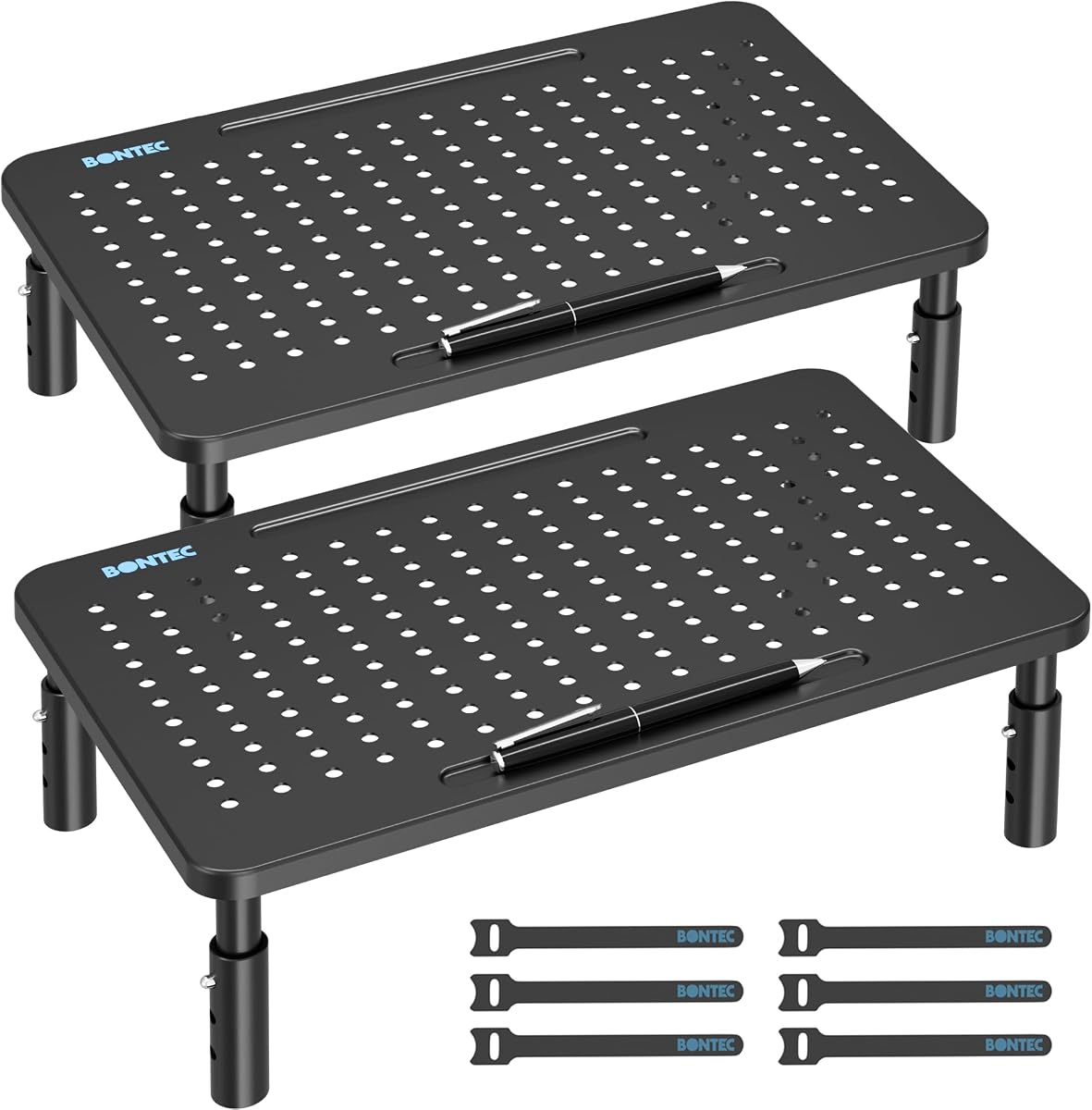
The BONTEC 2 Pack Adjustable Monitor Stand Riser with Drawer is a versatile bundle for home offices, study areas, shared desks, and computer labs. Its 4.7 rating reflects a useful balance of two complete stands, three-level height adjustment, and built-in organization features.
We may earn a commission when you buy through this link, at no additional cost to you.
Each stand offers 3.9, 4.7, and 5.5-inch height levels, making it easy to position a screen more comfortably. The powder-coated steel construction supports up to 44 pounds per stand, while non-slip rubber feet improve stability and protect the desktop. Under-platform space accommodates a keyboard, phone, notebooks, and common office items.
Built-in pen storage and cable-management features help keep smaller accessories in place, although the product description does not identify a separate pull-out drawer despite the title. The main practical consideration is redundancy: buyers who only need one riser may find two units excessive, and the combined footprint becomes significant when both are deployed together.
This two-pack is excellent for separating screens across two work areas or pairing a monitor with a laptop. It also works well for offices that standardize multiple desks. For a single-workstation buyer, compare the total bundled functionality with a one-stand alternative, but for a two-screen or two-desk plan, the package is especially convenient.
Matching stands can create a more uniform workstation when you work in separate locations. Each unit adjusts independently, so different desk and chair heights can still be accommodated.
A dedicated pen holder and cable-management system keep small essentials from spreading across the work surface. The open area below the platform adds useful storage for items used throughout the day.
We may earn a commission when you buy through this link, at no additional cost to you.
The YAOHUOO Dual Monitor Stand Riser is a large, heavy-duty platform designed for expansive desks and multiple devices. Its 4.6 rating highlights the appeal of its wide surface and 100-pound capacity, while the steel legs offer support for demanding dual-monitor arrangements.
We may earn a commission when you buy through this link, at no additional cost to you.
The desktop riser measures 38.6 inches long, 10.2 inches wide, and 5 inches high. That broad span can hold two monitors, a monitor and laptop, or other equipment such as a printer or TV. Its 100-pound maximum capacity is the highest stated figure among the featured stands, and non-slip pads on each leg help guard the desk.
The size is also its main drawback. A 38.6-inch platform requires careful desk measurement and may dominate a compact workspace. The listed height is fixed, and installation is described as taking up to 10 minutes, making it less convenient than button-adjustable or tool-free models. There is also no drawer or integrated device slot.
This stand is a strong option for a command-center desk, trading workstation, media setup, or shared office with a very wide surface. It is especially compelling for users with several sizable displays who value load capacity and a broad elevated platform. If your desk can accommodate the footprint, its sturdy construction offers impressive support.
The 100-pound rating provides substantial headroom for a pair of sizable monitors and other desk equipment. Heavy-duty steel footing is designed to reduce movement and maintain a stable work surface.
The long platform creates room for multiple screens or a broad collection of equipment. Its open shelf underneath can hold a keyboard and accessories that would otherwise crowd the desk.
We may earn a commission when you buy through this link, at no additional cost to you.
The most useful monitor riser depends on your display size, desk layout, storage needs, and tolerance for fixed or adjustable positioning. Use the following factors to narrow the field before making a final selection.
Single-screen stands are ideal for one monitor, a laptop, a printer, or a compact computer. Their platforms are generally easier to position and often leave more open space around the workstation. Dual-screen models are better for productivity, gaming, editing, and financial workflows, but they demand a wider desk and may limit placement around other equipment. The WESTREE and YAOHUOO models provide broad dual-screen structures, while the AMERIERGO and BONTEC expand for flexible arrangements.
An adjustable stand lets you raise a screen to a more comfortable viewing level without replacing the entire desk. Models with three positions are common, while the ECOLOVI offers four settings for finer control. Adjustability is especially valuable when several people use the same station, when your chair or desk height changes, or when you alternate between a monitor and laptop. Fixed-height stands can still improve ergonomics, but they offer less flexibility after installation.
Measure the usable width and depth of your desk before selecting a platform. Compact single-screen stands often occupy about 12 to 14 inches of width, while large dual-screen models can extend beyond 38 inches. Also account for the depth of the display base, the need to keep speakers and microphones close, and clearance for a keyboard underneath. A riser that improves screen height but crowds every other work area may not create a more usable desk.
The listed capacity should comfortably exceed the combined weight of your devices. Most models support 44 pounds, the Klearlook supports 55 pounds, the TEAMIX supports 80 pounds, and the YAOHUOO reaches 100 pounds. Capacity alone does not guarantee stability, so consider the frame, foot placement, non-slip pads, and whether the display has a centered or widely distributed base. Steel frames generally favor load strength, while wood surfaces can provide a more decorative appearance.
Open under-stand space is the most versatile storage format because it can accommodate a keyboard, files, notebooks, or printers of different sizes. Drawers conceal smaller accessories, while open compartments make frequently used items easier to reach. The Klearlook includes a drawer, the AMERIERGO provides three compartments, and the BONTEC dual stand adds phone and cable slots. Consider which accessories you actually use rather than paying attention to storage features you will not need.
If you regularly place a laptop or compact computer on a solid shelf, ventilation becomes important. The HUANUO and Canyora stands feature perforated platforms designed to encourage airflow. Cable-management slots or openings can also reduce tangling behind the stand, while a phone holder may provide a convenient landing place for a mobile device. For a clean setup, look for both the vertical storage underneath and a practical route for power and signal cables at the rear.
Some stands are ready to use immediately, while others require legs to be attached to the platform. The HUANUO, Canyora, and BONTEC two-pack use tool-free leg installation, and the Klearlook needs no assembly. Larger wood-and-steel structures often take longer to put together but may feel more permanent once assembled. If you expect to move the stand frequently, select a foldable design such as the Klearlook and check that the folded size suits your storage plan.
Begin by measuring your desk and confirming that the stand's platform, base, and intended equipment will fit without blocking your chair, drawers, or keyboard. Assemble the frame according to its instructions, tighten all fasteners, and place the stand on a flat, clean surface before adding any equipment.
If the model has adjustable height or width, change the setting while the stand is empty. Position the display near the center of the platform, distribute heavier equipment evenly, and confirm that the screen sits close to eye level without forcing you to look upward. Route cables through any openings and keep power adapters clear of the shelf and storage compartments.
For routine care, dust the top and storage area with a soft, dry cloth. Wipe wood surfaces with a slightly damp cloth and dry them promptly, while avoiding harsh cleaners on coated steel or rubber feet. Check screws periodically, particularly after moving the stand, and make sure vents remain unobstructed. Do not exceed the stated load capacity or place items beyond the platform's supported edges.
A properly positioned riser can raise a display closer to eye level, which may help reduce the need to look downward during long work sessions. It can also create useful space beneath the screen for a keyboard or other accessories. However, comfort depends on the combined height of the stand, monitor, desk, and chair, so adjust the screen and seating position together.
Choose a single-screen stand when your workflow uses one monitor, a laptop, or a printer and you want to preserve desk space. A dual-screen stand is more appropriate when you regularly work across multiple applications, play games, edit media, or need documents and communication visible together. Dual models need substantially more desk width and should be measured before purchase.
Adjustable stands are usually more adaptable because they can accommodate different chairs, users, and device arrangements. Fixed shelves are simpler and may be more attractive when the setup is stable and known in advance. The best fixed model is still useful, but an adjustable stand gives you more options after the monitor is in place.
Yes, provided the platform is large and stable enough for the laptop and its stated load capacity does not exceed the stand's limit. Ventilated platforms are preferable for long work sessions because they promote airflow. A laptop stand with a width of at least 9.25 inches can accommodate many 15.6-inch models, but always check the exact dimensions.
Choose a limit comfortably above the combined weight of every item placed on top, including monitors, stands, hubs, and accessories. A monitor alone is usually not the only factor because dual-screen arrangements can concentrate substantial weight. The featured capacities range from 44 pounds for several models to 100 pounds for the YAOHUOO stand.
Ventilation is especially relevant for laptops, mini PCs, and other electronics that generate heat during active use. Perforated platforms such as those on the HUANUO and Canyora stands allow more airflow. For printers, verify the manufacturer's own ventilation guidance and ensure that vents and output areas are not blocked by the riser.
No. You should compare the riser's full base dimensions, not only the width of its top platform, with your available desk area. Also allow room for the monitor base, cable movement, and access to a keyboard beneath the shelf. Large models measuring around 38 to 41 inches are best reserved for wide dedicated workstations.
Look for a cable-management opening or a clear rear route before installation. Stand the riser toward the back of the desk, use the space below for the power brick, and bundle excess length with reusable ties. Integrated slots, such as those on the BONTEC dual stand, can reduce loose cables around the main work area.
The ECOLOVI stand is the best budget-oriented option for a single screen because it combines four height settings, a warm wooden finish, and useful storage. The HUANUO is the most versatile all-rounder, adding strong adjustability and ventilation, while the Klearlook stands out as the premium choice with folding width options, a hidden drawer, and a built-in device holder.
Prioritize desk fit, display format, and the storage you will genuinely use. Single-screen users should focus on stable support and a comfortable height range, while dual-screen buyers should check total width, base stability, and the arrangement of displays. Ventilation, cable management, and folding storage are valuable additions when they match your equipment and workflow.
Finally, confirm the current listing details before ordering because product dimensions, configuration, ratings, and availability can change. Checking the latest dimensions, load rating, included parts, and current seller information will help ensure that your chosen PC Monitor Riser Stand integrates cleanly with your desk.