
Movo Video Podcast Bundle with Boom Arms
5.0Editor score
Two 4K UHD cameras
Dual XLR dynamic microphones
48V phantom power
Our expert guide compares the best Podcast Equipment Bundles for solo, two-person, four-person, portable, streaming, and video podcasting setups in 2026.
Podcast Equipment Bundles combine microphones, an audio interface or mixer, cables, stands, headphones, and other recording essentials into one coordinated package. A well-chosen bundle can shorten setup time, reduce incompatible connections, and make it easier to begin recording without assembling each component separately.
We compared all ten bundles by considering participant count, microphone type, interface capabilities, device compatibility, monitoring options, portability, included accessories, and suitability for interviews, gaming, streaming, music, or video. The list covers everything from compact two-person kits to complete four-person and multi-camera podcast stations.
Each review identifies the bundle's standout strengths and practical limitations, helping you match the equipment to your recording environment. Ratings and product configurations can change over time, and current prices vary, so confirm the latest bundle contents and availability before purchasing.
5.0Editor score

4.5Editor score

4.5Editor score
The comparison below places each podcast equipment bundle according to its core recording format, host capacity, included microphones, and principal connection options. These details show how the packages differ in complexity, portability, and suitability for podcasting, streaming, interviews, gaming, and video production.


The Movo PodPro Portable Podcast Equipment Bundle for iPhone/Android Phones has a 4.5 rating and offers a balanced approach to two-person recording. Its central MDX-2 interface supports two XLR microphones, two headphone outputs, and stereo 1/4-inch outputs, while the included CastMic microphones provide cardioid dynamic capture for speech-focused production.
We may earn a commission when you buy through this link, at no additional cost to you.
One of the bundle's strongest features is connection flexibility. USB-A, USB-C, and Lightning cables allow the interface to work with PC, Mac, iPhone, iPad, and Android devices. The interface can operate for up to eight hours on battery power, although that figure drops to three hours when phantom power is enabled. A travel case also makes the complete kit more practical for interviews, remote recordings, and temporary studio setups.
The microphones have a 40Hz-16kHz frequency response and metal construction, while the interface adds 48V phantom power, XLR inputs, and separate monitoring connections. The trade-off is that this version uses two tabletop microphone stands rather than adjustable boom arms, so achieving consistent mouth-to-microphone distance may require careful desk placement. It is also an audio-focused package and does not include cameras for video podcasts.
This is a compelling choice for two co-hosts who want a complete, portable XLR setup and expect to work across computers, tablets, and phones. It is particularly useful for podcasters who value monitoring, battery operation, and a travel case more than the finer physical adjustment offered by boom arms. Overall, it is one of the most versatile conventional podcast bundles in the group.
The inclusion of USB-A, USB-C, and Lightning cables removes much of the guesswork when connecting the MDX-2 to a computer, phone, or tablet. That makes the bundle a practical option for creators who alternate between mobile interviews and desktop editing or streaming.
Two dedicated headphone outputs allow both participants to monitor the recording through the included studio headphones. Real-time monitoring can help speakers catch level changes, speaking balance, and unwanted noise before completing a take.
We may earn a commission when you buy through this link, at no additional cost to you.
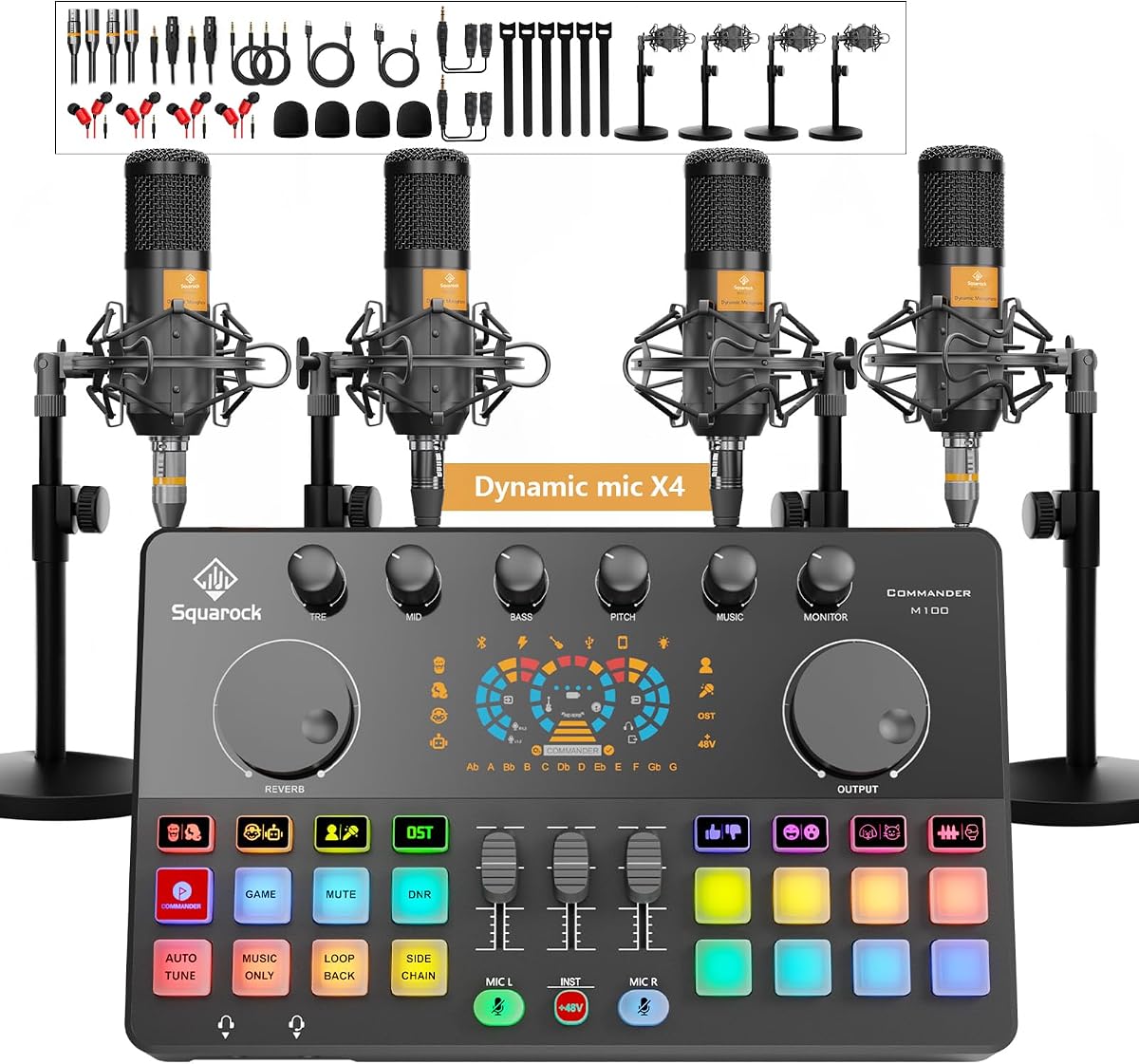
The Podcast Equipment Bundle for 4, M100 Audio Mixer, Dynamic Mics, Recording carries a 4.3 rating and is built for group podcasts, panel discussions, and multi-host streams. It combines four dynamic microphones, desktop stands, monitor earphones, cables, shock mounts, foam covers, and an audio interface mixer in a package intended to get beginners recording quickly.
We may earn a commission when you buy through this link, at no additional cost to you.
The mixer accepts two XLR and two 3.5mm microphone inputs, providing more flexible connection options than a simple all-XLR system. Each independent channel has its own volume adjustment and one-click mute. Its tuning controls include treble, mid, bass, reverb, pitch correction, loopback, and side chain functions, while 10 sound effects, four voice-change modes, auto-tune, and customizable sound pads support entertainment-oriented production.
Bluetooth can provide accompaniment music, and the built-in 4000mAh battery supports wireless operation in indoor or outdoor setups. The interface is described as plug-and-play across Windows, iOS, and Android, with compatibility listed for platforms including TikTok, YouTube, and Twitch. Its many controls and RGB lighting modes add complexity, however, and a four-person arrangement needs considerably more space than a typical two-host desk.
Choose this bundle if you regularly record with three or four people and value channel control, effects, and flexible microphone inputs. It is less restrained than a basic XLR package, but for panel podcasting, group streaming, and mobile entertainment production, the extensive feature set can reduce the need for separate components. It is best suited to users who are comfortable learning a mixer rather than expecting only basic level adjustment.
Independent channel volume and one-click mute controls make it easier to balance four speakers during a live session. These controls can also reduce interruptions when one participant coughs, shifts position, or begins speaking over another host.
Reverb, pitch, voice-changing, auto-tune, sound pads, and Bluetooth accompaniment give creators options beyond basic dialogue capture. These functions are particularly useful for gaming streams, entertainment podcasts, and live shows that need quick sound effects.
We may earn a commission when you buy through this link, at no additional cost to you.
The Movo PodPro Podcast Equipment Bundle for 2 with Boom Arms and Headphones has a 4.5 rating and builds around the same dual-channel MDX-2 platform as the other PodPro option. It includes two CastMic XLR dynamic microphones, adjustable boom arms, studio headphones, cables, and a travel case for a complete two-host recording arrangement.
We may earn a commission when you buy through this link, at no additional cost to you.
The boom arms are the main practical distinction in this bundle. They let each host position a microphone closer and at a more consistent angle while freeing desk space. Combined with the MDX-2's two headphone outputs, this creates a convenient shared monitoring arrangement for co-hosted shows, interviews, streaming, or music recording.
Connection options remain extensive: USB-A, USB-C, and Lightning cables support PCs, Macs, iPhones, iPads, and Android devices. The interface is battery powered for up to eight hours, or three hours with phantom power enabled. Two XLR inputs, 48V phantom power, two headphone outputs, and stereo 1/4-inch outputs make it a conventional, expandable central hub. The trade-off is that boom arms and headphones add bulk relative to a tabletop-stand bundle.
This package is an excellent match for two-person podcasters who want consistent mic placement and a polished desktop setup without assembling separate accessories. It is especially suitable for fixed home studios, while the travel case and battery-powered interface still preserve some portability. If your priority is flexible positioning rather than the smallest possible footprint, this is the more refined PodPro configuration.
Adjustable arms make it easier to maintain a useful speaking distance and direct each microphone toward its assigned host. That consistency can reduce level variation between speakers and preserve more desk space than a pair of conventional stands.
The included pair of studio headphones connects through the interface's separate headphone outputs. Each participant can follow the mix in real time while remaining free to move around the recording area.
We may earn a commission when you buy through this link, at no additional cost to you.
The M100 2-Person Podcast Equipment Bundle,XLR/USB Dynamic Mics & Audio Mixer has a 4.4 rating and combines two dual-connection dynamic microphones with a feature-rich interface. It is designed for podcasting, gaming, voice-over, streaming, and broader content creation, with a 4000mAh battery and plug-and-play operation.
We may earn a commission when you buy through this link, at no additional cost to you.
Each microphone can operate through XLR or USB, making the bundle useful for creators who sometimes connect through a mixer and sometimes use a computer directly. The interface provides four microphone inputs, two monitor connections, independent microphone volume controls, one-click mute, noise reduction, music-only, loopback, side chain, and eight tuning controls. A Commander button stores desired settings for quick recall during a stream.
The microphones also have eight recordable sound effects, four voice changes, 15 listed effects, 12 auto-tune options, RGB lighting, and Bluetooth music support. An instrument input accommodates guitar, bass, and similar sources. The limitation is that the microphones' own buttons and controls are inactive when connected in XLR mode; channel adjustments must then be made through the interface or mixer.
This is a strong option for a creator who wants one bundle to support multiple workflows. XLR provides a conventional studio path, while USB makes individual microphone use more approachable. It is less streamlined than a basic two-microphone kit, but the combination of preset memory, instrument input, monitoring, and wireless features makes it appealing for gaming streamers and podcasters who want their setup to do more than record conversation.
XLR and USB connectivity provide a useful amount of flexibility for beginners and experienced creators. USB offers a direct digital path to a computer, while XLR routes the microphones through the included audio interface and its controls.
The red Commander button memorizes settings for music, monitoring, reverb, output, microphone channels, instrument input, and sound modes. A presenter can restore a preferred configuration without repeating several knob adjustments during a live session.
We may earn a commission when you buy through this link, at no additional cost to you.
The M100 Podcast Equipment Bundle for 4, Audio Interface with 4 Dynamic Mics has a 4.2 rating and is designed for group podcasting, streaming, voice-over, and general content production. Its package includes four dynamic microphones, four stands, four earphones, shock mounts, foam covers, cables, splitters, and a central mixer.
We may earn a commission when you buy through this link, at no additional cost to you.
The recording hardware uses two XLR microphone connections and two 3.5mm microphone inputs. This mixed design allows the included microphones to be distributed across the available connections while still supporting standard dynamic sources. Two USB interfaces can connect two computers or mobile devices at the same time, which is useful when a remote participant and local hosts need separate capture paths.
A dedicated 6.35mm instrument input supports guitar, bass, or keyboard recording, while separate microphone and instrument faders provide basic level control. The mixer also includes noise reduction, music-only, loopback, side chain, reverb, pitch, auto-tune, voice-change options, Bluetooth accompaniment, RGB modes, real-time monitoring, and Commander preset memory. These features make the package broad but somewhat complex for someone who only needs clean dialogue capture.
Choose this bundle for a regular four-person production that needs more than two microphones and occasionally records instruments or multiple devices. The dual USB arrangement and comprehensive accessory list are particularly valuable. Its larger desk footprint and variety of connection types require more setup planning, but it can create a complete group studio without assembling four microphones, stands, headphones, and mixer functions separately.
The dual USB interfaces allow two PCs or mobile devices to connect at once. That arrangement can support separate local and remote tracks or provide a flexible path for creators who manage more than one recording workflow.
The dedicated instrument jack and independent instrument fader broaden the system beyond voice-only production. Guitar, bass, keyboard, and similar sources can share the setup with the included microphones.
We may earn a commission when you buy through this link, at no additional cost to you.
The Also GO Podcast Equipment Bundle for 2, V8s Sound Card with Voice Changer has a 4.5 rating and is positioned as an approachable starter package. Although it is described as a two-person bundle, the listed core microphone is a single BM-800, accompanied by a V8s audio interface mixer, microphone boom arm, shock holder, pop filter, foam cover, and 3.5mm earphone.
We may earn a commission when you buy through this link, at no additional cost to you.
The V8s mixer uses cardioid pickup and noise-reduction features intended to focus on the speaker while limiting unwanted sound. Its DSP functions include 10 effects, including reverb, treble, bass, and noise reduction, along with four voice changes: female, male, child, and monster. The dual-layer pop filter and windproof foam cover add useful protection for close spoken recordings.
Connectivity is one of this bundle's strengths. The mixer works with PCs, smartphones, Xbox, Windows, macOS, iOS, and Android. Bluetooth pairing is suggested for phones and tablets, while included cables provide a straightforward route for computers. The limitation is that one core microphone does not provide a true dedicated microphone for every co-host, even though the package supports a two-person workflow.
This is a practical choice for a beginner recording solo podcasts, interviews with one remote voice channel, or entering streaming with an effects-oriented sound card. It provides many of the accessories that would otherwise need to be purchased separately. For a genuine two-host studio with independent local microphones, buyers should instead examine bundles that explicitly include two microphones.
Bluetooth makes the mixer convenient to pair with phones and tablets, while wired cables provide a simple computer connection. Supporting both paths gives new creators flexibility in how they approach a first recording setup.
The four selectable voice modes can add character to gaming streams, comedy podcasts, and other entertainment formats. These tools make the bundle more versatile than a conventional microphone-and-cable starter set.
We may earn a commission when you buy through this link, at no additional cost to you.
The Movo 4-Person USB Podcast Equipment Bundle – 4 Condenser Mics, Hub & Case has a 4.4 rating and offers a simple route to four-person recording. It includes four condenser microphones, a UMX-1 four-port USB hub, and a hard-shell carrying case designed for group podcasts, panel interviews, and multi-host streams.
We may earn a commission when you buy through this link, at no additional cost to you.
The central hub can power all four condenser microphones simultaneously through its dedicated 5V USB-C input. This powered approach is designed to provide stable, low-noise operation across every channel. A built-in 3.5mm headphone output enables real-time monitoring, allowing speakers to check levels and catch mistakes while recording.
The bundle uses USB and is described as plug-and-play without drivers. It is listed as compatible with Zoom, GarageBand, Audacity, OBS, and major audio or video applications on Mac and Windows. Compared with a mixer-based bundle, it has fewer onboard sound effects and less physical channel control, but its central concept is straightforward: plug in four USB microphones and record them through the computer.
This is a good fit for creators who need four individual microphones without navigating a large analog mixer. It also suits education, remote interviews, and panel sessions where each participant should have a separate USB microphone. Be sure the recording computer has enough USB capacity for the hub and all four microphones. For users who require XLR cabling, per-channel hardware mixing, or phone-first operation, a different bundle may be more appropriate.
The dedicated 5V USB-C input gives the four-port hub a stable power source for all included condenser microphones. This focus on powering multiple devices makes the package suitable for panel sessions that require every participant to record independently.
The included hard-shell carrying case helps protect the microphones and hub during transport. That portability is useful for classrooms, temporary interview locations, and remote productions where the full setup must move between spaces.
We may earn a commission when you buy through this link, at no additional cost to you.
The Movo 4-Person Podcast Equipment Bundle – 4-Channel USB Audio Interface, 4 CastMic Dynamic Microphones, 4 Boom Arms – Complete Recording Kit has a 3.9 rating and creates a dedicated four-person production station. It pairs a UMX-2 four-channel USB interface with four CastMic dynamic microphones, four tabletop stands, and four adjustable boom arms.
We may earn a commission when you buy through this link, at no additional cost to you.
The interface uses dual XLR/TRS combination inputs, 48V phantom power, zero-latency direct monitoring, and loopback for capturing system audio with dialogue. The dynamic microphones are designed for speech and do not require phantom power, making them suitable for podcasting in rooms that are not perfectly treated. Four boom arms give each participant an adjustable microphone position while helping keep the desk organized.
Connectivity is explicitly narrower than several other bundles. It works instantly on macOS without drivers, supports Windows 10 and later in ASIO driver mode, and includes USB-C cables. The product is not compatible with phones or tablets, so this setup is better suited to a computer-based production room. Its lower rating among the listed products may also warrant checking recent customer feedback before buying.
The bundle is compelling for creators with a permanent computer studio and a recurring need for four hosts. It avoids the complexity of a large effects mixer while still offering professional XLR connections and direct monitoring. Choose it for flexible four-person podcasting, gaming commentary, or panel recording when computer-only operation is acceptable and boom-arm positioning is a priority.
The four CastMic dynamic microphones are intended to deliver clear vocal capture while rejecting background noise. Because they are dynamic models, they are a sensible match for untreated rooms and do not depend on the interface's phantom power.
Zero-latency direct monitoring gives speakers immediate headphone feedback, while loopback can include computer audio with the recorded conversation. Together, these features support polished podcast, livestream, and gaming workflows.
We may earn a commission when you buy through this link, at no additional cost to you.
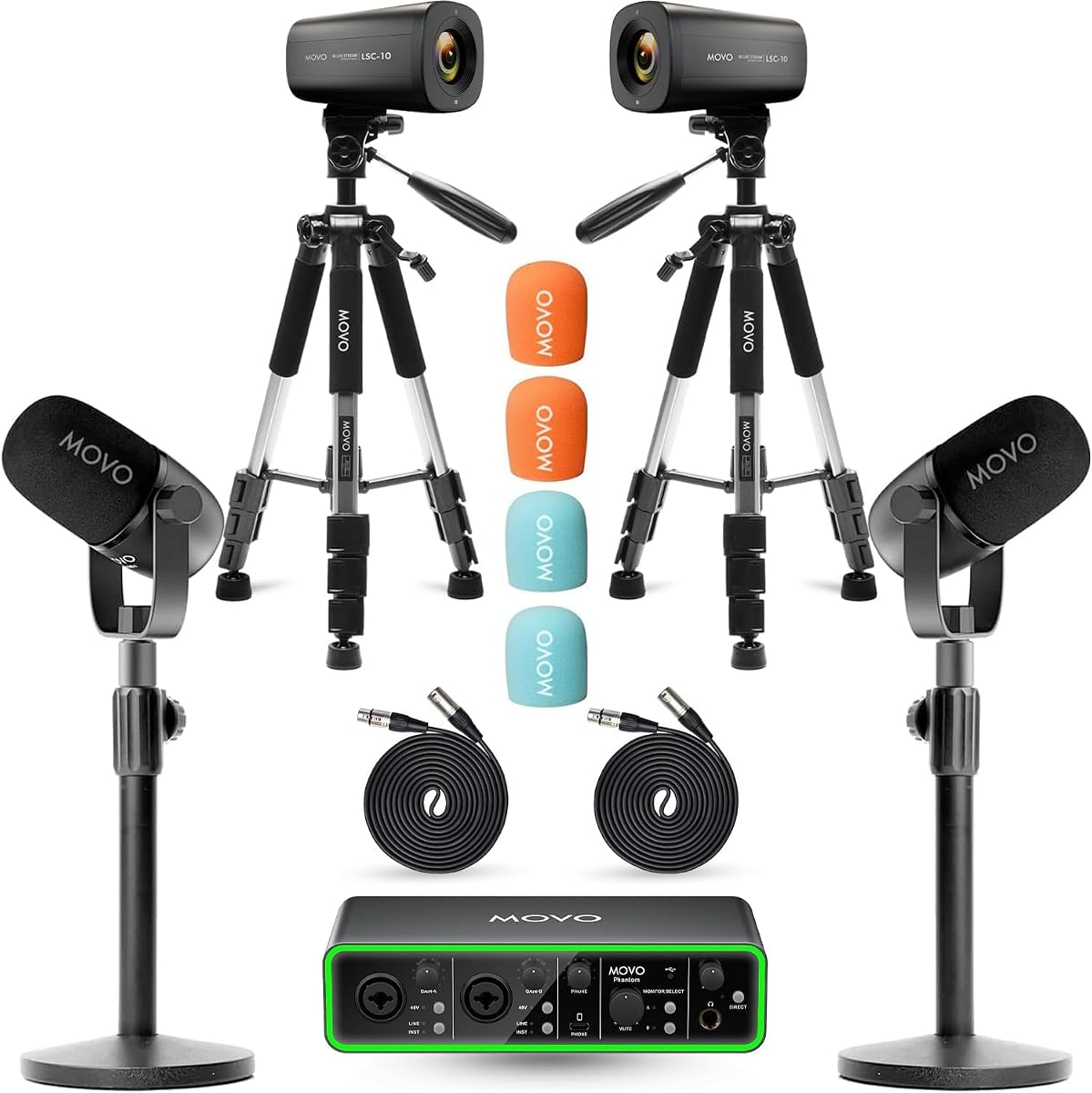
The Movo Video Podcast Equipment Bundle – USB Audio Interface, 2 XLR Dynamic Microphones, 2 4K Cameras, 2 Boom Arms – Complete Podcast Setup has a 5.0 rating and is the most complete conventional video-podcast package in the list. It includes two XLR dynamic microphones, two 4K UHD cameras, two boom arms, and a USB audio interface.
We may earn a commission when you buy through this link, at no additional cost to you.
The cameras create a genuine multi-camera production possibility for co-hosted shows, interviews, panel discussions, YouTube, and Twitch. On the audio side, the dual cardioid microphones cover a 40Hz-16kHz frequency response and are designed to reject background noise. The interface provides high dynamic range preamps, 48V phantom power, USB-C connectivity, and dual monitor outputs.
This is more than a basic microphone kit disguised as a video bundle. The two cameras can provide alternate angles, while the boom arms support stable microphone placement and the dual monitor outputs allow both speakers to follow the mix. The limitation is operational complexity: creators need to frame both cameras, balance their angles, confirm the output workflow, and make sure their recording setup can capture the selected video sources.
Choose this bundle if your immediate goal is to launch a two-person video podcast without sourcing cameras, microphones, an interface, arms, and monitoring equipment separately. It offers the clearest all-in-one path to a multi-camera production among the listed products. For creators who only need audio, the cameras and boom arms add unnecessary bulk, but for a new video show they substantially shorten the initial equipment list.
The pair of 4K UHD cameras enables a multi-camera layout rather than a single fixed viewpoint. Multiple angles can make interviews and co-hosted discussions more visually engaging while keeping the microphones and interface in one coordinated setup.
The USB audio interface and dual XLR microphones are included alongside the cameras, reducing the need to assemble an unrelated audio chain. Dual monitor outputs and the included boom arms help creators build a consistent two-person studio from the outset.
We may earn a commission when you buy through this link, at no additional cost to you.
The Movo Video Podcast Equipment Bundle – USB Audio Interface, 2 XLR Dynamic Microphones, 2 4K UHD Cameras, 2 Desk Stands – Complete Podcast Setup has a 5.0 rating and offers a compact alternative to the boom-arm video bundle. It combines two cameras, two microphones, two desk stands, and a USB audio interface.
We may earn a commission when you buy through this link, at no additional cost to you.
Its two 4K UHD cameras are designed for multi-camera co-hosted shows, interviews, and panel discussions. The audio side uses dual cardioid CastMic dynamic microphones with a 40Hz-16kHz response, intended to capture dialogue while naturally rejecting background noise. The interface includes 48V phantom power, USB-C connectivity, and dual monitor outputs.
Compared with the boom-arm version of this video package, the desk stands take up less articulated space and are simpler to arrange. They also provide less freedom to adjust the microphone distance after installation. The cameras also mean the system requires careful placement and a suitable recording or streaming workflow. Buyers should treat the two video bundles as distinct configurations rather than interchangeable versions.
This bundle is a strong choice for creators who want a complete two-person video podcast setup and prefer a more compact desktop arrangement. It supplies the major audio and visual components in one box, making it easier to begin a polished multi-camera production. Choose it when desk stands meet your positioning needs; choose the boom-arm version when precise microphone adjustment is more important than visual simplicity.
The two desk stands create a straightforward footprint for a shared recording desk. This can be helpful in smaller rooms where multiple articulated arms would restrict movement or make camera placement more difficult.
Cardioid dynamic microphones are suited to speech-focused recording and naturally reduce pickup from behind the mic. The included interface adds professional connection and monitoring, creating a complete audio path for the two included cameras.
We may earn a commission when you buy through this link, at no additional cost to you.
The right podcast bundle depends on how many people speak, what you record, where the equipment will be used, and how much control you need over sound. Reviewing microphones, interfaces, accessories, and compatibility before buying can prevent a collection of components that cannot work together.
Start by identifying how many people need independent microphones at the same time. A two-person bundle is appropriate for most co-hosted shows and interviews, while a four-person package is better suited to panels, round-table discussions, and group streams. Check the package contents carefully because a listing described as a two-person kit may still include only one core microphone.
Dynamic microphones generally prioritize speech, reject more background noise, and do not require phantom power. Condenser microphones can capture greater detail and sensitivity but may be less forgiving in untreated rooms. XLR models integrate with conventional mixers and interfaces, while USB microphones connect more directly to a computer. Match the microphone design to the room and recording experience of its users.
An interface converts microphone signals for a computer, while a mixer combines and controls multiple audio sources. Look for independent channel volume, one-click mute, real-time monitoring, headphone outputs, loopback, and—in some bundles—instrument inputs. Extensive effects such as reverb, pitch shifting, auto-tune, and voice changing can be useful for entertainment, but they add complexity and are not essential for straightforward interview recording.
Confirm which computer, mobile device, operating system, and recording application you intend to use. Some bundles include USB-A, USB-C, and Lightning cables, while others are designed only for computers or only for a specific USB arrangement. The Movo four-channel dynamic bundle is explicitly not compatible with phones or tablets, while other systems advertise broader mobile support. Checking limitations before ordering avoids an otherwise capable bundle becoming difficult to use.
Headphone monitoring helps speakers hear the mix as it is being recorded and can reveal level imbalances, clipping, and background noise. Separate headphone outputs are especially valuable for two-person interviews because each participant can monitor privately. Look for independent microphone controls and clear mute buttons, as these features are useful during live streams and group conversations where stopping one channel quickly matters.
Portable bundles should include a travel case, battery-powered interface, or compact components suitable for transport. Battery life figures should be considered alongside the features you plan to enable, since the Movo PodPro interface is rated for eight hours generally and three hours with phantom power on. A built-in battery, compact case, and flexible cables can make mobile interviews easier than a fixed studio package.
A complete bundle should include the hardware needed to use the microphones immediately. Tabletop stands are simple and compact, while boom arms provide better positioning and can free desk space. Look for shock mounts, pop filters, XLR cables, USB cables, headphone splitters, and protective cases as appropriate. Extra accessories can be valuable, but their usefulness depends on whether they match your microphone and interface connectors.
Audio-only podcasters can concentrate on microphone quality, preamp controls, monitoring, and room treatment. Video creators should also consider camera resolution, number of angles, framing, lighting, and how the camera feeds will reach the recording software. The two Movo video bundles provide two 4K UHD cameras, making them more complete for a new video show than an audio kit, provided the creator is prepared to manage a multi-camera workflow.
Begin by unpacking every component and identifying the microphones, interface or mixer, power source, connection cables, stands, and monitoring accessories. Read the included manual before connecting microphones, especially when a bundle supports both XLR and USB operation. Confirm that each XLR cable runs from a microphone to the correct input and that headphones connect to the designated monitoring sockets rather than a regular line output.
Set up the microphones before powering the interface. For boom arms, position each capsule near the speaker's mouth and away from direct sources of noise; for desktop stands, keep a consistent distance and angle. Connect the interface to the intended computer or mobile device, launch the recording application, and confirm that every microphone produces a separate signal. Adjust channel volumes and gain levels while everyone speaks at a normal recording volume, then use headphones to check balance and clarity.
Care for the bundle by storing microphones in a dry, stable place, loosening or removing tension from boom arms when possible, and keeping cables from being sharply bent. Clean reusable foam covers and pop filters according to the manufacturer's guidance, and avoid moisture around XLR connections and the interface controls. Before every important session, check battery level, connector fit, microphone positioning, headphone monitoring, recording levels, and the final track path before speaking.
Prioritize the number of speakers, microphone type, interface inputs, monitoring connections, and compatibility with your computer or phone. A good bundle should include all essential cables and mounting accessories, while optional effects should support your format rather than distract from basic recording. Confirm the current package contents before ordering because configurations can differ between similar listings.
XLR microphones route through an interface or mixer, which usually provides more control over gain, channel balance, and monitoring. USB microphones are simpler and can be especially convenient for beginners or individual mobile workflows. The best choice depends on your room, recording software, number of participants, and whether you need separate control over each speaker.
Each local participant should generally have a dedicated microphone to maintain consistent levels and reduce crosstalk. Remote guests can often use their own microphones or a separate remote connection. If a listing includes fewer microphones than participants, verify that the interface supports an alternate input before purchasing.
Dynamic microphones are often easier to use in untreated rooms because they prioritize speech and naturally limit sensitivity to distant background sound. Condenser microphones can provide more detailed capture but may be more sensitive to room noise, handling noise, and incorrect gain. The room and recording style matter more than any universal rule.
That depends on the bundle. Some include USB-A, USB-C, and Lightning connections, while others are designed for computers or a specific operating system. Check the product description for supported devices and application compatibility before buying, and avoid assuming that a USB interface will work with every phone or tablet.
An audio interface primarily converts microphone signals into a digital signal for a computer. A mixer combines and controls multiple inputs, often adding effects, channel faders, and headphone monitoring. Some podcast bundles combine both roles in one unit, which can simplify the setup but may also provide more controls than a new creator needs.
Headphones are highly useful for real-time monitoring and are included with many of the featured bundles. A pop filter can reduce abrupt consonant sounds, although it is not included with every package. Check the contents and add a suitable filter if your chosen microphones or speaking style produce noticeable plosives.
Position microphones consistently, record at a reasonable level without clipping, use headphones for monitoring, and reduce unnecessary background noise. Sound treatment or moving away from obvious noise sources often helps more than adding complex mixer effects. After recording, apply restrained editing and normalization rather than relying on effects to compensate for poor microphone placement.
The Movo PodPro Portable Bundle is the most balanced all-audio option for two people who need XLR microphones, a portable interface, broad device support, and separate headphone monitoring. The Movo Video Podcast Bundle with Boom Arms stands out for creators launching a two-camera production, while the Also GO Two-Person V8s Bundle offers an accessible entry point with a mixer, accessories, and multiple sound effects.
For most new podcasters, prioritize independent microphones, reliable connections, real-time monitoring, and enough controls for the number of speakers. Choose an effects-oriented mixer for gaming and entertainment, a USB-based system for straightforward computer recording, or a multi-camera bundle only when your video workflow is ready to support the added complexity. The right package should fit the room and the show rather than simply include the longest feature list.
Before purchasing, verify the microphone count, connector types, supported devices, included stands, and current bundle contents. Product configurations, ratings, and prices can change, so check the latest listing and compare it with your recording plan. With those checks completed, the appropriate podcast equipment bundle can provide a dependable foundation for recording and publishing.