
TEACH TECH Hydrobot Arm
4.5Editor score
Water-powered hydraulic operation
Six axes with 270-degree rotation
Interchangeable gripper and suction parts
Discover the best robotic arm kits for kids, teens, and adults, with expert comparisons of build difficulty, controls, features, and educational value today.
Robotic arm kits combine mechanical construction, electronics, and problem-solving into a hands-on project that can entertain, teach, and inspire future engineers. A satisfying kit should offer clear instructions, reliable movement, engaging controls, and enough challenge to feel like a real build rather than a simple model.
We compared ten robotic arm kits across age suitability, degrees of freedom, control options, included components, programming support, construction materials, and educational scope. The list covers wooden beginner projects, hydraulic models, programmable desktop arms, modular tracked robots, and advanced artificial-intelligence platforms for hobbyists and researchers.
Each pick highlights a different route into robotics, whether your priority is an affordable first build, advanced programming, realistic multi-axis movement, or open-source experimentation. Product listings and availability can change over time, so confirm the current specifications, included accessories, and seller information before purchasing.
4.5Editor score

4.8Editor score
4.3Editor score
This side-by-side overview highlights the major differences among the ten kits, including their movement systems, control methods, construction complexity, and ideal users.


The TEACH TECH Hydrobot Arm is an approachable way to explore mechanical engineering without electronic programming. It carries a 4.5 rating and stands out for using water pressure to power a working robotic arm rather than relying on conventional motors and batteries. That distinctive system gives the build a direct, physical connection to basic hydraulics while still delivering several axes of movement.
We may earn a commission when you buy through this link, at no additional cost to you.
Its six axes and up to 270 degrees of rotation create more movement than a simple classroom model. Levers operate the gripper, which can open and close, while the included suction components can be used for picking up suitable objects. The absence of batteries also removes one potential source of assembly friction, making the kit especially convenient for a family STEM activity or an older child learning how mechanical systems transmit force.
The principal trade-off is that it is a hands-on building project rather than a preassembled toy. Buyers should allow multiple hours for careful assembly and should expect to follow the detailed instructions closely. Hydraulic performance also depends on maintaining an appropriate water level, and the water-based mechanism is less flexible than a programmable electronic arm for automation tasks. These limitations are reasonable for a kit whose main purpose is teaching.
This is a strong recommendation for buyers seeking a budget-conscious STEM project without sacrificing meaningful movement. It is particularly suitable for children age 12 and up, parents looking for a cooperative build, and anyone interested in hydraulics. Compared with more electronic kits, the Hydrobot offers a more unusual learning experience and dependable mechanical action without complicated coding.
The water-powered mechanism lets builders see how pressure and fluid movement can create controlled mechanical action. That makes the kit more than a decorative robot; it provides a tangible way to connect a science lesson with an object that visibly responds to user input.
A movable gripper and replaceable suction components broaden the play possibilities. Builders can experiment with different objects and discover which surfaces respond best to each attachment rather than relying on a single predetermined movement.
We may earn a commission when you buy through this link, at no additional cost to you.
This wooden circuit robot arm is designed as an accessible introduction to robotics for children roughly age eight and older, with additional appeal for teenagers and adults. Its 4.2 rating reflects a kit that prioritizes the learning journey over sophisticated automation. Combining a 3D wooden puzzle with motors, circuit boards, and wires gives builders a satisfying transition from craft construction to working electronics.
We may earn a commission when you buy through this link, at no additional cost to you.
The included components let users see how an electronic command becomes physical movement. Assembly requires attention to both the wooden structure and the wiring, which can strengthen spatial reasoning, patience, and fine motor skills. A tutorial supports the process, and the no-soldering design lowers the barrier for younger builders or families without electronics experience.
Its main limitation is that six AA batteries are needed but not included, so the package is not completely ready to operate out of the box. It also offers less sophisticated programming and control than desktop robotic arms, vehicles, or open-source platforms. The long product title lists many age ranges and occasions, but the core product is a hands-on mechanical build rather than a programmable industrial-style arm.
The kit works well for a child who enjoys model building, wants a first exposure to circuits, or prefers a more natural-looking arm on the desk. It may also suit an adult or teen seeking a manageable project that still has real motorized movement. For young makers, it offers one of the gentlest introductions to robotic arms in this list.
The wooden parts make the project feel more like a model kit, while the motors and circuit boards add genuine electronic function. That balance can appeal to children who may not yet be ready for a complex programming environment but want more than a static craft.
No soldering is required, which makes assembly more approachable and reduces the likelihood of damaging small components. The educational emphasis falls on understanding how connected components cooperate to move the arm.
We may earn a commission when you buy through this link, at no additional cost to you.
The VANLINNY 4DOF Robot Arm combines a durable metal structure with programmable movement, earning it a 4.6 rating. Intended primarily for children age eight to 12, it offers a more robust and feature-rich experience than a simple wooden arm. The product description also mentions a robot car, an excavator, grasping, programming, and simulated sound effects, giving the set a broader playful identity.
We may earn a commission when you buy through this link, at no additional cost to you.
Its arm can move through multiple angles, rise and fall, and support basic programming. The included battery, USB charging cable, DIY tools, and remote control make it a convenient package for a family or classroom project. The listed remote range of approximately 30 to 50 meters is useful for moving the robot around a room without staying immediately beside it.
One reason to read the listing carefully is that its description mixes several robotic functions, including arm, excavator, and car behaviors. Buyers should confirm exactly how the shipped components interact before making plans around a particular configuration. The remote range may also perform differently through walls or in crowded areas, and the four-axis arm is less flexible than six-axis desktop models.
This is a compelling choice for a child who wants a durable programmable model and a broad STEM project. Its combination of metal parts, tools, charging equipment, and remote operation gives it a substantial feel, while the 4.6 rating suggests a favorable balance of construction and capability. It is a good middle step between basic educational kits and advanced programming platforms.
A metal structure gives the project a more durable foundation than one made primarily from lightweight decorative pieces. That makes the kit better suited to repeated operation and experimentation after the initial assembly is complete.
Basic programming introduces sequencing and cause-and-effect thinking without requiring the advanced software stack of a research platform. It gives younger builders a meaningful way to automate movement rather than simply operating the arm by hand.
We may earn a commission when you buy through this link, at no additional cost to you.
The 3 in 1 Technical Robotic Arm is the most feature-packed traditional building kit in this roundup, and its 4.8 rating is the highest among the ten products. It combines 975 ABS pieces, a tracked chassis, an articulated arm, and three interchangeable tools: a gripper, bucket, and simulated drill bit. That combination creates several distinct missions from a single completed model.
We may earn a commission when you buy through this link, at no additional cost to you.
Control is available through the included 2.4GHz remote or a companion mobile app. The app supports drag-and-drop programming, gyroscope steering, and custom path drawing, while four motors independently power the tracked base, arm lift, and attachment movement. These features extend the kit beyond immediate remote manipulation into sequencing, spatial control, and introductory coding.
The substantial piece count is the clearest trade-off. A 975-part build can be engaging and rewarding, but it is also more demanding than a compact wooden or hydraulic kit. The completed robot is approximately 15 by 7.9 by 12 inches, so buyers should consider workspace and storage needs. App availability and device compatibility are also important to verify before purchase.
This is an excellent recommendation for families seeking one platform that combines building, remote-control play, app interaction, and simple programming. It is suitable for older children, teens, and adults who want a visually impressive desktop model with several tasks. For a younger first robotics project, it may be ambitious, but for a committed builder it offers exceptional versatility.
The quick-swap gripper, bucket, and drill transform the model beyond a conventional arm. Each tool supports a different imagined task, encouraging creative problem-solving and making the interchangeable design more meaningful than simple decoration.
Drag-and-drop sequences, gyroscope control, and drawn paths introduce three distinct ways to direct the robot. Builders can move from immediate commands to repeatable instructions, which is an engaging step toward understanding automation.
We may earn a commission when you buy through this link, at no additional cost to you.
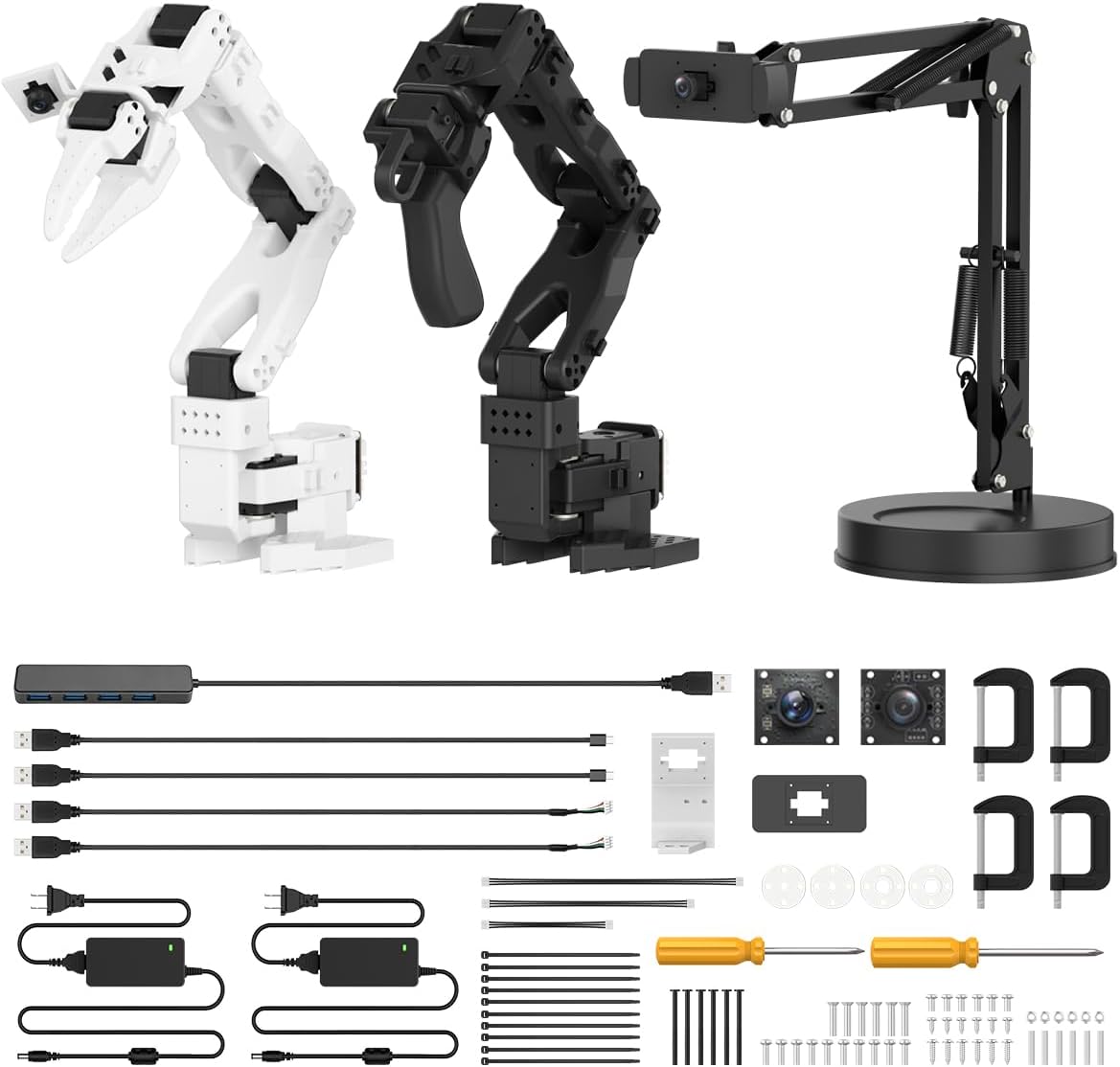
The Hiwonder SO-ARM101 is designed for developers, researchers, and advanced hobbyists interested in embodied artificial intelligence. It has a 4.3 rating and an ambitious feature set centered on imitation learning, computer vision, and open-source experimentation. Unlike most classroom kits in the roundup, it arrives as an advanced assembled platform with included 3D-printed parts and substantial servo hardware.
We may earn a commission when you buy through this link, at no additional cost to you.
Twelve high-torque bus servos with magnetic feedback provide the arm with smooth motion and detailed status information. A gripper-mounted camera and an external camera support precise manipulation and broader environmental awareness. The six-axis configuration also makes it suitable for tasks requiring more articulated movement than a four-axis educational model.
The included BusLinker V3.0 debugging board supports servo scanning, real-time monitoring, and trajectory control, while PC software assists with calibration and debugging. Compatibility with the LeRobot open-source framework gives users access to shared code, templates, and pre-trained models. This is a major advantage for experimentation, but it also creates a steeper learning curve than app-controlled or remote-controlled kits.
Buyers should choose the SO-ARM101 when software development and machine learning are central to the project. It is not the simplest introduction for a young child, and the advanced specification justifies the premium positioning. Even so, for an adult hobbyist, student, or developer who wants a ready-made experimentation platform, it offers a notably specialized and capable robotic arm.
The two-camera arrangement gives the system both a close view of the gripper and a wider view of its surroundings. That combination supports research tasks in which accurate perception and coordinated movement are equally important.
LeRobot compatibility provides access to shared resources rather than forcing users into a closed programming environment. It is especially valuable for developers who want to compare projects, adapt code, or explore pre-trained models.
We may earn a commission when you buy through this link, at no additional cost to you.
The Arduino miniArm is a 5DOF educational arm designed to grow with the builder's programming skills. It carries a 4.6 rating and uses the Atmega328 platform with Arduino programming support. Open-source programs, learning tutorials, and secondary-development examples make it a practical middle ground between a ready-to-play toy and a research-level platform.
We may earn a commission when you buy through this link, at no additional cost to you.
Its hardware includes a six-channel knob controller, Bluetooth module, high-precision digital servos, and expansion ports for additional sensors. Compatible additions include an ESP32 camera module, accelerometer, touch sensor, and glowing ultrasonic sensor. Those possibilities support ranging, pose control, environmental input, and other experiments that extend well beyond moving the arm manually.
App control, real-time potentiometer adjustment, and offline action editing provide several ways to operate the system. The main complication is the distinction between the starter and standard configurations. The starter kit does not include the listed sensor modules, while the standard configuration adds the ultrasonic, touch, acceleration, and ESP32 camera modules along with a cable and wire. Buyers should therefore identify the exact version they need.
This is a strong choice for a learner who is ready to move beyond simple remote control and begin working with Arduino. The open-source examples make it easier to start, while the expansion options prevent the initial project from becoming the endpoint. It is especially suitable for students, teachers, and hobbyists who value hardware experimentation as much as the finished appearance.
Published tutorials and secondary-development examples help users begin with known working projects. This reduces the barrier created by writing every routine from scratch and makes the hardware easier to adapt for classroom lessons.
The expansion system lets the arm react to distance, touch, movement, or visual input. This creates a path from direct operation toward projects where the robot's behavior changes in response to its environment.
We may earn a commission when you buy through this link, at no additional cost to you.
The LewanSoul LeArm is a six-degree-of-freedom desktop robotic arm intended for students, engineers, university learners, and committed robot enthusiasts. Its 4.2 rating reflects a capable platform with broad support, particularly its ability to be controlled through a PC, app, mouse, or wireless handle. The arm can grasp objects, transport them, perform custom actions, and run graphically programmed sequences.
We may earn a commission when you buy through this link, at no additional cost to you.
Its structure uses metal brackets, a reinforced base, high-torque servos, and industrial-grade bearings for stability. Three anti-blocking servos near the arm's end incorporate geared clutches intended to extend servo life. The combination of a mechanical claw and flexible control methods makes it useful for both supervised learning and more advanced desktop experiments.
The six-axis design and metal construction require more desk space and assembly attention than compact wooden kits. While the included tutorials and programming software lower the learning barrier, new users should expect to learn the software gradually. It is also worth noting that the product title references five servos while the supplied description specifies six high-quality digital servos, so buyers should verify the final package configuration.
This is a good selection for someone who wants the flexibility of a desktop manipulator with several ways to operate it. A student may appreciate the graphics-based programming, while a hobbyist may prefer direct mouse or handle control for precise tasks. It offers a strong balance of structure, capability, and accessible documentation for a non-industrial robotic arm.
PC software, an app, a mouse, and a wireless handle each suit a different habit or project. This flexibility makes it easier to move between programming exercises, direct manipulation, and remote demonstrations.
The reinforced base, bearings, and geared anti-stall servos support consistent movement around the workspace. These structural details are important when a robotic arm must position or transport an object rather than simply swing through an arc.
We may earn a commission when you buy through this link, at no additional cost to you.
The Wooden Robotics Circuit Kit is designed as a hands-on introduction to electronics and mechanical movement for children age eight and up. It has a 4.2 rating and uses natural wooden parts, motors, a microcontroller, and circuit boards. Its appeal lies in making robotics feel more like a refined craft model than a brightly colored plastic gadget.
We may earn a commission when you buy through this link, at no additional cost to you.
The assembled arm supports lifting, steering, and full 270-degree rotation. Clear step-by-step instructions help users coordinate the wooden structure with the electronic components. The build can sharpen problem-solving, patience, and fine motor skills while leaving the finished arm suitable for repeated demonstrations on a desk or classroom table.
The kit is less advanced than programmable desktop arms or open-source systems, and the product listing emphasizes the learning experience rather than sophisticated automation. Wooden components can also show scratches or marks during assembly, so careful handling is important. A family with younger children may need to supervise the wiring and mechanical installation.
This model is a strong option for educators, parents, and builders who prefer traditional construction materials. It works particularly well for a first robotics project because the components introduce circuits and motion without requiring advanced software. For users who eventually want sensors, custom code, or multi-axis research applications, it is better viewed as a foundation than a final platform.
The wood construction gives the finished robot a less industrial look than a typical plastic engineering kit. That makes it appealing as a display model as well as an activity project.
Lifting, steering, and broad rotation provide enough motion to demonstrate how motors and circuits control a mechanism. The range of movement gives learners something meaningful to test and compare.
We may earn a commission when you buy through this link, at no additional cost to you.
The ACEBOTT 4 in 1 Smart Robot combines a programmable arm with a tank vehicle, giving buyers more than one way to build. It has a 4.1 rating and is primarily aimed at children and teenagers age 12 to 16. The base car, tracked expansion, and robotic arm can be configured as an arm car, a tank robot, or a combined robotic arm tank.
We may earn a commission when you buy through this link, at no additional cost to you.
The 5DOF arm uses an ESP32 controller and can grasp, lift, and place objects. Compatibility with Arduino and Scratch makes the project approachable for coding learners, while 16 story-based tutorials and HD assembly videos provide structure for beginners. The rubber tank treads are designed to handle grass, gravel, slopes, and carpet, adding an outdoor mobility element beyond the arm itself.
The modular design also increases assembly complexity, and buyers must follow the guide carefully to understand which pieces belong to each configuration. Tutorial and code downloads are located through the ACEBOTT official website's Resources section, so a reliable internet connection and the correct source are important. The robot also combines several disciplines, so a learner interested only in desktop manipulation may prefer a dedicated arm.
The ACEBOTT system is a good recommendation for motivated teens who want coding, electronics, construction, and off-road play in one project. It offers a clear progression from guided lessons to more independent experimentation. Compared with simpler wooden kits, it demands more attention but provides substantially more control over movement and behavior.
The interchangeable base, tracks, and arm create more than one finished design. This lets builders compare a mobile platform with a manipulator and understand how the same electronic components can support different structures.
Arduino and Scratch compatibility broadens the possible audience. A beginner can follow structured activities, while a more experienced learner can use the ESP32 controller to develop custom behavior.
We may earn a commission when you buy through this link, at no additional cost to you.
The Hiwonder xArm1S is a six-axis desktop robotic arm built around an aluminum alloy bracket structure and six intelligent serial bus servos. Its 4.0 rating places it among the more established options in the roundup, and its specification set targets bionic robotics, coding study, grasping, transport, and custom action creation. The arm can handle objects weighing up to 500 grams according to the supplied product information.
We may earn a commission when you buy through this link, at no additional cost to you.
The intelligent servos provide position, voltage, and temperature feedback, which is useful for monitoring the arm's condition and understanding its operating state. Control methods include a PC, phone app, mouse, wireless PS2 controller, and another fingertip-oriented interface. Offline manual editing, desktop software, and app-based action editing offer several ways to create and refine movement sequences.
Its metal frame, high-torque base servos, and industrial-grade bearings help provide stability, but the physical footprint and assembly effort are greater than those of a compact wooden kit. The learning curve also comes with the broader control options. Buyers should make sure they have enough desk space and are comfortable with software setup before choosing this model.
The xArm1S is a worthwhile option for students, engineering learners, and desktop robotics fans who value six-axis movement and detailed servo feedback. It is especially suitable when the desired project involves repeated actions or grasping rather than only exploring basic circuits. Among the advanced desktop arms, it offers a particularly broad choice of control interfaces.
Position, voltage, and temperature information gives users a better picture of how the arm is operating. This feedback-oriented approach is useful for learning and for diagnosing behavior before creating longer automated sequences.
PC, app, mouse, and wireless controller options let users choose between precise screen-based work and intuitive physical commands. Versatility can make the platform more useful across demonstrations, lessons, and personal projects.
We may earn a commission when you buy through this link, at no additional cost to you.
The right robotic arm kit depends on the builder's age, experience, available space, and interest in mechanics, electronics, programming, or artificial intelligence. The most useful choice is the one that feels challenging without becoming frustrating.
Beginner kits are most appropriate when the builder is new to tools, wiring, or mechanical assembly. Wooden and hydraulic models can introduce movement with fewer programming demands, while a basic electronic kit adds motors and circuit boards without requiring advanced software. For teenagers or adults, ESP32, Arduino, and LeRobot-compatible systems open the door to custom code, sensors, and deeper experimentation. Age labels are useful guides, but actual assembly ability and interest matter more than a number alone.
Choose a kit that matches the builder's current skills and leaves room to grow. A first model that is too advanced may create frustration, while one that is too simple may lose the child's attention quickly.
Degrees of freedom indicate how many independent movements the arm can perform. A four-axis model may provide a useful combination of base rotation, lift, and gripper action, while six-axis arms more closely resemble the coordinated positioning of an industrial manipulator. More axes can improve reach and dexterity, but they also make programming more demanding and may require more space. Buyers should consider the type of motion they want rather than assuming that the highest number is automatically best.
Match the movement range to the intended task. Simple demonstrations may work with fewer axes, while grasping from varied positions or recreating coordinated arm motions benefits from a six-axis design.
Robotic arms may use batteries, USB charging, motors with gears, servos, hydraulics, or a combination of systems. Servo-driven arms provide repeatable positioning, while hydraulic kits teach a different mechanical principle and can feel responsive without electronic programming. Rechargeable systems are convenient for repeated use, but buyers should check whether required batteries, cables, or charging accessories are included. Understanding the power source also reveals how portable the finished model will be.
Check every required accessory before ordering. A model advertised as complete may still need batteries, a suitable power adapter, or a computer for initial programming.
Remote controls are intuitive for immediate operation, while app control can add range and convenience. PC software generally provides the most detailed action editing, and open-source compatibility supports deeper development. Scratch-style interfaces are approachable for younger learners, whereas Arduino and LeRobot environments suit users prepared to work with code and development tools. Multiple control methods can be useful, but the most important option is the one the builder will actually enjoy using.
Prioritize the platform needed for the intended project. Choose simple remote operation for hands-on play, graphical programming for introductory lessons, and open-source software for research or custom development.
Wooden kits often feel approachable and produce a natural-looking desktop model. ABS construction is lighter and supports compact mechanisms, while metal structures provide strength and stability for larger arms and repeated motion. The number of parts is another major assembly factor: a detailed 975-piece model can be satisfying for a patient builder but excessive for a first project. Clear instructions, labeled components, and a logical assembly sequence deserve as much attention as the advertised specifications.
Estimate the build time and work area before purchasing. Choose a model whose part count and construction demands match the builder's patience and the amount of help available.
Interchangeable grippers, buckets, suction components, tracked chassis, and vehicle modules can make one kit support many tasks. They also increase the number of ways a child can experiment and reduce the need for separate accessories. Some kits include assembly tools, charging cables, batteries, controllers, or even a screwdriver, while others require basic tools to be supplied separately. Sensor modules are also important for developers, but optional accessories should not be mistaken for standard package contents.
Review the package contents carefully, especially when comparing starter, standard, and advanced versions. A kit that includes every planned attachment offers better value and a more coherent first project.
Expandable kits can grow from a simple arm into a vehicle, sensor system, or programmable manipulator. Ports for cameras, touch sensors, accelerometers, and ultrasonic modules can support projects that respond to the environment. Open-source examples and tutorials are particularly helpful because they provide a known working starting point. Before purchasing a development-focused product, verify the operating system, software dependencies, documentation, and availability of community resources relevant to the intended platform.
Prioritize support that matches the builder's next likely project. A well-documented expansion path is more valuable than a large collection of features that the builder cannot yet access.
A six-axis desktop arm needs more room than a small wooden model, and tracked configurations require a clear path for movement. Keep the arm away from eyes, pets, breakables, and other objects that could be struck by a moving part. Secure the base during testing and avoid exceeding stated payload limits. Servos, gears, joints, and water systems also benefit from occasional inspection, especially after extended use or if movement becomes uneven.
Choose a safe operating area and leave room for the full range of motion. Regular checks and gentle handling help the arm operate consistently and extend the life of moving components.
Begin by reading the entire instruction set and identifying every included component before assembly. Sort pieces by type, install the smallest structural elements first, and confirm the orientation of cables, servos, joints, and sensors. Tighten fasteners evenly rather than fully tightening one connection at a time, since uneven pressure can misalign the arm and create unnecessary stress.
Test the mechanism gradually. For electronic arms, start with low-speed manual movement and short programmed actions before attempting long sequences or heavier objects. Keep fingers clear of joints, check that the workspace is free of breakables, and never exceed the listed payload. Hydraulic models require appropriate water levels and careful attention to the pump and reservoir, while tracked models need a clear path for their movement.
Care for the kit by storing it in a clean, dry place with its joints supported. Periodically inspect servo mounts, wiring, connectors, wheels, and mechanical fasteners. Remove dust with a soft dry cloth, avoid immersing electronic components, and follow the manual's battery guidance. A water-powered system should be drained or dried according to its instructions when it will not be used for an extended period.
The easiest kit is usually one with a manageable number of parts, clear instructions, and no advanced programming requirement. The TEACH TECH Hydrobot Arm and the wooden circuit arm options are more approachable for many beginners because they emphasize construction and basic mechanical principles. An adult should still supervise younger children around small parts, tools, wiring, and moving mechanisms.
The ACEBOTT 4 in 1 Robot is a practical choice for learners interested in coding because it supports Arduino and Scratch and includes guided tutorials. The Arduino miniArm offers deeper open-source development, while the Hiwonder SO-ARM101 is designed for advanced imitation-learning and AI experimentation. The easiest option depends on whether the learner wants guided activities, custom code, or research workflows.
Some kits can be operated immediately through an included remote or wireless handle, while programming and advanced action editing usually require a computer, tablet, or compatible phone. App-controlled models may reduce the need for a desktop, but buyers should verify device and operating-system requirements before assembly. Checking those requirements first can prevent a frustrating setup later.
Degrees of freedom describe the number of independent movements a robotic arm can perform. Each axis typically corresponds to a joint or controllable direction. More degrees of freedom can make positioning and grasping more versatile, but they also add programming complexity. Consider both the movement range and the builder's experience rather than choosing solely by the highest axis count.
Many of the kits in this guide are suitable for classroom and home STEM activities, especially the LEGO-compatible wooden arm, the standard Robot Arm Kit, the Robot Arm Tank, and the Hiwonder xArm1S. Teachers should still review safety notes, age recommendations, app and computer requirements, and the number of students sharing each build before purchasing.
They teach different concepts. Hydraulic models demonstrate fluid pressure, mechanical leverage, and simple control through physical interaction. Electric servo-driven arms introduce circuits, motors, feedback, programming, and automation. A builder can gain a broad mechanical foundation from hydraulics, while an electric platform is generally better for repeated programmable actions and sensor integration.
The requirement depends on the number of axes and the length of the links. Compact wooden and hydraulic arms may fit on a small table, while a six-axis metal arm needs enough room for its full sweep and for the base to remain stable. Tracked and vehicle-based models need additional floor or tabletop space for forward and turning movement.
Check the builder's age and experience, the required assembly time, included parts, power source, control options, software compatibility, and available workspace. Also compare the stated degrees of freedom, payload, attachments, sensors, and whether tutorials or sample code are supplied. Reading the exact package configuration is especially important when a listing offers starter, standard, and advanced versions.
The TEACH TECH Hydrobot Arm is the strongest value-oriented choice for a hands-on mechanical build, the 3 in 1 Technical Robotic Arm stands out for interchangeable tools and app-based programming, and the Hiwonder SO-ARM101 provides the most advanced platform for AI and imitation-learning experiments. Each represents a distinct level of complexity and serves a different type of builder.
For a young first-time builder, prioritize clear instructions, a moderate number of components, and safe assembly. For an older child or teen, look for programmable movement, interesting attachments, and tutorials that encourage independent projects. For an adult developer, prioritize open-source compatibility, expansion ports, accurate feedback, and access to the documentation needed for calibration and debugging.
Before purchasing, verify the current package contents, required accessories, device compatibility, dimensions, and manufacturer support. Product configurations, software, and availability can change, and current retailer listings may differ from earlier versions. Taking those final checks seriously will help ensure the selected kit matches both the builder's interests and the intended project.

