
ecobee Smart Thermostat Enhanced
4.4Editor score
Built-in occupancy sensing
Power Extender Kit included
SmartSensor-ready comfort controls
Our Smart Home Thermostat guide compares ten leading Wi-Fi thermostats for scheduling, energy insights, voice control, compatibility, installation, and comfort.
A smart home thermostat makes temperature control more convenient, energy-conscious, and connected than a basic mechanical model. The right unit can automate daily schedules, support remote access, work with voice assistants, and reveal useful information about household energy use. Compatibility and installation requirements matter just as much as app features.
We compared ten Wi-Fi thermostats across important categories including HVAC compatibility, C-wire requirements, scheduling options, occupancy features, energy reporting, ecosystem support, and installation support. The guide includes budget-friendly models, color-screen options, room sensors, air-quality monitoring, and premium thermostats with built-in voice functionality.
Each pick highlights the capabilities that set it apart while noting practical trade-offs, extra accessories, and systems that may require professional help. Ratings and availability can change, so verify current product details, utility programs, and pricing before purchasing.
4.4Editor score

4.1Editor score

4.3Editor score
The comparison below covers the leading functions, installation considerations, and connected-home capabilities of all ten thermostats, from straightforward Wi-Fi models to premium systems with sensors, air-quality monitoring, and built-in voice assistants.


The Google Nest Thermostat combines approachable controls, automatic comfort management, and broad smart-home compatibility. It carries a 4.1 customer rating and is especially attractive for households that want connected temperature control without a complex equipment upgrade. Its compact Snow design also blends neatly into many walls without drawing attention.
We may earn a commission when you buy through this link, at no additional cost to you.
One of its strongest features is the ability to lower heating or cooling when nobody is home. Homeowners can establish a schedule in the Google Home app for Android or iPhone, make remote changes from a phone, tablet, or laptop, and use voice control through Google Assistant, Alexa, or another Matter-certified voice assistant. The Savings Finder analyzes the schedule and suggests adjustments intended to reduce energy use.
HVAC monitoring adds another practical layer, with alerts for unusual system behavior and maintenance reminders. Nest Renew can also help prioritize energy use during periods when the power is cleaner or less expensive. The thermostat is designed to operate without a C-wire in many homes, although heating-only, cooling-only, zone-controlled, and certain heat-pump systems may require a C-wire or compatible power accessory.
The main trade-offs are modest display personalization and the absence of a physical lock. It also has a lower customer rating than several other models in this guide, so buyers who value highly rated customer feedback may prefer an alternative. Still, for easy scheduling, ecosystem integration, and a relatively uncomplicated approach to connected comfort, this remains an excellent overall recommendation.
The Nest can turn itself down when the household leaves and return to a preferred temperature on a programmed schedule. This automation makes it well suited to people who want consistent control without checking the thermostat throughout the day.
Savings Finder recommends schedule changes, while HVAC monitoring can flag unusual behavior and remind owners about maintenance. These features help the thermostat contribute to efficiency between routine comfort adjustments.
We may earn a commission when you buy through this link, at no additional cost to you.
The ecobee Smart Thermostat Essential delivers the core functionality expected from a modern connected thermostat in a straightforward package. Its 4.2 rating reflects a balanced combination of app-based control, scheduling, energy features, and broad HVAC support. A color touchscreen gives it a more interactive appearance than many basic Wi-Fi models.
We may earn a commission when you buy through this link, at no additional cost to you.
The thermostat follows a programmed schedule to reduce energy use while the home is empty and optimize comfort when occupants return. It works with Apple HomeKit, Google Assistant, and Alexa, allowing owners to control it through the app, voice assistants, or a broader smart-home setup. Indoor humidity detection, a schedule assistant, and time-of-use functions add practical tools without overcrowding the interface.
Compatibility extends to most 24 VAC gas, oil, electric, dual-fuel, forced-air, conventional, heat-pump, and boiler systems. Ecobee states that it is compatible with 85 percent of systems, but a system-specific check remains essential. Homes without a C-wire can use the optional Power Extender Kit, and a separate trim kit can improve the finished appearance.
The principal drawback is that useful additions are not included. A homeowner who wants room-by-room temperature balancing must purchase SmartSensors separately, while the Power Extender and trim kit are also optional purchases. For people seeking a polished touchscreen thermostat with flexible ecosystems and a sensible feature set, however, the Essential remains a strong choice.
The color touchscreen makes temperature changes direct and easy to understand. Free software upgrades help keep the core experience current, while the app provides access to schedules, energy consumption, and system status.
Compatibility with Apple HomeKit, Google Assistant, and Alexa gives owners several ways to integrate temperature control. This makes the Essential suitable for mixed-device households that do not want to depend on a single voice platform.
We may earn a commission when you buy through this link, at no additional cost to you.
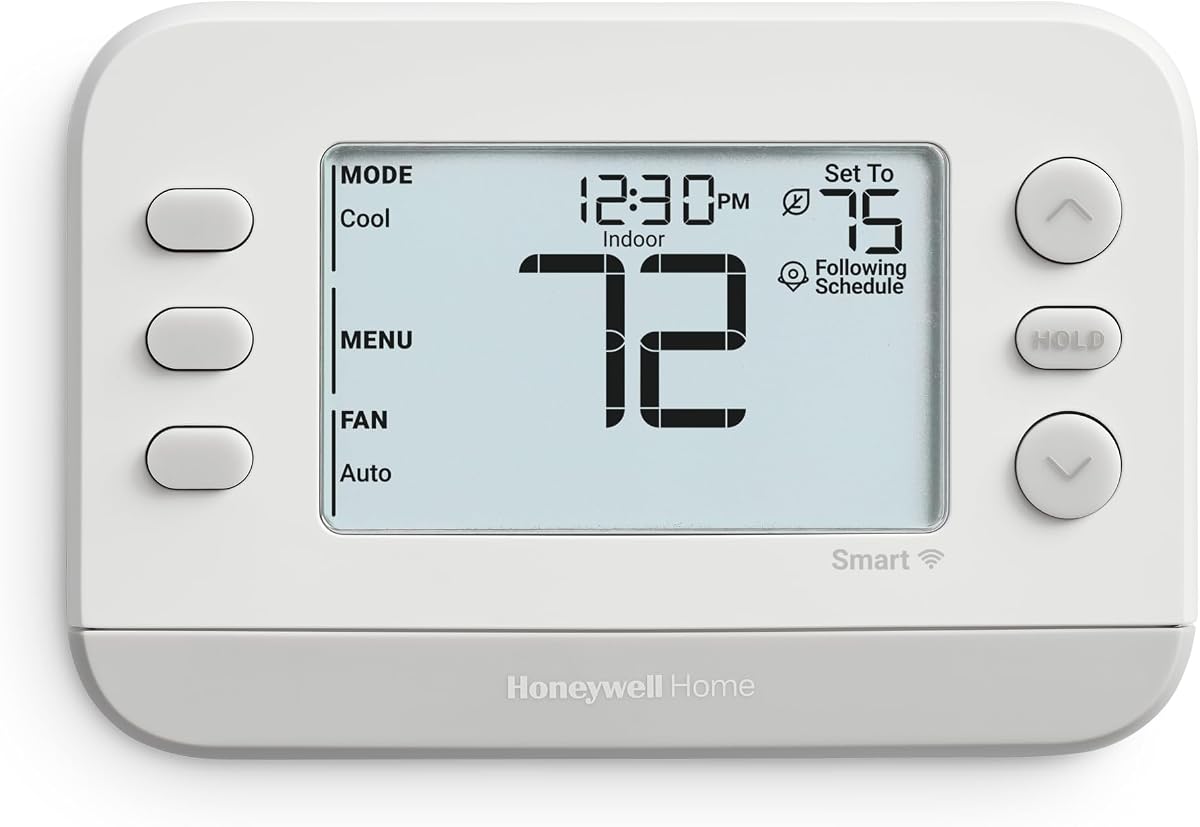
The Honeywell Home RTH9585WF1004 is a polished Wi-Fi thermostat for people who want a bright touchscreen, schedule flexibility, and a thermostat that can blend into the room. It has a 4.3 rating and supports seven-day programming, remote app control, and voice control through Amazon Alexa and Google Home.
We may earn a commission when you buy through this link, at no additional cost to you.
Customizable screen colors are a defining convenience. The display is designed to be readable while also offering an appearance that complements the wall and surrounding decor. Flexible programming can follow a personal routine or adapt to utility peak-rate pricing, creating options for households that actively participate in time-of-use programs.
ENERGY STAR certification is accompanied by monthly energy reports and personalized suggestions intended to reduce consumption. The thermostat supports gas, oil, or electric forced air, hot-water and steam systems, and heat pumps with electric backup. It does not support 120-240V electric baseboard heat, and a C-wire is required for operation.
The C-wire requirement narrows its appeal among owners of older wiring configurations, and the absence of built-in room sensors limits room-specific control. Even so, this Honeywell offers an attractive display, familiar controls, and flexible energy features. It is especially well matched to homes that already have suitable wiring and want a colorful, app-enabled thermostat.
Adjustable display colors set this model apart from utilitarian thermostats. The bright touchscreen is intended to remain legible and visually coordinated with the installation area.
Flexible programming supports both conventional weekly routines and utility-specific schedules. Demand-response eligibility may allow a utility to make small temperature adjustments during periods of high demand.
We may earn a commission when you buy through this link, at no additional cost to you.
The Sensi Smart Thermostat ST55 focuses on the fundamentals that matter most: accessible installation, familiar controls, remote access, and energy management. Its 4.4 customer rating is among the strongest in this guide. The unit is designed for many conventional residential HVAC systems and can be especially attractive to do-it-yourself homeowners.
We may earn a commission when you buy through this link, at no additional cost to you.
A built-in level and step-by-step app instructions support installation. The thermostat uses a familiar button-based design and fits into the same general space as a traditional unit, reducing the need for wall repair after an upgrade. A common C-wire is not required in most applications, although individual systems can have different wiring needs.
ENERGY STAR certification is supported by flexible scheduling, remote access, and usage reports. Sensi also provides equipment alerts and maintenance reminders such as filter-replacement notices, giving the device useful oversight beyond basic temperature changes. Privacy is another differentiator because the manufacturer states that it does not sell personal information to third parties.
This is not the most visually elaborate thermostat, as it lacks a large color screen and built-in room sensors. Owners seeking more advanced occupancy detection or premium voice features will need to look elsewhere. For people who value a high customer rating, straightforward operation, and an accessible installation process, the ST55 is a practical and dependable recommendation.
The integrated level and guided app instructions reduce uncertainty during placement. Its familiar form factor also means it can often replace a conventional thermostat without creating an obvious visual mismatch.
Beyond remote control, the ST55 can report energy use, alert owners to equipment concerns, and remind them about filter maintenance. Those functions turn a basic scheduling device into a more useful system-management tool.
We may earn a commission when you buy through this link, at no additional cost to you.
The ecobee Smart Thermostat Enhanced delivers a generous feature set without moving into the Premium model's specialized air-quality and voice hardware. It carries a 4.4 rating and includes the Power Extender Kit and Trim Kit, making it a compelling option for homeowners who want a complete-looking installation with more flexibility than many basic thermostats.
We may earn a commission when you buy through this link, at no additional cost to you.
Built-in occupancy sensing allows the thermostat to recognize when people are home and preheat or precool accordingly. It can also learn temperature preferences and routines, while adjusting for humidity. These features improve the chance that the home reaches a comfortable state before its occupants arrive instead of waiting for a fixed schedule to begin.
Ecobee states that the Enhanced is compatible with 90 percent of HVAC systems, though an official compatibility check is still recommended. It works with Amazon Alexa, Google Assistant, Apple HomeKit, and SmartThings. The app supports remote changes, vacation settings, energy review, system monitoring, and automation creation for when occupants leave or return.
Its main limitation is that additional room sensors remain optional. A household with uneven temperatures or a strong need for room-by-room balancing will need to purchase SmartSensors separately. Even so, the included accessories, occupancy sensing, broad ecosystem support, and three-year warranty make this an excellent value-oriented choice.
Built-in radar-based occupancy sensing can recognize arrival and departure patterns. That information allows the thermostat to begin heating or cooling before the household returns, reducing waits while maintaining automated efficiency.
The included Power Extender Kit supports homes without a C-wire, and the Trim Kit helps create a finished appearance. These additions reduce the need to source separate installation components immediately.
We may earn a commission when you buy through this link, at no additional cost to you.
The Honeywell Home RTH9600WF is a display-focused smart thermostat designed to make frequent household information available at a glance. Its 4.3 rating reflects a capable touchscreen, flexible programming, remote control, and strong support for popular voice ecosystems. The high-definition display is especially useful for owners who prefer information-rich home controls.
We may earn a commission when you buy through this link, at no additional cost to you.
The home screen can display indoor and outdoor temperature, humidity, and a daily forecast. Users can also change the display color, allowing the thermostat to fit a wider range of interiors. Scheduling options are flexible enough for everyday routines or utility-related programs, while monthly energy reports help occupants understand how heating and cooling contribute to household consumption.
The thermostat connects with the Honeywell app and works with Amazon Alexa, Google Assistant, Microsoft Cortana, and other compatible smart-home partners. It supports forced-air systems using gas, oil, or electric heat, hot-water and steam systems, and heat pumps with electric backup. A C-wire is mandatory, and 120-240V electric baseboard systems are unsupported.
The required wiring is the clearest disadvantage, particularly for older homes without an accessible C-wire. Heating-only oil furnace systems also need a C-wire. Buyers with modern conventional wiring will appreciate the informative display and polished design, but compatibility should be confirmed before ordering.
The display brings indoor and outdoor conditions, humidity information, and forecasts into one interface. This visibility can make it easier to judge why the system is running or decide whether a comfort adjustment is needed.
In addition to the mobile app, the thermostat supports Amazon Alexa, Google Assistant, Microsoft Cortana, and other compatible partners. This creates several convenient paths for managing temperature throughout the day.
We may earn a commission when you buy through this link, at no additional cost to you.
The ecobee Smart Thermostat Premium is the most feature-rich model in this roundup, offering room sensing, air-quality monitoring, a large display, and built-in voice functionality. It has a 4.3 rating and is positioned for households that want a thermostat to do more than set a schedule. Ecobee states that it is compatible with 95 percent of HVAC systems.
We may earn a commission when you buy through this link, at no additional cost to you.
The included SmartSensor detects which rooms are occupied and helps the thermostat prioritize comfort where people spend time. That can reduce the awkwardness of basing whole-house temperature on a hallway reading. Built-in radar sensing can also detect arrival and departure patterns so the home can preheat or precool before occupants enter.
A built-in air-quality monitor provides alerts when air quality declines, offers tips for improvement, and reminds users to change the furnace filter. The thermostat can also serve as a smart speaker through Siri or Alexa, stream music or podcasts, and listen for smoke-alarm sounds. A live video and two-way conversation are possible when paired with a compatible ecobee Smart Doorbell Camera.
Important platform caveats remain. The security-related smoke-alarm listening feature requires an ecobee Smart Security subscription, and enabling Siri requires an Apple home hub. Despite those dependencies, the Premium stands apart for its included sensor, attractive metal-finish design, sophisticated automation, and broad compatibility. It is the most complete option for users willing to use the wider ecobee ecosystem.
The included SmartSensor measures temperature and movement in the room where it is placed. This lets the Premium respond to the spaces occupants actually use rather than relying entirely on a single central temperature reading.
Built-in air-quality monitoring adds health and maintenance prompts to the comfort controls. Voice and media features extend the device further, although some security and voice services depend on subscriptions, compatible hardware, or external accessories.
We may earn a commission when you buy through this link, at no additional cost to you.
The Honeywell Home T5 is a practical Wi-Fi thermostat for households seeking reliable scheduling and location-based automation without a premium display. It carries a 4.2 rating and supports seven-day flexible programming, geofencing, and separate home and away modes. The result is a thermostat designed to automate transitions without requiring constant attention.
We may earn a commission when you buy through this link, at no additional cost to you.
Geofencing uses the occupant's smartphone location to recognize when the household leaves and returns. Owners can also establish a conventional seven-day schedule. These two approaches complement each other: a schedule provides a dependable baseline, while location data allows the system to react when plans differ from the usual routine.
ENERGY STAR certification comes with monthly energy reports and personalized suggestions for reducing consumption. The thermostat can also support utility rebate opportunities and demand-response programs, where eligible customers permit small heating or cooling adjustments during high-demand periods. These utility programs can make the scheduling tools more valuable over time.
A C-wire power adapter is required, and the T5 lacks a color touchscreen and room sensors. The display is therefore more functional than decorative. It is well suited to owners who prioritize automation, energy reports, and simple controls rather than advanced sensors or integrated entertainment.
Location-based control can recognize departures and returns, automatically shifting between away and home settings. It is particularly useful for households whose routines sometimes differ from a fixed weekly schedule.
Monthly reports offer a way to review consumption, while rebate and demand-response eligibility can add financial value. Availability depends on the homeowner's local utility and program terms.
We may earn a commission when you buy through this link, at no additional cost to you.
The Honeywell X2S in White is a modern, Matter-certified smart thermostat that emphasizes broad device interoperability, flexible programming, and accessible control. Its 4.4 customer rating is one of the strongest in the list. It connects through the First Alert app and is also compatible with Amazon Alexa, Google Assistant, and Apple HomeKit.
We may earn a commission when you buy through this link, at no additional cost to you.
Scheduling options include seven-day, 5-1-1 day, 5-2 day, and one-week configurations, along with a non-programmable mode. That range lets owners select the structure that best fits their routine. Auto-away technology adds another layer of automation, while the app enables remote adjustments and filter reminders.
Custom display settings, indoor humidity monitoring, and an extended 32-degree low-heat setpoint round out the practical features. The thermostat can participate in energy programs and rebate opportunities and is demand-response capable. Matter certification is especially valuable for owners who want reliable integration across multiple smart-home platforms.
The main requirement is a 24 VAC C-wire. Compatibility covers up to two-stage heat and two-stage cool conventional systems, up to two-stage heat and one-stage cool heat pumps with electric backup, hot-water heat, and gas, oil, or electric forced air. Electric baseboard heat is unsupported. For compatible homes, it offers a modern smart-home foundation at a practical level.
Matter certification supports more consistent communication between the thermostat and other smart devices. Owners can use the First Alert app, Alexa, Google Assistant, or Apple HomeKit instead of depending on only one control path.
Multiple programming structures accommodate families, workweeks, and changing schedules. The non-programmable option is useful for anyone who prefers manual temperature control while retaining app connectivity.
We may earn a commission when you buy through this link, at no additional cost to you.
The Gray Honeywell X2S offers the same broad smart-home foundation as the White model in a more neutral finish. It has a 4.2 customer rating, connects to the First Alert app, and is compatible with Amazon Alexa, Google Assistant, and Apple HomeKit. Matter certification provides a modern foundation for control through multiple platforms.
We may earn a commission when you buy through this link, at no additional cost to you.
The thermostat supports 5-1-1 day, 5-2 day, seven-day, and one-week scheduling, plus a non-programmable setting. Auto-away behavior can reduce the need to maintain the same temperature while the house is empty. Owners can also use filter reminders, humidity monitoring, display settings, and an extended 32-degree low-heat setpoint.
For energy-conscious households, demand-response capability and participation in utility rebate programs may add value. The RTH2CWF model is described as a replacement for the RTH6580 in applications up to two heat and two cool for conventional systems or two heat and one cool for heat pumps. Compatibility still needs to be confirmed against the installed equipment.
A C-wire is required, and the gray display is more understated than the colorful Honeywell models in this guide. It also lacks occupancy sensors, air-quality monitoring, and built-in voice features. Even so, it is a competent connected thermostat for compatible conventional systems, especially for users who appreciate Matter support and multiple scheduling formats.
The X2S supports several common schedule structures and a manual option. This makes it adaptable to changing work patterns without requiring users to learn a complicated programming interface.
The gray finish offers a subtle alternative to white devices in modern interiors. Despite the restrained appearance, the thermostat includes Matter support, app control, auto-away features, and energy-program participation.
We may earn a commission when you buy through this link, at no additional cost to you.
Choosing a smart home thermostat requires balancing installation constraints, daily scheduling, energy tools, room-level control, ecosystem compatibility, and budget. The most attractive model on paper may not suit your wiring or HVAC equipment, so verify those details before focusing on display size or secondary features.
Start with the type of heating and cooling equipment in your home. Some thermostats support conventional forced-air, heat pumps, boilers, and hot-water or steam systems, while others exclude particular configurations. Ecobee publishes estimated compatibility figures of 85, 90, and 95 percent for different models, but an estimate does not replace a model-specific check. Also consider the number of heating and cooling stages, because a two-stage system may require more control options than a basic single-stage setup.
Choose a thermostat specifically listed for your equipment and stages. Confirm compatibility online, inspect the existing wiring labels, and consult an HVAC professional when the configuration is unusual.
A C-wire supplies continuous power and is required by several models, including the Honeywell RTH9585WF1004, RTH9600WF, T5, and both X2S versions. The Google Nest Thermostat is designed to work without a C-wire in many homes, while ecobee models can use a Power Extender Kit, which is included with the Enhanced and Premium but sold separately with the Essential. Heating-only, cooling-only, zone-controlled, and some heat-pump installations can have unique power requirements even when a thermostat normally permits C-wire-free operation.
Inspect the existing thermostat before ordering. If a C-wire is absent, choose a model that explicitly includes or supports a compatible power adapter, and confirm whether the adapter is included.
Basic weekly scheduling is useful for stable routines, while occupancy-based automation handles more variable days. The Honeywell T5 uses geofencing to recognize when occupants leave and return, and the ecobee Enhanced and Premium use built-in radar sensing to anticipate arrival. The Google Nest Thermostat also lowers the temperature when the home is empty. For households with shifting schedules, combining a baseline program with geofencing or occupancy detection usually creates a more resilient system than relying exclusively on fixed times.
Prioritize automatic home and away modes, remote scheduling, and vacation controls. Confirm that the mobile app makes schedule changes easy to understand and maintain.
A thermostat measures temperature where it is installed, which may not represent the entire house. Hallways, upstairs bedrooms, sunlit rooms, and spaces with exterior walls can feel very different. The ecobee Premium includes a SmartSensor, while the Essential and Enhanced can use separately sold SmartSensors. The sensor detects occupancy and temperature, allowing the thermostat to prioritize occupied rooms. This is especially useful for homes with uneven heating, multiple floors, or a central thermostat located in an unused area.
Pay close attention to the number of sensors required and whether the chosen model supports them. Room balancing is more valuable than display customization when a household has persistent hot or cold spots.
Consider which voice assistant and app ecosystem already dominates your home. Google Nest works with Google Assistant, Alexa, and Matter-certified voice assistants. The ecobee models support combinations of Apple HomeKit, Google Assistant, Alexa, and SmartThings. Both Honeywell X2S models are Matter certified and work with the First Alert app, Amazon Alexa, Google Assistant, and Apple HomeKit. The older Honeywell models provide support for major assistants but may not offer the same cross-platform standard.
Check both the thermostat and smart speaker, confirm the required account, and ensure the home network can reach the device. Matter certification can be valuable when you expect to change platforms over time.
ENERGY STAR certification identifies models designed around energy efficiency, but the most useful features vary. Honeywell offers monthly energy reports and personalized recommendations across several models. Ecobee includes energy-use tracking, eco+ features, and time-of-use or utility-related functions. Google Nest includes Savings Finder recommendations and Nest Renew support where available. Utility rebates and demand-response programs can add further value, although eligibility depends on the provider, location, and thermostat.
Look for consumption history, personalized suggestions, and time-of-use scheduling. Check your utility's current rebate list separately because thermostat incentives vary by region and can change over time.
A color touchscreen can make standalone operation more pleasant, but it is not essential for every household. The Google Nest, Sensi ST55, and Honeywell T5 use more compact, practical displays. The ecobee Essential, Honeywell RTH9585WF1004, and RTH9600WF offer color screens, with the latter two allowing display-color customization. Larger screens may show weather, humidity, and forecasts more clearly, but app-based control remains useful when a homeowner is away from the wall unit.
Choose a display that is readable from normal viewing distance and controls that suit all household members. Consider whether physical buttons, touch responsiveness, and screen visibility are important for children, older adults, or other frequent users.
Most models target do-it-yourself replacement, but the experience varies. The Sensi ST55 includes a built-in level and step-by-step app instructions, while the ecobee Enhanced and Premium include a Power Extender Kit and Trim Kit. The ecobee Essential offers the same general installation approach, but its kit is sold separately. Honeywell models may require a C-wire adapter that is not included. Always switch off HVAC power, label wires, follow the manufacturer's instructions, and avoid relying on a thermostat's compatibility page alone when old, unlabeled, or unusual wiring is present.
If you are uncomfortable identifying terminals or working around the furnace, hire a qualified HVAC technician. Professional installation may cost more, but it helps prevent wiring errors and equipment damage.
Begin by confirming that the thermostat is compatible with your HVAC system, identifying the wiring, and gathering the necessary power accessory if one is required. Turn off the HVAC system before touching the old thermostat, photograph the existing wiring, and label each conductor. Follow the manufacturer's terminal map and app instructions carefully rather than assuming every installation uses the same lettered connections.
After installation, connect the thermostat to the home Wi-Fi network and complete the app setup. Set the correct heating and cooling modes, confirm the displayed room temperature, and test both system stages. Create a schedule that reflects an achievable target temperature rather than an extreme setting. If the thermostat includes occupancy features, grant only the permissions needed for geofencing or room sensing and adjust the detection range where supported.
For maintenance, review energy reports and system alerts every few weeks, change the HVAC filter on the recommended schedule, and check that the app still shows the correct home and away mode. Review utility program participation periodically, especially after a schedule change. Keep the thermostat free of dust and moisture, avoid covering its vents, and update the app or thermostat software when prompted so security, compatibility, and automation improvements remain available.
It depends on the model and your HVAC system. Several Honeywell models require a C-wire, while the Google Nest Thermostat can work without one in many homes and ecobee offers a Power Extender Kit for compatible installations. Check the manufacturer's compatibility guide and inspect your existing wiring before purchasing, especially for heating-only, cooling-only, zone-controlled, or heat-pump systems.
Yes, but the thermostat must support the correct heat-pump configuration and staging. Most models in this guide support common heat pumps, including several that work with electric backup, but compatibility details vary. Confirm the number of heating and cooling stages and use the manufacturer's compatibility checker before ordering.
They can, especially when households use schedules, occupancy detection, away settings, and energy-use recommendations consistently. The savings depend on climate, equipment efficiency, setpoints, household behavior, and utility programs. Choose a model with flexible scheduling and review its reports rather than assuming every connected feature will produce the same result.
Occupancy sensors use physical detection at or near the thermostat to infer whether the home is occupied. Geofencing uses a household member's phone location to determine arrival and departure. The ecobee Enhanced and Premium use built-in occupancy sensing, while the Honeywell T5 uses geofencing. Both approaches can automate away settings, but their accuracy and privacy implications differ.
The thermostat controls the whole HVAC system unless additional equipment or compatible sensors are used. Ecobee models can add SmartSensors to detect which rooms are occupied and prioritize comfort there, but the included SmartSensor is sold separately for the Essential and Enhanced models. The Premium includes one. Other listed thermostats primarily rely on the temperature near their installation location.
No. Every listed model is Wi-Fi connected and can be managed through its corresponding mobile app, so voice control is optional. Compatibility with Alexa, Google Assistant, Apple HomeKit, SmartThings, or Matter depends on the specific model and setup, allowing the thermostat to remain useful in a household that does not use a voice assistant.
Many of these models are designed for do-it-yourself replacement and provide guided instructions. Sensi includes a built-in installation level, while ecobee provides a Power Extender and trim kit with some models. If your wiring is old, unlabeled, incompatible, or unfamiliar, use a qualified HVAC technician rather than guessing at terminal connections.
A compatible thermostat manages the same heating and cooling equipment, but its scheduling, sensors, and automation can change when the system operates. Features such as preheating, humidity adjustments, demand response, and away settings may influence run time. Confirm equipment compatibility and configure the thermostat for the correct stages and system type.
The Google Nest Thermostat is the strongest overall choice for straightforward scheduling, away automation, energy recommendations, and broad voice-platform support. The ecobee Smart Thermostat Enhanced stands out as the best budget pick because it combines occupancy sensing with included installation accessories, while the ecobee Premium is the most complete option for households that value an included room sensor, air-quality monitoring, and built-in voice features.
Before choosing among them, prioritize HVAC compatibility, C-wire requirements, and the way your household actually lives. Families with stable routines may be well served by a straightforward scheduling model, while frequently changing schedules benefit from geofencing or occupancy detection. Room sensors matter more than a large display for anyone dealing with uneven temperatures across multiple spaces.
Finally, verify the manufacturer's latest compatibility information, included accessories, app requirements, and local utility rebate programs before buying. Product availability, ratings, software behavior, and pricing can change, so check current listings and manufacturer guidance to ensure the selected thermostat still fits your installation and priorities.


