
LENSGO TCQI 10P Magnetic Base Teleprompter
5.0Editor score
Ten-inch anti-glare display
App and Bluetooth remote
Handheld mini tripod included
Magnetic phone mounting
A teleprompter for Zoom calls can make remote presentations feel more polished by placing notes directly in front of a webcam. The best systems combine a readable beam-splitter surface, a stable camera position, and convenient scrolling controls, helping speakers deliver prepared remarks while appearing to look at the audience.
We compared all ten options by considering their Zoom relevance, supported devices, teleprompter size, script controls, portability, and construction details. The list includes phone and tablet prompters, a desktop model with a built-in screen, and larger camera-mounted systems for creators who need more setup flexibility.
Each review identifies the product's strongest use case and practical trade-offs, helping you distinguish a compact phone prompter from a fixed desktop or studio system. Product features and availability can change, and current prices vary, so confirm the latest specifications and listing details before buying.
5.0Editor score

4.4Editor score
3.8Editor score
As an Amazon Associate we earn from qualifying purchases.
The comparison covers screen size, supported equipment, script controls, and portability so you can identify the most appropriate teleprompter for a simple phone-based Zoom call or a dedicated camera setup.


The LENSGO TC12P is a large portable teleprompter aimed at creators who want generous reading space without committing to a full studio rig. It earns a 4.2 rating and stands out for its 14.5-inch HD wide-angle beam-splitter glass, horizontal and vertical shooting modes, and included Bluetooth remote. Its design is especially relevant to Zoom presentations recorded with a phone or tablet.
We may earn a commission when you buy through this link, at no additional cost to you.
The oversized glass can display long paragraphs with fewer scroll interruptions, which is valuable during sales calls, webinars, teaching sessions, and scripted video updates. Four universal adapter rings and an adjustable holder accommodate a broad selection of phones and tablets. The TCQI app lets users import TXT scripts, choose mirror mode, and control scrolling without repeatedly touching the device.
Portability is the main compromise. The 14.5-inch panel is larger and less discreet than the 9.7-inch and 10-inch alternatives, so it takes more space to store and position. Device compatibility is also limited to screens measured up to 7.3 inches in landscape orientation, which excludes larger tablets. Those limitations are reasonable when clear text and less frequent scrolling are the priorities.
Choose the TC12P if you regularly deliver lengthy scripts, move between phone and tablet configurations, or work outdoors in changing light. It is especially helpful for Zoom calls where the phone also serves as the presentation screen. A smaller tabletop or camera-mounted prompt may be more convenient if your device is larger than seven inches or your calls require a minimal setup.
The 14.5-inch reading surface is the centerpiece of this model. It gives presenters a broad field for notes, letting the scrolling pace remain slow enough for natural delivery without requiring frequent pauses or sudden adjustments.
Universal adapter rings, an adjustable holder, and quick horizontal-to-vertical changes make the prompter useful for different recording orientations. The included remote and mirror-mode support simplify script control during a live call.
We may earn a commission when you buy through this link, at no additional cost to you.
The Elgato Prompter is a dedicated desktop solution for people who regularly communicate through a computer and camera. It has a 4.4 rating, the highest among the fixed camera-focused options in this guide. Its built-in display removes the need to position a separate phone or tablet, creating a cleaner and more professional Zoom environment.
We may earn a commission when you buy through this link, at no additional cost to you.
The central advantage is its familiar monitor-like interface. Users can drag any window or application onto the Prompter display, much as they would on a conventional computer monitor. The Camera Hub app adjusts text and chat appearance, while Stream Deck support adds another layer of control. This makes the unit well suited to presenters who work across slides, live chat, browser tools, and scripts.
Unlike portable phone kits, this product depends on a PC or Mac and a desktop mounting arrangement. Mac users need DisplayLink software, while Android display use requires DisplayLink Presenter. Those additional software requirements may discourage someone who wants a simple phone-based tool, but the setup is more integrated and consistent for a permanent workstation.
This is the strongest choice for regular Zoom presenters, remote instructors, and streamers who want their camera and script display in one desktop system. Select it when a computer will already be running the meeting and the benefit of natural eye contact justifies a fixed installation. For occasional mobile calls, a folding phone prompter is easier to carry and deploy.
Drag-and-drop operation makes the built-in display behave like an additional monitor. Presenters can keep the script, meeting window, or supporting application visible without managing a separate mobile screen.
By placing text close to the camera lens, the system helps speakers appear to address viewers directly. That benefit is particularly noticeable during formal Zoom presentations, interviews, and teaching sessions.
We may earn a commission when you buy through this link, at no additional cost to you.
The LENSGO TCQI 10P is a well-balanced all-in-one kit for mobile Zoom calls and video creation. It carries a 4.2 rating and combines a 10-inch HD prompt, mini tripod, magnetic base, adapter rings, and Bluetooth remote. The package gives first-time buyers the core accessories needed to begin presenting without sourcing each component separately.
We may earn a commission when you buy through this link, at no additional cost to you.
At a listed weight of 0.8 pounds, the system is portable enough for home offices, temporary workspaces, and outdoor use. Its magnetic base supports rapid attachment, and the holder rotates for horizontal or vertical shooting. The TCQI app allows users to start, pause, change speed, and alter font and background settings, reducing the need to touch the phone mid-call.
Phone width is the most important limitation because the holder fits devices under 3.82 inches wide. Users with wider models may need an alternative adapter or mounting approach. The app also requires downloading and learning its controls, and text visibility still depends on ambient light and the viewing angle of the beam splitter.
The TCQI 10P is a sensible choice for creators who want one portable kit to cover Zoom meetings, short-form video, tutorials, and walk-and-talk footage. It offers a better balance of screen size and packing convenience than the larger TC12P. Choose it if your phone fits the stated dimensions and you value a quick magnetic setup.
The included tripod, magnetic base, shading rings, and remote provide a cohesive starter setup. Users can position a compatible phone, load a script, and begin a call with minimal additional equipment.
Remote play, pause, and speed controls make the TCQI app practical for live delivery. Font and background adjustments can also improve legibility when the default display does not suit a bright room.
We may earn a commission when you buy through this link, at no additional cost to you.
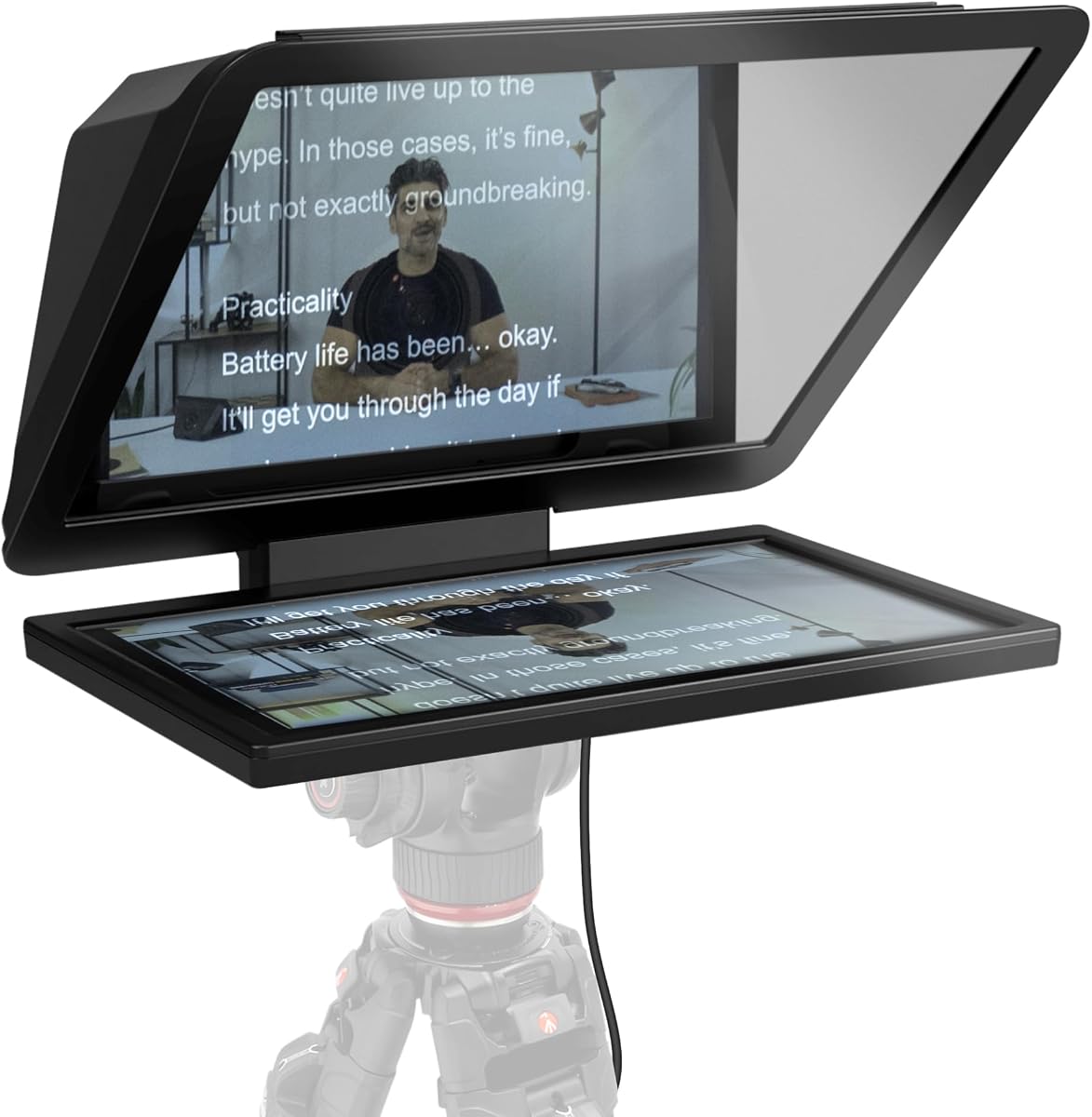
The LENSGO TCQI 10P with mini handheld tripod is the strongest budget-oriented choice for Zoom calls, earning a 5.0 rating. Its ten-inch anti-glare panel provides a practical reading area for prepared remarks, while the beam-splitter glass uses a 75/25 coating intended to maintain clear reflections without visibly distorting the camera image.
We may earn a commission when you buy through this link, at no additional cost to you.
The lens hood is a particularly thoughtful inclusion. It blocks more ambient light than a bare frame, improving script readability when the phone is near a bright window or in a room with overhead lighting. A handheld tripod adds stability without demanding a full-size support, and the magnetic mount makes repeated phone changes more convenient.
The app and Bluetooth remote support text sizing, color changes, pause, playback, and scrolling-speed control. However, the instructions identify the iOS app as TXQI and direct Android users to scan a QR code, so it is worth checking the current app availability before purchase. Phone dimensions and magnetic compatibility should also be confirmed for your specific device.
This model suits budget-conscious presenters, online educators, and social creators who need a dedicated call setup at home. Its five-star rating and anti-glare features make it particularly appealing when script visibility is the priority. A desktop system would be better for permanent installations, while a folding model would be easier to travel with.
The lens hood and light-sealing materials help suppress stray light, which can otherwise wash out the reflected script. This makes the ten-inch panel more practical for daytime calls and temporary workspaces.
The mini tripod steadies the phone while preserving a compact footprint. It is a useful middle ground between a completely unsupported phone and a large permanent studio stand.
We may earn a commission when you buy through this link, at no additional cost to you.
The LENSGO TC7 is a folding teleprompter for users who need one setup to handle Zoom presentations, online teaching, interviews, and camera recording. It has a 4.0 rating and a 9.7-inch frame that folds in approximately one second. That quick transformation makes it attractive for people who move between temporary call locations.
We may earn a commission when you buy through this link, at no additional cost to you.
Device flexibility is a major strength. The prompt supports phones, tablets below 9.7 inches, and cameras with the supplied adapter rings. Vertical and horizontal placement are supported, as are left- and right-side shooting arrangements. Multiple cold-shoe mounting points offer places to attach a microphone, tripod, or light, making this more versatile than a basic phone-only holder.
The TCQI app supplies remote script control and formatting options. Text can be entered directly, pasted in, imported from a TXT file, or loaded as an image, though the product guidance notes that image-based scripts are less flexible because their size cannot be adjusted as easily. The 9.7-inch area is also smaller than the 14.5-inch and 15.6-inch alternatives.
Choose the TC7 if you need a compact, versatile prompter for several kinds of work rather than one permanent Zoom station. Its rapid folding and broad mounting support are especially useful for traveling educators and hybrid professionals. It may require more setup knowledge than the magnetic phone kits, but it offers greater flexibility once configured.
Phone, tablet, and camera support makes the TC7 useful beyond Zoom. A user can move from an online class to a recorded interview without relying on separate prompters for each device category.
The one-second folding design simplifies storage and transport. Multiple cold-shoe points make it easier to reorganize the camera, microphone, tripod, and light as the shooting environment changes.
We may earn a commission when you buy through this link, at no additional cost to you.
The Desview T5 is a feature-rich teleprompter for smartphone, tablet, and DSLR workflows. Its 4.0 rating reflects a capable package that supports tablets below 11 inches and cameras through adapter rings ranging from 49mm to 82mm. It is a sensible option for creators who move between a Zoom call, live stream, and conventional camera recording.
We may earn a commission when you buy through this link, at no additional cost to you.
The free iOS and Android app is one of the more versatile control tools in this category. Users can import TXT or DOCX files, adjust the font, color, and background, rotate or mirror the screen, and use a countdown timer. The included Bluetooth remote adds play, pause, speed, and page-turn control, helping keep hands away from the screen.
A real-time self-check function requires a second phone to monitor the shooting status, which may not be practical for every presenter. The one-key phone alignment and adjustable front panel improve setup precision, but the large number of rings and adjustment points can make initial configuration more involved than a simple magnetic kit.
Select the T5 if your work regularly crosses device categories or if importing office documents is important. It gives experienced creators considerable control without requiring a separate monitor. For a straightforward Zoom setup with one phone, the more compact LENSGO kits will usually be easier to operate.
TXT and DOCX imports, screen rotation, mirror mode, font styling, and countdowns provide more ways to prepare a call. These options are helpful when the script comes directly from a business document.
Nine adapter sizes support many DSLR lens standards. This broad compatibility reduces the need to hunt for a separate ring when moving the teleprompter from a phone to a dedicated camera.
We may earn a commission when you buy through this link, at no additional cost to you.
This Desview T5 listing offers a versatile combination of phone, tablet, and camera support for Zoom calls and live production. Its 4.1 rating reflects a well-equipped system with coated glass, a Bluetooth remote, and compatibility with DSLRs. The stated tablet range reaches ten inches, making it useful for iPad-based presentations and script review.
We may earn a commission when you buy through this link, at no additional cost to you.
Script handling is the strongest feature. The app accepts TXT and DOCX files and allows users to change font size, text color, background color, screen orientation, and countdown timing. A remote handles playback, speed, and page changes, which helps maintain a composed delivery when the phone or tablet is also carrying the active meeting.
As with the other Desview T5 option, setup requires selecting the correct lens shading ring, aligning the camera, and checking the holder position. The phone alignment feature is convenient, but it should not be confused with the real-time self-check option that requires another device. Users should verify the exact included accessories and current app process for their operating system.
This T5 is best for an active presenter who values script formatting and may also create recorded or streamed content. It provides more control than a basic mobile holder while remaining less computer-dependent than the Elgato desktop system. A first-time user focused only on simple Zoom notes can choose the easier magnetic option instead.
The combination of background controls, font options, mirror mode, and countdown tools helps prepare scripts for different rooms and delivery speeds. A user can tailor the display before joining the meeting.
Compatibility with smartphones, tablets, and DSLR cameras makes this system useful beyond a single call format. Creators can maintain a consistent prompting approach across live presentations and pre-recorded content.
We may earn a commission when you buy through this link, at no additional cost to you.
The LENSGO TC7S is a compact folding teleprompter designed for phone-led teaching, vlogging, streaming, and Zoom calls. It has a 4.0 rating and a 9.7-inch panel that folds in approximately one second. Its principal appeal is the balance between a useful reading area and a structure that can be stored or carried without much effort.
We may earn a commission when you buy through this link, at no additional cost to you.
The TCQI app and included Bluetooth remote provide the expected controls for live script delivery. Users can pause, resume, alter scrolling speed, and change background and font settings. The prompt supports phones and small tablets below eight inches, along with vertical, horizontal, left-side, and right-side shooting arrangements.
The smaller 9.7-inch screen is less forgiving than the 14.5-inch and 15.6-inch models. Long scripts may require a faster scroll speed or more frequent adjustments, and the tablet limitation excludes larger iPads. The glass should also be handled carefully during repeated folding and unfolding to avoid accidental damage.
Buy the TC7S when portability matters more than maximum script visibility. It is a good fit for online instructors, interviewers, and creators who need a compact prompting tool for temporary calls. For long scripts displayed on a larger tablet, consider the TC12P or a system with a larger built-in screen.
The one-second folding mechanism lets users unpack and position the prompter quickly. This convenience is valuable for appointments, travel, and shared workspaces where a permanent installation is not available.
Despite its smaller footprint, the panel supports remote playback, speed control, and text formatting. That gives presenters the essential controls without requiring a full computer interface.
We may earn a commission when you buy through this link, at no additional cost to you.
The Elgato Prompter XL is the premium large-format choice, offering a removable 15.6-inch Full HD display for professional scripts, video calls, and multitasking. Its 3.8 rating is the lowest among the products reviewed, but the underlying feature set is substantial and clearly aimed at users who prioritize screen scale and flexibility.
We may earn a commission when you buy through this link, at no additional cost to you.
The large display provides an extended reading range, meaning a speaker can sit farther from the camera than with a compact phone prompter. That can make a home office feel less constrained and gives long scripts more room. Detaching the screen also allows it to function as a spare monitor for conferencing, script review, and other desktop tasks.
The system supports DSLRs, mirrorless cameras, and studio camera arrangements. Its optional voice synchronization can pace the scroll to speech, but the supplied information notes that it requires an NVIDIA RTX GPU, Apple M1, or a comparable system. Consequently, voice sync is not available on every computer, and some users may see the advanced feature as an added complication.
Choose the Prompter XL for a permanent professional setup, long scripts, or a presenter who wants a reusable large monitor. Its size demands desk space and more deliberate camera alignment than a magnetic phone kit. If you need the simplest possible experience, one of the smaller LENSGO prompters offers a more compact path.
A 15.6-inch screen allows more text to remain visible and supports a more distant viewing position. This reduces visual fatigue during lengthy presentations and limits the need for aggressive scrolling.
The removable display adds value beyond prompting. It can serve as a secondary full-screen display for meeting software, reference documents, or production tasks when the teleprompter frame is not in use.
We may earn a commission when you buy through this link, at no additional cost to you.
The Elgato Prompter Video Script is a nine-inch teleprompter with an integrated display designed for scripts, Twitch chat, and Zoom meetings. It receives a 2.0 rating, making it the least favorably rated option in this guide. That result warrants careful attention to regional availability, software requirements, and expectations before purchasing.
We may earn a commission when you buy through this link, at no additional cost to you.
Its main strength is the monitor-style interface. Any window or application can be dragged into the Prompter display, allowing users to combine a script with chat or other meeting content. Compatibility includes webcams, DSLRs, and smartphones, while the compact nine-inch screen gives creators a smaller alternative to the Prompter XL.
The listing's regional designation and limited supplied information make it harder to compare confidently with the standard Elgato Prompter. Product availability, included accessories, computer requirements, and software behavior should be verified on the listing. The low rating does not negate the useful concept, but it signals that customer experiences may involve setup or fulfillment concerns.
This product makes most sense for a streamer or presenter who wants integrated script and chat visibility in a dedicated setup and can confirm local compatibility before buying. For a simpler, better-rated desktop choice, the standard Elgato Prompter offers a clearer recommendation. Mobile presenters should favor a phone-specific kit with straightforward app controls.
The built-in display can present both a script and Twitch chat, reducing the need to glance between separate screens. This is useful for creators who actively monitor audience reactions during a live session.
Dragging windows and applications onto the screen offers convenient control for Zoom and streaming workflows. The nine-inch panel preserves a compact footprint while retaining a dedicated display.
We may earn a commission when you buy through this link, at no additional cost to you.
Choose a Zoom teleprompter by balancing reading space, device fit, camera placement, script controls, and the portability required for your normal work location.
Screen size determines how much script you can see at once and how far you can sit from the camera. Compact 9.7-inch and 10-inch panels suit close-up desk setups, while the TC12P and Prompter XL offer larger fields for long scripts or greater physical distance. A larger display can reduce eye strain, but it also requires more space and careful camera alignment.
Prioritize enough room for your preferred font and scroll speed rather than the largest panel available. Test the viewing distance with a representative script before committing.
Check the stated device-width limit before purchasing. Some holders support phones only, others accept tablets up to eight, ten, or 11 inches, and the TC12P supports devices up to 7.3 inches in landscape orientation. Magnetic systems may also require a magnetic ring or case on certain Android phones.
Measure the width of your actual device and confirm the mounting method. Compatibility with your phone's camera position matters as much as general device support.
A teleprompter works only when the lens remains centered and unobstructed through the beam splitter. Phone models vary in camera placement, while dedicated cameras require the correct adapter ring. Look for adjustable holders, clear shading rings, and alignment features.
Choose a system that supports your current and likely future camera. Keep the lens close to the glass without touching or blocking it.
Mobile prompters rely on companion apps for imported scripts, scrolling, mirroring, font changes, and playback speed. Desktop models often behave more like additional monitors and may support drag-and-drop windows. Remote controls are useful because touching the device during a live call can interrupt the meeting or create an accidental pause.
Confirm that the required app is available for your operating system and offers the formatting options you need. Prefer a remote for hands-free speed and pause changes.
A permanently installed desktop prompter is efficient for daily calls but difficult to move. Magnetic phone kits offer quick positioning, while folding designs suit appointments and travel. Mini tripods can hold a phone steadily without requiring a large stand.
Consider how often you change workspaces. Choose the most compact model that still provides readable text and stable camera positioning.
Coated beam-splitter glass, light-seal foam, and lens hoods help keep the script visible in bright rooms. The TCQI 10P listing specifically highlights its lens hood and 75/25 coated glass, while other portable models use anti-glare panels or light-blocking materials.
Test in the brightest conditions you expect to encounter. Position the screen to minimize reflections from windows, lamps, and bright monitors.
The prompter must support how you run Zoom. If a phone or tablet hosts the call, ensure it can display the script and meeting view appropriately. If a computer runs Zoom while a separate webcam records you, a desktop prompt or camera-mounted system may be more suitable.
Map the prompt to your actual meeting setup before buying. Check whether a second screen, mobile device, or display adapter is required.
Foam cushioning, one-click opening panels, adjustable heights, and included adapter rings improve daily usability. A tripod or magnetic base provides a more dependable camera position than a freestanding phone.
Check the included accessories against your needs. A complete kit may be more convenient than a less expensive frame that requires several separate purchases.
Begin by selecting a stable location and checking the room for bright windows, overhead reflections, and distracting background elements. Assemble the frame, install the appropriate camera or phone adapter, and position the lens as close to the center of the beam-splitter glass as possible without contacting it. Make small height and angle adjustments before opening the meeting.
Load your script into the required app or desktop software, select a font and background that remain legible against the reflected image, and set a conservative scroll speed. If mirror mode is needed, enable it before the call. Test play, pause, page-turn, and speed controls, then rehearse several complete passages to identify where pauses should occur.
For care, clean the glass with a soft, lint-free cloth and avoid abrasive or ammonia-based cleaners that could damage coatings. Keep the panel protected during storage, do not place heavy objects against the glass, and check that hinges and adapters remain tight. Clean the phone or camera lens separately and recheck alignment after every major movement.
Yes. A teleprompter places your script in front of the camera so you can read while appearing to look at viewers. It works especially well when your Zoom call runs on a phone or tablet placed behind the beam splitter. You can also use a computer-based system with a separate webcam and monitor.
A properly positioned teleprompter can make eye contact appear natural because the text is reflected close to the lens. Lighting, font size, scroll speed, and rehearsal affect how convincing the result looks. Use a large enough display and place it as close as practical to the camera.
It depends on the model. Phone and tablet prompters use a mobile app and can run entirely from the device hosting Zoom. Desktop systems such as the Elgato Prompter connect to a PC or Mac and may require additional display software. Check the product requirements before deciding.
Most models support both because they combine a script display with a camera mount. Phones, tablets, webcams, DSLRs, and mirrorless cameras may require different adapters or holders. Confirm the supported device dimensions and included rings, especially if you plan to change cameras frequently.
Use the supplied lens hood and light-seal foam where available, and position the unit away from direct windows or bright lamps. Adjust the panel angle carefully rather than forcing the camera out of alignment. A clean, uncoated-damaged glass surface also reflects light more clearly than one with fingerprints or residue.
A larger screen such as the 14.5-inch LENSGO TC12P or 15.6-inch Elgato Prompter XL can show more text and support a more distant reading position. Compact 9.7-inch and 10-inch models remain more portable, but they may require a faster scroll or closer viewing distance for lengthy scripts.
A tripod or stable support is highly recommended because camera alignment affects both image quality and eye contact. Some kits include a mini tripod, while others require separate support. A weighted stand that resists accidental movement is preferable to leaning the phone against an unstable object.
Yes, if the system supports your webcam and offers an appropriate mounting method. You may need a separate screen or device for the script, and the camera must sit close enough to the reflected text to preserve natural eye contact. Desktop prompters are generally easier to coordinate with a computer-based Zoom setup.
The LENSGO TCQI 10P with the mini handheld tripod is the leading budget choice because it combines a 10-inch anti-glare panel, lens hood, magnetic base, tripod, and remote. The standard Elgato Prompter is the Editor's Choice for computer-based presenters who want an integrated display and drag-and-drop workflow. The Elgato Prompter XL stands out as the premium option for large scripts, extended reading distance, and a removable Full HD screen.
For most mobile callers, prioritize a stable mount, glare control, and an app that works with your device. Larger scripts and permanent studios benefit from wider screens and dedicated camera support. Check device dimensions, software requirements, and the way Zoom will run on your equipment before making a final selection.
Features and product availability can change, while current prices vary between sellers and over time. Review the latest listing, included accessories, and compatibility information before purchasing, and choose the system that fits your meeting setup rather than one based solely on display size.