
VIVO Black Pole Mount Monitor Arm
4.6Editor score
17 to 32-inch screen support
Poles from 1.1 to 2.4 inches
360-degree rotation
Removable VESA plate
Cable management clips
A monitor arm pole extension mount can add height, reach, and flexibility to an existing workstation, but the best choice depends on pole diameter, screen weight, VESA compatibility, and available desk space. These mounts are especially useful for sit-stand desks, compact setups, and shared workstations where a standard monitor arm cannot place the display in the ideal position.
This guide compares ten pole extension mounts and complete pole-mounted systems based on supported screen sizes, load limits, articulation, extension reach, mounting options, and cable-management features. The list includes both arms that require a separate pole and all-in-one stands, so readers can compare solutions for an existing support with complete workstation upgrades.
The top selections demonstrate different strengths: the VIVO Black Long Pole Mount Monitor Arm offers versatile movement for standard displays, while other picks provide greater height reach or broader screen compatibility. Product listings and availability can change, and prices vary over time, so confirm the current specifications, included components, and latest cost before purchasing.
4.6Editor score

5.0Editor score

4.5Editor score
As an Amazon Associate we earn from qualifying purchases.
The comparison below highlights each product's screen range, maximum reach or height, supported weight, adjustment range, and key installation consideration, making it easier to identify the right pole mount for your display and workspace.


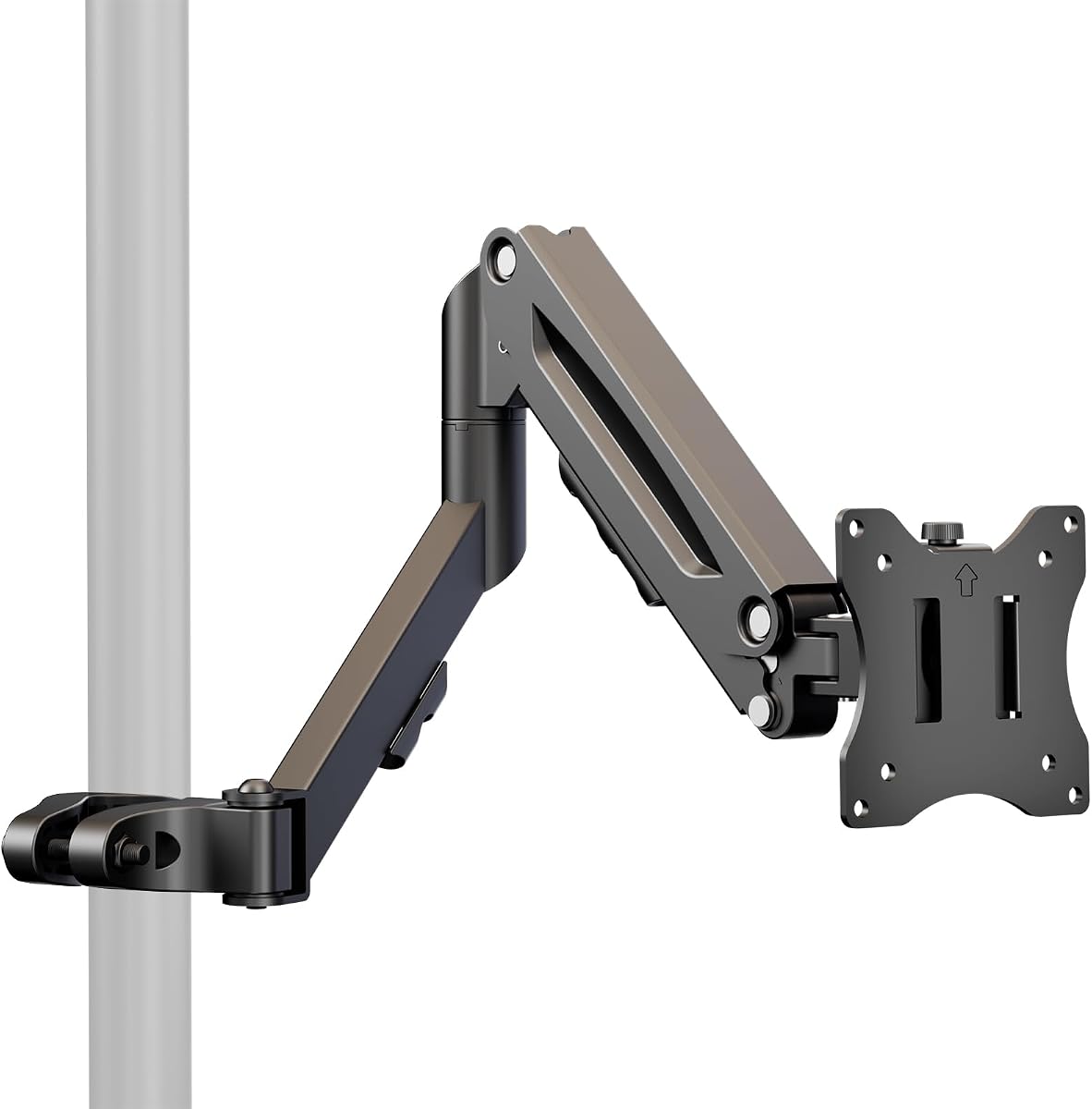


The VIVO Black Long Pole Mount Monitor Arm combines a 26.8-inch extension with universal pole compatibility, giving standard monitors more freedom of movement than a compact desk arm. It carries a 5.0 rating and supports 17- to 32-inch screens up to 22 pounds with either 75x75mm or 100x100mm VESA mounting patterns. Its pole-clamp design is intended for users who already have a compatible support or want to add an arm to an existing pole-based workstation.
We may earn a commission when you buy through this link, at no additional cost to you.
Adjustment is the product's strongest feature. The mounting bracket offers a tilt range of +30 to -30 degrees, swivel from +90 to -90 degrees, and rotation from +180 to -180 degrees. The pole clamp can also rotate completely around the pole, allowing the display to move readily between a personal viewing position and a position facing a nearby collaborator. Cable-management clips run along the arm, which is useful for keeping power and display leads from becoming tangled as the monitor moves.
There are two important limitations. First, this is an arm rather than a complete monitor stand, and the pole is not included. Buyers must verify that their pole has a diameter between 1.1 and 2.0 inches and ensure that the display's weight and VESA pattern fall within the listed limits. Even with those requirements, the specification suggests a versatile option for ordinary monitors, although it is not designed to carry very large displays.
This is a strong all-around recommendation for someone seeking a conventional monitor arm with long reach and full-motion positioning. It suits shared offices, creative desks, and compact workstations where the screen needs to come forward or turn toward a second person. For buyers who already own a compatible pole, it offers an adaptable and well-equipped solution without requiring a complete new base.
The independently adjustable bracket and rotating pole clamp make it easy to turn the display toward a colleague without dismantling the setup. This makes the arm particularly useful in shared workspaces, consultation areas, and desks where frequent screen sharing occurs.
A 26.8-inch total extension helps the screen clear objects positioned near the pole and creates a more open desktop beneath the display. Integrated cable clips keep the moving cables contained along the arm rather than allowing them to fall into the primary work area.
We may earn a commission when you buy through this link, at no additional cost to you.
The MOUNT PRO Single Long Monitor Arm is built for users who need more vertical reach than a conventional desk-mounted arm can provide. Its extended column can position a display up to 28.5 inches above the desktop, while the arm itself extends to 27.76 inches. The product has a 4.5 rating and supports most flat or curved LCD and LED screens from 13 to 32 inches, with a maximum load of 19.8 pounds.
We may earn a commission when you buy through this link, at no additional cost to you.
The adjustment range is broad for a single-arm product. It swivels through 90 degrees in either direction, tilts from +85 to -45 degrees, and rotates 360 degrees for portrait or landscape use. These movements can help place the display closer to eye level, especially for users who sit at a tall desk or spend significant time working while standing. Integrated cable management keeps the display and power leads routed neatly along the tall structure.
The main constraint is its 19.8-pound capacity, which is lower than the 22-pound maximum offered by several VIVO models. The listing also states that 1000R, 1500R, and 1800R curved screens are not compatible, an important detail for buyers considering aggressive curvature. Its clamp base supports desks from 0.39 to 3.15 inches thick, while the grommet option accommodates desktops from 0.39 to 1.97 inches thick.
This arm is a compelling choice for larger, deeper desks where height and reach matter more than carrying a very heavy display. It also gives users the convenience of choosing between clamp and grommet installation. Anyone with a heavy monitor should check the weight first, while shoppers with a strongly curved panel should select a model that explicitly supports their curvature.
The 28.5-inch maximum height offers meaningful adjustment above a standard desktop arm, making this design relevant to tall users and sit-stand configurations. The extra-long column can bring the display closer to eye level without requiring a separate riser.
Including both a clamp and grommet base gives users flexibility when the desk has either a usable edge or a cable pass-through. The stated desktop thickness limits should be compared carefully with the actual desk before installation.
We may earn a commission when you buy through this link, at no additional cost to you.
The VIVO Black Pole Mount Monitor Arm provides a straightforward way to add an articulating display arm to a compatible pole. It carries a 4.6 rating, accepts 17- to 32-inch screens, and supports weights up to 17.6 pounds. Its clamp fits poles measuring 1.1 to 2.4 inches in diameter, giving it a broad range of possible supports compared with mounts designed around one specific pole diameter.
We may earn a commission when you buy through this link, at no additional cost to you.
The mounting bracket tilts 30 degrees in either direction, swivels through 180 degrees, and rotates a full 360 degrees. This movement makes the arm practical for repositioning a screen during a task change or turning it toward someone seated nearby. The pole clamp itself can also rotate completely around the pole. Cable-management clips help keep cords close to the arm, and the removable VESA plate makes attaching the display more manageable.
The main tradeoff is the 17.6-pound load capacity. Although that limit covers many mainstream monitors, it excludes some heavier models and substantially large displays. The pole itself is also not supplied, so the product is best treated as an add-on or replacement arm rather than a standalone workstation. Its standard 75x75mm and 100x100mm VESA support covers a broad range of screens but not every modern pattern.
This model is a sensible selection for value-conscious users who already have a compatible pole and need standard articulation. It is particularly useful when the goal is to improve the position of a typical 17- to 32-inch monitor without replacing the entire desk setup. Heavy-screen owners should move toward a higher-capacity model, while those starting from scratch should include a suitable pole in their purchase plan.
The 1.1-to-2.4-inch pole range gives this arm a useful advantage when the diameter of an existing support is uncertain. Measure the pole before ordering because the clamp range is the critical compatibility checkpoint.
Tilt, swivel, and 360-degree rotation provide enough movement for typical productivity, media-viewing, and collaboration needs. The compact load rating keeps the product focused on conventional monitors.
We may earn a commission when you buy through this link, at no additional cost to you.
The 31.6-Inch Steel Extra Tall 2-Section Monitor Arm Pole is a foundation rather than a complete display mount. It is designed to raise an existing monitor arm to a higher position, which makes it useful for replacing a short pole or assembling a custom workstation. The product has a 4.2 rating, reaches approximately 31.6 inches high, measures 1.4 inches in diameter, and can support approximately 44 pounds.
We may earn a commission when you buy through this link, at no additional cost to you.
A two-section construction provides a useful degree of height configuration during installation. The pole can be secured using a C-clamp or a screw-based grommet base. The stated clamp range covers desktops from 0.4 to 3.3 inches thick, while the grommet method is listed for 0.4 to 1.6 inches. Cable-management components help keep wiring orderly along the upright, and the necessary installation hardware and manual are included.
Because the pole is sold alone, this product will not directly mount a monitor without a compatible arm and VESA hardware. The purchaser must verify that the existing arm accepts a 1.4-inch pole and that its clamp geometry is compatible. The listed load figure also represents the pole's capacity rather than a guarantee that every monitor arm, head, or display combination will perform equally well.
This is a worthwhile choice for someone who already has a satisfactory monitor arm but needs a taller foundation. It may be particularly useful when rebuilding a sit-stand desk or correcting a display that sits too low. It is less convenient for first-time buyers, who would generally benefit from a complete pole-and-arm system with clearly coordinated dimensions.
A dedicated pole can refresh a workstation without replacing a serviceable monitor arm. The two-section format also offers some flexibility when setting the final monitor height.
Buyers can select the method that best fits their desk, provided its thickness falls within the stated range. Check the existing arm's pole opening and mounting requirements before making the upgrade.
We may earn a commission when you buy through this link, at no additional cost to you.
The SUPTEK Single Monitor Arm uses a three-tier articulated design to create a long, adaptable support for one display. It has a 5.0 rating and is designed around a 1.375-inch center pole, which is not included with the arm. The stated compatibility covers one monitor up to 32 inches, a maximum weight of 22 pounds, and VESA patterns from 75x75mm through 100x100mm.
We may earn a commission when you buy through this link, at no additional cost to you.
Its articulated sections measure 7.48, 8.07, and 8.07 inches, and the maximum extension from the pole to the center of the panel is 27.56 inches. The arm supports telescopic adjustment, a 90-degree swivel in either direction, a 90-degree tilt in either direction, and 360-degree plate rotation. These controls make it possible to tune the screen for seated use, standing work, portrait viewing, or occasional sharing.
Detachable cable clips help keep power and audiovisual leads organized as the arm moves. The package includes the arm, mounting hardware kit, and VESA plate, but shoppers still need to source an appropriate pole and base. The product title emphasizes a 13- to 27-inch range while the supplied specifications state support for one monitor up to 32 inches, so buyers should use the more detailed compatibility information and confirm their display's size and mounting pattern.
This arm stands out for users who want tier-by-tier reach rather than a conventional single extension. It is well suited to large desks, creative workstations, and setups where the monitor must move both vertically and horizontally around a central pole. It is less convenient for users without an existing 1.375-inch support, making the missing pole the most important caveat to account for.
The three-tier layout distributes the monitor's distance from the pole across several articulated sections. This can make fine positioning easier than pulling a single arm through its entire range.
A rotating VESA plate supports portrait and landscape use, while swivel and tilt controls handle everyday ergonomic changes. Detachable clips keep the cable path visible and orderly without permanently trapping the leads.
We may earn a commission when you buy through this link, at no additional cost to you.
The Steel Extra Tall 32 Inch 2-Section Monitor Stand Pole is built for high-load applications and large displays. It has a 4.5 rating, a 32-inch height, and 1.38-inch diameter, with a listed capacity of up to 88 pounds. The steel tubing and powder-coated finish create a substantial foundation that is positioned as an alternative to a standard short arm.
We may earn a commission when you buy through this link, at no additional cost to you.
Its dual-joint design is intended to maintain stability as the pole is configured. The matte black finish resists fingerprints and blends into office or gaming environments. Installation is possible with a sturdy C-clamp for desks between 0.39 and 3.35 inches thick or with a grommet base for desks between 0.39 and 1.97 inches thick. The product can serve as an add-on to an existing arm or as a foundation for a compatible custom monitor setup.
The headline load capacity is impressive, but it should not be treated as permission to pair the pole with every arm and display combination. The monitor arm's own weight rating, clamp size, VESA pattern, and overall configuration still need to be compatible. Because the pole is the primary product, buyers must inspect the existing arm and measure its pole opening before ordering.
This is a compelling upgrade for owners of large gaming monitors, ultrawide screens, or heavy professional displays whose existing support is too short or insufficiently substantial. It may be unnecessary for a lightweight office monitor, where a lighter complete stand would be easier to install. The key advantage is its combination of height, rigidity, and high listed load capacity.
The steel tubing, dual-joint layout, and high listed load figure create a more substantial base than many light-duty poles. This is relevant when the monitor is large, wide, or adjusted frequently.
The tall pole moves the display upward and away from the primary desktop surface without requiring a full monitor arm and base. It can preserve usable desk area in a workstation where a large screen would otherwise occupy substantial room.
We may earn a commission when you buy through this link, at no additional cost to you.
The Height Adjustable Pole Mount Monitor Arm with Gas Spring offers spring-assisted movement for displays mounted to a pole. It carries a 4.4 rating, supports 17- to 32-inch screens up to 19.8 pounds, and accepts 75x75mm and 100x100mm VESA patterns. Unlike a standard desk-mounted product, it is intended for installations where a desk may not be available or convenient.
We may earn a commission when you buy through this link, at no additional cost to you.
Its internal mechanical spring provides a listed height range of approximately 5.98 to 17 inches. The arm also extends to 19.8 inches, tilts from +55 to -55 degrees, swivels through 90 degrees in either direction, and rotates through 180 degrees in either direction. Together, these movements provide extensive control over viewing angle, display orientation, and position around the pole.
The clamp attaches securely to a compatible pole, and cable management is incorporated into the design. However, the product's supplied information does not describe it as a complete stand, so a suitable pole and stable base may need to be sourced separately. The maximum screen weight is also lower than that of the best premium options, making weight verification essential for larger or heavier displays.
This mount is a specialized pick for users who already use pole-based displays, need to work away from a conventional desk, or specifically want spring-assisted height changes. It is less convenient for someone seeking a single ready-to-install workstation. Within its intended pole-mounted format, though, it offers a notably broad articulation range and practical height flexibility.
The internal spring assists the vertical movement of the mounted display, making frequent height changes easier. The listed range allows the monitor to move between lower and elevated positions without replacing the entire support.
The pole clamp approach makes the product useful in shared rooms, studios, service areas, and other locations where a permanent desk mount is inconvenient. A stable compatible pole remains essential for safe, controlled movement.
We may earn a commission when you buy through this link, at no additional cost to you.
The VIVO Extra Tall Single Monitor Desk Mount is a complete, premium-style solution for users who want considerable vertical placement and broad articulation. It has a 4.5 rating, a 39-inch center pole, and support for screens from 13 to 32 inches as well as ultrawide displays up to 38 inches. Its maximum load is 22 pounds, and the mounting plate accommodates 75x75mm and 100x100mm VESA patterns.
We may earn a commission when you buy through this link, at no additional cost to you.
The 39-inch pole allows the display to be moved between sitting and standing positions, making it particularly useful with a sit-stand desk. The articulating arm provides 90 degrees of tilt in either direction, 360-degree swivel, and 360-degree rotation, with a detachable bracket that permits portrait or landscape orientation. Cable clips run along both the arm and center pole to contain power and audiovisual cords.
Installation is drill-free through the included heavy-duty C-clamp, which is rated for surfaces up to 4 inches thick. A grommet mount is also available for users who prefer that configuration. The hardware and step-by-step manual are supplied, and the detachable VESA plate simplifies screen attachment. Buyers should still measure the desk edge and ensure that the chosen base has sufficient room behind it for the arm's movement.
This stand is our premium recommendation because it combines a tall pole, complete mounting hardware, useful articulation, and ultrawide support in one coordinated package. It is a strong choice for ergonomic workstations, standing desks, and users replacing a short original monitor stand. Those seeking a compact arm only may prefer a pole-mounted accessory, but this model minimizes compatibility guesswork.
The 39-inch center pole provides much more vertical travel than a standard monitor arm, allowing the display to remain usable as the desk changes position. This is especially helpful for taller users and alternating seated or standing work.
Unlike products that require a separately sourced pole, this stand combines the vertical support, articulating arm, mounting plate, and base options. That makes it a convenient upgrade for a new desk or a replacement for an inadequate factory stand.
We may earn a commission when you buy through this link, at no additional cost to you.
The second VIVO Black Long Pole Mount in this list is distinguished by its support for larger screens. It carries a 5.0 rating and fits 23- to 43-inch monitors or TVs up to 22 pounds. Unlike the standard 75x75mm and 100x100mm patterns, its VESA support extends as high as 200x200mm, making it relevant for larger displays with more widely spaced mounting holes.
We may earn a commission when you buy through this link, at no additional cost to you.
The arm has a total extension of 27 inches and fits poles measuring 1.1 to 2.3 inches in diameter. It tilts 30 degrees in either direction, swivels 90 degrees in either direction, and rotates 180 degrees in either direction. The pole clamp can rotate fully around the support, adding flexibility when the display needs to face a nearby person. Cable-management clips help maintain a tidy appearance throughout the workspace.
As with the smaller VIVO pole arm, the compatible pole is not included. The relatively modest 22-pound maximum means screen size alone should not determine compatibility; weight must be checked independently. A large television may fall within the dimensional range but exceed the supported load. Buyers should also confirm that the display's VESA pattern is covered by the stated range.
This model is the most suitable of the standard pole arms for a larger monitor or lightweight television. Its wider VESA range and 43-inch screen support offer a useful upgrade path for buyers who do not need the complete 39-inch desk stand. It is best for users with a compatible pole who want long reach and a larger supported display category.
The expanded 23-to-43-inch range and support for VESA patterns up to 200x200mm offer access to larger display sizes without purchasing a complete extra-tall pole system. Weight and mounting-pattern checks remain essential.
Tilt, swivel, and rotation give the screen a broad range of working positions, while the rotating clamp assists with sharing. The 27-inch extension helps bring the display forward on a crowded desktop.
We may earn a commission when you buy through this link, at no additional cost to you.
The HUANUO Single Monitor Arm with 39-inch Extra-Tall Pole is another complete solution for users seeking substantial screen height. It has a 4.6 rating, a height-adjustable 39-inch center pole, and compatibility with most 13- to 32-inch screens as well as ultrawide displays up to 38 inches. The maximum supported weight is 22 pounds, with standard 75x75mm and 100x100mm VESA mounting patterns.
We may earn a commission when you buy through this link, at no additional cost to you.
Its articulating arm offers 180 degrees of tilt, 180 degrees of swivel, and 360-degree rotation. The tall pole allows the screen to be positioned comfortably while sitting or standing, and the detachable mounting plate supports changes between portrait and landscape orientation. Integrated cable management helps organize the power connection, reducing visual clutter around the base and upright.
Two desk configurations are included: a C-clamp for surfaces up to 3.93 inches thick and a grommet mount for surfaces up to 2.75 inches thick. The listing says installation can be completed in about 10 minutes according to the manual, though actual assembly time will depend on the desk and the user's familiarity with monitor mounting hardware. The major consideration is therefore compatibility with the display and work surface rather than the included tools.
This stand is a worthwhile all-in-one choice for users replacing a basic factory monitor stand, particularly those with a sit-stand desk or a large ultrawide screen. It offers more complete hardware than a pole-only accessory and more height than ordinary arms. Users should still confirm desk thickness, display weight, and VESA pattern before finalizing the installation.
A 39-inch pole gives the display a broad vertical range, which is useful when moving between seated and standing work. The height-adjustable center helps keep the screen usable as the desk position changes.
The included clamp and grommet base make the system adaptable to desks with a suitable edge or a cable pass-through. Comparing both mounting options against the desk's construction helps avoid an unsuitable installation.
We may earn a commission when you buy through this link, at no additional cost to you.
The right pole extension mount depends on your existing support, display dimensions and weight, VESA pattern, preferred range of motion, and desk construction. Measure before shopping, distinguish between arm-only and complete systems, and prioritize stability over movement that you will not use.
Monitor arm pole extension mounts fall into two broad groups: arms that clamp onto an existing pole and complete stands that include a pole, base, and mounting arm. The VIVO Black Long Pole Mount, the 31.6-inch steel pole, and the SUPTEK arm do not include a compatible pole, while the MOUNT PRO, HUANUO, and VIVO Extra Tall products are presented as more complete systems. This distinction affects the total parts required, the amount of assembly, and the likelihood of compatibility problems.
Choose an arm-only model when you already have a stable pole with a compatible diameter and a suitable base. Choose a complete system when replacing an inadequate factory stand, creating a new workstation, or installing in a location without an existing pole support.
The pole diameter is one of the most important physical compatibility checks. Listed ranges vary substantially: the 31.6-inch steel pole has a 1.4-inch diameter, the SUPTEK arm requires a 1.375-inch pole, and the two VIVO long arms accept much wider ranges. A range such as 1.1 to 2.4 inches can be helpful, but it does not guarantee that every pole in the range has a compatible clamp shape, mounting position, or available space.
Measure the pole's outside diameter and check the mount's supported range before ordering. Also consider the pole's construction and stability because a high-capacity arm cannot compensate for a poorly secured or unstable support.
Screen size and supported weight are separate limits. The 31.6-inch steel pole and 32-inch heavy-duty pole carry much higher listed capacities than most articulating arms, which commonly stop at 17.6, 19.8, or 22 pounds. A large display may fit the dimensional range of a product while exceeding the arm's safe load limit.
Find the weight of the specific monitor and include the VESA plate and connecting hardware when comparing a mount's rating. Choose an arm with a comfortable margin rather than placing a display directly at the stated maximum.
VESA compatibility is determined by the distance between the four mounting holes on the back of the display. Most products in this guide support 75x75mm and 100x100mm patterns, which cover many conventional monitors, but the larger VIVO Black Long Pole Mount extends support to 200x200mm. Some displays use other patterns, so the hole dimensions must be measured rather than estimated from screen size.
Also check whether the included VESA plate is removable. A removable plate makes it easier to attach the screen before connecting the arm to a pole, particularly in a tight or less accessible installation area.
Extension reach and maximum height solve different ergonomic problems. Long arms bring a display forward from a pole, clear keyboards and other desk objects, or make screen sharing easier. Tall poles raise the display closer to eye level and allow the screen to follow a sit-stand desk. Some complete systems provide both, while arm-only products depend on the existing pole's height.
Measure the distance from the desired mounting point to the screen and compare it with the listed maximum extension. For height, consider the user's seated eye level, standing eye level, desk thickness, and whether the pole must retract to avoid obstacles.
Tilt, swivel, rotation, and extension determine how easily the display can be placed for different tasks. Full swivel and 360-degree rotation are valuable for collaboration or portrait viewing, while generous tilt helps align the panel with seated or standing users. The MOUNT PRO adds notably tall positioning, and the gas-spring mount provides spring-assisted height changes.
Avoid choosing a complicated mechanism solely for movement you will not use. Consider desk clearance, nearby walls, lighting, and how often you will reposition the screen, because a stable, simple setup may be more valuable than maximum articulation.
C-clamp and grommet installations offer different advantages. A clamp generally requires a compatible desk edge and enough space behind it for the mount to tighten, while a grommet base requires an existing cable hole or willingness to drill. Listed thickness limits vary widely, from approximately 2.75 to 4 inches for several heavy-duty systems, and should not be generalized across products.
Measure the desk thickness, inspect the underside, and check for drawers, support rails, or other obstructions. A grommet installation can be cleaner near the rear of the desk, but a carefully positioned clamp avoids permanent modification.
Cable clips and routing features are valuable on a pole mount because the display can travel through a wide area and pull cords across the desk. Several VIVO arms include clips along the arm, while complete poles may provide cable-management parts. Look for routes that preserve the arm's motion without pinching the cables.
Stability depends on the entire system, not only the advertised load rating. Secure the base firmly, tighten every connection, and use the correct hardware for the desk. For a large or ultrawide monitor, a wide two-section steel pole and stable base may offer more confidence than a lighter general-purpose arm.
Begin by assembling the support before attaching the display. For a complete stand, secure the base to the desk using the appropriate clamp or grommet method, check that the pole is fully tightened, and install the arm at a comfortable working height. For an arm-only model, fit the pole clamp to the compatible pole and tighten it evenly. Confirm that the support is stable before adding the monitor's weight.
Attach the display using the correct VESA plate and the specified bolts. The bolts should enter the mounting holes evenly rather than being forced or tightened asymmetrically. Once the screen is secure, reconnect the power, video, and other required cables, then route them through the included cable clips. Move the display through its tilt, swivel, rotation, and extension ranges to verify that the cables do not snag.
Periodically inspect the base, pole joints, arm fasteners, and VESA connection for loosening or unusual movement. Tighten loose hardware according to the product instructions, and avoid exceeding the listed screen-weight limit. Clean the metal components with a soft, dry cloth, keep moisture away from joints and electrical connections, and disconnect power before making any structural adjustment. Periodic maintenance helps preserve smooth movement and stable support.
It is a monitor mounting arm that attaches to a vertical pole, allowing the display to be raised, extended, tilted, or turned away from its original position. Some products include a complete pole and desk base, while others are arms that require a separately purchased pole. The format is useful for sit-stand desks, shared workstations, and setups where a standard factory stand does not provide enough positioning flexibility.
It depends on the product. The VIVO Black Long Pole Mount, the 31.6-inch two-section steel pole, and the SUPTEK Single Monitor Arm are arm or pole components that do not include a compatible full support system. Complete products such as the MOUNT PRO, HUANUO, and VIVO Extra Tall setups include a tall pole and mounting hardware. Always check the package contents before ordering.
Measure the outside diameter of the existing pole, then compare it with the mount's stated range. For example, the smaller VIVO Black Pole Mount accepts poles from 1.1 to 2.4 inches, while the SUPTEK arm specifically requires a 1.375-inch pole. A diameter within the stated range is necessary, but you should also confirm that the clamp can physically close around the pole and that the mounting position leaves room for the arm.
Several models can, provided the display remains within both the screen-size and weight limits. The VIVO Extra Tall and HUANUO models support ultrawide screens up to 38 inches, while the larger VIVO Black Long Pole Mount accepts screens up to 43 inches. A large screen is not automatically compatible, so check its weight, VESA pattern, and any curvature restrictions before purchasing.
A clamp is convenient when the desk has a thick, accessible edge and you want to avoid drilling. A grommet base is useful when the desk already has a suitable cable hole or when a flush installation is preferred. Choose the method that matches the desk thickness, underside clearance, and personal drilling preference, using only the base components supplied with the selected system.
Check the four holes on the back of the monitor and measure the distance between them in millimeters. Most of the products reviewed support 75x75mm and 100x100mm, while the larger VIVO Black Long Pole Mount supports patterns up to 200x200mm. A compatible-looking screen size does not guarantee VESA compatibility, so verification should happen before installation.
Yes, provided it is adjusted correctly. Taller poles can bring the top of the display closer to eye level, while long arms allow the screen to sit farther forward and at a more comfortable distance. Swivel and rotation also make it easier to share a display. The best result comes from balancing those movements with a stable base and a display positioned directly in front of the user.
Capacity varies considerably by product. Several articulating arms support 17.6, 19.8, or 22 pounds, while the 31.6-inch steel pole lists approximately 44 pounds and the 32-inch heavy-duty pole lists up to 88 pounds. Use the lower rating when components are combined, and never assume that a pole's capacity overrides the arm, clamp, or VESA plate's individual limit.
The VIVO Black Long Pole Mount Monitor Arm stands out as the best overall choice for standard displays because it combines long extension, universal pole compatibility, full-motion positioning, and cable management. The VIVO Black Pole Mount Monitor Arm is a capable budget-focused option for a compatible existing pole, while the VIVO Extra Tall Single Monitor Desk Mount offers the most complete premium package for users who want a tall pole, an integrated arm, and flexible desk installation.
Prioritize compatibility before features. Measure the existing pole or desk, confirm the display's weight, verify the VESA pattern, and make sure the intended base fits the desktop. A slightly simpler mount that fits properly will be more useful than a highly adjustable product with incompatible dimensions or an insufficient load rating.
Finally, review the current listing before checkout because included components, supported specifications, and prices can change over time. Check that the package includes the pole, base, hardware, and VESA plate you need. Current availability and cost should also be confirmed so the final purchase matches both your workspace and your budget.
