
ARCTIC Case Fan Hub
4.7Editor score
Ten four-pin PWM outputs
Synchronous motherboard control
SATA-powered fan delivery
Single-cable case management
Our Fan Control Hub for PC guide compares 10 options for ports, PWM control, ARGB support, delivery, mounting, and cable management inside your build.
A fan control hub for PC gives a crowded case a cleaner way to power, monitor, and synchronize multiple fans. The right unit can free motherboard headers, support ARGB lighting, provide SATA power, or deliver genuinely independent software control. Good options also make installation easier and reduce the tangle of splitter cables behind the motherboard tray.
We compared the ten featured hubs by examining port count, supported connections, control methods, current limits, mounting options, lighting support, and practical cable-management features. The list includes basic passive splitters, combined PWM and ARGB hubs, temperature-aware controllers, and software-driven models for Windows and Linux. It does not imply that every product performs the same type of control.
Each review shows what the selected product is best suited to do, along with its important limitations. Some merely expand fan and lighting headers, while others add remote control, temperature regulation, or per-fan software management. Ratings and specifications can change over time, so verify the current listing, connector requirements, included cables, and current price before ordering.
4.7Editor score

4.7Editor score
4.6Editor score
The table below places all ten hubs side by side, emphasizing the distinctions that most affect installation: fan capacity, power source, ARGB compatibility, control style, and monitoring capabilities.


The Thermalright ARGB Fan HUB Controller has a 4.5 rating and stands out as a compact, practical solution for builders who need more fan and lighting connections than the motherboard provides. It supports up to eight groups of ARGB fans through 4-pin fan connectors while also synchronizing compatible 5V three-pin ARGB devices. Its small body is particularly useful behind a motherboard tray or beneath a power-supply shroud.
We may earn a commission when you buy through this link, at no additional cost to you.
The hub combines power expansion, PWM signal distribution, and ARGB synchronization in one enclosure. A SATA power connection provides direct fan power, while the motherboard supplies the relevant control and lighting signals. Strong paste and magnetic suction give builders two mounting options, helping the unit remain securely positioned in different chassis layouts. The red interface is intended for speed reading, although only one connected fan in that position is recognized because of motherboard PWM-reading limitations.
An important distinction is that this device is primarily an interface expander and signal distributor. It does not independently control fan speed or adjust lighting effects; those functions remain dependent on the connected motherboard headers and compatible software. It also must not be used with 12V four-pin RGB equipment, because that connector is electrically incompatible with the hub's 5V three-pin ARGB system.
This is a sensible choice for a colorful build with several ARGB fans and a shortage of motherboard headers. It is less appropriate for someone seeking true per-fan control, automatic temperature curves, or a unit that can be controlled without motherboard software. For those requirements, the software-driven ARCTIC Fan Controller is the stronger choice.
Combining 4-pin fan headers and 5V three-pin ARGB connectors reduces the number of separate splitters in the case. It is especially helpful for builds that pair illuminated intake and exhaust fans while preserving a cleaner wiring path.
The hub passes through PWM and lighting signals rather than acting as a standalone control center. Buyers should therefore treat it as a wiring aid, not a replacement for motherboard fan control or dedicated monitoring software.
We may earn a commission when you buy through this link, at no additional cost to you.
The ARCTIC Fan Controller has a 4.7 rating and is the most capable general-purpose option in this guide. Unlike passive hubs that copy one PWM signal to every output, it offers independent control for up to ten connected fans. That makes it a strong match for builders who want different intake and exhaust curves, balanced airflow, or quieter behavior under varying workloads.
We may earn a commission when you buy through this link, at no additional cost to you.
Native support for Windows and Linux with Kernel 7.2 or later makes this controller unusually flexible. It can work with a wider selection of fan-control and monitoring applications instead of requiring a closed ecosystem. Power delivery reaches up to 2 A per port and 4.5 A in total, offering more headroom for compatible fans than many motherboard headers provide.
The trade-off is that this is a fan-control device, not a combined ARGB hub. Lighting requires separate handling, and sophisticated setup depends on the selected software and operating system. The stated 4.5 A total ceiling also means the complete connected load must remain below that limit, even if individual port ratings appear sufficient.
This is the best pick for users who genuinely need per-fan control, software monitoring, or a way to create a more balanced cooling profile. It is less suitable for a simple build where motherboard PWM control is already adequate or where ARGB consolidation is the main goal. For those priorities, the ARCTIC Case Fan Hub is simpler and more economical.
Assigning separate curves or speeds to each fan can reduce unnecessary noise and make a multi-fan layout easier to balance. The controller also makes it more practical to detect a stopped or unusually slow fan when supported software provides that monitoring option.
Native Windows and Linux support is valuable for both conventional gaming systems and enthusiast Linux builds. Buyers should still confirm that their preferred monitoring application recognizes the controller before finalizing the installation.
We may earn a commission when you buy through this link, at no additional cost to you.
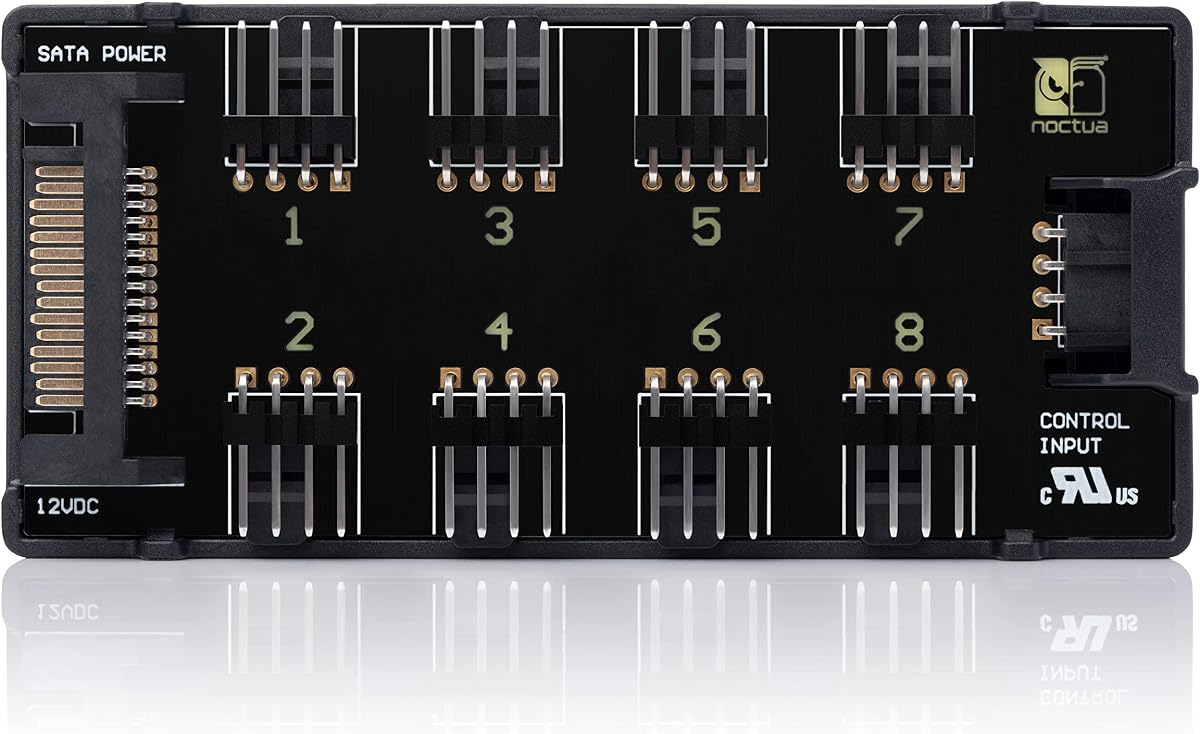
The Noctua NA-FH1 carries a 4.6 rating and offers a particularly mature approach to safe fan distribution. Its eight outputs can power, control, and monitor multiple fans, transmitting the motherboard's PWM signal to connected devices. It also supports RPM monitoring, making it a better fit for builds that value dependable operation and useful system feedback.
We may earn a commission when you buy through this link, at no additional cost to you.
Its 4-pin and SATA inputs can be used together: SATA supplies power for 12V fans, while the 4-pin connection carries RPM and PWM information. Safety fuses add protection against overcurrent and short circuits. Four strong magnets make installation on a steel case panel straightforward without adhesive, and the included NA-EC1 input cable facilitates connection to a motherboard fan header.
The product is focused and does not attempt to do everything. It has eight outputs rather than ten, no integrated ARGB handling, and no independent per-fan controller. It also must be installed where its magnetic mounting system can grip a suitable steel surface. Those constraints are easy to accept for a builder who values protection, clear electrical design, and established quality standards.
The NA-FH1 is best for Noctua-oriented systems, quiet builds, and users who want PWM distribution with monitoring and short-circuit protection. It is a stronger long-term choice than a basic splitter when safety and dependable signal handling are priorities. Its warranty and listed compliance certifications further reinforce that positioning.
The integrated safety fuses are particularly relevant when several high-current fans share one hub. They add a layer of protection that simpler splitters often omit, although sensible cable practices and adherence to the stated current limits remain essential.
RPM monitoring through the motherboard connection helps users verify that the expanded fan group is operating as expected. For builders focused on acoustics and cooling reliability rather than RGB synchronization, this narrow feature set can be preferable to a combined hub.
We may earn a commission when you buy through this link, at no additional cost to you.
The ARCTIC Case Fan Hub has a 4.7 rating and delivers one of the clearest solutions for expanding a case's available fan connections. It provides ten 4-pin PWM sockets, allowing nine more case fan positions than a typical single motherboard header can directly serve. That capacity makes it especially useful for airflow-heavy cases with multiple intake and exhaust fans.
We may earn a commission when you buy through this link, at no additional cost to you.
The motherboard's PWM signal is passed synchronously to every connected fan. RPM information from the first fan slot is returned to the system, giving users a basic indication of whether the connected group is operating. Fans receive power directly from the power supply through SATA, avoiding voltage loss that can occur when multiple high-current devices are powered through a small motherboard header.
The limitation is the shared control signal: connected fans respond to the same PWM command instead of receiving independent settings. Each port is rated for up to 1 A, while total input current is limited to 4.5 A. It also offers no ARGB functionality, so builders with illuminated hardware may need a separate lighting hub.
For a straightforward, tidy, and capable multi-fan installation, this hub is hard to beat. It is a better budget choice than an unmanaged collection of loose Y-splitters because it centralizes both power and signal distribution. Choose the ARCTIC Fan Controller instead if separate fan curves and software-based individual control are essential.
Ten outputs provide ample room for common high-airflow layouts without requiring multiple splitters. The hub can be hidden in the unused space behind the motherboard tray, where its compact dimensions make routing easier.
The shared signal makes setup straightforward: one motherboard PWM header controls the entire bank. It is an effective approach when all fans in the group should accelerate together, though separate intake and exhaust curves require a more advanced controller.
We may earn a commission when you buy through this link, at no additional cost to you.
The Thermalright ARGB and Fan HUB X12 IR White has a 4.4 rating and is built for builders who need a large number of fan connections. It supports up to 12 groups of 4-pin fans while also handling 5V three-pin ARGB fans and light bars. The white housing and 108-by-50-by-21-millimeter dimensions are designed to blend into a light-colored case.
We may earn a commission when you buy through this link, at no additional cost to you.
Its two-sided connector layout places fan and lighting sockets where cables can be routed efficiently. SATA power provides direct output under load, and a single motherboard PWM connection allows the connected fans to synchronize their speed. Compatible 5V ARGB equipment can likewise synchronize with the motherboard's lighting effects, reducing the need for separate adapters and extension leads.
This hub expands interfaces but does not itself control speed or lighting. Only the fan installed in the red speed-recognition position is reported because of the PWM-reading limitation in motherboard controllers. A SATA cable must be purchased separately, and 12V four-pin RGB devices must never be connected to the 5V ARGB sockets.
This is a strong option for a white-themed system with many illuminated fans, provided the builder understands the connector restrictions. It is better suited to large, coordinated groups of fans than to a system requiring different speeds for each device. Users wanting active independent control should consider the ARCTIC Fan Controller.
The unusually high output count can simplify large radiator or multi-intake configurations. It also reduces the number of separate PWM splitters that would otherwise occupy valuable motherboard headers and interior space.
The white finish makes this model visually appropriate for matching builds. Ports on both sides help separate fan power from ARGB lighting connections and keep the wiring plan cleaner when many devices are installed.
We may earn a commission when you buy through this link, at no additional cost to you.
The upHere PWM and ARGB Magnetic Fan Hub has a 4.6 rating and stands out for its combination of nine fan connections, 5V addressable lighting, and a front-facing RGB panel. It is aimed at custom builders who want a single compact device to organize cooling wiring while retaining direct access to lighting effects through the included remote.
We may earn a commission when you buy through this link, at no additional cost to you.
Magnets secure the hub to suitable metal surfaces inside a case, and its SATA-powered design supplies fan power independently of the limited capacity of a motherboard header. A front-facing RGB panel can synchronize with compatible ARGB fans, while the included remote provides control over colors and dynamic effects. The package also includes a SATA cable, PWM and ARGB leads, and a synchronization cable.
The product is not as universally simple as its all-in-one kit may initially suggest. It combines multiple connection types, so correct routing and compatible 5V ARGB equipment are essential. Its main cooling role is to distribute the motherboard's PWM signal rather than assign independent speeds to each of the nine fans.
This hub is best for a visually coordinated build where convenient remote lighting control and tidy wiring are the main objectives. It gives builders more active RGB control than a basic pass-through hub while keeping fan management relatively straightforward. For true per-fan PWM control, step up to the software-driven ARCTIC model.
The included remote makes it simple to change colors and effects without entering the operating system. The front panel adds another visible control point in a case with a window or transparent side panel.
Supplying the SATA, PWM, ARGB, and synchronization cables reduces the need to source matching leads separately. Buyers should still confirm connector orientation before connecting any lighting equipment.
We may earn a commission when you buy through this link, at no additional cost to you.
The Thermalright Integrated Fan Hub carries a 4.6 rating and provides a straightforward way to expand a PC's fan headers. It supports up to ten 4-pin fans through a compact hub that can be secured with the built-in double-sided adhesive. It is a practical option for large cases where intake, exhaust, and radiator fans exceed the available motherboard connections.
We may earn a commission when you buy through this link, at no additional cost to you.
SATA power feeds the hub directly, which lets the connected fans draw from the power supply rather than drawing all their power through a motherboard header. The hub's shared PWM connection allows the fan group to follow a motherboard curve. The red interface supports speed reading, with one connected fan providing the readable RPM signal because of the limitations of motherboard PWM controller chips.
This is not an independent fan controller and does not combine PWM and ARGB functions. It also does not include a SATA power cable, which should be planned for before installation. Users wanting separate lighting and cooling control will need an additional hub or a motherboard that offers suitable ARGB headers.
The product is a good fit for a clean, high-fan-count installation that does not need elaborate RGB lighting. It offers a good balance of capacity, compact size, and simple motherboard-based control. For broader current handling or independent fan settings, the ARCTIC alternatives provide more flexibility.
Ten ports allow a substantial group of case fans to run from one motherboard header. Mounting the hub behind the tray and using SATA power keeps the visible interior cleaner than several loose splitter cables.
The shared hub can report RPM from one fan position, offering a basic check of the connected group. It does not provide a separate tachometer reading for every output or individual speed management.
We may earn a commission when you buy through this link, at no additional cost to you.
The Thermalright FAN and ARGB HUB X8 has a 4.5 rating and offers a balanced combination of cooling and lighting connectivity. It supports eight ARGB fans and eight PWM fan positions through connectors arranged on both sides of the housing. This dual-sided layout makes it easier to route separate fan power and lighting cables within a crowded chassis.
We may earn a commission when you buy through this link, at no additional cost to you.
Compatible 5V three-pin ARGB devices can synchronize their lighting effects with the motherboard, while 4-pin PWM fans follow the connected motherboard speed signal. The hub receives direct power through SATA, helping maintain stable output under a substantial load. Strong double-sided adhesive allows it to be placed on a suitable surface inside the case.
As with other pass-through hubs, the device does not provide active speed or color adjustment. The 12V four-pin RGB standard is incompatible and must not be connected. Buyers also need to supply a SATA power cable, and the total current drawn by connected fans must remain within the limits of the power supply and the hub's own specifications.
This model is a good fit for builders who want both PWM and ARGB consolidation but do not need sophisticated per-fan curves. Its eight-fan capacity covers many standard configurations without becoming unnecessarily large. Users prioritizing independent control or remote lighting should look to one of the more advanced controllers in the list.
Eight fan outputs are enough for many common case arrangements, including a radiator fan group paired with several intake and exhaust fans. The result is a useful balance between capacity and physical footprint.
Placing ARGB and PWM connectors on opposite sides encourages deliberate cable routing. This separation can reduce crossed leads and make the system easier to service after installation.
We may earn a commission when you buy through this link, at no additional cost to you.
The J-10 Pro ARGB Fan Hub has a 4.4 rating and provides a larger, feature-rich alternative for builders who want remote and physical lighting control. The listing describes support for nine or ten sets of ARGB fans, along with 4-pin PWM connections, SATA power, RF remote control, and a chassis key control. Magnetic mounting helps position the unit securely inside the case.
We may earn a commission when you buy through this link, at no additional cost to you.
Its lighting functionality supports ARGB fans and light bars using the 5V three-pin standard. A red interface can carry a PWM speed-reading connection, while SATA power feeds the connected fans directly. The remote and chassis key make it convenient to change lighting without relying entirely on software or a motherboard control panel.
The product's cooling and lighting functions are not interchangeable. Its supplied note emphasizes that the controller is for lighting switching and that the 12V four-pin motherboard interface must be connected for the hub's PWM function. It does not provide nine or ten independently tuned fan outputs, and 12V four-pin RGB lighting must not be attached to the 5V ARGB connectors.
The J-10 Pro is best for a colorful case where convenient remote lighting operation and magnetic placement matter. It is more complex than a simple PWM splitter and offers less direct cooling control than the ARCTIC software controller. Buyers should map both lighting and motherboard fan connections before installation.
The RF remote and chassis key provide convenient ways to manage compatible lighting. This is useful when the system is already assembled or when motherboard software is not the preferred control method.
The magnetic design allows the hub to be relocated without adhesive or permanent fasteners. It is most effective on ferrous surfaces and may require alternate mounting where no suitable metal surface is available.
We may earn a commission when you buy through this link, at no additional cost to you.
The Thermalright FAN and ARGB HUB X8 has a 4.6 rating and serves as a compact combined hub for eight fan groups. It supports 4-pin PWM fans as well as compatible 5V three-pin ARGB equipment, allowing both cooling and lighting wiring to be consolidated without occupying several motherboard headers.
We may earn a commission when you buy through this link, at no additional cost to you.
The hub takes power directly from a SATA connection and is described as maintaining stable output under high load. After connection to the motherboard, the fans can synchronize with its PWM signal while compatible ARGB devices follow the lighting effect. Strong double-sided adhesive provides a simple mounting method inside the chassis.
Its limitations are clearly defined. It cannot adjust fan speed or lighting color itself, and only the fan in the red interface is recognized for speed reading. A SATA cable is not included, while the required 4-pin PWM and 5V three-pin ARGB motherboard connections must be routed carefully. Connecting 12V four-pin RGB equipment can damage the hub.
This model is a practical option for a coordinated eight-fan or eight-light installation that does not need individual fan curves. It complements a motherboard with suitable control headers, while a dedicated controller is preferable when software control or independent settings are priorities. Among combined hubs, it provides a simple, compact solution for a broad range of builds.
Combining both functions into one unit keeps related wiring together and can free valuable motherboard headers. It is particularly useful when a case already has several illuminated fans or light bars.
The 5V three-pin ARGB and 12V four-pin RGB standards are not interchangeable. Confirming every connector before powering the system is essential, and a compatible SATA power lead must be obtained separately.
We may earn a commission when you buy through this link, at no additional cost to you.
The most useful hub is the one that matches your fan count, connector standards, power demands, and preferred control method while fitting cleanly inside the chassis.
A basic PWM hub copies one motherboard signal to every connected fan, which is useful when the whole group should run at the same speed. A software-driven controller provides independent settings for each port and may support detailed monitoring. A remote-controlled lighting hub adds another category altogether, focusing on color and lighting effects rather than separate cooling curves. Choosing the wrong type can mean paying for controls you do not need or installing a device that cannot perform the function you actually want.
Choose independent control for multi-zone cooling, and choose a simple splitter for synchronized groups.
Count every fan that will connect directly to the hub, including radiator, intake, and exhaust models. Some products list eight outputs, while others support nine, ten, or twelve. Also note whether the count refers only to fan power or includes separate lighting ports. The hub must be large enough for the planned number of cables and positioned where those cables can bend without tension.
Allow room for spare ports, but do not choose capacity that adds unnecessary bulk.
Four-pin PWM fan connectors carry power, ground, tachometer, and control signals. Five-volt three-pin ARGB connectors handle addressable lighting, while 12V four-pin RGB connectors use a different electrical and data arrangement. Many hubs support the first two but explicitly exclude 12V four-pin RGB equipment. Trying to force an incompatible connector into a socket can damage the hub or connected hardware.
Match 3-pin 5V ARGB exactly, and never assume 4-pin RGB is interchangeable.
The current rating of a hub matters because each fan draws a different amount of power, and high-speed or high-static-pressure models can consume considerably more than small case fans. Per-port ratings protect individual outputs, while a total input rating determines how many fans can operate together. A controller with a two-amp port limit and a defined total maximum offers more flexibility than a unit rated for one amp per port.
Calculate the combined starting current of connected fans and remain below all stated limits.
SATA power is the common source for powered fan hubs because it is available from the power supply and avoids routing fan current through a motherboard header. Some units also accept a four-pin PWM input, which can carry both power and control signals. Products that require SATA may not include the cable, so verify the package contents. A clean, purpose-built SATA lead is generally preferable to an improvised adapter arrangement.
Confirm whether SATA power is supplied and use a properly rated cable.
Magnetic hubs attach quickly to steel surfaces and are easy to reposition. Adhesive-backed units offer broader placement possibilities but need a clean, rigid surface and careful cable strain management. Some controllers support either method. Placement should provide access to connectors, avoid blocking intake airflow, and keep the hub and cables away from rotating parts and hot exhaust paths.
Choose magnetic mounting for flexibility or adhesive mounting for a fixed, tidy route.
Independent fan control depends on compatible software, which must recognize the specific hub and its connection method. Native Windows and Linux support provides a wider choice of monitoring utilities, but users should still verify device recognition before committing to a complex configuration. Pass-through hubs have fewer software requirements because the motherboard's existing utility manages the shared signal.
Confirm software compatibility before choosing an independently controlled model.
Short-circuit protection, safety fuses, clear current limits, and compliance with recognized safety standards are valuable indicators of a carefully designed device. A compact enclosure should still provide strain relief for cables and maintain adequate spacing around connectors. For visible components, color and finish may affect the build's appearance, but electrical protections and accurate labeling should take priority over decorative features.
Look for documented protection, realistic ratings, and clearly identified inputs.
Plan the installation before connecting anything. Identify the hub's motherboard input, SATA power lead, fan outputs, and any ARGB sockets, then choose a location that keeps the wiring short and the connectors accessible. Confirm the electrical standard of every attached fan or light bar, especially when 5V three-pin ARGB and 12V four-pin RGB devices are both present in the build.
With the PC powered off, mount the hub using its magnets or adhesive, connect the motherboard PWM input, attach the required SATA power cable, and then install compatible fans. If the hub includes a separate synchronization or lighting cable, connect it according to the manual. Route fan and lighting wires away from sharp case edges, hot components, and fan blades, and avoid forcing a plug into a socket with a different pin arrangement.
After checking every connection, power the system and use the motherboard utility or supported controller software to confirm that the fans spin and follow the expected curve. Test the lighting connection separately, then monitor temperatures and operating speeds. If a fan does not start, stop and disconnect the system rather than repeatedly reconnecting it, and check power, orientation, motherboard settings, and the hub's current limits.
No. Some hubs only distribute four-pin PWM fan power and control, while combined models add 5V three-pin ARGB lighting connectors. A hub that supports ARGB may still rely on the motherboard for color changes and effects rather than providing standalone lighting controls. Always check the hub's listed lighting features and software requirements.
No. The two RGB standards use different voltages and connector arrangements, and they are not safely interchangeable. The featured Thermalright models specifically warn against inserting 12V four-pin RGB equipment. Use only the exact lighting standard identified on the hub and on the connected device.
A basic fan hub acts like a powered splitter, copying one PWM signal to all connected fans. A dedicated controller can manage ports individually through software, hardware logic, or a remote. The best choice depends on whether synchronized group behavior is acceptable or separate fan settings and monitoring are important.
It needs a compatible SATA power connection, but that cable is not always included. Several featured Thermalright products explicitly list the SATA cable as not included, while the upHere package states that one is supplied. Check the product listing and package contents before installation so the system can be powered safely.
Some pass-through hubs use one red interface for tachometer reporting, and the limitation of the motherboard's PWM controller chip means only the fan in that position is recognized. Other ports can still receive power and the shared PWM command, but they may not provide an individual RPM reading. A controller with native software support can offer more detailed monitoring.
No. Every connected fan should remain within the hub's per-port and total current limits, even if its nominal wattage appears small. High-speed and high-static-pressure fans can draw more current than expected. The power supply must also have sufficient available capacity, and all cables should be properly rated and seated.
Behind the motherboard tray is often ideal for a simple wired hub because it keeps the main chamber uncluttered. Magnetic or remote-controlled models may be placed where their status panel or controls remain accessible. Avoid blocking airflow, and provide enough room for the cables to bend without pulling against the connectors.
It depends on the model. Basic PWM hubs generally follow the motherboard's existing fan settings, while temperature-aware and independently controlled units need compatible hardware and software. Check the product description for Windows or Linux support, then verify that your preferred monitoring application recognizes the specific controller before installation.
The ARCTIC Fan Controller is the strongest all-around choice for genuine independent fan management, while the ARCTIC Case Fan Hub is an efficient option for a straightforward synchronized group. The Noctua NA-FH1 is the premium pick for builders who prioritize PWM monitoring, short-circuit protection, and mature electrical design. For lighting-oriented systems, the combined Thermalright hubs and remote-controlled upHere model offer practical ways to organize 5V ARGB connections alongside fan power.
Before buying, decide whether the hub needs to control fans independently, merely expand available headers, synchronize lighting, or combine these functions. Match the connector standards, current ratings, power input, mounting method, and control software to the build rather than focusing only on port count. Safe connection practices are especially important for models that support both PWM and ARGB equipment.
Ratings, package contents, software compatibility, and current prices can change, so review the latest product listing and manufacturer documentation before ordering. Checking the current price is also necessary because promotions and availability vary over time. With the correct hub and a carefully planned wiring layout, even a densely configured PC can have cleaner cables, more useful fan control, and a more organized interior.