
viozon 3-in-1 Selfie Desktop Live Stand
4.2Editor score
Integrated adjustable eight-inch ring light
Interchangeable phone and tablet adapters
Swiveling 360-degree device holder
Desktop base with folding arm
A tablet stand for live streaming should do more than hold a screen upright. It needs to keep the device stable, place the camera at a useful angle, and adapt comfortably to a bedroom, home office, studio, or live sales space. The right model can also reduce repetitive reaching and keep both hands available for presenting, demonstrating, or managing a broadcast.
This guide compares ten stands using the specifications and customer ratings supplied for each product. The list covers full-height floor stands, desktop models, dual-device mounts, an integrated ring-light stand, and a pole-mounted holder, with attention to height range, reach, rotation, clamp capacity, base construction, portability, and intended live-streaming use.
Each review explains the product's strongest benefits, practical limitations, and most suitable audience. The top selections highlight exceptional reach, integrated lighting, and flexible dual-device support, while the remaining picks serve different spaces and priorities. Product availability and configurations can change, so readers should verify current listing details before ordering.
4.2Editor score

4.5Editor score

3.8Editor score
As an Amazon Associate we earn from qualifying purchases.
The comparison below organizes all ten stands by mounting style, reach, adjustment, and device support. Floor models suit larger rooms and overhead views, desktop stands work well for compact creator spaces, and specialized pole mounts add flexibility for performances.



The XXZU 72in Tablet Floor Stand Tripod receives a 4.5 rating and stands out as the most adaptable general-purpose choice in this guide. It combines a substantial 33.07-to-72-inch height range, three levels of leg-angle adjustment, and a rotating ball head, allowing a tablet or phone to move from eye-level viewing to overhead and diagonal camera positions.
We may earn a commission when you buy through this link, at no additional cost to you.
Its stand legs can spread almost horizontally at the widest angle, creating a larger footprint for stability, while the flip-lock adjustment makes height changes quick. The holder accommodates devices from 4.7 to 13 inches and supports up to 5 kilograms, covering common iPads, iPhones, Kindles, and even sheet music. That versatility makes the stand useful for livestreams, demonstrations, video calls, performances, and hands-free viewing.
The practical trade-off is that this is a tall floor tripod rather than a compact desktop accessory. It needs enough floor area for the legs, and the final camera angle depends on how evenly the device is centered. It also weighs 639 grams, so portability is practical but not as effortless as with a small folding stand. Nevertheless, the long reach and broad viewing range justify the additional footprint for many creators.
This is the strongest recommendation for a creator who wants one stand for streaming, overhead demonstrations, seated content, and lying-down viewing. Its 360-degree head and unusually tall range reduce the need for separate equipment, while the folding construction simplifies storage. It is especially suitable for users who value adaptable framing more than a minimal desk footprint.
The rotating ball head and three-level leg adjustment let users select vertical, horizontal, diagonal, overhead, or low-angle views. That range is valuable for tutorials, gaming, live demonstrations, and monitoring a device from across a room.
The 4.7-to-13-inch holder supports common tablets and phones without limiting the setup to one brand. Reverse folding reduces the stand to a 16.93-inch length, and the included storage bag makes it easier to move between rooms or events.
We may earn a commission when you buy through this link, at no additional cost to you.
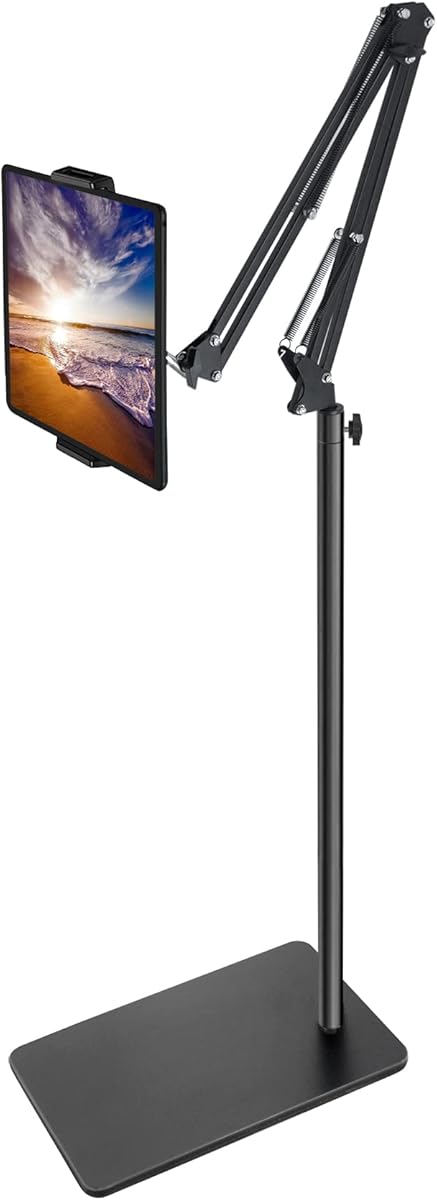
The SAMHOUSING Adjustable Floor Stand has a 4.4 rating and offers a balanced combination of sturdy construction, simple adjustment, and space-saving design. Its carbon-steel frame, reinforced base, and double-support structure are intended to reduce flexing while a device is used for live streaming, video calls, gaming, or music practice.
We may earn a commission when you buy through this link, at no additional cost to you.
The height adjusts from 27.5 to 53 inches, and the bracket rotates through 360 degrees to accommodate portrait, landscape, and angled views. The holder fits screens from 4.7 to 13 inches and can accommodate cases up to 4.3 to 9.8 inches wide and 0.63 inch thick, depending on the device configuration. No tools are required for installation or disassembly.
Unlike a conventional tripod, this stand has a flat base that can hold small items or slide partly beneath furniture. That makes it useful in compact rooms, although the manufacturer specifically advises keeping the arm and base in the same direction and warns against an unbalanced setup. Its maximum height is also considerably lower than the XXZU model, so it is less suitable when the camera must be positioned substantially above the user.
Choose this model for a straightforward metal floor stand that can be assembled quickly and repositioned as needed. It works particularly well for seated streaming, bedside viewing, online lessons, and live calls where the tablet needs to remain visible but does not require extreme overhead reach. Its main appeal is the combination of steel construction, a useful flat base, and tool-free handling.
The flat base gives this stand a different advantage from a three-legged tripod. It can support small items and may fit partially under a bed, helping creators reclaim space in compact rooms.
The 360-degree bracket makes framing changes straightforward without a motorized head. Users can switch between landscape and portrait views and fine-tune the angle before beginning a broadcast.
We may earn a commission when you buy through this link, at no additional cost to you.
The viozon 3-in-1 Selfie Desktop Live Stand has a 4.2 rating and is the most complete lighting-focused option in the collection. It combines a device holder, an overhead folding arm, and an eight-inch LED ring light in one desktop structure, reducing the need to coordinate separate supports for a camera, tablet, or phone.
We may earn a commission when you buy through this link, at no additional cost to you.
Three adapters can be rearranged to place the devices and light where needed. The holder swivels 360 degrees, while the arm adjusts from zero to 35 inches and extends up to 14.6 inches. The ring light uses USB power and offers adjustable brightness plus three color-temperature settings: 3200K, 6500K, and a natural middle option. Its aluminum shaft, round iron base, and updated hinge are designed for stable desktop use.
The main limitation is that this is a desktop creation station rather than a full-room floor stand. Its reach is well suited to a desk, bedside table, or compact filming corner, but it cannot provide the overhead distance of a tall tripod. The lighting also requires a dependable USB power source. For creators who already have excellent room lighting and need maximum reach, a dedicated floor stand may be more appropriate.
This model is a compelling premium choice for new livestreamers, online teachers, remote workers, and short-form content creators who want better facial illumination and a more polished camera position in one accessory. Its interchangeable layout and adjustable light make it particularly versatile for calls, demonstrations, recording, and streaming.
A ring light placed around or beside the device can reduce harsh shadows and create a more even presentation. The swiveling holder makes it possible to change the camera relationship without rebuilding the entire setup.
The three interchangeable adapters let users vary the positions of the light, tablet, and phone. This is valuable for switching among a front-facing livestream, overhead demonstration, and call involving a second screen.
We may earn a commission when you buy through this link, at no additional cost to you.
The 65-Inch Remote Tablet Tripod has a 4.4 rating and is especially useful to creators who broadcast or record without another person nearby. Its included Bluetooth remote can initiate photo capture or video recording from a distance, while the rotating mount and broad height range simplify common framing changes.
We may earn a commission when you buy through this link, at no additional cost to you.
The stand moves through four height settings from 16.7 to 65 inches, allowing it to serve users who are lying in bed, seated, standing, or exercising. It supports devices from 4.5 to 12.9 inches and is listed as compatible with numerous iPad, iPhone, Galaxy Tab, Fire, Kindle, and Nintendo Switch models. The aluminum construction keeps the stand relatively light while maintaining a collapsible form.
A folded size of 17.1 by 4.7 by 3.1 inches makes this easier to move than a large fixed-base model. However, the remote is most valuable when the connected device supports the relevant Bluetooth control functions; compatibility can vary by operating system and app. The tripod also needs enough floor area to open safely, and a device extended high above the base should be positioned carefully.
This is a good choice for solo streamers, online instructors, fitness creators, and families using the stand for video calls or entertainment. The remote adds genuine convenience when the user cannot reach the tablet after starting a recording. For those who do not need remote operation, it remains a capable lightweight tripod for everyday content creation.
The Bluetooth remote reduces the need to return to the device after framing begins. That convenience is particularly useful for demonstrations, exercise recordings, and unattended virtual classes.
Separate locking positions make height changes less granular than a continuously adjustable arm, but they cover a wide range of postures. The lowest setting also supports comfortable bedside viewing.
We may earn a commission when you buy through this link, at no additional cost to you.
The elitehood Adjustable Tablet Floor Stand has a 4.5 rating and emphasizes stability, reach, and refined positioning. Its 14-pound circular base, reinforced aluminum arm, and steel-reinforced joints are designed to resist tipping and wobbling when a larger tablet is extended or the screen is touched frequently.
We may earn a commission when you buy through this link, at no additional cost to you.
The 24-inch arm can reach toward the center of a bed or over a sofa, making the stand useful for shared viewing, browsing, gaming, video calls, and TikTok-style live broadcasts. Height adjustment spans 22 to 49 inches, while the three-axis hinge offers 135-degree tilt and 360-degree rotation for switching between landscape and portrait orientation. The clamp supports widths from 4.6 to 9.7 inches and is described as case-friendly.
The trade-off is substantial physical bulk. The weighted base and long arm make this model less convenient to move between locations than a folding aluminum tripod. The prescribed arm-and-base positioning and the need to avoid overextending a heavy tablet also require care. Those limitations are understandable for a stand designed primarily for stable furniture-side placement.
Choose the elitehood model for creators who regularly stream from a sofa or bed and want the screen to hover comfortably over the user. It is also appropriate for a permanent studio corner where a stable overhead or side view is more important than portability. Its adjustment system makes fine framing easier than a basic fixed-angle mount.
The extended swing arm positions a device over a bed or seating area without requiring the user to prop it on a cushion. This supports comfortable viewing and creates a practical angle for overhead demonstrations.
A heavy base, reinforced arm, and steel joints work together to limit movement. The result is especially relevant for livestreams, where vibration or accidental screen pressure can undermine framing.
We may earn a commission when you buy through this link, at no additional cost to you.
The Five-Pound Metal Base Floor Stand earns a 4.5 rating and targets creators who want a dependable overhead or bedside camera position. Its reinforced base and carbon-steel construction create a stable platform, while the height range of 27.5 to 55 inches and 360-degree bracket allow the tablet to be aimed from seated to overhead perspectives.
We may earn a commission when you buy through this link, at no additional cost to you.
The holder accepts phones and tablets from 4.7 to 11 inches that weigh less than 1.5 pounds. That includes many common streaming devices, although the manufacturer recommends adding weight to the base when using a heavier tablet or a device with a substantial case. The spring arrangement can also be repositioned to improve stability for heavier setups.
Assembly requires no tools, and the stand can be disassembled for storage or transport. As with other offset floor stands, the arm and base should remain aligned to avoid an unbalanced configuration. The five-pound base is substantial enough to feel planted, yet it does not offer the exceptional reach of the 72-inch tripod or the long furniture-reaching arm of the elitehood model.
This stand is best for a creator working from a bed, sofa, or nearby floor space who needs the camera to hover rather than remain on a desk. It also works for tutorials, gaming, live calls, music practice, and overhead videos. Buyers should first confirm that their device falls within the stated size and weight limits.
The height and rotating bracket place a device above the user, making this suitable for livestream demonstrations or casual viewing while reclining. The broad adjustment range also supports seated use in the same setup.
The ability to swap spring positions offers a practical way to improve support for heavier devices. Users should follow the guidance for adding base weight when a tablet and case exceed the stand's preferred load.
We may earn a commission when you buy through this link, at no additional cost to you.
The Tablet Stand for Desk with Dual Device Support has a 3.8 rating, making it the lowest-rated selection in this roundup, but it offers a distinctive dual-mode design. In phone mode, two independent movable clamps can hold a separate phone each, while in tablet mode those clamps slide into storage and a wider spring clamp holds one screen.
We may earn a commission when you buy through this link, at no additional cost to you.
The stand adjusts from 9.84 to 20 inches and supports 180-degree flipping plus 360-degree rotation. Its heavy-duty carbon-steel rod and 15-centimeter weighted metal base are designed to prevent wobble on a desk. The main clamp accommodates devices from 5.31 to 10.62 inches wide and up to 0.75 inch thick, allowing many tablets and portable monitors to remain inside a protective case.
Its main limitation is that it is intended for desk-scale use rather than overhead or across-the-room framing. The two-phone configuration also means the stand cannot simultaneously hold a full-size tablet and a phone. Users should also consider its lower 3.8 customer rating when weighing the otherwise useful metal construction and adjustable clamp system.
This is a practical budget choice for creators who want to monitor comments on a phone while streaming from a tablet, manage two applications, or alternate between two camera angles. It also works as a portable monitor stand for a compact workspace. It is less suitable for a creator who needs a large floor footprint, extended reach, or integrated lighting.
The independent clamps let one device display the live view while another handles comments, notes, or a second stream. That arrangement can reduce the need to switch applications during a broadcast.
The wide spring clamp expands from 5.31 to 10.62 inches and accommodates substantial cases. Switching the stand from the dual-phone arrangement to one tablet does not require changing the base.
We may earn a commission when you buy through this link, at no additional cost to you.
The BluuSuuk Double-Weight Floor Stand holds the highest customer rating in this selection at 4.6. Its 6.6-pound base is a major improvement over a light tripod base, offering more resistance to sliding and tipping while the extended arm supports a tablet or phone above a bed, sofa, or exercise area.
We may earn a commission when you buy through this link, at no additional cost to you.
The adjustable arm reaches from 12 to 57 inches above the floor, and the ball-head wrist offers 360-degree angle adjustment. The stand is suitable for phones, tablets, and other devices under 1.5 pounds. Its stated uses include reading, gaming, photography, video calls, online lessons, TikTok livestreams, overhead recordings, treadmill training, and cooking or music activities.
The important qualification is the 1.5-pound device limit. Owners should check both the weight of the device and the weight of its case before extending the arm. The heavy base also makes the stand less convenient for frequent transport. Although the arm can fold or be repositioned, the base remains a substantial part of the setup.
This model is a strong fit for streamers who work from bed or need a high, overhead view without a ceiling mount. It also suits home fitness demonstrations and live tutorials where a stable device position matters. Among the floor stands here, it offers an appealing balance of height, sturdy weighting, and 360-degree positioning.
The broad base gives the long arm a stable foundation for elevated views. This is particularly helpful when a creator is reclining or demonstrating a task below the camera.
Beyond livestreaming, the adjustable reach supports lessons, calls, gaming, reading, and exercise videos. That versatility can justify one stand for multiple household and creator needs.
We may earn a commission when you buy through this link, at no additional cost to you.
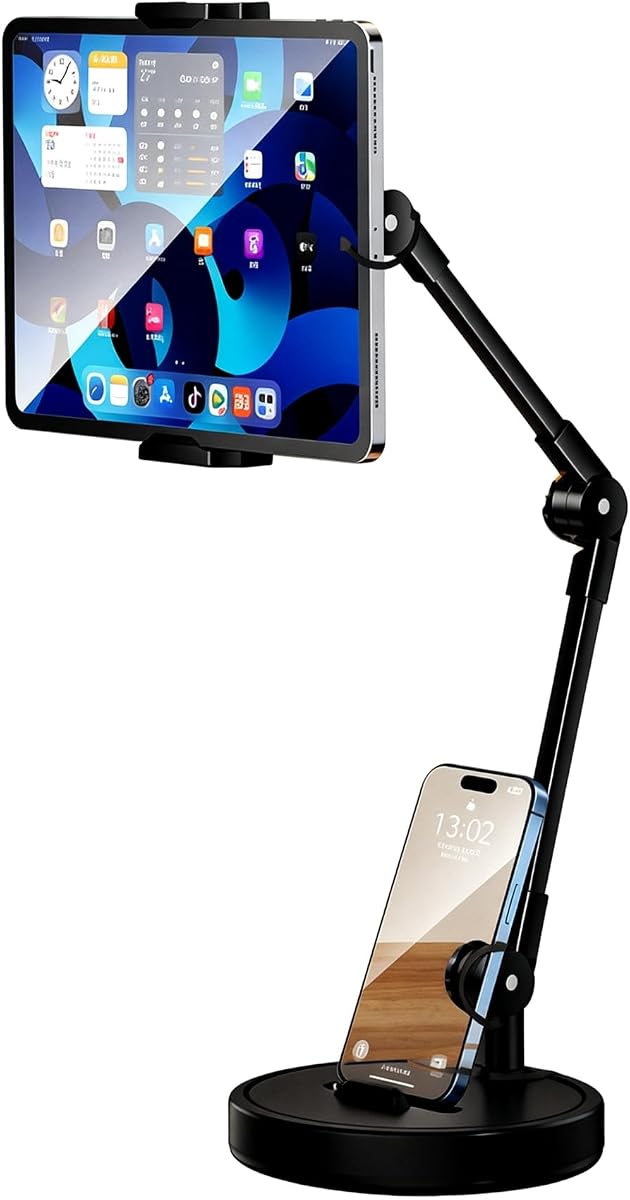
The Rotatable Dual Phone Stand has a 4.0 rating and uses a clever two-device arrangement. The upper clamp supports a tablet from 4 to 15 inches, while a separate slot in the base displays a smartphone. A creator can therefore keep the main broadcast on the larger screen while monitoring messages or comments on the phone.
We may earn a commission when you buy through this link, at no additional cost to you.
A 762-gram weighted round base, EVA non-slip pad, and reinforced carbon-steel cantilever form the support system. The multi-joint arm allows 360-degree horizontal rotation and further angle and height adjustment, making the stand suitable for aerial-style views, overhead shooting, video calls, gaming, and online learning. The upper clamp accommodates common iPad, Galaxy Tab, and Surface models.
The base phone slot is less flexible than an adjustable clamp, and the overall design remains a desktop accessory rather than a long floor stand. The listed 4.0 rating also suggests mixed experiences, so buyers should pay close attention to the product dimensions and their own desk space. It offers less direct device adjustment than a two-clamp desktop model.
This stand makes sense for creators who want a stable second screen without adding another mount. It is especially useful during a livestream when a separate phone displays live comments, notes, or a monitoring application. The rotating arm also allows the tablet to move from a conventional call position into a more overhead demonstration angle.
Keeping a phone visible beneath the tablet can make audience interaction easier to monitor. Creators can answer questions without switching to a separate computer or losing sight of the broadcast screen.
The multi-joint carbon-steel arm supports both horizontal rotation and vertical repositioning. That makes it possible to tune the tablet for a call, presentation, or overhead activity without replacing the entire stand.
We may earn a commission when you buy through this link, at no additional cost to you.
The PLDHPRO Microphone Stand Mount has a 4.4 rating and serves a specialized audience: musicians, presenters, and performers who already use a microphone or music stand. It clips onto poles between 0.78 and 1.6 inches wide, allowing a tablet to become a lyric, chord, backing-track, or performance-control display.
We may earn a commission when you buy through this link, at no additional cost to you.
The holder fits devices from 5.5 to 14.6 inches in portrait or landscape orientation, with smaller devices limited to vertical use. A 3.74-inch arm and three 360-degree adjustable joints provide enough movement to position the screen for reading while playing. It also attaches to boom stands, cymbal stands, music stands, and other compatible poles.
The lightweight ABS construction makes the mount convenient to carry between rehearsals, gigs, karaoke sessions, speeches, and online meetings. It can be assembled or separated without tools. However, it does not provide its own weighted base, and the stability of the entire arrangement depends on the microphone stand, pole, clamp, and device weight. It is therefore less appropriate as a freestanding livestream solution.
Choose this model when streaming is part of a live performance or when the screen must sit close to a microphone or music stand. It is particularly useful for musicians who need digital sheet music or backing tracks at a comfortable angle. For conventional home broadcasting, one of the full-size floor or desktop stands will offer a more independent and stable platform.
A creator who already owns a microphone or music stand does not need a separate floor tripod for performance notes. The clamp converts compatible poles into a tablet support with minimal added hardware.
Three swivel joints let the performer place lyrics, chords, or controls within easy sightline. The compact design also travels more easily than a large weighted stand, making it practical for rehearsals and small stages.
We may earn a commission when you buy through this link, at no additional cost to you.
The most useful tablet stand is the one that matches your filming space, device size, preferred camera angle, and need for portability. Consider reach, stability, adjustment, lighting, and mounting style together rather than focusing on a single height number.
Floor tripods and weighted floor stands work best when the device must hover above a bed, sofa, desk, or demonstration area. Their height can be raised without adding a separate pole, although they occupy more floor space. Desktop stands suit compact creator stations, video calls, and two-screen workflows because they are easy to reposition around a workstation. A microphone-stand mount is the most specialized option and makes the most sense for performers who already own compatible stage equipment.
Every stand has a stated screen-size range, but that number does not always reveal whether a protective case will fit. Review the clamp width, maximum device thickness, supported weight, and any case-specific guidance before buying. Larger tablets may approach the upper limit of a smaller holder, and a thick case can prevent the jaws from closing. Some products also impose a weight ceiling that matters more than nominal screen size for stability.
Minimum height determines how low a device can sit, while maximum height or arm reach determines how far it can move over furniture. A stand intended for overhead demonstrations needs substantially more reach than one used for eye-level calls. For a floor setup, look for a wide enough leg spread or weighted base; for a desktop setup, verify that the arm can actually reach above the monitor or table surface without leaning awkwardly.
A live stream is vulnerable to visible vibration, accidental touches, and devices slowly shifting out of frame. A weighted base, steel construction, reinforced arm, and non-slip feet are often more valuable than a remote or extra adapter. Stability becomes especially important when a large tablet is extended overhead or when a creator taps the screen while speaking. Review the stated materials and base weight, and position the arm in the intended direction before raising the device.
Creators often move between portrait, landscape, and diagonal views. A 360-degree rotating joint or ball head makes those changes faster and keeps the device centered while the angle changes. Tilt range matters when filming from above, particularly for demonstrations, recipes, crafts, and fitness content. Desktop models may offer 180-degree flipping and 360-degree rotation, while floor stands commonly use a ball head or multi-joint arm for similar freedom.
An integrated ring light can make a compact streaming setup more consistent by providing even illumination around the presenter's face. The viozon model includes an eight-inch USB light with adjustable brightness and color temperature, allowing the user to move between warm, natural, and cool output. If the stream already has a separate light, spending that effort on reach and stability may produce a better result. If lighting is not available, an integrated model can reduce setup complexity.
Livestreamers may want a tablet for the broadcast and a phone for comments, notes, or a second application. A dual-device stand can reduce the need for separate supports and keep both screens visible. Options range from two independent phone clamps to a tablet above a phone in a base slot. Check whether the mount changes between a single tablet and multiple smaller devices, because one configuration may not support both simultaneously.
A stand that works well but is awkward to move may be used only once. Folding aluminum tripods are convenient for mobile creators, while heavy circular bases prioritize stability over portability. Desktop models are generally easiest to store but may need a larger case. Pole mounts are highly portable because they use equipment the performer already carries. Compare folded size, included storage, assembly requirements, and the weight you would need to lift after a long session.
Begin by placing the stand on a level surface and confirming that the arm and base are aligned as directed by the manufacturer. Assemble the legs or base fully, tighten the locking points, and set the device clamp before raising the arm. For a floor model, position the base away from walkways and doorways; for a desktop model, choose a surface large enough for the weighted base and check that the arm will not strike nearby objects.
Attach the tablet or phone with the protective case installed, then adjust the holder until the device is centered in the frame. Set the height and viewing angle before joining the livestream, checking the camera preview at both the top and bottom of the frame. If using a two-device setup, confirm that the second screen remains readable and that cables have enough slack to move without pulling the device.
For daily care, wipe the metal arm, base, and silicone pads with a soft dry or lightly damp cloth, and avoid abrasive cleaners. Check locking screws and spring tension periodically, particularly on adjustable models. Do not exceed the stated device-weight limit, and remove the device before folding or disassembling the stand. When a pole-mounted model is used outdoors, verify that the pole, clamp, and surface can withstand the conditions before the session.
The best type depends on the shot and the room. A weighted floor stand is usually better for overhead, bedside, and across-the-room framing, while a desktop stand is more convenient for a compact workstation or two-screen setup. Pole-mounted holders are most useful for musicians and performers who already have compatible equipment. Choose based on camera angle, stability, and available space rather than screen size alone.
A stable stand can improve the result by preventing accidental movement and keeping the device consistently framed. It also lets a creator position the camera more accurately and use both hands for demonstrations. Image quality itself still depends on the tablet camera, lighting, network connection, and software, so the stand solves framing and stability rather than every part of the broadcast.
Not necessarily. Several stands in this guide are designed to accommodate cases, but every clamp has a maximum width and thickness. Check the compatibility specifications and compare them with the dimensions of the device and case. If the jaws do not close securely, remove the case or choose a wider holder rather than forcing the clamp.
A heavier base is generally helpful when a long arm supports a large device at an elevated angle. Weight alone does not guarantee good performance, however; construction quality, arm alignment, joint tightness, and floor conditions also matter. Choose a model that is stable for your device and placement rather than selecting the heaviest option regardless of its design.
A remote is useful for solo creators who want to start recording or take a photo without walking back to the device. It is less important when another person controls the stream or when the software provides other control methods. Confirm that the remote is compatible with the device and application before relying on it during a live session.
Yes, if the stand's reach, base stability, and device weight are appropriate. Extend the arm only to the needed distance, keep the base aligned with the arm, and avoid placing the stand where it could be tripped. Check for cables that might tighten as the arm moves, and confirm that the device remains securely clamped in the intended orientation.
Choose a floor stand when the camera must be above eye level, hover over furniture, or remain at a particular point in a larger room. Choose a desktop stand when filming at a desk, using a compact setup, or keeping a second phone visible for comments. Floor stands provide reach and overhead framing, while desktop models are easier to move and usually occupy less space.
Place the base on a level surface, fully engage its locks, and keep the arm in the direction specified by the manufacturer. Avoid overextending a heavy device, tighten the holder securely, and use the non-slip pad when one is included. Before going live, check the frame for movement and make sure the stand will not be touched or bumped during the session.
The XXZU 72in Tablet Floor Stand Tripod is the most versatile overall choice because it combines exceptional height adjustment with a rotating head and three-level stability configuration. The viozon 3-in-1 Desktop Stand is ideal when integrated lighting matters, while the Dual-Device Desktop Tablet Stand offers a budget-friendly way to monitor a second phone during a broadcast.
Prioritize the features your production actually requires. Overhead demonstrations call for extended reach and a weighted base, compact livestreams may need only a desktop model, performers can benefit from a pole mount, and creators handling audience comments should consider two-device support. Always verify the device dimensions, case clearance, weight limit, and mounting position before purchasing.
Ratings and product configurations can evolve, and availability may change over time. Read the current listing details, compare the clamp with the device you already own, and confirm the intended room setup before ordering. With those checks complete, the right stand can provide steadier framing, more comfortable angles, and a smoother live-streaming workflow.