
Sony Camcorder USB Transfer Kit
3.8Editor score
Direct USB tape transfer
AV and S-Video cables
Windows and Mac support
A miniDV cassette player for PC can unlock decades of camcorder footage by connecting tapes to a computer, external storage, or television. The right device depends on whether you want direct computer transfer, standalone recording, basic playback, or supplies for preserving and maintaining an existing tape collection.
We compared the ten products according to their stated playback functions, computer connectivity, output formats, included accessories, recording capabilities, and suitability for digitizing miniDV tapes. The list also includes blank tapes and a cleaning cassette because dependable media and routine maintenance are essential to successful transfers.
Each review explains what the product can actually do, where it fits into a digitization workflow, and any important limitations. Ratings and availability can change over time, so readers should verify current product details and pricing before purchasing.
3.8Editor score

4.5Editor score

4.6Editor score
As an Amazon Associate we earn from qualifying purchases.
The table below compares every listed product by function, connectivity, media support, and intended role. Because the results include full camcorders, standalone converters, playback equipment, blank tapes, and maintenance accessories, it shows how each item contributes to a complete miniDV digitization setup.
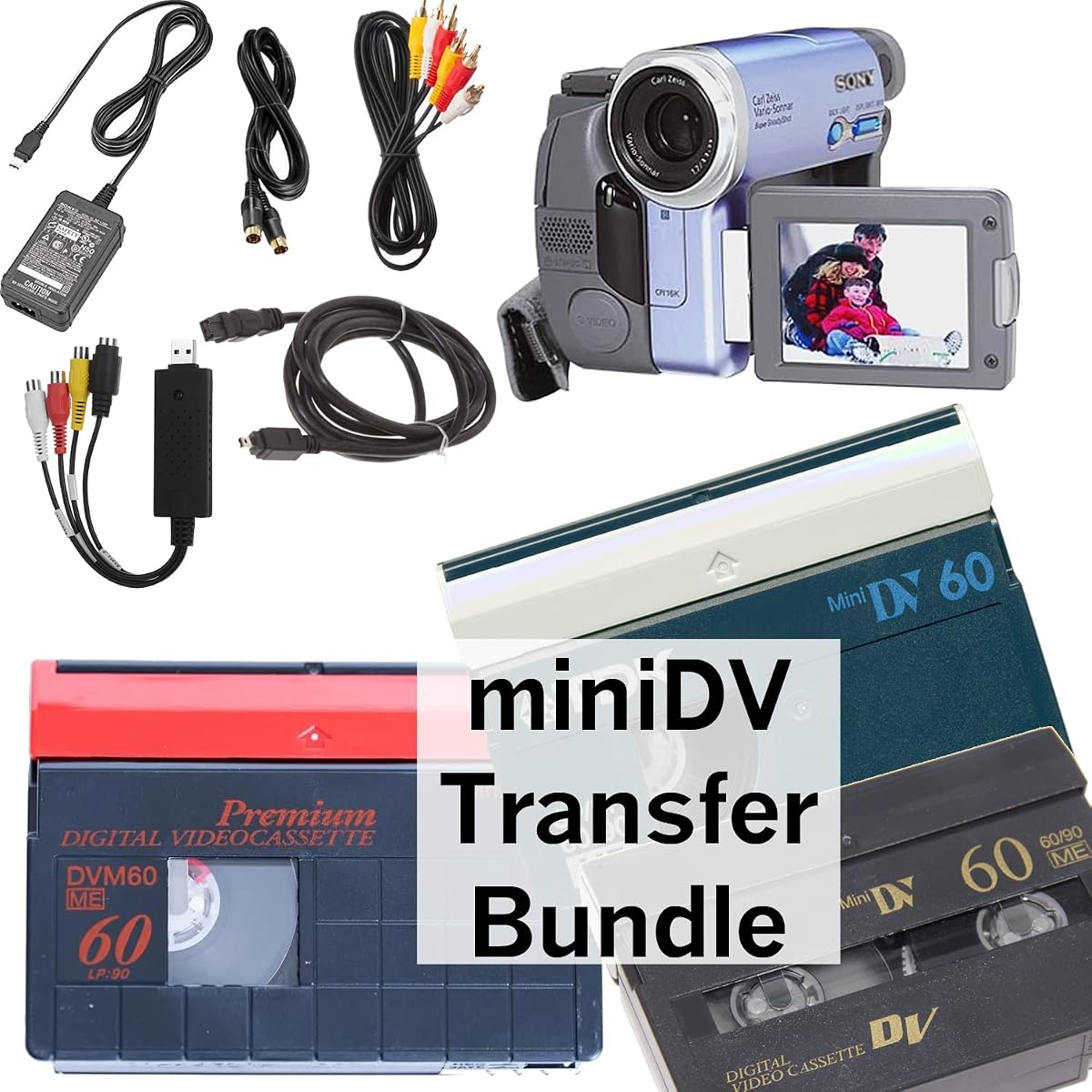


The Sony Camcorder for miniDV Tape Transfer to Computer USB and DVD is a focused solution for people who want to move old miniDV recordings onto a computer. It earns a 3.8 rating, but its practical package stands out because it combines a camcorder capable of playing miniDV tapes with a USB capture device and the cables needed to begin a transfer workflow.
We may earn a commission when you buy through this link, at no additional cost to you.
Its strongest feature is the USB capture adapter, which can transfer tapes into computer files or support burning transferred video to DVD. The package also includes a power supply, AV cables, and S-Video cables for transfers or television playback. Compatibility is listed for both Windows and Mac systems through USB, FireWire, and Thunderbolt connections, giving users several ways to connect a computer.
There are clear limits. The product cannot record video, and the listing specifically states that HDV is not supported. Because it is designed to read miniDV rather than act as a modern all-purpose media hub, buyers should confirm that their existing tapes are genuinely miniDV and that their computer has a compatible input method. The included capture solution will also determine how much editing software and post-transfer workflow they need.
This is a sensible choice for someone seeking a relatively straightforward camcorder-based transfer kit without purchasing a separate playback deck and a collection of connection cables. It suits users who already have a suitable computer and want a one-product starting point for digitizing a home tape archive. Among the listed options, it is the most directly aligned with transferring miniDV footage to a PC.
Instead of requiring users to assemble a player, capture interface, and cable set separately, this bundle places the essential conversion components together. The USB capture device provides the bridge between the camcorder's tape output and a computer file workflow.
AV and S-Video cables make the camcorder useful beyond direct computer capture. They can support a television connection for checking playback, while the listed FireWire, Thunderbolt, and USB options provide flexibility across compatible computers.
We may earn a commission when you buy through this link, at no additional cost to you.
The Portta VHS to Digital Converter is the most versatile standalone digitization device in this guide. Its 4.5 rating reflects a well-rounded feature set centered on converting analog video into digital files without requiring a PC, software, or drivers. It can accept output from a miniDV player, although the player itself is not included.
We may earn a commission when you buy through this link, at no additional cost to you.
Recording is offered at up to 1080P 30Hz, with MP4 for video and MP3 for audio. The box accepts CVBS right and left audio/video, S-Video, and AUX input, allowing it to work with a compatible camcorder or other legacy source. A three-inch preview LCD and built-in speaker help users monitor recordings, while USB and TF card options provide flexible storage destinations.
The essential distinction is that this is a converter, recorder, and capture box rather than a tape player. It cannot independently play VHS, DVDs, or miniDV tapes. A compatible source device must be connected, and the correct video and audio levels must be enabled in the menu. Larger USB storage devices may also require the included power supply to ensure stable operation.
This converter is ideal for a user who wants a computer-free workflow or wants the option to capture tapes without tying every session to a desktop. It is also attractive for households with mixed analog media because the same box supports VHS, Hi8, DVR, DVD, camcorder, and gaming-console sources. For readers specifically searching for a miniDV-to-PC workflow, it can serve as a flexible bridge, provided they already own a compatible player.
Recording directly to MP4 reduces dependence on a live computer, which can simplify long capture sessions and make the converter useful as a compact archiving station. USB and TF card support provide more than one way to manage and move the resulting files.
CVBS, S-Video, and AUX connections make the device practical beyond one camcorder generation. The menu-controlled input settings also allow a source's audio and video to be monitored through the preview display.
We may earn a commission when you buy through this link, at no additional cost to you.
The Tech Collector miniDV Player Transfer Bundle is designed for people who want a package that can begin with playback and move directly into a computer transfer. Its 2.9 rating is the lowest among these products, so buyers should pay particular attention to compatibility details and the condition of any previously used hardware.
We may earn a commission when you buy through this link, at no additional cost to you.
The bundle includes a miniDV camcorder, a USB capture device, a battery, AV cables, and a blank miniDV tape. This combination covers several basic needs: reading existing tapes, connecting them to a computer, and using or recording on a cassette. The added blank tape is unusual for a transfer kit and may be useful for testing the device or handling a short new recording.
The product data gives fewer technical details than the Sony transfer kit. It does not state supported operating systems, specific video or audio formats, or whether the included camcorder has additional playback features. It also does not describe a screen or standalone recording capability. The listed guarantee covers a working unit and free returns, which provides some reassurance, but the low rating signals that overall customer satisfaction may be less consistent.
This bundle is most appropriate for a buyer who values convenience and wants the main pieces of a miniDV transfer setup in one package. It is less attractive when detailed specifications, broad computer compatibility, or a well-defined standalone workflow are priorities. Prospective buyers should confirm the interface requirements of their computer and review the current listing details before ordering.
The camcorder, capture device, battery, and AV cables cover the fundamental elements of a tape-to-computer setup. Adding a blank miniDV tape also gives the buyer a way to check recording or playback performance with familiar media.
The supplied information does not identify operating-system support or detail the capture file format. Checking the computer's available ports, the adapter's requirements, and the device's stated specifications is therefore especially important before purchase.
We may earn a commission when you buy through this link, at no additional cost to you.
The Sony GV-D1000 Portable MiniDV Video Walkman is a full-featured playback and recording deck rather than a minimal tape reader. Its 3.9 rating reflects a capable device with a four-inch LCD, multiple analog and digital connections, and support for viewing, editing, and recording both video and still images.
We may earn a commission when you buy through this link, at no additional cost to you.
Its connection panel is particularly useful for a digitization setup. The device offers S-Video and composite video input and output, a mini-jack audio output, an iLink DV input and output, a USB terminal, and a stereo headphone jack. Memory Stick storage can hold 640 x 480 still images for email, printing, or editing, while the built-in display makes it practical for checking tapes away from a computer.
The tradeoff is size and weight. At 5.88 by 2.62 by 5.38 inches and two pounds, it is larger and less portable than a minimalist camcorder-based player. The supplied information also does not describe dedicated computer capture software, supported file types, or a simple step-by-step transfer process. Buyers who want a predictable desktop workflow may need a capture device or converter in addition to this unit.
The GV-D1000 is best for someone who values a built-in screen, broad connectivity, and the ability to work with more than just computer transfer. It can serve as a versatile viewing and recording deck, while its iLink and USB connections may suit users with compatible equipment. For a dedicated miniDV-to-PC purchase, it is a premium-style option only when the additional playback and recording functions are genuinely useful.
The LCD allows tape footage to be checked directly on the device, making it easier to locate clips and confirm playback before transferring. This is helpful for collections where knowing the contents of each cassette can be part of the organizing process.
S-Video, composite, iLink, USB, audio, and headphone connections create several paths for moving between tapes, computers, televisions, and other devices. The breadth of the interface makes the Walkman useful beyond a single computer model.
We may earn a commission when you buy through this link, at no additional cost to you.
The VHS to Digital Converter with a four-inch screen is the highest-rated product in the guide at 4.6. It combines a larger preview display with standalone MP4 recording, making it particularly convenient for users who want to monitor and control capture sessions without working directly at a computer.
We may earn a commission when you buy through this link, at no additional cost to you.
The device can digitize video from a miniDV player, camcorder, VCR, VHS deck, DVD player, DVR, Hi8 source, or retro game console. It supports USB drives and TF cards up to 512G each, although neither storage medium is included. A built-in speaker and screen permit real-time monitoring, while HDMI output allows recordings to be shared on a television or monitor. Files can also be configured to split by length or size without an indicated effect on playback quality.
As with the other standalone converters, it cannot play tapes or discs by itself. A working VCR, camcorder, or other source player is required. The box also separates video and audio recording functions, supports S-Video and CVBS video, L and AUX audio, and includes screenshot and timed-recording options. Its compact ABS housing measures 6.5 by 2.83 by 1.04 inches.
This converter is a strong choice for a household that wants one archiving device for several obsolete media formats, including miniDV output from a compatible camcorder. Its four-inch screen makes the process more approachable than a headless capture box, while standalone recording keeps a computer optional. Buyers should still plan to own or purchase a suitable source player and reliable storage.
The screen, speaker, one-touch recording, and no-computer operation simplify capture for users who are less comfortable with desktop editing software. HDMI output adds a convenient way to review the selected footage on a larger display.
Support for USB drives and TF cards of up to 512G each gives archivists room to organize larger tape collections. Automatic file splitting helps manage long recordings without requiring the converter to remain tied to a single computer.
We may earn a commission when you buy through this link, at no additional cost to you.
The Sony DVM60PRR/3 60-Minute DVC Tape is not a player or transfer device, but it is an important part of a miniDV setup. With a 4.5 rating, it provides new recording media for a compatible camcorder and can also serve as a familiar test tape when checking a player, adapter, or converter.
We may earn a commission when you buy through this link, at no additional cost to you.
The cassette uses advanced metal-evaporated technology, which the listing associates with strong picture and sound quality. A diamond-like carbon protective layer is intended to improve durability and help minimize dropouts. These are meaningful attributes for a format whose tapes may already be aging, particularly when a user wants dependable results from a new recording or a controlled playback test.
It will not read an existing tape or transfer footage to a computer. Users therefore need compatible playback hardware, and they must check their camcorder or deck's tape format before recording. The package also contains only one cassette, making it less convenient for bulk archiving than the three-, six-, and ten-pack alternatives later in the guide.
The DVM60PRR/3 is best viewed as a precision supplement rather than the primary answer to a miniDV-to-PC search. It is a sensible choice for a new recording, a backup tape, or a maintenance-related test. For the main conversion task, pair it with one of the camcorder-based transfer kits or standalone converters featured above.
A known new cassette can help evaluate a camcorder, playback deck, or converter before an important archive transfer. It does not replace a professionally prepared test tape, but it offers a simple way to confirm basic recording and playback behavior.
The diamond-like carbon layer is designed to help protect the recording surface and reduce dropouts. This makes the tape a useful choice for preserving newly captured miniDV footage with compatible equipment.
We may earn a commission when you buy through this link, at no additional cost to you.
The Sony MiniDV Cleaning Cassette is a maintenance accessory that can support more dependable playback and recording. Its 4.0 rating reflects a simple purpose and straightforward operation: insert the cassette into a compatible miniDV camcorder and play it for about ten seconds.
We may earn a commission when you buy through this link, at no additional cost to you.
The dry cleaning system is designed to clean the camcorder's tape heads, helping maintain picture and sound performance. Because it can be used with any brand of miniDV camcorder, it is not limited to Sony equipment. It may be particularly relevant for owners of aging camcorders that have not been used recently or that produce noise, dropouts, or inconsistent image playback.
The product cannot transfer footage, play a personal tape collection for viewing, or archive files. It must be inserted into a compatible camcorder, and users should follow the instructions supplied with the cassette and camcorder. Because the cleaning cycle is short, the device is designed for occasional maintenance rather than repeated deep servicing.
This cleaning cassette is a useful companion to any miniDV player or transfer camcorder. It can help preserve the condition of the playback path before a major digitization project, especially when a deck has been idle. It is not a substitute for a player, but it is a sensible preventive accessory for anyone serious about maintaining an aging camcorder.
A brief dry-cleaning cycle can help keep the tape heads clear of debris that may interfere with playback. Routine cleaning can be especially helpful before transferring an archive that will take multiple sessions.
The dry cassette works with any brand of miniDV camcorder, which makes it easier to include in a general maintenance kit. Users should always confirm that the device accepts miniDV cleaning media before insertion.
We may earn a commission when you buy through this link, at no additional cost to you.
The Panasonic miniDV Videocassette 60-Minute 3-Pack is a compact collection of three recording tapes. Its 4.6 rating places it among the strongest products in the guide, and the three-cassette format offers a practical middle ground between buying one tape at a time and choosing a large archival pack.
We may earn a commission when you buy through this link, at no additional cost to you.
Each cassette provides 60 minutes of recording time. The media uses a diamond-like carbon-coated thin film for durability, while the formulation is designed to reduce tape friction and promote stable running. Those attributes make the tapes appropriate for new footage and for keeping a few separate recordings organized within a larger archive.
These are blank tapes rather than players, so they cannot retrieve existing miniDV recordings or move video to a computer. A compatible miniDV camcorder is required for recording, and users should check that their equipment supports the format before buying. The supplied data also does not list particular transfer features or computer compatibility because no capture hardware is included.
The Panasonic three-pack is a good supporting choice for a miniDV-to-PC project when the user also owns or is buying a transfer device. Three cassettes provide enough media for several recordings, test sessions, or backups without creating the clutter of a much larger pack. It is especially appealing for users who want several new tapes but do not need a high-volume recording supply.
Three cassettes offer flexibility for recording separate events or maintaining backups while remaining easy to store. The 60-minute duration matches the standard miniDV format used by many compatible camcorders.
The diamond-like carbon coating supports durability, and the reduced-friction design is intended to promote stable tape movement. These features make the media more suitable for ongoing recording than a casual spare tape.
We may earn a commission when you buy through this link, at no additional cost to you.
The Sony DVM60PRR/6C 6-Pack is designed for users who need a moderate supply of new miniDV media. It carries a 4.6 rating and includes six 60-minute Mini DV cassettes, making it suitable for multiple events, short projects, or maintaining separate copies of newly recorded material.
We may earn a commission when you buy through this link, at no additional cost to you.
The tapes are identified as premium DVC media and are designed for high-definition digital recording and playback within the miniDV ecosystem. Their hang-tab packaging can make them convenient to store on a hook, in a labeled group, or within a larger media organizer. The six-tape count provides useful flexibility without reaching the bulk offered by the ten-pack in this comparison.
As with all blank media, these cassettes do not read old recordings, transfer footage, or supply a computer connection. A compatible camcorder is necessary for recording, while a playback device or converter is needed for archiving existing material. The product data provides no additional specifications beyond the miniDV format, pack count, recording purpose, and tape length.
The DVM60PRR/6C is most useful for owners of a functioning miniDV camcorder who want several new tapes on hand. It can also complement a transfer setup by supplying media for test recordings and fresh captures. Buyers seeking a direct miniDV-to-PC solution should choose one of the camcorder transfer kits or standalone converters rather than mistake blank tape for a player.
Six separate cassettes make it easier to assign each event or project to its own tape. That organization can simplify later editing and reduce the risk of accidentally overwriting a recording.
Hang-tab packaging is designed for convenient storage and retrieval. It is a minor convenience, but it can make a collection of blank cassettes easier to keep visible and organized.
We may earn a commission when you buy through this link, at no additional cost to you.
The Sony DVC60PRL Mini DV Tape 60-Minute Premium Data Cartridge 10-Pack is the largest blank-media package in the guide. Its 4.6 rating and ten-cassette count make it a practical choice for frequent camcorder use, organized event recording, or owners who want a substantial backup supply of miniDV media.
We may earn a commission when you buy through this link, at no additional cost to you.
Each tape is a 60-minute Sony DVC60PRL cartridge, and the model information is clearly identified in the product data. The media is intended for Mini DV use, so it requires compatible recording equipment. The ten-pack format provides more flexibility than the smaller bundles for separate projects, multiple family events, or routine archival copies of new footage.
The package does not read or transfer existing tapes. It cannot substitute for a miniDV camcorder, USB capture device, or standalone converter. Users should also account for the need to label and store the tapes properly, since a large supply can become difficult to navigate without a clear filing system. The listing does not specify coating, friction, or dropout-prevention features beyond identifying the media as premium DVC.
This is the best blank-tape choice for someone already equipped for miniDV recording and preparing to create a substantial amount of new footage. It complements the transfer devices in this guide but does not solve the central playback and digitization task by itself. For someone starting only with old tapes and a computer, a playback kit or converter should take priority over bulk media.
Ten cassettes provide enough media for numerous separate recordings without requiring frequent replenishment. This is useful for regular camcorder use, family events, or planned backup copies of new footage.
The DVC60PRL model and 60-minute Mini DV format are clearly identified, making it easier to match the tapes with compatible equipment. Buyers should still confirm their camcorder's format support before recording.
We may earn a commission when you buy through this link, at no additional cost to you.
Choosing a miniDV-to-PC solution involves matching the device to your tape collection, computer setup, and preferred archiving workflow. The most important distinctions are whether the product plays tapes directly, captures through a computer, records independently, or supplies media and maintenance accessories.
A direct transfer kit includes a miniDV-capable camcorder and a USB capture device, allowing tape footage to move into computer files. A standalone converter instead accepts the analog output of a separate player and records it to USB or TF storage without a computer. This is a fundamental workflow choice: direct transfer is convenient when a compatible camcorder is part of the bundle, while standalone recording is more flexible across multiple source formats.
Choose direct playback and transfer for the simplest dedicated miniDV workflow. Choose a standalone converter if you already own a player or want to digitize VHS, Hi8, DVD, and other sources through one device.
Modern computers may not include the ports once associated with legacy camcorders, so the included USB, FireWire, or iLink connection should be considered carefully. The Sony transfer camcorder lists USB, FireWire, and Thunderbolt compatibility for Windows and Mac, while the Tech Collector bundle provides a USB adapter but gives fewer operating-system details. Confirm which connector your computer actually has, whether an adapter is required, and what software or drivers the capture device expects.
In short, do not assume every miniDV camcorder is automatically plug-and-play with a current computer. Verify the capture method, port availability, and editing requirements before buying.
A camcorder or Walkman reads a tape and sends its imagery through analog or digital outputs. A converter records that output and creates a new digital file. Blank tapes and cleaning cassettes have entirely different roles and cannot read a collection. Understanding this chain prevents the common mistake of buying media or a capture box and assuming it includes a tape-playing mechanism.
In short, identify the missing link in your setup. Add a player for tape access, a capture device for computer transfer, or a standalone recorder for computer-free archiving.
The Portta converter records at up to 1080P 30Hz and stores video as MP4, while the four-inch-screen converter also emphasizes MP4 output and can be set to 1080P or auto-detect the television standard. These are useful indicators for modern playback, but they should not be confused with the native miniDV signal. A converter packages the source video into a convenient digital file rather than necessarily increasing the detail present on an older tape.
In short, prioritize MP4 output and a stated resolution when planning digital access. For maximum source fidelity, use quality connections and retain an unmodified archival copy when possible.
Direct USB capture sends files into a computer workflow, whereas standalone converters may save to USB drives or TF cards. The Portta model has no stated capacity limitation but recommends its own power supply for high-capacity USB storage. The four-inch-screen converter supports USB drives and TF cards up to 512G each. Storage media is generally not included, so budget for enough capacity to hold the entire collection and consider whether removable media will make organization easier.
In short, check both supported capacity and power requirements. Choose more than one storage destination when it helps separate projects, backups, or partially completed transfers.
A complete cable set can prevent the disappointment of discovering that a camcorder cannot connect to a computer, television, or converter. The Sony transfer kit includes a power supply, AV cables, and S-Video cables. The Tech Collector bundle includes a battery and AV cables, while both standalone converters provide power adapters, AV or AUX leads, and remote controls. The exact connector arrangement still matters because a cable's presence does not guarantee that it suits a particular computer.
In short, inventory your existing cables and compare their connectors with the source player's outputs. Prioritize packages that include the correct signal path rather than simply the greatest number of accessories.
A built-in screen makes it easier to locate content, check a tape's condition, and confirm that a recording is being captured. The Sony GV-D1000 has a four-inch LCD, the Portta converter has a three-inch preview screen, and the other standalone converter also has a four-inch display. If comfortable tape navigation is central to the task, a larger screen and clear speaker may be worth more than a compact footprint.
In short, choose a screen size based on viewing habits. Larger displays aid monitoring, while compact units are easier to store and may be sufficient for straightforward file transfers.
Older miniDV tapes can be affected by debris, dried tape, or repeated playback, so maintenance deserves consideration. The Sony dry cleaning cassette is designed to clean camcorder heads through a short playback cycle. New blank tapes from Sony and Panasonic support future recording and can also serve as familiar test media. These accessories do not replace a player, but they can improve the reliability of the equipment used in the transfer workflow.
In short, build a complete archival setup rather than focusing only on the capture device. Include cleaning media when the camcorder has been idle and blank tape when you plan to record new footage.
Before connecting a camcorder or converter, inspect each tape for cracks, loose tape, unusual warping, or a stuck reel. Confirm that the device accepts miniDV, and clean the camcorder heads with a compatible dry cleaning cassette when appropriate. Make a short test recording or playback to verify the direction of audio and video before transferring an important collection.
For direct computer transfer, connect the camcorder's output to the included USB capture adapter, attach the adapter to the computer, and begin a short preview capture. Confirm that the software sees the signal, then create a properly named folder for the source tape. If using a standalone converter, select the correct input, enable the relevant video and audio levels, connect storage, and verify a brief recording before starting a full tape.
Capture footage in manageable sections, keep each source tape organized, and avoid overwriting files before confirming that the MP4 or computer output opens and plays correctly. Store tapes upright in their cases, protect them from heat, humidity, and magnetic fields, and label both the physical cassette and its digital folder with the same reference. Periodically back up completed digital files to another storage device.
A camcorder-based transfer kit is usually the most direct option because it reads the tape and sends video to a USB capture device connected to the computer. The Sony Camcorder for miniDV Tape Transfer is designed for this workflow and includes the capture hardware and relevant cables. Confirm your computer's ports and required software before ordering, then test a short section before beginning a full transfer.
Yes. The Portta and four-inch-screen converters are recording and capture boxes, not independent tape players. They require a working source such as a compatible miniDV camcorder, VCR, or other listed video device. The converter captures that source's output and saves the resulting file, but it cannot retrieve a tape without the external player.
It can, but the connection method matters. Some camcorders use USB, FireWire, iLink, or other legacy interfaces, and modern computers may require an appropriate adapter or compatible capture device. The Sony transfer kit lists Windows and Mac support through USB, FireWire, and Thunderbolt, but buyers should verify the exact port on their computer and the capture software's current requirements.
A converter does not automatically restore missing detail or repair severe tape damage. It converts the signal coming from the player into a modern file format such as MP4, which can make storage and playback easier. Image quality still depends on the original recording, tape condition, connection quality, and the source player's output.
No. Blank tapes are not required to read and transfer existing footage. They are useful for new recordings, backups, and test tapes when checking a camcorder or converter. A new tape can also help confirm that a compatible player is operating normally before committing to a long archive session.
Cleaning frequency depends on use and storage conditions, but a dry miniDV cleaning cassette is most relevant when a camcorder has been idle or begins showing noise, dropouts, or picture problems. The Sony cleaning cassette is designed for an approximately ten-second playback cycle and works with any brand of miniDV camcorder. Follow the camcorder manufacturer's cleaning guidance and avoid unnecessary repeated cleaning.
Standalone converters can record to USB storage or a TF card without a computer, but they still need a compatible source player. The camcorder-based products can record when the camcorder itself supports recording, although the first-ranked Sony unit is explicitly intended only for playback and transfer. A blank cassette is also required for any new miniDV recording.
A reliable first step is to capture each tape as a separate file or clearly separated group, confirm that it plays, and then organize it without renaming the source beyond recognition. A contact sheet or written log can help identify events and people. Keep the physical tape as the preservation copy while maintaining at least one separate backup of the digital files.
The Portta Video-to-Digital Converter is the strongest all-around choice for flexible standalone recording, while the Sony Camcorder USB Transfer Kit offers the most direct miniDV-to-computer workflow. The VHS Converter 4-Inch Screen stands out for its larger preview monitor, standalone operation, and generous USB and TF storage options. Each serves a different need, so the correct choice depends on whether the priority is immediate PC capture, a computer-free archiving station, or clear visual monitoring.
For a dedicated computer transfer, prioritize a product that actually reads miniDV and includes a compatible capture interface. For mixed media or a simpler viewing process, a standalone converter can be more convenient. Whichever route you choose, verify source compatibility, connection requirements, storage needs, and the completeness of the cable package before transferring an irreplaceable collection.
Availability and pricing can change, so check the current listing and compare the complete package rather than focusing on a single headline feature. Also remember that a cleaning cassette and suitable blank media can make the playback process smoother and protect new recordings. With the right hardware and a careful, organized workflow, old miniDV footage can be made much easier to watch, share, and preserve.