
Lenovo Digital Pen 2
4.3Editor score
4,096 pressure sensitivity levels
Customizable side shortcut buttons
Lightweight frosted metal body
Discover the best Pressure Sensitive Stylus options, comparing pressure response, compatibility, palm rejection, battery needs, and everyday portability.
A pressure sensitive stylus can transform touchscreen work by translating changes in hand pressure into varying line widths, shading, and stroke density. The best model should feel natural, support the software you use, and avoid unnecessary charging, pairing, or compatibility complications.
This guide compares ten styluses using their published specifications, ratings, supported devices, pressure features, connection methods, and practical accessories. It covers active pressure-sensitive models for creative work and productivity alongside a battery-free capacitive option for basic touchscreen interaction.
Each review explains the strongest benefits, limitations, and ideal use case, helping you identify the most suitable pick for your devices and routines. Product details and marketplace availability can change, so verify current specifications, accessories, and pricing before buying.
4.3Editor score

4.4Editor score

4.0Editor score
The comparison highlights pressure capability, device support, power requirements, and practical features, helping distinguish dedicated creative styluses from general-purpose capacitive pens and models designed for specific ecosystems.




The Metapen A8 is an active iPad stylus built around convenience, portability, and a natural writing position. It carries a 4.4 rating, adds palm rejection, and uses an all-metal aluminum barrel rather than the lightweight plastic construction common among inexpensive alternatives. Its headline appeal is the combination of responsive pen input, fast USB-C charging, magnetic attachment, and a tip durability design intended for regular use.
We may earn a commission when you buy through this link, at no additional cost to you.
One of its strongest features is the combination of palm rejection and a double-tap power control. The latter eliminates Bluetooth menus, companion apps, and pairing delays, so you can begin writing almost immediately. Its charging system reaches a full charge in approximately 30 minutes, while a one-minute charge is stated to provide about 50 minutes of use. A four-minute charge is stated to offer roughly two hours, making short top-ups useful between classes, meetings, or creative sessions.
The aluminum body adds weight that can help the pen feel stable and controlled, while the stated 200 MPa flexural strength and drop-resistance claims suggest a durability-oriented design. Two magnets secure the pen to compatible iPads and help prevent it from rolling away. Replacement tips are also included, with the package described as containing two nibs in total: one installed and one spare. These features make the A8 appealing for students, note-takers, and everyday iPad users.
Compatibility is the main constraint. The product is not designed for iPhones, Android devices, or Microsoft hardware, and even within the iPad range several models are excluded. It also does not support magnetic charging or wireless charging despite using magnets for attachment. Buyers should check the detailed model list carefully, especially if they own an older iPad, a newer iPad Pro, or a model outside the published 2018–2026 range. For a supported iPad, it is the most versatile all-around choice in this list.
Double-tap activation and automatic shutdown reduce setup and battery waste, while short USB-C charging cycles help cover unexpected gaps in a schedule. The pen does not depend on a wireless connection, so there is no pairing workflow to repeat.
Palm rejection allows your hand to rest on the display while you sketch, write, or annotate. The metal barrel and replaceable tips further support frequent use, although the exact iPad model must support the pen.
We may earn a commission when you buy through this link, at no additional cost to you.
The black SonarPen is a pressure-sensitive stylus that emphasizes simplicity and broad compatibility. It has a 4.0 rating and supports Apple, Android, Chromebook, Windows notebook, tablet, and Nintendo Switch devices when the appropriate connection and model requirements are met. Instead of using a rechargeable cell, it draws power through the device's audio jack, eliminating both charging and Bluetooth pairing.
We may earn a commission when you buy through this link, at no additional cost to you.
Its pressure response is the most important creative feature: pressing harder produces a heavier stroke, which can help with shading, line variation, and more expressive drawing. Palm rejection creates a more natural working position, and a customizable shortcut button can be mapped to frequently used functions. Those features make this model more versatile than a basic capacitive stylus even though its physical design is intentionally straightforward.
Practical details are unusually well considered. Integrated cable management keeps the attached lead organized, and the included holder adheres to the back of a compatible device. The package also includes a standard nib and an Android nib. This arrangement is useful for anyone who wants to carry one pen across several platforms without maintaining a separate charging cable for every gadget.
The trade-off is the audio-jack connection. Newer phones and many modern computers no longer include that port, so you may need an appropriate adapter or may not be able to use the pen at all. The USB-C SonarPen is a better option for newer devices, while this model is attractive for compatible hardware and users who value immediate, battery-free operation. It is a compelling choice when pressure control matters more than the latest connector.
The audio-jack power method means there is no battery to recharge and no wireless pairing to manage. The trade-off is that your device must provide a compatible connection.
A bundled adhesive holder provides a secure place to store the pen, while built-in cable management prevents the attached lead from becoming tangled during travel.
We may earn a commission when you buy through this link, at no additional cost to you.
The Lenovo Digital Pen 2 is a laptop-focused stylus with a premium feature set centered on fine pressure control. Its 4,096 pressure levels offer detailed stroke differentiation, while the elastomer tip is designed to create a more natural pen-on-paper sensation. The pen receives a 4.3 rating and is intended for Windows 10 or later hardware that supports AES 1.0 pen technology.
We may earn a commission when you buy through this link, at no additional cost to you.
Two quick-access side buttons are one of its most useful productivity features. They can be customized for navigation, annotation, document signing, and other shortcuts, reducing the need to reach for a keyboard or touchpad. The design targets practical work in addition to illustration, making it suitable for office tasks, classroom notes, image editing, and document review where consistent input and accessible controls are valuable.
Its frosted all-metal body gives the pen a refined appearance, and the listed weight of only 17.3 grams including the battery makes it comfortable for extended use. A single AAA battery powers the device, with Lenovo stating up to twice the runtime of the previous generation. The elastomer tip and wide pressure range are especially relevant to artists and writers, while the shortcut buttons benefit users who multitask across professional applications.
This is not a universal tablet pen. Compatibility centers on Windows devices with the appropriate AES 1.0 pen support, so a phone, Android tablet, Chromebook, or unsupported laptop may not recognize it. You also need to carry a spare AAA battery if you expect long periods away from a replacement. For a compatible Windows laptop, though, the pressure precision, light body, and customizable controls justify its premium position.
The 4,096-level pressure range supports subtle transitions in line weight and density. Combined with the elastomer tip, this creates a controlled yet natural feel for sketching and detailed annotations.
Two configurable side buttons can accelerate common actions such as navigation, markup, and document signing. The lightweight metal construction helps offset the practical benefits of a more specialized Windows design.
We may earn a commission when you buy through this link, at no additional cost to you.
The blue SonarPen offers the same core design strengths as the black version: pressure-sensitive strokes, palm rejection, a customizable shortcut button, and a battery-free audio-jack connection. It carries a 4.0 rating and supports a wide range of Apple, Android, Windows notebook, Chromebook, tablet, and Switch hardware when the model compatibility guide is followed.
We may earn a commission when you buy through this link, at no additional cost to you.
Its appeal lies in the rare combination of cross-platform flexibility and advanced pen input. Users can vary strokes according to applied force, rest their hand on the display, and trigger a frequently used function with the side button. These features make it more suitable for sketching and detailed note-taking than a generic finger-based touchscreen accessory.
The cable management system and adhesive back-of-device holder improve portability. Because the pen remains connected during use, organizing the lead matters, and the included accessories address that issue directly. Standard and Android nibs are included, which is useful when moving between different devices or changing the feel of the tip.
Its main limitation is the same one that defines the audio-jack model: it is not designed for a USB-C-only device. Some users may also prefer a rechargeable pen that does not occupy a port or remain tethered. If your equipment includes a compatible audio connection and you want pressure sensitivity without charging, the blue SonarPen remains a practical, colorful choice.
Broad device support reduces the need to own separate pens for different systems. Verify the compatibility guide first, especially for newer phones and computers without an audio jack.
Pressure control varies the stroke, while palm rejection lets your hand remain in a relaxed position. The result is a more natural tool for extended drawing and handwriting.
We may earn a commission when you buy through this link, at no additional cost to you.
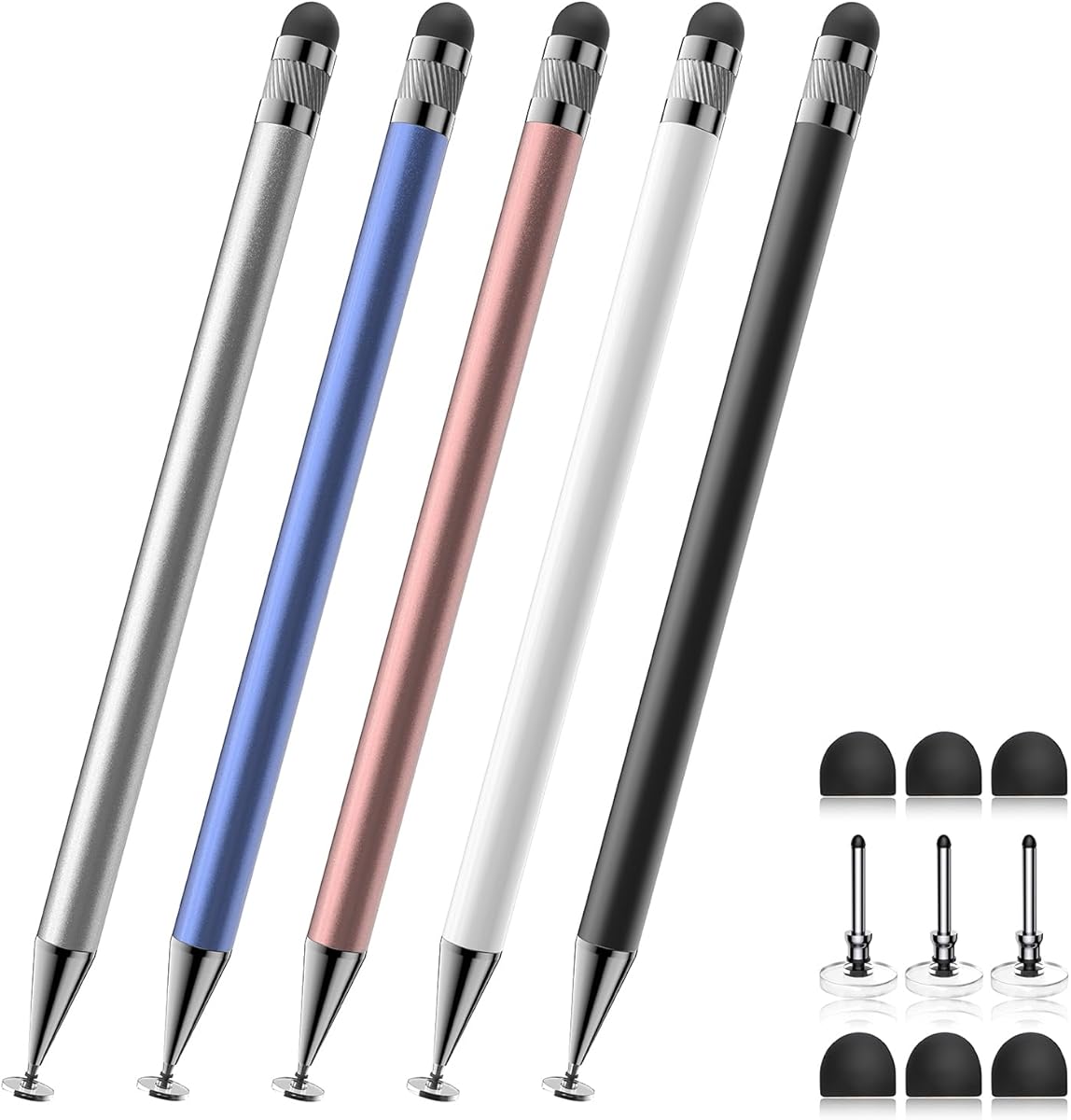
The Bopomofo Stylus is not a pressure-sensitive active pen, but it earns a place in this comparison as the most accessible general touchscreen option. It has the highest listed rating at 4.6, includes five colored pens, and operates as a passive capacitive stylus. That makes it useful for basic tapping, scrolling, note-taking, and light drawing without charging, pairing, or installing an app.
We may earn a commission when you buy through this link, at no additional cost to you.
Each pen combines a flexible transparent disc tip with a rubber tip. The disc can offer a smoother glide, while the rubber tip is intended to maintain reliable contact over many screen protectors. Multiple tip choices help users decide which feels better on a particular display or protective film. The package also includes six replacement rubber nibs and three replacement disc nibs.
The set works with iPads, iPhones, Samsung Galaxy Tab devices, Android tablets, Kindles, and other capacitive touchscreens. It is especially appealing for classrooms, families, shared tablets, or offices because several pens can be distributed among users. The battery-free design also removes any concern about a stylus running out of power at an inconvenient moment.
The crucial limitation is explicit: it does not provide pressure sensitivity or palm rejection. It therefore cannot deliver pressure-varying line width, realistic shading, or the same creative control as an active stylus. Device settings can also affect writing performance on certain screens. Choose this product for inexpensive, shareable touchscreen navigation and basic input—not for professional digital illustration or advanced note-taking.
Five colored styluses make the package suitable for students, colleagues, or family members sharing a device. The included replacement nibs extend the useful life of the set.
Users can switch between a transparent disc and a rubber tip to find a preferred glide and contact level. Neither tip creates pressure-based stroke variation.
We may earn a commission when you buy through this link, at no additional cost to you.
The USB-C SonarPen adapts the familiar pressure-sensitive design to a modern connector. It supports devices including iPhone 15, iPhone 16, iPads, Android phones and tablets, Chromebooks, Windows notebooks, Mac computers, and Nintendo Switch systems when the published compatibility guide is followed. Like the audio-jack models, it needs neither a battery nor Bluetooth pairing.
We may earn a commission when you buy through this link, at no additional cost to you.
Its core creative function is pressure-sensitive stroke control, allowing changes in applied pressure to affect line weight. A customizable button adds a shortcut for frequently used actions. The package includes a standard nib, an Android nib, and an adhesive holder, while integrated cable management helps keep the attached lead organized during travel or extended work.
The key advantage is relevance to contemporary hardware. Rather than requiring a legacy audio connection, it uses USB Type-C, making it a more realistic choice for newer phones and computers. The connection also provides continuous operation without the charging interruptions associated with active styluses that use internal batteries.
Its 3.6 rating is the lowest among the products compared, and palm rejection is not available for Android or Chromebook devices. USB-C is a connector rather than a guarantee of protocol compatibility, so the model guide remains important. Buyers should also accept the tethered design. Subject to those limitations, this is the SonarPen variant to consider when your devices rely on modern USB-C connections.
The USB-C design serves current phones, tablets, and computers without requiring a separate rechargeable pen. Confirm protocol and model support before relying on pressure or shortcut functions.
Palm rejection is not available for every supported platform, particularly Android and Chromebook according to the product details. Check the guide if a relaxed hand position is essential.
We may earn a commission when you buy through this link, at no additional cost to you.
The Dirty Pink SonarPen combines pressure-sensitive input, palm rejection, and a customizable shortcut button in a portable package designed for several types of devices. It holds a 4.0 rating and supports compatible Apple, Android, Chromebook, Windows notebook, tablet, and Switch hardware through its audio-jack design.
We may earn a commission when you buy through this link, at no additional cost to you.
For artists and note-takers, the pressure response is the defining advantage. Greater force can create heavier lines, which is valuable when varying outlines, adding shading, or distinguishing emphasis in handwritten content. Palm rejection supports a natural posture, and the shortcut button can be set for a frequently accessed tool. Together, these features extend the pen well beyond basic pointing and scrolling.
Operation remains refreshingly uncomplicated. Plugging the pen into a supported device supplies its power, so there is no charging schedule, low-battery warning, or wireless pairing process. Integrated cable management helps the attached lead remain orderly. The bundled adhesive holder gives the pen a secure position on the back of a device, reducing the chance that it will be misplaced.
The connection method is the deciding constraint. Audio-equipped devices are increasingly uncommon, and newer USB-C-only models will not work with this version. The stylus also remains tethered while in use, which may be less convenient than a self-contained active pen. If your hardware has a compatible audio connection and you value expressive strokes over connector modernity, the Dirty Pink version provides the same established feature set as its other audio-jack colors.
Force-sensitive strokes allow line weight to respond to your hand, adding nuance to handwriting and digital drawing. The effect is most useful in software that supports pressure input.
Because the device supplies power through the audio jack, there is no internal battery to maintain. That simplicity comes with the need for a compatible port.
We may earn a commission when you buy through this link, at no additional cost to you.
The Fuchsia SonarPen is a colorful option that retains the established combination of pressure sensitivity, palm rejection, and a shortcut button. It has a 4.0 rating and works with compatible Apple, Android, Chromebook, Windows notebook, tablet, and Nintendo Switch hardware through an audio-jack connection.
We may earn a commission when you buy through this link, at no additional cost to you.
Its suitability depends on how you work. The pressure response allows strokes to become thicker or lighter as you apply more or less force, supporting varied handwriting and basic shading. Palm rejection lets you rest your palm on the screen, which is particularly useful for extended writing or drawing. A customizable shortcut button provides quick access to a repeated action without leaving the active pen workflow.
There are no batteries to recharge and no Bluetooth menus to navigate. The included holder adheres to a compatible device, while built-in cable management keeps the lead organized. A standard nib and Android nib are supplied, allowing some adaptation to different devices and preferred tip responses.
The audio connection is both its main convenience and its main constraint. It avoids internal charging hardware, but it also rules out use with devices lacking a compatible port. The tethered design may be inconvenient in setups where a free port is needed for another accessory. For compatible equipment, the fuchsia model is a straightforward way to obtain true pressure-sensitive input without maintaining a rechargeable stylus.
Pressure control and palm rejection together make this more than a navigation tool. The pen is better suited to handwriting, annotation, and expressive sketching than a standard finger replacement.
No battery or wireless pairing reduces routine maintenance. The adhesive holder and integrated cable management address the practical challenge of carrying a tethered pen.
We may earn a commission when you buy through this link, at no additional cost to you.
The Purple SonarPen shares a feature set aimed at users who want more precise touchscreen input without the maintenance demands of a rechargeable active pen. It has a 4.0 rating, responds to changes in applied pressure, supports palm rejection, and includes a customizable shortcut button for repeated actions.
We may earn a commission when you buy through this link, at no additional cost to you.
It is compatible with a broad selection of Apple, Android, Chromebook, Windows notebook, tablet, and Switch devices, subject to the published guide. This makes it attractive for a mixed-device setup, particularly if the products in that setup still include an audio connection. The standard and Android nibs offer some flexibility in how the pen interacts with different screens.
Because the connected device provides power, the stylus operates without charging and avoids Bluetooth pairing. That simplicity can be valuable in classrooms, meetings, and travel situations where a charged pen or paired accessory would add another preparation step. Built-in cable management and the included adhesive holder make the tethered design more manageable.
The purple model shares the same unavoidable caveat as the other audio-jack SonarPens: compatibility with current devices is restricted. If you own a USB-C-only phone or tablet, this version may not function without a compatible solution that the manufacturer does not support. For devices with a suitable port, it is a capable and straightforward option for pressure-aware notes and sketches.
Pressure sensitivity gives written lines more variation than a passive capacitive stylus. This can make annotations and handwritten notes feel more expressive while remaining easy to carry.
The audio-jack method provides immediate operation without menu-based pairing. It is ideal for compatible devices but unsuitable where a modern USB-C port is the only option.
We may earn a commission when you buy through this link, at no additional cost to you.
The Red SonarPen is another strong audio-jack option for shoppers seeking pressure sensitivity, palm rejection, and a customizable button. It has a 4.0 rating and supports compatible Apple, Android, Chromebook, Windows notebook, tablet, and Nintendo Switch devices according to the product's compatibility information.
We may earn a commission when you buy through this link, at no additional cost to you.
Pressure control improves the range of marks possible on a touchscreen. Instead of producing one fixed line width, the stylus responds to the force you apply, allowing subtler transitions that are useful for shading, illustration, and expressive handwriting. Palm rejection helps you maintain a comfortable writing angle, and the programmable button reduces repeated navigation through software tools.
Its power comes directly from the connected device. As a result, there is no rechargeable battery to run down and no wireless pairing process to repeat. The included standard and Android nibs, built-in cable management, and adhesive pen holder form a convenient travel kit. The pen can remain attached to the back of a device when it is not being used.
The audio-jack requirement prevents this model from being a universal choice. Many current phones and laptops omit that port, and a generic USB-C adapter may not create the connection the pen requires. The attached cable can also occupy a valuable port. If your device is explicitly listed as compatible and you prefer zero charging overhead, the Red SonarPen delivers the relevant pressure and convenience features.
The pressure-sensitive tip works with the connected device's power, providing expressive line control without a rechargeable internal battery. Software support determines how thoroughly the pressure response is used.
Two nib types, cable management, and an adhesive holder are included. These accessories help users move between devices while keeping the tethered pen organized and accessible.
We may earn a commission when you buy through this link, at no additional cost to you.
The right pressure sensitive stylus depends on device compatibility, connection style, creative needs, and how often you work. Review these factors before choosing a model.
Start with a complete list of the devices and applications you intend to use. Some products are restricted to particular iPad generations or Windows computers with AES 1.0 pen support, while SonarPen models span several platforms but depend on the correct audio-jack or USB-C connection. Compatibility also involves more than the shape of a connector: operating-system support, application pressure support, shortcut configuration, and palm-rejection behavior can differ by platform.
Pressure resolution determines how finely a stylus can vary line width and shading. The Lenovo Digital Pen 2 provides a stated 4,096 levels, offering exceptionally fine differentiation for professional illustration and detailed work. Other pressure-sensitive models in the list support stroke control without publishing a comparable numeric range, so their specifications are less precise. Consider the software you use as well, because a device may read pressure differently or cap the number of usable levels.
Connection design affects convenience more than most buyers expect. The Metapen A8 uses its own rechargeable battery and USB-C charging, while Lenovo's pen uses an AAA battery. SonarPen models draw power from a device connection, eliminating charging but keeping the pen tethered. Audio-jack versions suit older equipped hardware, whereas the USB-C model better fits many recent devices. Always confirm the physical port and required protocol before deciding.
Palm rejection prevents a resting hand from registering unintended touches, allowing a more natural writing position. It is especially important for left-handed writers, people with larger hands, and anyone who tends to anchor their wrist on the display. Some models support it broadly, while the USB-C SonarPen excludes Android and Chromebook devices. A comfortable grip, balanced weight, and compatible tip should be considered alongside the feature itself.
The tip determines glide, contact, and the character of your marks. The Lenovo Digital Pen 2 uses an elastomer tip designed for a natural tactile response, while the Metapen A8 provides replaceable polymer tips and states that they pass a 20-kilometer durability test. SonarPen packages include standard and Android nibs. For heavy use, consider replacement availability, grip texture, and whether the tip feels controlled on your screen protector.
A programmable side button can make a stylus much more efficient for repetitive work. SonarPen and Lenovo models include customizable controls that can support navigation, annotation, document signing, or other actions, depending on the device and software. Metapen uses a double-tap switch for power rather than a programmable shortcut. If you annotate documents, sign files, or switch tools often, a configurable button may save meaningful time.
A stylus that travels should be easy to carry, secure, and ready to use. The Metapen A8 uses magnets to attach to compatible iPads, reducing the chance of losing it. SonarPen packages include adhesive holders and built-in cable management, which are especially useful for tethered models. Lenovo's 17.3-gram metal body prioritizes low weight for laptop work. Weigh bulk, attached cables, storage, and charging accessories against how and where you write.
Professional illustration benefits from fine pressure levels, a natural tip, low latency, and strong palm rejection. Note-taking emphasizes comfortable writing, reliable palm support, and easy organization. Basic navigation may require only a passive capacitive stylus, which is why the Bopomofo set appears in this comparison despite lacking pressure sensitivity. Define your hardest task and choose the tool that handles it well rather than paying for capabilities you will never use.
Begin by confirming compatibility and installing any required device updates. Charge a rechargeable stylus fully before the first session, or install the specified battery correctly in a replaceable-battery model. For a device-powered SonarPen, connect the correct audio or USB-C variant and review the compatibility guide. Open your intended drawing, handwriting, or annotation application and perform a short test before beginning a long project.
Choose a pressure-sensitive line or brush, then vary the force gradually to learn how the software and stylus translate your input. Use light pressure for fine details and firmer pressure for stronger lines or denser shading. Keep your grip relaxed, especially when palm rejection is supported, and avoid pressing hard enough to gouge the screen or damage the nib. Update shortcut-button assignments in the relevant device settings and test them before relying on them during an important workflow.
Store the pen with the tip protected and the surface free from dust, grit, and sticky residue. Do not tap or drag a damaged nib against the display, and replace worn tips according to the manufacturer's guidance. For the Metapen A8, use certified charging equipment, avoid prolonged charging sessions, and keep the stylus away from heat and humidity. Keep SonarPen cables organized, and carry a spare AAA battery if you use the Lenovo pen away from home.
A pressure sensitive stylus detects changes in the force applied to its tip. That information can control line width, opacity, brush size, shading, and other digital effects when supported by the device and application. It is different from a passive capacitive stylus, which generally registers touch position but not pressure.
No. Compatibility can depend on the operating system, device model, connector, wireless protocol, and application. The Metapen A8 is limited to listed iPad models, while the Lenovo Digital Pen 2 requires compatible Windows 10 or later hardware with AES 1.0 support. SonarPen products support several platforms but still require the correct connection method.
Palm rejection is highly useful, particularly for left-handed users and people who rest their hand while writing. It prevents the screen from interpreting the resting palm as additional touch points. However, availability varies by model and platform, so check the specifications for the exact device you own rather than assuming every pressure stylus includes it.
That depends on the design. The Metapen A8 uses USB-C charging and offers a stated full-charge time of about 30 minutes. The Lenovo Digital Pen 2 uses a single AAA battery. SonarPen models draw power from the connected device, so they require no stylus charging, although the host device must support the appropriate connection.
A passive stylus can support basic drawing, tapping, scrolling, and light note-taking, but it cannot provide pressure-based line variation. The Bopomofo 2-in-1 set in this guide is a useful basic touchscreen tool with rubber and disc tips. For expressive line weight, shading, and professional illustration, choose an active pressure-sensitive model and compatible software.
Choose the connector that your device actually supports. Audio-jack SonarPen models are useful for older compatible hardware and avoid charging, while the USB-C version is more relevant to newer phones, tablets, and computers. A physical USB-C port does not automatically guarantee full protocol compatibility, so consult the product's compatibility guide before purchasing.
For ordinary notes and general annotation, a responsive pressure range is usually sufficient. Fine-grained control becomes more valuable for detailed illustration, shading, and professional retouching. The Lenovo Digital Pen 2 lists 4,096 levels, making it a strong choice when precision is the priority, but device and application support also influence the final experience.
Keep the pen in a protective case or supported holder, protect the tip from grit, and replace it when it becomes rough or damaged. Follow the charging and battery guidance supplied for your model. Avoid leaving a stylus pressed against a screen, and do not use unapproved cables or chargers. For tethered designs, use the included cable management to prevent connector strain.
The Metapen A8 stands out as the best overall choice for supported iPads, combining palm rejection, a durable metal barrel, replaceable tips, fast charging, and magnetic storage without Bluetooth pairing. The Lenovo Digital Pen 2 is the strongest premium option for compatible Windows laptops, offering 4,096 pressure levels, customizable buttons, and a lightweight metal design. SonarPen provides a battery-free route to true pressure control across multiple platforms when a suitable device connection is available.
Prioritize device compatibility first, then decide whether pressure detail, palm support, shortcut controls, portability, or connector convenience matters most. Passive capacitive styluses are sufficient for basic navigation but do not duplicate the expressive capabilities of an active pressure-sensitive pen. Also consider tip behavior and application support, since a technically compatible stylus can still deliver a different experience across different apps.
Before ordering, recheck the current model list, included nibs, charging method, and available accessories. Ratings and marketplace details can change over time, and prices fluctuate as well. Comparing the current product page with your device and software requirements will help ensure that your final choice remains suitable at the moment of purchase.