
Yamaha MGX12
5.0Editor score
18-channel compact control surface
Touchscreen and five knobs
Dual USB-C interface
Our digital mixing consoles guide compares ten models for live sound, studio recording, streaming, effects, control, and connectivity, helping you choose the
Digital mixing consoles combine microphones, signal routing, effects, recording, and monitoring into one control surface. A well-matched model can simplify rehearsals, live performances, podcast production, and multitrack sessions while providing repeatable control over every important mix setting.
We compared these ten consoles by examining input capacity, bus flexibility, microphone preamps, automation, recording options, physical controls, connectivity, and workflow features. The list covers compact desktop units, rack-mountable models, tablet-controlled systems, and professional touring consoles for different scales of work.
Each pick highlights the environment it appears best suited for, from budget streaming setups to feature-rich live consoles. Product configurations and retailer availability can change, so confirm current specifications, accessories, and prices before making a final purchase.
5.0Editor score

4.7Editor score

4.2Editor score
The comparison below highlights channel capacity, routing, control, and recording capabilities to show how each console approaches live and studio production differently.



The Behringer X32 is a highly capable all-purpose digital console with a 4.7 rating and a configuration suited to both studio and live work. Its defining combination is a 40-input channel count, 25 buses, 32 fully programmable MIDAS-designed microphone preamps, and 25 motorized 100 mm faders. Few control surfaces in this group offer such an even balance of physical operation, routing capacity, and recallable mix control.
We may earn a commission when you buy through this link, at no additional cost to you.
The physical layout is one of the X32's strongest selling points. Motorized faders move to stored positions when a scene is recalled, while individual and dynamic LCD Scribble Strips provide clear channel and bus identification. Sixteen XLR outputs, additional line connections, two headphone connectors, and an integrated talkback section make the console practical for rehearsal rooms, small theaters, mobile production, and project studios without requiring a separate analog control layer.
The trade-off is size and complexity. This is a full console rather than a compact desktop mixer, so its footprint may be substantial in smaller rooms. Users who want access to every routing, processing, and scene option will also face a meaningful learning curve. However, those features become advantages once the operator understands how the console organizes channels, buses, groups, matrices, and effects.
The X32 is the strongest general recommendation for buyers who need one console to cover live mixing, studio recording, rehearsals, and multimedia production. Its capacity and tactile controls also provide more room to grow than a small mixer, while motorized recall makes it particularly useful for operators who repeatedly rebuild similar mixes. For those priorities, it offers the most convincing all-around package on this list.
The 25 fully automated 100 mm faders make the console particularly effective for scene-based operation. When a stored scene is recalled, the motorized controls move into their saved positions, giving the operator a quick visual and physical overview of the mix rather than requiring every level to be adjusted manually.
A 40-input, 25-bus architecture can support crowded live inputs, monitor mixes, effects sends, recording feeds, and separate output groups. The 32 programmable microphone preamps add useful headroom for varied microphones, while 16 XLR outputs provide a substantial number of physical destinations.
We may earn a commission when you buy through this link, at no additional cost to you.
The Yamaha DM3 is an ultracompact digital console built around a large 9-inch touchscreen, a 22-channel input structure, and Yamaha's 96kHz processing platform. Its 4.4 rating reflects a console that focuses on efficient touchscreen operation, polished connectivity, and a smaller physical footprint rather than providing a large bank of motorized faders.
We may earn a commission when you buy through this link, at no additional cost to you.
Its channel architecture includes 16 mono channels, one stereo channel, and two stereo effects returns, with six mono or three stereo mixes, two matrices, and one stereo bus. Sixteen professional Yamaha preamps, including 12 XLR and four combo connections, give users a flexible input section. The 18×18 USB audio interface supports playback and recording, while a separate 2×2 USB recorder expands the recording workflow.
The 9-inch display is the main attraction. It provides a much larger working canvas than the small screens found on many entry-level mixers, which can make channel selection, routing, effects, and scene review easier. The compromise is that most of the console's operation is not represented by dedicated motorized faders, so users who prefer tactile mixing may find the DM3 less immediately satisfying.
The DM3 is best for mobile live work, small events, rehearsal spaces, podcast production, and studio users who value compactness and a modern interface. It is especially attractive when the operator is comfortable navigating a touchscreen. Buyers who require many physical faders for fast live changes should compare that limitation carefully with the X32 or WING.
The 9-inch screen gives operators more room to inspect multiple parameters, menus, meters, and routing views at once. That extra display area can reduce the number of page changes required during setup and make a compact console more practical for detailed work.
The 18×18 USB interface and 2×2 recorder create a convenient path between live mixing and computer-based capture. This is useful for rehearsal, podcast, and streaming workflows where the console can serve as both a sound mixer and a central audio interface.
We may earn a commission when you buy through this link, at no additional cost to you.
The Behringer WING is the most expansive premium-focused console in the group, offering 48 input channels, 28 buses, and a design centered on professional live and production workflows. Its 4.2 rating reflects a feature-rich instrument with substantial routing capability, remote expansion, and tactile control rather than a simple desktop mixer.
We may earn a commission when you buy through this link, at no additional cost to you.
Its stand-out architecture is the plug-and-play remote I/O system. Using three AES50 ports with Klark Teknik's SuperMAC technology, the console can handle up to 144 input and output signals over a remote network. That scale makes it relevant to ensembles, theater, broadcast, and multi-room production, where stage boxes and remote racks can be more practical than routing everything through the desk.
Twenty-four motorized 100 mm faders are divided into three fully configurable sections, and the main display uses a large capacitive touchscreen with an adjustable swivel. A touch-sensitive channel editing section adds 11 rotary controls and a dedicated color TFT display, helping operators move between channel properties without relying entirely on the main screen.
The WING is suited to users who have outgrown a compact console and want a scalable central platform. Its remote I/O and large routing architecture are particularly valuable in professional live environments, although the desk requires space, setup, and training. For a simpler studio or small acoustic performance, a smaller model may deliver a more manageable experience.
The three AES50 ports can carry up to 144 input and output signals to compatible remote devices. This is a major advantage for productions that need stage boxes, distributed microphones, or additional output capacity beyond the console's onboard connections.
Three configurable fader sections let the operator organize inputs, mixes, and groups according to the production. The result is a desk that can adapt to different show layouts instead of forcing every workflow into a fixed channel order.
We may earn a commission when you buy through this link, at no additional cost to you.
The Yamaha MGX12 is a compact 18-channel digital console designed to make recording and mixing approachable. It carries a 5.0 rating and stands out for tactile faders, a 4.3-inch touchscreen, five control knobs, assisted features, and a bundle that includes Cubase AI, WaveLab Cast LE, a Basic FX Suite, and Steinberg Plus software.
We may earn a commission when you buy through this link, at no additional cost to you.
The MGX12 uses new MGX preamps with an 86 dB gain range, Bluetooth audio input, and a microSD card slot. Its built-in DSP supports professional sound shaping and latency-free monitoring, while the USB-HDMI interface adds 4K video capture and pass-through. These additions make it useful for creators who want one setup to handle audio, streaming, recording, and basic video tasks.
Assistive features including Simple and Standard modes, Auto Gain, Clip Safe, and Scene Recall reduce the burden of setup for less experienced users. The trade-off is that an 18-channel console cannot match the routing scale of the X32, WING, or Qu-5, and the 4.3-inch display offers less visual space than the DM3's 9-inch touchscreen.
This is the most practical budget-oriented recommendation for home studios, podcasters, small ensembles, and mobile creators. It provides a genuine digital signal path, physical faders, direct recording tools, and helpful automation without requiring a large touring console. It is less suitable for a busy stage with many simultaneous sources, but it covers common project and small-room needs well.
Auto Gain, Clip Safe, Simple and Standard modes, and Scene Recall can shorten the path from initial connection to a usable mix. These tools are especially helpful for creators who mix less frequently and want the console to guide them through common setup decisions.
Bluetooth input, microSD recording, USB-C connectivity, and the USB-HDMI feature give the MGX12 several ways to move audio through a modern production setup. The included software bundle adds recording and editing tools for a more complete entry-level package.
We may earn a commission when you buy through this link, at no additional cost to you.
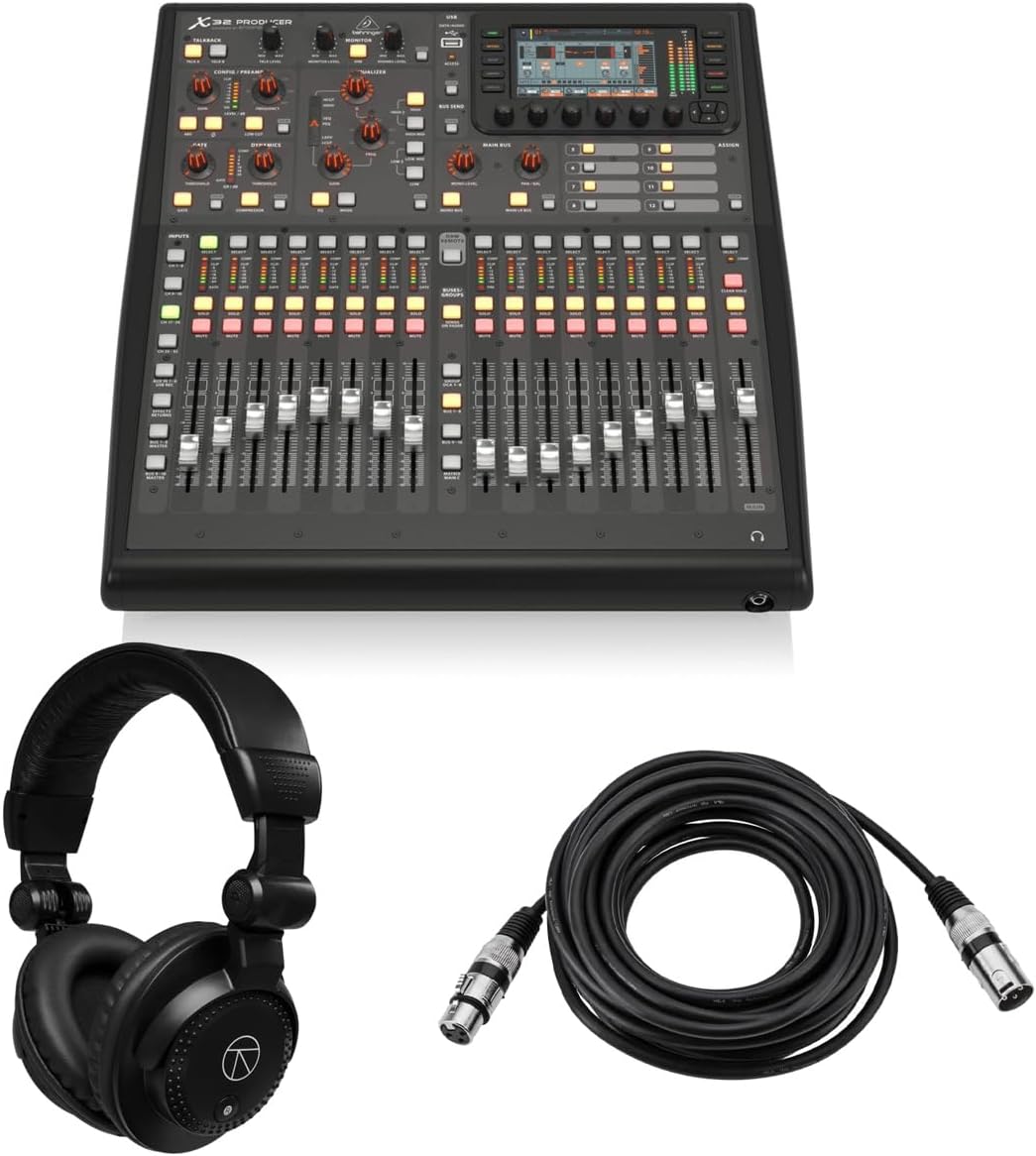
The Behringer X32 PRODUCER is a rack-mountable production console with a 5.0 rating, offering 40 input channels, 25 buses, 16 XLR balanced inputs, and eight XLR balanced outputs. It is built for studios where repeatable scenes, extensive mix buses, and detailed processing matter more than having a complete set of faders across every input.
We may earn a commission when you buy through this link, at no additional cost to you.
The console includes 16 programmable MIDAS preamps with 24-bit/48 kHz conversion and a stated 114 dB dynamic range. Its main LCR, six matrix buses, and 16 mix buses each support inserts, six-band parametric EQ, and full dynamics processing. Eight DCA groups and six mute groups help manage larger sessions, while eight true-stereo effects slots expand the internal effects palette.
A 5-inch day-viewable color TFT, 17 motorized faders, and 100 total recall scenes make the PRODUCER easier to operate than a fixed-output mixer. The limitation is physical portability: a rack-oriented instrument is less convenient for moving between rehearsal spaces than a compact desktop console, and its smaller fader count does not represent all 40 input channels simultaneously.
This model is well matched to fixed installations, project rooms, and producers who value recall and routing. The bundled headphones and 25-foot XLR cable add practical value for a new setup, while the console itself provides enough bus structure to support demanding sessions. It is an especially strong choice when a rack space is available and the operator values scene management over a large all-in-one surface.
With 100 total recallable scenes, the console can preserve distinct mixes, routing arrangements, and processing configurations for recurring projects. This makes it practical for studios that repeatedly move between different sessions or need to recreate a specific mix without rebuilding it manually.
The main LCR, matrix, and mix buses include inserts, parametric EQ, and dynamics processing. This level of control is valuable for multitrack sessions because it allows the operator to refine output mixes rather than treating every bus as a simple signal copy.
We may earn a commission when you buy through this link, at no additional cost to you.
The Behringer X32 Compact has a 4.7 rating and brings a 40-input, 25-bus architecture to a smaller desktop format. Like the full X32, it includes 16 fully programmable MIDAS-designed microphone preamps and motorized 100 mm faders, but it reduces the physical control surface to 17 faders for easier transport between rooms.
We may earn a commission when you buy through this link, at no additional cost to you.
Eight XLR outputs, six additional line inputs and outputs, two headphone connectors, and talkback functionality cover many common live and studio requirements. Individual and dynamic LCD Scribble Strips help the operator identify channels and buses, while automated faders support scene recall and DAW control. The console can therefore serve as a central routing and mixing hub even when not all sources are represented by dedicated faders.
The main compromise is that compactness comes at the cost of immediate physical access. In a busy live mix, a user may need to select a layer or group to reach certain channels. The detailed screen and menu system also remains more complex than that of a small touchscreen mixer, although the motorized faders preserve an important degree of tactile operation.
The X32 Compact is ideal for users who want nearly the full X32-style routing architecture in a more manageable footprint. It suits rehearsal rooms, small venues, mobile rigs, and studios with limited desk space. If the main priority is fast physical access to every source, the full X32 is more appropriate; if a condensed surface and 40-channel capacity are more important, this model is a strong compromise.
Keeping the 40-input and 25-bus architecture while reducing the number of motorized faders makes the Compact especially useful where desk space is limited. Users retain sophisticated routing and recall without carrying a full-size touring console.
XLR outputs, line-level connections, headphone outlets, and talkback provide a versatile collection of physical hooks for rehearsal and small-event work. The console is still feature-rich, but its smaller body is more manageable when it must be moved or installed temporarily.
We may earn a commission when you buy through this link, at no additional cost to you.
The PreSonus StudioLive Classic 16.0.2 is a 16-input USB digital console mixer with a 3.9 rating. Its defining appeal is the combination of Class A XMAX preamplifiers, 12 physical faders, four auxiliary buses, two internal effects buses, and a broad collection of bundled music-production and control software.
We may earn a commission when you buy through this link, at no additional cost to you.
Fat Channel processing gives every input and bus access to three-band semi-parametric EQ, compression, downward expansion, and limiting. The main output also has a stereo 31-band graphic EQ. An 18-in/16-out USB 2.0 interface records all channels and the main stereo mix at 24-bit/44.1 kHz or 48 kHz, while MIDI I/O can control output levels, recall effects, and scenes.
Its limitations are visible in the 16-channel input count and the 12-fader control surface. That makes it less expandable than the Behringer X32 family or the WING, and its 3.9 rating is lower than those alternatives. On the other hand, the included Studio One Artist DAW, Capture recording software, UC Surface control software, and QMix-UC touch software create a particularly complete software-centered package.
The StudioLive Classic 16 is a sensible option for musicians who want recording software and a capable physical mixer in one package. It is especially useful for rehearsals, small gigs, and studio sessions that fit within 16 channels. Buyers should weigh its software ecosystem and straightforward processing layout against the greater input capacity and routing flexibility of higher-ranked consoles.
Studio One Artist, Capture, UC Surface, and QMix-UC cover recording, editing, mixer control, and mobile auxiliary control. This makes the console a practical center for a computer-based workflow rather than an isolated hardware mixer.
Fat Channel strips place EQ, compression, expansion, and limiting in the same workflow for inputs and buses. The result is a consistent sound-shaping process that can help a new operator build controlled mixes without assembling separate outboard-style processing chains.
We may earn a commission when you buy through this link, at no additional cost to you.
The Behringer XR18 is an 18-input, 12-bus tablet-controlled digital mixer with a 4.6 rating. Instead of placing faders and meters on a large desk, it uses an iPad or Android tablet for control, making it one of the most portable options for rehearsals, small performances, mobile recording, and location work.
We may earn a commission when you buy through this link, at no additional cost to you.
Sixteen fully programmable MIDAS-designed microphone preamps provide solid input capability, while the built-in tri-mode Wi-Fi router enables direct operation without an external router. The 18×18 bidirectional USB interface can feed a tablet for direct recording, and the main output includes two XLR connections. An optional Dugan-style automatic microphone mixing function is described as dependent on future firmware.
The main benefit is physical flexibility. A small control surface, remote tablet, and separate audio interface can be placed where they are most useful, which is valuable in cramped rehearsal rooms or mobile events. The limitation is equally clear: without dedicated physical faders, operation depends on a compatible tablet, the control application, and a stable network or wired connection.
The XR18 is an excellent choice for users who want console-level routing and preamp quality without carrying a traditional desk. It is particularly suitable for small bands, podcast production, mobile livestreaming, and rehearsal work. Operators who need tactile faders under pressure should look toward the X32 Compact or full X32 instead, while tablet-focused users get a highly portable alternative here.
The integrated tri-mode Wi-Fi router removes the need to pair the mixer with a separate wireless router for many standard setups. That simplifies rehearsals and temporary installations where the operator wants to open the control app and begin working with minimal infrastructure.
The bidirectional 18×18 USB interface supports a tablet-based recording workflow while the tablet also controls the mixer. Combining capture and mix control in a portable arrangement can make it easier to capture rehearsals, livestreams, and performances in locations where a full console is impractical.
We may earn a commission when you buy through this link, at no additional cost to you.
The Allen & Heath Qu-5 is a 38-input, 24-output digital mixer built around 96kHz XCVI FPGA processing, low latency, and a flexible modern production architecture. It is designed for live sound, recording, and installed audio, with up to 12 configurable mixes, four matrix outputs, and customizable channel layers.
We may earn a commission when you buy through this link, at no additional cost to you.
Connectivity is extensive. There are 16 XLR/TRS combi inputs, 12 XLR outputs, an AES3 digital output, a 128×128 SLink expansion port, and a USB-C 32×32 multichannel audio interface. Six multi-FX engines with dedicated returns, USB-A stereo playback and recording, USB-C multitrack capture, and SD card support for up to 32 channels make it suitable for both live and studio roles.
Its physical interface combines a 7-inch capacitive touchscreen, 17 motorized faders, eight programmable SoftKeys, and chromatic channel metering. Remote control is available through applications for Windows, macOS, iOS, and Android. The console's flexibility is impressive, but its numerous routing modes, layer concepts, and recording paths require deliberate setup rather than a quick, menu-free workflow.
The Qu-5 is a strong candidate for operators who want modern processing, broad I/O, and multitrack flexibility. It is particularly compelling for live recording, broadcast, theater, and installations. Since the supplied listing does not include a numerical customer rating, buyers should evaluate current user feedback alongside the detailed specifications and their own workflow requirements.
The XCVI FPGA engine is designed for high-resolution operation with very low latency. It gives the Qu-5 a technically advanced foundation for live, recording, and installed use, where clean conversion and flexible internal routing can be valuable.
The USB-C interface supports 32×32 multichannel audio, while the SD card system can capture up to 32 channels. These parallel recording paths give operators useful options for backing up a performance or sending isolated channels into a production workstation.
We may earn a commission when you buy through this link, at no additional cost to you.
The QSC TouchMix-16 is a compact digital mixer with a 4.4 rating, built for practical live mixing in rehearsals, small venues, houses of worship, and mobile event work. It provides 20 full-function inputs, including 12 microphone inputs, four XLR/TRS microphone-line combinations, two stereo TRS line inputs, talkback, and USB 2-track connectivity.
We may earn a commission when you buy through this link, at no additional cost to you.
Its output section is more substantial than the input count alone might suggest. Six XLR auxiliary outputs can serve wired in-ear monitor systems, alongside two stereo TRS outputs, main left and right XLR outputs, a TRS cue output, and a TRS monitor output. Every input channel includes four-band full parametric EQ, variable high-pass and low-pass filters, a gate, and a compressor.
The main limitation is that the supplied specifications do not identify a comparable multichannel USB recording interface. That makes the TouchMix-16 less compelling for users who expect direct multitrack capture, while its smaller control surface may also provide less overview than the Behringer consoles. On the other hand, the dedicated physical controls and straightforward processing can be advantageous for operators who do not want to depend heavily on a tablet or large screen.
This is a sensible live-mixing choice for acoustic performers, teaching environments, community events, and mobile engineers. The included bag supports transport, and the generous selection of XLR and TRS connections helps simplify signal connection. It is less compelling for modern computer-based production, but it remains a focused and approachable option for smaller live sound duties.
Six XLR auxiliary outputs are unusual on a compact mixer and particularly useful for driving wired in-ear monitor systems. Multiple cue and monitor connections also give the operator room to build a practical monitoring path for performers and technicians.
Four-band parametric EQ, adjustable high-pass and low-pass filters, gate, and compressor are available on every input. Having these tools built in reduces the need to rely entirely on external processors for standard live vocal and instrument control.
We may earn a commission when you buy through this link, at no additional cost to you.
The right digital mixing console depends on the number of sources, destination outputs, recording demands, operating style, and amount of physical control needed. Work through these factors before comparing models so the specification that looks most impressive also serves the actual production.
Begin by counting realistic sources rather than simply choosing the console with the highest headline channel number. Include microphones, instruments, playback devices, talkback, and any sources that may arrive at different times. Outputs matter just as much: monitor mixes, in-ear feeds, main left and right, zone feeds, recording connections, and external effects each require a destination. A console with ample inputs but too few independent buses can be less useful than a moderately sized model with flexible routing.
Choose enough physical input channels for normal work plus reasonable expansion room. Confirm the console has the connector types you need, because channel totals may include software channels, returns, or remote inputs rather than only front-panel microphone sockets.
Buses determine how many different mixes, monitor paths, and subgroups can exist simultaneously. A main stereo mix alone is rarely enough for live production, rehearsal recording, or complex studio work. Matrix buses can create additional combinations, while DCA or mute groups simplify control of several channels at once. Compare the number of fully processed mix buses, not simply the total number of outputs, because a dedicated main output is less flexible than a configurable bus.
For most live and studio work, look for several independently adjustable mix buses and clear labeling or recallable scenes. More buses create more options, but only if the interface makes them easy to understand and retrieve.
Microphone preamps determine how usable quiet, dynamic, ribbon, and condenser microphones are in real conditions. Gain range, low-noise performance, phantom power, and converter quality all influence the recording and live mix. Match the preamp count to the number of microphones that may be active at once rather than to the total input count. Consider whether the console offers enough headroom for quiet sources and whether balanced connections preserve signal quality over long cable runs.
Select a console with a preamp and converter design appropriate to your microphones and operating level. Extra preamps are useful for live sessions, but they matter more when they are genuinely available and easy to assign.
The best control surface is the one an operator can use reliably. Motorized faders are valuable for recall and visual mix status, while a large touchscreen supports deeper editing and routing. Compact consoles often use fewer physical controls and more menus, and tablet-controlled systems trade desk stability for portability. Think about whether the console will be operated by one person during a live event or configured in advance and then used for studio recall.
Match the interface to the user's habits and the production's tempo. A technically capable console is less useful if navigating it under pressure distracts from the performers or recording task.
USB audio capabilities determine whether the console can function as the main recording hub. Check the channel direction, supported sample rates, included recording software, and whether inputs can be recorded individually or only as a stereo mix. Some consoles support multitrack capture to a computer or SD card, while others focus on live mixing and two-track playback. For podcasting, streaming, and multitrack rehearsal capture, a broad channel count and isolated recording paths are more useful than basic playback alone.
Verify compatibility with the computer, operating system, and production software before buying. A suitable interface should make the intended recording workflow simpler, not add a separate routing problem.
Onboard effects can reduce the need for external processors, particularly for reverb, delay, and basic channel shaping. A console with comprehensive EQ, compression, gates, dynamics, and matrix routing can cover most standard live and studio tasks. Internal effects are most useful when they can be recalled, assigned clearly, and monitored without unpredictable latency. Effects processing also consumes resources, so users with complex routing should examine available effect slots and return channels rather than counting effects alone.
Prioritize a good selection of standard processors and dependable recall. Specialized or highly modeled effects are useful, but the everyday mix depends more on clear gain staging and repeatable processing.
Consider where the console will live and how it will travel. Rack-mountable models are efficient for permanent installations and studio builds, while compact desktop units fit smaller rooms. Tablet-controlled mixers minimize hardware in the signal path but depend on a compatible mobile device and stable control connection. High-capacity touring consoles with remote I/O can serve distributed systems, but they require more space, networking, and setup knowledge.
Choose a form factor that matches the actual environment. Do not purchase a large console merely for future capacity if its size, weight, and operating complexity will make everyday rehearsals inconvenient.
Scenes, automix functions, recallable channel settings, and control software determine how much work must be repeated between sessions. A large scene library is valuable for fixed studios, recurring shows, and predictable rehearsal material. Remote-control apps can support off-console adjustments, while DAW integration can make the console easier to incorporate into a recording workflow. Users should confirm which platform requirements apply and whether advanced control features depend on compatible hardware or software.
Favor automation that matches the production. A simple, dependable recall system is more useful than an extensive feature set that the operator rarely configures correctly.
Begin with signal flow rather than effects. Connect sources one at a time, verify phantom power and input levels, establish sensible gain, and route the main mix or recording destination before adding processing. Label channels, outputs, and buses as the patch grows. Saving an initial clean scene creates a reliable baseline that can be recalled if a later experiment produces an unsuitable result.
Build the mix with equalization, compression, and gain staging in mind. Keep levels predictable, leave adequate headroom, and use mute or solo carefully to isolate problems. When recording, test every channel independently and confirm the software is receiving the intended signals. For live use, save separate scenes for different songs, performers, or room configurations, and rehearse transitions before relying on automated recall.
Protect the console by placing it on a stable surface, keeping liquids and debris away from controls, and using properly rated cables and covered connectors. Keep ventilation paths clear, avoid abrupt power changes, and follow the manufacturer's guidance for storage and cleaning. Use a soft, dry cloth on surfaces, update associated software when appropriate, and back up scene files or show settings to a separate location.
A digital mixer routes audio through an internal digital signal path, allowing scenes, effects, recall, and remote control to be stored and managed in software. An analog mixer provides a more direct path from physical controls to the signal chain, often with fewer recall and routing features. The best choice depends on the operator, the required routing, and the importance of repeatable mixes.
Count every source that may be connected at the same time, including microphones, instruments, playback, talkback, and any spare channels needed for future expansion. A console with fewer physical inputs may still support software or remote channels, so verify the actual connector types. For live work, leaving some spare inputs is usually more useful than operating continuously at maximum capacity.
Yes, provided the console has suitable preamps, recording connections, and compatible software. Models such as the X32, MGX12, StudioLive Classic 16, and Qu-5 offer USB or computer-based recording options suited to different session sizes. Confirm whether the console records individual channels or a stereo mix, and check the supported sample rates and operating systems before purchase.
A touchscreen can provide deeper routing, effects, and visual information in a compact design, while physical faders are often faster for live adjustments and provide clearer mix overviews. The best choice depends on operator experience and workflow. Some consoles also combine both approaches, using a screen for detailed control and motorized faders for primary level changes.
An input channel represents a source entering the console, while a mix or bus is an internal destination that combines selected channels. Main mixes feed the main output, while auxiliary mixes often power monitors or in-ear systems. A matrix can create additional combinations of buses, giving the operator a way to build specialized feeds without using a dedicated physical output for every path.
Motorized faders are especially useful when scenes are recalled because they move to the stored positions and provide a visual overview of the mix. They are also convenient for controlling digital audio workstations and organized live mixes. For a small, fixed studio with manual level changes, a less expensive or more compact console may still meet the user's needs.
Many digital consoles are designed for both uses because they combine flexible routing, high-quality preamps, multichannel outputs, and USB or digital recording connections. Live work emphasizes fast recall, monitor feeds, and output control, while recording emphasizes isolated channels, low-latency monitoring, and DAW integration. Choose a model with enough inputs, buses, and recording paths to support both without compromise.
Store the console on a stable surface, protect it from moisture and excessive heat, and avoid placing heavy objects on faders or touchscreens. Use quality cables, handle connectors without pulling on the cable, and keep the vents unobstructed. Update associated software when needed, save important scenes in backups, and clean the enclosure with a soft dry cloth rather than harsh liquids.
The Behringer X32 is the strongest all-around recommendation because it combines 40 inputs, 25 buses, 32 programmable preamps, 25 motorized faders, and extensive recall-oriented control. The Yamaha DM3 stands out for compact touchscreen operation, while the Behringer WING offers the strongest premium expansion path through AES50 remote I/O. For budget-conscious creators, the Yamaha MGX12 provides a remarkably approachable package with recording and assisted-mixing features.
Prioritize the workflow that matters most: live operators should examine motorized control, scene recall, monitor outputs, and output routing; studio users should verify preamp quality, multichannel recording, DAW compatibility, and bus processing. Tablet users should also account for device compatibility, whereas users needing permanent rack integration should prioritize chassis format. No feature list replaces matching the console to the actual source count and operating style.
Before purchasing, verify the current manufacturer specifications, included accessories, software requirements, and retailer price. Product bundles and configurations can change, and live availability may vary. Checking those details at the time of purchase will help ensure that the selected digital mixing console supports the intended studio, stage, streaming, or recording setup.