EPOMAKER Galaxy100 QMK
4.5Editor score
Aluminum full-size enclosure
QMK and VIA customization
Pre-lubed linear switches
Multi-device wireless support
Hot-swappable switch sockets
Epomaker keyboards guide comparing wireless performance, switch options, displays, layouts, build quality, and customization for gaming and work.
Epomaker keyboards cover a broad range of gaming and productivity needs, from compact wireless models to full-size boards with screens, knobs, and multi-device connectivity. A worthwhile choice balances responsive input, satisfying construction, useful software, and a layout that suits your desk and daily workflow rather than simply maximizing specifications.
The keyboards in this guide were compared using the supplied product information, focusing on layout, connection methods, battery capacity, polling performance, acoustic construction, switch support, displays, and customization features. The list includes full-size, 96%, 75%, and 80% designs, with both standard mechanical and Hall effect switches represented.
Each pick highlights the strongest reason to consider that model, whether that is gaming speed, a practical number pad, a configurable screen, or a more compact footprint. Product ratings and specifications can change over time, and retailer availability also varies, so readers should verify current listings and configuration details before buying.
4.5Editor score
4.7Editor score

4.7Editor score
The comparison below places all ten models side by side, highlighting their layouts, connectivity, core performance features, and customization capabilities to make the most relevant choice easier to identify.


The EPOMAKER TH108 PRO is the most complete all-purpose model in this guide, combining a traditional 104-key layout with a configurable screen, rotary knob, wireless connectivity, hot-swappable sockets, and a substantial 10,000mAh battery. Its 4.7 rating reflects a strong balance of construction, responsiveness, and useful extras, although the full-size design is less suitable for very compact desks.
We may earn a commission when you buy through this link, at no additional cost to you.
Its standout qualities begin with the smart display, which can show information such as the time, keyboard status, and backlight controls. Users can also upload personal images or GIFs through the Chrome-based software. The knob provides immediate volume adjustment and can switch screen pages, turning these decorative features into practical controls that are useful during work and gaming.
Performance specifications are also competitive for a conventional mechanical keyboard. The supplied information lists 2ms latency in wired mode and 1,000Hz polling in 2.4GHz mode. It supports wired, 2.4GHz, and Bluetooth connections, can move among as many as five paired devices, and offers up to 200 hours of stated wireless use. The 104 double-shot PBT keycaps and body weighing more than 1.1kg reinforce a stable, durable impression.
The trade-offs are mainly about size and software rather than missing core functions. A full-size board needs enough desk depth for a separate mouse, and custom screens, remapping, and macros require some configuration. Even so, those compromises are easy to accept because the TH108 PRO covers gaming, office work, media control, and multi-device productivity without requiring a separate accessory. It is the strongest recommendation for buyers who want one capable keyboard to handle nearly every role.
The display is more than a static decoration because it can present keyboard status, time, and lighting information while also accepting personal GIFs or images. The rotary knob gives quick access to volume and screen navigation, reducing dependence on software for common tasks.
Wired, 2.4GHz, and Bluetooth modes make the TH108 PRO practical across PCs, Macs, laptops, and tablets. The large battery and multi-device pairing support a desk setup that moves between productivity, gaming, and media use without constant reconnection.
We may earn a commission when you buy through this link, at no additional cost to you.
The EPOMAKER X Aula F75 MAX combines a compact 75% layout with a TFT display, rotary knob, gasket mounting, and extensive customization in a 4.6-rated package. It is especially attractive for people who want to preserve desk space without giving up the controls and information normally associated with larger gaming keyboards.
We may earn a commission when you buy through this link, at no additional cost to you.
The keyboard has 80 programmable keys, combining its screen, volume knob, and connection indicators in one compact area. The TFT display can show a GIF and present backlight, battery, and connectivity information. A two-stage adjustable kickstand and low front height allow the typing angle to be adapted, while the gasket structure and flex-cut plate seek a softer, less rigid feel.
For gaming, the F75 MAX supports anti-ghosting and NKRO, while the supplied specifications list 1,000Hz polling in USB and 2.4GHz modes. It is compatible with Windows, Mac, Linux, and Android, making it useful beyond games. The factory-lubed linear switches and layered foam, IXPE, PET, and silicone materials aim to produce a creamy, low-echo sound.
Its main limitation is the absence of a dedicated number pad, which matters for spreadsheet-heavy work or users accustomed to a full-size board. It also lacks the extended programmability associated with QMK-based models in the supplied lineup. Nevertheless, the blend of a screen, knob, compact layout, wireless support, and flexible switch sockets makes the F75 MAX a particularly well-balanced choice for mixed gaming and productivity.
Unlike a bare 65% board, the F75 MAX preserves a dedicated function row and useful navigation keys. That makes the layout easier to adapt to, while the 75% footprint still leaves more mouse space than a conventional full-size keyboard.
The gasket-mounted structure, flex-cut plate, factory-lubed switches, and multiple damping layers are designed to reduce harsh bottom-out and internal echo. This makes the board appealing for shared rooms and long work sessions as well as gaming.
We may earn a commission when you buy through this link, at no additional cost to you.
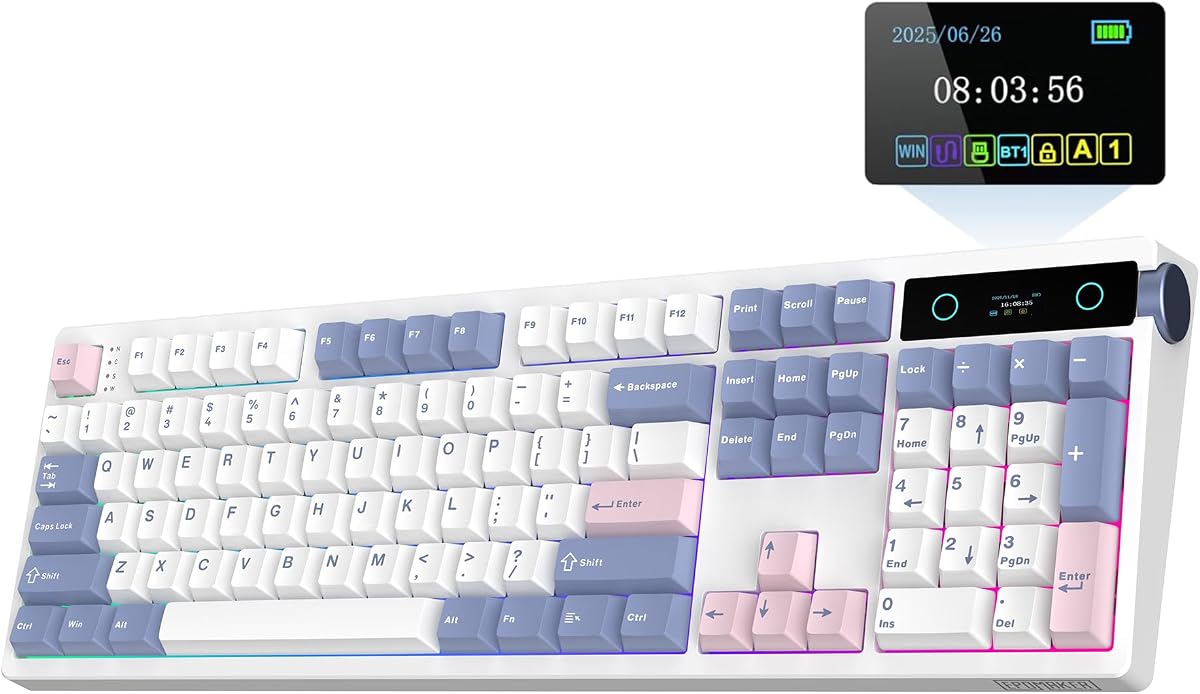
The EPOMAKER Galaxy100 QMK is the premium enthusiast option here, pairing a full-size aluminum shell with QMK and VIA support, hot-swappable linear switches, multi-device wireless connectivity, and a 4.5 rating. Its emphasis is not simply gaming speed but the deeper control available to keyboard enthusiasts and productivity-focused users.
We may earn a commission when you buy through this link, at no additional cost to you.
QMK and VIA support allows extensive key remapping, layer creation, and macro automation. The included number pad and metal knob add direct control for data entry and volume adjustment. The aluminum alloy case gives the board a weighty, stable feel, while its gasket mount and five cushioning layers—including Poron, IXPE, EMDP, and PET materials—are designed to produce a soft, muted thock.
Connectivity includes 2.4GHz wireless, Bluetooth, and low-latency wired operation, with compatibility across Windows, Mac, and Android. The 8,000mAh battery supports extended wireless use, and the hot-swappable PCB allows switch changes without soldering. Pre-lubed linear switches, south-facing RGB lighting, and thick non-shine-through PBT keycaps complete a specification set oriented toward long-term ownership.
The main compromises are size and weight. A full-size aluminum keyboard occupies significant desk space and may be less convenient to reposition than a compact plastic model. QMK can also feel unnecessarily technical for buyers who only need basic media keys. For enthusiasts willing to invest time in configuration, however, the Galaxy100 offers the deepest software control and most premium construction among these selections.
QMK and VIA make the Galaxy100 more adaptable than conventional gaming boards. Users can build layers, reassign keys, and automate repetitive sequences, turning the keyboard into a personalized productivity tool as well as a gaming peripheral.
The aluminum shell contributes rigidity and a reassuring weight, while the gasket construction softens bottom-out without making the board feel unstable. PBT keycaps and factory-lubed linear switches add practical durability and a refined out-of-box feel.
We may earn a commission when you buy through this link, at no additional cost to you.
The EPOMAKER TH108 V2 PRO is a refined full-size option that retains the familiar 104-key format while adding a customizable screen, rotary knob, tri-mode wireless support, and a 10,000mAh battery. Its 4.7 rating makes it one of the strongest choices for users who prefer a traditional number pad and navigation cluster.
We may earn a commission when you buy through this link, at no additional cost to you.
Its screen displays real-time keyboard information and can show GIFs, drawings, or photos. The knob switches between screen pages and volume by default, while the Chrome-based software enables remapping, macro recording, and screen uploads. Quick device shortcuts make it easy to move among PCs, Macs, and other paired systems, and dedicated Mac modifier legends improve cross-platform usability.
For gaming, the board weighs more than 1kg, uses factory-lubed and tuned switches, and supports 1,000Hz polling with 2ms latency. Gasket mounting and multiple cushioning layers create a softer, quieter feel, while the 104-key layout includes a complete number pad. The claimed wireless battery life reaches up to 200 hours under suitable conditions.
This model is essentially for buyers who want a full-size board with refined extras rather than a compact or specialist gaming design. It needs more desk space than smaller alternatives, and the display software adds a setup step. Even so, the combination of a stable chassis, long battery life, cross-platform controls, and a conventional layout makes the TH108 V2 PRO an excellent fit for a multi-purpose desktop.
The 104-key map preserves a number pad and dedicated navigation cluster, reducing the adaptation required when moving from a conventional office keyboard. The screen and knob add control without forcing a more compact layout.
Poron, latex, IXPE, silicone, and foam layers cushion the typing experience, while the weighted body helps keep the keyboard in place. This balance suits long writing sessions, coding, and gaming without emphasizing only one use case.
We may earn a commission when you buy through this link, at no additional cost to you.
The EPOMAKER TH99 PRO offers a useful middle ground between a full-size board and a compact gaming keyboard. Its 98-key 96% layout preserves a number pad, includes a screen and knob, and supports tri-mode wireless connectivity. The 4.6 rating reflects a versatile package suited to work, gaming, and media use.
We may earn a commission when you buy through this link, at no additional cost to you.
The display functions as a status panel for information such as time, battery state, and keyboard settings, while also supporting GIFs and RGB control. Chrome-based software allows remapping, macro recording, and display customization, with both online and offline availability noted in the supplied information. The rotary knob provides direct volume adjustment during games or calls.
The large 10,000mAh battery is a major advantage for wireless use, with stated endurance of 150 to 200 hours with RGB off and more than 40 hours with the lighting and display active. The board weighs over 1.2kg, uses PBT keycaps, and includes an adjustable kickstand for stability. Its hot-swappable construction and layered gasket design support switch changes and a softer, thockier feel.
Compared with a 100% keyboard, the 96% format leaves somewhat more space for the mouse while retaining numerical entry. It still occupies more room than the F75 MAX or G84 HE, so buyers with compact desks may prefer those alternatives. For users who cannot give up the number pad, however, the TH99 PRO is a highly practical middle ground with unusually useful controls.
The 98-key layout compresses the traditional full-size arrangement while keeping a full number pad. That makes it suitable for spreadsheets, accounting, data entry, and games that benefit from dedicated numeric controls.
The glass screen can serve as a status hub or display custom visuals, and the knob gives quick access to volume. These features add daily convenience without requiring users to memorize numerous application shortcuts.
We may earn a commission when you buy through this link, at no additional cost to you.
The EPOMAKER TH108 is a direct full-size wireless option for buyers who prioritize a familiar layout, a substantial battery, and a softer acoustic profile over smart displays or specialized gaming switches. It carries a 4.5 rating and provides 108 double-shot PBT keycaps, hot-swappable sockets, and tri-mode connectivity.
We may earn a commission when you buy through this link, at no additional cost to you.
The keyboard weighs more than 1.2kg, which helps it remain planted during typing and gaming. Its listed performance includes 2ms latency in wired mode and 1,000Hz polling over 2.4GHz. Up to five devices can be paired through wired, 2.4GHz, and Bluetooth connections, supporting use across PCs, Macs, tablets, and consoles. The stated wireless battery life reaches 160 hours.
Its five-layer construction includes sandwich foam, an IXPE switch pad, PET sound enhancement, PORON socket foam, and bottom silicone. These materials are intended to reduce resonance and cushion bottom-out. The included Creamy Jade switches are factory-lubed, and the custom driver supports key mapping, macros, backlight, and sensitivity settings.
Compared with the TH108 PRO and V2 PRO, the standard TH108 omits the display and knob, which may disappoint buyers seeking smart controls. Its large footprint also makes it less convenient for travel. In return, the core package is clear and capable: a stable full-size mechanical board with long battery life, broad connectivity, and layered sound control.
The TH108 focuses on the essentials rather than adding a screen or knob. Buyers who routinely use a number pad and navigation cluster get a conventional 108-key experience with wireless convenience and customizable RGB lighting.
The gasket structure and multiple damping materials are designed to make each keystroke softer and less hollow. Combined with the heavy chassis and factory-lubed switches, it should suit extended typing sessions where comfort matters.
We may earn a commission when you buy through this link, at no additional cost to you.
The EPOMAKER G84 HE is the specialist gaming pick, built around Hall effect magnetic switches, 8,000Hz polling, adjustable actuation, and advanced input logic. Its 4.7 rating and 0.125ms listed latency make it a compelling option for competitive players who want precise control over key activation.
We may earn a commission when you buy through this link, at no additional cost to you.
Actuation and release can be adjusted from 0.1mm to 3.3mm, with sensitivity listed as fine as 0.01mm. SOCD logic can prioritize the latest directional input, while Dynamic Key Rollover allows one keypress to trigger different commands at different travel depths. These features are particularly relevant to fast-paced games where accidental movement and rapid counter-actions matter.
The 80% layout reduces desk usage without removing a dedicated function row. Tri-mode connectivity supports PC, Mac, Android, and other devices, while the 8,000mAh battery and hidden 2.4GHz receiver storage support a clean wireless setup. A two-stage kickstand adjusts the typing angle, and a gasket structure with Poron, IXPE, silicone, and sound-enhancement materials softens the overall feel.
The trade-off is that Hall effect operation is less immediately natural for general typing than standard mechanical switches. Users may need to adjust actuation and sensitivity through the EPOMAKER software to avoid accidental presses, and the advanced gaming features may be unnecessary for office work. Even so, for competitive gaming, this is one of the clearest performance-focused selections in the guide.
Fine actuation control lets players choose how early a key registers or how quickly it releases. That flexibility can support different movement styles and makes it possible to tune one keyboard for several game genres.
The 8,000Hz polling rate, 256K scan rate, and 0.125ms listed latency target the rapid communication demands of competitive gaming. The wired, 2.4GHz, and Bluetooth modes offer flexibility, although the highest performance claims deserve careful evaluation in each preferred connection.
We may earn a commission when you buy through this link, at no additional cost to you.
The EPOMAKER TH99 is a productivity-minded 96% keyboard that combines 102 keys, a full number pad, tri-mode wireless connectivity, and an 8,000mAh battery. Its 4.6 rating reflects a practical design for users who need numerical entry and frequent device switching without opting for a very large full-size chassis.
We may earn a commission when you buy through this link, at no additional cost to you.
The 1800-style layout includes eight separate function keys and a number pad, all fitted with grease-resistant PBT keycaps. A two-stage kickstand and Cherry-profile keycaps support comfortable typing, while the body weighs more than 1kg and includes four silicone pads for stability. The flexible gasket structure and five sound-dampening layers are intended to produce a soft, creamy thock.
Bluetooth 5.0, 2.4GHz, and detachable wired connections support computers, tablets, phones, and gaming controllers. The supplied information lists up to 800 hours of battery life with the backlight off, as well as 2 to 5ms latency in cable and 2.4GHz modes. For wired gaming, the board offers 1,000Hz polling, 2ms latency, NKRO, and anti-ghosting.
The TH99 does not offer the screen or knob found on the TH99 PRO, so it is less suited to buyers who value status displays or quick media control. Its advanced remapping and macro functions still require the software. Even so, the 96% layout, strong battery specification, stable construction, and useful gaming features make it a versatile recommendation for hybrid work-and-play desks.
The compact 1800 arrangement preserves eight function keys and a complete number pad, which is useful for spreadsheets, navigation, and competitive titles. It saves some space compared with a standard 104-key board without adopting a more disruptive compact layout.
The 8,000mAh battery and stated 800-hour backlight-off endurance make the TH99 well suited to shared workstations and travel between devices. Wired and 2.4GHz modes provide alternatives when maximum responsiveness or a depleted battery becomes a concern.
We may earn a commission when you buy through this link, at no additional cost to you.
The EPOMAKER Ajazz AK820 Pro is a compact 75% keyboard distinguished by a TFT display, rotary knob, gasket mounting, and tri-mode connectivity. Its 4.7 rating makes it a strong fit for users who want an information-rich desk accessory and appreciate a keyboard that occupies less space than a full-size model.
We may earn a commission when you buy through this link, at no additional cost to you.
The high-definition screen can display the time, date, battery status, connectivity, operating system, and backlight effects. It can also show customized visuals, while the knob provides practical media control. Bluetooth 5.1, 2.4GHz, and included Type-C wired connections allow the board to move among devices, and switching between Mac and Windows modes is supported.
Typing quality comes from a gasket-mounted design with a flex-cut PC plate and flex-cut PCB, both intended to reduce vibration and introduce controlled give. South-facing LEDs and a stated 1.6 million RGB color combinations provide vivid illumination. The 75% format preserves useful navigation and function keys while removing the number pad and some surrounding keys.
The 4,000mAh battery is smaller than those in most competing selections here, so buyers who travel frequently or expect the longest wireless runtime may prefer an 8,000mAh or 10,000mAh model. The absent number pad also limits its appeal for data entry. Still, for a desk where screen information, portability, and a refined gasket feel matter most, the AK820 Pro is highly capable.
Rather than limiting the display to decorative graphics, the AK820 Pro can present time, date, battery, connection, operating system, and lighting status. The screen therefore supports everyday awareness as well as customization.
The 75% footprint and flex-cut plate-and-PCB design balance portability with a softer typing feel. Mac and Windows support further improves its usefulness for mixed personal and professional setups.
We may earn a commission when you buy through this link, at no additional cost to you.
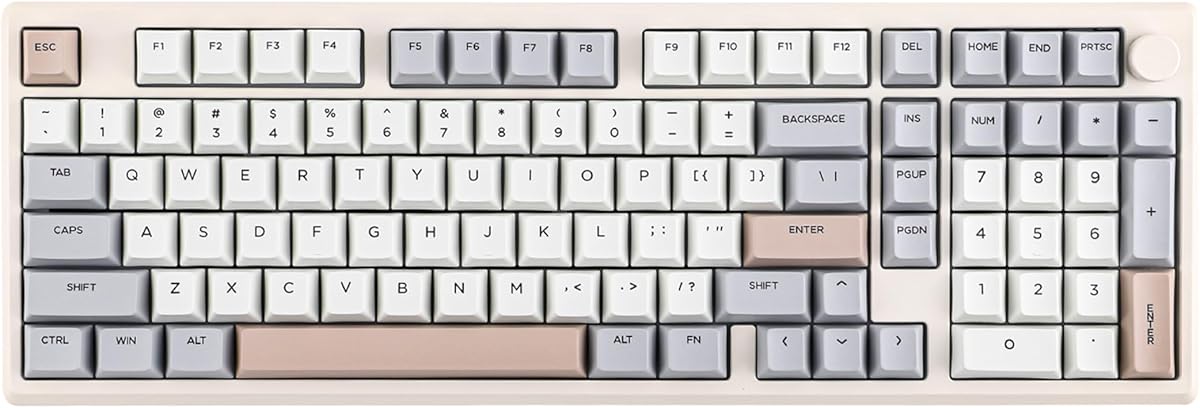
The EPOMAKER x Aula F99 is a customizable 96% mechanical keyboard that retains 99 keys, a number pad, and arrow controls while using a gasket-mounted structure. Its 4.5 rating and combination of hot-swappable sockets, wireless connectivity, and layered acoustic treatment make it an appealing entry point for keyboard customization.
We may earn a commission when you buy through this link, at no additional cost to you.
The layout compresses a full-size arrangement without eliminating the number pad or arrow keys, creating a useful compromise for gaming and office work. An extended one-piece silicone pad supports a soft, stable feel, while the single-key slotted FR4 PCB is intended to improve feedback and isolate each key position. Dual-tone PBT keycaps provide a durable, textured finish.
The acoustic design uses five layers, including IXPE under-shaft pads, PORON sound-absorbing material, and silicone bottom padding. All switch sockets are hot-swappable and support common three- and five-pin mechanical switches. Factory-pre-lubed linear switches offer a smooth starting point and can be replaced as preferences change.
Bluetooth, 2.4GHz, and wired USB Type-C connections support Windows, macOS, iOS, and Android, while the 8,000mAh battery supports extended use. The F99 lacks a screen and knob, and the supplied details do not highlight a deep remapping ecosystem, so advanced firmware users may prefer the Galaxy100. For buyers beginning a hot-swap collection, though, its 96% layout and accessible construction remain compelling.
Full-key hot-swap sockets let users replace three- or five-pin switches without soldering. That makes it easy to test quieter, tactile, clicky, or linear options while preserving the rest of the board.
The 99-key layout keeps the number pad and arrow keys that compact boards often remove. It is therefore a strong option for mixed gaming, spreadsheet, and general productivity use where those controls remain important.
We may earn a commission when you buy through this link, at no additional cost to you.
The right Epomaker keyboard depends on desk space, preferred layout, connection habits, switch feel, and the importance placed on gaming speed, sound, or software control. These factors narrow the field before you compare individual models.
Full-size 104-key and 108-key designs include a number pad and provide the least disruptive transition from a traditional office keyboard. The 96% models in this guide compress the arrangement to retain numeric controls while freeing some desk space, making them a useful middle ground. The 75% and 80% options maximize room for mouse movement but remove the number pad, so frequent spreadsheet work and users accustomed to dedicated numerals should account for that loss.
Tri-mode boards generally support a wired connection, 2.4GHz wireless, and Bluetooth. Wired mode is the simplest choice for a permanently installed gaming desk, while 2.4GHz is generally intended for low-latency wireless play. Bluetooth is convenient for switching to laptops, tablets, and phones but may not provide the same responsiveness as a dedicated wireless receiver. Check the listed polling rate, latency, operating-system support, and paired-device behavior before choosing.
Battery capacity is useful, but it should be considered alongside RGB and display usage because lighting and active screens consume additional power. Models with 8,000mAh or 10,000mAh batteries provide a comfortable margin for multi-device use, while the 4,000mAh AK820 Pro is more modest. Review the stated endurance under realistic lighting conditions and keep the included cable accessible as a backup.
Linear switches generally provide smooth travel without a pronounced tactile bump, while tactile and clicky options add more feedback. Silent variants can reduce noise in shared environments. Hot-swap sockets make it easier to change 3-pin or 5-pin mechanical switches without soldering, though users should confirm socket and switch compatibility before buying replacement switches.
Gasket mounting isolates the plate and internal assembly from the outer shell, often producing a softer bottom-out and less rigid feel. Poron, IXPE, PET, foam, and silicone layers can reduce hollow resonance and high-frequency noise. These construction choices do not determine one universal sound profile, but they are especially relevant to users who type for long periods, share a room, or find hard plastic boards uncomfortably loud.
Conventional gaming boards focus on polling rate, wired latency, anti-ghosting, and NKRO support. The G84 HE goes further with Hall effect switches, adjustable actuation, SOCD, and Dynamic Key Rollover. These advanced controls can benefit competitive games but may require software tuning and can be less suitable for ordinary typing. Conventional buyers should focus on reliable low-latency operation rather than paying for features they will not configure.
A screen can display time, battery state, connection mode, operating system, GIFs, or personal images, while a knob provides convenient volume or screen navigation. Their usefulness depends on the supporting software and willingness to customize. QMK and VIA offer deeper remapping, while other EPOMAKER utilities focus on macros, lighting, screen content, and device control. Look for browser-based software if avoiding large installers is important.
Windows and Mac are the most common compatibility targets, but some models also list Linux or Android support. Dedicated Mac legends, operating-system switching, and cross-platform key mapping are useful for mixed systems. Material choices also affect portability: full-size aluminum boards tend to be heavier, while compact plastic models are easier to move between desks. Check desk dimensions, weight, switch format, kickstand design, and receiver storage before ordering.
Begin by charging the keyboard fully, installing the chosen connection mode, and updating its software if a configuration utility is included. Select the correct Windows or Mac layer where applicable, then test the basic keys, function row, navigation cluster, knob, display, and connection switching before beginning a demanding work or gaming session.
For the best gaming behavior, begin with conservative settings and adjust actuation, sensitivity, SOCD, or rollover only after confirming that ordinary typing remains reliable. With standard mechanical boards, test several switch types gradually, clean between changes, and confirm that each replacement is supported by the hot-swap sockets. Save custom layers or macros so a reset does not erase useful configurations.
Keep the keyboard free from liquids and abrasive debris, and clean keycaps or the case with a soft, lightly dampened cloth according to the manufacturer's guidance. Recharge periodically rather than leaving a battery depleted for long periods, and use the proper charging connection. For wireless models, store the 2.4GHz receiver safely and avoid pressing switches while transporting a board with exposed magnetic components.
The EPOMAKER G84 HE is the most specialized gaming model in this guide because it uses Hall effect magnetic switches, 8,000Hz polling, adjustable actuation, and advanced input logic. The TH108 PRO and TH99 also offer conventional low-latency features such as 1,000Hz polling and 2ms wired latency. Competitive players should prioritize the connection mode, latency, and switch behavior they actually use.
Many of the listed models support both Windows and Mac, with some offering dedicated Mac modifier keys or a mode switch. The Galaxy100, F75 MAX, and AK820 Pro specifically list compatibility with the two major desktop systems, while several other models also mention Android. Buyers should confirm the exact operating-system requirements for their chosen model.
A 75% layout reduces desk width by removing the number pad and condensing the navigation area while usually retaining a function row. A 96% layout is larger but preserves a full number pad, making it more practical for spreadsheets, accounting, and numeric game controls. The choice is primarily between maximum desk space and convenient numerical entry.
Hot-swap sockets are designed to let compatible 3-pin or 5-pin mechanical switches be removed and replaced without soldering. The process generally involves removing the keycap, pulling out the switch, and pressing the replacement into the socket. Users should confirm switch compatibility, handle the pins carefully, and consult the product instructions before making changes.
A display can provide useful information such as time, battery state, connection mode, and operating system without occupying a separate monitor. Models with knobs also make volume and display navigation more convenient. However, displays are still optional tools, and buyers who mainly need remapping, a number pad, or advanced gaming performance may prioritize those features instead.
Wired and 2.4GHz connections are generally the more predictable options when minimizing delay matters. Bluetooth is best regarded as a convenient mode for switching among laptops, tablets, and phones. Gamers should test their preferred setup and account for the operating system, wireless environment, and any power-saving behavior.
Both are used to remap keys and create custom keyboard layouts, with QMK providing a deeper, firmware-based framework and VIA offering a more accessible interface for common layer and key assignments. The Galaxy100 supports both, making it attractive to users who want either quick configuration or deeper control.
Linear switches move smoothly without a distinct tactile bump and suit fast gaming or users who prefer minimal interruption while typing. Silent versions reduce audible feedback and are often preferable in shared offices or late-night settings. If uncertain, a hot-swappable board allows experimentation without replacing the entire keyboard.
The EPOMAKER TH108 PRO is the strongest all-around recommendation, combining a familiar full-size layout with a configurable screen, knob, wireless connectivity, hot-swappable switches, and a large battery. The Galaxy100 QMK stands out for premium aluminum construction and deeper firmware control, while the G84 HE is the strongest choice for competitive gaming because of its Hall effect switches and very high polling performance.
For buyers who need a number pad in a relatively compact body, the TH99 PRO or x Aula F99 are easier to live with than a conventional full-size board. The X Aula F75 MAX and Ajazz AK820 Pro suit those who prefer more desk space and useful displays. Prioritize the features you will use most: layout and comfort for productivity, polling and actuation for gaming, or battery life and wireless flexibility for a mobile setup.
Ratings, configurations, software behavior, and retailer listings can change over time, so check the current product page before ordering. Confirm operating-system support, connection modes, switch compatibility, desk space, and any included accessories, and compare current retailer availability to ensure that the keyboard you choose best fits your daily workflow.