
40Wh M5Y1K for Dell Inspiron
4.4Editor score
40Wh four-cell capacity
Wide Inspiron model coverage
Upgraded internal PCB
Explore the best laptop batteries for replacement, comparing fit, capacity, voltage, cell design, and support for popular HP and Dell models.
A replacement laptop battery can restore portability to a computer that still performs well, but choosing the wrong unit may lead to charging errors, unstable power, or an improper fit. A useful replacement should match the battery’s model, part number, voltage, connector, dimensions, and power requirements rather than relying only on the laptop’s marketing name.
The products in this guide cover popular HP Pavilion and Dell Inspiron, Latitude, Vostro, XPS, Precision, and G-series families. They were compared using the supplied compatibility lists, electrical specifications, included accessories, protection features, stated support periods, and customer ratings. Each review highlights the models that a buyer should verify before ordering.
The selections represent different needs: broad compatibility for common Pavilion machines, dependable replacements for mainstream Dell Inspiron notebooks, and higher-capacity options for newer Dell systems. The entries also show why voltage and watt-hour ratings alone are not enough to establish fit. Prices and availability can change, so confirm the current listing and exact model number before purchasing.
4.4Editor score

4.4Editor score
4.4Editor score
The table below compares each battery’s principal fit, electrical configuration, and practical buying consideration. Because laptop battery compatibility is model-specific, begin with the replacement part number printed on your existing battery rather than choosing solely by brand or screen size.



The HT03XL L11119-855 Laptop Battery for HP Pavilion 15-CS 15-DA 15-DB 15-DW is the strongest general choice in this guide for owners of a compatible HP Pavilion. It carries a 4.4 customer rating and combines a 41.7Wh three-cell design with an extensive list of supported 14-, 15-, and 17-inch systems. The package also includes two screwdrivers and a user manual, making it more convenient than a bare replacement battery.
We may earn a commission when you buy through this link, at no additional cost to you.
Its main strength is breadth. The supplied compatibility information covers Pavilion 14-CE, 14-CF, 14-CK, 14-CM, 14-DF, 14-MA, 14Q and 14S families, 15-CS, 15-CW, 15-DA, 15-DB, 15G and 15T variants, and 17-BY and 17-CA models. It also lists several 240, 245, 250, 255, 340, and 348 G-series systems. Numerous part numbers, including HSTNN-DB8R, HSTNN-UB7J, HT03041XL, L11119-855, L11421-542, and several TPN numbers, help buyers cross-check the battery already installed in their notebook.
There is one important limitation that deserves attention. The product information specifically notes that although HT03XL and HW03XL are both used with some HP Pavilion 15 and 17 systems, the HT03XL battery is not compatible with HW03XL. That distinction illustrates why a shared laptop family name is not enough to establish fit. A buyer should use the complete notebook model designation and the label on the original battery rather than assuming that every similarly sized Pavilion battery is interchangeable.
This is a good choice for HP Pavilion owners who want broad model coverage, straightforward included tools, and a clearly documented electrical specification. It is especially attractive for 15-CS, 15-DA, and 15-DB users, the most prominent groups in the listing. Before ordering, power down the laptop, disconnect the charger, open the bottom cover carefully, and compare the replacement part number and connector with the removed battery.
The model list covers a large portion of the HP Pavilion line, while the supplied voltage, watt-hour rating, and part numbers make verification comparatively straightforward. The explicit HT03XL-versus-HW03XL warning is useful: it helps prevent a technically similar but electrically different battery from being purchased by mistake.
Two screwdrivers and a user manual are included, reducing the need to find separate tools before opening the laptop. They do not replace basic care, so owners should still use the correct screw heads, avoid puncturing the cells, and disconnect the battery before working on other internal components.
We may earn a commission when you buy through this link, at no additional cost to you.
This HT03XL L11119-855 battery is another well-documented option for HP Pavilion owners, with a 4.3 rating and a stated 11.55V, 41.9Wh, three-cell polymer configuration. It is tailored to many Pavilion 14-, 15-, and 17-series systems and includes two installation tools and a user manual in the package. That makes it a practical alternative for users who want a battery, basic tools, and clear post-purchase support together.
We may earn a commission when you buy through this link, at no additional cost to you.
The compatibility list is extensive. It includes HP Pavilion 14-CE, 14-CF, 14-CK, 14-CM, 14-DF, 14-MA, 14Q, and 14S families, along with 15-CS, 15-CW, 15-DA, 15-DB, 15G, 15T, 17-BY, and 17-CA models. The listing also names 240, 245, 250, 255, 340, and 348 G-series systems and a broad collection of part numbers. The title additionally highlights newer 14-DQ and 14-DK families, which may make this listing relevant to more recent Pavilion configurations than older HT03XL references alone suggest.
The stated support package is a meaningful point of distinction. The manufacturer describes a 30-day refund window, a 12-month warranty, and 24/7 email support. It also explains that the return window closes one month after delivery and directs buyers with problems to the contact-seller option in their order history. Those conditions should be reviewed before purchase rather than assumed to apply indefinitely.
This battery suits owners of a supported Pavilion model who value installation tools and explicit support terms. As with the first HT03XL option, the deciding factor is fit rather than brand recognition. Confirm the full system number, original battery label, connector position, and physical dimensions. Once those details align, the 41.9Wh three-cell design and included accessories make this a solid replacement candidate.
A stated 12-month warranty and 30-day refund period provide a clearer support framework than a listing that offers only the battery itself. Review the exact terms and contact process before ordering, particularly if a fault is discovered after installation.
The battery’s broad fit list includes mainstream Pavilion configurations such as 15-CS, 15-DA, 15-DB, 17-BY, and 17-CA. The numerous alternative part numbers are useful when a service label identifies the battery by component number rather than by a retail notebook name.
We may earn a commission when you buy through this link, at no additional cost to you.
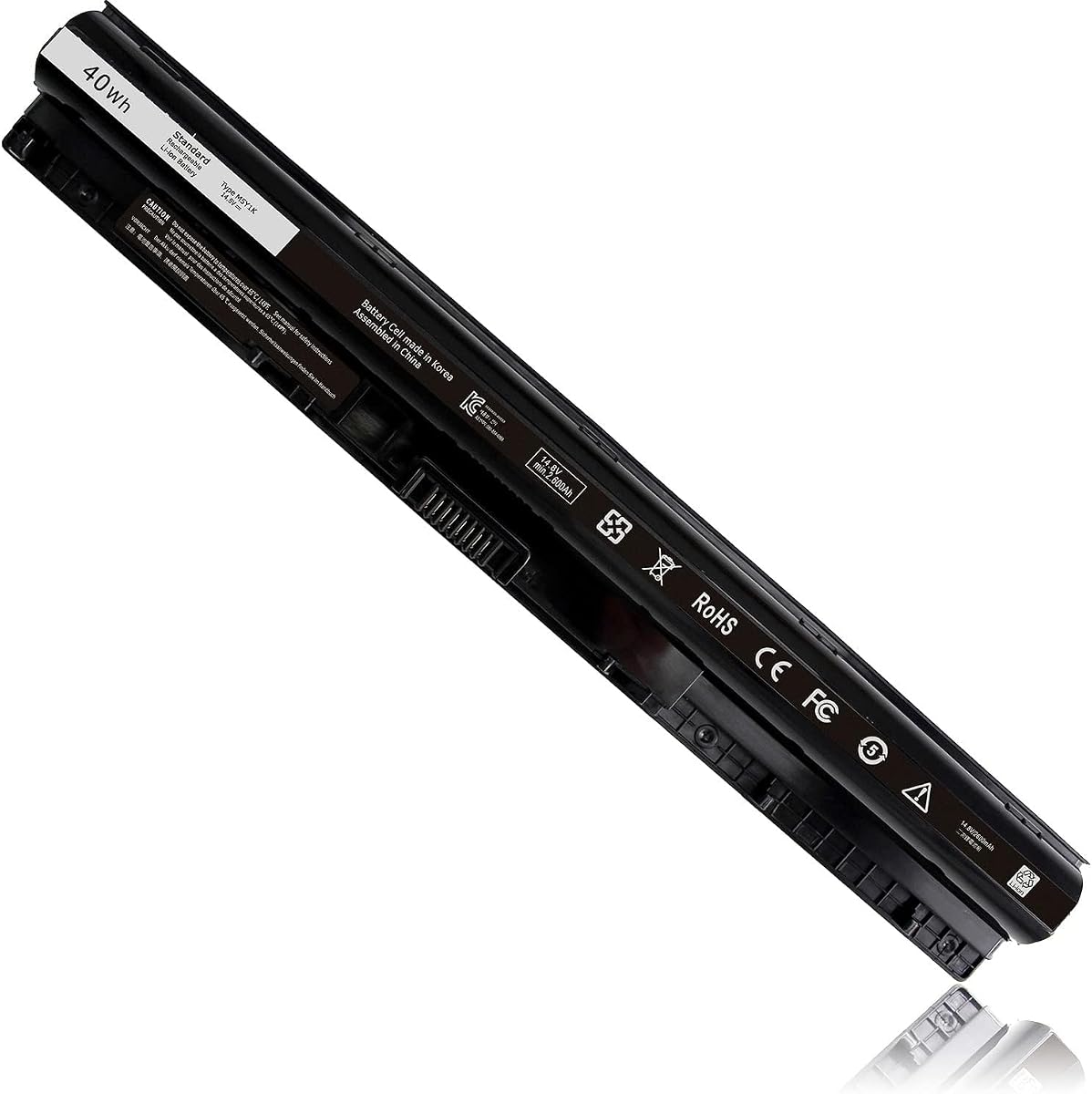
The 40Wh M5Y1K 14.8V Battery for Dell Inspiron 14 15 17 3000 5000 Series 5559 is an appealing replacement for owners of older mainstream Dell Inspiron notebooks. It has a 4.4 rating, supplies a 40Wh four-cell battery, and lists compatibility across Inspiron 14, 15, and 17 systems in the 3000 and 5000 families. Its upgraded internal PCB is presented as improving compatibility with the original M5Y1K battery design.
We may earn a commission when you buy through this link, at no additional cost to you.
The fit list includes specific Inspiron 3451, 3452, 3458, 3459, 3462, 3467, 5451, 5452, 5455, 5458, 5459, 3551, 3552, 3558, 3559, 3565, 3567, 5551, 5552, 5555, 5558, 5559, 5758, 5755, 5756, and 5759 systems. It also names Dell N-series laptops, Vostro 3458, 3459, 3558, and 3559, and Latitude 3460 and 3560. A long list of replacement part numbers, including M5Y1K, GXVJ3, HD4J0, WKRJ2, VN3N0, 451-BBMG, 453-BBBP, and P51F, supports more precise identification.
A key advantage is the product's claim that its upgraded PCB supports full compatibility and removes restrictions based on the computer's model year. This statement applies to the M5Y1K format, not every Dell battery. Newer XPS, Precision, G-series, and Inspiron models often use different connectors, dimensions, voltages, and battery families, so they should not be treated as interchangeable with this replacement.
This is a strong choice for a compatible older Inspiron that has lost useful runtime or charging reliability. It provides a conventional 40Wh capacity, a detailed compatibility map, and an instruction sheet. Buyers should still verify the complete model number and original part number, disconnect power before installation, and allow the operating system to recognize the new component.
The 14.8V, 40Wh specification is appropriate for systems designed around the M5Y1K battery family. It is a sensible target for common Inspiron 3000- and 5000-series owners who need a straightforward replacement rather than a high-capacity battery for a newer premium platform.
The upgraded internal PCB is a notable product-specific feature because older notebooks may need to communicate with the battery across different model years. That advantage applies only after the battery format, connector, and supported model have all been verified.
We may earn a commission when you buy through this link, at no additional cost to you.
This HT03XL HTO3XL Laptop Battery is a particularly expansive listing for HP Pavilion users, carrying a 4.3 rating and a 41.9Wh, 11.55V, three-cell polymer specification. Two auxiliary installation tools and a user manual accompany the battery, giving buyers the basic supplies needed for a typical bottom-cover replacement.
We may earn a commission when you buy through this link, at no additional cost to you.
Its strongest feature is the range of identified systems. The listing covers Pavilion 14-CE, 14-CF, 14-CK, 14-CM, 14-DF, 14-DH, 14-MA, 14Q, 14S, and 14-FQ families, as well as 15-CS, 15-CU, 15-CW, 15-DA, 15-DB, 15-DY, 15-EF, 15G, and 15T models. It also names 17-BY and 17-CA systems, selected Pavilion x360 14m-dh models, and several 240, 245, 250, 255, 340, 340S, 348, and 470 G-series notebooks.
The large model list has both value and risk. It makes the product useful for a buyer whose exact designation appears in the details, but the number of similarly named families makes visual and label verification essential. The listing also provides a substantial set of replaceable part numbers, spanning HSTNN, L11421, TPN, and related identifiers. A shopper should search the full notebook designation and original battery label rather than simply choose the first family name that seems close.
This option is a good fit for a compatible Pavilion owner who values an explicitly documented and extensive compatibility reference. It also suits users of the specified 14m-dh x360 models, which are not included in every competing HT03XL listing. It is less compelling for buyers seeking a higher-capacity battery, since 41.9Wh is the stated rating and alternative laptop families may require entirely different battery formats.
The listing includes conventional 14-, 15-, and 17-inch Pavilion systems, selected G-series notebooks, and several x360 configurations. This makes it a useful one-stop compatibility reference when the buyer can identify a complete model number.
HSTNN, L11421, TPN, HT03XL, and related identifiers are listed in detail. These can be more dependable than a family label when checking the sticker on the installed battery or the service information for the notebook.
We may earn a commission when you buy through this link, at no additional cost to you.
The HT03XL L11119-855 Battery for HP Pavilion is a solid choice when a buyer wants a replacement accompanied by clear safety claims and generous stated support. It has a 4.3 rating and an 11.55V, 3610mAh, three-cell lithium-ion configuration. The package includes the battery, two screwdrivers, and an instruction manual.
We may earn a commission when you buy through this link, at no additional cost to you.
This listing identifies a wide range of HP Pavilion 15-CS, 15-CW, 15-DA, 15-DB, 15-DW, 15-DY, 15-CU, 15-EF, 15-CR, 15G, 15T, and 15Z configurations. It also covers 17-BY and 17-CA models, along with 14-CE, 14-CF, 14-CK, 14-CM, 14-DH, 14M-DH, 14-DF, 14-DQ, 14-DK, 14-FQ, 14-MA, 14Q, and 14S families. Numerous model suffixes and the long list of HT03XL, HSTNN, L11119, L11421, and TPN part numbers make exact checking possible.
The battery is described as having passed intelligent detection for short circuit, overvoltage, discharge, and overcurrent protection. The manufacturer also states that the batteries are CE, FCC, and RoHS certified and tested to meet OEM specifications. These are useful product attributes, although certification and compatibility claims should be understood in the context of the information supplied by the seller rather than as independent evidence of real-world testing.
This recommendation is strongest for a compatible Pavilion owner who values the combination of included tools, 24/7 email support, a stated 60-day refund period, and 12-month replacement support. The absence of a clearly stated watt-hour figure means buyers should pay close attention to the 3610mAh and 11.55V information. Confirm both the label and physical connector before ordering, as no installation can compensate for an incorrect battery format.
The stated short-circuit, overvoltage, discharge, and overcurrent protections make this a reassuring option for a component that sits permanently between mains power and a portable computer. Buyers should still follow normal charging and storage practices.
The stated 60-day refund period, 12-month replacement support, and 24/7 email assistance distinguish this listing from options that provide only a battery and manual. Review the seller's stated procedure if a fault appears.
We may earn a commission when you buy through this link, at no additional cost to you.
The LA03DF Battery for HP 15-F Series is the highest-rated product in the guide at 4.7. It is a focused replacement for compatible HP Pavilion 15-f notebooks, with an 11.1V, 31Wh, 2600mAh, three-cell configuration. The black battery is supplied as a new unit and includes built-in circuit protection.
We may earn a commission when you buy through this link, at no additional cost to you.
Its model coverage includes a substantial number of 15-f variants, including 15-f001dx, 15-f004dx, 15-f010dx, 15-f014wm, 15-f019dx, 15-f021dx, 15-f023wm, 15-f027ca, 15-f033wm, 15-f048ca, 15-f059wm, 15-f085wm, 15-f100dx, 15-f111dx, 15-f113ca, 15-f118ca, 15-f125wm, 15-f128ca, 15-f158ca, 15-f162dx, 15-f211wm, 15-f215dx, 15-f224wm, 15-f233wm, 15-f271wm, 15-f272wm, 15-f305dx, and 15-f337wm. The title also highlights 776622-001, 775625-221, 775625-141, 775625-121, TPN-Q130, TPN-Q132, HSTNN-IB6R, and HSTNN-DB6N.
The battery is described as using high-end battery chips, a low-power design, and built-in protection against overcharging, over-discharging, and short circuits. The seller also presents it as suitable for work, video, and gaming, although actual runtime will depend on the computer's display, processor load, wireless connections, battery condition, and power settings. A 31Wh replacement is primarily about restoring the intended configuration of a compatible notebook.
This is the most attractive option for a buyer whose HP 15-f system appears explicitly in the supplied list. Its high customer rating reflects favorable owner feedback, though ratings do not guarantee identical experience across every computer. Confirm the original battery's part number, connector, and physical shape before ordering. If compatible, the focused fit, clear specifications, and stated protection features make it an excellent replacement candidate.
The 4.7 rating is the strongest numerical result among the ten products, and the compatibility list is specific enough to make cross-checking practical. The rating should complement, not replace, verification against the notebook's exact designation.
Built-in safeguards against overcharging, over-discharging, and short circuits address common concerns with a permanently installed power pack. They work alongside sound charging habits and the use of a compatible power adapter.
We may earn a commission when you buy through this link, at no additional cost to you.
The Futurebatt 33YDH Laptop Battery is designed for a broad group of Dell systems, including Inspiron, G3, G5, G7, Latitude, and Vostro notebooks. It has the lowest customer rating in this roundup at 3.8, but its 56Wh capacity and 15.2V, four-cell configuration distinguish it from the standard 40Wh M5Y1K batteries used in many older Inspiron models.
We may earn a commission when you buy through this link, at no additional cost to you.
Compatibility information names Dell Inspiron 17 7000, 7577, 7773, 7778, 7786, and 7779 systems; Inspiron G3 15 3579 and G3 17 3779; G5 15 5587; G7 15 7588; Latitude 15 3590 and 3580; Latitude 14 3490; Latitude 13 3000 and 3380; and Vostro 15 7580 and 7570. The product also references the 33YDH, PVHT1, DNCWSCB6106B, P30E, P30E001, P36E, P72F, and P75F identifiers.
The battery's notable feature is its stated protection system. The description refers to twelve security protections, flame-retardant materials, an upgraded production process, and a Smart Core system for real-time temperature control during charging and discharging. It also states that Grade A cells are used for fast charging and lower power consumption. These are meaningful selling points, but buyers should judge them alongside the lower 3.8 rating and verify fit carefully.
This is a relevant choice for a compatible newer Dell notebook owner who wants a higher stated capacity and sees the 33YDH part number on the original battery. It is not a universal replacement for Dell laptops merely because several families appear in the title. Compare the label, connector, voltage, and dimensions before ordering, and use the seller's support and stated 30-day refund option if the unit does not match.
At 56Wh, this four-cell battery offers a higher stated energy rating than common 31Wh and 40Wh replacements. That makes it worth investigating for compatible systems that originally used the 33YDH format.
The claimed real-time temperature control and flame-retardant materials are specific product features. As with any replacement battery, correct installation, compatible charging equipment, and avoidance of physical damage remain essential.
We may earn a commission when you buy through this link, at no additional cost to you.
The 40Wh M5Y1K 14.8V Battery for Dell Inspiron 15 3000 5000 Series is a well-established replacement option with a 4.5 customer rating. Its 14.8V, 2600mAh, four-cell specification is intended for the M5Y1K battery platform used across numerous Dell Inspiron 14, 15, and 17 notebooks, as well as certain Vostro systems.
We may earn a commission when you buy through this link, at no additional cost to you.
The compatibility information is extensive, covering Inspiron 15 models 3551, 3552, 3558, 3559, 3565, 3567, 5545, 5551, 5552, 5555, 5558, 5559, and 5758. It also includes 14-series systems 3451, 3452, 3458, 3459, 3462, 3467, 5451, 5452, 5455, 5458, and 5459, plus 17-series systems 5755, 5756, 5758, and 5759. A long list of M5Y1K, MSY1K, P51F, VN3N0, GXVJ3, HD4J0, WKRJ2, 451, and 453 part numbers assists identification.
The product description emphasizes intelligent detection for short circuit, overvoltage, discharge, and overcurrent protection. It also states that the materials meet high quality performance requirements and that the batteries are CE, FCC, and RoHS certified. The package includes one battery and a manual, while the seller states that 24/7 email support, a 60-day refund period, and 12-month replacement support are available.
This battery is a strong pick for an older compatible Dell Inspiron owner who values a high customer rating and a detailed model list. Its limitation is platform age: it is meant for the M5Y1K form factor and should not be assumed to fit the 69KF2, 33YDH, or JC03 families elsewhere in the guide. Match the original label and connector before ordering, then allow the system to complete an initial charge and recognize the new battery.
A 4.5 rating and broad compatibility list make this an attractive mainstream choice. Its 40Wh rating aligns with the original M5Y1K format rather than attempting to substitute a physically or electrically different pack.
The stated short-circuit, voltage, discharge, and current protections add reassurance, while the stated refund and replacement periods offer recourse if a fault occurs. The manual-only accessory package is simpler than some competing listings.
We may earn a commission when you buy through this link, at no additional cost to you.
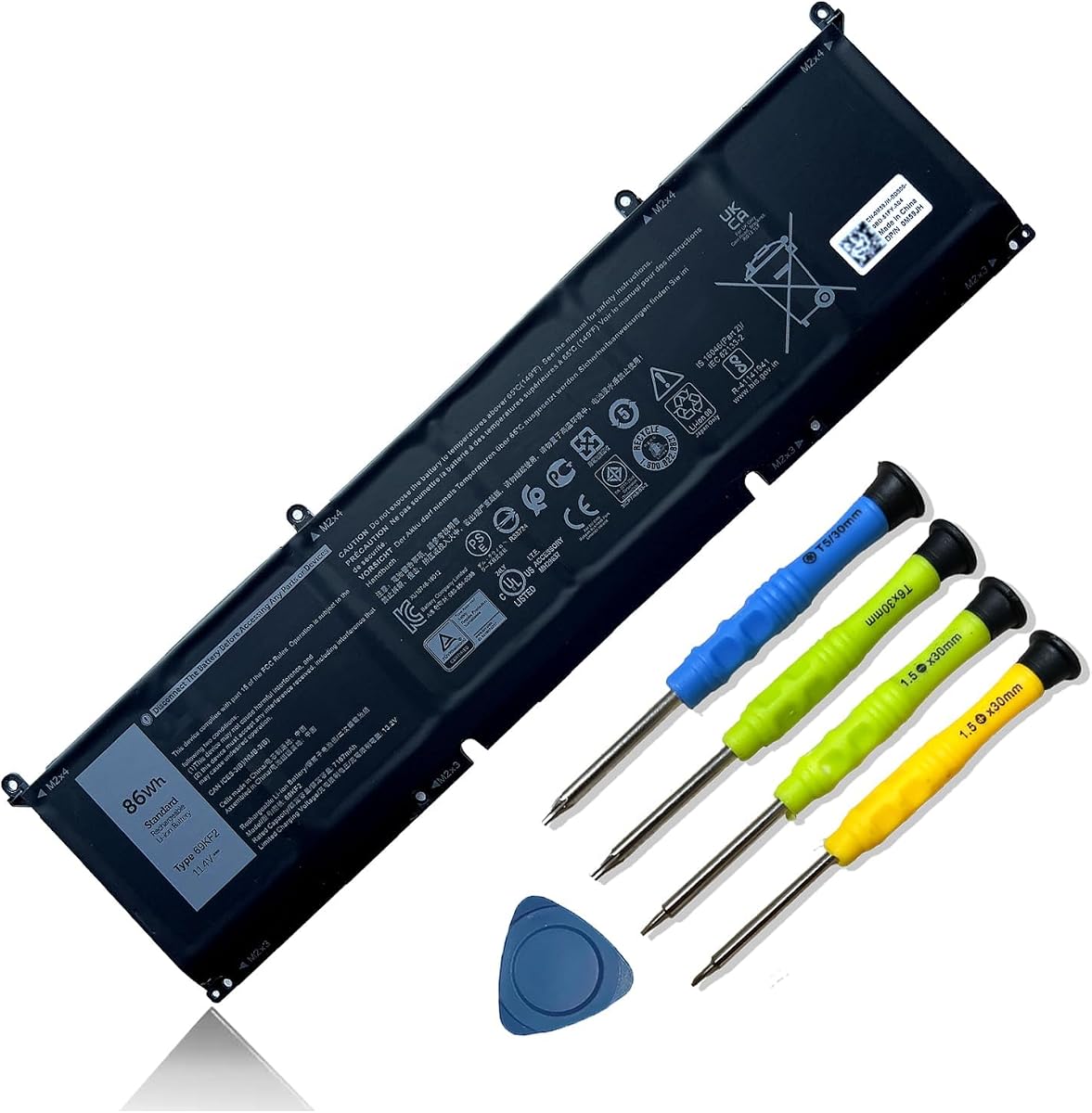
The 86Wh 69KF2 6-Cell Battery Replacement is the premium-capacity choice in this guide. It has a 4.4 rating, an 11.4V voltage, a stated 86Wh or 7167mAh capacity, and six lithium-ion cells. It is intended for newer Dell XPS 15, Precision, Inspiron Plus, M15, M17, G15, and G7 systems that use the 69KF2 format.
We may earn a commission when you buy through this link, at no additional cost to you.
Compatibility is broken down clearly by product family. The battery supports XPS 15 9500 and 9510 models, Precision 5550 and 5560 systems, Inspiron 16 Plus 7610, Inspiron 7510, M15 R3 through R7 systems, M17 R3 and R4 systems, G15 5510, 5511, and 5520 models, G15 5515 Ryzen Edition, G15 5521 Special Edition, and G7 15 7500 systems. Compatible part numbers include 69KF2, 70N2F, M59JH, 8FCTC, 08FCTC, and 070N2F.
The stated 86Wh capacity gives it a clear advantage over lower-capacity replacements for compatible large-screen machines. The seller says the battery uses Grade A cells rated for up to 500 recharge cycles, and the package includes screwdrivers. It also states UL, CE, FCC, and RoHS certification, with short-circuit, overheat, and overload protections. Those claims make this a particularly complete specification sheet for buyers who want a high-capacity modern option.
The product is not a universal solution for Dell laptops, however. The 69KF2 connector, dimensions, charging profile, and power requirements differ from the M5Y1K, 33YDH, and other batteries in this roundup. Check the full notebook designation and original battery label carefully. For a compatible XPS, Precision, M-series, G-series, or Inspiron Plus system, this is a compelling high-capacity replacement with useful installation accessories.
The 86Wh six-cell configuration offers substantially more stated energy than the 31Wh, 40Wh, and 56Wh alternatives here. That distinction is meaningful for compatible larger systems that place heavier demands on their battery.
The seller advises reinstalling the battery if it is not immediately recognized, checking that the interface is fully connected, and then discharging it to 5% before charging and cycling it three or four times. Follow the laptop manufacturer's calibration and safety guidance as well.
We may earn a commission when you buy through this link, at no additional cost to you.
The 919700-850 JC03 Laptop Battery is a well-regarded replacement for owners of compatible HP 15-bs, 15-bw, and 17-bs systems. It has a 4.5 rating, a 10.95V voltage, a 31Wh or 2600mAh capacity, and a three-cell lithium-ion design. An instruction sheet is included, and the seller states a 12-month warranty and 60-day return period.
We may earn a commission when you buy through this link, at no additional cost to you.
The compatible model list includes HP Notebook 15-BS, 15-BW, 17-BS, 15Q-BU, 15G-BR, 17-AK, and 15Q-BY series. Numerous suffixes are identified, including 15-bs013dx, 15-bs015dx, 15-bs113dx, 15-bs115dx, 15-bs020wm, 15-bs033cl, 15-bs038dx, 15-bs051od, 15-bs053od, 15-bs077nr, 15-bs080wm, 15-bs091ms, 15-bs095ms, 15-bw011dx, 15-bw053od, 15-bw032wm, 15-bw033wm, 17-bs061st, 17-bs011dx, 17-bs049dx, and 17-bs153cl.
Part-number support is extensive as well. The listing names JC03, HSTNN-LB7V, 919700-850, 919701-850, 919681-221, 919681-421, 919682-121, 919682-421, 919682-831, HSTNN-DB8E, HSTNN-H7BX, HSTNN-L67N, HSTNN-LB7W, HSTNN-PB6Y, HSTNN-HB7Y, TPN-C129, TPN-C130, TPN-W129, TPN-W130, TPN-Q186, and TPN-Q187. The battery is described as using Grade A cells with CE, FCC, and RoHS certification and a smart chip for overcharge, overheat, and short-circuit protection.
This is a good recommendation for an HP owner whose battery label identifies the JC03 or 919700-850 family. The 4.5 rating and 1000-plus cycle claim make it appealing for a long-term replacement, although actual cycle life varies with temperature, charging habits, and use. The package does not include screwdrivers, so buyers may need suitable tools for the laptop's bottom panel. Always verify the connector, dimensions, and complete model designation before purchase.
The model and part-number list makes this an attractive choice when the original battery is marked JC03 or 919700-850. It should be selected by the installed battery's identifiers rather than by screen size alone.
The stated use of Grade A cells, more than 1000-cycle rating, and smart-chip safeguards are attractive for owners seeking longevity. Real-world results depend on keeping the battery within appropriate temperatures and avoiding prolonged depletion or abusive charging.
We may earn a commission when you buy through this link, at no additional cost to you.
Choosing a laptop replacement battery requires matching both the physical design and the electrical expectations of the computer. The most important step is to identify the existing battery accurately, then compare every relevant specification before considering support terms or convenience features.
Start with the label on the battery currently installed in the laptop. Record the main battery model, every visible part number, voltage, and connector layout. A notebook family name is only a broad clue because vendors sometimes use the same series designation for systems with different battery formats. The complete model number printed on the laptop's underside and any service information can provide a second check.
Use the original battery identifiers whenever possible. If the label has faded, the retailer's compatibility list can help, but you should still confirm physical dimensions and the connector. Do not rely on a visual resemblance alone.
A replacement should have the same nominal voltage and a compatible cell arrangement as the original. Voltage is not a cosmetic specification: a mismatched pack may trigger charging errors, fail to power the system correctly, or create unsafe operating conditions. The listed alternatives here use several voltages, including 10.95V, 11.1V, 11.4V, 11.55V, 14.8V, and 15.2V, each intended for particular platforms.
Treat a differing voltage as a warning to stop and recheck the model. Some electrically related packs may appear close, but only the correct platform-specific battery should be considered.
Capacity may be stated in watt-hours or ampere-hours, and a battery may use several cells to reach its final rating. The watt-hour figure reflects the energy available, while ampere-hours alone do not fully describe it without voltage. A replacement should generally preserve the original energy class so that charging behavior, thermals, and expected runtime remain appropriate.
Higher capacity is not automatically better. A larger pack may add weight, change the machine's balance, and be incompatible with the charger or firmware. For most replacements, matching the original format and capacity is the safest approach.
Even when the part numbers appear similar, the plug, contact arrangement, cable position, and battery outline must align. A pack can have compatible electrical figures yet be impossible to install or unable to establish a proper connection. Compare the top and bottom views, mounting-tab positions, and connector orientation with the removed battery or official imagery.
Do not force a battery into position. Resistance, unusual pressure, or a connector that does not sit flush are clear signs that the replacement is wrong.
Several listings state that the batteries include short-circuit, overcharge, over-discharge, overvoltage, overcurrent, overheat, or overload protection. Some also mention CE, FCC, RoHS, or UL certification. These details are useful differentiators, but buyers should still use suitable chargers, avoid extreme heat, and inspect the battery before installation.
Choose a seller that clearly describes its safety protections and quality-control process. A vague claim is not equivalent to a detailed specification, so look for verifiable part numbers, ratings, and certifications.
Support terms can make a replacement purchase less risky. Listed options include 30-day refunds, 60-day returns, 12-month warranties, 12-month replacement support, and 24/7 email assistance. These periods are stated by the respective sellers and may be subject to conditions, so read the current listing carefully before relying on them.
Save the order confirmation and keep the packaging, battery, and installation record if a problem develops. Contact the seller promptly if the battery is damaged, does not charge, or produces an unexpected error.
Several HP options in this guide include two screwdrivers and a user manual. That can make a basic replacement more convenient, especially when the laptop requires a uncommon screw. Tool inclusion does not guarantee a simple procedure; some notebooks contain multiple screw types, clips, or several layers beneath the cover.
Use the correct tool, keep screws organized, and never puncture or bend the battery. If a cell is swollen, torn, overheated, or otherwise damaged, do not install or continue using it.
The roundup covers older HP Pavilion and Dell Inspiron formats as well as newer high-capacity systems. A replacement designed for a 40Wh M5Y1K notebook will not automatically suit a newer 69KF2 or 33YDH machine, even when both belong to Dell. Connector standards, voltages, firmware communication, and physical designs can change substantially.
If the battery label identifies a format not represented in your model family, search using that exact identifier rather than trying to adapt a similar-looking unit. Generic compatibility claims are less reliable than a match confirmed by the manufacturer part number.
Before installation, power the laptop fully off, disconnect the AC adapter and peripherals, and consult the laptop's service guide. Remove the bottom cover with the correct tool, disconnect the battery cable before removing screws, and avoid pulling on the connector. Compare the new battery with the old one before connecting it.
After installation, reconnect the battery and bottom cover, then boot the laptop and connect the appropriate charger. Some systems may need several charge cycles before they recognize or calibrate a new pack. The 69KF2 product specifically advises rechecking the connector, discharging to 5% rather than fully empty, and cycling three or four times if initial recognition is an issue. Follow the computer manufacturer's calibration guidance as well.
For long service, keep the battery away from excessive heat, direct sunlight, liquid, and physical damage. Avoid keeping a laptop in a hot car or using a swollen battery. Use the specified charger, remove the system from sustained mains power only when appropriate, and follow local travel guidance for carrying lithium-ion batteries. If a pack becomes hot, bulges, leaks, or smells unusual, stop using it and arrange safe professional service.
Yes, a compatible third-party battery can replace an original pack if its model number, voltage, capacity, cell arrangement, physical dimensions, connector, and charging requirements all match. Many buyers use replacements from Emanjor, Futurebatt, Mobik, and other third-party sellers. Never assume that two batteries for the same laptop brand are interchangeable, and never force a connector that does not fit.
Open the bottom cover and read the label on the existing battery, or find the part number in the laptop's service information. Record all main and secondary part numbers, then compare them with the replacement listing. The complete notebook model designation provides a useful second check, especially for families containing many similar configurations.
A system may require the connector to be reseated, several charge cycles, a firmware update, or an operating-system power-management reset. Some modern laptops can also distinguish a replacement battery from an original one and limit charge behavior until a manufacturer-approved battery is installed. If the warning persists or the battery does not charge, contact the laptop manufacturer or a qualified repair technician.
Only when the battery is genuinely compatible and the laptop's charging system supports it. A higher energy rating can provide more runtime, but it can also add weight and create heat. For most standard replacements, preserving the original voltage, capacity class, and cell design is the most reliable approach.
The supplied information for the first HT03XL product specifically states that HT03XL is not compatible with HW03XL, even though both may be associated with some HP Pavilion 15 and 17 systems. Treat them as different battery formats and verify the installed label before ordering. Similar names do not guarantee interchangeable connectors or electrical designs.
A new or previously unused battery may need several charge and discharge cycles for the laptop and battery management system to learn its charge limits. The 69KF2 listing recommends reconnecting the interface, discharging to 5%, and cycling three or four times. Avoid repeated full depletion solely for calibration, and follow the laptop manufacturer's recommended procedure.
Stop using and charging the laptop, disconnect the AC adapter if it is safe to do so, and avoid pressing on or puncturing the battery. A swollen pack should be handled according to local battery and e-waste guidance and replaced by a qualified technician. Do not place a damaged lithium-ion battery in ordinary household trash.
Lower weight can be useful, but capacity and fit should take priority. Many compatible replacements use three or four cells, while high-capacity models may use six. Compare the original weight, energy rating, and manufacturer-supported format. A battery that offers the intended capacity and reliable fit is generally preferable to one chosen only for minimal weight.
The HT03XL L11119-855 for HP Pavilion stands out as the best overall option in this guide because of its extensive supported model list, 41.7Wh specification, included screwdrivers, and strong customer rating. The 40Wh M5Y1K battery serves Dell users of older mainstream Inspiron systems, while the 86Wh 69KF2 option offers a high-capacity choice for compatible modern XPS, Precision, M-series, G-series, and Inspiron Plus computers.
For a specific computer, compatibility matters more than a general ranking. Check the battery's main model number, all printed part numbers, voltage, cell count, connector, and physical dimensions before buying. The LA03DF is particularly compelling for a listed HP 15-f system, the JC03 fits compatible HP 15-bs families, and the Futurebatt 33YDH targets a different group of Dell notebooks, so exact model verification is essential.
Finally, check the current product listing, seller terms, compatibility details, and price at the time of purchase. Inventory and pricing can change, and warranty or return conditions are controlled by the individual listing. Taking a few minutes to compare the replacement with the battery already in your laptop is the best protection against an incorrect order and unnecessary return.