
Corsair K55 CORE TKL RGB
4.7Editor score
Space-saving tenkeyless layout
Eight-zone RGB lighting
Responsive 1,000Hz polling
Explore the best tenkeyless keyboard for more mouse space with 10 top TKL models compared for gaming, typing, responsiveness, connectivity, comfort, and
A tenkeyless keyboard, or TKL, removes the number pad while preserving the core letters, numbers, function keys, and navigation controls used in everyday computing. That reduction can free valuable desk space for wider mouse movements, which is especially useful in competitive shooters, strategy games, and any setup where fluid cursor control matters.
This guide compares ten TKL keyboards across switch technology, sound character, responsiveness, lighting, connectivity, media controls, build quality, and practical features. The list includes membrane, tactile mechanical, linear mechanical, and Hall-effect options, as well as wired and wireless designs, so readers can compare formats without relying on a single preferred brand.
Each review explains the product's strongest benefits, practical trade-offs, and likely audience. The top selections stand out for their balance of responsiveness, controls, connectivity, and desktop utility, while the remaining options serve different priorities. Product details and availability can change, so check the current listing, layout, and features before purchasing.
4.7Editor score

4.7Editor score
4.1Editor score
The table below compares all ten TKL keyboards by layout, switch behavior, connection method, lighting, and standout controls, making it easy to identify the model that best fits your desk and play style.


The Corsair K55 CORE TKL RGB is a compelling first tenkeyless keyboard for players who want more room to move a mouse without paying for a full-size board. It carries a 4.7 rating and combines a compact layout, quiet membrane keys, eight-zone RGB lighting, dedicated media controls, and a reported 1,000Hz polling rate. Those traits make it unusually well equipped for the category.
We may earn a commission when you buy through this link, at no additional cost to you.
The most obvious benefit is the TKL footprint. Without the number pad, the keyboard occupies less desk width, leaving a clearer area for sweeping mouse movements. Its membrane switches are designed to operate quietly, which can be useful in shared rooms or late-night sessions. Four dedicated media buttons add direct control over volume, playback, the Windows key, and lighting, while the eight lighting zones provide color without taking away desk space.
The trade-off is the nature of the switches. Membrane keys do not offer the distinct bottom-out or tactile bump associated with many mechanical and Hall-effect boards. Its RGB is also divided into eight zones instead of lighting each key independently, and the product information does not mention adjustable switch actuation, dedicated per-key macros, or wireless operation. Those omissions make it more conventional than the most specialized gaming models.
Despite those limits, the K55 CORE TKL is an excellent match for someone entering the TKL category, building a compact gaming setup, or prioritizing quiet operation and practical controls. It may be the most balanced way to free mouse space without moving into enthusiast-grade switch systems. It is especially convincing for competitive and everyday use where responsiveness, spill resistance, and simple controls matter more than elaborate customization.
Removing the number pad creates a broad, uninterrupted mouse area without sacrificing the navigation cluster or full function row. That balance makes this board useful for both gaming and regular productivity.
Membrane switches keep operation relatively quiet, and the four dedicated media buttons provide quick access to common system functions. The result is a board that is easier to share and quicker to adjust during a session.
We may earn a commission when you buy through this link, at no additional cost to you.
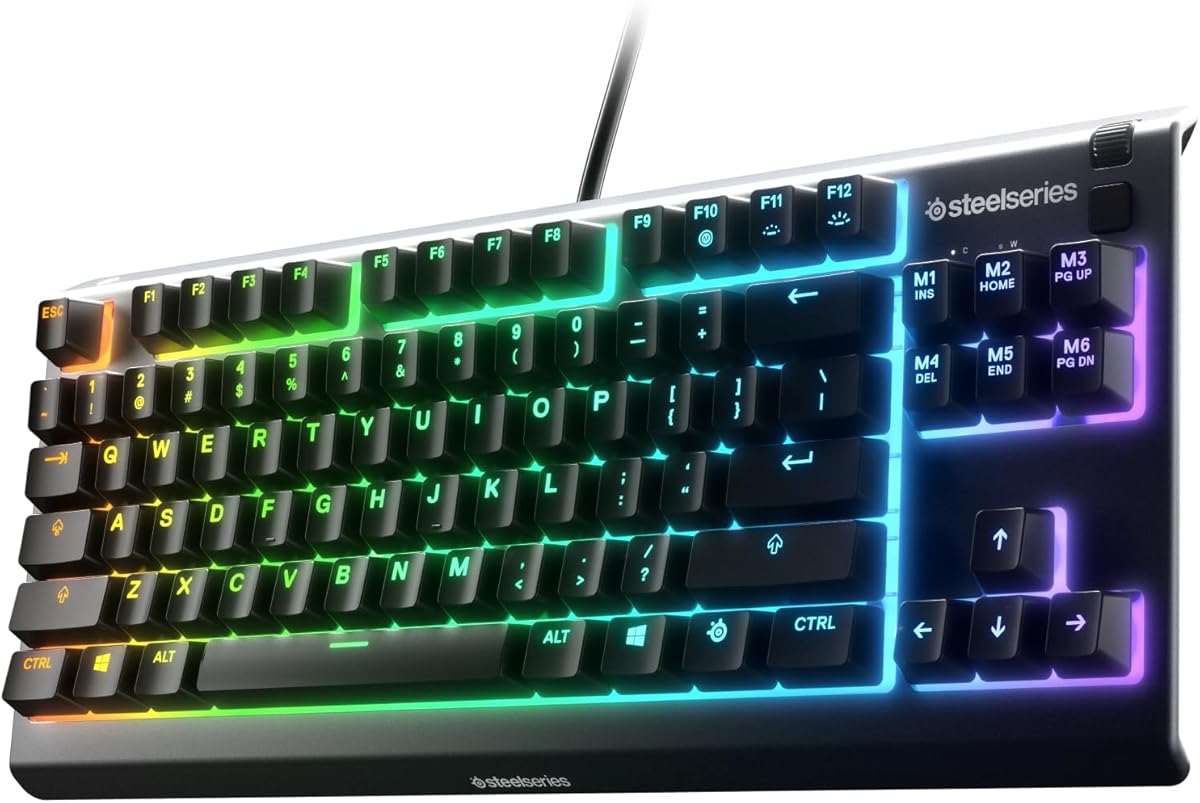
The SteelSeries Apex 3 TKL RGB is a broad-purpose gaming keyboard with a 4.5 rating, quiet switches, PrismSync illumination, and an unusually useful set of multimedia controls. Its tenkeyless shape follows the compact form factor favored by competitive players, making it suitable for anyone who wants more room for mouse movement while retaining familiar navigation keys.
We may earn a commission when you buy through this link, at no additional cost to you.
The switches are built from durable low-friction material and are designed for near-silent operation, with a stated lifespan of more than 20 million keypresses. Anti-ghosting technology supports reliable multi-key input, while IP32 water and dust resistance helps protect the board during regular use. A clickable volume roller, playback keys, and brightness control make it convenient without requiring constant software navigation.
The main limitations are its reliance on a wired setup and the use of reactive RGB effects rather than individually programmable keys. It also lacks the switch-level actuation control offered by magnetic gaming keyboards, as well as the hot-swappable construction found in some premium models. For a buyer seeking broad device compatibility and a straightforward wired design, those are reasonable compromises.
This keyboard is best for gamers who value quiet operation, convenient media controls, and compatibility across Windows, macOS, and current console platforms. It also works well for users who need a TKL for both work and play. The compact footprint, understated control set, and durable switch design make it a confident general recommendation without entering the more specialized competition offered by Hall-effect alternatives.
The clickable roller and dedicated media keys are useful for adjusting sound and playback without leaving a game or application. They add everyday convenience while preserving the TKL's space-saving shape.
Low-friction switches reduce the chance of disturbing others, and anti-ghosting helps maintain accurate input. IP32 protection adds confidence against the dust and splashes encountered in an active desktop setup.
We may earn a commission when you buy through this link, at no additional cost to you.
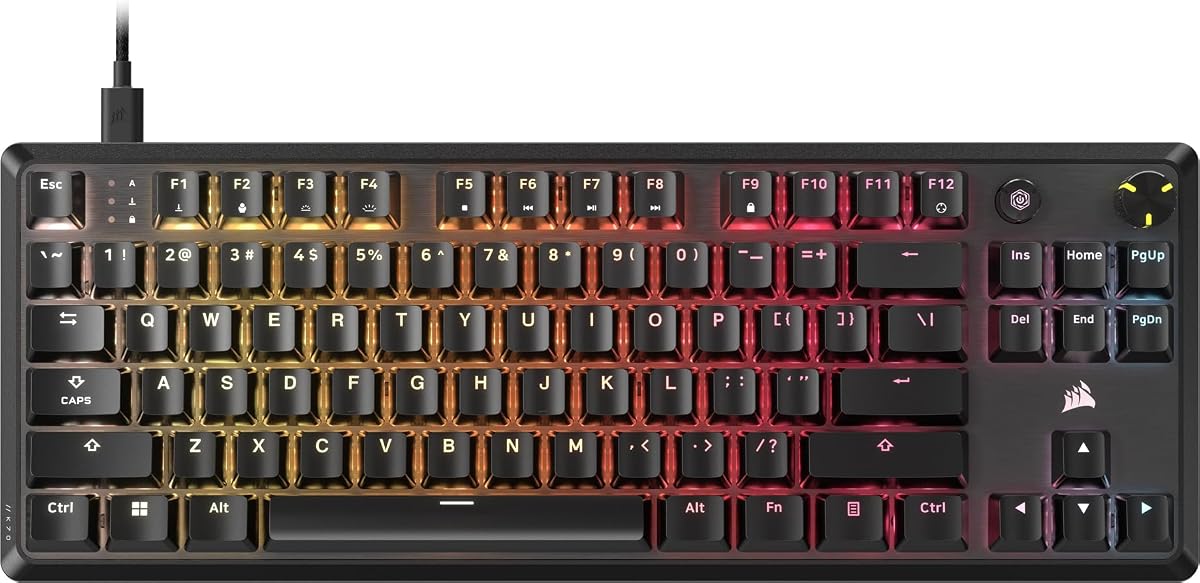
The Corsair K70 CORE TKL RGB is a mechanical gaming board that combines a compact footprint, linear performance, per-key lighting, and a programmable rotary control. Its 4.4 rating reflects a well-rounded design aimed at players who want more mouse space and a refined mechanical feel without moving to a full-size keyboard.
We may earn a commission when you buy through this link, at no additional cost to you.
Pre-lubed CORSAIR MLX Red v2 linear switches are intended to deliver smooth, stable keystrokes. Two layers of foam and pre-lubricated stabilizers temper unwanted pings and clacks, which should make the board more pleasant during long typing or gaming sessions. The ABS double-shot keycaps are designed to resist cracking, while a multi-function dial and programmable media button can be customized through iCUE.
Linear switches are the main preference-dependent feature. They can feel fast and unobtrusive, but someone who wants a visible bump or audible click may find them less satisfying. The keyboard is also a wired model, and its deepest customization depends on iCUE software. Compared with Hall-effect boards, it does not provide adjustable actuation or rapid-trigger behavior.
The K70 CORE TKL is a good recommendation for gamers who prefer linear mechanical switches and want per-key lighting, manageable acoustics, and premium controls in a compact package. It is also suitable for users who divide their time between gaming and typing. The balance of sound management, tactile quality, and useful media hardware makes it more specialized than the K55 CORE without reaching the same complexity as rapid-trigger models.
Pre-lubricated MLX Red v2 switches provide a smooth linear action, while foam and stabilized internals reduce harsh acoustic peaks. The result is designed for long sessions where a loud mechanical board can become tiring.
The programmable media button and multi-function dial add useful control points without restoring a number pad. This keeps the desktop streamlined while making common adjustments easier to reach.
We may earn a commission when you buy through this link, at no additional cost to you.
The Logitech G PRO X TKL Rapid is the strongest specialist choice in this roundup for competitive shooters and other games where key timing matters. It has a 4.7 rating and uses magnetic analog Hall-effect switches, offering a level of control that goes beyond the fixed behavior of conventional mechanical or membrane keyboards.
We may earn a commission when you buy through this link, at no additional cost to you.
Its central advantage is Rapid Trigger, which allows a key to reactivate without a full release. Actuation is listed at 35 grams, and users can customize actuation points and sensitivity in Logitech G HUB. KEYCONTROL adds commands and multi-action combinations across multiple layers, while LIGHTSYNC RGB synchronizes the keyboard with music, on-screen action, and other compatible equipment. Function-key modes also allow Rapid Trigger and switch travel to be adjusted without repeatedly opening the software.
This depth comes with a learning curve. Advanced functions require G HUB, and the board uses a wired connection, so it will not suit someone seeking a freely movable wireless setup. Players who only need a quiet membrane feel may find the configuration excessive. Fixed-switch purists may also prefer the clearer, more consistent bottom-out of a standard mechanical board over magnetic analog operation.
The Rapid is best recommended to competitive players willing to configure the keyboard for their preferred movement and fire rate. It is especially compelling for first-person shooters where rapid movement, counter-strafing, and repeated inputs benefit from early reactivation. For those users, the TKL footprint frees mouse space while the switch technology addresses a real performance need rather than adding another decorative feature.
Because a key can re-register before complete release, movement inputs can occur with less waiting. This makes Rapid Trigger a practical tool for games that reward precise counter-strafing and fast directional changes.
KEYCONTROL supports programmable commands and multi-action combinations across layers. Adjustable actuation and sensitivity let users tune the same physical key to different tasks, provided G HUB is available.
We may earn a commission when you buy through this link, at no additional cost to you.
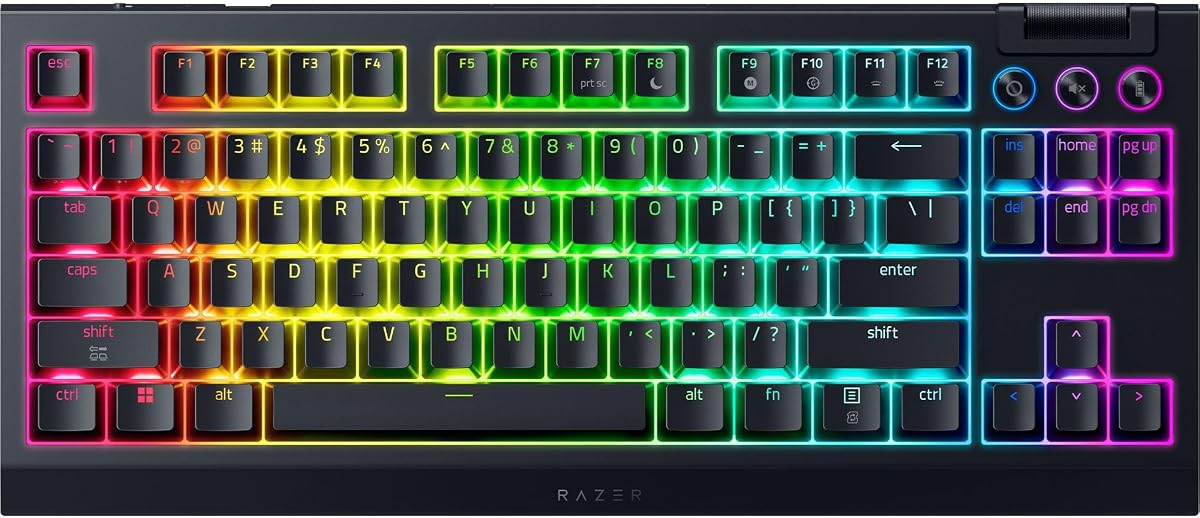
The Razer Ornata V3 TKL focuses on a slimmer, lower-profile alternative to the taller mechanical designs found in many gaming keyboards. It carries a 4.6 rating and pairs those short keys with a magnetic soft-touch wrist rest, mecha-membrane switches, dedicated media controls, and eight-zone Razer Chroma RGB lighting.
We may earn a commission when you buy through this link, at no additional cost to you.
The low-profile keycaps and shorter switches are intended to support natural hand positioning during extended sessions. UV coating helps protect the legends from fading and everyday wear, while the wrist rest attaches magnetically to provide palm support without creating a separate accessory. Razer Snap Tap can prioritize the latest input between two assigned keys through Synapse 4, and the media keys can manage playback, brightness, and volume.
The mecha-membrane construction is the defining compromise. It blends familiar membrane behavior with a clicky, mechanical-style feel, but it does not provide the deeper programmability or consistent bottom-out of a premium mechanical board. The Snap Tap feature also depends on Razer software, and the eight-zone lighting is less granular than per-key illumination. Like the other wired options here, it prioritizes stability over portability.
The Ornata V3 TKL is a strong fit for users who want the space benefits of TKL without a tall keyboard. It is particularly appealing for extended gaming and typing sessions where low-profile geometry, wrist support, and relatively restrained noise matter. Those who want deeper key customization may lean toward a mechanical or magnetic model, but for a slimmer, simpler gaming experience, this keyboard offers a distinctive combination.
Slim keys and shorter switches reduce the distance your hands must travel vertically. The magnetic wrist rest adds support that can make long gaming and productivity sessions more comfortable.
Dedicated media keys provide quick access to common controls, while Snap Tap adds an optional response behavior for paired inputs. Eight-zone Chroma lighting provides visual customization without adding controls to the top edge.
We may earn a commission when you buy through this link, at no additional cost to you.
The Razer BlackWidow V4 TKL Wireless is the most feature-rich conventional mechanical option in the guide, with a 4.1 rating, hot-swappable sockets, 2.4GHz wireless, Bluetooth, a clickable multi-function roller, and an advertised battery life of up to 980 hours. It combines all of those features in a TKL chassis designed to preserve mouse space.
We may earn a commission when you buy through this link, at no additional cost to you.
The socketed PCB accepts three- or five-pin switches, allowing the pre-loaded orange switches to be replaced with alternatives that suit a preferred feel. A top-mounted stainless-steel plate, tape-enhanced PCB, lubricated stabilizers, and two layers of foam are intended to produce a clean typing experience. The keyboard can connect through Razer HyperSpeed Wireless, pair with a compatible Razer mouse on the same dongle, or connect to three Bluetooth devices.
Its 4.1 rating is the lowest among the products here, and the available information does not explain the reason, so it would be misleading to assign a specific cause. The keyboard also lacks adjustable magnetic actuation, and its orange switches will not satisfy someone seeking a linear or tactile experience out of the box. Some buyers may find the breadth of configuration unnecessary for basic desktop use.
Even so, this is a strong premium recommendation for someone who wants a flexible mechanical board without giving up wireless freedom. Hot-swappable construction lets the user change switch feel over time, while the multi-device setup works well for a desk shared among a gaming PC, laptop, and other devices. The combination of TKL dimensions, connectivity, and customization offers a particularly flexible foundation for a mouse-heavy setup.
HyperSpeed Wireless keeps the board connected for gaming, while Bluetooth can serve up to three paired devices. This makes it easier to move between a gaming computer and everyday productivity systems without changing desk arrangements.
The socketed PCB supports both three- and five-pin switches, making it possible to replace the supplied orange switches. That flexibility is valuable for users who may want to try linear, tactile, or acoustically different options later.
We may earn a commission when you buy through this link, at no additional cost to you.
The Logitech G PRO X TKL Lightspeed is a wireless tenkeyless mechanical keyboard built around tactile GX Brown switches. It has a 4.6 rating and combines LIGHTSPEED wireless, Bluetooth, USB, LIGHTSYNC lighting, game mode, media keys, and a volume roller in a layout designed for both competitive play and daily productivity.
We may earn a commission when you buy through this link, at no additional cost to you.
The tactile switches give each key a noticeable bump, making them a familiar middle ground for users who want clearer feedback than a light linear switch. Dual-shot PBT keycaps are built for durability and resist the oily appearance associated with lower-quality plastic caps. The LIGHTSPEED adapter can pair with a compatible mouse and keyboard, while Bluetooth and wired modes provide alternatives for a more flexible desk.
One consideration is receiver placement. Product information notes that the USB receiver may be included in the mouse's battery compartment for wireless keyboard bundles or attached to the keyboard packaging for standalone purchases, so buyers should confirm what is included. The keyboard also lacks the adjustable actuation and rapid-trigger behavior of magnetic models. Its traditional tactile action will feel more familiar to many users.
This is an excellent choice for gamers who want a proven TKL shape, wireless operation, and tactile feedback. It works especially well for players who value mouse freedom and clear key contact without needing a specialized rapid-trigger setup. It is also a good fit for hybrid work, since the volume roller, media controls, and multiple connection modes help it function beyond gaming.
GX Brown switches offer a clear bump during travel without the sharper click associated with clicky mechanical designs. That middle-ground profile can help players confirm inputs while remaining suitable for extended typing.
LIGHTSPEED, Bluetooth, and wired options let the keyboard adapt to different sessions. A compatible mouse can share the wireless adapter, reducing cable clutter around the area reserved for mouse movement.
We may earn a commission when you buy through this link, at no additional cost to you.
The Logitech G515 Lightspeed TKL is a slim, tri-mode gaming keyboard built around low-profile GL Brown tactile switches. It carries a 4.5 rating and combines a compact tenkeyless design with LIGHTSPEED wireless, Bluetooth, wired operation, LIGHTSYNC RGB, and up to 36 hours of stated continuous battery life.
We may earn a commission when you buy through this link, at no additional cost to you.
The factory-lubed switches are designed to feel smooth, actuate quickly, and provide discernible tactile feedback. KEYCONTROL can assign as many as 15 functions to each key, allowing users to create shortcuts, multi-action controls, and personalized gaming commands. Three hotkeys provide direct access to wireless mode, Bluetooth, and Game Mode, while the 1 ms LIGHTSPEED report rate supports a low-latency wireless connection.
Its low-profile silhouette is less visually imposing than a full-height mechanical keyboard and leaves more visual and physical room around a mouse pad. The trade-offs are a shorter advertised battery duration than the Razer BlackWidow V4 TKL and the need for G HUB to access advanced functions. It also does not have Hall-effect adjustment, so users cannot tune actuation points or use rapid reactivation.
The G515 is well suited to players who want tactile keys, a slim body, and effortless switching among wireless and wired use. It is a particularly attractive choice for a mixed gaming and work desk because its compact proportions and programmable controls serve both environments. It may not be the first choice for a player who prioritizes the deepest competitive tuning, but it delivers a polished, flexible TKL experience.
The low-profile GL switches reduce overall keyboard height and retain tactile feedback. Their factory lubrication is intended to create a smooth, consistent action across regular typing and gaming use.
KEYCONTROL's support for up to 15 functions per key turns the board into more than a standard gaming peripheral. Users can place commands and multi-action sequences on different layers and access them through G HUB.
We may earn a commission when you buy through this link, at no additional cost to you.
The MSI Gaming Gear Bundle FRIEREN Edition is the only package here that includes both a wireless TKL keyboard and a wireless mouse, making it a convenient starting point for a complete compact gaming setup. It has a 4.9 rating, the highest in the list, and pairs an ergonomic mechanical keyboard with a lightweight 65-gram mouse.
We may earn a commission when you buy through this link, at no additional cost to you.
The keyboard uses durable, dustproof mechanical linear switches and a tenkeyless layout intended to free desk space and improve working ergonomics. Its long-range 2.4GHz wireless connection removes cable constraints, while rechargeable power reduces the need for disposable batteries. The included mouse uses a PixArt PAW3395DM optical sensor with up to 26,000 DPI and a stated 1,000Hz polling rate.
Buying as a bundle does mean less freedom than selecting a keyboard and mouse separately. The available product information does not list RGB lighting, dedicated media controls, a volume roller, rapid-trigger controls, or detailed battery figures for the keyboard. The mouse is extremely light at 65 grams, which may be ideal for fast movement but does not necessarily suit every hand or preference.
This bundle is best for a gamer who wants a coordinated wireless keyboard-and-mouse solution with a TKL footprint and minimal desk clutter. The combination removes the need to research separate components and presents a mouse specifically designed for quick movement. It is also a compelling gift option because the two core peripherals are included together, provided the user is comfortable with the linear switches and lightweight mouse.
The keyboard and mouse work together as a wireless set, simplifying initial setup. This is useful for a new gaming station that needs both devices but does not offer the freedom of selecting each component separately.
The 65-gram mouse and 26,000-DPI optical sensor target quick cursor movement. Its 1,000Hz polling rate complements the keyboard's space-saving role by supporting precise, responsive aiming.
We may earn a commission when you buy through this link, at no additional cost to you.
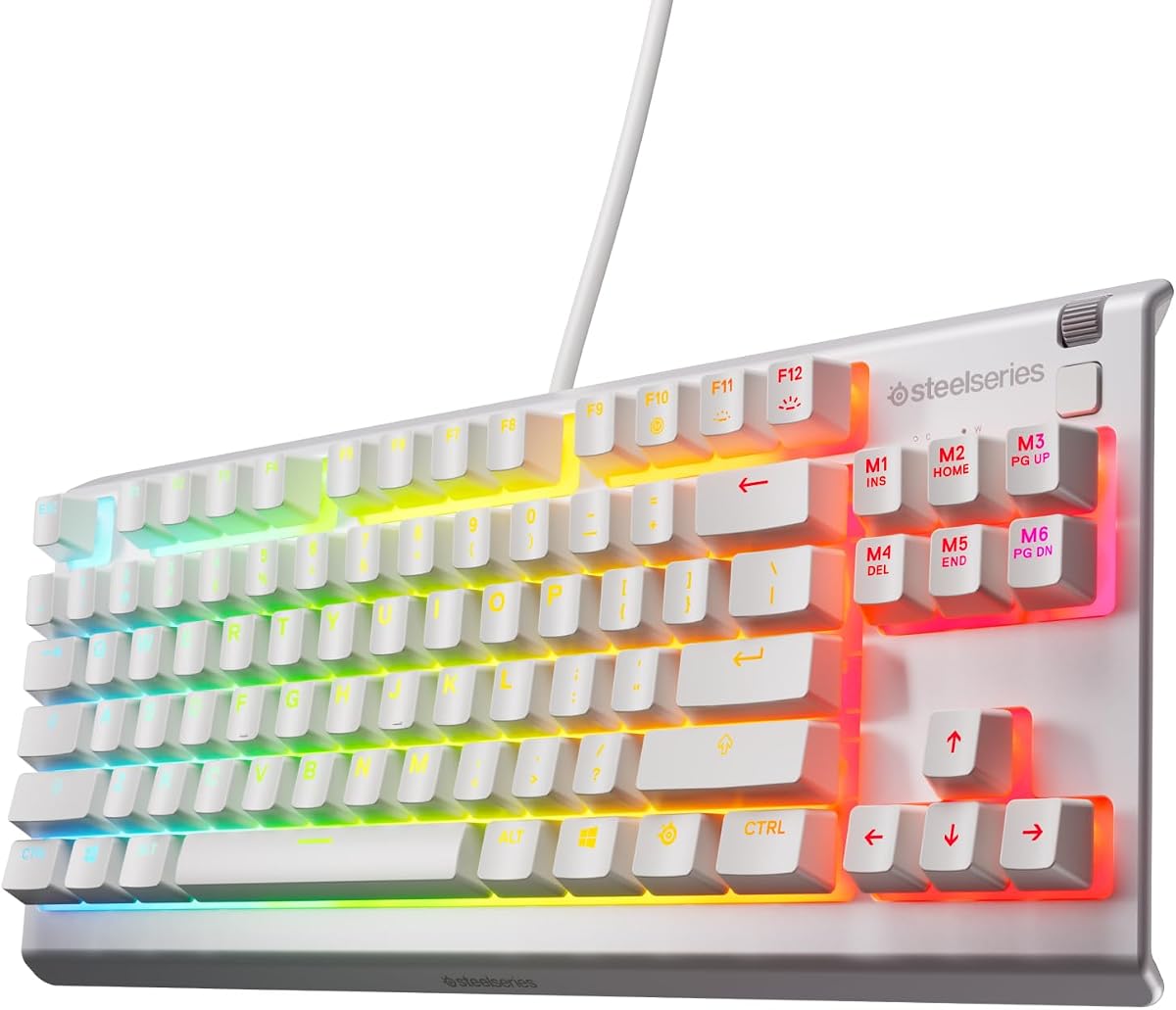
The SteelSeries Apex 3 TKL White offers a straightforward route to a compact gaming layout. It has a 4.5 rating and combines an esports-style tenkeyless form factor, near-silent gaming switches, anti-ghosting, water and dust resistance, and eight-zone RGB illumination in a clean white design.
We may earn a commission when you buy through this link, at no additional cost to you.
The compact footprint maximizes the amount of open desk around the keyboard, allowing a mouse to move without being pushed against a number pad. Nearly silent switches are designed to withstand 20 million keypresses, while anti-ghosting helps the board register simultaneous inputs accurately. Reactive lighting effects add visual customization without requiring the user to manage numerous individual lighting zones.
This model does not advertise the same control hardware as the black Apex 3 TKL RGB. No clickable volume roller is mentioned, and it lacks the advanced rapid-trigger, per-key actuation, hot-swap, or multi-device options found elsewhere in the lineup. Its primary appeal is therefore its simple, clean, quiet foundation rather than extensive enthusiast features.
The white Apex 3 TKL is a good recommendation for a gamer who prioritizes desk space, understated visual design, and quieter operation. It also works for anyone who wants a dedicated gaming keyboard but does not need extensive macro programming. As the final option in the guide, it provides a clear alternative to feature-heavy models: fewer specialized options, but a practical, compact, and durable core.
The absence of a number pad opens a larger continuous area for mouse movement. That makes the board a natural fit for compact desks where every centimeter around the keyboard matters.
Near-silent switches help keep shared or nighttime sessions discreet. Water and dust resistance add practical durability, while anti-ghosting supports dependable multi-key input.
We may earn a commission when you buy through this link, at no additional cost to you.
The right TKL keyboard depends on how you game, the space available on your desk, and the level of control and customization you need. Consider switch behavior, connection method, controls, acoustic profile, and software support before making a choice.
A TKL keyboard removes the numeric keypad but usually retains the function row, navigation cluster, arrow keys, and dedicated media controls. Before buying, compare the actual dimensions with your desk and mouse pad because some gaming designs place the navigation keys and controls differently. A smaller footprint creates more usable mouse space, while a left-aligned cluster can preserve a straighter mouse path. Also confirm that the North American layout shown in the relevant listing meets your language and key arrangement needs.
Membrane switches are quiet and approachable but provide less distinctive feedback than mechanical models. Tactile mechanical switches add a noticeable bump, while linear mechanical switches are often chosen by players who prefer a smooth press without resistance. Hall-effect switches use magnetic analog sensing to support adjustable actuation and rapid reactivation. Match the switch style to your preferences rather than assuming one type is automatically fastest in every game.
Responsiveness includes more than a high polling figure. It also depends on switch travel, debounce behavior, software support, and how the board registers repeated or simultaneous inputs. Hall-effect models stand out for adjustable actuation and rapid reactivation, while some conventional boards list high polling rates, rollover, or anti-ghosting. Consider the types of games you play and whether specialized timing controls will genuinely improve your experience.
Wired keyboards provide a simple, dependable connection and avoid wireless battery management. LIGHTSPEED, HyperSpeed, and other 2.4GHz systems offer low-latency wireless play, while Bluetooth makes it convenient to switch between a gaming computer and other devices. Check whether a receiver is included, whether it can be shared with a mouse, and whether a wired mode is available for charging or stationary use.
A volume roller, media keys, and programmable buttons can be more useful than elaborate lighting if you frequently adjust sound or playback. RGB systems range from eight-zone effects to dynamic per-key illumination and software-synchronized lighting. For deeper control, look at programmable layers, multi-action bindings, and per-key actuation. Remember that advanced features often depend on a compatible configuration application.
Quiet membrane and low-friction switches can reduce distraction, while linear mechanical boards may produce a deeper and more familiar sound. Foam layers, stabilizers, and tuned switch materials can soften harsh acoustic peaks. Low-profile designs reduce vertical hand travel and may be easier to position comfortably, but their shortened travel changes the overall feel. Include your desk height and preferred wrist position in the decision.
Look for spill resistance, dust protection, durable keycaps, and a stated switch lifespan. PBT and double-shot keycaps resist common forms of wear, while sealed switches add protection in busy work or gaming environments. Hot-swappable sockets are valuable if you expect to change switch preferences over time. Spill resistance is helpful but should still be paired with sensible care around drinks.
Configuration software can add powerful remapping, lighting control, profiles, and rapid-trigger settings, but it may add setup time and system requirements. Decide how much software involvement you want before choosing a board. A straightforward wired model can be ideal for a dedicated gaming PC, while a wireless model is more valuable if you frequently move between devices or value a cable-free desk.
Begin by placing the keyboard in the center of the usable desk area and positioning the mouse pad beside it. Keep the keyboard's lower edge aligned with the front edge of the mouse pad so your hands can move naturally between the two devices. Connect a wired board directly, or install the appropriate receiver for a 2.4GHz system, and use Bluetooth only for the everyday device you want to control most often.
Install the manufacturer's configuration software before assigning custom commands, lighting effects, or actuation settings. Create separate profiles for gaming, typing, and other activities, and use a layer for functions that could conflict with normal typing. For a rapid-trigger keyboard, begin with conservative settings, then make small adjustments based on how comfortably you can move and fire. Keep the wireless receiver close to the keyboard to maintain a stable connection.
For daily care, disconnect the cable or switch the keyboard off before cleaning around its base. Use a soft brush or microfiber cloth to remove dust, and avoid spraying cleaner directly onto the keys. Clean keycaps according to their removal instructions, taking care with hot-swappable switches and stabilizers. Keep drinks on a separate surface, review the battery status for wireless models, and periodically check the connection and software updates.
A TKL removes the number pad, freeing substantial desk width for mouse movement. It still provides most standard typing, function, navigation, and arrow keys, making it a practical middle ground for gaming and productivity. The best choice depends on whether you use a dedicated number pad and how much uninterrupted mouse space you need.
A TKL can be better for competitive gaming because it shifts the mouse closer to the center of the desk and supports more sweeping movements. It also tends to leave more room for a larger mouse pad. Performance still depends on switch behavior, latency, software, and personal comfort, so the compact layout is only one part of the ideal setup.
No. Hall-effect switches provide adjustable actuation and rapid reactivation, which can benefit competitive shooters and other timing-sensitive games. Mechanical switches may feel more familiar, offer different acoustic profiles, and suit players who do not need advanced tuning. The better option depends on whether the additional control functions improve your play style.
Only if cable-free movement or switching between devices matters to you. A wired TKL offers a simple and consistent connection with no battery management, while 2.4GHz wireless reduces desk clutter. Bluetooth is convenient for productivity but may not be the first choice for latency-sensitive competitive play.
Membrane and specially designed low-friction gaming switches are often the quietest options. Mechanical and Hall-effect boards vary considerably because case construction, stabilizers, switch choice, and dampening materials influence the final sound. Reviewing the specific switch description and intended acoustic character is more reliable than relying on a general keyboard category.
A TKL frees the horizontal space previously occupied by a number pad, often making the keyboard noticeably narrower than a full-size model. The exact difference varies by design, but it can be meaningful on a compact desk or with a large mouse pad. Compare published dimensions and the position of the navigation cluster to estimate the space available in your setup.
If you need number entry for spreadsheets, accounting, or data tasks, a separate number pad can restore full-size functionality while leaving the TKL in the main playing position. Some users also prefer a full-size board for its dedicated function and navigation clusters. Check whether a separate keypad would fit without pushing your mouse into a cramped area.
Use Game Mode or a Windows-lock function if the keyboard supports it, and review whether a dedicated key disables the Windows key. Magnetic boards can also reduce unwanted inputs by setting appropriate actuation behavior. Keep a desktop shortcut for emergency lock controls, and avoid placing the keyboard where a sleeve or loose object can rest across its keys.
The Corsair K55 CORE TKL RGB is the most approachable all-around option, offering a compact layout, quiet membrane keys, useful media buttons, and responsive polling. The Logitech G PRO X TKL Rapid is the leading specialist for competitive timing because Hall-effect switches, Rapid Trigger, and adjustable actuation create a much deeper control environment. The Razer BlackWidow V4 TKL Wireless stands out for premium flexibility, combining hot-swappable switches, multi-device wireless connectivity, and extensive controls.
Your priorities should determine which feature comes first. Choose quiet keys for shared spaces, tactile feedback for a pronounced press, low-profile geometry for a slim desk, linear switches for smooth movement, and magnetic actuation for advanced competitive tuning. Also consider whether the software and receiver arrangement will integrate cleanly with your computer, mouse, and preferred games. A smaller footprint is useful, but the best TKL is the one whose controls and feel suit your routine.
Before purchasing, verify the current listing for the exact layout, included accessories, connection method, switch behavior, and warranty details. Product features and prices can change over time, so current information matters more than an earlier recommendation. Comparing the final specifications against your desk and gaming needs will help you choose a tenkeyless keyboard that genuinely creates more room for precise, comfortable mouse movement.